MG3-7020TiVo Series 5 Remote Control 2014
Universal Electronics Inc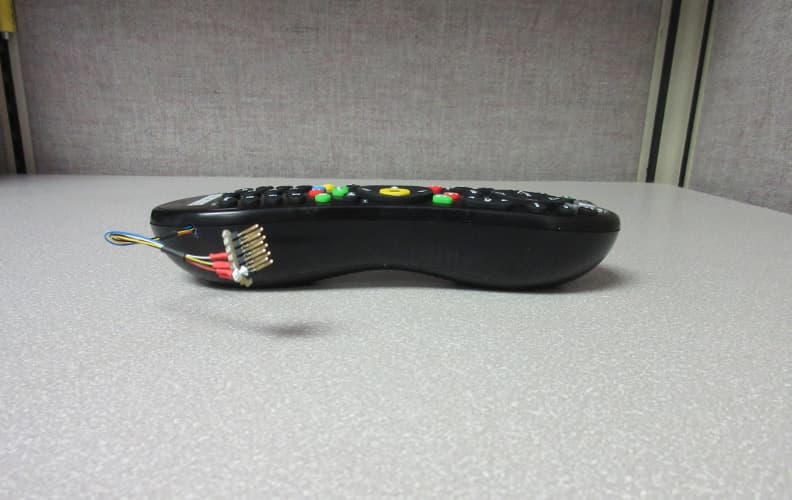
Click to zoom
Application Details
- Equipment Class
- DXT - Part 15 Low Power Transceiver, Rx Verified
- Date of Grant
- Apr 16, 2015
- Application Purpose
- Original Equipment
- Date of Application
- Apr 16, 2015
- Equipment Note
- TiVo Series 5 Remote Control 2014
- Frequency Range
- 2425.00000000 - 2475.00000000
- Company
- Universal Electronics Inc
- Country
- United States
Documents & Files
Document Text
Text extracted from the exhibit documents filed with the FCC. Open a document above to read the original.
Users Manual
CABLE (MoCA) ETHERNET RESOLUTION DIGITAL AUDIO (OPTICAL) HDMI EXTERNAL STORAGE (E-SATA) USB AC (In) COMPONENTCOMPOSITE CableCARD ™ (MULTI-STREAM ONLY) TiVo Inc. Complete Guided Setup Turn on your TV. After the TiVo box starts up, you’ll see a Welcome screen. When you see the Welcome screen, you’re ready to begin Guided Setup. Just follow the on-screen instructions. You should complete Guided Setup even if you don’t yet have a CableCARD decoder. Note: If you don’t see the Welcome screen, use the Input, Source, or TV/Video button on your TV remote or TV to select the correct video input source. Once you’ve completed Guided Setup, turn this poster over to learn more about using your TiVo Roamio Plus/Pro! 7 Plug in the power cord The TiVo Roamio Plus/Pro’s front panel displays a green light at startup. 6 Why use MoCA? A MoCA (Multimedia over Coax) connection gives you the same high-speed connection you get with a wired Ethernet connection, but it comes though your existing coaxial cable (the same one you use to get cable TV). This is a great option if you have additional TiVo boxes that connect to your home network wirelessly. A MoCA network lets you: • Stream shows to/from other boxes • Transfer shows to/from other boxes • Stream/transfer shows to iPad and iPhone If you can connect an Ethernet cable to your Roamio Plus/Pro, you can use the Roamio’s built-in MoCA network adapter to enable MoCA networking throughout your entire home! After Guided Setup, go to Settings > Network > Change Network Settings. Then choose “Use this DVR to create a MoCA network.” To learn more about MoCA, including other setup options and how to secure your MoCA network, visit tivo.com/moca. Connect to the Internet The TiVo Roamio Plus/Pro needs a high-speed Internet connection to receive program listings, TiVo ® service updates, and on-demand content. The type of network connection you choose will depend on what you want to do with your TiVo box(es), and whether it’s possible to connect an Ethernet cable to your TiVo box(es). If you plan to stream shows from this TiVo box to other TiVo boxes, you must use a wired connection: Ethernet (Option 1) or MoCA (Option 1 or 2). But don’t worry, no matter which one you pick, you can always change your mind later. Use this option if you have a MoCA home network. This option lets you: • Stream shows to/from other boxes • Transfer shows to/from other boxes • Stream/transfer shows to iPad and iPhone Because MoCA is delivered through your coax cable, and you already connected that cable in Step 2, you don’t need to connect anything more here. During Guided Setup (Step 7), choose “MoCA” as your network connection type. Use this option if you have wired Ethernet connections available to all TiVo boxes on your home network, or if you want to create a MoCA network (see box at left). This option lets you: • Stream shows to/from other boxes • Transfer shows to/from other boxes • Stream/transfer shows to iPad ® and iPhone ® Connect an Ethernet cable from the TiVo box’s ETHERNET port to an open port on your router or to an Ethernet jack in your wall. During Guided Setup (Step 7), choose “Ethernet” as your network connection type. Then, to create a MoCA network (if desired), see box at left. Use this option if you don’t plan to stream shows between TiVo boxes. This option lets you: • Transfer shows to/from other boxes. • Stream/transfer shows to iPad and iPhone Note that this option uses the TiVo box’s built-in wireless capabilities. You don’t need to connect anything in this step. During Guided Setup (Step 7), choose “Wireless” as your network connection type. Option 1: Use Ethernet or Create MoCA network Option 2: Use existing MoCA ® network Option 3: Use wireless network 5 CABLE (MoCA) Did you know? You can use the MoCA network adapter built in to your TiVo Roamio Plus/Pro to enable a MoCA network throughout your home. See the “Why use MoCA?” box at left to learn more. INPUT 3 S-Video HDMI Connect to your TV Connect an HDMI cable from the HDMI port of the TiVo box to the HDMI IN port on the back of your TV. If your TV does not have an HDMI port, see tivo.com/support for additional installation instructions. 4 Television Connect to the cable service Connect the coaxial RF cable coming from the wall to the CABLE (MoCA) port on the back of the DVR. If this cable is connected to the TV or cable box, disconnect it and connect it to the TiVo DVR instead. 3 2 Get to know your cables HDMI ® cable for high de nition video and digital audio - recommended for HD setup Coaxial RF cable for receiving a cable signal and for connecting to the Internet through a MoCA network. Power cord (included) Ethernet cable for connecting to the Internet through a wired network if not using MoCA. Order a CableCARD from your cable company The TiVo Roamio Plus/Pro uses a multi-stream CableCARD decoder to receive HD and digital cable channels. Order one Multi-Stream CableCARD (M-CARD) from your cable company and disconnect your digital cable box (if you have one). The M-CARD will replace your digital cable box. For CableCARD installation instructions, see the “Installing a CableCARD” insert that came with your TiVo Roamio Plus/Pro. Once you install your CableCARD, simply follow the on-screen instructions to set it up. During setup, you will need to call your cable company to activate (or “pair”) your CableCARD with your Roamio Plus/Pro. For CableCARD activation “hotline” numbers for many cable companies, and for more information and help, visit tivo.com/cablecardhelp. You don’t have to wait for your CableCARD to set up your TiVo Roamio Plus/Pro. Continue to step 2. 1 CableCARD TM M-CARD Welcome! Start Here Before you begin: Activate the TiVo ® service (if you haven’t already). The TiVo service is what makes your TiVo Roamio Plus/Pro smart. It includes everything from your program listings to Season Pass ® recordings and WishList ® searches—all the cool features you’ve heard about. Some TiVo DVRs are sold with a TiVo…
Text truncated - open the document above for the full version.
Attestation Statements
Universal Electronics, Inc. , 201 East Sandpointe Ave, 8 th Floor, Santa Ana, CA 92707, Tel: 714 918-9500 March 31, 2015 Compatible Electronics TCB 114 Olinda Drive Brea, California 92823 Gentlemen: This is a letter of authorization to accept that any personnel of Compatible Electronics, Inc. as an Agent for Universal Electronics, 201 East Sandpointe Ave, 8 th Floor, Santa Ana CA 92707, for a period of one year, to sign applications before the certification body on our behalf, to make representations to you on our behalf, and to receive and exchange data between our company and the certification body in connection with certification of the following Universal Electronics products: Name of Product: Product name: TiVo Series 5 Remote Control 2014 Model name: URC-7020BC0-XXXX-R FCC ID: MG3-7020 Under FCC Docket Number 20780 and General Docket Number 80-284 pursuant to Part 15 of the FCC Rules and Regulations. Please also accept this letter as an attestation that neither Universal Electronics nor any of its officers, directors, or persons holding 5% or more of the outstanding stock or shares, voting or non- voting, have been denied federal benefits under section 5301 of the Anti-Drug Abuse act of 1988, 21 U.S.C. 853(a). In addition, Universal Electronics will notify the Federal Communications Commission if, at any time, the situation changes causing Universal Electronics to be denied federal benefits. If you have any further questions or need additional information, please feel free to give me a call at 714 918-9500 Ext 9701 Sincerely, Jesse Mendez Staff Engineer Electrical
Attestation Statements
Universal Electronics, Inc. , 201 East Sandpointe Ave, 8 th Floor, Santa Ana, CA 92707, Tel: 714 918-9500 March 31, 2015 Compatible Electronics TCB 114 Olinda Drive Brea, California 92823 Subject: TCB application submittal Gentlemen: We, Universal Electronics, would like to declare that the application being submitted for the device with FCC ID: MG3-7020 has not been submitted to another TCB or FCC for certification. If you have any further questions or need additional information, please feel free to give me a call at 714 918-9500 Ext 9701 Sincerely, Jesse Mendez Staff Engineer Electrical
Attestation Statements
Universal Electronics, Inc. , 201 East Sandpointe Ave, 8 th Floor, Santa Ana, CA 92707, Tel: 714 918-9500 List of Modifications March 31, 2015 Compatible Electronics TCB 114 Olinda Drive Brea, California 92823 Gentlemen: FCC ID: MG3-7020 List of modifications: TiVo Series 5 Remote Control 2014, URC-7020BC0-XXXX-R The footprint for L7 was DNF “do not fit” now a 0.6pF was installed and found to be necessary for compliance. If you have any questions or need additional information, please contact the undersigned at (714) 918-9500 ext 9701 Regards, Jesse Mendez Staff Engineer Electrical
Cover Letter(s)
Universal Electronics, Inc. 201 East Sandpointe Ave, 8 th Floor, Santa Ana, CA 92707 Tel: 714 918-9500 March 31, 2015 Compatible Electronics TCB 114 Olinda Drive Brea, California 92823 Subject: Request for withholding from public disclosure the schematic diagrams, block diagrams, and operational description pursuant to an application for certification for the following universal remote control: Product name: TiVo Series 5 Remote Control 2014 Model number: URC-7020BC0-XXXX-R FCC ID: MG3-7020 Gentlemen: We, Universal Electronics, Inc., would like to request that all schematics, block diagrams, and operational descriptions submitted with our application for certification be withheld from public disclosure per Section 0.459 of the FCC rules. This request is made under the provisions of Section 0.457 (d) of the Commissions rules, and Section 552 (b)(4) of the Freedom of Information Act. These sections authorize the withholding from public inspection, those materials which would be privileged as matter of law if retained by the person submitting them, and materials which would not customarily be released to the public by that person. If you have any further questions or need additional information, please contact the undersigned at (714) 918-9500 ext 9701 Regards, Jesse Mendez, Staff Engineer Electrical
RF Exposure Info
SAR Exclusion Justification This device FCC ID: is excluded from SAR testing by the following justification The maximum power that the transmitter is capable of is 3.42 mW Using the following formula from section 4.3.1 of KDB 447498 at test separation distances ≤ 50 mm [(max. power of channel, including tune-up tolerance, mW) / (min. test separation distance, mm)] * [ √ f(GHz)] Duty Cycle 100.00% V alue 1-g (mW) 10-g (mW) 1.08 (355) -212 "Value" is 3 , the SAR test exclusion threshold 1-g power limit 10-g power limit 95 238 “source-based” time-averaging based on an inherent property or duty-cycle of a device is allowed. An example of this is the determination of exposure from a device that uses digital technology such as a time-division multiple-access (TDMA) scheme for transmission < 50mm power limits for above caclulation using specified frequency MG3-7020 Max Peak Power (dBm) Min Separation distance (mm) Frequency (Ghz) When the minimum test separation distance is < 5 mm, a distance of 5 mm according to 5) in section 4.1 is applied to determine SAR test exclusion. 2.475 5 5.34 SAREXJUST-B-0-43 REV A 01/21/2014
Test Report
Duty Cycle – Advertising Mode – Time of One Pulse = 1.803607 ms Ref Lvl 102 dB V Ref Lvl 102 dB V RBW 1 MHz VBW 3 MHz RF Att 10 dB A IN1 Unit dB V P0 TDS SWT 100 ms Center 2.425 GHz10 ms/ 2VIEW2MA 10 20 30 40 50 60 70 80 90 2 102 1 1 Delta 1 [T2] 0.07 dB 1.803607 ms 1 [T2] 27.94 dB V 98.388778 ms 1 [T2] 0.07 dB 1.803607 ms D1 74 dB V D2 54 dB V Date: 12.MAR.2015 06:39:13 Duty Cycle – Advertising Mode – The duty cycle is less than 10 % – Thus the full 20 dB peak to average ratio is allowed. Duty Cycle = 1.803607 ms / 100 ms = 1.8 % Ref Lvl 102 dB V Ref Lvl 102 dB V RBW 1 MHz VBW 3 MHz RF Att 10 dB A IN1 Unit dB VSWT 1 s Center 2.425 GHz100 ms/ P0 TDS 2VIEW2MA 10 20 30 40 50 60 70 80 90 2 102 1 1 Delta 1 [T2] -0.41 dB 4.008016 ms 1 [T2] 27.60 dB V 438.869739 ms 1 [T2] -0.41 dB 4.008016 ms D1 74 dB V D2 54 dB V Date: 12.MAR.2015 06:39:58 Duty Cycle – Pairing Mode – Time of One Pulse = 1.202405 ms Ref Lvl 102 dB V Ref Lvl 102 dB V RBW 1 MHz VBW 3 MHz RF Att 10 dB A IN1 Unit dB VSWT 100 ms Center 2.425 GHz10 ms/ P0 TDS 2VIEW2MA 10 20 30 40 50 60 70 80 90 2 102 1 1 Delta 1 [T2] 0.82 dB 1.202405 ms 1 [T2] 28.14 dB V 28.849699 ms 1 [T2] 0.82 dB 1.202405 ms D1 74 dB V D2 54 dB V Date: 12.MAR.2015 06:46:12 Duty Cycle – Pairing Mode – The duty cycle is less than 10 % – Thus the full 20 dB peak to average ratio is allowed. Duty Cycle = 1.202405 ms / 30.260521 ms = 3.97 % Ref Lvl 102 dB V Ref Lvl 102 dB V RBW 1 MHz VBW 3 MHz RF Att 10 dB A IN1 Unit dB VSWT 100 ms Center 2.425 GHz10 ms/ P0 TDS 2VIEW2MA 10 20 30 40 50 60 70 80 90 2 102 1 1 Delta 1 [T2] 0.49 dB 30.260521 ms 1 [T2] 28.14 dB V 28.849699 ms 1 [T2] 0.49 dB 30.260521 ms D1 74 dB V D2 54 dB V Date: 12.MAR.2015 06:46:34
Contact Information
Applicant
Jesse Mendez(Staff Engineer Electrical)
Technical Contact
Compatible Electronics, Inc.Kenneth Lee
[email protected]714-579-0500
114 Olinda Drive · Brea, California · United States
Test Firm
Compatible Electronics, Inc.Michael Christensen
Technical Specifications
| # | Rule Parts | Frequency Range | Power Output |
|---|---|---|---|
| 1 | 15C | 2.42 GHz - 2.48 GHz | - |
Other Applications from Universal Electronics Inc
MG3-PIRZWLR
Sep 15, 2026UEI/Ecolink Z-Wave Long Range PIR Sensor
Equipment Class
DTS - Digital Transmission System
MG3-DWZW8ECO
Jul 27, 2026Door Sensor
Equipment Class
DTS - Digital Transmission System
MG3-J1TH028
Jun 11, 2026Thermostat
Equipment Class
DTS - Digital Transmission SystemMG3-R37967R01
Apr 13, 2026OFA Smart Control Pro 6
Equipment Class
DTS - Digital Transmission SystemMG3-R36021BA00
Dec 12, 2025Tatlow Platform RCU Android TV
Equipment Class
DTS - Digital Transmission System