MG31033-4RF Remote
Universal Electronics Inc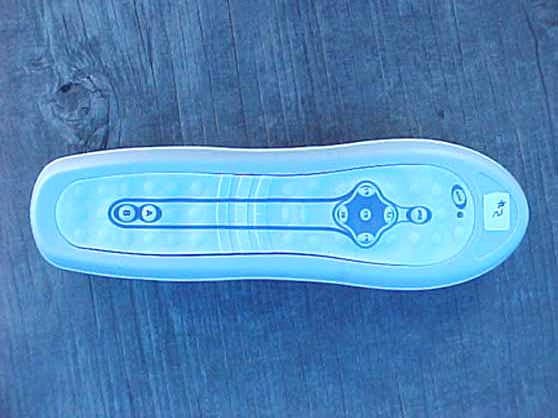
Click to zoom
Application Details
- Equipment Class
- DSC - Part 15 Security/Remote Control Transmitter
- Date of Grant
- Sep 26, 2006
- Application Purpose
- Original Equipment
- Date of Application
- Sep 26, 2006
- Equipment Note
- RF Remote
- Frequency Range
- 433.92000000 - 433.92000000
- Company
- Universal Electronics Inc
- Country
- United States
Documents & Files
Document Text
Text extracted from the exhibit documents filed with the FCC. Open a document above to read the original.
Users Manual
Dolphin TM II Water-Resistant Remote Control P/N 40418 Rev. B 08/18/2006 2 TABLE OF CONTENTS Introduction..........................3 Features And Functions .................4 Installing Batteries.....................6 Spa Addressing........................7 Programming TV Control ................8 Setup Codes for TVs....................8 Programming VCR Control..............12 Setup Codes for VCRs..................12 Programming Cable Converter (or Satellite Receiver) Control...........15 Setup Codes for Cable Converters.........16 Setup Codes for Satellite Receivers........16 Programming DVD Control..............17 Setup Codes for DVD Players ............18 Programming CD Control...............20 Setup Codes for CD Players .............20 Programming Audio Control.............22 Setup Codes for Stereo Receivers .........22 Setup Codes for Stereo Amplifiers.........24 Setup Codes for Automotive and Marine .....24 Searching For Your Code ...............25 Checking The Codes...................26 Reassigning Device Keys................27 Setting Volume Lock...................28 To Change Volume Lock to the CBL/SAT Mode 28 To Change Volume Lock to the TV Mode....28 To Change Volume Lock to the VCR Mode. . .28 To Change Volume Lock to the DVD Mode . .28 To Change Volume Lock to the CD Mode . . .29 To Change Volume Lock to the RCVR Mode. .29 Clearing Volume Lock .................29 Clearing Volume Lock For One Device .....29 Using the Learning Feature..............30 Feature Reset........................31 Using the IR/RF Command Center.........32 Specifications........................34 Compliance with FCC Rules and Regulations 35 Troubleshooting......................36 3 INTRODUCTION The Universal Dolphin™ II Remote is Balboa’s latest generation remote control. It is designed with sophisticated technology that will allow you to consolidate many of your existing remote controls along with the entertainment system in your spa. It’s packed with easy-to-use features such as: • Pre-programmed to operate the cable converter supplied by your cable system provider • Pre-programmed technology for easy setup • Color-coded keys to quickly locate popular functions • Code library for video and audio components • Code Search to help program control of older components • Learning function to allow programming with another infrared (IR) remote • Combination IR and RF (radio frequency) capability that can send commands through the optional RF base station to devices in your house. Before you can use your new remote control, you will need to program it to operate the specific home entertainment components you wish to control. Follow the instructions detailed in this manual to set up your Dolphin Remote and enjoy your new remote control. IMPORTANT! PLEASE READ: When you are required to enter an address into the spa, please write down the address you have selected for future reference. Address may need to be re-entered after servicing Remote should be stored outside of spa when not in use. Do not store in direct sunlight. 4 FEATURES AND FUNCTIONS Use the illustration below to locate the Dolphin™ II RemotE features and study the key locations (on these two pages) to learn how they function. 5 Press POWER once to turn on or off the selected home entertainment component. The LED (red light) blinks to show that the remote control is working and is sending signals. Use SETUP for all programming sequences. Press TV, VCR/DVD, CBL/SAT, RCVR, SPA, or CD once to select a home entertainment component to control. See next page for descriptions of the buttons in this circular area of the remote. Use volume + (or volume -) to raise (or lower) the sound volume. Use CH + (or CH -) to select the next higher (or lower) channel. Press MUTE once to turn sound off or on. Press LAST once to recall the last channel and to page back one screen in the main menu. Use these buttons to control available spa functions. (Depending on your spa, some buttons may control other equipment than indicated here.) Use the keypad (0 ~ 9) to directly select channels (e.g., 09 or 31). Press MODE once to switch the VCR to view TV channels or tape. This key will also control the input select feature on most TVs. Press ENTER once after entering channel numbers on some TV models. In the VCR and TV modes, use the REW, PLAY, FF, REC, STOP, and PAUSE keys to control your VCR. To record a program, press REC twice. These keys are also used for CD and DVD functions. Continued on next page... Use GUIDE to display the program guide. Use EXIT to exit out of an on-screen menu and guide. Use the four directional keys to move the cursor in the program guide and menu screens. Use SELECT to choose options, PPV events, and to tune programs from the program guide. Use INFO to display current channel and program information. Press MENU once to display an on-screen menu. FEATURES AND FUNCTIONS ...Continued INSTALLING BATTERIES (See illustration on opposite page) 1. On the back of the Dolphin Remote, remove the screws that hold the battery cover in place and lift off the battery cover. 2 Obtain two (2) fully-charged AA alkaline batteries. Match the + and – marks on the batteries to the + and – marks in the battery case, then insert the new batteries. 3. Press the battery cover back into place, being careful to align it with the rubber seal. 4. Replace the screws that hold the battery cover by carefully starting each one without tightening it. Once they are all started, snug up one screw and then do the same to the screw on the opposite side of the door. Repeat this in a crossing pattern until all screws are snug. Do not overtighten them. This will assure an adequate water seal around the battery cover. 5. Test the unit by pressing any mode key (e.g., TV, VCR/DVD, CBL/SAT, RCVR, SPA, or CD). If the batteries are inserted correctly, the LED will blink once. NOTE: Whenever batteries need to be replaced, the Dolphin LED will blink twice with every key press. Simply replace the b…
Text truncated - open the document above for the full version.
Test Report
Report Number: B60626B1 FCC Part 15 Subpart B and FCC Section 15.231 Test Report RF Remote Model: Balboa 114 OLINDA DRIVE, BREA, CALIFORNIA 92823 PHONE: (714) 579-0500 FAX: (714) 579-1850 Page 1 of 14 FCC PART 15, SUBPART B and C TEST REPORT for RF REMOTE Model: BALBOA Prepared for UNIVERSAL ELECTRONICS, INC. 6101 GATEWAY DRIVE CYPRESS, CALIFORNIA 90630 Prepared by:_____________________ JAMES ROSS Approved by:____________________ KYLE FUJIMOTO COMPATIBLE ELECTRONICS INC. 114 OLINDA DRIVE BREA, CALIFORNIA 92823 (714) 579-0500 DATE: JULY 14, 2006 REPORT APPENDICES TOTAL BODY A B C D E PAGES 14 2 2 2 12 13 45 This report shall not be reproduced except in full, without the written approval of Compatible Electronics. Report Number: B60626B1 FCC Part 15 Subpart B and FCC Section 15.231 Test Report RF Remote Model: Balboa 114 OLINDA DRIVE, BREA, CALIFORNIA 92823 PHONE: (714) 579-0500 FAX: (714) 579-1850 Page 2 of 14 TABLE OF CONTENTS Section / Title PAGE GENERAL REPORT SUMMARY 4 SUMMARY OF TEST RESULTS 4 1. PURPOSE 5 2. ADMINISTRATIVE DATA 6 2.1 Location of Testing 6 2.2 Traceability Statement 6 2.3 Cognizant Personnel 6 2.4 Date Test Sample was Received 6 2.5 Disposition of the Test Sample 6 2.6 Abbreviations and Acronyms 6 3. APPLICABLE DOCUMENTS 7 4. DESCRIPTION OF TEST CONFIGURATION 8 4.1 Description of Test Configuration - EMI 8 4.1.1 Cable Construction and Termination 8 5. LISTS OF EUT, ACCESSORIES AND TEST EQUIPMENT 9 5.1 EUT and Accessory List 9 5.2 EMI Test Equipment 10 6. TEST SITE DESCRIPTION 11 6.1 Test Facility Description 11 6.2 EUT Mounting, Bonding and Grounding 11 7. TEST PROCEDURES 12 7.1 Radiated Emissions (Spurious and Harmonics) Test 12 7.2 Bandwidth of the Fundamental 13 8. CONCLUSIONS 14 Report Number: B60626B1 FCC Part 15 Subpart B and FCC Section 15.231 Test Report RF Remote Model: Balboa 114 OLINDA DRIVE, BREA, CALIFORNIA 92823 PHONE: (714) 579-0500 FAX: (714) 579-1850 Page 3 of 14 LIST OF APPENDICES APPENDIX TITLE A Laboratory Recognitions B Modifications to the EUT C Additional Models Covered Under This Report D Diagrams, Charts, and Photos • Test Setup Diagrams • Radiated Emissions Photos • Antenna and Effective Gain Factors E Data Sheets LIST OF FIGURES FIGURE TITLE 1 Plot Map And Layout of Radiated Test Site Report Number: B60626B1 FCC Part 15 Subpart B and FCC Section 15.231 Test Report RF Remote Model: Balboa 114 OLINDA DRIVE, BREA, CALIFORNIA 92823 PHONE: (714) 579-0500 FAX: (714) 579-1850 Page 4 of 14 GENERAL REPORT SUMMARY This electromagnetic emission test report is generated by Compatible Electronics Inc., which is an independent testing and consulting firm. The test report is based on testing performed by Compatible Electronics personnel according to the measurement procedures described in the test specifications given below and in the "Test Procedures" section of this report. The measurement data and conclusions appearing herein relate only to the sample tested and this report may not be reproduced without the written permission of Compatible Electronics, unless done so in full. This report must not be used to claim product endorsement by NVLAP, NIST or any other agency of the U.S. Government. Device Tested: RF Remote Model: Balboa S/N: N/A Product Description: See Expository Statement. Modifications: The EUT was not modified in order to meet the specifications. Manufacturer: Universal Electronics, Inc. 6101 Gateway Drive Cypress, California 90630 Test Dates: June 16, 26, and 29, 2006 Test Specifications : EMI requirements CFR Title 47, Part 15 Subpart B; and Subpart C, Sections 15.205, 15.209, and 15.231 Test Procedure: ANSI C63.4 Test Deviations: The test procedure was not deviated from during the testing. SUMMARY OF TEST RESULTS TEST DESCRIPTION RESULTS 1 Conducted RF Emissions, 150 kHz – 30 MHz This test was not performed because the EUT operates on batteries only and cannot be plugged into the AC public mains. 2 Radiated RF Emissions, 10 kHz – 4340 MHz Complies with the Class B limits of CFR Title 47, Part 15, Subpart B; and Subpart C, sections 15.205, 15.209, and 15.231. 3 -20 dB Bandwidth of the Fundamental Complies with the limits of Subpart C, sections 15.231 [c]. Report Number: B60626B1 FCC Part 15 Subpart B and FCC Section 15.231 Test Report RF Remote Model: Balboa 114 OLINDA DRIVE, BREA, CALIFORNIA 92823 PHONE: (714) 579-0500 FAX: (714) 579-1850 Page 5 of 14 1. PURPOSE This document is a qualification test report based on the Electromagnetic Interference (EMI) tests performed on the RF Remote, Model: Balboa. The EMI measurements were performed according to the measurement procedure described in ANSI C63.4. The tests were performed in order to determine whether the electromagnetic emissions from the equipment under test, referred to as EUT hereafter, are within the Class B specification limits defined by CFR Title 47, Part 15, Subpart B; and Subpart C, sections 15.205, 15.209, and 15.231. Report Number: B60626B1 FCC Part 15 Subpart B and FCC Section 15.231 Test Report RF Remote Model: Balboa 114 OLINDA DRIVE, BREA, CALIFORNIA 92823 PHONE: (714) 579-0500 FAX: (714) 579-1850 Page 6 of 14 2. ADMINISTRATIVE DATA 2.1 Location of Testing The EMI tests described herein were performed at the test facility of Compatible Electronics, 114 Olinda Drive, Brea, California 92823. 2.2 Traceability Statement The calibration certificates of all test equipment used during the test are on file at the location of the test. The calibration is traceable to the National Institute of Standards and Technology (NIST). 2.3 Cognizant Personnel Universal Electronics, Inc. Jesse Mendez Electrical Engineer Compatible Electronics, Inc. Falguni Patel Test Technician Benigno Chavez Test Engineer James Ross Test Engineer Kyle Fujimoto Test Engineer 2.4 Date Test Sample was Received The test sample was received prior to its qualification testing on June 16, 2006. 2.5 Disposition of the Test Sample The test sample has not been returned to Universal Electronics, Inc. as of the date …
Text truncated - open the document above for the full version.
Contact Information
Applicant
Jesse Mendez(Staff Engineer Electrical)
Technical Contact
Compatible ElectronicsKyle Fujimoto
[email protected]714-579-0500
114 Olinda Drive · Brea, California · United States
Test Firm
Compatible Electronics, Inc.Michael Christensen
Technical Specifications
| # | Rule Parts | Frequency Range | Power Output |
|---|---|---|---|
| 1 | 15.231 | 433.92 MHz - 433.92 MHz | - |
Other Applications from Universal Electronics Inc
MG3-PIRZWLR
Sep 15, 2026UEI/Ecolink Z-Wave Long Range PIR Sensor
Equipment Class
DTS - Digital Transmission System
MG3-DWZW8ECO
Jul 27, 2026Door Sensor
Equipment Class
DTS - Digital Transmission System
MG3-J1TH028
Jun 11, 2026Thermostat
Equipment Class
DTS - Digital Transmission SystemMG3-R37967R01
Apr 13, 2026OFA Smart Control Pro 6
Equipment Class
DTS - Digital Transmission SystemMG3-R36021BA00
Dec 12, 2025Tatlow Platform RCU Android TV
Equipment Class
DTS - Digital Transmission System