MG362400NevoCL
Universal Electronics Inc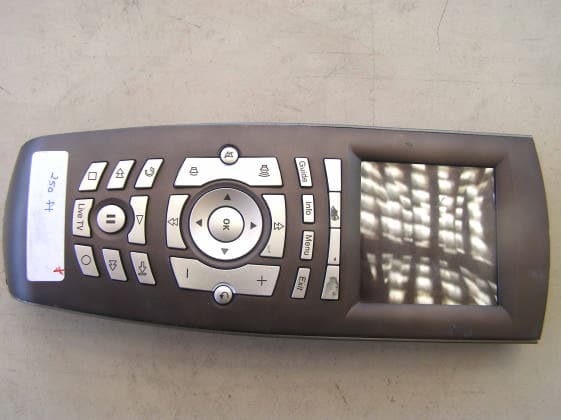
Click to zoom
Application Details
- Equipment Class
- DXT - Part 15 Low Power Transceiver, Rx Verified
- Date of Grant
- Oct 21, 2007
- Application Purpose
- Original Equipment
- Date of Application
- Oct 21, 2007
- Equipment Note
- NevoCL
- Frequency Range
- 908.40000000 - 908.40000000
- Company
- Universal Electronics Inc
- Country
- United States
Documents & Files
Document Text
Text extracted from the exhibit documents filed with the FCC. Open a document above to read the original.
Users Manual
Nevo Q50 provides fully-customizable control of all of your home theater devices. Its touch-sensitive screen is software-based, so your installer/ integrator can include just those controls you actually use. Before You Use Nevo Q50 Please ensure your Nevo Q50 is fully charged before use. To charge your Nevo Q50 : 1.Connect the power adapter to the charging cradle and plug the adapter into a wall outlet. 2.Power on and dock Nevo Q50 to begin charging the battery. If it has not already been charged, it will take 3-4 hours to fully charge the battery the first time. Recharging Nevo Q50 Nevo Q50 has a built-in Lithium-ion rechargeable battery. Nevo Q50 beeps and displays a warning message when the battery is running low. You should dock Nevo Q50 at this time to charge the battery. You can dismiss the warning message by clicking OK; if you do so and the battery power becomes critically low, Nevo Q50 will beep and display a critical low battery warning message. You cannot dismiss this message and should dock Nevo Q50 immediately. To d o c k N e v o Q50 , simply set the controller in the charging cradle. When it is correctly docked, the blue light will appear on the bottom of the remote. About Battery Life As with all battery-operated devices, battery life will vary depending on use. It is a good practice to keep Nevo Q50 in its charging cradle when you are not using it. Nevo Q50 Universal Controller Charging Cradle AC Power Adapter; varies by country Getting to Know Nevo Q50 Nevo Q50 offers the following types of controls: Touchscreen: To use the touchscreen, gently touch the buttons that appear on it. If you prefer, slide the stylus from its storage port on the bottom of Nevo Q50 : Using the stylus, gently tap buttons on the touchscreen to control your home theater and home automation devices. You may prefer to always use the stylus when you are configuring settings. Talk with your installer/integrator for more information on these settings. Nevo Q50 Keys: The keys on Nevo Q50 have been customized to your preference by your installer/integrator. An additional set of unlabeled keys (function keys) appear immediately below the touchscreen, above the hard buttons. A label appears on the touchscreen above them to indicate the functions assigned to those keys. Move the toggle wheel up and down to move between the screens. Press the toggle wheel in to return to the first page of the current page collection. Note:The On/Off Switch must be moved completely into the up or down position to turn Nevo Q50 on or off. Stylus Hard Keys Function Keys RIGHT SIDE Programmable Home Key Toggle Wheel LEFT SIDE USB Port On/Off Switch up=ON down=OFF Reset Button BACK Caring for Nevo Q50 Use only the stylus to switch Nevo Q50 on or off. Avoid using sharp objects. C lean your remote with a soft, damp cloth using a gentle, non-caustic cleaner. CAUTION:Do not use a caustic or abrasive cleaner. This may damage the surface of your controller. For more information, contact your installer/integrator: NOTICE: Nevo, NevoStudio, Nevo Q50 , NevoStudio Pro and NevoConnect are registered trademarks or trademarks of Universal Electronics Inc., in the United States and/or other countries. Other product and company names may be trademarks of their respective companies. FCC NOTICE: This equipment has been tested and found to comply with the limits for a class B digital device, pursuant to part 15 of the FCC Rules. These limits are designed to provide a reason- able protection against harmful interference in a residential installation. This equipment gener- ates, uses, and can radiate radio frequency energy, and if not installed and used in accordance with the instructions, may cause harmful interference to radio communications. However, there is no guarantee that interference will not occur in a particular installation. If this equipment does cause harmful interference to radio or television reception, which can be deter- mined by turning the equipment off and on, the user is encouraged to try to correct the interference by one or more of the following measures: •Reorient or relocate the receiving antenna. •Increase the separation between the equipment and receiver. •Connect the equipment into an outlet or a circuit different from that to which the receiver is connected. •Consult the dealer or an experienced radio/TV technician for help Operation is subject to the following two conditions: (1) this product may not cause harmful inter- ference, and (2) this product must accept any interference received, including interference that may cause undesired operation. This equipment has been verified to comply with the limits for a class B computing device, pursu- ant to FCC Rules. In order to maintain compliance with FCC regulations, shielded cables must be used with this equipment. Operation with non-approved equipment or unshielded cables is likely to result in interference to radio and TV reception. The user is cautioned that changes and modifi- cations made to the equipment without the approval of the manufacturer could void the user’s authority to operate this equipment. FCC ID: MG362400 IC ID: 2575A-URC6240 Installer/integrator: attach your business card or business sticker here. Copyright © 2007 Universal Electronics Inc All rights reserved. Document version NQ50QGP101007 Corporate Headquarters Universal Electronics 6101 Gateway Drive Cypress, CA 90630-4841 www.uei.com International Headquarters Universal Electronics Institutenweg 21 7521 PH Enschede The Netherlands www.uei.com
Users Manual
Nevo Q50 provides fully-customizable control of all of your home theater devices. Its touch-sensitive screen is software-based, so your installer/ integrator can include just those controls you actually use. Before You Use Nevo Q50 Please ensure your Nevo Q50 is fully charged before use. To charge your Nevo Q50 : 1.Connect the power adapter to the charging cradle and plug the adapter into a wall outlet. 2.Power on and dock Nevo Q50 to begin charging the battery. If it has not already been charged, it will take 3-4 hours to fully charge the battery the first time. Recharging Nevo Q50 Nevo Q50 has a built-in Lithium-ion rechargeable battery. Nevo Q50 beeps and displays a warning message when the battery is running low. You should dock Nevo Q50 at this time to charge the battery. You can dismiss the warning message by clicking OK; if you do so and the battery power becomes critically low, Nevo Q50 will beep and display a critical low battery warning message. You cannot dismiss this message and should dock Nevo Q50 immediately. To d o c k N e v o Q50 , simply set the controller in the charging cradle. When it is correctly docked, the blue light will appear on the bottom of the remote. About Battery Life As with all battery-operated devices, battery life will vary depending on use. It is a good practice to keep Nevo Q50 in its charging cradle when you are not using it. Nevo Q50 Universal Controller Charging Cradle AC Power Adapter; varies by country Getting to Know Nevo Q50 Nevo Q50 offers the following types of controls: Touchscreen: To use the touchscreen, gently touch the buttons that appear on it. If you prefer, slide the stylus from its storage port on the bottom of Nevo Q50 : Using the stylus, gently tap buttons on the touchscreen to control your home theater and home automation devices. You may prefer to always use the stylus when you are configuring settings. Talk with your installer/integrator for more information on these settings. Nevo Q50 Keys: The keys on Nevo Q50 have been customized to your preference by your installer/integrator. An additional set of unlabeled keys (function keys) appear immediately below the touchscreen, above the hard buttons. A label appears on the touchscreen above them to indicate the functions assigned to those keys. Move the toggle wheel up and down to move between the screens. Press the toggle wheel in to return to the first page of the current page collection. Note:The On/Off Switch must be moved completely into the up or down position to turn Nevo Q50 on or off. Stylus Hard Keys Function Keys RIGHT SIDE Programmable Home Key Toggle Wheel LEFT SIDE USB Port On/Off Switch up=ON down=OFF Reset Button BACK Caring for Nevo Q50 Use only the stylus to switch Nevo Q50 on or off. Avoid using sharp objects. C lean your remote with a soft, damp cloth using a gentle, non-caustic cleaner. CAUTION:Do not use a caustic or abrasive cleaner. This may damage the surface of your controller. For more information, contact your installer/integrator: NOTICE: Nevo, NevoStudio, Nevo Q50 , NevoStudio Pro and NevoConnect are registered trademarks or trademarks of Universal Electronics Inc., in the United States and/or other countries. Other product and company names may be trademarks of their respective companies. FCC NOTICE: This equipment has been tested and found to comply with the limits for a class B digital device, pursuant to part 15 of the FCC Rules. These limits are designed to provide a reason- able protection against harmful interference in a residential installation. This equipment gener- ates, uses, and can radiate radio frequency energy, and if not installed and used in accordance with the instructions, may cause harmful interference to radio communications. However, there is no guarantee that interference will not occur in a particular installation. If this equipment does cause harmful interference to radio or television reception, which can be deter- mined by turning the equipment off and on, the user is encouraged to try to correct the interference by one or more of the following measures: •Reorient or relocate the receiving antenna. •Increase the separation between the equipment and receiver. •Connect the equipment into an outlet or a circuit different from that to which the receiver is connected. •Consult the dealer or an experienced radio/TV technician for help Operation is subject to the following two conditions: (1) this product may not cause harmful inter- ference, and (2) this product must accept any interference received, including interference that may cause undesired operation. This equipment has been verified to comply with the limits for a class B computing device, pursu- ant to FCC Rules. In order to maintain compliance with FCC regulations, shielded cables must be used with this equipment. Operation with non-approved equipment or unshielded cables is likely to result in interference to radio and TV reception. The user is cautioned that changes and modifi- cations made to the equipment without the approval of the manufacturer could void the user’s authority to operate this equipment. FCC ID: MG362400 IC ID: 2575A-URC6240 Installer/integrator: attach your business card or business sticker here. Copyright © 2007 Universal Electronics Inc All rights reserved. Document version NQ50QGP101007 Corporate Headquarters Universal Electronics 6101 Gateway Drive Cypress, CA 90630-4841 www.uei.com International Headquarters Universal Electronics Institutenweg 21 7521 PH Enschede The Netherlands www.uei.com
Test Report
Report Number: B70914D1 FCC Part 15 Subpart B and FCC Section 15.249 Test Report NevoCL Model: URC6240 Brea Division 114 Olinda Drive Brea, CA 92823 (714) 579-0500 Agoura Division 2337 Troutdale Drive Agoura, CA 91301 (818) 597-0600 Silverado Division 19121 El Toro Road Silverado, CA 92676 (949) 589-0700 Lake Forest Division 20621 Pascal Way Lake Forest, CA 92630 (949) 587-0400 Page 1 of 16 FCC PART 15, SUBPART B and C TEST REPORT for NevoCL MODEL: URC6240 Prepared for UNIVERSAL ELECTRONICS, INC. 6101 GATEWAY DRIVE CYPRESS, CALIFORNIA 90630 Prepared by:_____________________ KYLE FUJIMOTO Approved by:____________________ MICHAEL CHRISTENSEN COMPATIBLE ELECTRONICS INC. 114 OLINDA DRIVE BREA, CALIFORNIA 92823 (714) 579-0500 DATE: SEPTEMBER 20, 2007 REPORT APPENDICES TOTAL BODY A B C D E PAGES 16 2 2 2 23 32 77 This report shall not be reproduced except in full, without the written approval of Compatible Electronics. Report Number: B70914D1 FCC Part 15 Subpart B and FCC Section 15.249 Test Report NevoCL Model: URC6240 Brea Division 114 Olinda Drive Brea, CA 92823 (714) 579-0500 Agoura Division 2337 Troutdale Drive Agoura, CA 91301 (818) 597-0600 Silverado Division 19121 El Toro Road Silverado, CA 92676 (949) 589-0700 Lake Forest Division 20621 Pascal Way Lake Forest, CA 92630 (949) 587-0400 Page 2 of 16 TABLE OF CONTENTS Section / Title PAGE GENERAL REPORT SUMMARY 4 SUMMARY OF TEST RESULTS 4 1. PURPOSE 5 2. ADMINISTRATIVE DATA 6 2.1 Location of Testing 6 2.2 Traceability Statement 6 2.3 Cognizant Personnel 6 2.4 Date Test Sample was Received 6 2.5 Disposition of the Test Sample 6 2.6 Abbreviations and Acronyms 6 3. APPLICABLE DOCUMENTS 7 4. DESCRIPTION OF TEST CONFIGURATION 8 4.1 Description Of Test Configuration - EMI 8 4.1.1 Cable Construction and Termination 9 5. LISTS OF EUT, ACCESSORIES AND TEST EQUIPMENT 10 5.1 EUT and Accessory List 10 5.2 EMI Test Equipment 11 6. TEST SITE DESCRIPTION 12 6.1 Test Facility Description 12 6.2 EUT Mounting, Bonding and Grounding 12 7. TRANSMITTER DESCRIPTION 12 8. TEST PROCEDURE 13 8.1 RF Emissions 13 8.1.1 Conducted Emissions Test 13 8.1.2 Radiated Emissions (Spurious and Harmonics) Test 14 8.1.3 Radiated Emissions (Spurious and Harmonics) Test (Continued) 15 9. CONCLUSIONS 16 Report Number: B70914D1 FCC Part 15 Subpart B and FCC Section 15.249 Test Report NevoCL Model: URC6240 Brea Division 114 Olinda Drive Brea, CA 92823 (714) 579-0500 Agoura Division 2337 Troutdale Drive Agoura, CA 91301 (818) 597-0600 Silverado Division 19121 El Toro Road Silverado, CA 92676 (949) 589-0700 Lake Forest Division 20621 Pascal Way Lake Forest, CA 92630 (949) 587-0400 Page 3 of 16 LIST OF APPENDICES APPENDIX TITLE A Laboratory Recognitions B Modifications to the EUT C Additional Models Covered Under This Report D Diagrams, Charts, and Photos • Test Setup Diagrams • Radiated Emissions Photos • Antenna and Effective Gain Factors E Data Sheets LIST OF FIGURES FIGURE TITLE 1 Plot Map And Layout of 3 Meter Radiated Site Report Number: B70914D1 FCC Part 15 Subpart B and FCC Section 15.249 Test Report NevoCL Model: URC6240 Brea Division 114 Olinda Drive Brea, CA 92823 (714) 579-0500 Agoura Division 2337 Troutdale Drive Agoura, CA 91301 (818) 597-0600 Silverado Division 19121 El Toro Road Silverado, CA 92676 (949) 589-0700 Lake Forest Division 20621 Pascal Way Lake Forest, CA 92630 (949) 587-0400 Page 4 of 16 GENERAL REPORT SUMMARY This electromagnetic emission test report is generated by Compatible Electronics Inc., which is an independent testing and consulting firm. The test report is based on testing performed by Compatible Electronics personnel according to the measurement procedures described in the test specifications given below and in the "Test Procedures" section of this report. The measurement data and conclusions appearing herein relate only to the sample tested and this report may not be reproduced without the written permission of Compatible Electronics, unless done so in full. This report must not be used to claim product endorsement by NVLAP, NIST or any other agency of the U.S. Government. Device Tested: NevoCL Model: URC6240 S/N: N/A Product Description: See Expository Statement Modifications: The EUT was not modified in order to meet the specifications. Customer: Universal Electronics, Inc. 6101 Gateway Drive Cypress, California 90630 Manufacturer: Nam Tai Electronics (Shenzhen) Company, Limited Number 56 Jingnan Road, Luogang Industrial Zone, Bu Ji, Shenzhen, China Test Dates: September 4, 5, 6, and 7, 2007 Test Specifications : EMI requirements CFR Title 47, Part 15 Subpart B; and Subpart C, Sections 15.205, 15.209 and 15.249 Test Procedure: ANSI C63.4 Test Deviations: The test procedure was not deviated from during the testing. SUMMARY OF TEST RESULTS TEST DESCRIPTION RESULTS 1 Conducted RF Emissions, 150 kHz – 30 MHz Complies with the Class B limits of CFR Title 47, Part 15, Subpart B; and the limits of CFR Title 47, Part 15, Subpart C, section 15.207. 2 Radiated RF Emissions, 10 kHz – 9300 MHz (Transmitter Portion) Complies with the limits of CFR Title 47, Part 15, Subpart C, section 15.205, 15.209, and 15.249. 3 Radiated RF Emissions, 10 kHz – 9300 MHz (Digital and Receiver Portion) Complies with the Class B limits of CFR Title 47, Part 15, Subpart B. Report Number: B70914D1 FCC Part 15 Subpart B and FCC Section 15.249 Test Report NevoCL Model: URC6240 Brea Division 114 Olinda Drive Brea, CA 92823 (714) 579-0500 Agoura Division 2337 Troutdale Drive Agoura, CA 91301 (818) 597-0600 Silverado Division 19121 El Toro Road Silverado, CA 92676 (949) 589-0700 Lake Forest Division 20621 Pascal Way Lake Forest, CA 92630 (949) 587-0400 Page 5 of 16 1. PURPOSE This document is a qualification test report based on the Electromagnetic Interference (EMI) tests performed on the NevoCL, Model: URC6240. The EMI measurements were performed according to the measurement procedure described in ANSI C63.4. The tests were performed in order to determine whether the electromagn…
Text truncated - open the document above for the full version.
Contact Information
Applicant
Jesse Mendez(Staff Engineer Electrical)
Technical Contact
Compatible ElectronicsKyle Fujimoto
[email protected]714-579-0500
114 Olinda Drive · Brea, California · United States
Test Firm
Compatible Electronics, Inc.Ruby Hall
[email protected]805-480-4044
Technical Specifications
| # | Rule Parts | Frequency Range | Power Output |
|---|---|---|---|
| 1 | 15C | 908.4 MHz - 908.4 MHz | - |
Other Applications from Universal Electronics Inc
MG3-PIRZWLR
Sep 15, 2026UEI/Ecolink Z-Wave Long Range PIR Sensor
Equipment Class
DTS - Digital Transmission System
MG3-DWZW8ECO
Jul 27, 2026Door Sensor
Equipment Class
DTS - Digital Transmission System
MG3-J1TH028
Jun 11, 2026Thermostat
Equipment Class
DTS - Digital Transmission SystemMG3-R37967R01
Apr 13, 2026OFA Smart Control Pro 6
Equipment Class
DTS - Digital Transmission SystemMG3-R36021BA00
Dec 12, 2025Tatlow Platform RCU Android TV
Equipment Class
DTS - Digital Transmission System