MG38881-RInsignia cTV RF Remote 2010
Universal Electronics Inc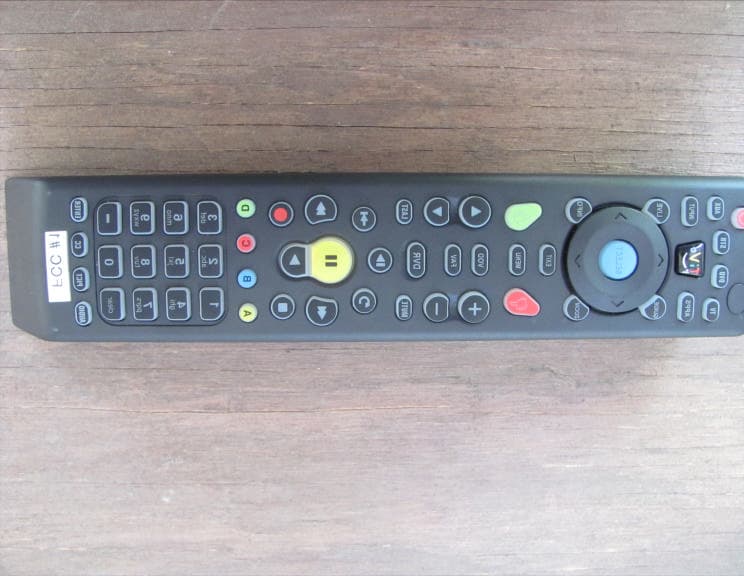
Click to zoom
Application Details
- Equipment Class
- DXT - Part 15 Low Power Transceiver, Rx Verified
- Date of Grant
- Sep 30, 2010
- Application Purpose
- Original Equipment
- Date of Application
- Sep 30, 2010
- Equipment Note
- Insignia cTV RF Remote 2010
- Frequency Range
- 908.42000000 - 908.42000000
- Company
- Universal Electronics Inc
- Country
- United States
Documents & Files
Document Text
Text extracted from the exhibit documents filed with the FCC. Open a document above to read the original.
Users Manual
14 www.insi g nia p roducts.com Getting Started NS-32E859A11/NS-42E859A11 Remote control # Button Description (power) Press to turn on your TV. Press again to put your T V in standby mode. When your TV is in standby mode, power still flows through it. To completely disconnect power, unplug the power cord. DVD Press to control a DVD player. You must program the remote control before this button works. For more information, see “Programming your universal Insignia remote control” on page 27. TV Press to put the remote in TV mode. APPS Press to open the Apps screen in the on-screen menu. TiVo Press to open the on-screen menu. GUIDE Press to open the program guide. For more informati on, see “Displaying additional information” on page 35. SELECT Press to confirm selections or changes. ! " # $ Press to move left, right, up, or down in on-screen menus. ZOOM Press to select the aspect ratio. For more informat ion, see “Adjusting the video settings” on page 40. EXIT Press to close the on-screen menu. (thumbs down) Press to decrease the thumbs rating by 1 thumb. In the channel list, press to remove a highlighted channel from the favorite list.In the on-screen keyboard, press to switch to lower case letters. VOL+/VOL– Press to increase or decrease the volume. FAV Press to open the favorite channel list. For more i nformation, see “Setting up the channel and favorite channel lists” on page 63 and “Viewing a favorite channel” on page 64. MUTE Press to mute the sound. Press again to restore the sound. /SLOW Press to enter slow motion playback in TV VOD mode (watching Netflix and CinemaNow) or when using a DVD player, Blu-ray player, or DVR. For more information, see “Programming your universal I nsignia remote control” on page 27.Press to turn the video window on or off. For more information, see “Turning the video window on or off” on page 43. (replay) Press to jump back eight seconds in TV VOD mode (wa tching Netflix and CinemaNow) or when using a DVD player, Blu-ray play er, or DVR. For more information, see “Programming your universal I nsignia remote control” on page 27. (pause) Press to pause playback in TV VOD mode (watching Ne tflix and CinemaNow) or when using a DVD player, Blu-ray play er, or DVR. For more information, see “Programming your universal I nsignia remote control” on page 27. 1234567 89 1011121314151617 www.insi g nia p roducts.com 15 NS-32E859A11/NS-42E859A11 Getting Started (fast-reverse) Press to fast-reverse in TV VOD mode (watching Netf lix and CinemaNow) or when using a DVD player, Blu-ray player, or DVR. For more information, see “Programming your universal Insign ia remote control” on page 27. (stop) Press to stop playback in TV VOD mode (watching Net flix and CinemaNow) or when using a DVD player, Blu-ray play er, or DVR. For more information, see “Programming your universal I nsignia remote control” on page 27. $ (play) Press to start playback in TV VOD mode (watching Ne tflix and CinemaNow) or when using a DVD player, Blu-ray play er, or DVR. For more information, see “Programming your universal I nsignia remote control” on page 27. CLEAR Press to clear character input in the on-scree n keyboard. AUDIO Press to select Audyssey Dynamic Volume, SRS TruSur round HD, Audio Only, Treble, Bass, or Balance. For more informatio n, see “Manually adjusting audio settings” on page 44. PICT Press to adjust the video settings. For more inform ation, see “Adjusting the video settings” on page 40. STB Press to control a set-top box. You must program the remote control before this button works. For more information, see “Programming your universal Insignia remote control” on page 27. AUX Press to control auxiliary devices, such as amplifi ers or receivers . You must program the remote control before this button works. You need to program the remote control to control connected dev ices. For more information, see “Programming your universal Insign ia remote control” on page 27. INPUT Press to open the input source list, then press ! or " to cycle through the available input sources. For more information, see “Selecting the video input source” on page 33. LIVE In menu mode, press to return to full-screen vi deo TV mode. INFO Press to display TV status information, such as the channel number, channel name (if available), or signal source. For more information, see “Displaying additional information” on page 35.In the channel list, press to rename the highlighte d channel. For more information, see “Setting up the channel and favori te channel lists” on page 63. MENU Press to open the on-screen menu. (thumbs up) Press to increase the thumbs rating by 1 thumb.In the channel list, press to add a highlighted cha nnel to the favorite list. In the on-screen keyboard, press to switch to upper case letters. VOD Press to access the VOD (video on demand) on-screen menu to watch video services offered through your connected TV, s uch as Netflix, CinemaNow, etc. # Button Description 1819202122232425262728293031 CH ! /CH " Press to change channels. For more information, see “Selecting a channel” on page 34. LIST/DVR Press to see the list of all the recorded programs in a DVR/STB that is set up with your remote control. You need to program th e remote control to control connected devices. For more information, se e “Programming your universal Insignia remote control” on page 27. LAST Press to go to the last viewed channel in TV mode. (advance) Press to jump forward to the next segment in TV VOD mode (watching Netflix and CinemaNow) or when using a DVD player, Blu-ray player, or DVR. For more information, see “Programming your un iversal Insignia remote control” on page 27. (fast-forward) Press to fast-forward in TV VOD mode (watching Netf lix and CinemaNow) or when using a DVD player, Blu-ray play er, or DVR. For more information, see “Programming your universal I nsignia remote control” on page 27. (record) In DVR mode, press to record a program. You need to program the remote control to record from…
Text truncated - open the document above for the full version.
Cover Letter(s)
Correspondence by Project Project Number: Correspondence NumberMemo MG38881-R-1 1. On page 105 of the supplied owner’s manual, it mentions that “Every Z-Wave enabled device acts as a signal repeater...”. Can this device be used as a repeater? If so, were the FCC technical requirements verified in repeating mode? Response: No. It is a slave controller without any routing/repeating functionality.
Test Report
Report Number: B00517D1 FCC Part 15 Subpart B and FCC Section 15.249 Test Report Insignia cTV RF Remote 2010 Model: URC-8881BJ0-R Brea Division 114 Olinda Drive Brea, CA 92823 (714) 579-0500 Agoura Division 2337 Troutdale Drive Agoura, CA 91301 (818) 597-0600 Silverado Division 19121 El Toro Road Silverado, CA 92676 (949) 589-0700 Lake Forest Division 20621 Pascal Way Lake Forest, CA 92630 (949) 587-0400 Page 1 of 16 FCC PART 15 SUBPART B and C TEST REPORT for INSIGNIA CTV RF REMOTE 2010 Model: URC-8881BJ0-R Prepared for UNIVERSAL ELECTRONICS, INC. 6101 GATEWAY DRIVE CYPRESS, CALIFORNIA 90630-4841 Prepared by:_____________________ KYLE FUJIMOTO Approved by:____________________ JAMES ROSS COMPATIBLE ELECTRONICS INC. 114 OLINDA DRIVE BREA, CALIFORNIA 92823 (714) 579-0500 DATE: MAY 27, 2010 REPORT APPENDICES TOTAL BODY A B C D E PAGES 16 2 2 2 11 9 42 This report shall not be reproduced except in full, without the written approval of Compatible Electronics. Report Number: B00517D1 FCC Part 15 Subpart B and FCC Section 15.249 Test Report Insignia cTV RF Remote 2010 Model: URC-8881BJ0-R Brea Division 114 Olinda Drive Brea, CA 92823 (714) 579-0500 Agoura Division 2337 Troutdale Drive Agoura, CA 91301 (818) 597-0600 Silverado Division 19121 El Toro Road Silverado, CA 92676 (949) 589-0700 Lake Forest Division 20621 Pascal Way Lake Forest, CA 92630 (949) 587-0400 Page 2 of 16 TABLE OF CONTENTS Section / Title PAGE GENERAL REPORT SUMMARY 4 SUMMARY OF TEST RESULTS 4 1. PURPOSE 5 2. ADMINISTRATIVE DATA 6 2.1 Location of Testing 6 2.2 Traceability Statement 6 2.3 Cognizant Personnel 6 2.4 Date Test Sample was Received 6 2.5 Disposition of the Test Sample 6 2.6 Abbreviations and Acronyms 6 3. APPLICABLE DOCUMENTS 7 4. DESCRIPTION OF TEST CONFIGURATION 8 4.1 Description of Test Configuration – EMI 8 4.1.1 Cable Construction and Termination 9 5. LISTS OF EUT, ACCESSORIES AND TEST EQUIPMENT 10 5.1 EUT and Accessory List 10 5.2 EMI Test Equipment 11 6. TEST SITE DESCRIPTION 12 6.1 Test Facility Description 12 6.2 EUT Mounting, Bonding and Grounding 12 6.3 Facility Environmental Characteristics 12 7. TEST PROCEDURES 13 7.1 RF Emissions 13 7.1.1 Conducted Emissions Test 13 7.1.2 Radiated Emissions (Spurious and Harmonics) Test 14 8. CONCLUSIONS 16 Report Number: B00517D1 FCC Part 15 Subpart B and FCC Section 15.249 Test Report Insignia cTV RF Remote 2010 Model: URC-8881BJ0-R Brea Division 114 Olinda Drive Brea, CA 92823 (714) 579-0500 Agoura Division 2337 Troutdale Drive Agoura, CA 91301 (818) 597-0600 Silverado Division 19121 El Toro Road Silverado, CA 92676 (949) 589-0700 Lake Forest Division 20621 Pascal Way Lake Forest, CA 92630 (949) 587-0400 Page 3 of 16 LIST OF APPENDICES APPENDIX TITLE A Laboratory Recognitions B Modifications to the EUT C Additional Models Covered Under This Report D Diagram, Charts, and Photos • Test Setup Diagram • Antenna and Amplifier Factors • Radiated Emissions Photos E Data Sheets LIST OF FIGURES FIGURE TITLE 1 Conducted Emissions Test Setup 2 Plot Map And Layout of Radiated Test Site – 3 Meters Report Number: B00517D1 FCC Part 15 Subpart B and FCC Section 15.249 Test Report Insignia cTV RF Remote 2010 Model: URC-8881BJ0-R Brea Division 114 Olinda Drive Brea, CA 92823 (714) 579-0500 Agoura Division 2337 Troutdale Drive Agoura, CA 91301 (818) 597-0600 Silverado Division 19121 El Toro Road Silverado, CA 92676 (949) 589-0700 Lake Forest Division 20621 Pascal Way Lake Forest, CA 92630 (949) 587-0400 Page 4 of 16 GENERAL REPORT SUMMARY Compatible Electronics Inc. generates this electromagnetic emission test report, which is an independent testing and consulting firm. The test report is based on testing performed by Compatible Electronics personnel according to the measurement procedures described in the test specifications given below and in the "Test Procedures" section of this report. The measurement data and conclusions appearing herein relate only to the sample tested and this report may not be reproduced without the written permission of Compatible Electronics, unless done so in full. This report must not be used to claim product endorsement by NVLAP, NIST or any other agency of the U.S. Government. Device Tested: Insignia cTV RF Remote 2010 Model: URC-8881BJ0-R S/N: N/A Product Description: See Expository Statement Modifications: The EUT was not modified in order to meet the specifications. Customer: Universal Electronics, Inc. 6101 Gateway Drive Cypress, California 90630-4841 Test Date(s): May 14 and 17, 2010 Test Specifications: EMI requirements CFR Title 47, Part 15, Subpart B Test Procedure: ANSI C63.4 Test Deviations: The test procedure was not deviated from during the testing. SUMMARY OF TEST RESULTS TEST DESCRIPTION RESULTS 1 Conducted RF Emissions 150 kHz to 30 MHz The EUT does not directly or indirectly connect to the AC mains, thus this test was not performed. 2 Radiated RF Emissions 10 kHz – 9300 MHz (Transmitter Portion) Complies with the limits of CFR Title 47, Part 15, Subpart C, sections 15.205, 15.209, and 15.249. Highest reading in relation to spec limit: 92.01 (QP) dBuV/m @ 908.42 MHz (*U = 4.22 dB) 3 Radiated RF Emissions 10 kHz – 9300 MHz (Digital Portion) Complies with the Class B limits of CFR Title 47, Part 15, Subpart B. *U = Expanded Uncertainty with a coverage factor of k=2 Report Number: B00517D1 FCC Part 15 Subpart B and FCC Section 15.249 Test Report Insignia cTV RF Remote 2010 Model: URC-8881BJ0-R Brea Division 114 Olinda Drive Brea, CA 92823 (714) 579-0500 Agoura Division 2337 Troutdale Drive Agoura, CA 91301 (818) 597-0600 Silverado Division 19121 El Toro Road Silverado, CA 92676 (949) 589-0700 Lake Forest Division 20621 Pascal Way Lake Forest, CA 92630 (949) 587-0400 Page 5 of 16 1. PURPOSE This document is a qualification test report based on the Electromagnetic Interference (EMI) tests performed on the Insignia cTV RF Remote 2010, Model: URC-8881BJ0-R. The EMI measurements were performed according to the measurement procedure described in …
Text truncated - open the document above for the full version.
Contact Information
Applicant
Jesse Mendez(Staff Engineer Electrical)
Technical Contact
Compatible Electronics, Inc.Kyle Fujimoto
[email protected]714-579-0500
114 Olinda Drive · Brea · United States
Test Firm
Compatible Electronics, Inc.Michael Christensen
Technical Specifications
| # | Rule Parts | Frequency Range | Power Output |
|---|---|---|---|
| 1 | 15C | 908.42 MHz - 908.42 MHz | - |
Other Applications from Universal Electronics Inc
MG3-PIRZWLR
Sep 15, 2026UEI/Ecolink Z-Wave Long Range PIR Sensor
Equipment Class
DTS - Digital Transmission System
MG3-DWZW8ECO
Jul 27, 2026Door Sensor
Equipment Class
DTS - Digital Transmission System
MG3-J1TH028
Jun 11, 2026Thermostat
Equipment Class
DTS - Digital Transmission SystemMG3-R37967R01
Apr 13, 2026OFA Smart Control Pro 6
Equipment Class
DTS - Digital Transmission SystemMG3-R36021BA00
Dec 12, 2025Tatlow Platform RCU Android TV
Equipment Class
DTS - Digital Transmission System