N58HBP200DLP Pico Projector
HB Optoelectronics Co.,Ltd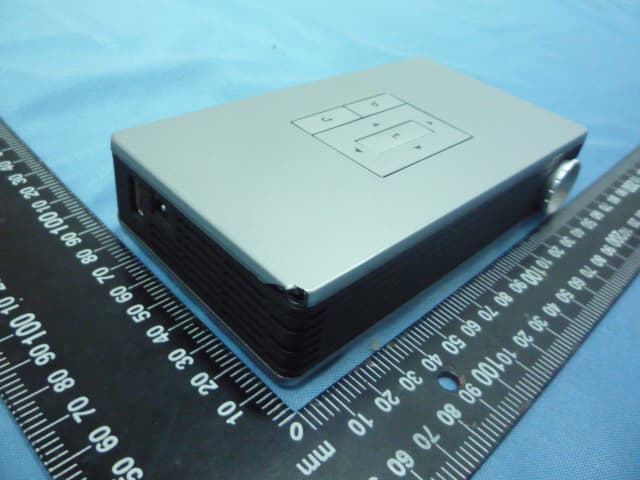
Click to zoom
Application Details
- Equipment Class
- JBP - Part 15 Class B Computing Device Peripheral
- Date of Grant
- May 08, 2012
- Application Purpose
- Original Equipment
- Date of Application
- May 08, 2012
- Equipment Note
- DLP Pico Projector
- Company
- HB Optoelectronics Co.,Ltd
- Country
- Taiwan
Documents & Files
Document Text
Text extracted from the exhibit documents filed with the FCC. Open a document above to read the original.
Users Manual
HBP200/200+/200++ DLP Pico Projector User Guide Contents Chapter 1 Important Safety Information 1 Chapter 2 Getting Started 4 Product Overview 4 Package Overview 5 Remote Control 6 Device Connectivity 7 Power on/off the Projector 9 Adjust Focus 12 Function Keys 13 Chapter 3 Playing Your Files 14 Using AV/HDMI/VGA Devices 15 Using USB Drive/Micro SD Card 16 Watching Videos 18 Playing Music 21 Viewing Photos 24 Browsing Text Files 27 Chapter 4 Adjusting Setting 29 Picture 30 Sound 34 Option 38 Appendix Battery Pack 42 Safety Instructions 42 Specification 44 Overview 45 Connection 46 Charging the Battery 49 HBP200/200+/200++ DLP Pico Projector User Guide 1 Chapter 1 Important Safety Information FCC Notice 1. Caution: Modification not expressly approved by the company could void the user’s authority to operate the equipment. 2. NOTE: This equipment has been tested and found to comply with the limits for a Class B digital device, pursuant to Part 15 of the FCC Rules. These limits are designed to provide reasonable protection against harmful interference in a residential installation. This equipment generates, uses, and can radiate radio frequency energy and, if not installed and used in accordance with the instructions, may cause harmful interference to radio communications. However, there is no guarantee that interference will not occur in a particular installation. If this equipment does cause harmful interference to radio or television reception, which can be determined by turning the radio or television off and on, the user is encouraged to try to correct interference by one or more of the following measures: A. . Reorient or relocate the receiving antenna. B. . Increase the separation between the equipment and receiver. C. . Connect the equipment into an outlet on another circuit. D. . Consult the dealer or an experienced radio/TV technician for help. Important Safety Information 1. To ensure reliable operation of the projector and prevent overheating, make sure the projector is properly ventilated during use HBP200/200+/200++ DLP Pico Projector User Guide 2 and that all ventilation openings on the projector remain unobstructed and kept free from obstacles. For example, do not place the projector on a sofa, carpet or bed during operation and do not use the projector is an enclosed place, such as a book cabinet or steel cabinet. 2. Do not expose the projector to moisture or rain. (i.e. using the projector near a bathroom sink, kitchen, laundry room, damp corners of a wall or a swimming pool can be very dangerous) 3. Do not operate the projector near sources of heat or equipment that will generate high temperatures. (i.e. heater, cooler, furnace and so forth) 4. Before cleaning the projector, be sure to unplug the power cord from the wall outlet. Do not spray cleaning solvent directly onto the projector, but apply the cleaning solvent on a piece of soft fabric to clean the projector. 5. Be sure to read all instructions printed on the labels on the projectors. 6. In order to prevent short circuit caused by lightning, be sure to turn off the projector’s power and unplug the power supply when it will not be attended or used for a long time. 7. Do not attempt to force any objects into the openings of the projector case. It will cause a fire hazard or electric shock caused by direct contact with the high voltage. Do not connect the projector with any cables or connectors that are not compatible with its connectors. Do not spill any liquid onto the projector. 8. If the projector emits strange noise or odors, usually caused by inappropriate operation, turn off the projector immediately and HBP200/200+/200++ DLP Pico Projector User Guide 3 seek assistance from your dealer. Do not attempt to open the case or repair the projector by yourself as you may get an electrical shock. 9. Should any of the following situations occur, unplug the power supply immediately and contact your dealer to solve the problem: 10. The power cord is damaged or frayed. 11. Liquid has been spilled onto the projector and it seeps through the projector case or when the projector has been exposed to rain or water. A. The projector has been dropped from a high location. B. Display from the projector shows a noticeable difference. C. The product fails to function normally when you operate it as instructed in this user’s guide. 12. To ensure the projector functions normally, do not attempt to use the power adapter or battery other than the power adapter and battery in the accessory package. We will not be responsible for the damages caused by using the power supply from other manufacturers. HBP200/200+/200++ DLP Pico Projector User Guide 4 Chapter 2 Getting Started Product Overview ① Power SW ② Focus Ring ③ AV ④ Earphone ⑤ IR Sensor ⑥ Micro SD ⑦ VGA ⑧ HDMI ⑨ USB ⑩ DC in ① ② ③ ④ ⑤ ⑥ ⑦ ⑧ ⑨ ⑩ HBP200/200+/200++ DLP Pico Projector User Guide 5 Package Overview The following items are the standard accessories of the projector. Please check if you have received all items before you start using the projector. If there is any item missing, please contact your dealer immediately. Power Adapter with AC plug Hybrid VGA cable Remote control Quick Start Guide User Guide (CD-Rom) Battery Pack (Optional) Warranty Card HBP200/200+/200++ DLP Pico Projector User Guide 6 Remote Control 1. Remove the plastic tab from the battery compartment before using the remote control. 2. Point the remote control toward the IR sensor at the back of the projector to make the remote control function normally. 3. Remote Control Key Function IR Sensor Source Right Enter Mute Stop Left Prev Down Fast Backward Menu Volume Down Volume Up Pause Next Play Fast Forward Exit Up Power On/Off HBP200/200+/200++ DLP Pico Projector User Guide 7 Device Connectivity The projector can be connected to various multimedia devices through the connectors on the back and right side of the projector. Connect 1. DVD Player and other AV interface multimedia devic…
Text truncated - open the document above for the full version.
Cover Letter(s)
2F.,No.300,Ruekuang Rd.,Taipei 114,Taiwan Tel: 886-2-2627-6515 Fax: 886-2-2627-6515 We, (the approval holder) Company name HB Optoelectronics Co.,Ltd Address 2F.,No.300,Ruekuang Rd.,Taipei 114,Taiwan City New Taipei Country Taiwan declare that the following representative (agent): Name (person) Jackie Company name Asia Institute Technology limited Address No.6, Bin-He Roan Tian-Xin Village, Huang-jiang City DongGuan, GuangDong Country China is hereby authorized to apply the following equipment for certification on our behalf: Product Description DLP Pico Projector Type or Model(s) HBP200, HBP200+, HBP200++ Tradename or Brand(s) HB OPTO We also authorize Teleconformity (Mr. M. Koop, Manager Certification, Address: Rietven 31, 7534NH Enschede, the Netherlands) to apply and sign this application for certification, registration or filing on our behalf (as representative agent or certifier). Attestation: City and Country: Date: Name: (this must be a person) Function: Signature: (or official company stamp) New Taipei, Taiwan 05/04/2012 CP Huang General manager
Cover Letter(s)
2F.,No.300,Ruekuang Rd.,Taipei 114,Taiwan . Tel: 886-2-2627-6515 Fax: 886-2-2627-6515 To: Federal Communications Commission Equipment Authorization Branch 7435 Oakland Mills Road Columbia, MD 21046 Pursuant to 47 CFR Section 0.459(a) & (b), we, (the applicant / grantee) Company name HB Optoelectronics Co.,Ltd Address 2F.,No.300,Ruekuang Rd.,Taipei 114,Taiwan City New Taipei Country Taiwan request for this certification filing under: Grantee Code Product Number FCC ID: N58 HBP200 to maintain permanent confidentiality for the following documents submitted within this application: (please cross what is applicable, or add other documents, provide the file name and description) Exhibit File Name Description x Operational Description x Block Diagrams x Schematics Diagrams Above materials contain secrets, proprietary and technical information, which would customarily be guarded from competitors under 47 CFR, section 0.457(d)(2). Disclosure or publication or any portion of this company confidential material to other parties could cause substantial competitive harm and provide unjustified benefits for competitors. We understand that pursuant to 47 CFR section 0.457(d)(1)(ii) disclosure of the applicant and all accompanying documentation will not be made before the date of the grant. The documents indicated as confidential above, are not publicly available elsewhere. Attestation: City and Country: Date: Name: (this must be a person) Function: Signature: (or official company stamp) New Taipei, Taiwan 05/04/2012 CP Huang General manager
External Photos
Model: HBP200+ Model: HBP200+ Model: HBP200+ Model: HBP200+ Model: HBP200+ Battery Battery Battery Battery Battery Adapter Adapter Adapter
Internal Photos
Model: HBP200+ Model: HBP200+ Model: HBP200+ Model: HBP200+ Model: HBP200+ Model: HBP200+ Model: HBP200+ Model: HBP200+ Model: HBP200+
Test Report
Report No.: E-F1204003 Page 1 of 44 Rev: None Asia Institute Technology (Dongguan) Limited No,6.Binhe Road, Tianxin Village, Huangjiang, Dongguan, Guangdong, China. FCC Verification Test Report For HB Optoelectronics Co., Ltd EUT Name: DLP Pico Projector Model No.: HBP200, HBP200+, HBP200++ Brand Name: HB OPTO Prepared By: Asia Institute Technology (Dongguan) Limited Date of Receipt: Apr. 23, 2012 Date of Test: Apr. 24~25, 2012 Date of Issue: May. 05, 2012 Test Result: Pass This report shall not be reproduced except in full, without the written approval of Asia Institute Technology (Dongguan) Limited. Report No.: E-F1204003 Page 2 of 44 Rev: None Asia Institute Technology (Dongguan) Limited No,6.Binhe Road, Tianxin Village, Huangjiang, Dongguan, Guangdong, China. Verification of Compliance Client Information: Applicant: HB Optoelectronics Co., Ltd EUT Information: EUT Name: DLP Pico Projector Model No.: HBP200, HBP200+, HBP200++ Brand Name: HB OPTO Test procedure used: FCC Part 15 Subpart B Class B ICES-003 This device described above has been tested by Asia Institute Technology (Dongguan) Limited, and the test results show that the equipment under test (EUT) is in compliance with the FCC and IC requirements. And it is applicable only to the tested sample identified in the report. Reviewed by: Approved by: Test director Technical director Applicant add.: 2F.,No.300, Ruekuang Rd.,Taipei 114, Taiwan Report No.: E-F1204003 Page 3 of 44 Rev: None Asia Institute Technology (Dongguan) Limited No,6.Binhe Road, Tianxin Village, Huangjiang, Dongguan, Guangdong, China. 1 Contents Page COVER PAGE 1 CONTENTS ...........................................................................................................................................................3 2 TEST SUMMARY ..................................................................................................................................................4 2.1 MEASUREMENT UNCERTAINTY............................................................................................................................5 3 TEST FACILITY.....................................................................................................................................................6 3.1 DEVIATION FROM STANDARD...............................................................................................................................6 3.2 ABNORMALITIES FROM STANDARD CONDITIONS....................................................................................................6 4 GENERAL INFORMATION ...................................................................................................................................7 4.1 GENERAL DESCRIPTION OF EUT ........................................................................................................................7 4.1.1 EUT Test Mode ...................................................................................................................7 4.2 DESCRIPTION OF TEST SETUP.............................................................................................................................8 4.3 PERIPHERAL LIST...............................................................................................................................................9 4.4 EUT PERIPHERAL LIST..........................................................................................................................................9 5 EQUIPMENTS LIST FOR ALL TEST ITEMS .....................................................................................................10 6 EMISSION TEST RESULTS ...............................................................................................................................11 6.1 MAINS TERMINALS DISTURBANCE VOLTAGE MEASUREMENT..............................................................................11 6.1.1 E.U.T. Operation ...............................................................................................................11 6.1.2 Test Specification ..............................................................................................................11 6.1.3 Measurement Data............................................................................................................12 6.1.4 Test Setup Photograph .....................................................................................................20 6.2 RADIATED EMISSION MEASUREMENT................................................................................................................22 6.2.1 E.U.T. Operation ...............................................................................................................22 6.2.2 Test Specification ..............................................................................................................22 6.2.3 Measurement Data............................................................................................................23 6.2.4 Test Setup photograph......................................................................................................41 Report No.: E-F1204003 Page 4 of 44 Rev: None Asia Institute Technology (Dongguan) Limited No,6.Binhe Road, Tianxin Village, Huangjiang, Dongguan, Guangdong, China. 2 Test Summary Test Test Requirement Test Method Criterion Result Mains Terminals Disturbance Voltage, 150kHz to 30MHz FCC Part 15 Subpart B ICES-003 FCC Part 15 Subpart B ANSI C63.4: 2009 Limits PASS Radiated Emissions 30MHz to 1GHz FCC Part 15 Subpart B ICES-003 FCC Part 15 Subpart B ANSI C63.4: 2009 Limits PASS Remark: None Model description: The HBP200+ andHBP200++ are equipped with the special battery, and HBP200 has no battery.The difference between HBP200+ and HBP200++ is only the different battery. Report No.: E-F1204003 Page 5 of 44 Rev: None Asia Institute Technology (Dongguan) Limited No,6.Binhe Road, Tianxin Village, Huangjiang, Dongguan, Guangdong, China. 2.1 Measurem…
Text truncated - open the document above for the full version.
Test Setup Photos
Report No.: E-F1204003 Page 41 of 44 Rev: None Asia Institute Technology (Dongguan) Limited No,6.Binhe Road, Tianxin Village, Huangjiang, Dongguan, Guangdong, China. 6.2.4 Test Setup photograph Between 30—1000MHz Model: HBP200+ Mode: 3-2 Model: HBP200+ Mode: 3-2 Report No.: E-F1204003 Page 42 of 44 Rev: None Asia Institute Technology (Dongguan) Limited No,6.Binhe Road, Tianxin Village, Huangjiang, Dongguan, Guangdong, China. Model: HBP200+ Mode: 3-4 Model: HBP200+ Mode: 3-4 Report No.: E-F1204003 Page 43 of 44 Rev: None Asia Institute Technology (Dongguan) Limited No,6.Binhe Road, Tianxin Village, Huangjiang, Dongguan, Guangdong, China. Between 1000—4000MHz Model: HBP200+ Mode: 3-2 Model: HBP200+ Mode: 3-2 Report No.: E-F1204003 Page 44 of 44 Rev: None Asia Institute Technology (Dongguan) Limited No,6.Binhe Road, Tianxin Village, Huangjiang, Dongguan, Guangdong, China. Model: HBP200+ Mode: 3-4 Model: HBP200+ Mode: 3-4
Contact Information
Applicant
CP Huang
Technical Contact
TeleconformityMark Koop
[email protected]+31 84 8395876
Rietven 31 · Enschede, Overyssel · Netherlands
Test Firm
Dongguan Yaxu (AiT) Technology LimitedJackie Deng
Technical Specifications
| # | Rule Parts | Frequency Range | Power Output |
|---|---|---|---|
| 1 | 15B | - | - |