NC8MA361SH900MHz/2.4GHz 40 Channel Cordless Phone (Handset)
CCT Tech Advanced Products Limited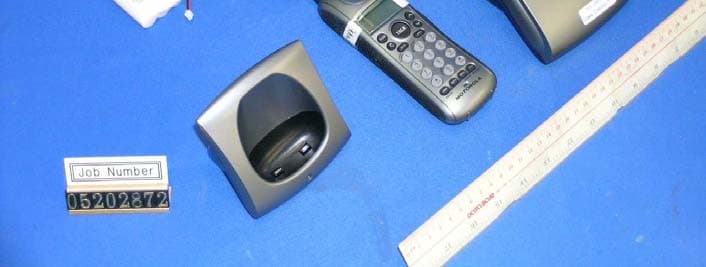
Click to zoom
Application Details
- Equipment Class
- DXT - Part 15 Low Power Transceiver, Rx Verified
- Date of Grant
- Oct 27, 2005
- Application Purpose
- Original Equipment
- Date of Application
- Oct 27, 2005
- Equipment Note
- 900MHz/2.4GHz 40 Channel Cordless Phone (Handset)
- Frequency Range
- 2402.48400000 - 2409.00400000
- Country
- Hong Kong
Documents & Files
Document Text
Text extracted from the exhibit documents filed with the FCC. Open a document above to read the original.
Users Manual
Unplug this cordless phone immediately from an outlet if: The power cord or plug is damaged or frayed. Liquid has been spilled into the product. The product has been exposed to rain or water. Do not retrieve the handset or base until after you have unplugged the power and phone from the wall, then retrieve the unit by the unplugged cords. The product has been dropped or the cabinet has been damaged. The product exhibits a distinct change in performance. I NSTALLATIONGUIDELINES Read and understand all instructions and save them for future reference. Follow all warnings and instructions marked on the product. Do not install this product near a bath tub, sink, or shower. Operate this phone using only the power source that is indicated on the marking label. If you are unsure of the power supply to your home, consult your dealer or local power company. Do not place this product on an unstable cart, stand, or table. This product may fall, causing serious damage to the product. Adjust only those controls that are covered by the operating instructions. Im- proper adjustment of other controls may result in damage and will often re- quire extensive work to restore the product to normal operation. Clean this product with a soft, damp cloth. Do not use chemicals or cleaning agents. Use only the power supply that came with this unit. Using other power sup- plies may damage the unit. Because cordless phones operate on electricity, you should have at least one phone in your home that isn’t cordless, in case the power in your home goes out. To avoid interference to nearby appliances, do not place the base of the cord- less phone on or near a TV, microwave oven, refrigerator, or VCR. To maintain compliance with the FCC’s RF exposure guidelines, place the base unit at least 20 cm from nearby persons. B ATTERYSAFETYPRECAUTIONS • Do not burn, disassemble, mutilate, or puncture. Like other batteries of this type, toxic materials could be released which can cause injury. • To reduce the risk of fire or personal injury, use only the battery listed in the User's Guide. • Keep batteries out of the reach of children. • Remove batteries if storing over 30 days. INTRODUCTION CAUTION: When using telephone equipment, there are basic safely in- structions that should always he followed. Refer to the “Important Safety Instructions”section for further information on safely operating your cordless phone. Your cordless telephone/answering system with Caller ID and Call Waiting is designed to give you flexibility in use and high-quality performance.To get the most from your new cordless telephone/answering system, we suggest that you take a few minutes right now to read through this instruction manual. This telephone is a multifunction product for use with the Call Waiting and Caller ID services available from your local telephone company.Your Caller ID/Call Waiting phone allows you to: • View the name and telephone number of a caller (Call Waiting/Caller ID) • Identify callers before you answer the phone • View the time and date of each incoming call • Record up to 40 Caller ID messages sequentially • Know who called while you were on the other line or when you were away. • Screen unwanted calls, eliminate harassment from annoying calls, or prepare before answering a call I MPORTANT: In order to use all of the features of this telephone, you must sub- scribe to two separate services available from your local telephone company: the standard Name/Number Caller ID service to know who is calling when the phone rings, and Caller ID with Call Waiting service to know who is calling while you are on the phone. Because cordless phones operate on electricity, you should have at least one phone in your home that isn't cordless, in case the power in your home goes out. BEFORE YOU BEGIN PARTSCHECKLIST MEMORY You can store up to ten 24-digit numbers in memory for speed dialing. Speed dialing memory is distinct from Caller ID memory. S TORING A NAME ANDNUMBER INMEMORY 1. Make sure the phone is off. 2. Press the MEMbutton. 3. Press a number from 0–9 on the keypad to store the phone number in that memory location. For example, press the number 1 key to store the record in memory location 1. You will hear a confirmation tone. If the memory location is occupied, the memory location and stored name and number appear on the screen. This indicates you must choose an other memory location. N OTE:If the memory location is empty, EMPTY appears in the display. 4. Press the MEMbutton again.The display shows ENTER NAME. N OTE:If you don't want to enter a name, skip step 5. 5. Use the handset number keypad to enter a name (up to 15 characters). The chart below shows how many times to press each button on the handset to enter letters and special characters (e.g., press 7 three times to enter R). 6. Press the MEMbutton again to save the name.The display shows ENTER NUMBER. 7. Use the handset number keypad to enter the telephone number (up to 24 digits, including pauses, which are entered by pressing the PAUSE* button), and press the MEMbutton again to save the number. The unit beeps to confirm. S TORING AREDIALNUMBER 1. Repeat steps 1 through 6 in “Storing a Name and Number in Memory.” 2. Press the REDIALbutton. 3. Press the MEMbutton to store the number.You will hear a confirmation tone. C HANGING ASTOREDNUMBER 1. Repeat steps 1 through 7 in “Storing a Name and Number in Memory.” 2. REPLACE MEMO?shows in the display. 3. Press the MEMbutton to replace the old number with the new number. You will hear a confirmation tone. D IALING ASTOREDNUMBER 1. Make sure the phone is on. 2. Press the MEMbutton. 3. Press a number from 0–9 on the keypad for the desired memory loca- tion. The number dials automatically. OR 1. Make sure the phone is not in Talk mode. 2. Press the MEM button. 3. Use the up or down CIDbuttons to scroll through the numbers stored in memory until the desired number is shown. 4. Press TALK.The number dials automatically. C HAINDIALINGFROMMEMO…
Text truncated - open the document above for the full version.
External Photos
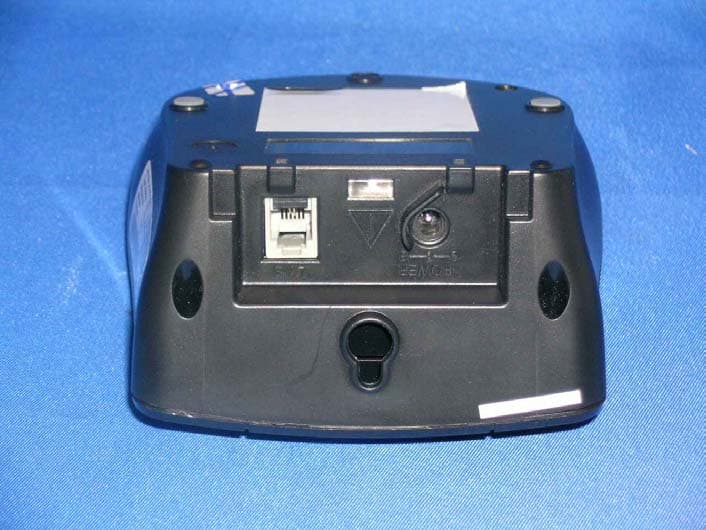
INTERTEK TESTING SERVICES External Photos FCC ID NC8MA361SH external photos - 1 of 1
Internal Photos
INTERTEK TESTING SERVICES Internal photos FCC ID NC8MA361SH internal photos - 1 of 3 Handset assembly Handset Main PCB comp side (View 1) INTERTEK TESTING SERVICES Internal photos FCC ID NC8MA361SH internal photos - 2 of 3 Handset Main PCB comp side (View 2) Handset Main PCB display side INTERTEK TESTING SERVICES Internal photos FCC ID NC8MA361SH internal photos - 3 of 3 Handset Oscillator PCB comp side Handset Oscillator PCB solder side
Test Report
INTERTEK TESTING SERVICES Radiated Emission on the Bandedge Plots FCC ID NC8MA361SH emission - 1 of 1 Plot H1A Plot H1B
Test Report
• The test results reported in this test report shall refer only to the sample actually tested and shall not refer or be deemed to refer to bulk from which such a sample may be said to have been obtained. • This report shall not be reproduced except in full without prior authorization from Intertek Testing Services Hong Kong Limited. • For Terms And Conditions of the services, it can be provided upon request. • The evaluation data of the report will be kept for 3 years from the date of issuance. Intertek Testing Services Hong Kong Ltd. 2/F., Garment Centre, 576 Castle Peak Road, Kowloon, Hong Kong. Tel: (852) 2173 8888 Fax: (852) 2741 1693 Website: www.hk.intertek-etlsemko.com CCT R&D Ltd. Application For Certification 900MHz/2.4GHz 40 Channel Analog Modulation Cordless Phone with Caller ID and Digital Answering Machine - Handset (FCC ID: NC8MA361SH) 05202872 TL/ Ann Choy October 19, 2005 INTERTEK TESTING SERVICES FCC ID: NC8MA361SH i LIST OF EXHIBITS INTRODUCTION EXHIBIT 1: General Description EXHIBIT 2: System Test Configuration EXHIBIT 3: Emission Results EXHIBIT 4: Equipment Photographs EXHIBIT 5: Product Labelling EXHIBIT 6: Technical Specifications EXHIBIT 7: Instruction Manual EXHIBIT 8: Security Code Information EXHIBIT 9: Confidentiality Request INTERTEK TESTING SERVICES FCC ID: NC8MA361SH ii MEASUREMENT/TECHNICAL REPORT CCT R&D Ltd. - Model: MA36Xsys series, MA300sys FCC ID: NC8MA361SH This report concerns (check one:) Original Grant X Class II Change Equipment Type : DXT - Cordless Telephone Deferred grant requested per 47 CFR 0.457(d)(1)(ii)? Yes No X If yes, defer until : date Company Name agrees to notify the Commission by: date of the intended date of announcement of the product so that the grant can be issued on that date. Transition Rules Request per 15.37 ? Yes No X If no, assumed Part 15, Subpart C for intentional radiator - the new 47 CFR [10-01-04 Edition] Provision. Report prepared by: Tommy Leung Intertek Testing Services Hong Kong Ltd. 2/F., Garment Centre, 576 Castle Peak Road, Kowloon, Hong Kong. Phone : 852-2173-8538 Fax: 852-2741-1693 INTERTEK TESTING SERVICES FCC ID: NC8MA361SH iii Table of Contents 1.0 General Description............................................................................................2 1.1 Product Description..........................................................................................2 1.2 Related Submittal(s) Grants ............................................................................3 1.3 Test Methodology ............................................................................................3 1.4 Test Facility ......................................................................................................3 2.0 System Test Configuration ...................................................................................5 2.1 Justification.......................................................................................................5 2.2 EUT Exercising Software.................................................................................5 2.3 Support Equipment List and Description.........................................................6 2.4 Measurement Uncertainty ...............................................................................7 2.5 Equipment Modification ...................................................................................7 3.0 Emission Results ...................................................................................................9 3.1 Field Strength Calculation .............................................................................10 3.2 Radiated Emission Configuration Photograph - Handset.............................11 3.3 Radiated Emission Data - Handset ...............................................................12 3.4 Radiated Emission on the bandedge ............................................................15 4.0 Equipment Photographs .....................................................................................17 5.0 Product Labelling .................................................................................................19 6.0 Technical Specifications .....................................................................................21 7.0 Instruction Manual ...............................................................................................23 8.0 Security Code Information ..................................................................................25 9.0 Confidentiality Request .......................................................................................27 INTERTEK TESTING SERVICES FCC ID: NC8MA361SH iv List of attached file Exhibit type File Description filename Cover Page Confidentiality Request request.pdf Test Report Test Report report.pdf Operation Description Technical Description descri.pdf Test Setup Photo Radiated Emission for Handset config photos.doc Test Report Emission Plot emission.pdf External Photo External Photo external photos.doc Internal Photo Internal Photo internal photos.doc Block Diagram Block Diagram block.pdf Schematics Circuit Diagram circuit.pdf ID Label/Location Label Artwork and Location label.pdf User Manual User Manual manual.pdf User Manual FCC Information fcc information.pdf INTERTEK TESTING SERVICES FCC ID: NC8MA361SH 1 EXHIBIT 1 GENERAL DESCRIPTION INTERTEK TESTING SERVICES FCC ID: NC8MA361SH 2 1.0 General Description 1.1 Product Description The MA361sys is a 900MHz/2.4GHz 40 Channel Analog Modulation Cordless Phone with Caller ID and Digital Answering Machine. Base Unit and handset operate at frequency of 924.045MHz to 926.219MHz and 2402.484MHz to 2409.004MHz respectively. The unit is capable of either tone or pulse dialing. The internal power supply's isolation is accomplished through a power transformer having an adequate dielectric rating. The circuit wiring is consistent under the requirement of part 68. The handset unit consists of a keypad w…
Text truncated - open the document above for the full version.
Test Setup Photos
INTERTEK TESTING SERVICES The Worst Case Configuration Photographs FCC ID NC8MA361SH config photos (radiated emission - handset) - 1 of 1 Radiated Emission – Handset Front View Rear View
Contact Information
Applicant
Ronilo Paredes(Senior Approval Engineer)
Technical Contact
Intertek Testing Services Hong Kong Ltd.Tommy Leung
[email protected]852-2173-8538
2/F., Garment Centre, · Kowloon · Hong Kong
Non-Technical Contact
Intertek Testing Services Hong Kong Ltd.Tommy Leung
[email protected]852-2173-8538
Test Firm
Intertek Testing Services Hong KongBilly Chow
Technical Specifications
| # | Rule Parts | Frequency Range | Power Output |
|---|---|---|---|
| 1 | 15C | 2.40 GHz - 2.41 GHz | - |
Other Applications from CCT Tech Advanced Products Limited
NC8P9122G
May 16, 2007900MHz 40Ch Analog Modulation Cordless Phonew/CID
Equipment Class
DXT - Part 15 Low Power Transceiver, Rx Verified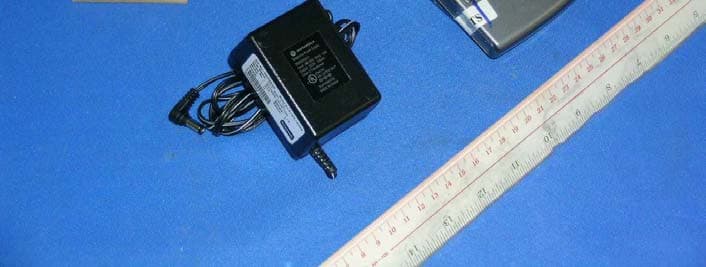
NC8SD7505
Sep 12, 20065.8GHz FHSS CellDock w/ Bluetooth
Equipment Class
DXT - Part 15 Low Power Transceiver, Rx Verified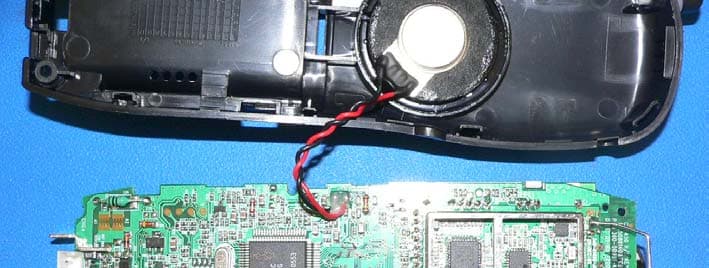
NC8CT5450
Aug 14, 20065.8GHz Cordless Phone
Equipment Class
DSS - Part 15 Spread Spectrum Transmitter
NC8MD2400
Jun 11, 20062.4Gz Cordless Phone
Equipment Class
DSS - Part 15 Spread Spectrum Transmitter
NC8KX-TG2120
May 24, 20062.4GHz/900MHz Analog Cordless phone w/ CID (Base)
Equipment Class
DXT - Part 15 Low Power Transceiver, Rx Verified