NC8MD4502.4GHz FHSS Cordless Phone With Caller ID
CCT Tech Advanced Products Limited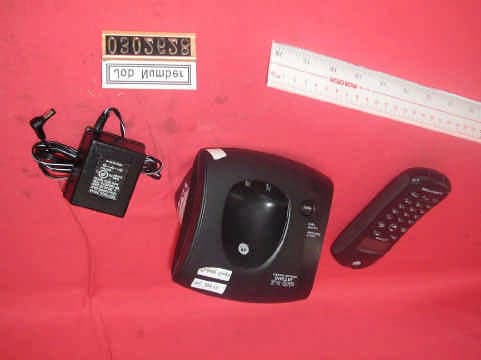
Click to zoom
Application Details
- Equipment Class
- DSS - Part 15 Spread Spectrum Transmitter
- Date of Grant
- Apr 02, 2003
- Application Purpose
- Original Equipment
- Date of Application
- Apr 02, 2003
- Equipment Note
- 2.4GHz FHSS Cordless Phone With Caller ID
- Frequency Range
- 2401.80800000 - 2479.40100000
- Country
- Hong Kong
Documents & Files
Document Text
Text extracted from the exhibit documents filed with the FCC. Open a document above to read the original.
Users Manual
6881041B65-O User's Guide > motorola.com MD450 Series Digital 2.4GHz Expandable Cordless Telephone System 031068o User's Guide > MD450 Series Digital 2.4GHz Expandable Cordless Telephone System 031068o 1 Congratulations on your purchase of a Motorola product! Product registration is an important step. Registering helps us facilitate warranty service and permits us to contact you if your Motorola product requires an update or other service. To register your product online, visit: www.motorola.com/warranty/cordless Please retain your original dated sales receipt for your records. For warranty service of your Motorola product, you will need to provide a copy of your dated sales receipt to confirm warranty status. Registration is not required for warranty coverage. For a large-print version of this guide, or for product- related questions, please call: 1-800-353-2729 in the USA 1-888-390-6456 TTY (Text Telephone) On the Web: www.motorola.com/cordless MOTOROLA and the Stylized M Logo are registered in the US Patent & Trademark Office. All other product or service names are the property of their respective owners. © Motorola, Inc. 2003 6881041B65-O 1041b65o.book Page 1 Friday, March 7, 2003 11:36 AM 2 Handset Controls Handset Controls Turn handset on to make a call Earphone jack Raise volume Redial Scroll up or down on display Left soft key Right soft key Turn handset off (hang up) Use handset as intercom Talk handsfree using speakerphone Lower volume Microphone 1041b65o.book Page 2 Friday, March 7, 2003 11:36 AM 3 FCC and Interference Information This equipment complies with Parts 15 and 68 of the FCC rules and the requirements adopted by the Administrative Council for Terminal Attachments (ACTA). A plug and jack used to connect this equipment to the premises wiring and telephone network must comply with applicable FCC Part 68 rules and requirements adopted by the ACTA. A compliant telephone cord and modular plug is provided with this product. It is designed to be connected to a compatible modular jack that is also compliant. See installation instructions for details. Notification of the Local Telephone Company On the bottom of this equipment is a label that contains, among other information, a product identifier in the form US:AAAEQ##TXXXX. You must, upon request, provide this information to your telephone company. The digits represented by ## in the product identifier indicate the Ringer Equivalency Number (REN) for this equipment. The REN is useful in determining the number of devices you may connect to your telephone line and still have all of these devices ring when your telephone number is called. In most (but not all) areas, the sum of the RENs of all devices connected to one line should not exceed 5. To be certain of the number of devices you may connect to your line as determined by the REN, contact your local telephone company. Notes: •This equipment may not be used on coin service provided by the telephone company. •Connection to party line service is subject to state tariffs. Contact the state public utility commission, public service commission or corporation commission for information. •If your home has specially wired alarm equipment connected to the telephone line, ensure the installation of this cordless phone does not disable your alarm equipment. If you have questions 1041b65o.book Page 3 Friday, March 7, 2003 11:36 AM 4 about what will disable alarm equipment, consult your telephone company or a qualified installer. •Notice must be given to the telephone company upon permanent disconnection of your telephone from your line. •The FCC requires that you connect your cordless telephone to the nationwide telephone network through a modular telephone jack (USOC RJ11C/RJ11W or RJ14C/RJ14W). Rights of the Telephone Company Should your equipment cause trouble on your line which may harm the telephone network, the telephone company shall, where practicable, notify you that temporary discontinuance of service may be required. Where prior notice is not practical and the circumstances warrant such action, the telephone company may temporarily disconnect service immediately. In case of such temporary discontinuance, the telephone company must: 1. Promptly notify you of such temporary discontinuance; 2. Afford you the opportunity to correct the situation; 3. Inform you of your right to bring a complaint to the Commission pursuant to procedures set forth in Subpart E of Part 68, FCC Rules and Regulations. The telephone company may make changes in its facilities, equipment, operations, or procedures that could affect the operation of the equipment. If this happens, the telephone company will provide advance notice in order for you to make necessary modifications to maintain uninterrupted service. Interference Information This device complies with Part 15 of the FCC Rules. Operation is subject to the following two conditions: 1. This device may not cause harmful interference. 2. This device must accept any interference received, including interference that may cause undesired operation. 1041b65o.book Page 4 Friday, March 7, 2003 11:36 AM 5 This equipment has been tested and found to comply with the limits for a Class B digital device, pursuant to Part 15 of the FCC Rules. These limits are designed to provide reasonable protection against harmful interference in a residential installation. This equipment generates, uses, and can radiate radio frequency energy and, if not installed and used in accordance with the instructions, may cause harmful interference to radio communications. However, there is no guarantee that interference will not occur in a particular installation. If this equipment does cause harmful interference to radio or television reception, which can be determined by turning the equipment on and off, the user is encouraged to try to correct the interference with one or more of the following measures: Reorient or relocate the receiving antenna (that is, the antenna for the radi…
Text truncated - open the document above for the full version.
Users Manual
27 Setting Up Your Phone Setting the Language Setting Touch Tone or Pulse Dialing Your phone is set to touch tone dialing. Do not change this setting unless touch tone service is not available in your area. Action 1Press MENU (a). 2Scroll to Language and press SELECT ( a). 3Press c until ! points to the language you want to set. 4Press DONE (a). 5Press EXIT (a) to return to the standby screen, or c to scroll to a different menu option. Action 1Press MENU (a). 2Scroll to Tone/Pulse. 3Press c or CHANGE (a) to switch between Tone and Pulse. 4Press DONE (a). 5Press EXIT (a) to return to the standby screen, or c to scroll to a different menu option. 1041b65o.book Page 27 Friday, March 7, 2003 11:36 AM 28 Using the Handset Using the Handset See page 2 for an illustration of the handset. Making a Call Press ON. When you hear the dial tone, dial the number. or Enter the phone number, then press ON. This lets you see the phone number on the display before the number is dialed. During a call, a timer on the display shows the amount of time on the call. When you are finished talking, press OFF to hang up. Press ON or Handsfree to answer using the speakerphone. If you have call waiting service, press ON to answer the second call. Adjusting the Volume During a Call Press to make caller’s voice Louder Softer 1041b65o.book Page 28 Friday, March 7, 2003 11:36 AM 29 Using the Handset When you are not on a call, use the volume keys to change the day (6 am–9 pm) or night (9 pm–6 am) ringer volume. The time of day as set on the phone determines whether you are adjusting the day or night volume. To set the time, see page 26. Making a Call Using the Speakerphone Press Handsfree and dial the number. For optimal speakerphone sound quality, make sure the belt clip is on. This raises the handset up so it is not lying flat (the speakerphone is on the back of the handset). When the speakerphone on the handset is on, V appears on the display. When you are finished talking, press OFF to hang up and turn the speakerphone off. Note: Pressing Handsfree while in the caller ID list, redial list, or phonebook turns the speakerphone on and dials the number. Press Handsfree. If you have call waiting service, press ON to answer the second call. Adjusting the Speakerphone Volume Press the volume up or volume down key (see page 28). Switching Between the Handset and Speakerphone Press Handsfree. 1041b65o.book Page 29 Friday, March 7, 2003 11:36 AM 30 Using the Handset Muting a Call Press MUTE (a). To unmute the call, press UMUTE(a). Putting a Call on Hold Press HOLD (a). To return to the call, press UNHOLD (a) or ON. When a call is on hold, you can use the intercom features (see page 41). Redialing a Number To redial the most recently dialed number: To redial one of the last 5 numbers you dialed: If a number in the redial list matches a number in your phonebook, the phonebook name and number display in the redial list instead of just the phone number. Action 1Press ON. 2Press Redial. Action 1Press Redial. 2Press c until ! points to the number you want to redial. 3Press Dial (a) or ON or Handsfree. 1041b65o.book Page 30 Friday, March 7, 2003 11:36 AM 31 Using the Handset Finding a Lost or Misplaced Handset Press PAGE on the base station. All handsets registered to the base station will start beeping. Press Off, EXIT (a), or OK (a) on a handset to stop paging that handset, or press PAGE on the base station to stop paging all handsets. Saving a Number in the Phonebook Storing numbers in the phonebook makes it easy to dial numbers you call frequently. You can enter numbers directly into the phonebook or add them from the caller ID or redial list. Each handset has its own phonebook. The phonebook can hold 50 names and numbers. Action 1Press PHONEBK (a). 2Scroll to (New Entry) and press SELECT ( a). 3Enter the name (up to 12 characters). Press DELETE (a) to backspace and erase characters to the left of the blinking cursor. See page 26 for information on entering text. 4Scroll down ( c ). 5Enter the phone number (up to 24 digits). Press DELETE (a) to backspace and erase characters to the left of the blinking cursor. 6Press DONE (a). 1041b65o.book Page 31 Friday, March 7, 2003 11:36 AM 32 Using the Handset To store a recently called number in the phonebook : Note: You can also store a number in the phonebook from the caller ID list (see page 36). Action 1Press Redial. The display shows the last 5 numbers you dialed, with the most recent number at the top. 2Press c until ! points to the number you want to save. 3Press STORE (a). 4Enter the name (up to 12 characters). Press DELETE (a) to backspace and erase characters to the left of the blinking cursor. See page 26 for information on entering text. 5Scroll down ( c ). 6The phone number displays in the Number: field. To modify the number, press DELETE (a) to backspace and erase characters to the left of the blinking cursor. 7When the phone number is correct as you want to store it, press DONE (a). 1041b65o.book Page 32 Friday, March 7, 2003 11:36 AM 33 Using the Handset Calling a Number from the Phonebook Editing a Phonebook Entry Action 1Press PHONEBK (a). 2Press c until ! points to the entry you want to call. 3Press ON or Handsfree. Action 1Press PHONEBK (a). 2Press c until ! points to the entry you want to edit. 3Press OPTIONS (a). 4Scroll to Edit and press SELECT (a). 5To modify the name, press DELETE (a) to backspace and erase characters to the left of the blinking cursor. See page 26 for information on entering text. 6Scroll down ( c ) to move to the phone number field. 7Modify the number. 8Press DONE (a). 1041b65o.book Page 33 Friday, March 7, 2003 11:36 AM 34 Using the Handset Deleting a Phonebook Entry Inserting Pauses in a Number At the position where you want to insert a pause, press and hold # until P appears. When you call a number with a pause, the phone waits 3 seconds before transmitting the next digits in the dialing sequence. This is useful, for example, when you have to…
Text truncated - open the document above for the full version.
Attestation Statements
STATEMENT OF SECURITY CODE The Digital Telephone System has a digital security code combinations that are produced by the following means 1) Provided with 27 bits which equal for 134 Millions security codes. The security code is assigned from 0 to max (134 Millions) manually under tracted record. 2) When shipped from factory, the security code is decided during manufacturing. It is memorized in the non- volatile memory Integrated Circuit (IC). 3) Base and Handset knows each other’s security code information. For Single handset, 1) It is also carry a digital security code which is also decided during manufacturing. 2) After registered to base, the handset knows the base ID and handset knows the Handset ID.
Cover Letter(s)
From: [email protected] Sent: Thursday, April 03, 2003 2:05 AM To: [email protected] Cc: [email protected] Subject: RE: CCT Telecom (HK) Limited, FCC ID:NC8MD450, AN03T2753 Dear Mike, The frame structure is 10ms long and divided into 8 slots, each 1250us long. The active transmission time is 938us, therefore the TX duty cycle shall be 938us/10ms = 9.38%. In addition, the TX frame is about 10% because in TX frame, there will a guard time between slots which provide time to stable the RF transceiver for channel are changed. In the guard time, the transmitter will turn OFF. And the total transmitter on time will be less than 1/8. If you need other information, please feel free to contact me. I expect to complete the certification today and I will call you tomorrow morning. Thanks and best regards, Tommy. -----Original Message----- From: Mike Kuo [mailto:[email protected]] Sent: Thursday, April 03, 2003 10:36 AM To: '[email protected]'; Mike Kuo Cc: [email protected] Subject: RE: CCT Telecom (HK) Limited, FCC ID:NC8MD450, AN03T2753 Hi Tommy : 1)Why the duty cycle is not 1/8=12.5% but 10% ? Best Regards Mike Kuo -----Original Message----- From: [email protected] [mailto:[email protected]] Sent: Wednesday, April 02, 2003 12:07 AM To: [email protected] Cc: [email protected] Subject: RE: CCT Telecom (HK) Limited, FCC ID:NC8MD450, AN03T2753 Dear Mike, This mail is in response to your e-mail on Apr 1, 2003. 1) The test data of charging mode with base unit is attached for your review. 2) For Walkie Talkie Mode -- It is a special feature for TDD (Time Division Duplex) system like this phone. One handset function as a Base and no communication is through Base in the mode. Handset talk to another handset without going through Base. So, it only need one time slot out of eight to communicate, the duty cycle is still 10%. 3) Please refer to page 7 of the test report for equipment setting. "Analyzer resolution is 100 kHz or greater for frequencies below 1000MHz. The resolution is 1MHz or greater for frequencies above 1000MHz." 4) It is because the maximum duty cycle of handset and base are different. The duty cycle of handset is around 10% whereas the base is up to 40%. Hence, the peak field strength of handset is 117.6dBuV/m which is higher than 113.3dBuV/m of the base unit. And we calculated with the peak field strength of handset in RF exposure information. If you need other information, please feel free to contact me. Thanks and best regards, Tommy. -----Original Message----- From: Mike Kuo [mailto:[email protected]] Sent: Wednesday, April 02, 2003 4:49 AM To: '[email protected]' Subject: FW: CCT Telecom (HK) Limited, FCC ID:NC8MD450, AN03T2753 -----Original Message----- From: CERTADM Sent: Tuesday, April 01, 2003 12:31 PM To: '[email protected]' Subject: CCT Telecom (HK) Limited, FCC ID:NC8MD450, AN03T2753 Notice_content ------------- Question #1: AC Line conducted tests: There are two different chargers included in this filing. One is base unit used as charger and the other one is charger for the handset. In AC line conducted plots submitted, one of spectrum plots is tested with talk mode (handset charger ) with peak and average traces on the same plots. However, there is one set of data with one current-carrying measurement. Please provide additional Ac line conducted test data by following ANSI C63.4 section 7 procedures. Please doing the same measurement for Base unit in charging mode as well. Question #2: The handset is also capable of operating as Walkie Talkie mode between two handsets. What is the duty cycle during Walkie Talkie mode ? Question #3: What is the instrument setting used during radiated spurious emission tests below 1GHz and above 1GHz ? Question #4: The conducted output power of handset is higher than the base unit. However, the fundamental field strength of base unit is higher than the handset. Please explain. Best Regards Mike Kuo The items indicated above must be submitted before processing can continue on the above referenced application. Failure to provide the requested information within 60 days of the original e-mail date may result in application dismissal and forfeiture of the filing fee. Also, please note that partial responses increase processing time and should not be submitted. Any questions about the content of this correspondence should be directed to the e-mail address listed below the name of the sender. Your Global Partners in Quality ________________________________________________________________ Confidentiality Notice: All information or opinions expressed in this message and/or any attachments are those of the author and are not necessarily those of Intertek Testing Services or its associated companies. Intertek Testing Services accepts no responsibility for loss or damage arising from its use, including damage from virus. Any personal data contained in this e-mail is treated with the strictest confidence. If you have received this message in error, please notify us immediately and delete it from your system. Our privacy policy can be found at http://www.itslabtest.com/home/privacy.htm Please note that any direct business correspondence contained in this e-mail is subject to our business Terms & Conditions available upon request from the sender. Your Global Partners in Quality ________________________________________________________________ Confidentiality Notice: All information or opinions expressed in this message and/or any attachments are those of the author and are not necessarily those of Intertek Testing Services or its associated companies. Intertek Testing Services accepts no responsibility for loss or damage arising from its use, including damage from virus. Any personal data contained in this e-mail is treated with the strictest confidence. If you have received this message in error, please notify us immediately and delete it from your system. Our privacy policy can be found at http://www.itslabtest.com/home/privacy.htm Please…
Text truncated - open the document above for the full version.
External Photos
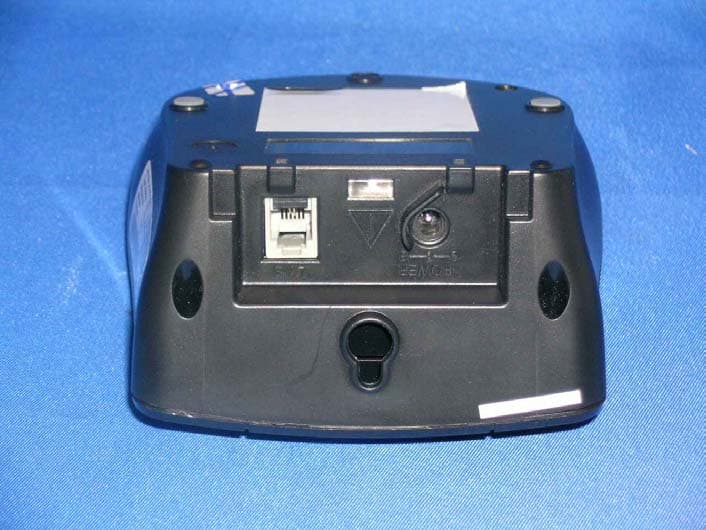
External photos FCC ID: NC8MD450 External photos FCC ID: NC8MD450
ID Label/Location Info
5 0 . 0 m m 41.0 mm 3 5 . 5 m m 28.5 mm
Internal Photos
Internal photos FCC ID: NC8MD450 Base assembly (View 1) Base assembly (View 2) Internal photos FCC ID: NC8MD450 Base Main PCB comp side (view 1) Base Main PCB comp side (view 2) Internal photos FCC ID: NC8MD450 Base Main PCB solder side Base keypad front side Internal photos FCC ID: NC8MD450 Base keypad rear side Base Oscillator PCB comp side Internal photos FCC ID: NC8MD450 Handset assembly Handset Main PCB comp side) Internal photos FCC ID: NC8MD450 Handset Main PCB display side Handset Oscillator PCB comp side
RF Exposure Info
Intertek Testing Services FCC ID: NC8MD450 Date: Apr 2, 2003 For SAR evaluation of the handset, refer to TCB Exclusions List Revised on 17 July 2002. Potable transmitter with output power less than 60/fGHz (d < 2.5cm) can be certified by TCB without the SAR evaluation. In fact, the Output power for portable transmitters is the higher of the conducted or radiated (EIRP) source-based time-averaged output. And the fGHz is mid-band frequency in GHz, and d is the distance to a person’s body, excluding hands, wrists, feet, and ankles. For the tested model of MD450, the measured peak conducted power was 179.06mW and the source-based time averaged output power was 17.9mW as TX duty cycle of the handset is < = 10%. The maximum field strength (FS) was 117.6dBμV/m at 2440.159MHz. The distance (D) between the antenna and the equipment under test (EUT) was 3 meters. From these data, the EIRP can be calculated by: EIRP = (FS*D) 2 / 30 = 172.6mW Source-based time averaged output power = (172.6 *0.1)mW = 17.3mW Based on the above calculation, it is concluded that the handset can be certified by TCB without the SAR evaluation.
Test Report
FCC ID: NC8MD450 Intertek Testing Services Hong Kong Ltd. 2/F., Garment Centre, 576 Castle Peak Road, Kowloon, Hong Kong. Tel: (852) 2173 8888 Fax: (852) 2741 1693 April 2, 2003 CCT Telecom (HK) Limited 18/F., CCT Telecom Building, 11 Wo Shing Street, Fo Tan, Shatin, N.T., Hong Kong.. Tel. : (852) 2695 8333 Fax. : (852) 2694 8660 Dear Mr. Boni Baniqued: Enclosed you will find your file copy of a Part 15 Certification (FCC ID: NC8MD450). For your reference, TCB will normally take another 15 to 20 days for reviewing the report. Approval will then be granted when no query is sorted. Please contact me if you have any questions regarding the enclosed material. Sincerely, Tommy Leung Supervisor Enclosure • The test results reported in this report shall refer only to the sample actually tested and shall not refer or be deemed to refer to bulk from which such a sample may be said to have been obtained. • This report shall not be reproduced except in full without prior authorization form Giant Electronics Limited Limited FCC ID: NC8MD450 Intertek Testing Services Hong Kong Ltd. 2/F., Garment Centre, 576 Castle Peak Road, Kowloon, Hong Kong. Tel: (852) 2173 8888 Fax: (852) 2741 1693 CCT Telecom (HK) Limited Application For Certification 2.4GHz Frequency Hopping Spread Spectrum Cordless Phone (FCC ID: NC8MD450) WO# 03026281 WL/Ann Choy April 2, 2003 INTERTEK TESTING SERVICES FCC ID: NC8MD450 i LIST OF EXHIBITS INTRODUCTION EXHIBIT 1: Summary of Tests EXHIBIT 2: General Description EXHIBIT 3: System Test Configuration EXHIBIT 4: Measurement Results EXHIBIT 5: Equipment Photographs EXHIBIT 6: Product Labelling EXHIBIT 7: Technical Specifications EXHIBIT 8: Instruction Manual EXHIBIT 9: Security Code Information INTERTEK TESTING SERVICES FCC ID: NC8MD450 ii MEASUREMENT/TECHNICAL REPORT CCT Telecom (HK) Limited- MODEL: MD45X series FCC ID: NC8MD450 This report concerns (check one) Original Grant X Class II Change Equipment Type: DSS-Part 15 Spread Spectrum Transmitter Deferred grant requested per 47 CFR 0.457(d)(1)(ii)? Yes No X If yes, defer until : date Company Name agrees to notify the Commission by: date of the intended date of announcement of the product so that the grant can be issued on that date. Transition Rules Request per 15.37? Yes No X If no, assumed Part 15, Subpart C for intentional radiator - the new 47 CFR [08-20-02 Edition] provision. Report prepared by: Tommy Leung Intertek Testing Services 2/F., Garment Centre, 576 Castle Peak Road, Kowloon, Hong Kong. Phone: 852-2173-8538 Fax: 852-2741-1693 INTERTEK TESTING SERVICES FCC ID: NC8MD450 iii Table of Contents 1.0 Summary of test results ......................................................................................................2 2.0 General Description..................................................................................................................4 2.1 Product Description .................................................................................................................4 2.2 Related Submittal(s) Grants .....................................................................................................5 2.3 Test Methodology....................................................................................................................5 2.4 Test Facility.............................................................................................................................5 3.0 System Test Configuration .......................................................................................................7 3.1 Justification ..............................................................................................................................7 3.2 EUT Exercising Software.........................................................................................................7 3.3 Support Equipment List and Description ..................................................................................8 3.4 Equipment Modification...........................................................................................................9 4.0 Measurement Results..............................................................................................................11 4.1 Maximum Conducted Output Power at Antenna Terminals....................................................11 4.2 Maximum 20 dB RF Bandwidth ............................................................................................13 4.3 Minimum Number of Hopping Frequencies................................................................................ 15 4.4 Minimum Hopping Channel Carrier Frequency Separation ....................................................... 16 4.5 Average Time of Occupancy..................................................................................................18 4.6 Out of Band Conducted Emissions .............................................................................................. 19 4.7 Out of Band Radiated Emissions ............................................................................................20 4.8 Transmitter Radiated Emissions in Restricted Bands..............................................................21 4.9 Field Strength Calculation......................................................................................................22 4.10 Radiated Emission Configuration Photograph - Base Unit....................................................... 23 4.11 Radiated Emission Data - Base Unit.....................................................................................24 4.12 Radiated Emission Configuration Photograph - Handset ......................................................28 4.13 Radiated Emission Data - Handset .......................................................................................29 4.14 AC Line Conducted Emission ..............................................................................................33 4.15 Line C…
Text truncated - open the document above for the full version.
Test Report
Intertek Testing Services ETL SEMKO Report No.:03026281 Talk Mode Ctrl No.:N/A PAGE 1 Tested By:Hong, Report No.:03026281 Scan Settings (1 Range) |--------- Frequencies -----------||----------- Receiver Settings ------------| Start Stop Step IF BW Detector M-Time Atten Preamp OpRge 150k 30M 5k 10k PK+AV 10ms AUTO LN OFF 60dB Final Measurement: x QP / + AV Meas Time: 1 s Subranges: 16 Acc Margin: 20dB Transducer No. Start Stop Name 21 9k 30M EW0698 0 10 20 30 40 50 60 70 80 90 dBuV 100 0.15 MHz 30110 F15Q F15A Intertek Testing Services ETL SEMKO Report No.:03026281 Talk Mode Ctrl No.:N/A Tested By:Hong, Report No.:03026281 Scan Settings (1 Range) |--------- Frequencies -----------||----------- Receiver Settings ------------| Start Stop Step IF BW Detector M-Time Atten Preamp OpRge 150k 30M 5k 10k PK+AV 10ms AUTO LN OFF 60dB Final Measurement Results: no Results
Test Setup Photos
The Worst Case Configuration Photographs FCC ID: NC8MD450 Radiated Emission – Base Front View Rear View The Worst Case Configuration Photographs FCC ID: NC8MD450 Radiated Emission – Handset Front View Rear View The Worst Case Configuration Photographs FCC ID: NC8MD450 Conducted Emission Front View Rear View The Worst Case Configuration Photographs FCC ID: NC8MD450 Conducted Emission Side View
Contact Information
Applicant
Ronilo Paredes(Senior Approval Engineer)
Test Firm
Intertek Testing Services Hong KongBilly Chow
Technical Specifications
| # | Rule Parts | Frequency Range | Power Output |
|---|---|---|---|
| 2 | 15C | 2.40 GHz - 2.48 GHz | 179.00 mW |
Other Applications from CCT Tech Advanced Products Limited
NC8P9122G
May 16, 2007900MHz 40Ch Analog Modulation Cordless Phonew/CID
Equipment Class
DXT - Part 15 Low Power Transceiver, Rx Verified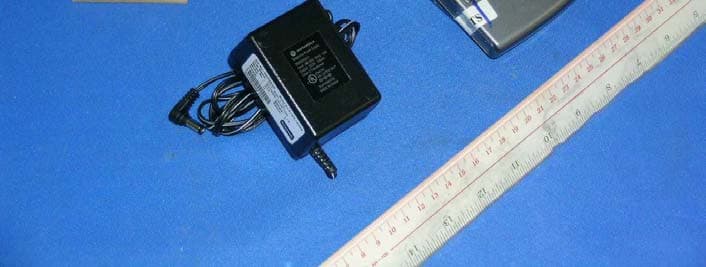
NC8SD7505
Sep 12, 20065.8GHz FHSS CellDock w/ Bluetooth
Equipment Class
DXT - Part 15 Low Power Transceiver, Rx Verified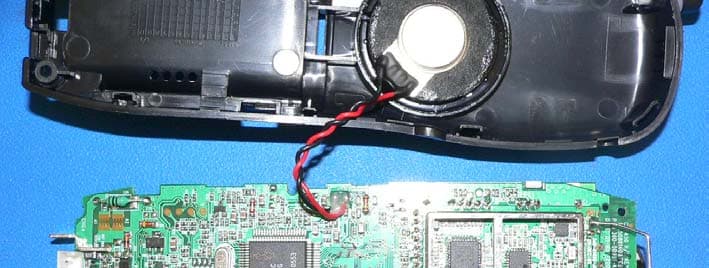
NC8CT5450
Aug 14, 20065.8GHz Cordless Phone
Equipment Class
DSS - Part 15 Spread Spectrum Transmitter
NC8MD2400
Jun 11, 20062.4Gz Cordless Phone
Equipment Class
DSS - Part 15 Spread Spectrum Transmitter
NC8KX-TG2120
May 24, 20062.4GHz/900MHz Analog Cordless phone w/ CID (Base)
Equipment Class
DXT - Part 15 Low Power Transceiver, Rx Verified