NC8MD7081Digital Cordless Telephone System - Base
CCT Tech Advanced Products Limited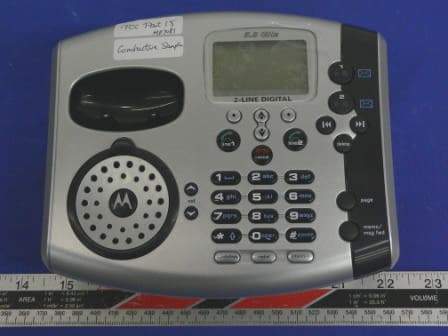
Click to zoom
Application Details
- Equipment Class
- DSS - Part 15 Spread Spectrum Transmitter
- Date of Grant
- Mar 28, 2005
- Application Purpose
- Original Equipment
- Date of Application
- Mar 28, 2005
- Equipment Note
- Digital Cordless Telephone System - Base
- Frequency Range
- 5760.72000000 - 5838.31000000
- Country
- Hong Kong
Documents & Files
Document Text
Text extracted from the exhibit documents filed with the FCC. Open a document above to read the original.
Users Manual
1 MD7080 Series User Guide Digital 5.8GHz Expandable Cordless 2-Line Telephone System with Base Speaker Phone, Keypad, and Answering Machine 2 Welcome Congratulations on your purchase of a Motorola product! Your Motorola handset at a glance: 3 Base Station Controls Soft Keys The left and right soft keys perform the function displayed. For example, pressing the left soft key while PHONEBK is displayed, opens your list of phone numbers and names. 4 For a copy of a large-print version of this guide, or for product-related questions, please contact: 1-800-353-2729 U.S.A. 1-800-461-4575 Canada 1-888-390-6456 TTY (Text Telephone) Or visit us online: www.motorola.com/cordless Product registration is an important step toward enjoying your new Motorola product. Registering helps us facilitate warranty service, and permits us to contact you should your Motorola product require an update or other service. Registration is not required for warranty coverage. To register your product online, visit: www.motorola.com/warranty/cordless Please retain your original dated sales receipt for your records. For warranty service of your Motorola Product, you will need to provide a copy of your dated sales receipt to confirm warranty status. Copyright © 2004 Motorola, Inc. All rights reserved. No part of this publication may be reproduced in any form or by any means or used to make any derivative work (such as translation, transformation or adaptation) without written permission from Motorola, Inc. Motorola reserves the right to revise this publication and to make changes in content from time to time without obligation on the part of Motorola to provide notification of such revision or change. Motorola provides this guide without warranty of any kind, either implied or expressed, including but not limited to, the implied warranties of merchantability and fitness for a particular 5 purpose. Motorola may make improvements or changes in the product(s) described in this manual at any time. MOTOROLA, the Stylized M Logo, and PhoneWrap are registered in the U.S. Patent and Trademark Office. All other product or service names are the property of their respective owners. 6 Table of Contents Welcome . . . . . . . . . . . . . . . . . . . . . . . . . . . . . . . . . . . . . 2 Important Safety Instructions . . . . . . . . . . . . . . . . . . . 8 FCC Information . . . . . . . . . . . . . . . . . . . . . . . . . . . . . 10 Getting Started . . . . . . . . . . . . . . . . . . . . . . . . . . . . . . . . 14 Battery Safety Instructions . . . . . . . . . . . . . . . . . . . . . . 14 Charging the Battery . . . . . . . . . . . . . . . . . . . . . . . . . . 15 Installing Backup Batteries . . . . . . . . . . . . . . . . . . . . . . 16 Using the Phone . . . . . . . . . . . . . . . . . . . . . . . . . . . . . . . 18 Using the Display . . . . . . . . . . . . . . . . . . . . . . . . . . . . . . 18 Using the Soft Keys . . . . . . . . . . . . . . . . . . . . . . . . . . . . 19 Using the Navigation Key . . . . . . . . . . . . . . . . . . . . . . 20 Installation. . . . . . . . . . . . . . . . . . . . . . . . . . . . . . . . . . . . 21 Installing the Phone on a Desk . . . . . . . . . . . . . . . . . . . 21 Installing the Phone on the Wall . . . . . . . . . . . . . . . . . 22 Setting Up . . . . . . . . . . . . . . . . . . . . . . . . . . . . . . . . . . . 24 Personalizing Your Phone . . . . . . . . . . . . . . . . . . . . 24 Setting the Ring Volume . . . . . . . . . . . . . . . . . . . . . 24 Setting the Ring Tone . . . . . . . . . . . . . . . . . . . . . . . 25 Setting Key Beeps On or Off . . . . . . . . . . . . . . . . . 25 Naming a Handset or Base. . . . . . . . . . . . . . . . . . . . . . 28 Setting the Handset Date and Time . . . . . . . . . . . . . . 29 Setting the Language . . . . . . . . . . . . . . . . . . . . . . . . . 30 Setting Touch Tone or Pulse Dialing . . . . . . . . . . . . . . 30 Using the Phone . . . . . . . . . . . . . . . . . . . . . . . . . . . . 31 Making a Call . . . . . . . . . . . . . . . . . . . . . . . . . . . . . . . 31 Adjusting the Volume During a Call . . . . . . . . . . . . . . 31 Inserting Pauses in a Number . . . . . . . . . . . . . . . . . . 32 Using Automated Dialing . . . . . . . . . . . . . . . . . . . . . . 33 Using the Speakerphone . . . . . . . . . . . . . . . . . . . . . . 33 Muting a Call . . . . . . . . . . . . . . . . . . . . . . . . . . . . . . . 34 Putting a Call on Hold . . . . . . . . . . . . . . . . . . . . . . . . 34 7 Redialing a Number . . . . . . . . . . . . . . . . . . . . . . . . . . 35 Finding a Lost or Misplaced Handset . . . . . . . . . . . . 35 Using the Phonebook . . . . . . . . . . . . . . . . . . . . . . . . 36 Storing a New Number . . . . . . . . . . . . . . . . . . . . . . 36 Storing a Recently Called Number . . . . . . . . . . . . . 38 Storing a Caller ID Number . . . . . . . . . . . . . . . . . . 38 Editing a Phonebook Entry . . . . . . . . . . . . . . . . . . 39 Deleting a Phonebook Entry . . . . . . . . . . . . . . . . . 40 Sorting the Phonebook . . . . . . . . . . . . . . . . . . . . . 40 Calling a Number from the Phonebook . . . . . . . . . 41 Using Caller ID . . . . . . . . . . . . . . . . . . . . . . . . . . . . . 43 Reviewing the List of Caller ID Calls . . . . . . . . . . . 43 Deleting Caller ID Calls . . . . . . . . . . . . . . . . . . . . . 43 Multihandset Functions . . . . . . . . . . . . . . . . . . . . . . . 44 Using the Intercom . . . . . . . . . . . . . . . . . . . . . . . . . 44 Enabling Auto-Answer . . . . . . . . . . . . . . . . . . . . . . 45 Transferring Calls to Other Handsets . . . . . . . . . . . 46 Conference Calling . . . . . . . . . . . . . . . . . . . . . . . . 46 Monitoring a Room . . . . . . . . . . . . . . . . . . . . . . . . . 47 Using the Answering Machine. . . . . . . . . . . . . . . . . . . 48 Setting Up the Answering Machine . . . . . . . . . . . . . . 48 Turning the Answering Machine On or Off . . . . . . . 48 Setting the Date and Time . . . .…
Text truncated - open the document above for the full version.
Users Manual
1 MD7080 Series User Guide Digital 5.8GHz Expandable Cordless 2-Line Telephone System with Base Speaker Phone, Keypad, and Answering Machine 2 Welcome Congratulations on your purchase of a Motorola product! Your Motorola handset at a glance: 3 Base Station Controls Soft Keys The left and right soft keys perform the function displayed. For example, pressing the left soft key while PHONEBK is displayed, opens your list of phone numbers and names. 4 For a copy of a large-print version of this guide, or for product-related questions, please contact: 1-800-353-2729 U.S.A. 1-800-461-4575 Canada 1-888-390-6456 TTY (Text Telephone) Or visit us online: www.motorola.com/cordless Product registration is an important step toward enjoying your new Motorola product. Registering helps us facilitate warranty service, and permits us to contact you should your Motorola product require an update or other service. Registration is not required for warranty coverage. To register your product online, visit: www.motorola.com/warranty/cordless Please retain your original dated sales receipt for your records. For warranty service of your Motorola Product, you will need to provide a copy of your dated sales receipt to confirm warranty status. Copyright © 2004 Motorola, Inc. All rights reserved. No part of this publication may be reproduced in any form or by any means or used to make any derivative work (such as translation, transformation or adaptation) without written permission from Motorola, Inc. Motorola reserves the right to revise this publication and to make changes in content from time to time without obligation on the part of Motorola to provide notification of such revision or change. Motorola provides this guide without warranty of any kind, either implied or expressed, including but not limited to, the implied warranties of merchantability and fitness for a particular 5 purpose. Motorola may make improvements or changes in the product(s) described in this manual at any time. MOTOROLA, the Stylized M Logo, and PhoneWrap are registered in the U.S. Patent and Trademark Office. All other product or service names are the property of their respective owners. 6 Table of Contents Welcome . . . . . . . . . . . . . . . . . . . . . . . . . . . . . . . . . . . . . 2 Important Safety Instructions . . . . . . . . . . . . . . . . . . . 8 FCC Information . . . . . . . . . . . . . . . . . . . . . . . . . . . . . 10 Getting Started . . . . . . . . . . . . . . . . . . . . . . . . . . . . . . . . 14 Battery Safety Instructions . . . . . . . . . . . . . . . . . . . . . . 14 Charging the Battery . . . . . . . . . . . . . . . . . . . . . . . . . . 15 Installing Backup Batteries . . . . . . . . . . . . . . . . . . . . . . 16 Using the Phone . . . . . . . . . . . . . . . . . . . . . . . . . . . . . . . 18 Using the Display . . . . . . . . . . . . . . . . . . . . . . . . . . . . . . 18 Using the Soft Keys . . . . . . . . . . . . . . . . . . . . . . . . . . . . 19 Using the Navigation Key . . . . . . . . . . . . . . . . . . . . . . 20 Installation. . . . . . . . . . . . . . . . . . . . . . . . . . . . . . . . . . . . 21 Installing the Phone on a Desk . . . . . . . . . . . . . . . . . . . 21 Installing the Phone on the Wall . . . . . . . . . . . . . . . . . 22 Setting Up . . . . . . . . . . . . . . . . . . . . . . . . . . . . . . . . . . . 24 Personalizing Your Phone . . . . . . . . . . . . . . . . . . . . 24 Setting the Ring Volume . . . . . . . . . . . . . . . . . . . . . 24 Setting the Ring Tone . . . . . . . . . . . . . . . . . . . . . . . 25 Setting Key Beeps On or Off . . . . . . . . . . . . . . . . . 25 Naming a Handset or Base. . . . . . . . . . . . . . . . . . . . . . 28 Setting the Handset Date and Time . . . . . . . . . . . . . . 29 Setting the Language . . . . . . . . . . . . . . . . . . . . . . . . . 30 Setting Touch Tone or Pulse Dialing . . . . . . . . . . . . . . 30 Using the Phone . . . . . . . . . . . . . . . . . . . . . . . . . . . . 31 Making a Call . . . . . . . . . . . . . . . . . . . . . . . . . . . . . . . 31 Adjusting the Volume During a Call . . . . . . . . . . . . . . 31 Inserting Pauses in a Number . . . . . . . . . . . . . . . . . . 32 Using Automated Dialing . . . . . . . . . . . . . . . . . . . . . . 33 Using the Speakerphone . . . . . . . . . . . . . . . . . . . . . . 33 Muting a Call . . . . . . . . . . . . . . . . . . . . . . . . . . . . . . . 34 Putting a Call on Hold . . . . . . . . . . . . . . . . . . . . . . . . 34 7 Redialing a Number . . . . . . . . . . . . . . . . . . . . . . . . . . 35 Finding a Lost or Misplaced Handset . . . . . . . . . . . . 35 Using the Phonebook . . . . . . . . . . . . . . . . . . . . . . . . 36 Storing a New Number . . . . . . . . . . . . . . . . . . . . . . 36 Storing a Recently Called Number . . . . . . . . . . . . . 38 Storing a Caller ID Number . . . . . . . . . . . . . . . . . . 38 Editing a Phonebook Entry . . . . . . . . . . . . . . . . . . 39 Deleting a Phonebook Entry . . . . . . . . . . . . . . . . . 40 Sorting the Phonebook . . . . . . . . . . . . . . . . . . . . . 40 Calling a Number from the Phonebook . . . . . . . . . 41 Using Caller ID . . . . . . . . . . . . . . . . . . . . . . . . . . . . . 43 Reviewing the List of Caller ID Calls . . . . . . . . . . . 43 Deleting Caller ID Calls . . . . . . . . . . . . . . . . . . . . . 43 Multihandset Functions . . . . . . . . . . . . . . . . . . . . . . . 44 Using the Intercom . . . . . . . . . . . . . . . . . . . . . . . . . 44 Enabling Auto-Answer . . . . . . . . . . . . . . . . . . . . . . 45 Transferring Calls to Other Handsets . . . . . . . . . . . 46 Conference Calling . . . . . . . . . . . . . . . . . . . . . . . . 46 Monitoring a Room . . . . . . . . . . . . . . . . . . . . . . . . . 47 Using the Answering Machine. . . . . . . . . . . . . . . . . . . 48 Setting Up the Answering Machine . . . . . . . . . . . . . . 48 Turning the Answering Machine On or Off . . . . . . . 48 Setting the Date and Time . . . .…
Text truncated - open the document above for the full version.
Attestation Statements
Bay Area Compliance Lab Corp. 230 Commercial St., Ste.2 Sunnyvale, CA 94086 22 March 2005 To Whom It May Concern: Non Modification Statement Model MD79X This letter is to provide information regarding the fact that Motorola has the authority to approve or disapprove modifications for this device. Motorola owns or is otherwise in control of the applicant in this capacity. Should you have any query, please don’t hesitate to contact the undersigned. Your Faithfully, Ronilo Paredes Senior Approval Engineer
External Photos
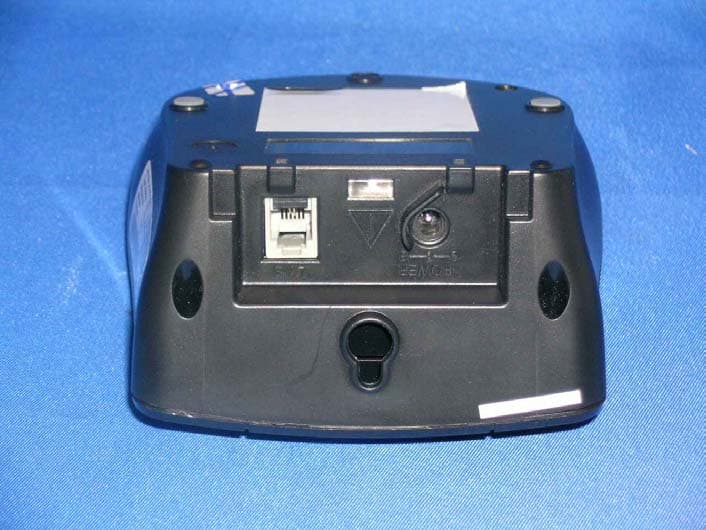
EXHIBIT C - EUT PHOTOGRAPHS Base - Top View Base - Bottom View Power Supply – Top View Power Supply – Bottom View
ID Label/Location Info
EXHIBIT A - FCC ID LABEL INFORMATION Proposed FCC ID Label Specifications: Text is black or white in color and is left justified. Labels are silk- screened and shall be “permanently affixed” at a conspicuous location on the EUT. Proposed Label Location on EUT Bottom Side of EUT/FCC ID Label FCC ID: NC8MD7081 This device complies with Part 15 of the FCC Rules. Operation is subject to the following two conditions: (1) this device may not cause harmful interference, and (2) this device must accept any interference received, including interference that may cause undesired operation. 2.1875" 1.0"
Internal Photos
Base – Chassis Cover off View Base - Main Board Component View Base - Main Board Solder View Base - Main Board RF Cover off View Base – TX View Base– LCD Keypad Board Component View Base– LCD Keypad Board Solder View
Operational Description
CCT MD75X / 76X / 78X /79X FCC Submission For 5.8G/ 2.4GHz Hybrid EDCT FHSS System Page 2 of 33 DSP Group Confidential 18 Mar 2005 Table of Contents DEFINITIONS, ACRONYMS AND ABBREVIATIONS..........................................................4 1 INTRODUCTION..................................................................................................................5 1.1 SCOPE...................................................................................................................................5 2 BRIEF SYSTEM DESCRIPTION.......................................................................................6 2.1 FREQUENCY CHANNELS........................................................................................................6 2.2 TDMA FRAMES STRUCTURE................................................................................................7 2.3 RESIDENTIAL / DOMESTIC SYSTEM.......................................................................................7 2.4 BEARERS...............................................................................................................................8 3 OVERVIEW OF FREQUENCY HOPPING ALGORITHM..........................................10 3.1 HOPPING RATE....................................................................................................................10 3.2 HOPPING SEQUENCE...........................................................................................................10 3.2.1 HOPPING PATTERN BASE-TABLE........................................................................................10 3.2.2 LCG RANDOM NUMBER GENERATOR................................................................................11 3.2.3 LOGICAL AND PHYSICAL CHANNEL NUMBERS...................................................................11 3.3 IDENTIFYING CHANNEL INTERFERENCE.............................................................................13 3.4 HOP SEQUENCE ADAPTION.................................................................................................13 3.5 STARTING A DUMMY BEARER.............................................................................................13 3.5.1 AVOIDING DUMMY BEARER ‘SEQUENCE COLLISION’.........................................................14 3.6 GAINING SYNC WITH A DUMMY BEARER............................................................................14 3.6.1 DETERMINING THE PATTERN AND HSI FROM AN N T MESSAGE..........................................14 3.7 FOLLOWING A DUMMY BEARER.........................................................................................14 3.8 STARTING A TRAFFIC BEARER............................................................................................15 3.8.1 AVOIDING TRAFFIC BEARER ‘SEQUENCE COLLISION’.........................................................15 3.9 STARTING A COMBINED DUMMY/TRAFFIC BEARER............................................................15 3.9.1 AVOIDING COMBINED DUMMY/TRAFFIC BEARER ‘SEQUENCE COLLISION’.........................16 4 CONFORMANCE TO FCC REQUIREMENTS..............................................................17 4.1 SECTION 15.247(A)(1)........................................................................................................17 4.2 SECTION 15.247(B)(1)........................................................................................................17 4.3 SECTION 15.247(G).............................................................................................................17 4.4 SECTION 15.247(H).............................................................................................................18 APPENDIX A – CHANNEL CENTRE FREQUENCIES........................................................19 FCC Submission For 2.4GHz FHSS System D30006 Rev 0.1 18 Mar 2005 DSP Group Confidential Page 3 of 33 APPENDIX B – BASE TABLE HOPPING SEQUENCE........................................................20 APPENDIX C – LCG RANDOM HOPPING SEQUENCE.....................................................21 APPENDIX D – LOGICAL TO PHYSICAL MAPPING TABLE.........................................30 Page 4 of 33 DSP Group Confidential 18 Mar 2005 DEFINITIONS, ACRONYMS AND ABBREVIATIONS Channel collision The simultaneous occupancy of a hopping channel by multiple transmitters. DECT Digital Enhanced Cordless Telecommunications. EIRP Equivalent isotropically Radiated Power. ETSI European Telecommunications Standards Institute. FCC Federal Communications commission (the body in the USA that regulates the use of the radio spectrum). FH Frequency Hopper: the name of the software component responsible for frequency hopping. FHSS Frequency Hopping Spread Spectrum. FP Fixed Part or base-station. Hand-over A process by which a second traffic bearer is established to carry an existing call. Once established the first traffic bearer can be released. HSI Hope Sequence Index: used to index into the pattern table. ISM Industrial, Scientific, Medical band: a radio frequency band in the range 2400 – 2483.5 MHz LCG Linear Congruential Generator: a type of random number generator LDC Low Duty Cycle: a power saving feature. OET Office of Engineering and Technology, a division of the FCC. PP Portable Part or handset. PSCN Primary Scan Carrier Number; used in DECT. PSPN Primary Scan Pattern Number; the analogue of the PSCN for frequency hopping. Radio Cell The area covered by a single FP. RFPI Radio Fixed Part Identity RNG Random Number Generator; more accurately a Pseudo-Random Number Generator or PRNG. RSSI Received Signal Strength Indication. Sequence collision When two transmitters, with overlapping radio cells, are using the same slot, pattern and phase within the pattern. Channel collisions will occur on every frame, until the slot, pattern or phase is changed. TDD Time Division Duplexing. TDMA Time Division Multiple Access. FCC Submission For 2.4GHz FHSS System D30006 Rev 0.1 …
Text truncated - open the document above for the full version.
Parts List/Tune Up Info
Level no.ObjectComponent numberAsmPhant.item .1@A6@500-32670-11000Xx ..2@A6@141-50007-20121 ..2@A6@340-02368-00415 ..2@A6@352-00985-10115 ..2@A6@441-32673-43001 ..2@A6@432-00001-01060 ..2@A6@432-32671-01000 ..2@A6@432-32671-01010 ..2@A6@432-32671-01020 ..2@A6@432-32024-05000 ..2@A6@475-21254-40001 ..2@A6@475-21254-50001 ..2@A6@432-32671-14000 ..2@A6@442-32642-52400 ..2@A6@444-32643-71400 ..2@A6@444-32643-71500 ..2@A6@480-32670-00000 ..2@A6@491-12700-09000 ..2@A6@491-25500-07600 ..2@A6@491-30500-10210 ..2@A6@491-32001-23010 ..2@A6@491-20500-12800 ..2@A6@491-18000-13000 ..2@A6@472-16005-81000 .1@A6@501-32671-11000Xx ..2@A6@502-32671-11000Xx ...3@A6@520-32670-11000Xx ....4@A6@408272700-32670 ....4@A6@410-32641-02200 ....4@A6@411267200-32672 ....4@A6@416266900-32672 ....4@A6@406266901-32642 ....4@A6@410-32641-02300 ....4@A6@412266301-32672 ....4@A6@405266400-32640 ....4@A6@406267000-32640 ....4@A6@408253500-32030 ....4@A6@410-32671-02000 ....4@A6@406266501-32640 ....4@A6@409267100-32645 ....4@A6@410-32671-02100 ....4@A6@408266500-32640 ....4@A6@409253300-32673 ....4@A6@407252501-30940 ....4@A6@409259600-32035 ....4@A6@409266600-32640 ....4@A6@407267300-32670 ....4@A6@409266800-32675 ....4@A6@540-32670-00000Xx .....5@A6@157-02115-08010 .....5@A6@470-52020-01000 .....5@A6@157-02235-08301 .....5@A6@157-02283-05003 .....5@A6@420-25133-11100 .....5@A6@420-14801-00100 .....5@A6@420-25121-01000 .....5@A6@470-82020-01020 .....5@A6@460-08020-11010 .....5@A6@150-01489-03001 .....5@A6@150-01479-03021 .....5@A6@470-82050-00020 .....5@A6@101-00026-10050 .....5@A6@101-10030-08050 .....5@A6@101-10026-06050 .....5@A6@101-00020-06050 .....5@A6@464-00940-00000 .....5@A6@470-01010-01190 .....5@A6@470-02045-01020 .....5@A6@461-00460-10200 .....5@A6@151-04204-02311 .....5@A6@152-01132-01300 .....5@A6@463-54020-90000 .....5@A6@463-45020-90000 .....5@A6@154-02166-50001 .....5@A6@472-05920-12000 ...3@A6@550-32671-00000Xx ....4@A6@570-32671-00000Xx .....5@A6@140-00602-00400 .....5@A6@212-56906-71205 .....5@A6@229-10414-50100 .....5@A6@229-47414-50000 .....5@A6@231-75010-90600 .....5@A6@236-20010-25200 .....5@A6@236-91010-25200 .....5@A6@240-15409-50102 .....5@A6@240-22309-51600 .....5@A6@240-47209-51602 .....5@A6@271-06233-37049 .....5@A6@271-09130-08083 .....5@A6@276-11817-08023 .....5@A6@300-00054-00035 .....5@A6@300-06000-00030 .....5@A6@311-07070-20600 .....5@A6@331-50033-10000 .....5@A6@333-42097-00807 .....5@A6@140-00600-00400 .....5@A6@212-36906-71205 .....5@A6@311-24070-20600 .....5@A6@140-02000-00400 .....5@A6@140-02002-00400 .....5@A6@236-00000-25200 .....5@A6@236-10090-25200 .....5@A6@236-10000-25200 .....5@A6@236-33000-25200 .....5@A6@236-47000-25200 .....5@A6@236-62000-25200 .....5@A6@236-10010-25200 .....5@A6@236-12010-25200 .....5@A6@236-15010-25200 .....5@A6@236-30010-25200 .....5@A6@236-33010-25200 .....5@A6@236-36010-25200 .....5@A6@236-47010-25200 .....5@A6@236-56010-25200 .....5@A6@236-10020-25200 .....5@A6@236-20020-25200 .....5@A6@236-22020-25200 .....5@A6@236-24000-25200 .....5@A6@236-33020-25200 .....5@A6@236-36020-25200 .....5@A6@236-47020-25200 .....5@A6@236-56020-25200 .....5@A6@236-62020-25200 .....5@A6@236-75020-25200 .....5@A6@236-82020-25200 .....5@A6@236-10030-25200 .....5@A6@236-12030-25200 .....5@A6@236-18030-25200 .....5@A6@236-51030-25200 .....5@A6@236-68030-25200 .....5@A6@236-75030-25200 .....5@A6@236-82030-25200 .....5@A6@236-10040-25200 .....5@A6@236-12040-25200 .....5@A6@236-15040-25200 .....5@A6@236-15010-25000 .....5@A6@236-10050-25000 .....5@A6@236-00000-15200 .....5@A6@236-50070-15200 .....5@A6@236-82080-15200 .....5@A6@236-91030-25000 .....5@A6@236-10090-15200 .....5@A6@231-12000-90600 .....5@A6@231-15010-90600 .....5@A6@231-47030-70000 .....5@A6@231-10050-70000 .....5@A6@254-05202-20012 .....5@A6@218-25009-00014 .....5@A6@223-22315-50000 .....5@A6@203-39040-90013 .....5@A6@203-80500-10300 .....5@A6@212-36006-71205 .....5@A6@203-20693-50005 .....5@A6@258-19301-90005 .....5@A6@260-13824-10117 .....5@A6@240-02009-01500 .....5@A6@240-07009-01500 .....5@A6@240-10009-11500 .....5@A6@240-22009-41502 .....5@A6@240-10109-51600 .....5@A6@240-22109-51600 .....5@A6@240-47109-51600 .....5@A6@240-10209-51600 .....5@A6@240-12309-51600 .....5@A6@240-68309-51600 .....5@A6@240-10409-81700 .....5@A6@240-10409-81700 .....5@A6@240-22406-81700 .....5@A6@240-10506-81700 .....5@A6@240-10506-80300 .....5@A6@240-47503-80300 .....5@A6@240-10411-50500 .....5@A6@244-10603-61315 .....5@A6@221-10702-60100 .....5@A6@221-10706-60247 .....5@A6@221-22703-68138 .....5@A6@221-22706-60100 .....5@A6@221-47703-60038 .....5@A6@221-47607-68047 .....5@A6@221-10803-60347 .....5@A6@221-10807-68047 .....5@A6@214-41480-10006 .....5@A6@214-41480-20000 .....5@A6@214-58171-00040 .....5@A6@214-40040-00000 .....5@A6@214-40010-00000 .....5@A6@214-00990-30007 .....5@A6@354-03501-00006 .....5@A6@252-68003-00100 .....5@A6@252-33104-10220 .....5@A6@301-00007-00000 .....5@A6@273-32670-25047 .....5@A6@271-34063-27031 .....5@A6@272-45081-27045 .....5@A6@272-02432-27145 .....5@A6@271-06125-28049 .....5@A6@271-62500-37049 .....5@A6@271-61320-28000 .....5@A6@271-07032-20003 .....5@A6@360-32670-10000 ....4@A6@571-32671-00000Xx .....5@A6@140-00500-00400 .....5@A6@140-00502-00400 .....5@A6@236-18000-25200 .....5@A6@335-03103-00032 .....5@A6@236-10010-25200 .....5@A6@203-39040-90000 .....5@A6@335-09130-00007 .....5@A6@360-32640-70020 ....4@A6@572-32671-00000Xx .....5@A6@335-12002-10005 .....5@A6@360-32670-40020 ....4@A6@574-32671-00000Xx .....5@A6@311-10035-20500 .....5@A6@334-32670-00007 .....5@A6@203-39040-90000 .....5@A6@214-41480-21030 .....5@A6@236-00000-25200 .....5@A6@236-10010-25200 .....5@A6@236-10020-25200 .....5@A6@236-27020-25200 .....5@A6@236-47090-25200 .....5@A6@236-68000-25200 .....5@A6@236-91020-25200 .....5@A6@240-10409-81702 .....5@A6@240-10507-80302 .....5@A6@270-00074-14004 .....5@A6@335-09130-00007 .....5@A6@360-32672-00000 ....4@A6@583-32641-00000Xx .....5@A6@203-50662-51205 .....5@A6@203-20311-60004 .....5@A6@20…
Text truncated - open the document above for the full version.
Parts List/Tune Up Info
CRITICAL AND ALTERNATE COMPONENTS OF MODEL MD7081 2005/3/10 Prepared by: Wong Chung Ting 1 ITEM DESCRIPTION MANUFACTURER P/N APPROVAL CCT P/N ALTERNATE 1 RECEIVER Kan Tsang SD-157BH 332-20157-00908 2 Fuse Walter 350mA 125V UL#E56092 354-03501-00006 BEL 350mA 250V UL#E20624 354-03501-00102 ALTERNATE 3 Varistor HONGZHI HEL-7D391K UL#E197799 218-25009-00014 THOMSON VE09M00251K UL#E84108(S) 218-25009-00001 ALTERNATE 4 BATTERY SANIK 3SN-AA80-S-J1 340-02368-00415 BYD D-AA800Bx3 TBC ALTERNATE GPI GP80AAS TBC ALTERNATE 5 LINE CORD DATAFIELD FCC + FCC 6P2C UL189743/ CSA#LR111543-1 141-50007-20121 6 MOD. JACK KECHENDA 6P2C UL#E225310 300-20054-00035 7 Audio Transformer Key Success EI-19 258-19301-90005 8 ADAPTOR ESL 120V 9VDC 850mA UL#E84316 352-00985-10115 9 Photocoupler EVERLIGHT EL817C 276-00817-01065 10 REED RELAY BERSTAR BR-500ohm-5VDC UL#E147052 254-05202-20012 11 PLASTIC TORAY 700 UL#E41797 12 BU MAIN PCB 94V0 360-32670-10000 BU LED PCB 94HB 360-32640-70020 BU KEY PCB 94HB 360-32670-40020 BU LCD PCB 94V0 360-32672-00000 BU RF PCB 94V0 360-33240-30000 HS KEY PCB 94V0 360-32671-40000 HS LCD PCB 94V0 360-24522-00100 HS LED PCB 94HB 360-32021-60020 HS RF PCB 94V0 360-24371-31100
RF Exposure Info
§15.247 (b)(4) - RF EXPOSURE According to §15.247(b)(4) and §1.1307(b)(1), systems operating under the provisions of this section shall be operated in a manner that ensures that the public is not exposed to radio frequency energy level in excess of the Commission’s guidelines. According to §1.1310 and §2.1093 RF exposure is calculated. Limits for Maximum Permissive Exposure (MPE) Frequency Range (MHz) Electric Field Strength (V/m) Magnetic Field Strength (A/m) Power Density (mW/cm 2 ) Averaging Time (minute) Limits for General Population/Uncontrolled Exposure 0.3-1.34 614 1.63 *(100) 30 1.34-30 824/f 2.19/f *(180/f 2 ) 30 30-300 27.5 0.073 0.2 30 300-1500 / / f/1500 30 1500-15000 / / 1.0 30 f = frequency in MHz * = Plane-wave equivalent power density MPE Prediction Predication of MPE limit at a given distance Equation from page 18 of OET Bulletin 65, Edition 97-01 S = PG/4πR² Where: S = power density P = power input to antenna G = power gain of the antenna in the direction of interest relative to an isotropic radiator R = distance to the center of radiation of the antenna Maximum peak output power at antenna input terminal: 19.67 (dBm) Maximum peak output power at antenna input terminal: 92.68 (mW) Prediction distance: 20 (cm) Predication frequency: 5800 (MHz) Antenna Gain (typical): 0 (dBi) Maximum antenna gain: 1(numeric) Power density at predication frequency at 20 cm: 0.018(mW/cm^2) MPE limit for uncontrolled exposure at prediction frequency: 1.0 (mW/cm^2) Test Result The predicted power density level at 20 cm is 0.018 mW/cm^2. This is below the uncontrolled exposure limit of 1mW/cm^2 at 5800 MHz. The EUT is used at least 20cm away from user’s body. It is determined as mobile equipment.
Test Report
Note: This test report is specially limited to the above client company and product model only. It may not be duplicated without prior written consent of Bay Area Compliance Laboratory Corporation. This report must not be used by the client to claim product certification, approval, or endorsement by NVLAP, NIST or any agency of the U.S. Government. FCC PART 15.247 EMI MEASUREMENT AND TEST REPORT For CCT R & D Limited 18F., CCT Telecom Building, 11 Wo Shing Street, Fo Tan, Shatin, N.T. FCC ID: NC8MD7081 This Report Concerns: Original Report Equipment Type: Digital Cordless Telephone System – Base Test Engineer: Snell Leong Report No.: R0502076(B) Report Date: 2005-03-03 Reviewed By: Daniel Deng Prepared By: Bay Area Compliance Laboratory Corporation (BACL) 230 Commercial Street Sunnyvale, CA 94085 Tel: (408) 732-9162 Fax: (408) 732 9164 CCT R & D Limited FCC ID: NC8MD7081 Report # R0502076(B)Rpt.doc Page 2 of 37 FCC Part 15.247 Test Report TABLE OF CONTENTS GENERAL INFORMATION......................................................................................................................................................4 PRODUCT DESCRIPTION FOR EQUIPMENT UNDER TEST (EUT)...............................................................................................4 OBJECTIVE.......................................................................................................................................................................................4 RELATED SUBMITTAL(S)/GRANT(S)............................................................................................................................................4 TES…
Text truncated - open the document above for the full version.
Contact Information
Applicant
Ronilo Paredes(Senior Approval Engineer)
Test Firm
Bay Area Compliance LaboratoryJohn Chan
Technical Specifications
| # | Rule Parts | Frequency Range | Power Output |
|---|---|---|---|
| 1 | 15C | 5.76 GHz - 5.84 GHz | 93.00 mW |
Other Applications from CCT Tech Advanced Products Limited
NC8P9122G
May 16, 2007900MHz 40Ch Analog Modulation Cordless Phonew/CID
Equipment Class
DXT - Part 15 Low Power Transceiver, Rx Verified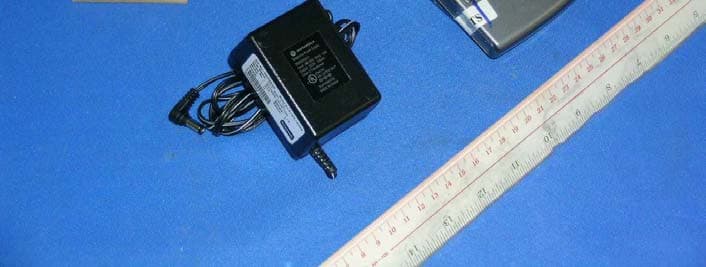
NC8SD7505
Sep 12, 20065.8GHz FHSS CellDock w/ Bluetooth
Equipment Class
DXT - Part 15 Low Power Transceiver, Rx Verified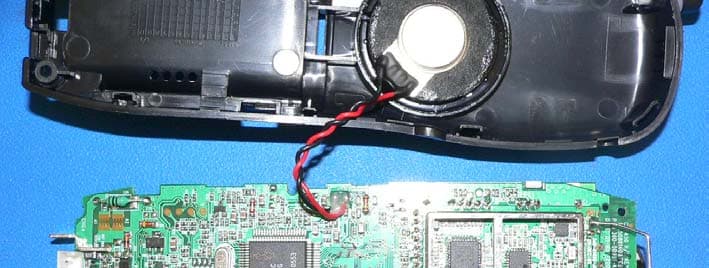
NC8CT5450
Aug 14, 20065.8GHz Cordless Phone
Equipment Class
DSS - Part 15 Spread Spectrum Transmitter
NC8MD2400
Jun 11, 20062.4Gz Cordless Phone
Equipment Class
DSS - Part 15 Spread Spectrum Transmitter
NC8KX-TG2120
May 24, 20062.4GHz/900MHz Analog Cordless phone w/ CID (Base)
Equipment Class
DXT - Part 15 Low Power Transceiver, Rx Verified