NC8MD751HDigital 2.4Ghz Cordless Telephone w/Caller ID HS
CCT Tech Advanced Products Limited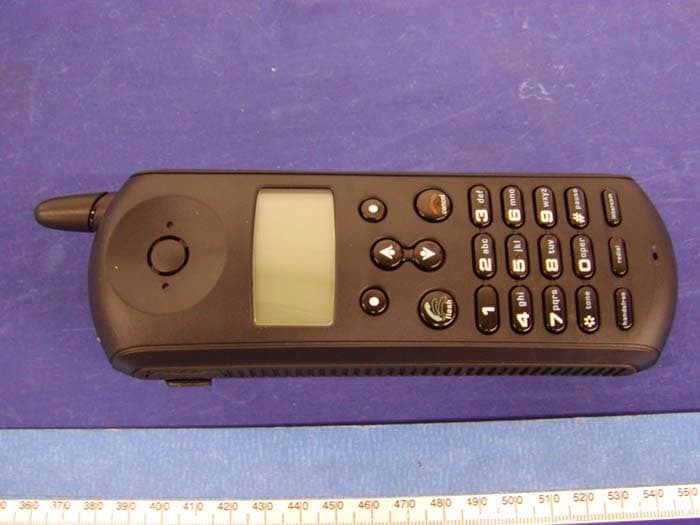
Click to zoom
Application Details
- Equipment Class
- DSS - Part 15 Spread Spectrum Transmitter
- Date of Grant
- Aug 15, 2004
- Application Purpose
- Original Equipment
- Date of Application
- Aug 15, 2004
- Equipment Note
- Digital 2.4Ghz Cordless Telephone w/Caller ID HS
- Frequency Range
- 2401.80850000 - 2479.40120000
- Country
- Hong Kong
Documents & Files
Document Text
Text extracted from the exhibit documents filed with the FCC. Open a document above to read the original.
Users Manual
MD750 Series User Guide Digital 5.8GHz i Welcome We l c o m e Congratulations on your purchase of a Motorola product! Your Motorola handset at a glance: ii Welcome For a copy of a large-print version of this guide, or for product-related questions, please contact: 1-800-353-2729 U.S.A. 1-800-461-4575 Canada 1-888-390-6456 TTY (Text Telephone) Or visit us online: www.motorola.com/cordless Product registration is an important step toward enjoying your new Motorola product. Registering helps us facilitate warranty service, and permits us to contact you should your Motorola product require an update or other service. Registration is not required for warranty coverage. To register your product online, visit: www.motorola.com/warranty/cordless Please retain your original dated sales receipt for your records. For warranty service of your Motorola Product, you will need to provide a copy of your dated sales receipt to confirm warranty status. Copyright © 2004 Motorola, Inc. All rights reserved. No part of this publication may be reproduced in any form or by any means or used to make any derivative work (such as translation, transformation or adaptation) without written permission from Motorola, Inc. Motorola reserves the right to revise this publication and to make changes in content from time to time without obligation on the part of Motorola to provide notification of such revision or change. Motorola provides this guide without warranty of any kind, either implied or expressed, including but not limited to, the implied warranties of merchantability and fitness for a particular iii Welcome purpose. Motorola may make improvements or changes in the product(s) described in this manual at any time. MOTOROLA, the Stylized M Logo, and PhoneWrap are registered in the U.S. Patent and Trademark Office. All other product or service names are the property of their respective owners. iv Welcome v Contents Table of Contents Welcome . . . . . . . . . . . . . . . . . . . . . . . . . . . . . . . . . . . . . i Important Safety Instructions . . . . . . . . . . . . . . . . . . . vii FCC Information . . . . . . . . . . . . . . . . . . . . . . . . . . . . . . xi Getting Started . . . . . . . . . . . . . . . . . . . . . . . . . . . . . . . . 1 Battery Safety Instructions . . . . . . . . . . . . . . . . . . . . . . 1 Charging the Battery . . . . . . . . . . . . . . . . . . . . . . . . . . 2 Installing Backup Batteries . . . . . . . . . . . . . . . . . . . . . . 4 Using the Handset . . . . . . . . . . . . . . . . . . . . . . . . . . . . 5 Using the Handset Display . . . . . . . . . . . . . . . . . . . . 5 Using the Soft Keys . . . . . . . . . . . . . . . . . . . . . . . . . 6 Using the Navigation Key . . . . . . . . . . . . . . . . . . . . . 7 Installation . . . . . . . . . . . . . . . . . . . . . . . . . . . . . . . . . . . . 9 Installing the Phone on a Desk . . . . . . . . . . . . . . . . . . . 9 Installing the Phone on the Wall . . . . . . . . . . . . . . . . . 10 Setting Up . . . . . . . . . . . . . . . . . . . . . . . . . . . . . . . . . . . 13 Personalizing Your Handset . . . . . . . . . . . . . . . . . . . . 13 Setting the Ring Volume . . . . . . . . . . . . . . . . . . . . . 13 Setting the Ring Tone . . . . . . . . . . . . . . . . . . . . . . . 14 Setting Key Beeps On or Off . . . . . . . . . . . . . . . . . 14 Naming a Handset . . . . . . . . . . . . . . . . . . . . . . . . . 15 Storing Area Codes for Caller ID . . . . . . . . . . . . . . . . 17 Setting the Date and Time . . . . . . . . . . . . . . . . . . . . . 18 Setting the Language . . . . . . . . . . . . . . . . . . . . . . . . . 19 Setting Touch Tone or Pulse Dialing . . . . . . . . . . . . . . 19 vi Contents Using the Handset . . . . . . . . . . . . . . . . . . . . . . . . . . . . 21 Making a Call . . . . . . . . . . . . . . . . . . . . . . . . . . . . . . . 21 Adjusting the Volume During a Call . . . . . . . . . . . . . . 21 Inserting Pauses in a Number . . . . . . . . . . . . . . . . . . 22 Using Automated Dialing . . . . . . . . . . . . . . . . . . . . . . 23 Using the Speakerphone . . . . . . . . . . . . . . . . . . . . . . 24 Muting a Call . . . . . . . . . . . . . . . . . . . . . . . . . . . . . . . 24 Putting a Call on Hold . . . . . . . . . . . . . . . . . . . . . . . . 24 Redialing a Number . . . . . . . . . . . . . . . . . . . . . . . . . . 25 Finding a Lost or Misplaced Handset . . . . . . . . . . . . 25 Using the Phonebook . . . . . . . . . . . . . . . . . . . . . . . . 25 Storing a New Number . . . . . . . . . . . . . . . . . . . . . . 26 Storing a Recently Called Number . . . . . . . . . . . . . 27 Storing a Caller ID Number . . . . . . . . . . . . . . . . . . 28 Editing a Phonebook Entry . . . . . . . . . . . . . . . . . . 28 Deleting a Phonebook Entry . . . . . . . . . . . . . . . . . 29 Sorting the Phonebook . . . . . . . . . . . . . . . . . . . . . 29 Calling a Number from the Phonebook . . . . . . . . . 30 Using Caller ID . . . . . . . . . . . . . . . . . . . . . . . . . . . . . 31 Reviewing the List of Caller ID Calls . . . . . . . . . . . 31 Deleting Caller ID Calls . . . . . . . . . . . . . . . . . . . . . 31 Using the Intercom . . . . . . . . . . . . . . . . . . . . . . . . . . 32 Using the Intercom . . . . . . . . . . . . . . . . . . . . . . . . . 32 Enabling Auto-Answer . . . . . . . . . . . . . . . . . . . . . . 32 Transferring Calls to Other Handsets . . . . . . . . . . . 33 Multihandset Functions . . . . . . . . . . . . . . . . . . . . . . . 34 Conference Calling . . . . . . . . . . . . . . . . . . . . . . . . 34 Using the Intercom . . . . . . . . . . . . . . . . . . . . . . . . . 35 Enabling Auto-Answer . . . . . . . . . . . . . . . . . . . . . . 36 Transferring Calls to Other Handsets . . . . . . . . . . . 36 Monitoring a Room . . . . . . . . . . . . . . . . . . . . . . . . . 37 Warranty . . . . . . . . . . . . . . . . . . . . . . . . . . . . . . . . . . . . 39 vii Safety Info Important Safety Instructions Follow these sa…
Text truncated - open the document above for the full version.
External Photos
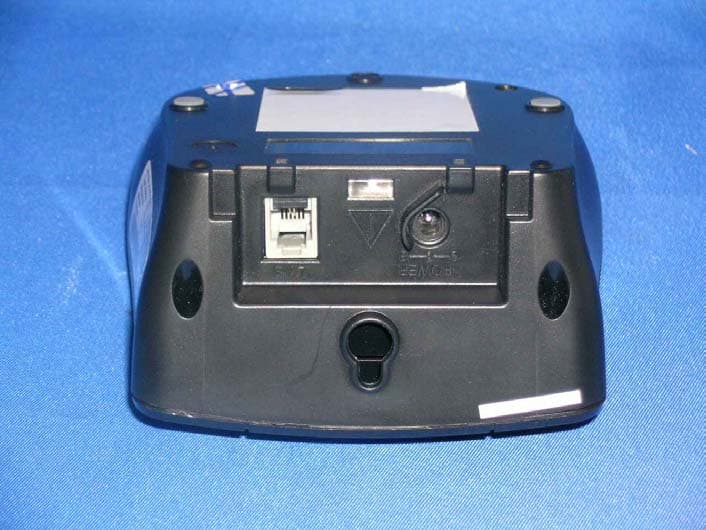
CCT R & D Limited FCC ID: NC8MD751H EXHIBIT C - EUT PHOTOGRAPHS EUT - Top View EUT - Bottom View
ID Label/Location Info
EXHIBIT A - FCC ID LABEL INFORMATION Proposed FCC ID Label Specifications : Text is black or white in color and is left justified. Labels are silk-screened and shall be “permanently affixed” at a conspicuous location on the EUT. Proposed Label Location on EUT Bottom Side of EUT/FCC ID Label FCC ID: NC8MD751H FCC ID: NC8MD751H
Internal Photos
CCT R & D Limited FCC ID: NC8MD751H EUT – Chassis Cover off View EUT - Main Board Component View with Shielding CCT R & D Limited FCC ID: NC8MD751H EUT - Main Board Component View without Shielding EUT - Main Board Solder View CCT R & D Limited FCC ID: NC8MD751H EUT - Transceiver Component View Key Pad - Component View CCT R & D Limited FCC ID: NC8MD751H Key Pad - Solder View
RF Exposure Info
§15.247 (b)(4) - RF EXPOSURE Please see the plots hereinafter for duty cycle measurement. Duty Cycle = TXon / (TXon + TXoff) = 1.333/10 = 13.33% Antenna Gain = 0 d < 2.5cm Average Power = Peak Power x duty cycle = 45mW x 13.33% = 6mW < (60/2.4) mW Therefore, according to the exclusion list, no SAR testing is needed.
Test Setup Photos
CCT R & D Limited FCC ID: NC8MD751H EXHIBIT B - TEST SETUP PHOTOGRAPHS Handset Radiated Emission - Front View Handset Radiated Emission - Rear View
Contact Information
Applicant
Ronilo Paredes(Senior Approval Engineer)
Test Firm
Bay Area Compliance Laboratory Corp.John Chan
Technical Specifications
| # | Rule Parts | Frequency Range | Power Output |
|---|---|---|---|
| 1 | 15C | 2.40 GHz - 2.48 GHz | 44.67 mW |
Other Applications from CCT Tech Advanced Products Limited
NC8P9122G
May 16, 2007900MHz 40Ch Analog Modulation Cordless Phonew/CID
Equipment Class
DXT - Part 15 Low Power Transceiver, Rx Verified
NC8SD7505
Sep 12, 20065.8GHz FHSS CellDock w/ Bluetooth
Equipment Class
DXT - Part 15 Low Power Transceiver, Rx Verified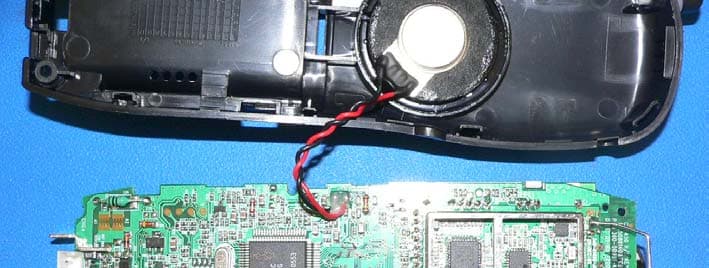
NC8CT5450
Aug 14, 20065.8GHz Cordless Phone
Equipment Class
DSS - Part 15 Spread Spectrum Transmitter
NC8MD2400
Jun 11, 20062.4Gz Cordless Phone
Equipment Class
DSS - Part 15 Spread Spectrum Transmitter
NC8KX-TG2120
May 24, 20062.4GHz/900MHz Analog Cordless phone w/ CID (Base)
Equipment Class
DXT - Part 15 Low Power Transceiver, Rx Verified