NIZKDC-100USB PC CAMERA
Korea Communications Co Ltd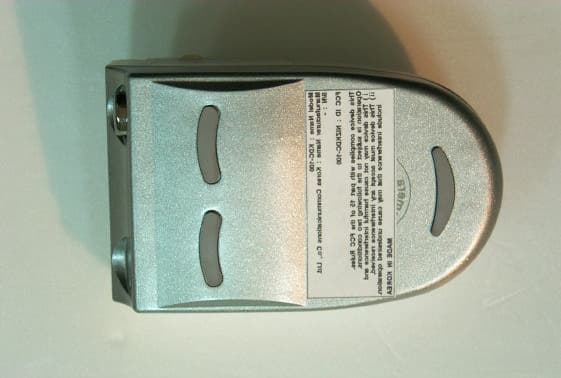
Click to zoom
Application Details
- Equipment Class
- JBP - Part 15 Class B Computing Device Peripheral
- Date of Grant
- Dec 27, 2000
- Application Purpose
- Original Equipment
- Date of Application
- Dec 27, 2000
- Equipment Note
- USB PC CAMERA
- Company
- Korea Communications Co Ltd
- Country
- South Korea
Documents & Files
Document Text
Text extracted from the exhibit documents filed with the FCC. Open a document above to read the original.
Users Manual
ASTRONICS BLDG., 260-7 Yumchang-Dong, Kangseo- Gu, Seoul 157-040, KoreaTEL:82-2-6675-2211 FAX:82-2-6675-2000 http://www.astronics.co.kr E-mail:[email protected] User s Manual KDC-100 Specifications Various Software Supply Compose Picture Draw 3.0 Windows98 or Windows2000 or Mac OS 8.5 Pentium 166MHZ 0r More, 32MB RAM Image SensorLens AGCS/N RatioInterfaceResolutionPicture StorageMemoryWhite BalancePowerFrame RateDimensionWeight VGA 1/3 CMOS 318,000 Pixels Focal Length f=6.2mmView Angle 53 , Aperture Fixed Iris, F:2.6 Normal lens position- 50Cm~InfinityMacro lens position- 10Cm~15Cm+18dB57dBUSB InterfaceDigital Camera 640 480(VGA),320 240(SIF) PC Camera 640 480(VGA),352 288(CIF) 320 240(SIF), 176 144(QCIF),160 120(SQCIF) High Resolution Mode (VGA,640 480) 26 frames Low Resolution Mode (SIF,320 240) 107 frames Internal SDRAM 64Mbit (8MB)Auto White BalanceDigital Camera DC 4.5V(AAA 1.5V 3) PC Camera Power By PC USB Port(5V)VGA, QVGA, QCIF, SQCIF: 5~30fps88mm(W) 54mm(H) 36mm(D) 66g (Exclude Battery) Capture Dog 2.0 Image Editing Making photo Sticker Video Conferencing,Chatting &Transmitting by USB Port Image can be edited by image editing software Can make and edit photo stickers by using Capture Dog Software ASTRONICS Viewer 1.0 Easy storage of Image Easy Downloading imagefrom camera to PC andstorage of the image taken bycamera Netmeeting 3.0 Video Conferencing by PC camera Dual Digital Dual Folder CAMERA Digital Dual Folder CAMERA KDC-100 Index Digital Dual Folder CAMERA PrecautionsWhat is in your boxConnection to PCLooking at your KDC-100Using the MODE FunctionsSpecificationsUsing your KDC-100How to install the driver and S/WASTRONICS Viewer 1.0Capture Dog 2.0Paint Draw 3.0 45567789161930 4 5 Dual USB PC CAMERA USB Port Do not leave thecamera in anunstable place. It willcause damage to thecamera when it falls. This product contains a very delicatemechanism inside. Do not give excessiveshock to the camera. Do not leave thecamera exposed to thehightemperature,suchas inside the vehiclesand under the directsunlight Do not leave thecamera in humidplaces and exposerain. It could causedamage to the product. Do not disassemble.It could causemalfunction. When Low Battery sign is flickering on the LCD, Wait about 30sec., mode changes to Sleep . Replace the batteries with new ones within 2min. Then, the image stored in camera can be kept securely. If not, image will be deleted from camera. When use this camera as a PC camera, download the image from camera to PC first. Then, the image stored in camera can be kept securely. If not, image will be deleted from camera.When take picture at dark place, to protect picture quality, if the camera is beeping sound, taking picture is not possible.For PC camera using, monitor screen may be blinked to let you know low illumination at dark conditions. Use the camera at bright conditions. At low resolution mode, even the camera takes picture from 107, LCD does not count down the actual number and it displays 99. From 99, LCD displays actual number. Do not use thinner orbenzene to clean thecamera. It couldcause damage to theproduct or cause fire. Precautions What is in your Box Connection to PC KDC-100Camera PC Camera USB port CD USB Cable 3xAAA 1.5V LR 6 Battery Strap Manual Digital Dual Folder CAMERA Digital Dual Folder CAMERA VGA 1/3 CMOS 318,000 Pixels Focal Length f=6.2mmView Angle 53 , Aperture Fixed Iris, F: 2.6 Normal lens position- 50Cm~InfinityMacro lens position- 10Cm~15Cm+18dB57dBUSB InterfaceDigital Camera 640 480(VGA), 320 240(SIF) PC Camera 640 480(VGA), 352 288(CIF) 320 240(SIF), 176 144(QCIF), 160 120(SQCIF) High Resolution Mode (VGA,640 480) 26 frames Low Resolution Mode (SIF,320 240) 107 frames Internal SDRAM 64M bit (8MB)Auto White BalanceDigital Camera DC 4.5V(3xAAA 1.5V LR6 battery) PC Camera Power By PC USB Port(5V) VGA, QVGA, QCIF, SQCIF: 5~30fps88mm(W) 54mm(H) 36mm(D) 66g (Exclude Battery) View FinderLED LampLCD Window Top Front Bottom USB PortCamera connection to PC to download the imageto PC and for Video conferencing.Snap Shot button (Shutter)Shutter for taking pictureMode and Power buttonThe mode turns to “Sleep” in case of no operations for 30sec.For Mode selection, refer to page 7.Camera LensLens Positon: Normal- 50Cm~InfinityMacro- 10Cm~15Cm Looking at your KDC-100 Specifications Digital Dual Folder CAMERA 6 Digital Dual Folder CAMERA Using the MODE function High resolution640x480 mode Low resolution320x240 mode To clear (delete) allpictures stored incamera, push the snapshot button twice. Self-Timer 10sec. Continuous shooting mode lets you take pictureof those moments easily missed in sportsgames, performances, and leisure activities. The number can take pictureat high resolution mode The number can take picture atlow resolution mode(Even the camera takes picturefrom 107, LCD does not countdown the actual number and itdisplays 99. From 99, LCDdisplays actual number) -After select any mode, if no operation for 5sec, the mode turns to “26” or “99” you selected. 22 66 99 99 CC tt SS tt CC LL HH rr LL rr 7 Image SensorLens AGCS/N RatioInterfaceResolution Picture StorageMemoryWhite BalancePowerFrame RateDimensionWeight System Requirements Windows 98 orWindows 2000 orMac OS 8.5Pentium 166MHZ 0rMore, 32MB RAM How to install the driver and S/W Digital Dual Folder CAMERA 9 Driver Installation for WIndows 98 and Windows ME When the KDC-100 Driver CD is inserted,Main screen will be displayedautomatically as shown in the picture. 1.1 Click “Driver Installation” 1.2 Click English , and OK for language selection Using your KDC-100 Digital Dual Folder CAMERA 8 Open the cover toright and place thebatteries with correctpolarity and in order Fold down the camera folderand place it on the monitor asshown in the picture For Digital Camera Tying up the strap Placing Batteries For PC Camera Open the camera folder and takepicture by viewing the object throughviewfinder as shown in the picture. 1.5 Click OK for restarting the PC 1.7 To Confirm proper …
Text truncated - open the document above for the full version.
Block Diagram
KDC-100 Block Diagram VGA CMOS Sensor sensor data Sensor clock 26 64Mbit SDRAM Power management 12MHz XTAL GPIO Sensor I/F PWM LCD Driver STV0680B Memory I/F RS232 I/F USB I/F Detect Low Battery 3v3 power supply Switched sensor supply , 3v3 for sensor USB Interface to PC 4.5v Battery Piezzo Buzzer Shutter ModeLED BACKUP Battery Optional 2 x 7 Seg. LCD
External Photos
Test Report No. CTK00 - F064 Certitek standards Laboratory Co., Ltd. VCCI Registration No. R-948, C-986 FCC Registration No. 93250 Issue: 2000-11-29 Page 11 of 15 www.certitek.com Certitek Standards Laboratory Co., Ltd. 386-1, Ho-Dong, Yongin-City, Kyunggi-Do, KOREA 449-100 4. Photographs EUT (Front/Rear)
ID Label/Location Info
Test Report No. CTK00 - F064 Certitek standards Laboratory Co., Ltd. VCCI Registration No. R-948, C-986 FCC Registration No. 93250 Issue: 2000-11-29 Page 13 of 16 www.certitek.com Certitek Standards Laboratory Co., Ltd. 386-1, Ho-Dong, Yongin-City, Kyunggi-Do, KOREA 449-100 Label (Format/Location) Location : Rear Side of EUT
Internal Photos
Test Report No. CTK00 - F064 Certitek standards Laboratory Co., Ltd. VCCI Registration No. R-948, C-986 FCC Registration No. 93250 Issue: 2000-11-29 Page 12 of 15 www.certitek.com Certitek Standards Laboratory Co., Ltd. 386-1, Ho-Dong, Yongin-City, Kyunggi-Do, KOREA 449-100 EUT (Inside/Label) Test Report No. CTK00 - F064 Certitek standards Laboratory Co., Ltd. VCCI Registration No. R-948, C-986 FCC Registration No. 93250 Issue: 2000-11-29 Page 13 of 15 www.certitek.com Certitek Standards Laboratory Co., Ltd. 386-1, Ho-Dong, Yongin-City, Kyunggi-Do, KOREA 449-100 Main Board (Front/Rear)
Test Report
Test Report No. CTK00 - F064 Certitek standards Laboratory Co., Ltd. VCCI Registration No. R-948, C-986 FCC Registration No. 93250 Issue: 2000-11-29 Page 1 of 16 www.certitek.com Certitek Standards Laboratory Co., Ltd. 386-1, Ho-Dong, Yongin-City, Kyunggi-Do, KOREA 449-100 Model : KDC-100 FCC ID NIZKDC-100 Product type Digital Still Camera + USB PC Camera Serial No. - Applicant Korea Communications Co., Ltd. Address 53B/4LT, Namdong-Industrial Zone, Namdong-Gu, Incheon, Korea 405-300 Manufacturer Korea Communications Co., Ltd. Address 53B/4LT, Namdong-Industrial Zone, Namdong-Gu, Incheon, Korea 405-300 Test specification (Standard) : FCC Part15 Subpart B Class B Test Result : In compliance Tested by (Test engineer) 2000-11-29 Young Joon, Park Date Name Signature Reviewed by (EMC Manager) 2000-11-29 James, Hong Date Name Signature Definition : Applicable, : Not Applicable, N/A : Not Applicable, - : Not Applicable The test result only responds to the tested sample. No single part of this document may be reproduced without permission from Certitek Standards Laboratory Co., Ltd. Tel: +82-31-339-9970, Fax: +82-31-339-9972 E E E M M M C C C - - - T T T e e e s s s t t t R R R e e e p p p o o o r r r t t t Test Report No. CTK00 - F064 Certitek standards Laboratory Co., Ltd. VCCI Registration No. R-948, C-986 FCC Registration No. 93250 Issue: 2000-11-29 Page 2 of 16 www.certitek.com Certitek Standards Laboratory Co., Ltd. 386-1, Ho-Dong, Yongin-City, Kyunggi-Do, KOREA 449-100 Table of contents 1. EUT description............................................................................................................................3 Introduction..........................................................................................................................................................................................3 Identification.........................................................................................................................................................................................3 Electrical rating..................................................................................................................................................................................3 2. Test Set-up.......................................................................................................................................4 Test Mode................................................................................................................................................................................................4 Cable configuration..........................................................................................................................................................................4 Cable description...............................................................................................................................................................................5 Auxiliary equipment........................................................................................................................................................................5 Test software.........................................................................................................................................................................................5 Measurement Procedures.............................................................................................................................................................6 3. Test Result.......................................................................................................................................7 Test summary.......................................................................................................................................................................................7 Radiated emission..............................................................................................................................................................................8 Conducted emission..........................................................................................................................................................................9 4. Photographs.................................................................................................................................11 EUT (Front/Rear)............................................................................................................................................................................11 EUT (Inside/Label).........................................................................................................................................................................12 Label (Format/Location).............................................................................................................................................................13 Main Board (Front/Rear)...........................................................................................................................................................14 Radiated emission............................................................................................................................................................................15 Conducted emission........................................................................................................................................................................16 Test Report No. CTK00 - F064 Certitek standards Laboratory Co., Ltd. VCCI Registration No. R-948, C-986 FCC Registration No. 93250 Issue: 2000-11-29 Page 3 of 16 www.certitek.com Certitek Standards Laboratory Co., Ltd. 386-1, Ho-Dong, Yongin-City, Kyunggi-Do, KOREA 449-100 1. EUT description Introduction KDC-100 is a Digital Still Camera + USB PC Camera. Identification Receipt date : 2000-11-13 Model : KDC-100 Manufacturer : Korea …
Text truncated - open the document above for the full version.
Test Setup Photos
Test Report No. CTK00 - F064 Certitek standards Laboratory Co., Ltd. VCCI Registration No. R-948, C-986 FCC Registration No. 93250 Issue: 2000-11-29 Page 14 of 15 www.certitek.com Certitek Standards Laboratory Co., Ltd. 386-1, Ho-Dong, Yongin-City, Kyunggi-Do, KOREA 449-100 Radiated emission Test Report No. CTK00 - F064 Certitek standards Laboratory Co., Ltd. VCCI Registration No. R-948, C-986 FCC Registration No. 93250 Issue: 2000-11-29 Page 15 of 15 www.certitek.com Certitek Standards Laboratory Co., Ltd. 386-1, Ho-Dong, Yongin-City, Kyunggi-Do, KOREA 449-100 Conducted emission
Contact Information
Applicant
Ko Sung-Wook(President)
Technical Contact
Certitek standards Laboratory Co., Ltd.Young Joon Park
[email protected]+82-31-339-9970
386-1, Ho-Dong · Kyunggi-Do · South Korea
Test Firm
CTK Co., Ltd.Jang-Hee Hong
Technical Specifications
| # | Rule Parts | Frequency Range | Power Output |
|---|---|---|---|
| 1 | 15B | - | - |
Other Applications from Korea Communications Co Ltd
NIZKMC-77
Sep 20, 2000USB PC Camera
Equipment Class
JBP - Part 15 Class B Computing Device PeripheralNIZKMC-30N
Sep 18, 1997JBP - Part 15 Class B Computing Device Peripheral
Equipment Class
JBP - Part 15 Class B Computing Device Peripheral