NKRUPAUS007Satellite Radio Receiver
Wistron NeWeb Corporation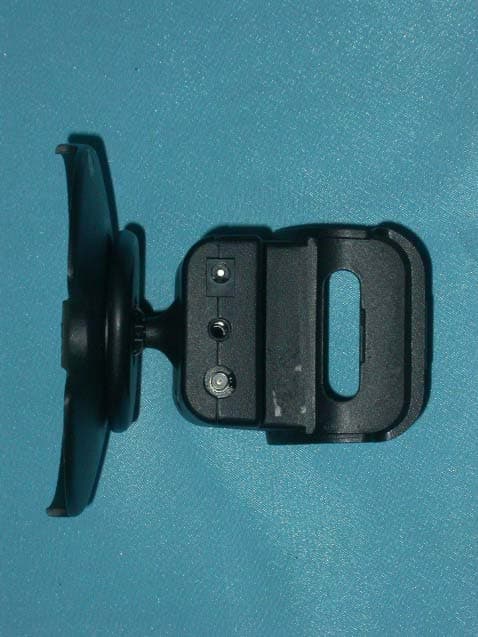
Click to zoom
Application Details
- Equipment Class
- DXX - Part 15 Low Power Communication Device Transmitter
- Date of Grant
- Jul 08, 2004
- Application Purpose
- Original Equipment
- Date of Application
- Jul 08, 2004
- Equipment Note
- Satellite Radio Receiver
- Frequency Range
- 88.10000000 - 107.90000000
- Company
- Wistron NeWeb Corporation
- Country
- Taiwan
Documents & Files
Document Text
Text extracted from the exhibit documents filed with the FCC. Open a document above to read the original.
Users Manual
Instruction Manual Model XTR1 To Activate your Satellite Radio Receiver or for latest news and questions regarding Sirius Satellite Radio service visit www.sirius.comor call 1-888-539-SIRIUS (7474). For accessory & product information visit us at www .getxact.com. KEEPMOVING This equipment has been tested and found to comply with the limits for a Class B digital device, pursuant to Part 15 of the FCC Rules. These limits are designed to provide reasonable protection against harmful interference in a residential installation. This equipment generates, uses, and can radiate radio frequency energy and, if not installed and used in accordance with the instructions, may cause harmful interference to radio communications. However, there is no guarantee that interference will not occur in a particular installation. If this equipment does cause harmful interference to radio or television reception, which can be determined by turning the equipment off and on, the user is encouraged to try to correct the interference by one or more of the following measures: •Reorient or relocate the receiving antenna. •Increase the separation between the equipment and receiver. •Connect the equipment into an outlet on a circuit different from that to which the receiver is connected. •Consult the dealer or an experienced radio/TV technician for help. Changes or modifications not expressly approved by the Manufacturer for compliance could void the user’s authority to operate the equipment. COPYRIGHT / TRADEMARKS No part of this publication may be reproduced, stored in a retrieval system, or transmitted in any form or by any means, whether electronic, mechanical, photocopying, recording or otherwise without the prior writing of the publisher. is a registered trademark of SIRIUS Satellite Radio. To Activate your Satellite Radio Receiver or for latest news and questions regarding Sirius Satellite Radio service visit www.sirius.com or call 1-888-539-SIRIUS (7474). SAFETYPRECAUTIONS Warning Follow these notifications to avoid any traffic accidents or personal injury: 1. Installation must be performed according to this user guide. 2. Do not install the device where it may obstruct your view through the windshield or of your vehicle’s indicator displays. 3. Do not install the device where it may hinder the function of safety devices such as an airbag. Doing so may prevent the airbag from functioning properly in the event of an accident. 4. The installation and usage suggestions contained in this user guide are subject to any restrictions or limitations that may be imposed by applicable law. The purchaser should check applicable law for any restrictions or limitations before installing and/or operating this device. 5. Failure to follow these safety instructions and warnings may result in a severe accident. Danger Be aware of the following precautions to prevent fire and avoid personal injury: 1. To avoid short circuits, never put or leave any metallic objects (coins, tools, etc.) inside the device. 2. If the device emits smoke or strange smells, turn the power off immediately and contact your dealer. 3. Do not drop the device or subject it to strong shocks. 4. If the LCD display becomes damaged or broken, do not touch the liquid crystal fluid. The fluid may be dangerous to your health or even fatal. If the liquid crystal fluid contacts your body or clothing, immediately wash it off with soap and water. Caution Do not operate this device in a way that might divert your attention from driving safely. As a driver, you are responsible for safely operating your vehicle in accordance with traffic safety laws at all times. TABLE OFCONTENTS IntroductionPage 3 Product Overview Page 3 Package ContentsPage 3 Components GuidePage 4 Xact Stream Jockey Sirius Radio Page 4 Wireless Remote Controller Page 5 Getting Started Page 6 Mounting your Xact Stream Jockey Satellite Radio at Home Page 6 Mounting your Xact Stream Jockey Satellite Radio in a Vehicle Page 6 Activating your Sirius SubscriptionPage 7 Basic OperationsPage 12 Tuning to Different Entertainment Categories Page 12 Searching for Music Page 13 Searching for Music by Channel Page 13 Searching for Music by Artist/Composer Page 13 Searching for Music by Song Page 14 Direct Tuning Page 14 Presetting Channels Page 15 Searching for a preset Channel/Artist/Song Page 16 S-seek Function Memo (memory Search) Button Page 17 Performing S-Seek Function Page 19 Menu Options Settings Page 20 Basic Setting Procedure Page 20 Sirius IDPage 20 Display Settings Page 22 FM transmitter Page 22 Channel Add/Skip Page 23 Lock Options Page 23 Audio Level Page 25 Antenna Aiming Page 26 Sirius Satellite MapPage 26 Memory Options Page 27 Time Based Features Page 28 Clock Page 29 Hour Format Page 29 Time Zone Page 29 1 TABLE OFCONTENTS Daylight Savings Time Page 30 Alarm Clock Page 30 Time Page 30 Program Alert Page 31 Day Page 32 Channel Selection Page 32 Auto Shutdown Page 32 Sleep Mode Page 33 Factory Default Settings Page 33 Display Messages Page 35 Problem SolvingPage 37 WarrantyPage 38 2 3 INTRODUCTION Overview Thank you for purchasing this product! Your new plug and play XACT Stream Jockey satellite radio is specifically designed to mount in a vehicle or indoor/outdoor location. Package Contents Carefully unpack your kit box and ensure that you have the following items. •XACT Stream Jockey Sirius Receiver •Wireless Remote Control •AAA Batteries (for the Wireless Remote Control) •User’s Guide In the event that any item is missing or if you find any mismatch or damage, promptly contact your dealer. Your Xact Stream Jockey Satellite Radio Receiver must be used in conjunction with any one of the following Xact Kits, such as the Universal kit, Home kit or Boom box as required by you specific needs. •Xact Vehicle Kit:Model Number XS021 •Xact Home Kit:Model Number XS022 •Xact Universal Kit:Model Number XS01UK •Xact Sound Pad Portable Boom Box:Model Number XS024 •Xact Sound System Portable Boom Box:Model Numb…
Text truncated - open the document above for the full version.
External Photos
Company : Wistron NeWeb Corporation Page : 1 of 5 Product : Satellite Radio Receiver Model : UPA-US External photo of EUT Company : Wistron NeWeb Corporation Page : 2 of 5 Product : Satellite Radio Receiver Model : UPA-US Company : Wistron NeWeb Corporation Page : 3 of 5 Product : Satellite Radio Receiver Model : UPA-US Company : Wistron NeWeb Corporation Page : 4 of 5 Product : Satellite Radio Receiver Model : UPA-US Company : Wistron NeWeb Corporation Page : 5 of 5 Product : Satellite Radio Receiver Model : UPA-US External photo of Adapter
ID Label/Location Info
Company : Wistron NeWeb Corporation Model : UPA-US Product : Satellite Radio Receiver Satellite Radio Receiver Model No: UPA-US FCC IDNKRUPAUS007 This device complies with part 15 of the FCC Rules. Operation is subject to the following two conditions: [1] this device may not cause harmful interference and [2] this device must accept any interference received, including interference that may cause undesired operation. S/N Made in Taiwan
Test Setup Photos
Ecom Sertech Corp. Rm. 258, Bldg. 17, NO.195, Sec. 4 Chung Hsing Rd.,Chu -Tung Chen, Hsinchu, Taiwan 310, R.O.C TEL:886 - 3 - 5918012 FAX : 886 - 3 - 5825720 FCC ID :NKRUPAUS007 Report No.:ER04-06-064FRF Page 12 of 42 2.7 Photos of Conduction Test
Test Setup Photos
Ecom Sertech Corp. Rm. 258, Bldg. 17, NO.195, Sec. 4 Chung Hsing Rd.,Chu -Tung Chen, Hsinchu, Taiwan 310, R.O.C TEL:886 - 3 - 5918012 FAX : 886 - 3 - 5825720 FCC ID :NKRUPAUS007 Report No.:ER04-06-064FRF Page 35 of 42 3.7 Photos of Open Site Ecom Sertech Corp. Rm. 258, Bldg. 17, NO.195, Sec. 4 Chung Hsing Rd.,Chu -Tung Chen, Hsinchu, Taiwan 310, R.O.C TEL:886 - 3 - 5918012 FAX : 886 - 3 - 5825720 FCC ID :NKRUPAUS007 Report No.:ER04-06-064FRF Page 36 of 42
Contact Information
Applicant
William Su(Senior Director / System Engineering dept.)
Test Firm
ECOM Sertech Corp.C. Wu
Technical Specifications
| # | Rule Parts | Frequency Range | Power Output |
|---|---|---|---|
| 1 | 15C | 88.1 MHz - 107.9 MHz | - |
Other Applications from Wistron NeWeb Corporation
NKR-ATTCGW453
Aug 25, 2026Enterprise product
Equipment Class
NII - Unlicensed National Information Infrastructure TXNKR-LS06B
Aug 24, 2026Touchscreen
Equipment Class
NII - Unlicensed National Information Infrastructure TXNKR-DWSZW
Aug 10, 2026Door/Window Sensor
Equipment Class
DXX - Part 15 Low Power Communication Device TransmitterNKR-TELE2
Jun 26, 2026TELE2
Equipment Class
NII - Unlicensed National Information Infrastructure TXNKR-VMC-SA525MAX
Jun 05, 2026NAD (Network Access Device)
Equipment Class
CXX - Communications Rcvr for use w/ licensed Tx and CBs