NOYRF98900MHz receiver for wireless transmitter
Atom Industrial Limited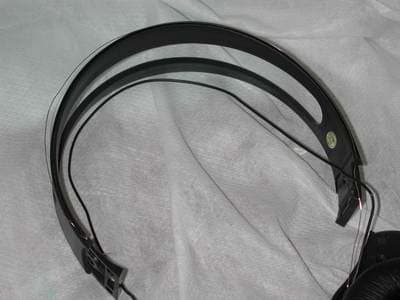
Click to zoom
Application Details
- Equipment Class
- CYY - Communications Receiver used w/Pt 15 Transmitter
- Date of Grant
- Nov 25, 2002
- Application Purpose
- Original Equipment
- Date of Application
- Nov 25, 2002
- Equipment Note
- 900MHz receiver for wireless transmitter
- Frequency Range
- 912.00000000 - 913.00000000
- Company
- Atom Industrial Limited
- Country
- Hong Kong
Documents & Files
Document Text
Text extracted from the exhibit documents filed with the FCC. Open a document above to read the original.
Users Manual
ATOMIC Quick Set-Up Guide Thomson: WHP140 RF8398 (900MHz) Manual Tuning Headphones Congratulations on the purchase of WHP140 (912-913MHz) Stereo RF Wireless Headphones! (Manual Tuning) Please check the supplied component against the following list: 1 x Transmitter (built-in 3.5mm stereo audio cord) 1 x Headphones 1 x Power Supply (AC/DC 12V 200mA Adaptor for Transmitter) 1 x 3.5mm Y-connection Cord FUNCTION KEYS HEADPHONES 5 1 2 4 (1) Channel Tuning Knob (2) Volume Control Knob (3) Power ON/OFF Switch (4) Dual Color LED Indicator (5) Battery Compartment 2 TRANSMITTER Transmitter Upper Surface: (6) Power LED Indicator Transmitter Bottom: (7) Channel Tuning Knob Transmitter Rear Side: (8) Built-in 3.5mm Stereo audio cord (9) DC IN Socket ACCESSORIES (10) 3.5mm Y-connection Cord (11) AC/DC Adaptor D C I N T U N I N G 7 9 6 8 10 11 3 INSTALLATION Please follow this quick set-up guide to ensure trouble free installation of your headphones. Step 1: Connect the built-in 3.5mm Stereo Audio Cord to the audio output socket of your audio source, e.g. TV, HiFi, CD, DVD player etc. *** If your audio source has 2 RCA output sockets (red and white in color), use the 90mm Y-connection Cord (10) for connection, if necessary. Step 2: Connect one end of the AC/DC Adaptor (11) to the DC IN Socket (9) at the rear side of the transmitter, and the other end to the main electric wall outlet. Step 3: The transmitter will be automatically ON when there is audio signal from the audio source (please make sure that the transmitter is powered on by the AC/DC Adaptor). Then the Power LED Indicator (6) will glow RED to confirm that the transmitter is ready for operation. Place the transmitter on a dry, cool place preferably above head level. *** The transmitter has auto-cut-off function. When there is no audio signal for a prolonged period, the power of the transmitter will be automatically cut off. You will then hear a little noise from the headset. Step 4: Insert 2 pieces AA size batteries into the Battery Compartment (5) at the Left hand side of the headphones and make sure that they are inserted in the correct way. Then replace the battery cover, and switch the headphones ON (3). Step 5: Switch on your music device (TV. HiFi, CD, DVD etc.) and start your media playing. Step 6: Tune the channel Tuning Knob (1) once until the Dual Color LED Indicator (4) of the headphones changes from RED to GREEN and then you can hear a good quality sound. Adjust the Volume Control Knob (2) to a comfortable sound level. 4 TROUBLE SHOOTING GUIDE If you encounter any trouble in setting up the Headphones, please check the following points: (1) Distorted sound quality or unclear sound: ~ Check if the sound of your audio source is distorted and whether the volume control is tuned to the suitable level. ~ Make sure that your audio equipment, the transmitter and headphones are powered and switched ON. If the batteries in the headphones have insufficient power, replace fresh ones. ~ Check if you have selected the best channel, Adjust the channel Tuning Knob(1) once again to check. ~ Make sure that your audio equipment, the transmitter and headphones are properly connected. (2) No Sound from the headphones: ~ Check if the batteries are inserted properly into the battery compartment and whether the headphones is switched ON. ~ Check if the batteries in the headphones have sufficient power. Replace fresh ones if necessary. ~ Check if the transmitter is properly connected and powered on with the AC/DC Adaptor (the Power LED Indicator (6) should glow RED). ~ Check if all the connection cords are properly connected. ~ Check if the distance between the headphones and transmitter are within the effective range. (The effective range of the device is approx. 50M in open area.) Place the headphones closer to the transmitter. (3)Mono Sound: ~ Check if the audio source is mono only, use stereo audio source. (4) Interference: ~ At the bottom side of the transmitter, there is Channel Tuning Knob (7), select a different Frequency and Turn the channel tuning knob (1) once again Until the Dual Color LED Indicator (4) glow GREEN showing that the channel has been properly tuned. (5) Power auto-cut-off: ~ The transmitter has auto-cut-off function. When there is no audio signal for a prolonged period, the power of the transmitter will be automatically cut-off. You will then hear a little noise from the headset. You just need to switch on the audio sources again and Turn the channel tuning knob (1) again, if necessary, until the Dual Color LED Indicator (4) glows GREEN. Then you can listen the good quality sound again. 5 Warning: Changes or modifications to this unit not expressly approved by the party responsible for compliance could void the user’s authority to operate the equipment. NOTE : This equipment has been tested and found to comply with the limits for a Class B digital device, pursuant to Part 15 of the FCC Rules. These limits are designed to provide reasonable protection against harmful interference in a residential installation. This equipment generates, uses and can radiate radio frequency energy and, if not installed and used in accordance with the instructions, may cause harmful interference to radio communications. However, there is no guarantee that interference will not occur in a particular installation. If this equipment does cause harmful interference to radio or television reception which can be determined by turning the equipment off and on, the user in encouraged to try to correct the interference by one or more of the following measures. - Reorient or relocate the receiving antenna. - Increase the separation between the equipment and receiver. - Connect the equipment in to an outlet on a circuit different form that to which the receiver is needed. - Consult the dealer or an experienced radio/TV technician for help. If you still have problem after checking the above points, please contact your customer service. Do not try to loosen the sc…
Text truncated - open the document above for the full version.
External Photos
INTERTEK TESTING SERVICE Report no.: 0214337 Equipment Photographs Model : WHP 140 (Receiver) (External) Equipment Photographs FCC ID: NOYRF98 INTERTEK TESTING SERVICE Report no.: 0214337 Model : WHP 140 (Receiver) (External) FCC ID: NOYRF98 INTERTEK TESTING SERVICE Report no.: 0214337 FCC ID: NOYRF98 INTERTEK TESTING SERVICE Report no.: 0214337 FCC ID: NOYRF98 INTERTEK TESTING SERVICE Report no.: 0214337 FCC ID: NOYRF98 INTERTEK TESTING SERVICE Report no.: 0214337 FCC ID: NOYRF98 INTERTEK TESTING SERVICE Report no.: 0200048 FCC ID: AAO3301196T
ID Label/Location Info
FCC ID: NOYRF98 This device complies with Part 15 of FCC Rules. Operation is subject to the following two conditions:(1) this device may not cause harmful interference, and (2) this device must accept any interference received, including interference that may cause undesired operation. 33mm 2 8 m m FCC ID: NOYRF83 This device complies with Part 15 of FCC Rules. Operation is subject to the following two conditions: (1) this device may not cause harmful interference, and (2) this device must accept any interference received, including interference that may cause undesired operation. 6cm 3 c m RX TX Location of FCC label on Tx, Rx
Internal Photos
INTERTEK TESTING SERVICE Report no.: 0214337 Equipment Photographs Model : WHP 140 (Receiver) (Internal) FCC ID: NOYRF98 INTERTEK TESTING SERVICE Report no.: 0214337 Equipment Photographs Model : WHP 140 (Receiver) (Internal) FCC ID: NOYRF98 INTERTEK TESTING SERVICE Report no.: 0214337 Equipment Photographs Model : WHP 140 (Receiver) (Internal) Equipment Photographs FCC ID: NOYRF98 INTERTEK TESTING SERVICE Report no.: 0214337 Model : WHP 140 (Receiver) (Internal) FCC ID: NOYRF98
Operational Description
WHP140 Theory of Operation General This Product is Stereo Wireless Transmitter & Headphones Transmitter Auto Power On /Off The Audio Signal from the Stereo plug to the Q6, Q4, Q9, Q8, Q7. When the Audio Signal is at High Signal, Transmitter Auto Power On. When the Audio Signal is at Lower Signal, Transmitter Auto Power Off. Stereo Modulator The Audio Signal from the Stereo plug to the U3 NJM2035 PIN 1, 2. Audio Signal & 19KHz Pilot from the U3 pin 8, 9 to Q5. Frequency Modulation Q5 output the Audio Signal to adjust the VD1. Frequency Adjust VR4 adjust the Voltage to control VD1 to change Frequency 900MHz Oscillator & RF Amplified Q1, DR1, VD1 oscillate the 900MHz Frequency from Q2, Q3 RF amplified to ANT. Receiver Power On SW1 push to ON Position, Q2 send the Signal to Led1B. Red Color lights up. RF VCO RF Signal from the ANT to FL1 912MHz, filter to Q2, Q1 & mix the Q3, DR1 RF Local Oscillator, send the IF Signal to U1 Cxa1538. IF Amplified & 2nd Oscillator U1 Cxa1538 PIN 18 receive the IF Signal, mix PIN 22 Local Oscillator & send the 10.7MHz Signal to U1 PIN 13. When the Signal is correct, U1 PIN 4 send the Signal to Q1 Led1A, Green Color lights Up, & U1 PIN 5, 6 send the Stereo Audio Signal from Audio Amplified. Frequency Adjust VR2 adjust the Voltage to control VD1 to change U1 PIN 22 Local Oscillator to select the Correct Channel. Audio Amplified U2 PT2308 PIN 1, 2 receive the Audio Signal from PIN 5, 7 to SP1, SP2.
Test Report
29 October, 2002 Atom Industrial Ltd. Unit 1003-5, 10/F., Westley Square, 48 Hoi Yuen Road, Kwun Tong, Kowloon, Hong Kong. Dear Mr. Chan Wing Fai: Enclosed you will find your file copy of a Part 15 report (FCC ID: NOYRF98). For your reference, TCB will normally take another 15-20 days for reviewing the report. Approval will then be granted when no query is sorted. Please contact me if you have any questions regarding the enclosed material. Sincerely, Alfred Lo Senior Technical Supervisor Enclosure FCC ID: NOYRF98 Intertek Testing Services Hong Kong Ltd. 2/F., Garment Centre, 576 Castle Peak Road, Kowloon, Hong Kong. Tel: (852) 2173 8888 Fax: (852) 2745 8306 Atom Industrial Ltd. Application For Certification (FCC ID: NOYRF98) Superheterodyne Receiver WO# 0214337 LC/sa 29 October, 2002 FCC ID: NOYRF98 • The test results reported in this test report shall refer only to the sample actually tested and shall not refer or be deemed to refer to bulk from which such a sample may be said to have been obtained. • This report shall not be reproduced except in full without prior authorization from Intertek Testing Services Hong Kong Limited • For Terms And Conditions of the services, it can be provided upon request. Intertek Testing Services Hong Kong Ltd. 2/F., Garment Centre, 576 Castle Peak Road, Kowloon, Hong Kong. Tel: (852) 2713 8888 Fax: (852) 2745 8306 INTERTEK TESTING SERVICES FCC ID: NOYRF98 i LIST OF EXHIBITS INTRODUCTION EXHIBIT 1: General Description EXHIBIT 2: System Test Configuration EXHIBIT 3: Emission Results EXHIBIT 4: Equipment Photographs EXHIBIT 5: Product Labelling EXHIBIT 6: Technical Specifications EXHIBIT 7: Instruction Manual EXHIBIT 8: Miscellaneous Information INTERTEK TESTING SERVICES MEASUREMENT/TECHNICAL REPORT Atom Industrial Ltd - MODEL: RCA WHP140 FCC ID: NOYRF98 This report concerns (check one:) Original Grant X Class II Change _____ Equipment Type: Superheterodyne Receiver (example: computer, printer, modem, etc.) Deferred grant requested per 47 CFR 0.457(d)(1)(ii)? Yes No X If yes, defer until: date Company Name agrees to notify the Commission by: date of the intended date of announcement of the product so that the grant can be issued on that date. Transition Rules Request per 15.37? Yes No X If no, assumed Part 15, Subpart B for unintentional radiator - the new 47 CFR [12-18-01 Edition] provision. Report prepared by: Alfred Lo Intertek Testing Services Hong Kong Ltd. 2/F., Garment Centre, 576, Castle Peak Road, Kowloon, Hong Kong Phone: 852-2173-8545 Fax: 852-2371-0914 FCC ID: NOYRF98 ii INTERTEK TESTING SERVICES FCC ID: NOYRF98 iii Table of Contents 1.0 General Description..................................................................................................................2 1.1 Product Description...............................................................................................................2 1.2 Related Submittal(s) Grants..................................................................................................2 1.3 Test Methodology .................................................................................................................3 1.4 Test Facility..........................................................................................................................3 2.0 System Test Configuration .......................................................................................................5 2.1 Justification...........................................................................................................................5 2.2 EUT Exercising Software......................................................................................................5 2.3 Special Accessories...............................................................................................................5 2.4 Equipment Modification .......................................................................................................6 2.5 Support Equipment List and Description...............................................................................6 3.0 Emission Results ........................................................................................................................8 3.1 Field Strength Calculation.....................................................................................................9 3.1 Field Strength Calculation (cont’d) .....................................................................................10 3.2 Radiated Emission Configuration Photograph.....................................................................11 3.3 Radiated Emission Data ......................................................................................................12 4.0 Equipment Photographs .........................................................................................................15 5.0 Product Labelling ....................................................................................................................17 6.0 Technical Specifications ..........................................................................................................19 7.0 Instruction Manual.................................................................................................................21 8.0 Miscellaneous Information .....................................................................................................23 8.1 Discussion of Pulse Desensitization ....................................................................................24 8.2 Calculation of Average Factor.............................................................................................25 8.3 Emissions Test Procedures..................................................................................................26 8.3 Emissions Test Procedures (cont'd) .......................................................................................... 27 INTERTEK TESTING SERVICES FCC ID: NOY…
Text truncated - open the document above for the full version.
Test Setup Photos
INTERTEK TESTING SERVICE Report no.: 0214337 Configuration Photographs Worst-Case Radiated Emissions Model : WHP 140 (Receiver) (Front View) Job: 0214337 Model no.:WHP 140 (Back View) Job: 0214337 Model no.:WHP 140 FCC ID: NOYRF98 INTERTEK TESTING SERVICE Report no.: 0214337 Configuration Photographs Worst-Case Line-Conducted Emissions Model: 33-1196 (Transmitter) (Front View) (Back View) FCC ID: NOYRF98 INTERTEK TESTING SERVICE Report no.: 0214337 Configuration Photographs Worst-Case Line-Conducted Emissions Model: 33-1196 (Receiver) (Side View) FCC ID: NOYRF98
Contact Information
Applicant
Carol Chan(Senior Marketing Executive)
Technical Contact
Intertek Testing Services Hong Kong Ltd.Alfred Lo
[email protected]852-2173-8551
2/F., Garment Centre, · Kowloon · Hong Kong
Non-Technical Contact
Intertek Testing Services Hong Kong Ltd.Alfred Lo
[email protected]852-2173-8551
Test Firm
Intertek Testing Services Hong KongBilly Chow
Technical Specifications
| # | Rule Parts | Frequency Range | Power Output |
|---|---|---|---|
| 1 | 15B | 912 MHz - 913 MHz | - |
Other Applications from Atom Industrial Limited

NOY-RCA822CTX
Apr 11, 2010900MHz Outdoor Speakers RCA822C
Equipment Class
DXX - Part 15 Low Power Communication Device Transmitter
NOY-RCA822CRX
Apr 08, 2010900MHz Outdoor Speakers RCA822C
Equipment Class
CYY - Communications Receiver used w/Pt 15 Transmitter
NOY-AW828RX
Apr 07, 2010900MHz Outdoor Speakers AW828
Equipment Class
CYY - Communications Receiver used w/Pt 15 Transmitter
NOY-AW827RX
Apr 07, 2010900MHz Outdoor Speakers AW827
Equipment Class
CYY - Communications Receiver used w/Pt 15 Transmitter
NOY-AWD204RX
Dec 13, 2009Wireless Headphone
Equipment Class
CYY - Communications Receiver used w/Pt 15 Transmitter