FCCID.CO- FCC ID Database
HomeCompaniesEquipment ClassesSearch

© 2026 FCC ID Database. All rights reserved.

AboutContactData sourced from FCC public records
  1. Home/
  2. Carbon Audio, LLC/
  3. O58-WLMS0002

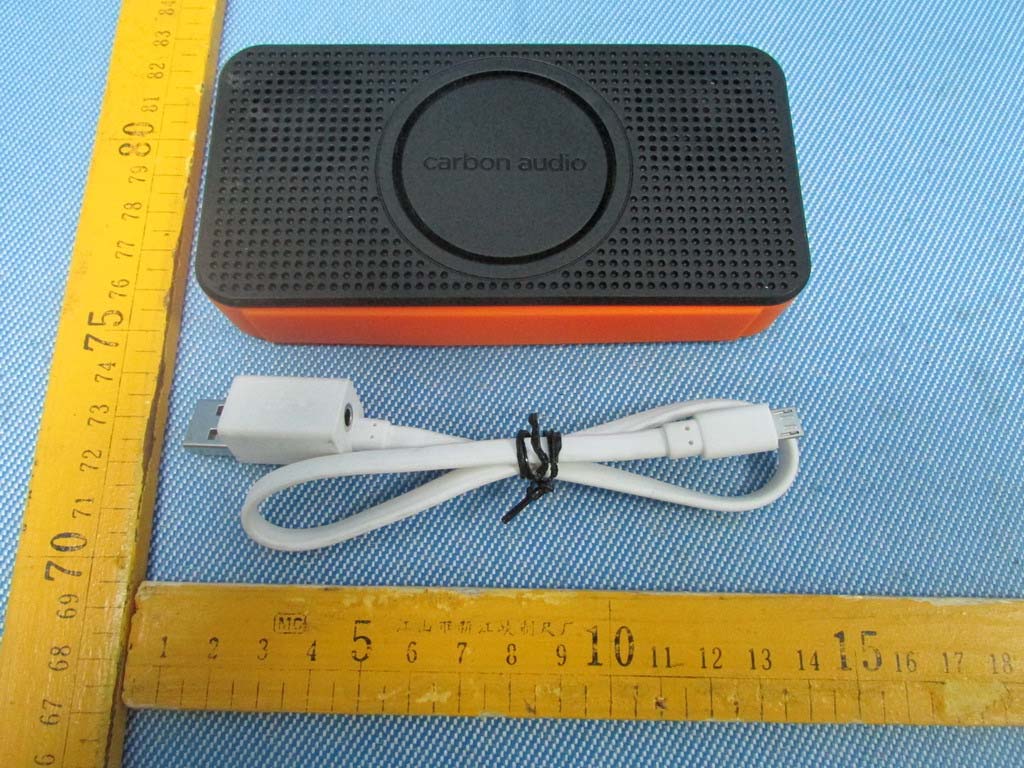
O58-WLMS0002WIRELESS POCKET SPEAKER

Carbon Audio, LLC
WIRELESS POCKET SPEAKER - FCC ID O58-WLMS0002 - Carbon Audio, LLC
Click to zoom

Application Details

Equipment Class
DSS - Part 15 Spread Spectrum Transmitter
Date of Grant
Dec 18, 2013
Application Purpose
Original Equipment
Date of Application
Dec 18, 2013
Equipment Note
WIRELESS POCKET SPEAKER
Frequency Range
2402.00000000 - 2480.00000000
Company
Carbon Audio, LLC
Country
United States

Documents & Files

Select a file to view

Users Manual

↗

Cover Letter(s)

↗
↗
↗

External Photos

↗

ID Label/Location Info

↗
↗

Internal Photos

↗

Test Report

Test Setup Photos

↗

Document Text

Text extracted from the exhibit documents filed with the FCC. Open a document above to read the original.

Users Manual

CHARGE / BATTERY UI 1. Plugged in charging Power LED blinks slowly RED.2. Pocket Speaker does not power on when plugged in.3. Only charges when USB power is plugged in.4. You can manually turn on Pocket Speaker when charging. 5. When fully charged and plugged in LED willshow steady green LED. 6. Fully charged tone will play when full charge is reached. Pocket Speaker UI REVISION 6.0 08/7/13 CHARGE UI Charge time is 3 hoursPlay time is up to 8 Hours Can be used when charging.When your plug in Pocket Speaker should not power on. 7. Can power on Pocket Speaker when plugged in manually.8. Pocket Speaker can be used while charging. press power button once topower on 9. When unplugged and power is on LED is steady green. 10. When power <30% LED is steady amber. 11. When power <10% LED is steady red. POWER ON / OFF UI 1. Press power button to power on. 2. Power LED turns steady Green and plays power on tone. 3. Bluetooth LED blinks fast blue and search tone is played.4. Bluetooth LED turns steady blue when connection is established and confirmed connection tone is played. press power button once topower on 5. Press power button once to power off. LEDs turn off. press power button once to power off. POWER ON POWER OFF If Pocket Speaker is already paired with a bluetooth device the bluetooth LED will turn on and solid when device is foundIf Pocket Speaker is not already paired with a bluetooth device the bleutooth LED willblink fast until a device is found. green power LED blue BT LED 6. Push and hold Power and BT button simultaneously for 5.0 seconds to reset Pocket Speaker to factory settings. press and hold power and BT buttons simultaneously for 5.0 seconds to reset unit. Pocket Speaker UI REVISION 6.0 08/7/13 POWER ON/OFF UI PAIR UI Press and hold the bluetooth button to enter pair mode. Bluetooth LED blinks fastand paring audio tone plays. Charge is 3 hoursPlay time 4 Hours (fill power)Can be used when charging.When your plug in Pocket Speaker should not power on. press and hold bluetoothbutton to enter pair mode. After successful pairing the bluetoothLED light will appear steady steady blue and hear connected tone. POCKET SPEAKER POCKET SPEAKER Select POCKET SPEAKER on the source device. Pocket Speaker UI REVISION 6.0 08/7/2013 PAIR UI PAIR L/R UI 1 6. After successful pairing the bluetooth LED light will light steady and hear connected tone play along with “ Leftl.” and 2.0 seconds later “Right.”7. After L/R channel quote you will hear, “ready to connect to Bluetooth device.” 8. Each blue tooth LED will be steady blue after connection. 2. Power on both speakers.3. Press and hold each bluetooth buttons simultaneously to enter L/R speaker pair mode.4. Tone will play while searching for each pocket speaker.5. Blue BT LED will blink fast until speakers are paired. Scenario 1. You have a Pocket Speaker already connected your BT device playing music and you want to add a second Pocket Speaker for L/R channel. POCKET SPEAKER POCKET SPEAKER PS1PS2 PS1PS2 PS2 PS1 1. Pocket Speaker playing music. True Wireless PS1 and PS2 Paired PS1 True Wireless PS1 and PS2 Connected True Wireless PS1 and PS2 connecting BT Phone and PS1 Connected 6. Go into BT settings and re-select Pocket Speaker to establish connection.7. Once Pocket Speaker is selected you will hear the Connected confirmation tone and will be ready to play music. Pocket Speaker UI REVISION 6.0 08/7/2013 PAIR L/R UI 1 PAIR L/R UI 2 6. After successful pairing the bluetooth LED light will light steady blue and hear connected tone play along with “ Left.” and 2.0 seconds later “Right.”7. After L/R channel quote you will hear, “ready to connect to Bluetooth device.” 8. Each blue tooth LED will be steady blue after connection. 2. Power on both speakers.3. Press and hold each bluetooth buttons simultaneously to enter L/R speaker pair mode.4. Tone will play while searching for each pocket speaker.5. Blue BT LED will blink fast until speakers are paired. Scenario 2. A. Your BT is turned of for quick set up.B. You purchase two Pocket Speakers and pair them out of the boxbefore pairing to device. PS1PS2 PS1PS2 PS2 True Wireless PS1 and PS2 Paired PS1 True Wireless PS1 and PS2 Connected True Wireless PS1 and PS2 connecting BT Phone and PS1 Connected 6. Go into BT settings turn BT on to establish connection.7. Once Pocket Speaker is selected you will hear the Connected confirmation tone and will be ready to play music. Pocket Speaker UI REVISION 6.0 08/7/2013 PAIR L/R UI 2 Pocket Speaker UI REVISION 6.0 08/7/2013 TONES VOICE UI AUDIO TONE LIST 1. Power ON Tone (short 1-2 seconds) Descriptive of power on / start up. 2. BT Searching (loop lasts as long as connection established.) sonar / ping / search. 3. Connected (1 second confirmation of BT or L/R connected) simple quick positive confirmation tone. 4. Voice “Left” (Hot Chick with accent) 5. Voice “Right” (Hot Chick with accent) 6. Voice “Ready to connect to Bluetooth device” (Hot Chick with accent) 7. Max Volume (tone when maxmimum volume reached on Pocket Speaker) Short / not anoying high pitch / qick blip. 8. Pause Music / Pick Up Incoming Call (tone to identify pause in music) Short two quick blip descriptive of pause. 9. Full Charge Battery (tone to identify 100% fully charged battery). FCC NOTE This device complies with Part 15 of the FCC Rules. Operation is subject to the following two conditions: (1) this device may not cause harmful interference, and (2) this device must accept any interference received, including interference that may cause undesired operation. THE MANUFACTURER IS NOT RESPONSIBLE FOR ANY RADIO OR TV INTERFERENCE CAUSED BY UNAUTHORIZED MODIFICATIONS OR CHANGE TO THIS EQUIPMENT. SUCH MODIFICATIONS OR CHANGE COULD VOID AND CHANGE ANNTENA WHICH THE MANUFACTURER PROVIDES. IT IS THE USER'S AUTHORITY TO OPERATE THE EQUIPMENT. This equipment has been tested and found to comply with the limits for a Class B digital device, pursuant to part 15 of the FCC Rules. These limits are designed to…

Text truncated - open the document above for the full version.

Cover Letter(s)

Carbon Audio, LLC Date: Oct 08, 2013 Federal Communications Commission Authorization and Evaluation Division Confidentiality Request regarding application for certification of FCC ID: O58-WLMS0002 Pursuant to Sections 0.457 and 0.459 of the Commission’s Rules, we hereby request confidential treatment of information accompanying this application as outlined below: Exhibit Type File Name Schematics SCH.pdf Block Diagram BlockDiagram.pdf Operational Description CircuitDescription.pdf The above materials contain trade secrets and proprietary information not customarily released to the public. The public disclosure of these materials may be harmful to the applicant and provide unjustified benefits to its competitors. The applicant understands that pursuant to Section 0.457 of the Rules, disclosure of this application and all accompanying documentation will not be made before the date of the Grant for this application. Sincerely, Carbon Audio, LLC 340 SE 6th Street Portland, Oregon 97204 ............................................................... Signature Eiryanna Bennett/ VP of Commercialization ............................................................... Typed name and Title

Cover Letter(s)

Federal Communications Commission Authorization and Evaluation Division 1435 Oakland Mills Road Columbia, MD 21046 Date: Oct 08, 2013 SUBJECT: FCC Application for (FCC ID: O58-WLMS0002 ) To Whom It May Concern: I, the undersigned, hereby attest to the fact that I will apply the Declaration of Conformity procedure to the class B computer peripheral portion of this composite device. I understand the following FCC requirements: 1. Devices subject to the DoC procedure are required to be tested to show compliance with the FCC technical regulations by a recognized accredited testing laboratory. The testing laboratory must be accredited by a Commission approved accreditation body or designated under the terms of a government-to-government Mutual Recognition Agreement (MRA). A listing of those accredited testing laboratories that have been recognized by the Commission is published on the FCC Webpage: https://apps.fcc.gov/oetcf/eas/reports/TestFirmSearch.cfm (Select the "accredited" option to search for FCC recognized accredited test firms.) 2. Test facilities located in countries, where the U.S. does not have an operational Telcom MRA are not recognized by the FCC to test for the DoC procedure. 3. Pt 2.1077 contains the list of information that must be included in the Declaration of Conformity, which must be supplied with each product sold. The DoC compliance info shall be included in the User’s Manual or as a separate sheet. The info must contain the name, address, and phone number of the responsible party, which must be located within the United States. According to 2.909(c)(2), the responsible party is either the Manufacturer or if the product is imported the Importer . Regards, Signature: Eiryanna Bennett/ VP of Commercialization Applicant: Carbon Audio, LLC Address: 340 SE 6th Street Portland, Oregon 97204, United States

Cover Letter(s)

Carbon Audio, LLC FCC ID: O58-WLMS0002 POWER OF ATTORNEY Date: Oct 08,2013 Federal Communications Commission Authorization and Evaluation Division 7435 Oakland Mills Road Columbia, MD 21046 To Whom It May Concern: We, the undersigned, hereby authorize Waltek Services (ShenZhen) Co., Ltd. (Philo Zhong) on our behalf, to apply to the Federal Communications Commission on our equipment. Any and all acts carried out by Waltek Services (ShenZhen) Co., Ltd. (Philo Zhong) on our behalf shall have the same effect as acts of our own. This authorization expires on Oct 07,2014. This is to advise that we are in full compliance with the Anti-Drug Abuse Act. We, Carbon Audio, LLC, are not subject to a denial of federal benefits pursuant to Section 5301 of the Anti-Drug Act of 1988, 21 USC853a, and no party to the application is subject to a denial of federal benefits pursuant to that section. Sincerely, Signature: Eiryanna Bennett/ VP of Commercialization .................................................................................... [typed name and title] Carbon Audio, LLC 340 SE 6th Street Portland, Oregon 97204

External Photos

Reference No.: WTD13S0806543E Page 80 of 85 Waltek Services (Shenzhen) Co.,Ltd. http://www.waltek.com.cn 19 Photographs - Constructional Details 19.1 EUT – External View Reference No.: WTD13S0806543E Page 81 of 85 Waltek Services (Shenzhen) Co.,Ltd. http://www.waltek.com.cn

ID Label/Location Info

FCC Label Location for model: WLMS-0002 The Label must not be a stick-on paper. The Label on these products must be permanently affixed to the product and readily visible at the time of purchase and must last the expected lifetime of the equipment not be readily detachable. Model No.: WLMS-0002 FCC ID: O58-WLMS0002

ID Label/Location Info

FCC Label Sample for model: WLMS-0002 FCC ID: O58-WLMS0002 This device complies with Part 15 of the FCC Rules. Operation is subject to the following two conditions: (1) this device may not cause interference, and (2) this device must accept any interference, including interference that may cause undesired operation of the device.

Internal Photos

Reference No.: WTD13S0806543E Page 82 of 85 Waltek Services (Shenzhen) Co.,Ltd. http://www.waltek.com.cn 19.2 EUT – Internal View Reference No.: WTD13S0806543E Page 83 of 85 Waltek Services (Shenzhen) Co.,Ltd. http://www.waltek.com.cn RF MODULE RF Antenna Reference No.: WTD13S0806543E Page 84 of 85 Waltek Services (Shenzhen) Co.,Ltd. http://www.waltek.com.cn Reference No.: WTD13S0806543E Page 85 of 85 Waltek Services (Shenzhen) Co.,Ltd. http://www.waltek.com.cn ==End of test report==

Test Setup Photos

Reference No.: WTD13S0806543E Page 78 of 85 Waltek Services (Shenzhen) Co.,Ltd. http://www.waltek.com.cn 18 Photographs – Test Setup 18.1 Conducted Emissions 18.2 Radiated Emissions Below 30MHz Reference No.: WTD13S0806543E Page 79 of 85 Waltek Services (Shenzhen) Co.,Ltd. http://www.waltek.com.cn From 30-1000MHz Above 1GHz

Contact Information

Applicant

Eiryanna Bennett(VP of Commercialization)
[email protected]5039541011Fax: 5039545205

Test Firm

Waltek Services(Shenzhen) Co., Ltd.Philo zhong
[email protected]0086-755-27553488Fax: 0086-755-27553868

Technical Specifications

#Rule PartsFrequency RangePower Output
115C2.40 GHz - 2.48 GHz1.57 mW
Confidentiality
Long Term
Grant Notes
Power listed is conducted.

Other Applications from Carbon Audio, LLC
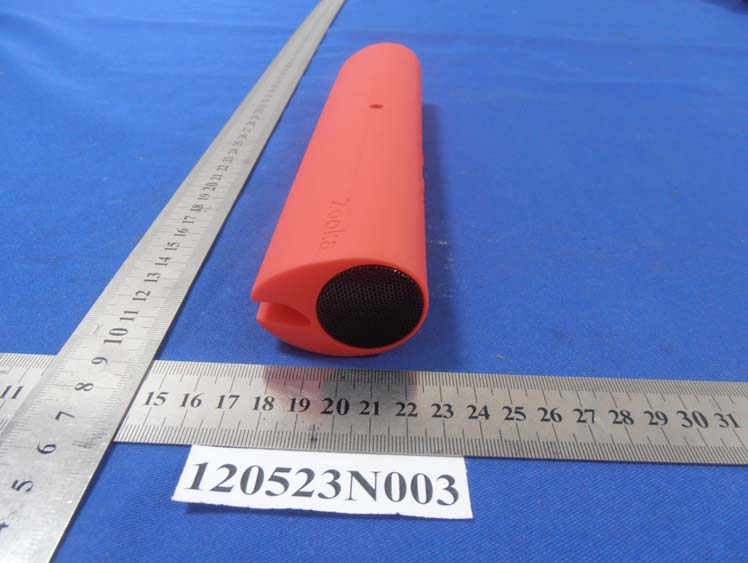
Wireless Speaker Bar - FCC ID O58WLMS-0001 - Carbon Audio, LLC
O58WLMS-0001

Wireless Speaker Bar

Jul 12, 2012

Equipment Class

DXX - Part 15 Low Power Communication Device Transmitter