O7Y-MU900E-Box
TECO IMAGE SYSTEMS CO.,LTD.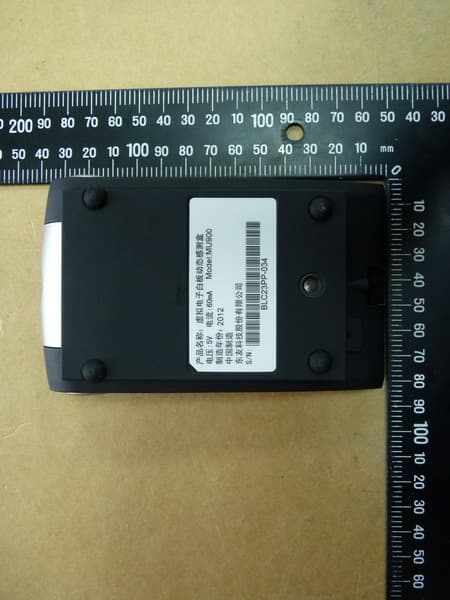
Click to zoom
Application Details
- Equipment Class
- DXX - Part 15 Low Power Communication Device Transmitter
- Date of Grant
- Jun 11, 2012
- Application Purpose
- Original Equipment
- Date of Application
- Jun 11, 2012
- Equipment Note
- E-Box
- Frequency Range
- 2425.00000000 - 2478.00000000
- Company
- TECO IMAGE SYSTEMS CO.,LTD.
- Country
- Taiwan
Documents & Files
Document Text
Text extracted from the exhibit documents filed with the FCC. Open a document above to read the original.
Users Manual
TOUCHACT AU560/MU400/MU900 Quick Guide 2 3 Package Contents Check the following accessories are complete: 5TOUCHACT Sensor box 5 Interactive light pen 5USB Dongle 5 Power adapter 5USB cable 5Quick guide 5 Bracket (MU Series only) ✎Note: If any accessories listed above are missing, please contact your dealer. System Requirements ‧Computer level: Pentium 4/1.6GHz 以上 RAM: 512 MB 以上 ‧Operating system: Windows XP (32bit/64bit) Windows Vista (32bit/64bit) Windows 7 (32bit/64bit) Setup Step1. Pairing 1. Sensor Box - In the shutdown state, press the power key and hold for about 10 seconds, green and red light flashes to enter the wait for the pairing mode. Plug USB dongle into your computer then press the pairing keys to complete pairing. 2. Interactive light pen, In the shutdown state, press and hold power key about 10 seconds, enter wait for the pairing mode, press the pairing keys on the USB dongle to complete pairing. ✎Note: MU series of sensors box will automatically enter the pairing mode after you connect the USB power, and wait about 30 seconds. Step2. Setup 1. After pairing complete, the sensor box is placed on the projector or face up to the location of the projection screen. About the setup distance, please refer to the following chart. 0.5m 1m 1.5m 2m 2.5m 3m 3.5m MU900 AU560 MU400 (Relative projection screen 60 "~100") 2. Double-click execution [USB:] \ Setup.exe, the installation. If the User Account Control dialog box appears, select "Yes." 3. After installation, TOUCHACT program will start automatically, please follow the instructions on the screen: [Confirm scan range] -> [Automatic or manual calibration] -> [Finish]. 4 Hardware devices Sensor Box Item Name Description 1 Power Key Continuous green light: Power sufficient Continuous red light: Power <10% Green light flashes: A failure to communicate. Please place the sensor box near USB dongle or re-paired with the USB dongle. Green/Red light flashes: waiting for the pairing mode. 2 System Ready Light Continuous blue light: Sensor box boot to complete. 3 Charge Light Continuous red light: Battery charging. Lights off: The battery charge finish. USB Dongle Item Name Description 1 Pairing Key When the sensor box or interactive light pen is waiting for the pairing mode, press the pairing key on the USB dongle to complete pairing. Interactive Light Pen Item Name Description 1 Cursor Mode Key Interactive light pen used like as mouse. 2 Pen Mode Key Can quickly switch the pen. About the pen setting, please refer to the “System Settings” on the toolbar. 3 Toolbar Show/Hide toolbar. 4 Charge Light Continuous red light: Battery charging. Lights off: The battery charge finish. 5 Power Key Continuous green light: Power sufficient Continuous red light: Power <10% Green light flashes: A failure to communicate. Please place the sensor box near USB dongle or re-paired with the USB dongle. Green/Red light flashes: waiting for the pairing mode. 6 Laser Key Open laser point 7 Page Up/Down Page Up/Down 5 包裝內容物 請檢查以下配件是否齊全: 5TOUCHACT 感測器主機 5互動光筆 5USB 接收器 5電源變壓器 5USB 線 5快速使用指南 5支架 (僅 MU 系列) ✎注意: 若以上列出的任何一項配件有損壞或是短缺的情形,請儘快與您的經銷商聯絡。 系統需求 ‧電腦等級: Pentium 4/1.6GHz 以上 RAM: 512 MB 以上 ‧作業系統: Windows XP (32bit/64bit) Windows Vista (32bit/64bit) Windows 7 (32bit/64bit) 安裝 步驟一. 配對 1. 感測器主機-在關機狀態下,電源鍵長按約 10 秒後,綠紅燈閃爍即進入等待配對模式。此時將 USB 接收器插入電 腦後,按壓接收器上的配對鍵進行配對。 2. 互動光筆操作同上,在關機狀態下,電源鍵長按約 10 秒後,即進入等待配對模式,按壓接收器上的配對鍵進行配 對。 ✎注意: MU 系列的感測器,於接上 USB 電源後自動進入等待配對模式,等待約 30 秒。 步驟二. 安裝 1. 配對完成後依上圖示擺置,感測器主機請置於投影機上或可正視投影幕的位置,安裝距離參考下列圖表。 0.5m 1m 1.5m 2m 2.5m 3m 3.5m MU900 AU560 MU400 (相對投影幕 60”~100”) 2. 雙擊執行[USB:]\Setup.exe 進行安裝。 若出現”使用者帳戶控制”對話框,選擇「是」。 3. 安裝後 TOUCHACT 程式便會自動啟動,依螢幕指示操作即可,流程大致為: [確認範圍] –> [自動或手動定位] –> [完成]。 6 硬體裝置 感測器主機 項目 名稱 描述 1 電源鍵 持續綠燈:電源充足 持續紅燈:電源<10% 綠燈閃爍:與 USB 接收器溝通失敗,請將感測器靠近 USB 接收器或者重新與 USB 接收器配對。 綠紅燈閃爍:等待配對模式。 2 開機完成指示燈 持續藍燈:感測主機開機完成。 3 充電指示燈 持續紅燈:電池充電。 燈號熄滅:電池充電完成。 USB 接收器 項目 名稱 描述 1 配對鍵 當感測器主機或互動光筆處於等待配對模式時,按下 USB 接收器上的配對鍵,即 可完成配對。 互動光筆 項目 名稱 描述 1 游標模式鍵 使互動光筆同滑鼠般使用。 2 常用筆切換鍵 可快速切換筆型,切換之筆型設定請參考「工具列」的「系統設定」。 3 工具列鍵 顯示/隱藏工具列。 4 充電指示燈 持續紅燈:電池充電。 燈號熄滅:電池充電完成。 5 電源鍵 持續綠燈:電源充足 持續紅燈:電源<10% 綠燈閃爍:與 USB 接收器溝通失敗,請將互動光筆靠近 USB 接收器或者重新與 USB 接收器配對。 綠紅燈閃爍:等待配對模式。 6 雷射鍵 打開雷射指示燈。 7 上/下頁鍵 翻至上一頁/下一頁。 7 包装内容物 请检查以下配件是否齐全: 5TOUCHACT传感器主机 5互动光笔 5USB接收器 5电源变压器 5USB线 5快速使用指南 5支架 (仅MU系列) ✎注意: 若以上列出的任何一项配件有损坏或是短缺的情形,请尽快与您的经销商联络。 系统需求 ‧计算机等级: Pentium 4/1.6GHz 以上 RAM: 512 MB以上 ‧操作系统: Windows XP (32bit/64bit) Windows Vista (32bit/64bit) Windows 7 (32bit/64bit) 安装 步骤一. 配对 1. 传感器主机-在关机状态时,电源键长按约10秒后,绿红灯闪烁即进入等待配对模式。此时将USB接收器插入计 算机后,按压接收器上的配对键进行配对。 2. 互动光笔操作同上,在关机状态时,电源键长按约10秒后,即进入等待配对模式,按压接收器上的配对键进行配 对。 ✎注意: MU系列的传感器,于接上USB电源后自动进入等待配对模式,等待约30秒。 步骤二. 安装 1. 配对完成后依上图标摆置,传感器主机请置于投影机上或可正视投影幕的位置,安装距离参考下列图表。 0.5m 1m 1.5m 2m 2.5m 3m 3.5m MU900 AU560 MU400 (相对投影幕60”~100”) 2. 双击执行[USB:]\Setup.exe进行安装。 若出现”用户帐户控制”对话框,选择「是」。 3. 安装后TOUCHACT程序便会自动启动,依屏幕指示操作即可,流程大致为: [确认范围] –> [自动或手动定位] –> [完成]。 8 硬件装置 传感器主机 项目 名称 描述 1 电源键 持续绿灯:电源充足 持续红灯:电源<10% 绿灯闪烁:与USB接收器沟通失败,请将传感器靠近 USB接收器或者重新与USB接收器配对。 绿红灯闪烁:等待配对模式。 2 开机完成指示灯 持续蓝灯:感测主机开机完成。 3 充电指示灯 持续红灯:电池充电。 灯号熄灭:电池充电完成。 USB接收器 项目 名称 描述 1 配对键 当传感器主机或互动光笔处于等待配对模式时,按下USB接收器上的配对键,即 可完成配对。 互动光笔 项目 名称 描述 1 光标模式键 使互动光笔同鼠标般使用。 2 常用笔切换键 可快速切换笔型,切换之笔型设定请参考「工具栏」的「系统设定」。 3 工具栏键 显示/隐藏工具栏。 4 充电指示灯 持续红灯:电池充电。 灯号熄灭:电池充电完成。 5 电源键 持续绿灯:电源充足 持续红灯:电源<10% 绿灯闪烁:与USB接收器沟通失败,请将互动光笔靠近 USB接收器或者重新与USB接收器配对。 绿红灯闪烁:等待配对模式。 6 雷射键 打开雷射指示灯。 7 上/下页键 翻至上一页/下一页。 9 パッケージの内容 以下のアクセサリーが揃っているかをごチェックください。 5 TOUCHACT センサーホスト 5 インタラクティブ・ライトペン 5 USB レシーバ 5 電源トランス 5 USB ケーブル 5 クイックガイド 5 ブラケット(MU シリーズのみ) ✎注意:上記の付属品のどれかが破損または欠落している場合は、できるだけ早く販売店にご相談ください。 システム要件 ‧コンピュータクラス: Pentium4/1.6GHz以上 RAM:512 MB 以上 ‧オペレーティングシステム: Windows XP (32bit/64bit) Windows Vista (32bit/64bit) Windows 7 (32bit/64bit) インストール ステップ 1. ペアリング 1. センサーホスト -シャットダウン状態では、電源ボタンを約10秒間長く押した後、緑・赤灯が点滅すれば、ペ アリング待ちモードに入ります。この時、USB レシーバをコンピュータに挿入してから、レシーバのペアリン グボタンを押してペアリングを行います。 2. インタラクティブ・ライトペンの操作は同上。シャットダウン状態では、電源ボタンを約10秒長く押せば、ペ アリング待ちモードに入ります。レシーバのペアリングボタンを押してペアリングを行います。 ✎注意:MU シリーズのセンサーは USB 電源を接続した後に自動的にペアリング待ちモードに入ります。約30秒 待ちます。 ステップ 2 インスト…
Text truncated - open the document above for the full version.
External Photos
Registration number: W6M21205-12480-FCC FCC ID: O7Y-MU900 Worldwide Testing Services(Taiwan) Co., Ltd. Appendix page 2 of 21 External Photos Registration number: W6M21205-12480-FCC FCC ID: O7Y-MU900 Worldwide Testing Services(Taiwan) Co., Ltd. Appendix page 3 of 21 Registration number: W6M21205-12480-FCC FCC ID: O7Y-MU900 Worldwide Testing Services(Taiwan) Co., Ltd. Appendix page 4 of 21 Registration number: W6M21205-12480-FCC FCC ID: O7Y-MU900 Worldwide Testing Services(Taiwan) Co., Ltd. Appendix page 5 of 21 Registration number: W6M21205-12480-FCC FCC ID: O7Y-MU900 Worldwide Testing Services(Taiwan) Co., Ltd. Appendix page 6 of 21 Registration number: W6M21205-12480-FCC FCC ID: O7Y-MU900 Worldwide Testing Services(Taiwan) Co., Ltd. Appendix page 7 of 21 Registration number: W6M21205-12480-FCC FCC ID: O7Y-MU900 Worldwide Testing Services(Taiwan) Co., Ltd. Appendix page 8 of 21 Registration number: W6M21205-12480-FCC FCC ID: O7Y-MU900 Worldwide Testing Services(Taiwan) Co., Ltd. Appendix page 9 of 21
ID Label/Location Info
产品名称:无线感测器主机 Model:MU900 电压:5V 电流:60mA 制造年份: 中国制造 CMIIT ID:XXXXXXXXXXXX 东友科技股份有限公司 S/N: 產品名稱:無線感測器主機 Model:MU900 額定電壓:5V 額定電流:60mA 製造年份: 生產國別:中國 東友科技股份有限公司 S/N: XXXXXXXXXXXX (TW) (CN) (WW) 產品名稱:無線感測器主機 Model:MU900 額定電壓:5V 額定電流:60mA 製造年份: 生產國別:中國 東友科技股份有限公司 S/N: XXXXXXXXXXXX Model:MU900 Input:DC 5V , 60mA MADE IN CHINA FCC ID:O7Y-MU900 TECO IMAGE SYSTEMS CO.,LTD. S/N: R 201- 125546
Internal Photos
Registration number: W6M21205-12480-FCC FCC ID: O7Y-MU900 Worldwide Testing Services(Taiwan) Co., Ltd. Appendix page 10 of 21 Internal Photos Registration number: W6M21205-12480-FCC FCC ID: O7Y-MU900 Worldwide Testing Services(Taiwan) Co., Ltd. Appendix page 11 of 21 Registration number: W6M21205-12480-FCC FCC ID: O7Y-MU900 Worldwide Testing Services(Taiwan) Co., Ltd. Appendix page 12 of 21 Registration number: W6M21205-12480-FCC FCC ID: O7Y-MU900 Worldwide Testing Services(Taiwan) Co., Ltd. Appendix page 13 of 21 Registration number: W6M21205-12480-FCC FCC ID: O7Y-MU900 Worldwide Testing Services(Taiwan) Co., Ltd. Appendix page 14 of 21 Registration number: W6M21205-12480-FCC FCC ID: O7Y-MU900 Worldwide Testing Services(Taiwan) Co., Ltd. Appendix page 15 of 21 Multi-listing Model No.: MU400 External Photo Registration number: W6M21205-12480-FCC FCC ID: O7Y-MU900 Worldwide Testing Services(Taiwan) Co., Ltd. Appendix page 16 of 21 Internal Photos Registration number: W6M21205-12480-FCC FCC ID: O7Y-MU900 Worldwide Testing Services(Taiwan) Co., Ltd. Appendix page 17 of 21
Test Report
of Applicant: TECO IMAGE SYSTEMS CO.,LTD. Address: 2nd Fl., 1568-1 Chung Shan Road, Sec. 1, Kuang-In, Taoyuan Hsien, Taiwan, R.O. C. Tested and Prepared by Worldwide Testing Services (Taiwan) Co., Ltd. FCC Registration No.: 930600 Industry Canada filed test laboratory Reg. No. IC 5679A-1 A2LA Accredited No.: 2732.01 Report No.: W6M21205-12480-C-1 6F, NO. 58, LANE 188, RUEY-KUANG RD., NEIHU TAIPEI 114, TAIWAN, R.O.C. TEL: 886-2-66068877 FAX: 886-2-66068879 E-mail: [email protected] FCC PART 15 SUBPART C TEST REPORT for E-Box Model No.: MU900 FCC ID: O7Y-MU900 Registration number: W6M21205-12480-C-1 FCC ID: O7Y-MU900 Worldwide Testing Services(Taiwan) Co., Ltd. Page 1 of 22 TABLE OF CONTENTS 1 GENERAL INFORMATION ..........................................................................................................2 1.1 NOTES..........................................................................................................................................2 1.2 TESTING LABORATORY................................................................................................................3 1.2.1 Location ..............................................................................................................................3 1.2.2 Details of accreditation status ............................................................................................3 1.3 D ETAILS OF APPROVAL HOLDER...................................................................................................4 1.4 APPLICATION DETAILS...................................................................................................................4 1.5 GENERAL INFORMATION OF TEST ITEM........................................................................................4 1.6 TEST STANDARDS.........................................................................................................................4 2 TECHNICAL TEST .........................................................................................................................5 2.1 S UMMARY OF TEST RESULTS........................................................................................................5 2.2 TEST ENVIRONMENT....................................................................................................................5 2.3 TEST EQUIPMENT LIST.................................................................................................................6 2.4 GENERAL TEST PROCEDURE......................................................................................................10 3 TEST RESULTS (ENCLOSURE) ................................................................................................11 3.1 P EAK OUTPUT POWER (TRANSMITTER) ......................................................................................12 3.2 E QUIVALENT ISOTROPIC RADIATED POWER................................................................................13 3.3 RF EXPOSURE COMPLIANCE REQUIREMENTS............................................................................13 3.4 OUT OF BAND RADIATED EMISSIONS.........................................................................................13 3.5 S PURIOUS EMISSION (TX) ...........................................................................................................14 3.6 R ADIATED EMISSIONS FROM DIGITAL PART..............................................................................17 3.7 RADIATED EMISSION ON THE BAND EDGE..................................................................................18 3.8 POWER LINE CONDUCTED EMISSION.........................................................................................20 A PPENDIX..............................................................................................................................................22 Registration number: W6M21205-12480-C-1 FCC ID: O7Y-MU900 Worldwide Testing Services(Taiwan) Co., Ltd. Page 2 of 22 1 General Information 1.1 Notes The purpose of conformity testing is to increase the probability of adherence to the essential requirements or conformity specifications, as appropriate. The complexity of the technical specifications, however, means that full and thorough testing is impractical for both technical and economic reasons. Furthermore, there is no guarantee that a test sample which has passed all the relevant tests conforms to a specification. Neither is there any guarantee that such a test sample will interwork with other genuinely open systems. The existence of the tests nevertheless provides the confidence that the test sample possesses the qualities as maintained and that is performance generally conforms to representative cases of communications equipment. The test results of this test report relate exclusively to the item tested as specified in 1.5. The test report may only be reproduced or published in full. Reproduction or publication of extracts from the report requires the prior written approval of the Worldwide Testing Services(Taiwan) Co., Ltd. Tester: June 07, 2012 Robert Ren Date WTS-Lab. Name Signature Technical responsibility for area of testing: June 07, 2012 Danny Sung Date WTS Name Signature Registration number: W6M21205-12480-C-1 FCC ID: O7Y-MU900 Worldwide Testing Services(Taiwan) Co., Ltd. Page 3 of 22 1.2 Testing laboratory 1.2.1 Location OATS No.5-1, Lishui, Shuang Sing Village, Wanli Dist., New Taipei City 207, Taiwan (R.O.C.) 3 meter semi-anechoic chamber No.35, Aly. 21, Ln. 228, Ankang Rd., Neihu Dist., Taipei City 114, Taiwan (R.O.C.) TEL:886-2-6613-0228 FAX:886-2-2791-5046 Company Worldwide Testing Services(Taiwan) Co., Ltd. 6F, NO. 58, LANE 188, RUEY-KUANG RD. NEIHU, TAIPEI 114, TAIWAN R.O.C. Tel : 886-2-66068877 Fax : 886-2-66068879 1.2.2 Details of accreditation status Accredited testing laboratory A2LA accredited number: 2730.01 FCC filed test laboratory Reg. No. 930600 Industry Canada filed test laboratory Reg. No. IC…
Text truncated - open the document above for the full version.
Test Setup Photos
Registration number: W6M21205-12480-FCC FCC ID: O7Y-MU900 Worldwide Testing Services(Taiwan) Co., Ltd. Appendix page 18 of 21 Set Up Photos of Radiated Emission EMI Mode Below 1GHz Registration number: W6M21205-12480-FCC FCC ID: O7Y-MU900 Worldwide Testing Services(Taiwan) Co., Ltd. Appendix page 19 of 21 Above 1GHz Registration number: W6M21205-12480-FCC FCC ID: O7Y-MU900 Worldwide Testing Services(Taiwan) Co., Ltd. Appendix page 20 of 21 RF Mode Registration number: W6M21205-12480-FCC FCC ID: O7Y-MU900 Worldwide Testing Services(Taiwan) Co., Ltd. Appendix page 21 of 21 Set Up Photo of Conducted Emission
Contact Information
Applicant
Lance Chiu(Project Manager)
Technical Contact
Worldwide Testing Services (Taiwan) Co., Ltd.Tse-Ming Chang
[email protected]+886-2-6606-8877
6F., No. 58, Lane 188, Ruey Kuand Rd. · Taipei · Taiwan
Test Firm
Worldwide Testing Services (Taiwan) Co. Ltd.Chang Tse-Ming
Technical Specifications
| # | Rule Parts | Frequency Range | Power Output |
|---|---|---|---|
| 1 | 15C | 2.42 GHz - 2.48 GHz | - |
Other Applications from TECO IMAGE SYSTEMS CO.,LTD.
O7Y-AU560
Jun 11, 2012E-Box
Equipment Class
DXX - Part 15 Low Power Communication Device Transmitter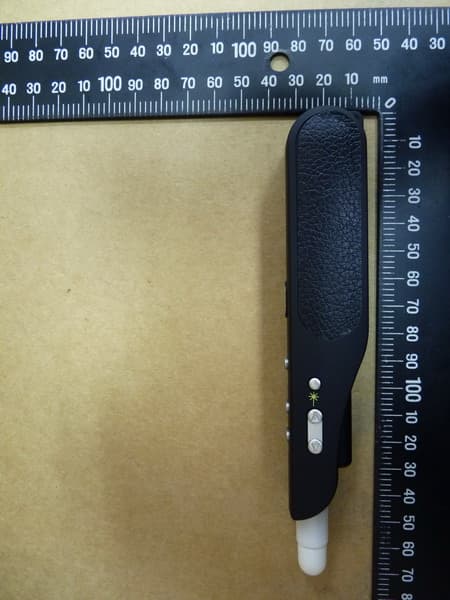
O7Y-EP940
Jun 11, 2012E-Pen
Equipment Class
DXX - Part 15 Low Power Communication Device Transmitter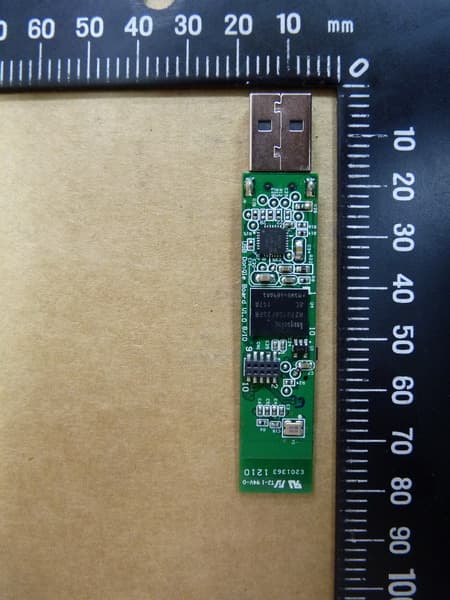
O7Y-DG2511
Jun 11, 2012E-Dongle
Equipment Class
DXX - Part 15 Low Power Communication Device Transmitter