OA8-CD18PTWO WAY RADIO
Quanzhou Chierda Electronic Telecom Co., Ltd.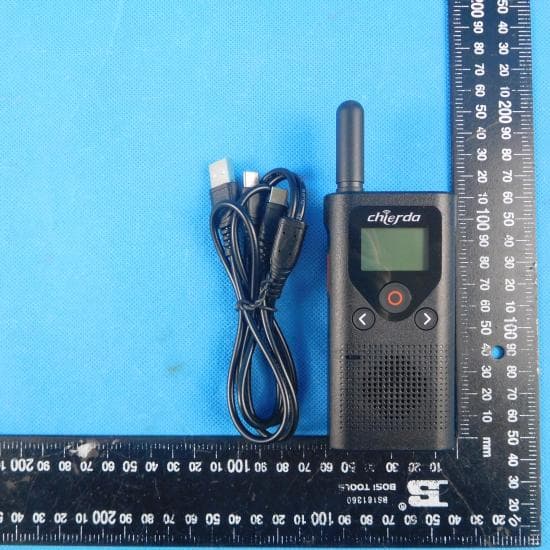
Click to zoom
Application Details
- Equipment Class
- JAB - Part 15 Class B Digital Device
- Date of Grant
- Apr 06, 2022
- Application Purpose
- Original Equipment
- Date of Application
- Apr 06, 2022
- Equipment Note
- TWO WAY RADIO
- Country
- China
Documents & Files
Document Text
Text extracted from the exhibit documents filed with the FCC. Open a document above to read the original.
Users Manual
User Manual CONTENTS Features........................................................................................... Buttons and functions.................................................................... LCD display..................................................................................... Battery installation......................................................................... Battery display and low battery warning...................................... Use the charger to charge............................................................. Turn on/off the radio....................................................................... Volume setting................................................................................ Transmit and receive...................................................................... TOT function................................................................................... Set the channel............................................................................... Tone code selection....................................................................... Set the calling tone......................................................................... Vox function.................................................................................... Set high/low power......................................................................... Scan function.................................................................................. Roger beep...................................................................................... Button control................................................................................. Lock key.......................................................................................... Power saving function................................................................... Weather forecast............................................................................. Enter weather mode....................................................................... Set up weather alerts..................................................................... Headphone function....................................................................... Specification Table......................................................................... Programme...................................................................................... Frequency table(FRS)..................................................................... Frequency table (PMR)................................................................... 01 01 02 02 02 03 03 03 03 03 03 04 04 04 04 05 05 05 05 06 06 06 06 06 07 07 08 08 Features • LCD backlight display • 22 channels • 121 subtone codes (38 analog, 83 digital) • Busy lock • Headphone jack • 10 optional calling tones • (VOX)Vox function • High and low power • Roger beep • Companding function • Battery display • Scanning function • Keypad lock • Voice prompt • Power saving function • Low battery alarm • Keypad tones • TOT function Buttons and functions 1 Antenna LCD display Power on/off and scan switch Earpiece and programme jack Type-C charging port Down/calling tone button Lock and menu button Speaker PTT Mic UP/Weather Battery installation 1) Battery: Li-ion battery. 2) Press the battery upwards to remove the battery. 3) Put the battery into the battery slot, pay attention to install the battery strictly according to the positive + negative-instructions in the slot, and press down firmly. 4) Reinstall the battery. Battery display and low battery warning The battery icon shows the battery level, from full display to space (0 battery). The 0 battery reminds the user to charge in time, and is accompanied by a low battery reminder (once 30 seconds). When the battery power is low, the intercom will be shut down. Note: When storing the radio for a long time, please remove the battery first. Long-term corrosion of the battery will cause damage to the radio. LCD display Battery power Scan Lock Status(tx/rx) High power Volume mute Vox 2 Use the charger to charge 1) Make sure the radio is closed. 2) Insert the Type-c charging plug into the jack of the radio with the rechargeable battery, and plug the other end of the charger into the power socket on the wall. 3) During the charging process, the battery symbol is displayed on the mobile to indicate the charging state. When the battery is fully charged, the battery symbol stops. Flashing, Advise to keep the radio closed when it’s charging, if you try to perform an intercom operation during charging, some abnormal phenomena may occur when the battery is almost empty. Turn on/off the radio Press the button to turn on or off the radio. When turn on the radio, the horn of radio sounds a boot prompt and displays all the icons on the full screen. After the power-on done, the radio is in the walkie-talkie mode by default, displaying the currently used channel number and subtone code, etc. Volume setting 1) In the standby or receiving state, press the ˂ or ˃ key, the LCD of the radio will display the current volume. 2) Then press ˂ or ˃ to increase or decrease the volume of the radio. 0,1-9 level the volume can be adjusted. 3) Press the key to decrease the volume to level 0, the mute icon ( ) will be displayed on the LCD of the walkie-talkie, and the speaker sound will be turned off. Note: When the volume is not adjusted to a proper state, Don’t put the speaker of the walkie-talkie too close to your ears to avoid damage to your ears due to too much sound. Transmit and receive 1) Press and hold the [PTT] key, keep a distance of 3 to 5 cm from the micro- phone, and talk at a normal speaking rate. When the display launches When the icon ( ) is displayed, it means that a message is being sent. In order to avoid cutting off your call, please press the [PTT] button to pause for a while, and then start speaking. 2) When you finish the call, please release the [PTT] key. You can…
Text truncated - open the document above for the full version.
External Photos
Report No.: CHTEW22030035 Page: 25 of 30 Issued: 2022-03-07 Shenzhen Huatongwei International Inspection Co., Ltd. Report Template Version: V03 (2021-01) 7. EXTERANAL AND INTERNAL PHOTOS 7.1. EXTERANAL PHOTOS Report No.: CHTEW22030035 Page: 26 of 30 Issued: 2022-03-07 Shenzhen Huatongwei International Inspection Co., Ltd. Report Template Version: V03 (2021-01) Report No.: CHTEW22030035 Page: 27 of 30 Issued: 2022-03-07 Shenzhen Huatongwei International Inspection Co., Ltd. Report Template Version: V03 (2021-01)
Internal Photos
Report No.: CHTEW22030035 Page: 28 of 30 Issued: 2022-03-07 Shenzhen Huatongwei International Inspection Co., Ltd. Report Template Version: V03 (2021-01) 7.2. INTERNAL PHOTOS Report No.: CHTEW22030035 Page: 29 of 30 Issued: 2022-03-07 Shenzhen Huatongwei International Inspection Co., Ltd. Report Template Version: V03 (2021-01) Report No.: CHTEW22030035 Page: 30 of 30 Issued: 2022-03-07 Shenzhen Huatongwei International Inspection Co., Ltd. Report Template Version: V03 (2021-01) 8. APPENDIX REPORT
Test Report
Page: 1 of 16 TEST REPORT Report No..................................: CHTEW22030036 Report Verification: Project No.................................: SHT2111066101EW FCC ID ............................................. : OA8-CD18P Applicant’s name ........................... : Quanzhou Chierda Electronic Telecom Co.,Ltd. Address ............................................. : No.8,Zian Road,Jiangnan High-tech Industrial Zone,Quanzhou,Fujian,China Test item description .................... : TWO WAY RADIO Trade Mark ....................................... : Chierda Model/Type reference ....................... : CD18P Listed Model(s) ................................. : CD18,JV18,JV18P Standard ......................................... : FCC CFR Title 47 Part 15 Subpart B Date of receipt of test sample...........: Jan.05, 2022 Date of testing..............................: Jan.06, 2022- Mar.04, 2022 Date of issue.................................: Mar.07, 2022 Result .................. ........................: PASS Compiled by (Position - Printed name - Signature): File administrators Fanghui Zhu Supervised by (Position - Printed name - Signature): Project Engineer Cheng Xiao Approved by ( position+printed name+signature) .. : RF Manager Hans Hu Testing Laboratory Name ............. : Shenzhen Huatongwei International Inspection Co., Ltd. Address ............................................. : 1/F, Bldg 3, Hongfa Hi-tech Industrial Park, Genyu Road, Tianliao, Gongming, Shenzhen, China Shenzhen Huatongwei International Inspection Co., Ltd. All rights reserved. This publication may be reproduced in whole or in part for non-commercial purposes as long as the Shenzhen Huatongwei International Inspection Co., Ltd. is acknowledged as copyright owner and source of the material. Shenzhen Huatongwei International Inspection Co., Ltd. takes no responsibility for and will not assume liability for damages resulting from the reader's interpretation of the reproduced material due to its placement and context. The test report merely corresponds to the test sample. Report No.: CHTEW22030036 Page: 2 of 16 Issued: 2022-03-07 Shenzhen Huatongwei International Inspection Co., Ltd. Report Template Version: V03 (2021-01) Contents 1. TEST STANDARDS AND REPORT VERSION ........................................... 3 1.1. Test Standards 3 1.2. Report version 3 2. TEST DESCRIPTION .................................................................... 3 3. SUMMARY ............................................................................... 4 3.1. Client Information 4 3.2. Product Description 4 3.3. Radio Specification Description 5 3.4. Testing Laboratory Information 5 4. TEST CONFIGURATION ................................................................. 6 4.1. EUT operation mode 6 4.2. Support unit used in test configuration 6 4.3. Environmental conditions 6 4.4. Statement of the measurement uncertainty 6 4.5. Equipments Used during the Test 7 5. TEST CONDITIONS AND RESULTS ..................................................... 8 5.1. Conducted Emissions 8 5.2. Radiated Emissions 11 6. TEST SETUP PHOTOS OF THE EUT .................................................. 15 7. EXTERNAL AND INTERNAL PHOTOS OF THE EUT .................................. 16 Report No.: CHTEW22030036 Page: 3 of 16 Issued: 2022-03-07 Shenzhen Huatongwei International Inspection Co., Ltd. Report Template Version: V03 (2021-01) 1. TEST STANDARDS AND REPORT VERSION 1.1. Test Standards The tests were performed according to following standards: FCC CFR Title 47 Part 15 Subpart B - Unintentional Radiators ANSI C63.4: 2014 – American National Standard for Methods of Measurement of Radio-Noise Emissions from Low-Voltage Electrical and Electronic Equipment in the Range of 9 kHz to 40GHz 1.2. Report version Revision No. Date of issue Description N/A 2022-03-07 Original 2. TEST DESCRIPTION Test Item Section in CFR 47 Result Test Engineer Conducted Emissions 15.107(a) Pass Quanhai Deng Radiated Emissions 15.109(a) Pass Hongbin Zhong Note: The measurement uncertainty is not included in the test result. Report No.: CHTEW22030036 Page: 4 of 16 Issued: 2022-03-07 Shenzhen Huatongwei International Inspection Co., Ltd. Report Template Version: V03 (2021-01) 3. SUMMARY 3.1. Client Information Applicant: Quanzhou Chierda Electronic Telecom Co.,Ltd. Address: No.8,Zian Road,Jiangnan High-tech Industrial Zone,Quanzhou,Fujian,China Manufacturer: Quanzhou Chierda Electronic Telecom Co.,Ltd. Address: No.8,Zian Road,Jiangnan High-tech Industrial Zone,Quanzhou,Fujian,China 3.2. Product Description Main unit Name of EUT: TWO WAY RADIO Trade Mark: Chierda Model/Type reference: CD18P Listed Model(s) CD18,JV18,JV18P Power supply: DC 3.7V Hardware version: V1.1 Software version: V1.1 Ancillary unit Battery information: Model No.: BL628 Voltage: 3.7V Capacity: 1500mAh(5.55Wh) Rechargeable Li-ion battery pack Adapter information: (sale without adapter) Model:SICO More 3 Input:100-240,50/60Hz 0.3A Output:5.0V,0.7A Manufacturer:Shenzhen East Sun Electronic Co., Ltd Report No.: CHTEW22030036 Page: 5 of 16 Issued: 2022-03-07 Shenzhen Huatongwei International Inspection Co., Ltd. Report Template Version: V03 (2021-01) 3.3. Radio Specification Description Support Frequency Range: CH01~CH07: 462.5625MHz~ 462.7125MHz CH08~CH14: 467.5625MHz~ 467.7125MHz CH15~CH22: 462.5500MHz~ 462.7250MHz Modulation Type: FM Emission Designator: *1 11K0F3E Antenna Type: integral antenna Antenna Gain: 1.4dBi 3.4. Testing Laboratory Information Laboratory Name Shenzhen Huatongwei International Inspection Co., Ltd. Laboratory Location 1/F, Bldg 3, Hongfa Hi-tech Industrial Park, Genyu Road, Tianliao, Gongming, Shenzhen, China Connect information: Tel: 86-755-26715499 E-mail: [email protected] http://www.szhtw.com.cn Qualifications Type Accreditation Number FCC 762235 Report No.: CHTEW22030036 Page: 6 of 16 Issued: 2022-03-07 Shenzhen Huatongwei International Inspection Co., Ltd. Report Template Version: V03 (20…
Text truncated - open the document above for the full version.
Test Setup Photos
Report No.: CHTEW22030036 Page: 15 of 16 Issued: 2022-03-07 Shenzhen Huatongwei International Inspection Co., Ltd. Report Template Version: V03 (2021-01) 6. TEST SETUP PHOTOS OF THE EUT Conducted Emissions (AC Mains) Radiated Emissions (30MHz-1GHz) Radiated Emissions (Above 1GHz)
Contact Information
Applicant
Anna Wang(Manager)
Test Firm
Shenzhen Huatongwei International Inspection Co.,Tony Jiang
[email protected]+86-755-26748078
Technical Specifications
| # | Rule Parts | Frequency Range | Power Output |
|---|---|---|---|
| 1 | 15B | - | - |
Other Applications from Quanzhou Chierda Electronic Telecom Co., Ltd.
OA8-M520D
Jul 14, 2026AMATEUR RADIO
Equipment Class
DSS - Part 15 Spread Spectrum Transmitter
OA8-V25
Jan 02, 2026REPEATER
Equipment Class
TNB - Licensed Non-Broadcast Station TransmitterOA8-TC18
Mar 13, 2024walkie talkie
Equipment Class
JAB - Part 15 Class B Digital DeviceOA8-TC368
Oct 12, 2023TWO WAY RADIO
Equipment Class
CXX - Communications Rcvr for use w/ licensed Tx and CBs