OLFMEMOR2000Handheld Computer
Minec Systems AB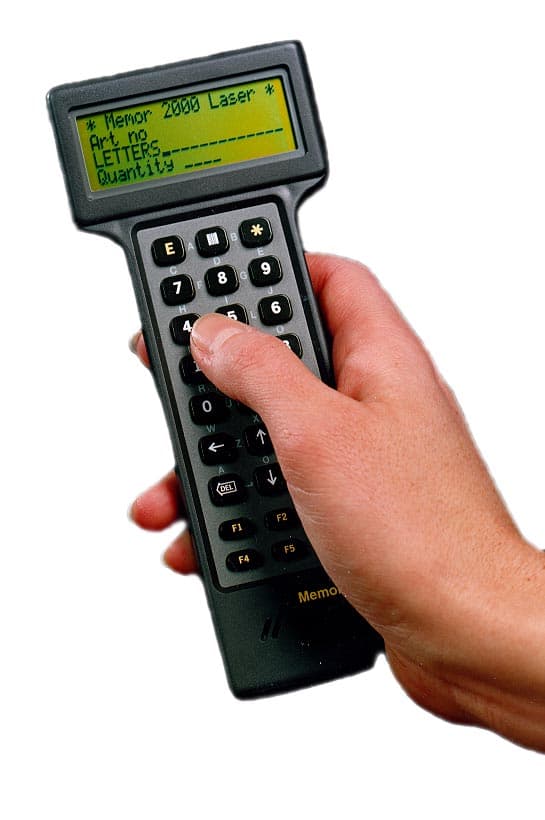
Click to zoom
Application Details
- Equipment Class
- JBC - Part 15 Class B Computing Device/Personal Computer
- Date of Grant
- Mar 16, 2000
- Application Purpose
- Original Equipment
- Date of Application
- Jun 06, 1999
- Equipment Note
- Handheld Computer
- Company
- Minec Systems AB
- Country
- Sweden
Documents & Files
Document Text
Text extracted from the exhibit documents filed with the FCC. Open a document above to read the original.
Users Manual
Memor2000 User Handbook 2 User Handbook Memor2000 Welcome as a Memor2000 user! The Memor2000, a Swedish-developed hand-held computer, incorporates the latest semiconductor technology. The Memor2000 is functional, compact and ergonomically designed, and sufficiently robust to withstand a wide variety of environments and working conditions. This handbook provides a general description of your new hand-held computer. We recommend that you read it carefully. In addition to this handbook you will normally have a separate description of your particular application program*. We are certain you will find your new hand-held computer extremely useful. * Application program and other terms are explained in the glossary at the end of this handbook. Produced by Minec Systems AB Box 7278 187 14 TÄBY SWEDEN Tel: +46 8 630 92 92 Fax: +46 8 630 05 07 E-mail: [email protected] Internet: http://www.minec.se MS-DOS is a trademark registered by Copyright © Minec Systems AB 1997Microsoft Corporation. User Handbook Memor2000 3 ContentsPage 1. General information about the Memor2000 ... 4-7 2. Battery replacement.............................................8 3. Accessories..........................................................9 4. Care and maintenance ..................................... 10 5. Troubleshooting................................................. 11 6. Technical specification................................12-13 7. Glossary of terms .............................................. 14 8. Appendix........................................................... 15 9. New menu functions ......................................... 16 NOTE: This equipment has been tested and found to comply with the limits for a Class B digital device, pursuant to part 15 of the FCC Rules. These limits are designed to provide reasonable protection against harmfull interference in a residential installation. This equipment generates, uses and can radiate radio frequency energy and, if not installed and used in accordance with the instructions, may cause harmful interference to radio communications. However, there is no guarantee that interference will not occur in a particular installation. If this equipment does cause harmful interference to radio or television reception, which can be determined by turning the equipment off and on, the user is encouraged to try to correct the interference by one more of the following measures: – Reorient or relocate the receiving antenna. – Increase the separation between the equipment and receiver. – Connect the equipment into an outlet on a circuit different from that to which the receiver is connected. – Consult the dealer or an experienced radio/TV technician for help. 4 User Handbook Memor2000 1. General information about the Memor2000 On delivery The Memor2000 is supplied complete with batteries and is ready to use. Once you have taken the computer out of its box, check immediately that there are no visible signs of transport damage. Getting started Start by becoming familiar with the various parts of the hand-held computer. The Memor2000 has an LCD Supertwist display, which means you never have to set the contrast. The characters on the screen can be clearly read in all light conditions and from all angles. The display is fully graphic, which means figures and symbols can also be shown. There is space to display four lines of twenty normal-size characters per line. The Memor2000 is held and operated by the same hand. Place the computer (still switched off) in the palm of one hand and pratice pressing the number keys with your thumb. User Handbook Memor2000 5 The keyboard is presented below. Any special features are described in your application program documentation. E This is the equivalent of the ENTER key on an ordinary PC, and is normally used to confirm data or to scroll to the next menu choice. Arrow keys Used to scroll forwards and backwards in menus and entered data. DEL The equivalent of the Backspace-key on an ordinary PC. Erases the previous character. F1-F5 Function keys that provide different functions depending on the application program. ON/OFF Press the ON/OFF key to switch the Memor2000 on or off. If no other key is pres- sed in the space of two minutes, the hand- held computer switches itself off automatically to save power. After automatic switch-off the computer is switched on again by using the ON/OFF key. Note: The Memor2000 cannot be switched off while undertaking certain sensitive calculations. In this event wait until the calculation has been completed, after which it will be possible to switch off the hand- held computer again as normal. See also ”New features...” on page 6. SHIFT The shift-key is used to increase the number of functions available. By holding down the shift-key while pressing another key, another function can be obtained. * This is the equivalent of the Escape-key on an ordinary PC, and is used to discontinue data entry or to return to the previous menu. Simplified you could say that the E-key means ”yes” and the *-key means ”no”. I The key for activating the laser scanner or RFID reader (see Application Modules). Letter entering The method used to enter letters is both simple and unique (patent pending). The required letter is obtained by pressing two adjacent keys at the same time with your thumb. For example, if you wish to enter the letter ”K”, you will find this letter between key ”4” and key ”5”. You simply press the letter ”K”. When you do this, adjacent keys ”4” and ”5” are both pres- sed, which results in entry of the desired letter. 6 User Handbook Memor2000 General information There are two angled holes below the keyboard. These let out sound from the built-in sounder and should therefore not be covered by the hand. There are two small black discs on the back of the Memor2000. These are infrared (IR) sensors used to trans- fer data to and from the docking station (DS-S) which is available as an accessory. There is a battery compartment co…
Text truncated - open the document above for the full version.
External Photos
ID Label
External Photos
ID Label
ID Label/Location Info
1 Memor 2000 Identification label Docname: Fccidlab.doc 06/08/01 Sven-Erik Arenbalk Memor 2000 FCC ID OLFMEMOR2000 CE Made in Sweden Size: 38 mm x 25 mm (1½” x 1”) Location: On the back of the unit.
Internal Photos
Memor2000 circuit boards
Contact Information
Applicant
Sven-Erik G Arenbalk(Manager R&D)
Technical Contact
Non-Technical Contact
Minec Systems ABGoran E Thorn
[email protected]+46 8 630 9292
Test Firm
Svenska EMC Lab ABHans Ostergren
Technical Specifications
| # | Rule Parts | Frequency Range | Power Output |
|---|---|---|---|
| 1 | 15B | - | - |