OW3NEM-2GSM850/1900 Cellular Telephone
Microsoft Corporation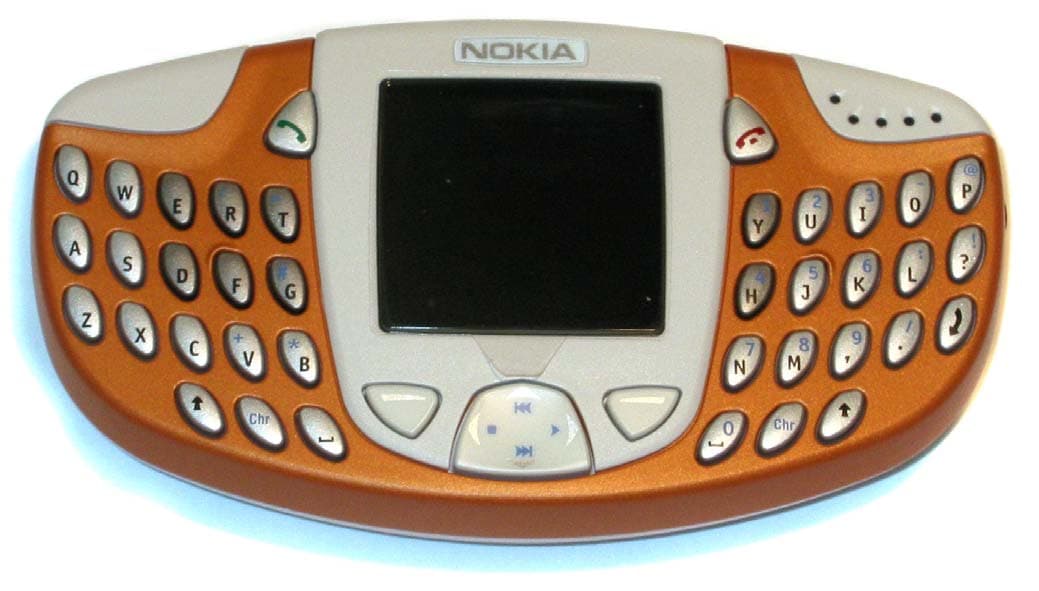
Click to zoom
Application Details
- Equipment Class
- PCE - PCS Licensed Transmitter held to ear
- Date of Grant
- May 02, 2003
- Application Purpose
- Original Equipment
- Date of Application
- May 02, 2003
- Equipment Note
- GSM850/1900 Cellular Telephone
- Frequency Range
- 1850.20000000 - 1909.80000000
- Company
- Microsoft Corporation
- Country
- United States
Documents & Files
Document Text
Text extracted from the exhibit documents filed with the FCC. Open a document above to read the original.
Users Manual
[ 1 ] User Guide for Nokia 3300 Music Phone FCC DRAFT [ 2 ] The wireless phone described in this guide is approved for use in 850 and 1900 GSM networks. LEGAL INFORMATION Part No. 9355979, Issue No. 1 Copyright ©2003 Nokia. All rights reserved. Nokia, Nokia Connecting People, Nokia 3300, and the Nokia Original Accessories logos are trademarks or registered trademarks of Nokia Corporation. All other product and company names mentioned herein may be trademarks or tradenames of their respective owners. Printed in Canada June/2003 US Patent No 5818437 and other pending patents. T9 text input software Copyright ©1999-2003. Tegic Communications, Inc. All rights reserved. Includes RSA BSAFE cryptographic or security protocol software from RSA Security.Java is a trademark of Sun Microsystems, Inc. The information in this user guide was written for the Nokia 3300 phone. Nokia operates a policy of ongoing development. Nokia reserves the right to make changes and improvements to any of the products described in this document without prior notice. UNDER NO CIRCUMSTANCES SHALL NOKIA BE RESPONSIBLE FOR ANY LOSS OF DATA OR INCOME OR ANY SPECIAL, INCIDENTAL, AND CONSEQUENTIAL OR INDIRECT DAMAGES HOWSOEVER CAUSED. THE CONTENTS OF THIS DOCUMENT ARE PROVIDED “AS IS.” EXCEPT AS REQUIRED BY APPLICABLE LAW, NO WARRANTIES OF ANY KIND, EITHER EXPRESS OR IMPLIED, INCLUDING, BUT NOT LIMITED TO, THE IMPLIED WARRANTIES OF MERCHANTABILITY AND FITNESS FOR A PARTICULAR PURPOSE, ARE MADE IN RELATION TO THE ACCURACY AND RELIABILITY OR CONTENTS OF THIS DOCUMENT. NOKIA RESERVES THE RIGHT TO REVISE THIS DOCUMENT OR WITHDRAW IT AT ANY TIME WITHOUT PRIOR NOTICE. EXPORT CONTROLS This product contains commodities, technology or software exported from the United States in accordance with the Export Administration regulations. Diversion contrary to U.S. law is prohibited. FCC/INDUSTRY CANADA NOTICE Your phone may cause TV or radio interference (for example, when using a telephone in close proximity to receiving equipment). The FCC or Industry Canada can require you to stop using your telephone if such interference cannot be eliminated. If you require assistance, contact your local service facility. This device complies with part 15 of the FCC rules. Operation is subject to the condition that this device does not cause harmful interference. [ 1 ] Contents Contents 1 Appendix A Message from the CTIA163 8 Appendix B Message from the FDA 167 8 For your safety 9 General information 11 Overview of functions 11 Digital music player and recorder 11 Stereo radio 11 Music key 12 Loudspeaker 12 Polyphonic sound 12 MIDP JavaTM applications 12 Instant Messaging and E-Mail 12 13 Multimedia messaging service (MMS) 13 General packet radio service (GPRS) 13 Nokia OTA settings service 13 Memory card 14 Access Codes 14 Security code 14 PIN code and PIN2 code 14 PUK and PUK2 codes 15 Restriction password 15 Shared memory 15 Accessibility solutions 15 Network Services 16 About enhancements 16 Understand your phone 17 Keys and Connectors 17 Keys 17 17 17 17 [ 2 ] 17 17 17 Connectors 19 Standby mode 19 Wrist strap 22 Headset 22 Data cables 23 Getting started 25 Install the SIM card and battery 25 Remove and install the memory card 27 Charge the battery 28 Switch the phone on and off 29 Keypad lock (Keyguard) 30 Change the covers 30 Music functions 33 Listen to music 33 Listen to the radio 35 Call functions 37 Make a call 37 Make a call using the Contacts list 37 Last number redialing 37 Call your voice mailbox 38 1-touch dialing 38 Vanity dialing 38 Answer or decline an incoming call 38 Make a conference call 39 Options during a call 40 Contacts 41 Contact settings 41 Saving contacts and phone numbers (Add name) 41 Search for a name in Contacts 43 Editing a contact, number or text item 43 Erasing names and numbers 43 Copying Contacts lists 44 Sending and receiving a business card 44 [ 3 ] 1-touch dialing 45 Info numbers (delete this? not in menu) 45 Service numbers 45 My numbers 45 Caller groups 46 Messages (Menu 1) 47 Menu functions 47 Access a menu function 47 Scroll to a menu 47 Menu shortcuts 47 Messages (Menu 1) 48 Text messages 49 Write and send messages 49 Write text 50 Tips for writing text 51 Options for sending a message 52 Write and send e-mail 52 Read and reply to a message 53 Inbox and outbox folders 54 Templates 55 Insert a text template into a message or an e-mail 55 Insert a picture into a text message 55 Archive folder and my folders 55 Multimedia messages 56 Write and send a multimedia message 57 Read and reply to a multimedia message 58 Inbox, Outbox, Saved and Sent items folders 59 Multimedia messages memory full 59 Erase messages 59 Use Instant messaging 60 Set up Instant messaging 61 Instant messages 61 Chat Sessions 62 Contacts 64 Add a new contact 64 Remove a contact 65 [ 4 ] Private Groups 66 IM settings 67 Log Off Service 70 Voice messages 70 Info messages 70 Message settings 71 Overwrite settings 72 Settings for multimedia messages 72 Receive the multimedia connection settings as a text message 73 Font size setting 73 Service commands 73 Call log (Menu 2) 75 Recent calls lists 75 Call counters and call timers 76 Profiles (Menu 3) 79 Settings (Menu 4) 81 Time and date settings 81 Clock 81 Date 81 Auto update of date and time 81 Call settings 82 Call Forwarding 82 Anykey answer 82 Automatic redial 82 1-touch dialing 82 Call waiting 83 Summary after call 83 Send my caller identity 83 Line for outgoing calls 83 Phone settings 84 Language 84 Automatic keyguard 84 Cell info display 84 Welcome note 85 System selection 85 [ 5 ] Confirm SIM service actions 85 Help text activation 85 Start-up tone 85 Music settings 85 Equalizer 85 Balance 86 Loudness 86 Stereo widening 86 Restore default music settings 86 Display settings 86 Wallpaper 86 Color schemes 87 Operator logo 87 Screen saver timeout 87 Display brightness 88 Tone settings 88 Enhancement settings 89 Headset 89 TTY/TDD 89 Security settings 89 Restore factory settings 90 Right se…
Text truncated - open the document above for the full version.
Users Manual
[ 93 ] 12 Music (Menu 6) You can listen to music or to the FM stereo radio with your phone. You can also record music from the radio or an external music source. You can record or transfer music files of up to 2 hours of near CD-quality music to a 64 MB memory card. Note: Your phone must be switched on to use this function. Do not switch the phone on when wireless phone use is prohibited or when it may cause interference or danger. Transferring music files from a PC: See Nokia Audio Manager. Using the Music key: You can quickly turn on and off, and switch between the music functions with the special Music key on the top of the phone. Press to select Music player, Radio or Music off. •A quick press of the music key switches between the Music player, Radio, and Music off. •A long press of the music key selects and starts the selected music function. Music player With the Music player you can listen to the music tracks stored on the memory card in your phone. You can listen to music using the internal loudspeaker, or the headset HDS-3H (stereo) or HDB-4 (mono). Warning: When using a headset, your ability to hear outside sounds is reduced. DO NOT USE A HEADSET WHERE IT CAN ENDANGER YOUR SAFETY. [ 94 ] 12 To turn on the Music player, press Menu, and select Music and Music player. Details of the first track on the track list are shown. Note: You must have a memory card containing audio files inserted in the phone to use the Music player. When the Music player is on, press Options and select: •Play to play the current track on the track list, or Stop to stop the playback. •Track list to view and modify the track list. See Track list. •Play options: Select Random to play the tracks on the track list in random order. Select Continuous to play the current track or the whole track list through repeatedly. •Music downloads to connect to the WAP address attached to the current track. This function is only available when a WAP address is attached to the current track. •Memory status to check the amount of free and used memory on the memory card. Tip: When the phone is in standby mode and the Music player is active in the background, you can control the player by simultaneously pressing the Music key and the appropriate function on the 4-way scroll key. To adjust the volume level, use the Volume key on the top of the phone. Warning: Listening to music at a high volume may damage your hearing. Listening to music To rewind the current track, press and hold . To fast forward the current track, press and hold . To skip to the next or previous track on the track list, quickly press or , respectively. [ 95 ] 12 Tip: In standby mode, you can skip to the next or previous track by simultaneously pressing the Music key and or , respectively. To select a track from the track list, press Options and select Track list. Scroll to the track you want, press Options and select Play. To stop the playback, press . To listen to music using the loudspeaker (or headset), press Options and select Loudspeaker (or Headset). Tip: When using the headset HDB-4 and HDS-3H, press the headset key quickly to skip to the next track on the track list. Press and hold the headset key to turn off the Music player. You can make a call or answer an incoming call while listening to music. During a call, the playback is stopped. Track list You can view and play the music tracks on the track list. You can also add tracks to the track list, change the playback order of tracks, rename tracks and delete tracks from the track list. When the Music player is on, press Options and select Track list. Scroll to the desired track. Press Options and the following options are available: •Play to play the selected track. •Add track to add a track to the track list. The Gallery folder list is shown. Select a folder to open it and scroll to the track you want to add. Press Options and select Add to track list. •Move track within track list to change the location of the selected track on the track list. Scroll to the new location and press Select. •Rename to edit the track title and artist name of the selected track. Key in the new track title and press OK. Key in the new artist name and press OK. •Remove track to delete the track from the track list. [ 96 ] 12 Radio To listen to the radio on your phone connect the headset HDS-3 (stereo) or HDB-4 (mono) to the phone. The headset cable functions as the antenna of the radio, so let it hang freely. To adjust the volume level, use the Volume key on the top of the phone. Warning: Listening to music at a high volume may damage your hearing. Note that the quality of the radio broadcast depends on the radio station’s coverage in that particular area. 1To turn on the radio, press Menu, and select Music and Radio. On the display are •Station (Will Menu change to localize Channel to Station?????) location number and the name of the radio station. •Frequency of the radio station. Tip: To quickly turn on the radio, press the Music key on the top of the phone and select Radio. 2If you have already saved radio stations, you can scroll to the station you would like to listen to, or select a radio station location 1 to 20 by pressing the corresponding number key. Tip: When using the headset HDB-4 and HDS-3, press the headset key to scroll to the desired saved radio station. When the phone is in standby mode and the radio is on in the background, you can scroll to the next or previously saved radio station by pressing or , respectively. 3When the radio is on, press Options and select Switch off to turn off the radio. Tip: To quickly turn off the radio, press and hold . [ 97 ] 12 Tune a radio station When the radio is on, press and hold or to start the station search. Searching stops when a station is found. To save the station, press Options, and select Save station. Key in the name of the station and press OK. Select the location where you want to save the station. Tip: To quickly save the station in a location 1 to 20, press…
Text truncated - open the document above for the full version.
Users Manual
Copyright © 2003 Nokia. All rights reserved. Copyright © 2003 Nokia. All rights reserved. The wireless phone described in this guide is approved for use in 850 and 1900 GSM networks. LEGAL INFORMATION Part No. 9355979, Issue No. 1 Copyright ©2003 Nokia. All rights reserved. Nokia, Nokia Connecting People, Water Rapids, Virtual Me, Snake EX2, DJ, Nokia 3300, Xpress-on, and the Nokia Original Accessories logos are trademarks or registered trademarks of Nokia Corporation. All other product and company names mentioned herein may be trademarks or tradenames of their respective owners. Printed in Canada 06/2003 US Patent No 5818437 and other pending patents. Includes RSA BSAFE cryptographic or security protocol software from RSA Security. Java is a trademark of Sun Microsystems, Inc. The information in this user guide was written for the Nokia 3300 music phone. Nokia operates a policy of ongoing development. Nokia reserves the right to make changes and improvements to any of the products described in this document without prior notice. UNDER NO CIRCUMSTANCES SHALL NOKIA BE RESPONSIBLE FOR ANY LOSS OF DATA OR INCOME OR ANY SPECIAL, INCIDENTAL, AND CONSEQUENTIAL OR INDIRECT DAMAGES HOWSOEVER CAUSED. THE CONTENTS OF THIS DOCUMENT ARE PROVIDED “AS IS.” EXCEPT AS REQUIRED BY APPLICABLE LAW, NO WARRANTIES OF ANY KIND, EITHER EXPRESS OR IMPLIED, INCLUDING, BUT NOT LIMITED TO, THE IMPLIED WARRANTIES OF MERCHANTABILITY AND FITNESS FOR A PARTICULAR PURPOSE, ARE MADE IN RELATION TO THE ACCURACY AND RELIABILITY OR CONTENTS OF THIS DOCUMENT. NOKIA RESERVES THE RIGHT TO REVISE THIS DOCUMENT OR WITHDRAW IT AT ANY TIME WITHOUT PRIOR NOTICE. Copyright © 2003 Nokia. All rights reserved. EXPORT CONTROLS This product contains commodities, technology or software exported from the United States in accordance with the Export Administration regulations. Diversion contrary to U.S. and Canadian law is prohibited. FCC/INDUSTRY CANADA NOTICE Your phone may cause TV or radio interference (for example, when using a telephone in close proximity to receiving equipment). The FCC or Industry Canada can require you to stop using your telephone if such interference cannot be eliminated. If you require assistance, contact your local service facility. This device complies with part 15 of the FCC rules. Operation is subject to the condition that this device does not cause harmful interference. i Copyright © 2003 Nokia. All rights reserved. Contents 1. For your safety . . . . . . . . . . . . . . . . . . . . . . . . . . . . . . . . . 1 2. General information . . . . . . . . . . . . . . . . . . . . . . . . . . . . . 4 Overview of functions . . . . . . . . . . . . . . . . . . . . . . . . . . . . . . . . . . 4 Digital music player and recorder . . . . . . . . . . . . . . . . . . . . . . . . . . . . . . 4 Stereo radio . . . . . . . . . . . . . . . . . . . . . . . . . . . . . . . . . . . . . . . . . . . . . . . . . . . . 5 Music key . . . . . . . . . . . . . . . . . . . . . . . . . . . . . . . . . . . . . . . . . . . . . . . . . . . . . . 5 Loudspeaker . . . . . . . . . . . . . . . . . . . . . . . . . . . . . . . . . . . . . . . . . . . . . . . . . . . . 5 Polyphonic sound . . . . . . . . . . . . . . . . . . . . . . . . . . . . . . . . . . . . . . . . . . . . . . . . 5 Save ringing tones . . . . . . . . . . . . . . . . . . . . . . . . . . . . . . . . . . . . . . . . . . . . . . . 6 Copyright protection. . . . . . . . . . . . . . . . . . . . . . . . . . . . . . . . . . . . . . . . . . . . . . 6 Java TM applications . . . . . . . . . . . . . . . . . . . . . . . . . . . . . . . . . . . . . . . . . . . . . . 6 Instant messaging and e-mail . . . . . . . . . . . . . . . . . . . . . . . . . . . . . . . . . . . . . . 6 Multimedia messaging service (MMS) . . . . . . . . . . . . . . . . . . . . . . . . . . . . . . . 7 General packet radio service (GPRS) . . . . . . . . . . . . . . . . . . . . . . . . . . . . . . . . . 7 Nokia OTA settings service . . . . . . . . . . . . . . . . . . . . . . . . . . . . . . . . . . . . . . . . . 8 Memory card . . . . . . . . . . . . . . . . . . . . . . . . . . . . . . . . . . . . . . . . . . . . . . . . . . . 8 Access Codes . . . . . . . . . . . . . . . . . . . . . . . . . . . . . . . . . . . . . . . . . . . . . 8 Security code . . . . . . . . . . . . . . . . . . . . . . . . . . . . . . . . . . . . . . . . . . . . . . . . . . . 8 PIN code and PIN2 code . . . . . . . . . . . . . . . . . . . . . . . . . . . . . . . . . . . . . . . . . . 9 PUK and PUK2 codes. . . . . . . . . . . . . . . . . . . . . . . . . . . . . . . . . . . . . . . . . . . . . . 9 Restriction password . . . . . . . . . . . . . . . . . . . . . . . . . . . . . . . . . . . . . . . . . . . . . 9 ii Copyright © 2003 Nokia. All rights reserved. Shared memory . . . . . . . . . . . . . . . . . . . . . . . . . . . . . . . . . . . . . . . . . . 10 Receive accessibility information . . . . . . . . . . . . . . . . . . . . . . . . . . . . . 10 Network Services . . . . . . . . . . . . . . . . . . . . . . . . . . . . . . . . . . . . . . . . . 10 Enhancements . . . . . . . . . . . . . . . . . . . . . . . . . . . . . . . . . . . . . . . . . . . 11 Get help . . . . . . . . . . . . . . . . . . . . . . . . . . . . . . . . . . . . . . . . . . . . . . . . 12 Find the phone’s label . . . . . . . . . . . . . . . . . . . . . . . . . . . . . . . . . . . . . . . . . . . 12 Contact Nokia . . . . . . . . . . . . . . . . . . . . . . . . . . . . . . . . . . . . . . . . . . . . . . . . . . 13 Contact your service provider . . . . . . . . . . . . . . . . . . . . . . . . . . . . . . . . . . . . . 13 3. Understand your phone. . . . . . . . . . . . . . . . . . . . . . . . . . 15 Keys and connectors. . . . . . . . . . . . . . . . . . . . . . . . . . . . . . . . . . . 15 Keys . . . . . . . . . . . . . . . . . . . . . . . . . . . . . . . . . . . . . . . . . . . . . . . . . . . 15 Connectors . . . . . . . . . . . . . . . . . . . . . . . . . . . . . . . . . . . . . . . . . . . . . 18 Standby…
Text truncated - open the document above for the full version.
Users Manual
16 Copyright © 2003 Nokia. All rights reserved. 2Volume key The volume key turns the volume up or down on the earpiece, the headset, and the loudspeaker. 3Music key The music key takes you to the Music player and FM radio without going through the menu. You can also switch the music off with this key. i)Short press and long press of the music key The first short press of the music key will take you to the music menu. j)Once you are in the music menu, a short press switches or scrolls through the menu choices (Music player, Radio, and Switch music off). The choices are highlighted as you move or switch from one menu choice to the next. k)A long press on a highlighted choice selects and starts the music player or radio, or switches the music off. 4Four-way scroll key Up , down , left and right Use the scroll key to scroll through contact names, phone numbers, menus or settings. You can also do a station search in the radio, adjust the music settings, and access music functions such as play, stop, fast forward, and rewind. 17 Copyright © 2003 Nokia. All rights reserved. While listening to the music player or radio, press once to skip back to the beginning of a song on the music player, or press twice to skip backwards to the previous recording or previous radio station. Press to skip forward to the next recording or radio station. In standby mode, press to go to the first name stored in Contacts. Press to go to the last name stored in Contacts. Press to go to Messages to create a new message. Press to go to a calendar of the current month with the current day highlighted. You can also scroll up and down to see previous and future months. 5Selection keys and In standby mode the selection keys are Menu and Contacts. As you go through the menus, the selection keys give you different options. For example, if you press the selection key below Contacts, you will see Select and Exit. 6Send and End keys Press the send key to dial a phone number or answer a call. If you press this key in standby mode, it shows the last phone number you dialed. Press the end key to end a call. This key is also a quick way to exit from any function. 18 Copyright © 2003 Nokia. All rights reserved. Connectors 1Charger connector 2Pop-Port TM connector for headsets, the USB data cable, and loopset 3Audio ADE-2 recording cable connector to connect the phone to external audio equipment such as a CD player or PC Standby mode The phone is in standby mode when it is on and ready to use, but you have not entered any numbers or characters. 1Indicates the wireless system that is in use. 2Shows the signal strength of the cellular system at your current location. The higher the bar, the stronger the signal. 3Shows the battery charge level. The higher the bar, the more power in the battery. 4The left selection key in standby mode is Menu. 5The right selection key in standby mode is Contacts. 1 2 3 1 2 3 4 6 5 19 Copyright © 2003 Nokia. All rights reserved. 6When the music player is on, the track title is shown. When the radio is on, the radio station is shown. You can show the time and date in standby mode. See Clock and Date for instructions. Also see Icons in standby mode. Screen saver Your phone has an automatic screen saver for saving power in standby mode. A digital clock is displayed when no phone functions are in use. You can set the timer to activate the screen saver. See Screen saver timeout. To deactivate the screen saver, press any key. If you have not set the time, 00:00 is displayed. To set the time, see Clock. Wallpaper You can select and set a wallpaper or background picture to display when the phone is in standby mode. See Wallpaper. 20 Copyright © 2003 Nokia. All rights reserved. Icons in standby mode The following list shows different icons seen on the screen in standby mode to let you know you have received messages or which settings are active. You have received one or more text or picture messages. See Read and reply to a message. You have received one or more multimedia messages. See Read and reply to a multimedia message. You have received one or more voice messages. See Voice messages. The phone keypad is locked. See Keypad lock (keyguard). The phone does not ring at an incoming call or text message when Incoming call alert is set to Off and Message alert tone is set to Off. See Tone settings. The alarm clock is set to On. See Alarm clock. The countdown timer is running. See Countdown timer. 21 Copyright © 2003 Nokia. All rights reserved. The stopwatch timer is running in the background. See Stopwatch. A GPRS connection is established. The indicator is shown on the top left of the display. The GPRS connection is on hold, for example, if there is an incoming or outgoing call during a GPRS connection. All your calls are forwarded to another number, Forward all voice calls. If you have two phone lines, the forward indicator for the first line is and for the second line . See Call forwarding. or If you have two phone lines, indicates the selected phone line. See Line for outgoing calls. The loudspeaker has been activated. Track name The music player is on. Radio station name The radio is on. Calls are limited to a closed user group. See Security settings. 22 Copyright © 2003 Nokia. All rights reserved. Wrist strap You can attach a wrist strap to your phone. Thread the strap through the holes behind the music key as shown in the picture, and pull to tighten. Headset Connect Insert the headset plug into the Pop- Port TM connector on the top of the phone. The cable is connected correctly when the arrowhead points toward the display screen and the cord falls toward the music key on the left side. When the headset is connected, appears on the screen. The timed profile is selected. See Profiles (Menu 4). A headset accessory is connected to the phone. A loopset accessory is connected to the phone. 23 Copyright © 2003 Nokia. All rights reserved. Disconnect Remove the headset cable from the Pop-Port TM connector by graspi…
Text truncated - open the document above for the full version.
Users Manual
36 Copyright © 2003 Nokia. All rights reserved. 4To replace the front cover, place the catches on the lower part of the cover into the corresponding holes in the phone (4); then gently press the cover into place (5). 5Replace the back cover. 4 5 5 37 Copyright © 2003 Nokia. All rights reserved. 5. Music functions You can listen to music stored on the memory card in your phone with the Music player, or you can listen to the FM stereo radio. You can turn the Music player on and off with the special music key located on the top left of your phone. Note: Your phone must be switched on to use this function. Do not switch the phone on when wireless phone use is prohibited or when it may cause interference or danger. You can use the Nokia Audio Manager software to create and organize digital music files on a compatible PC and transfer them to the memory card in your phone. Playlists appear as track lists in the phone. See Nokia Audio Manager for instructions. You can also record music from the radio or an external music source, for example, a CD player. See Recorder for instructions. To adjust the playback volume, use the Volume key on the top right of the phone. Warning: Listen to music at a moderate level. Continuous exposure to high volume may damage your hearing. 38 Copyright © 2003 Nokia. All rights reserved. Listen to music You can listen to music on the loudspeaker or with headphones. To connect the headset to your phone, See Headset. Press the Music key and select Music player. Use the functions of the four-way scroll key as described in the following table. Four-way scroll key Music functions Play Stop Fast forward, press and hold Rewind, press and hold Skip to the next track Skip to the previous track 39 Copyright © 2003 Nokia. All rights reserved. Press Options to open a list of available Music player options. For example, from the Options list you can select Loudspeaker to listen to music with the internal loudspeaker. To turn the Music player off, press the Music key and select Switch music off. For more information, see Music player. Listen to the radio To listen to the FM radio, you must first connect the headset. The headset functions as the radio antenna. For the best reception, allow it to hang freely. 1Press the Music key and select Radio. 2To tune a station, press and hold or and the station search starts. Searching stops when a station is found. 3Press Options to open a list of the available options. For example, from the Options list you can select Set frequency to manually key in the frequency of a radio station. For more information, see Radio. 40 Copyright © 2003 Nokia. All rights reserved. 6. Call functions Make a call 1The number keys are located on the right side of the keyboard. Key in the phone number, including the area code. If you key in an incorrect number, press Clear to delete it. For international calls, press for the international prefix (the + character replaces the international access code) and then key in the country code, area code without the leading 0, if necessary, and the phone number. 2Press to call the number. 3Press to end the call or to cancel the call attempt. See Options during a call. Note: If you are listening to music and receive a call, the music player and the radio are temporarily muted. When you end the call, the music player and radio are automatically turned back on. Make a call using the Contacts list Press Contacts and select Find. Scroll to the number you wish to call using the on the four-way scroll key. Press to call the number on the display. See Search for a contact. 41 Copyright © 2003 Nokia. All rights reserved. Last number redialing In standby mode, press once to access a list of the last 20 numbers you called or attempted to call. Scroll to the number or name you want, and press to call the number. Calls you dialed from numbers stored in your Contacts list will appear with the name you saved for the number. Calls you dialed that are not stored in Contacts will appear with the phone number. Call your voice mailbox In standby mode, press and hold , or press and . If the phone asks for the voice mailbox number, key in the number (obtained from your service provider) and press OK. See Voice messages. 1-touch dialing You can assign a phone number to one of the 1-touch dialing keys, from 2 to 9. 1Go to Contacts and select the number you want to assign a 1-touch dialing key. 2Select Details to see the phone number. 3Select Options and scroll to 1-touch dialing. Select a number from 2 to 9 and select Assign. 42 Copyright © 2003 Nokia. All rights reserved. To call the number in standby mode, press the 1-touch dialing key you wish to call and press . If the 1-touch dialing function is set to On: Press and hold the corresponding 1-touch dialing key until the call is started. See 1-touch dialing. Vanity dialing You can dial a phone number that is alphanumeric (using both letters and numbers). For example, many 800 numbers are advertised with a name such as +1-888-NOKIA-2U. You can enter the numbers and letters, and the phone will automatically dial the corresponding numbers for the letters you enter. To use this feature: 1Press the to enter the + symbol. 2Then enter 1 and 888. 3Press the key and enter the letters, such as NOKIA-2U. 4Press to make the call. Voice dialing The voice dialing feature allows handsfree operation while you place a call. You can dial a phone number by saying one or more words that have been saved as voice tags. Before using this feature, you need to create entries in the contacts list so you can associate a voice tag with a name and number. Voice dialing cannot be used while the phone is sending or receiving data over a GPRS connection. 43 Copyright © 2003 Nokia. All rights reserved. Add a voice tag to a contact To create contacts, see Add a contact using the Contacts menu. 1At the start screen, scroll to the name you want to give a voice tag. 2Press Details, then Options. Add voice tag appears highlighted. 3P…
Text truncated - open the document above for the full version.
Contact Information
Applicant
Hasnain Syed(Director, EMC, SI and RF Compliance)
Technical Contact
Technical Specifications
| # | Rule Parts | Frequency Range | Power Output | Emission | Tolerance |
|---|---|---|---|---|---|
| 2 | 24E | 1.85 GHz - 1.91 GHz | 1.175 W | 256KGXW | 48 Hz |
Other Applications from Microsoft Corporation

OW3HF-36W
Jan 15, 2008Bluetooth Handsfree Unit
Equipment Class
DSS - Part 15 Spread Spectrum Transmitter
OW3RX-42
Dec 19, 2007Bluetooth Car Kit
Equipment Class
DSS - Part 15 Spread Spectrum Transmitter
OW3PD-17
Oct 25, 2007Portable Navigation Device
Equipment Class
DXX - Part 15 Low Power Communication Device Transmitter
OW3RM-223
Oct 11, 2007GSM/WCDMA Cellular Phone with BT/WLAN
Equipment Class
DTS - Digital Transmission System
OW3RM-256
Sep 16, 2007GSM cellular phone with BT
Equipment Class
PCE - PCS Licensed Transmitter held to ear