OW3RX-1MBluetooth Car Kit
Microsoft Corporation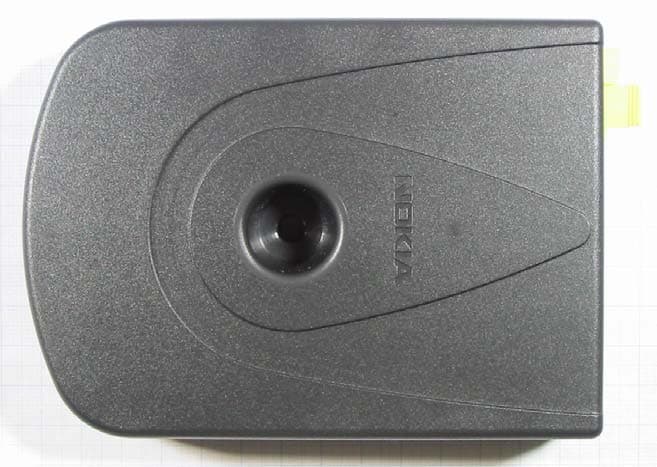
Click to zoom
Application Details
- Equipment Class
- DSS - Part 15 Spread Spectrum Transmitter
- Date of Grant
- Jun 02, 2004
- Application Purpose
- Original Equipment
- Date of Application
- Jun 02, 2004
- Equipment Note
- Bluetooth Car Kit
- Frequency Range
- 2402.00000000 - 2480.00000000
- Company
- Microsoft Corporation
- Country
- United States
Documents & Files
Document Text
Text extracted from the exhibit documents filed with the FCC. Open a document above to read the original.
Users Manual
R Telephone Handbook Publication Part No. LRL0000ENG *** Edition Land Rover 2004 All rights reserved. No part of this publication may be reproduced, stored in a retrieval system or transmitted in any form, electronic, mechanical, recording or other means without prior written permission from Land Rover. 1 L Telephone Handbook For your convenience, this handbook is divided into sections, each dealing with a different aspect of the Telephone System. These are listed on the contents page and you will find it worthwhile to take a little time to read each section relevant to your specification. The specification of each vehicle will vary according to territorial requirements and also from model to model within the vehicle range. Some of the information published in this handbook, therefore, may not apply to your particular vehicle. *An asterisk appearing within the text, identifies features or items of equipment that are fitted as options. Land Rover operates a policy of constant product improvement and therefore reserves the right to change specifications without notice at any time. Whilst every effort is made to ensure complete accuracy of the information in this handbook, no liabilities for inaccuracies or the consequences thereof can be accepted by the manufacturer or the dealer, except in respect of personal injury caused by the negligence of the manufacturer or the dealer. 1 Quick Overview R Quick Overview MAKING/ANSWERING AND ENDING CALLS VIA THE STEERING WHEEL CONTROLS The preferred method of making, answering or ending a call, is by using the steering wheel controls. This method is preferable, as both hands can be kept on the steering wheel. Visual confirmation of Names/Numbers is given via the Main message centre. (The following processes apply after your phone is docked). Answering and ending calls via the steering wheel controls 1.To switch between Audio/Telephone functions, press the R/T button. 2.To answer an incoming call, press the Telephone/Voice recognition button. 3.Press this hardkey again to end the active call. Making calls via the steering wheel controls 1.To switch between Audio/Telephone functions, press the R/T button. 2.The Main message centre displays your mobile phone addressbook/phonebook contacts. This is shown in name/number format, starting at the first entry. 3.A manual scroll function can be actioned via the steering wheel controls (Search forwards/backwards) as shown. 4.To make a call, press the Telephone/Voice recognition button when the required contact name/number is shown. Last number redial When you are not in the ‘Phonebook’ mode (as just described) and there is no number visible in the Main message centre, a short press of the Telephone/ Voice recognition button will call the last number dialled. TEL0056 ENG TEL0057 ENG 2 Quick Overview L 13 Introduction R Introduction USING THE PHONE IN THE VEHICLE WARNING Using the telephone near the car: Do not telephone inside a garage or near an open car bonnet. The air may contain fuel vapours and the telephone could produce sparks and start a fire. WARNING Unusual ambient conditions: Switch off the telephone in areas where high explosives are being used. High frequency remote controls could be interfered with and cause an explosion. Switch off your telephone in areas with a high explosion risk. This includes filling stations, fuel storage areas or chemical factories as well as places where the air contains fuel vapour, chemicals or metal dust. The telephone might possibly produce sparks and cause a fire or explosion. WARNING Medical equipment: The functioning of cardiac pacemakers or hearing aids may be impaired when the phone is in use. Check with a doctor or manufacturer whether any such devices you or your passengers are using are sufficiently protected against high-frequency energy. Cleaning Use a damp or anti-static cloth to clean your phone handset. Do not use dry or electrostatically-charged cloths. Do not use aggressive cleaning agents. GSM NETWORKS The GSM standard allows you to use your phone in many countries and has a uniform emergency call number (112) irrespective of the country in which you are driving. It is possible that telephone reception may be poor or unavailable in remote regions. This will usually be due to the inadequate power of the transmitter and, therefore, to incomplete coverage. Depending on your location, you may also be using the transmitters of a network operator with which your service provider has an agreement for handling your calls. IMPORTANT Use of your phone handset while you are driving is dangerous as it diverts attention from the traffic situation. In some countries, use of a phone handset whilst driving is prohibited and in other countries a hands-free unit must be used. If you wish to use your phone handset, stop at an appropriate place where you are not endangering or inconveniencing other vehicles. Docking Cradle 14 L Docking Cradle ATTACHING YOUR PHONE 1.Lift the top of the cubby box. 2.Insert the base of your phone into the docking cradle. 3.Push down on the upper part of your phone, until a ‘click’ is heard from the cradle. REMOVING YOUR PHONE 1.Press down the release button at the front of the docking cradle and lift the upper part of your phone. 2.Pull your phone forwards to remove from the cradle. 3.Lower the top of the cubby box. TEL0054 ENGTEL0055 ENG 15 Basic Functions R Basic Functions SELECTING PHONE MODE Once your phone is docked in the cradle, you can select the phone system in two ways: 1.Press the phone ‘hardkey’ as shown. 1.From the ‘Home menu’ display, press the phone ‘softkey’ as shown below. If your phone is not docked in the cradle before either of these selection methods are used, the following display is shown. TURNING PHONE ON/OFF VIA TOUCHSCREEN Turning the phone on If your phone is docked in the cradle, but turned off, the following display is shown. Press the Phone On/Off softkey to turn the handset on. Phone C Network 123 456 789 0 TEL000…
Text truncated - open the document above for the full version.
Cover Letter(s)
American Telecommunications Certification Body Inc. 6731 Whittier Ave, McLean, VA 22101 May 25, 2004 RE: FCC ID: OW3RX-1M_ATCB001327 Attention: Detlev Aust I have a few comments on this Application. Please note that further comments may arise in response to answers provided to the questions below. 1. Please note that as mentioned in the original email, Land Rover is not the applicant for this device and as such has not authority in this application. Please note that the two condition statement on page 43 of the manual has Land Rover as the responsible party. Please note that as Nokia is the applicant for this device Nokia is the responsible party. Please correct the manual to use the correct responsible party in the non modification statement. The statement should be revised to state either Nokia as the responsible party or simply use the phrase “the party responsible’ in place of Land Rover. 2. Please note that as this is a part 15 device, separate test setup photos must be provided. Please provide separate test setup photos. Dennis Ward mailto:[email protected] The items indicated above must be submitted before processing can continue on the above referenced application. Failure to provide the requested information may result in application termination. Correspondence should be considered part of the permanent submission and may be viewed from the Internet after a Grant of Equipment Authorization is issued. Please do not respond to this correspondence using the email reply button. In order for your response to be processed expeditiously, you must submit your documents through the AmericanTCB.com website. Also, please note that partial responses increase processing time and should not be submitted. Any questions about the content of this correspondence should be directed to the sender.
External Photos
CONFIDENTIAL 3/26/2004 1 (2) Figure 1: Cover A (top view) Figure 2: Cover B (bottum view) Figure 3: Connection panel (front view) Exhibit03: External Photographs Applicant: Nokia Corporation Nokia RX-1M FCC ID: OW3RX-1M IC ID: 661AA-RX1M Copyright © 2004 Nokia. All rights reserved CONFIDENTIAL 3/26/2004 2 (2) Figure 4: side view Figure 5: backside view Figure 6: Most-cap to protect optical bus receiver Exhibit03: External Photographs Applicant: Nokia Corporation Nokia RX-1M FCC ID: OW3RX-1M IC ID: 661AA-RX1M Copyright © 2004 Nokia. All rights reserved
ID Label/Location Info
4/21/2004 1 (1) Exhibit01: Type Label and Location Applicant: Nokia Corporation Nokia RX-1M FCC ID: OW3RX-1M IC ID: 661AA-RX1M Copyright © 2004 Nokia. All rights reserved Figure 1: Bottom view of product Made in Hungary Ty pe : R X- 1M e 17 PQ1234567
Internal Photos
CONFIDENTIAL 3/26/2004 1 (3) Antenna Figure 1: Top view of PWB Antenna Figur 2: Bottom view of PWB Internal Photographs Applicant: Nokia Corporation Nokia RX-1M FCC ID: OW3RX-1M IC ID: 661AA-RX1M Copyright © 2004 Nokia. All rights reserved CONFIDENTIAL 3/26/2004 2 (3) Figure 3: Bottom inner view of cover Figure 3: Bottom inner view of cover with shielding Internal Photographs Applicant: Nokia Corporation Nokia RX-1M FCC ID: OW3RX-1M IC ID: 661AA-RX1M Copyright © 2004 Nokia. All rights reserved CONFIDENTIAL 3/26/2004 3 (3) Figure 5: Shielding Figure 6: Top inner view of cover Internal Photographs Applicant: Nokia Corporation Nokia RX-1M FCC ID: OW3RX-1M IC ID: 661AA-RX1M Copyright © 2004 Nokia. All rights reserved
Contact Information
Applicant
Hasnain Syed(Director, EMC, SI and RF Compliance)
Technical Contact
Test Firm
7layers AGRobert Machulec
Technical Specifications
| # | Rule Parts | Frequency Range | Power Output |
|---|---|---|---|
| 1 | 15C | 2.40 GHz - 2.48 GHz | 1.80 mW |
Other Applications from Microsoft Corporation

OW3HF-36W
Jan 15, 2008Bluetooth Handsfree Unit
Equipment Class
DSS - Part 15 Spread Spectrum Transmitter
OW3RX-42
Dec 19, 2007Bluetooth Car Kit
Equipment Class
DSS - Part 15 Spread Spectrum Transmitter
OW3PD-17
Oct 25, 2007Portable Navigation Device
Equipment Class
DXX - Part 15 Low Power Communication Device Transmitter
OW3RM-223
Oct 11, 2007GSM/WCDMA Cellular Phone with BT/WLAN
Equipment Class
DTS - Digital Transmission System
OW3RM-256
Sep 16, 2007GSM cellular phone with BT
Equipment Class
PCE - PCS Licensed Transmitter held to ear