OZ5URCMX1200IRF Remote Controller
Ohsung Electronics Co., Ltd.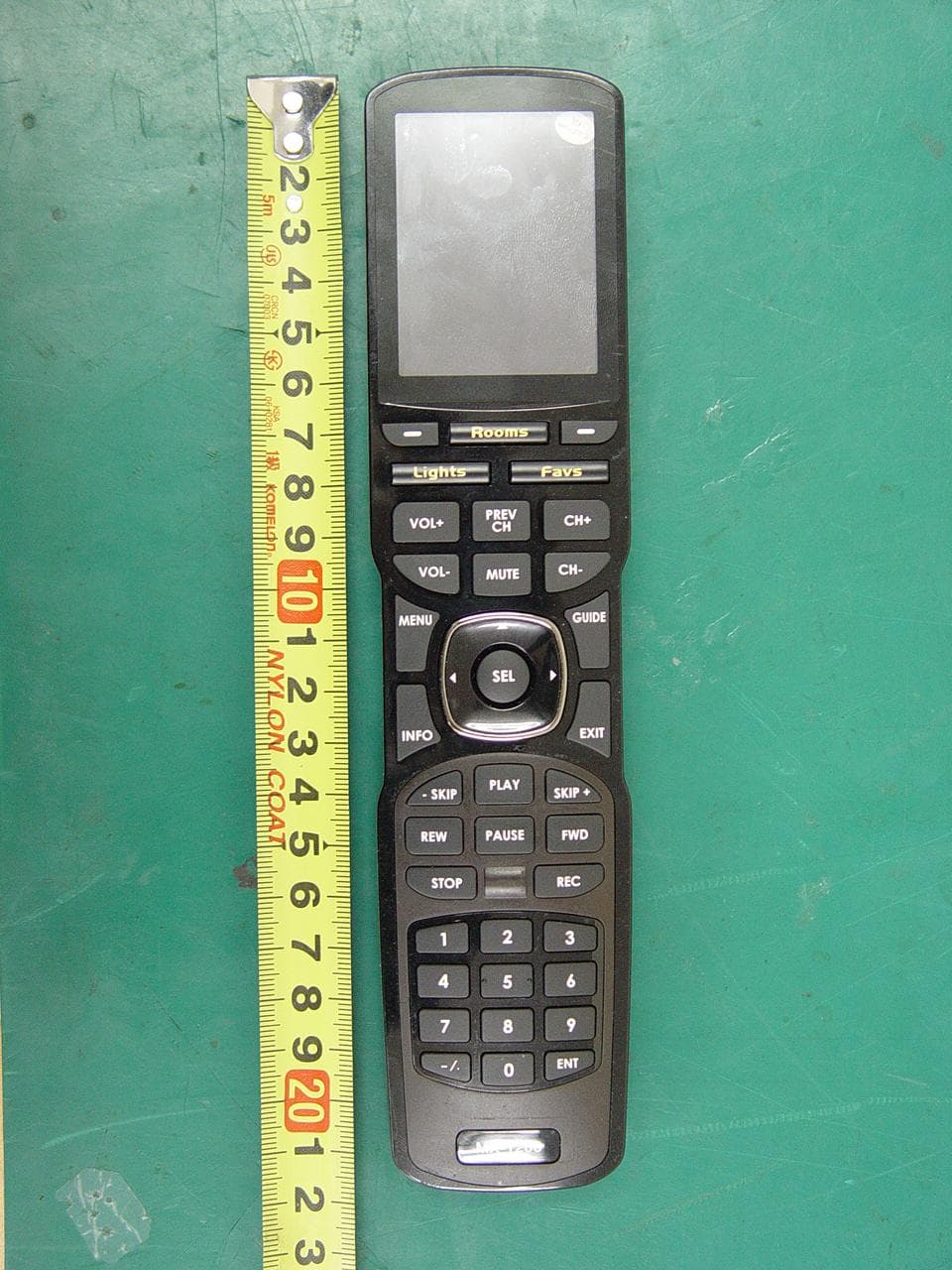
Click to zoom
Application Details
- Equipment Class
- DSC - Part 15 Security/Remote Control Transmitter
- Date of Grant
- Mar 07, 2012
- Application Purpose
- Original Equipment
- Date of Application
- Mar 07, 2012
- Equipment Note
- RF Remote Controller
- Frequency Range
- 433.92000000 - 433.92000000
- Company
- Ohsung Electronics Co., Ltd.
- Country
- South Korea
Documents & Files
Document Text
Text extracted from the exhibit documents filed with the FCC. Open a document above to read the original.
Users Manual
Order Number : GETEC-C1-12-047 FCC Part 15 subpart C Test Report Number : GETEC-E3-12-020 Page 1 / 1 EUT Type: RF REMOTE CONTROLLER FCC ID.: OZ5URCMX1200I APPENDIX H : USER’S MANUAL MX-1200i Color Touch Screen Owner’s Manual MX-1200i C OLORTOUCH SCREEN 500 Mamaroneck Avenue, Harrison, NY 10528 Phone: (914) 835-4484 Fax: (914) 835-4532 This remote control was Custom Programmed for you by: For questions about your Custom Programming call: Custom Programming of a complex home theater and/or a multi-room system is one of the most challenging tasks within an audio/video installation. It involves an intimate knowledge of how the components interact and exact details on the proper sequences of control. Only a Complete Control dealer has the requisite experience and training to quickly and effectively customize a remote control for true automated operation. Congratulations on your choice! MX-1200i Owner's Manual © 2012 Universal Remote Control, Inc. The information in this manual is copyright protected. No part of this manual may be copied or reproduced in any form without prior written consent from Universal Remote Control, Inc. UNIVERSAL REMOTE CONTROL, INC. SHALL NOT BE LIABLE FOR OPERATIONAL, TECHNICAL OR EDITORIAL ERRORS/OMISSIONS MADE IN THIS MANUAL. The information in this manual may be subject to change without prior notice. Complete Control is a registered trademark of Universal Remote Control, Inc. All other brand or product names are trademarks or registered trademarks of their respective companies or organizations. MX-1200i C OLORTOUCH SCREEN Congratulations!1 Using the MX-1200i2 Connecting the Battery Pack3 Using the Charging Base3 Displaying the Settings Screen4 Sleep Settings5 System5 Brightness5 Power5 Button Light6 Date and Time6 Calibration6 Pickup Settings6 Sound 7 Factory Default7 Exit7 Maintaining Your MX-1200i8 Specifications8 USA Limited Warranty Statement9 Federal Communication Commission Interference Statement11 Regulatory Information to the userRegulatory Information to the user12 Declaration of Conformity13 Precautions and Information Concerning Rechargeable Lithium-Ion Batteries 14 Page 1 MX-1200i COLORTOUCHSCREEN Congratulations Thank you for purchasing the Complete Control MX-1200i touch screen universal remote control. This remote can wirelessly control your devices throughout the home using an RF base station. Controlling your home is simple with the MX-1200i remote. Brilliant 2.4" color touch screen with audible button presses The MX-1200i has a programmable 2.4” color touch screen. When any button is pressed, an audible response is heard and the color LCD screen, as well as the remote buttons, will light up. Fast setup of complex systems via Complete Control PC Program To fully automate your audio/video system, the programmer must have detailed knowledge of each component and how the system is connected and operated. Only a trained and certified professional audio/video installer can install an MX-1200i remote control in a timely and efficient manner. User interface customizable for any activity Each button is customizable for activities such as Watch TV or Listen to Radio. These activities can contain multiple commands (macros) which enable a single button press to turn the needed devices ON or OFF. Ultra-reliable narrow band RF - compatible with URC 433.92 MHz RF Base Stations. The MX-1200i can communicate directly to RF base stations, such as the MRF-350i and the MRF-260i. It also natively communicates to URC Lighting via 433 MHz RF. This gives the MX-1200i the ability to control your system without being in direct line-of-sight. Page 2 MX-1200i COLORTOUCHSCREEN The 5-way cursor enables you to navigate through a variety of on-screen menus with ease. The Mainbutton always displays main menu pages. The Pagebuttons display additional pages of controls. The Volumeand Mutebuttons are always available regardless of what screen is displayed. Using the MX-1200i The MX-1200i's main pages display the activities and devices in your system. Press the MAIN button to view your devices or the activities placed here by your custom installation specialist. Large systems may have more than one page. Press either of the PAGE buttons if you don’t see all your devices. Gently press any screen button with your finger to select an activity or a device. The screen will change to display the buttons you need for that activity/device. The PAGE buttons may reveal additional buttons for some devices and activities. When you would like to control another device, press the MAIN page button and select a new device button. MX-1200i C OLORTOUCH SCREEN Connecting the Battery Pack Unlock the rear cover by pressing down on the spring lock at the top of the cover. Remove the cover. For shipment from the factory, the battery is left out of the MX-1200i. Place the battery into the battery compartment, making sure you align the contacts on the battery to the contacts on the MX-1200i. The battery will snap into place when aligned properly. Replace the cover and snap it into place. Using the Charging Base Plug the 5V adapter into a power outlet and into the back of the charging base. Gently place the MX-1200i into the cradle of the charging base. It automatically aligns itself to the contacts on the charging base. The Status light should immediately light. Red indicates that it is charging. Blue shows that it is fully charged. There is no harm in leaving the MX-1200i on its charging base whenever it is not in use. Page 3 Red indicates charging, Blue that the remote is fully charged. Page 4 Displaying the Settings Screen You can enter the settings menu by pressing and holding the MAIN and ENT button for three seconds. The MX-1200i will timeout after it is idle for 30 seconds and return to the previous setting or Main screen. There are two pages of Settings screens. Select a setting by pressing a button on the LCD screen. Press either of the PAGE buttons to access the other page. To go back a step or t…
Text truncated - open the document above for the full version.
Cover Letter(s)
SCS-F18: Project and Product Certification Representative Authorization Letter Page 1 of 2 Rev 2.0 2206 Ringwood Avenue San Jose, CA 95131 Tel: 408-526-1188 Fax: 408-526-1088 Email: [email protected] Project and Product Certification Representative Authorization Letter Reason for Amendment (current / obsolete) Revision History Approved Date From To Initial Release (current) 1.0 1.0 Nov-14-2006 Revised wording (current) 1.0 2.0 Sept–25-2007 SCS-F18: Project and Product Certification Representative Authorization Letter Page 2 of 2 Rev 2.0 OHSUNG ELECTRONICS CO., LTD #181 Gongdan-Dong, Gumi-Si,Gyeongsangbuk-Do, Korea Tel: +82-54-468-7282, Fax: +82-54-461-8368 March 08, 2012 To: SIEMIC, INC. 2206 Ringwood Avenue, San Jose, CA 95131 USA Dear Sir/Madam, Re: Project and Product Certification Representative Authorization Letter We, OHSUNG ELECTRONICS CO., LTD, hereby authorize SIEMIC, INC. to act as a Certification Body for certifying for the following project(s): Product Name: RF Remote Controller FCC ID: OZ5URCMX1200I We affirm that between SIEMIC and OHSUNG ELECTRONICS CO., LTD, any difference in understanding, including test plan, measurement methods, applicable standards and relevant procedures and processes have been resolved prior to commencement of testing activities. Sincerely, --------------------------------------------- Hak-Ki Kim, Q.C Manager OHSUNG ELECTRONICS CO.,LTD
Cover Letter(s)
Confidentiality Request Letter Reason for Amendment (current / obsolete) Revision History Approved Date From To Initial Release (current) 1.0 1.0 Nov-14-2006 OHSUNG ELECTRONICS CO., LTD #181 Gongdan-Dong, Gumi-Si,Gyeongsangbuk-Do, Korea Tel: +82-54-468-7282, Fax: +82-54-461-8368 SCS-F19: Confidentiality Request Letter Rev 1.0 Nov 14, 2006 Federal Communications Commission Authorization and Evaluation Division March 08, 2012 Confidentiality Request regarding application for certification of FCC ID: OZ5URCMX1200I We hereby request confidential treatment of information accompanying this application as outlined below: Exhibit Type File Name BLOCK DIAGRAM URCMX1200I_BlkDia.pdf SCHEMETIC DIAGRAM URCMX1200I_SchDia.pdf OPERATIONAL DESCRIPTION URCMX1200I_OpeDes.pdf The above materials contain trade secrets and proprietary information not customarily released to the public. The public disclosure of these materials may be harmful to the applicant and provide unjustified benefits to its competitors. In addition to above mentioned documents, pursuant to Public DA 04-1705 of the Commission’s policy, in order to comply with the marketing regulations in 47 CFR 2.803 and the importation rules in 47 CFR 2.1204, while ensuring that business sensitive information remains confidential until the actual marketing of newly authorized devices. We are requesting the commission to grant short-term confidentiality request on the following Exhibit Type File Name TEST SET UP PHOTOS URCMX1200I_Tsup.pdf EXTERNAL PHOTOGRAPHS URCMX1200I_ExtPho.pdf INTERNAL PHOTOGRAPHS URCMX1200I_IntPho.pdf USER’S MANUAL URCMX1200I_UseMan.pdf The applicant understands that pursuant to Section 0.457 of the Rules, disclosure of this application and all accompanying documentation will not be made before the date of the Grant for this application. Sincerely, --------------------------------------------- Hak-Ki Kim, Q.C Manager OHSUNG ELECTRONICS CO.,LTD
External Photos
Order Number : GETEC-C1-12-047 FCC Part 15 subpart C Test Report Number : GETEC-E3-12-020 Page 1 / 6 EUT Type: RF REMOTE CONTROLLER FCC ID.: OZ5URCMX1200I APPENDIX F : EXTERNAL PHOTOGRAPHS Order Number : GETEC-C1-12-047 FCC Part 15 subpart C Test Report Number : GETEC-E3-12-020 Page 2 / 6 EUT Type: RF REMOTE CONTROLLER FCC ID.: OZ5URCMX1200I Order Number : GETEC-C1-12-047 FCC Part 15 subpart C Test Report Number : GETEC-E3-12-020 Page 3 / 6 EUT Type: RF REMOTE CONTROLLER FCC ID.: OZ5URCMX1200I Order Number : GETEC-C1-12-047 FCC Part 15 subpart C Test Report Number : GETEC-E3-12-020 Page 4 / 6 EUT Type: RF REMOTE CONTROLLER FCC ID.: OZ5URCMX1200I Order Number : GETEC-C1-12-047 FCC Part 15 subpart C Test Report Number : GETEC-E3-12-020 Page 5 / 6 EUT Type: RF REMOTE CONTROLLER FCC ID.: OZ5URCMX1200I Order Number : GETEC-C1-12-047 FCC Part 15 subpart C Test Report Number : GETEC-E3-12-020 Page 6 / 6 EUT Type: RF REMOTE CONTROLLER FCC ID.: OZ5URCMX1200I
ID Label/Location Info
Order Number : GETEC-C1-12-047 FCC Part 15 subpart C Test Report Number : GETEC-E3-12-020 Page 1 / 2 EUT Type: RF REMOTE CONTROLLER FCC ID.: OZ5URCMX1200I APPENDIX B : ID SAMPLE LABEL & LOCATION Order Number : GETEC-C1-12-047 FCC Part 15 subpart C Test Report Number : GETEC-E3-12-020 Page 2 / 2 EUT Type: RF REMOTE CONTROLLER FCC ID.: OZ5URCMX1200I LABELLING REQUIREMENTS The label shown shall be permanently affixed at a conspicuous location on the device and be readily visible to the user at the time of purchase. ID Label ID Label Location of EUT ID Label
Internal Photos
Order Number : GETEC-C1-12-047 FCC Part 15 subpart C Test Report Number : GETEC-E3-12-020 Page 1 / 9 EUT Type: RF REMOTE CONTROLLER FCC ID.: OZ5URCMX1200I APPENDIX G : INTERNAL PHOTOGRAPHS Order Number : GETEC-C1-12-047 FCC Part 15 subpart C Test Report Number : GETEC-E3-12-020 Page 2 / 9 EUT Type: RF REMOTE CONTROLLER FCC ID.: OZ5URCMX1200I Order Number : GETEC-C1-12-047 FCC Part 15 subpart C Test Report Number : GETEC-E3-12-020 Page 3 / 9 EUT Type: RF REMOTE CONTROLLER FCC ID.: OZ5URCMX1200I Order Number : GETEC-C1-12-047 FCC Part 15 subpart C Test Report Number : GETEC-E3-12-020 Page 4 / 9 EUT Type: RF REMOTE CONTROLLER FCC ID.: OZ5URCMX1200I Order Number : GETEC-C1-12-047 FCC Part 15 subpart C Test Report Number : GETEC-E3-12-020 Page 5 / 9 EUT Type: RF REMOTE CONTROLLER FCC ID.: OZ5URCMX1200I Order Number : GETEC-C1-12-047 FCC Part 15 subpart C Test Report Number : GETEC-E3-12-020 Page 6 / 9 EUT Type: RF REMOTE CONTROLLER FCC ID.: OZ5URCMX1200I Order Number : GETEC-C1-12-047 FCC Part 15 subpart C Test Report Number : GETEC-E3-12-020 Page 7 / 9 EUT Type: RF REMOTE CONTROLLER FCC ID.: OZ5URCMX1200I Order Number : GETEC-C1-12-047 FCC Part 15 subpart C Test Report Number : GETEC-E3-12-020 Page 8 / 9 EUT Type: RF REMOTE CONTROLLER FCC ID.: OZ5URCMX1200I Order Number : GETEC-C1-12-047 FCC Part 15 subpart C Test Report Number : GETEC-E3-12-020 Page 9 / 9 EUT Type: RF REMOTE CONTROLLER FCC ID.: OZ5URCMX1200I
Test Report
R삐£과뀐L£암R£RGE Page 1 of27 FCC EVALUATION REPORT FOR CERTIFICATION Manufacturer: OHSUNG ELECTRONICS CO., LTD. Date of Issue: March 5, 2012 Order Number: GETEC-CI-12-047 #181 Gongdan-dong, Gumi-si, Gyeongbuk Republic of Korea. Attn : Mr. Hak-Ki Kim / General Manager Test Report Number: GETEC-E3-12-020 Test Site: GUMI COLLEGE EMC CENTER FCC Registration Number: (100749,443957) FCC ID. OZ5URCMX12001 Applicant: OHSUNG ELECTRONICS CO., LTD. Rule Part(s) : FCC Part 15 Subpart C-Intentional Radiator � 15.231 Equipment Class : Remote Control Transmitter (DSC) EUT Type : RF REMOTE CONTROLLER Type of Authority : Certification Model Name : MX-120Oi Trade Name : U NIVERSAL Remote Control This equipment has been shown to be in compliance with the applicable technical standards as indicated in the measurement report and was tested in accordance with the measurement procedures specified in ANSI C63.4-2003 1 attest to the accuracy of data. All measurements reported herein were performed by me or were made under my supervision and are correct to the vest of my knowledge and belief. 1 assume full responsibility for the completeness of these measurements and vouch for the qualifications of all persons taking them. Tested by, S놓ung-Chul Lee, Associate Engineer GUMI COLLEGE EMC CENTER GETEC-QP-28-007 (Rev.OO) Reviewed by, Jae-Hoon Jeong, Sénior Engineer GUMI COLLEGE EMC CENTER 전자파센터 This μst report only coptainsthp result of a specific sample supplied for the examination. It is no←alhwed to crpy th:s repor even partly without the approvaI of EMC center Order Number : GETEC-C1-12-047 FCC Part 15 subpart C Test Report Number : GETEC-E3-12-020 Page 2 / 27 EUT Type: RF REMOTE CONTROLLER FCC ID.: OZ5URCMX1200I CONTENTS 1. GENERAL INFORMATION ...................................................................................................................................... 4 2. INTRODUCTION ........................................................................................................................................................ 5 3. PRODUCT INFORMATION ...................................................................................................................................... 6 3.1 DESCRIPTION OF EUT .............................................................................................................................................. 6 3.2 SUPPORT EQUIPMENT / CABLES USED ..................................................................................................................... 7 3.3 MODIFICATION ITEM(S) ........................................................................................................................................... 7 4. ANTENNA REQUIREMENT - §15.203 ..................................................................................................................... 8 4.1 DESCRIPTION OF ANTENNA ...................................................................................................................................... 8 5. DESCRIPTION OF TESTS ......................................................................................................................................... 8 5.1 TEST CONDITION ...................................................................................................................................................... 8 5.2 CONDUCTED EMISSION ............................................................................................................................................ 9 5.3 RADIATED EMISSION .............................................................................................................................................. 10 5.4 DUTY CYCLE CORRECTION ................................................................................................................................... 11 5.5 OCCUPIED BANDWIDTH ......................................................................................................................................... 11 6. CONDUCTED EMISSION ........................................................................................................................................ 12 6.1 OPERATING ENVIRONMENT ................................................................................................................................... 12 6.2 TEST SET-UP ........................................................................................................................................................... 12 6.3 MEASUREMENT UNCERTAINTY.............................................................................................................................. 12 6.4 LIMIT ...................................................................................................................................................................... 13 6.5 TEST EQUIPMENT USED .......................................................................................................................................... 13 6.6 TEST DATA FOR CONDUCTED EMISSION ................................................................................................................ 13 7. DUTY CYCLE CORRECTION ................................................................................................................................ 15 7.1 OPERATING ENVIRONMENT ................................................................................................................................... 15 7.2 TEST SET-UP ........................................................................................................................................................... 15 7.3 TEST EQUIPMENT USED .......................................................................................................................................... 15 7.4 TEST RESULT OF DUTY CYCLE ............................................................................................................................... 15 8. ACTIVAT…
Text truncated - open the document above for the full version.
Test Setup Photos
Order Number : GETEC-C1-12-047 FCC Part 15 subpart C Test Report Number : GETEC-E3-12-020 Page 1 / 4 EUT Type: RF REMOTE CONTROLLER FCC ID.: OZ5URCMX1200I APPENDIX E : TEST SET UP PHOTOGRAPHS Order Number : GETEC-C1-12-047 FCC Part 15 subpart C Test Report Number : GETEC-E3-12-020 Page 2 / 4 EUT Type: RF REMOTE CONTROLLER FCC ID.: OZ5URCMX1200I Conducted Test Picture: Front Conducted Test Picture: Rear Order Number : GETEC-C1-12-047 FCC Part 15 subpart C Test Report Number : GETEC-E3-12-020 Page 3 / 4 EUT Type: RF REMOTE CONTROLLER FCC ID.: OZ5URCMX1200I Radiated Test Picture (X axis): Below 30 MHz Radiated Test Picture (Y axis): Below 1 GHz Order Number : GETEC-C1-12-047 FCC Part 15 subpart C Test Report Number : GETEC-E3-12-020 Page 4 / 4 EUT Type: RF REMOTE CONTROLLER FCC ID.: OZ5URCMX1200I Radiated Test Picture (Z axis): Above 1 GHz
Contact Information
Applicant
Hak-Ki Kim(General Manager)
Test Firm
Gumi University EMC CenterTae-Sig Park
Technical Specifications
| # | Rule Parts | Frequency Range | Power Output |
|---|---|---|---|
| 1 | 15.231 | 433.92 MHz - 433.92 MHz | - |
Other Applications from Ohsung Electronics Co., Ltd.
OZ5PSRMT
Jan 13, 2026RF4CE RCU
Equipment Class
DTS - Digital Transmission SystemOZ5G32
Dec 29, 2025Remote Controller
Equipment Class
DTS - Digital Transmission SystemOZ5PSEMR
Dec 19, 2025RF Module
Equipment Class
DTS - Digital Transmission SystemOZ5G22
Dec 16, 2025Remote Controller
Equipment Class
DTS - Digital Transmission SystemOZ5G12
Dec 16, 2025Remote Controller
Equipment Class
DTS - Digital Transmission System