OZ5URCMX350NRF REMOTE CONTROLLER
Ohsung Electronics Co., Ltd.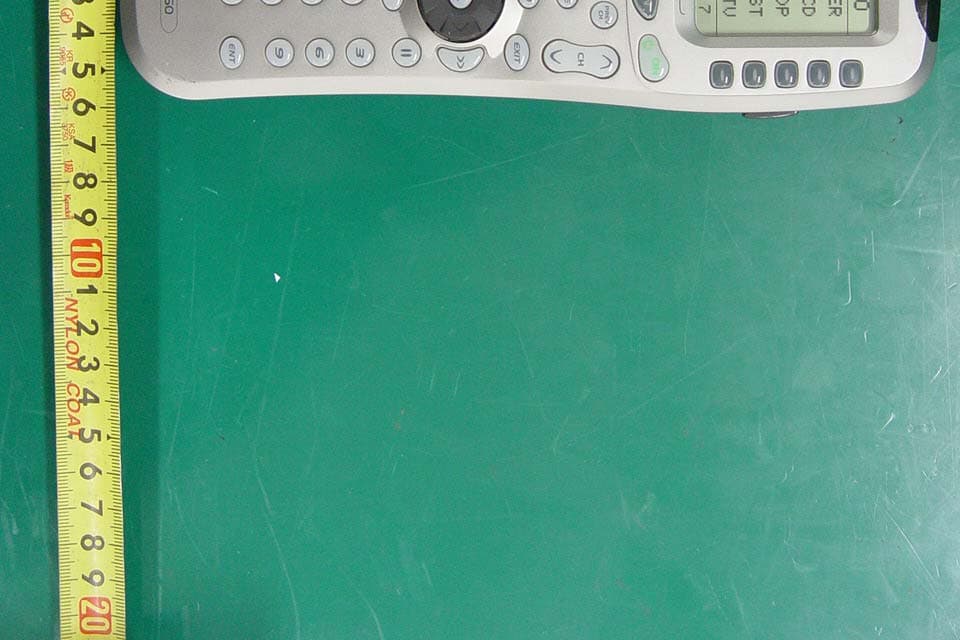
Click to zoom
Application Details
- Equipment Class
- DSC - Part 15 Security/Remote Control Transmitter
- Date of Grant
- Nov 13, 2007
- Application Purpose
- Original Equipment
- Date of Application
- Nov 12, 2007
- Equipment Note
- RF REMOTE CONTROLLER
- Frequency Range
- 418.00000000 - 418.00000000
- Company
- Ohsung Electronics Co., Ltd.
- Country
- South Korea
Documents & Files
Document Text
Text extracted from the exhibit documents filed with the FCC. Open a document above to read the original.
Users Manual
EUT Type: Remote Controller FCC ID: OZ5URCMX350N Test Report No.: GETEC-E3-07-073 FCC Part 15 Subpart B,C APPENDIX I : USER’S MANUAL Owner’s Manual 1 Osiris Owner’s Manual © 2004 Universal Remote Control, Inc. The information in this manual is copyright protected. No part of this manual may be copied or reproduced in any form without prior written consent from Universal Remote Control, Inc. UNIVERSAL REMOTE CON- TROL, INC. SHALL NOT BE LIABLE FOR OPERATIONAL, TECHNICAL OR EDITORIAL ERRORS/OMIS- SIONS MADE IN THIS MANUAL. The information in this manual may be subject to change without prior notice. Osiris is a registered trademark of Universal Remote Control, Inc. Power of Simple is a trademark of Universal Remote Control, Inc. All other brand or product names are trademarks or registered trademarks of their respective companies or organizations. 500 Mamaroneck Avenue, Harrison, NY 10528 Phone: (914) 835-4484 Fax: (914) 835-4532 Thank You! Thank you for purchasing the Osiris Pre-Programmed and Learning Remote Control. This manual is designed to assist you step-by-step as you setup the Osiris to replace all of your remote controls and automate your home entertainment system. TM Table of Contents Getting Started2 Button Layout3 Basic Setup5 Pre-Programmed Method5 Learning Method9 Volume Control Punch Through12 Advanced Operation14 Advanced Setup16 Editing Button Labels16 Macro Button Setup19 Favorite Channel Setup21 Hiding and Adding Pages23 Erasing25 Cloning One Osiris to Another26 Recalling Pre-Programmed Settings27 Utilizing Optional RF Base Stations28 IR/RF Signal Setting31 ID # - Setting Base Station Address33 EMITT - Setting IR Emitter Outputs34 BLAST - Setting the Front Panel Blaster On or Off35 Pre-Programmed Code Tables37 Frequently Asked Questions55 Warranty56 Specifications56 Memo57 1 Osiris Owner’s Manual © 2004 Universal Remote Control, Inc. The information in this manual is copyright protected. No part of this manual may be copied or reproduced in any form without prior written consent from Universal Remote Control, Inc. UNIVERSAL REMOTE CON- TROL, INC. SHALL NOT BE LIABLE FOR OPERATIONAL, TECHNICAL OR EDITORIAL ERRORS/OMIS- SIONS MADE IN THIS MANUAL. The information in this manual may be subject to change without prior notice. Osiris is a registered trademark of Universal Remote Control, Inc. Power of Simple is a trademark of Universal Remote Control, Inc. All other brand or product names are trademarks or registered trademarks of their respective companies or organizations. 500 Mamaroneck Avenue, Harrison, NY 10528 Phone: (914) 835-4484 Fax: (914) 835-4532 Thank You! Thank you for purchasing the Osiris Pre-Programmed and Learning Remote Control. This manual is designed to assist you step-by-step as you setup the Osiris to replace all of your remote controls and automate your home entertainment system. TM Table of Contents Getting Started2 Button Layout3 Basic Setup5 Pre-Programmed Method5 Learning Method9 Volume Control Punch Through12 Advanced Operation14 Advanced Setup16 Editing Button Labels16 Macro Button Setup19 Favorite Channel Setup21 Hiding and Adding Pages23 Erasing25 Cloning One Osiris to Another26 Recalling Pre-Programmed Settings27 Utilizing Optional RF Base Stations28 IR/RF Signal Setting31 ID # - Setting Base Station Address33 EMITT - Setting IR Emitter Outputs34 BLAST - Setting the Front Panel Blaster On or Off35 Pre-Programmed Code Tables37 Frequently Asked Questions55 Warranty56 Specifications56 Memo57 32 Getting Started Congratulations! You’ve purchased one of the most advanced and easy to setup control sys- tems available. The Osiris’s built-in library includes thousands of different brands and models of remote controls. In most systems, all you have to do to setup the Osiris is enter which brands and models you own. If you own a component too new to be in the library, the Osiris uses advanced learn- ing technology to quickly set each Osiris button, one at at time. Setting up your Osiris to replace all your existing remote controls can be done in a few minutes. Basic Setup is described on pages 5 to 13. The Osiris’s exciting advanced features automate and customize operation in many ways. You could use Macro Setup to power on all of your compo- nents and start the show with the press of one button! With the Osiris’s unique Favorite Channel capability, you can tune in a channel with the press of one button instead of entering the entire channel number. Any of the button names on the display can be edited as you like. It is best to delay any Advanced Setup (described on pages 14 to 36) until after you finish Basic Setup. Battery Installation Remove the battery compartment cover by pressing up the cover lock. Insert four AAA batteries into the battery compartment as shown in the diagram. The Osiris + + + + - - - - MAIN Button takes you to the MAIN Menu. Screen Labeled Display Buttons LIGHT Button PAGE Numbers FUNCTION Buttons TITLE FAVORITE CHANNEL Button PAGE Buttons change the page of Display Buttons. Button Layout Universal Remote Control, Inc. Transmitting “Busy” Signal Indicator* *Note: When a command, macro or favorite channel is being transmitted, an icon will appear in the top right corner of the display. While the Osiris is “busy”, it will ignore a button push. 32 Getting Started Congratulations! You’ve purchased one of the most advanced and easy to setup control sys- tems available. The Osiris’s built-in library includes thousands of different brands and models of remote controls. In most systems, all you have to do to setup the Osiris is enter which brands and models you own. If you own a component too new to be in the library, the Osiris uses advanced learn- ing technology to quickly set each Osiris button, one at at time. Setting up your Osiris to replace all your existing remote controls can be done in a few minutes. Basic Setup is described on pages 5 to 13. The Osiris’s exciting advanced features automate and customize operation in many ways. …
Text truncated - open the document above for the full version.
Attestation Statements
EUT Type: Remote Controller FCC ID: OZ5URCMX350N Test Report No.: GETEC-E3-07-073 FCC Part 15 Subpart B,C APPENDIX A : ATTESTATION STATEMENT April 01, 2007 Federal Communications Commission Authorization and Evaluation Division Equipment Authorization Branch 7435 Oakland Mills Road Columbia, MD 21046 U.S.A To whom it may concern: We, the undersigned, hereby authorize GUMI College EMC Center to act on our behalf in all matters relating to applications for equipment authorization, including the signing of all documents relation to these matters. Any and all acts carried out by GUMI College EMC Center on our behalf shall have the same effect as acts of our own. We also hereby certify that no party to the application is subject of a denial of benefits, including FCC benefits, pursuant 5301 of the Anti-Drug Abuse Act of 1988, 21 U.S.C. 853(a). Sincerely, Kwang-jae Ok, Manager OHSUNG Electronics Co., Ltd.
Block Diagram
EUT Type: Remote Controller FCC ID: OZ5URCMX350N Test Report No.: GETEC-E3-07-073 FCC Part 15 Subpart B,C APPENDIX D : BLOCK DIAGRAM(S)
Cover Letter(s)
OHSUNG ELECTRONICS CO., LTD #181 Gongdan-Dong, Gumi-Si,Gyeongsangbuk-Do, Korea Tel: +82-54-468-7282, Fax: +82-54-461-8368 TIMCO ENGINEERING INC. 849 NW State Road 45 Newberry, Florida 32669 Subject: Confidentiality Request regarding application for certification FCC ID: OZ5URCMX350N Dear TEI; Pursuant to Sections 0.457 and 0.459 of the Commission’s Rules, we hereby request confidential treatment of information accompanying this application as outlined below: z SCHEMETIC DIAGRAM(S) : URCMX350N_SchDia.pdf z OPERATIONAL DESCRIPTION : URCMX350N_OpeDes.pdf The above materials contain trade secrets and proprietary information not customarily released to the public. The public disclosure of these materials may be harmful to the applicant and provide unjustified benefits to its competitors. The applicant understands that pursuant to Section 0.457 of the Rules, disclosure of this application and all accompanying documentation will not be made before the date of the Grant for this application. Sincerely, --------------------------------------------- Kwang-Jae Ok, Q.C Manager OHSUNG ELECTRONICS CO.,LTD
External Photos
EUT Type: Remote Controller FCC ID: OZ5URCMX350N Test Report No.: GETEC-E3-07-073 FCC Part 15 Subpart B,C APPENDIX G : EXTERNAL PHOTOGRAPHS EUT Type: Remote Controller FCC ID: OZ5URCMX350N Test Report No.: GETEC-E3-07-073 FCC Part 15 Subpart B,C EUT Type: Remote Controller FCC ID: OZ5URCMX350N Test Report No.: GETEC-E3-07-073 FCC Part 15 Subpart B,C
Internal Photos
EUT Type: Remote Controller FCC ID: OZ5URCMX350N Test Report No.: GETEC-E3-07-073 FCC Part 15 Subpart B,C APPENDIX H : INTERNAL PHOTOGRAPHS EUT Type: Remote Controller FCC ID: OZ5URCMX350N Test Report No.: GETEC-E3-07-073 FCC Part 15 Subpart B,C EUT Type: Remote Controller FCC ID: OZ5URCMX350N Test Report No.: GETEC-E3-07-073 FCC Part 15 Subpart B,C EUT Type: Remote Controller FCC ID: OZ5URCMX350N Test Report No.: GETEC-E3-07-073 FCC Part 15 Subpart B,C EUT Type: Remote Controller FCC ID: OZ5URCMX350N Test Report No.: GETEC-E3-07-073 FCC Part 15 Subpart B,C EUT Type: Remote Controller FCC ID: OZ5URCMX350N Test Report No.: GETEC-E3-07-073 FCC Part 15 Subpart B,C EUT Type: Remote Controller FCC ID: OZ5URCMX350N Test Report No.: GETEC-E3-07-073 FCC Part 15 Subpart B,C EUT Type: Remote Controller FCC ID: OZ5URCMX350N Test Report No.: GETEC-E3-07-073 FCC Part 15 Subpart B,C
Parts List/Tune Up Info
EUT Type: Remote Controller FCC ID: OZ5URC MX350N Test Report No.: GETEC-E3-07-073 FCC Part 15 Subpart B,C APPENDIX B : TEST PLOTS EUT Type: Remote Controller FCC ID: OZ5URC MX350N Test Report No.: GETEC-E3-07-073 FCC Part 15 Subpart B,C <Plot of occupied bandwidth > EUT Type: Remote Controller FCC ID: OZ5URC MX350N Test Report No.: GETEC-E3-07-073 FCC Part 15 Subpart B,C EUT Type: Remote Controller FCC ID: OZ5URC MX350N Test Report No.: GETEC-E3-07-073 FCC Part 15 Subpart B,C EUT Type: Remote Controller FCC ID: OZ5URC MX350N Test Report No.: GETEC-E3-07-073 FCC Part 15 Subpart B,C < Maximum with rate of pulse train >
Test Report
EUT Type: Remote Controller FCC ID: OZ5URCMX350N Page: 2 of 17 Test Report No.: GETEC-E3-07-073 FCC Part 15 Subpart B,C CONTENTS 1. SCOPE...........................................................................................................................................................................4 2. INTRODUCTION ........................................................................................................................................................5 3. TEST CONDITIONS & EUT INFORMATION........................................................................................................6 3.1 DESCRIPTION OF EUT..............................................................................................................................................6 3.3 MODIFICATION ITEM(S)...........................................................................................................................................6 4. ANTENNA REQUIREMENT-§15.203........................................................................................................................6 4.1 DESCRIPTION OF ANTENNA......................................................................................................................................6 5. DESCRIPTION OF TESTS.........................................................................................................................................7 5.1 TEST CONDITION......................................................................................................................................................7 5.2 RADIATED EMISSION................................................................................................................................................8 5.3 CONDUCTED EMISSION............................................................................................................................................9 5.4 DUTY CYCLE CORRECTION.....................................................................................................................................9 5.5 OCCUPIED BANDWIDTH...........................................................................................................................................9 6. DUTY CYCLE CORRECTION................................................................................................................................10 6.1 OPERATING ENVIRONMENT...................................................................................................................................10 6.2 TEST SET-UP............................................................................................................................................................10 6.3 TEST EQUIPMENT USED..........................................................................................................................................10 6.4 TEST RESULT OF DUTY CYCLE...............................................................................................................................10 7. RADIATED EMISSION TEST ................................................................................................................................. 11 7.1 OPERATING ENVIRONMENT................................................................................................................................... 11 7.2 TEST SET-UP............................................................................................................................................................ 11 7.3 MEASUREMENT UNCERTAINTY.............................................................................................................................. 11 7.4 LIMIT......................................................................................................................................................................12 7.5 TEST EQUIPMENT USED..........................................................................................................................................12 7.6 RADIATED EMISSION TEST DATA............................................................................................................................13 8. OCCUPIED BANDWIDTH MEASUREMENT......................................................................................................16 8.1 OPERATING ENVIRONMENT...................................................................................................................................16 8.2 TEST SET-UP............................................................................................................................................................16 8.3 LIMIT......................................................................................................................................................................16 8.4 TEST EQUIPMENT USED..........................................................................................................................................16 8.5 TEST RESULT OF OCCUPIED BANDWIDTH...............................................................................................................16 9. RECOMMENDATION & CONCLUSION..............................................................................................................17 EUT Type: Remote Controller FCC ID: OZ5URCMX350N Page: 3 of 17 Test Report No.: GETEC-E3-07-073 FCC Part 15 Subpart B,C APPENDIX A – ATTESTATION STATEMENT APPENDIX B – TEST PLOTS APPENDIX C – FCC ID LABEL & LOCATION APPENDIX D – BLOCK DIAGRAM(S) APPENDIX E – SCHEMATIC DIAGRAM(S) APPENDIX F – TEST SET UP PHOTOS APPENDIX G – EXTERNAL PHOTOGRAPHS APPENDIX H – INTERNAL PHOTOGRAPHS APPENDIX I – USER’S MANUAL APPENDIX J – OPERATIONAL DESCRIPTION EUT Type: Remote Controller FCC ID: OZ5URCMX350N Page: 4 of 17 Test Report No.: GETEC-E3-07-073 FCC Part 15 Subpart B,C 1. Scope Measurement and determination of electromagnetic emissions (EME) of radio frequency devices including int…
Text truncated - open the document above for the full version.
Test Setup Photos
EUT Type: Remote Controller FCC ID: OZ5URCMX350N Test Report No.: GETEC-E3-07-073 FCC Part 15 Subpart B,C APPENDIX F : TEST SET UP PHOTOS EUT Type: Remote Controller FCC ID: OZ5URCMX350N Test Report No.: GETEC-E3-07-073 FCC Part 15 Subpart B,C Radiated Test Picture ( X axis ) Radiated Test Picture ( Y axis ) EUT Type: Remote Controller FCC ID: OZ5URCMX350N Test Report No.: GETEC-E3-07-073 FCC Part 15 Subpart B,C Radiated Test Picture ( Z axis ) < RF mode >
Contact Information
Applicant
Hak-Ki Kim(General Manager)
Test Firm
GUMI UNIVERSITY EMC CENTERTea-Sig Park
Technical Specifications
| # | Rule Parts | Frequency Range | Power Output |
|---|---|---|---|
| 1 | 15.231 | 418 MHz - 418 MHz | - |
Other Applications from Ohsung Electronics Co., Ltd.
OZ5PSRMT
Jan 13, 2026RF4CE RCU
Equipment Class
DTS - Digital Transmission SystemOZ5G32
Dec 29, 2025Remote Controller
Equipment Class
DTS - Digital Transmission SystemOZ5PSEMR
Dec 19, 2025RF Module
Equipment Class
DTS - Digital Transmission SystemOZ5G22
Dec 16, 2025Remote Controller
Equipment Class
DTS - Digital Transmission SystemOZ5G12
Dec 16, 2025Remote Controller
Equipment Class
DTS - Digital Transmission System