OZ5URCTKP7500In-Wall Touch Screen
Ohsung Electronics Co., Ltd.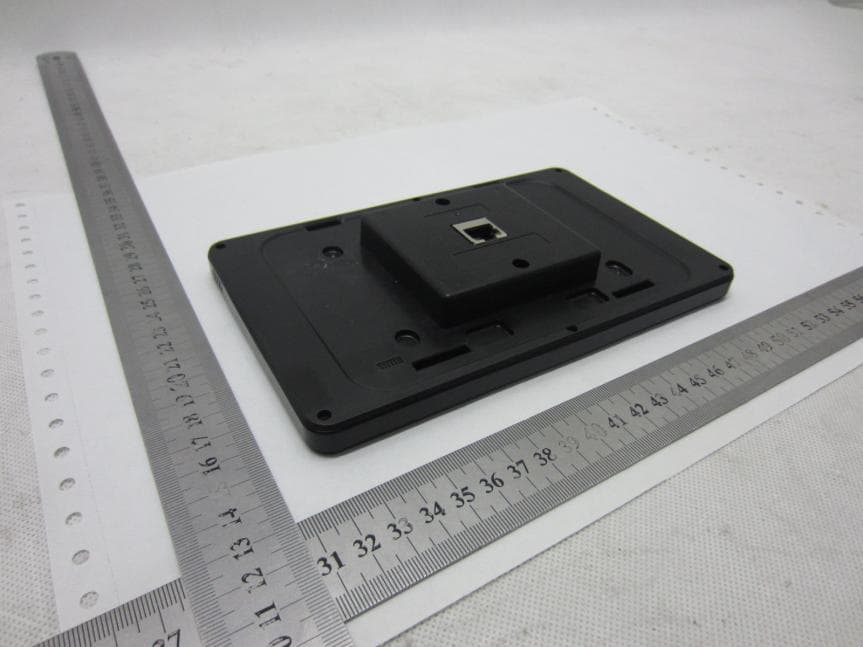
Click to zoom
Application Details
- Equipment Class
- JBP - Part 15 Class B Computing Device Peripheral
- Date of Grant
- Jan 12, 2014
- Application Purpose
- Original Equipment
- Date of Application
- Jan 12, 2014
- Equipment Note
- In-Wall Touch Screen
- Company
- Ohsung Electronics Co., Ltd.
- Country
- South Korea
Documents & Files
Document Text
Text extracted from the exhibit documents filed with the FCC. Open a document above to read the original.
Users Manual
Owner's Manual TKP-7500 In-Wall Network Color Touchscreen TKP-7500 Owner's Manual ©2013 Universal Remote Control, Inc. The information in this owner’s manual is copyright protected. No part of this manual may be copied or reproduced in any form without prior written consent from Universal Remote Control, Inc. UNIVERSAL REMOTE CONTROL, INC. SHALL NOT BE LIABLE FOR OPERATIONAL, TECHNICAL OR EDITORIAL ERRORS/OMISSIONS MADE IN THIS MANUAL. The information in this owner’s manual may be subject to change without prior notice. URC - Control the Experience is a registered trademark of Universal Remote Control, Inc. Total Control is a registered trademark of Universal Remote Control, Inc. All other brand or product names are trademarks or registered trademarks of their respective companies or organizations. Universal Remote Control,Inc. 500 Mamaroneck Avenue, Harrison, NY 10528 Phone: (914) 835-4484 Fax: (914) 835-4532 TABLEOFCONTENTS Introducing the TKP-75001 Parts List3 Installing the TKP-7500 4 Installation4 Adjusting User Settings on the TKP-75005 Specifications 14 Limited Warranty Statement15 End User Agreement17 Federal Communication Commission Interference Statement18 Regulatory Information to the user19 Page 1 TKP-7500 IN-WALLNETWORKCOLORTOUCHSCREEN Introducing the TKP-7500 Thank you for purchasing URC's TKP-7500 In-Wall Network Color Touch-screen keypad. Its easy intuitive use will help simplify your life while adding control of more things than you thought possible. Enjoy some key features like: Rooms Menu With the touch of a single button, take control of your domain. Besides the ability to temporarily link the different rooms/areas of your system for music listening, the Rooms Menuoffers a snapshot of “what's going on” in every room of your Total Control system. Better yet, tapping on a room will convert your keypad into a controller for THAT room. See how easy it is to keep track of what's happening in your world... and control it! Shortcuts Pop-Up With all of the different options to choose from, the Shortcut Pop- Upallows you to save some of the most common devices/activities for easy selection. Keep up to 6 different activities at your fingertips with the Shortcuts Pop-Up menu. Capacitive Touch screen Navigation just became easier; it's as simple as a “swipe” or “flick”. By incorporating gesture control, every screen can be explored by simple finger swipes while the on-board accelerometer supports flicking. Time & Weather Module A simple button press opens the Time & Weather Module; a full screen display keeping you “up to date” with today's time, date and weather conditions. Page 2 TKP-7500 IN-WALLNETWORKCOLORTOUCHSCREEN Page 3 TKP-7500 IN-WALLNETWORKCOLORTOUCHSCREEN Parts List The TKP-7500 Network Keypad includes: 1 - TKP-75004 - Mounting Screws 1- Mounting Ring1 - Owner’s Manual TKP-7500 Mounting Ring 4 Mounting Screws Owner’s Manual Page 4 TKP-7500 IN-WALLNETWORKCOLORTOUCHSCREEN Installing the TKP-7500 The TKP-7500 is wall-mountable and fits easily into a dual-gang opening. Prior to installation, make sure power is available at the preferred location. Power can be supplied to the TKP-7500 through an Ethernet cable connected to a PoE (power over ethernet), in either of the following ways: =Router/Switch =Injector Power over Ethernet or PoE technology describes a system to pass electrical power safely, along with data, on Ethernet cabling. The IEEE standard for PoE requires Category 5 cable or higher for high power levels. Installation Follow the diagram below for installation: 1. Make sure the dual-gang opening is fitted with a standard two-gang trim box (available from the local electrical supplier/store) 2. Connect the Ethernet cable to the rear of the supplied TKP-7500 wall-plate. 3. Mount the wall-plate to the two-gang retro-box 4. The TKP-7500 easily snaps into place to the wall-plate. Page 5 TKP-7500 IN-WALLNETWORKCOLORTOUCHSCREEN Adjusting User Settings on the TKP-7500 By pressing and holding the Mainand Mutebuttons for 5 seconds (found in the Core Menu) simultaneously the TKP-7500 Settings Menuwill appear. Simultaneously press both the Mainand Mutebuttons to activate the Settings Menu. Settings Menu The Settings Menuallows you to adjust some basic parameters of the TKP-7500 keypad. Select these options by pressing the appropriate icon. If no icon/button is pressed for 45 seconds, the unit will revert back to the Mainscreen. The Settings Menu is broken down into the following categories: Sleep Settings:Manages how long the LCD remains ON after usage. General:Contains settings for Time, Date and Temperature Scale Sound: Allows control of any confirmation beeps, or the ability to disable these tones. Brightness:Easily adjust the LCD screen's brightness level, and enable/disable the light sensor. Vibration: Adjust the touch screen’s vibration sensitivity. System:Quickly view the Memory Usage, Firmware Version and other details about the TKP-7500. Network:View information about the current network as well as set a Dynamic or static IP address for the TKP-7500. Factory Default:Reset the TKP-7500 to factory settings. Page 6 TKP-7500 IN-WALLNETWORKCOLORTOUCHSCREEN Sleep Settings Decide upon the option that best fits the current needs. LCD Screen is always ON:This option keeps the LCD screen illuminated at all times LCD Screen will turn OFF:This option allows the user to decide on the amount of time that the LCD screen will remain illuminated after it is last used. The + and – buttons will adjust the time frame up or down accordingly. LCD Screen will display a screen saver This option will display a screen saver of the photos found on the online website, Picassa. This will start display after the time frame selected in the Start Afterbox, and will continue for the amount of time dictated in the Duration box. Selecting OKwill accept any changes made and return to the Main menu, as well as selectingCancelwill return the user to the Main menu, without incorporating any changes. Pag…
Text truncated - open the document above for the full version.
Users Manual
Owner's Manual TKP-7500 In-Wall Network Color Touchscreen TKP-7500 Owner's Manual ©2013 Universal Remote Control, Inc. The information in this owner’s manual is copyright protected. No part of this manual may be copied or reproduced in any form without prior written consent from Universal Remote Control, Inc. UNIVERSAL REMOTE CONTROL, INC. SHALL NOT BE LIABLE FOR OPERATIONAL, TECHNICAL OR EDITORIAL ERRORS/OMISSIONS MADE IN THIS MANUAL. The information in this owner’s manual may be subject to change without prior notice. URC - Control the Experience is a registered trademark of Universal Remote Control, Inc. Total Control is a registered trademark of Universal Remote Control, Inc. All other brand or product names are trademarks or registered trademarks of their respective companies or organizations. Universal Remote Control,Inc. 500 Mamaroneck Avenue, Harrison, NY 10528 Phone: (914) 835-4484 Fax: (914) 835-4532 TABLEOFCONTENTS Introducing the TKP-75001 Parts List3 Installing the TKP-7500 4 Installation4 Adjusting User Settings on the TKP-75005 Specifications 14 Limited Warranty Statement15 End User Agreement17 Federal Communication Commission Interference Statement18 Regulatory Information to the user19 Page 1 TKP-7500 IN-WALLNETWORKCOLORTOUCHSCREEN Introducing the TKP-7500 Thank you for purchasing URC's TKP-7500 In-Wall Network Color Touch-screen keypad. Its easy intuitive use will help simplify your life while adding control of more things than you thought possible. Enjoy some key features like: Rooms Menu With the touch of a single button, take control of your domain. Besides the ability to temporarily link the different rooms/areas of your system for music listening, the Rooms Menuoffers a snapshot of “what's going on” in every room of your Total Control system. Better yet, tapping on a room will convert your keypad into a controller for THAT room. See how easy it is to keep track of what's happening in your world... and control it! Shortcuts Pop-Up With all of the different options to choose from, the Shortcut Pop- Upallows you to save some of the most common devices/activities for easy selection. Keep up to 6 different activities at your fingertips with the Shortcuts Pop-Up menu. Capacitive Touch screen Navigation just became easier; it's as simple as a “swipe” or “flick”. By incorporating gesture control, every screen can be explored by simple finger swipes while the on-board accelerometer supports flicking. Time & Weather Module A simple button press opens the Time & Weather Module; a full screen display keeping you “up to date” with today's time, date and weather conditions. Page 2 TKP-7500 IN-WALLNETWORKCOLORTOUCHSCREEN Page 3 TKP-7500 IN-WALLNETWORKCOLORTOUCHSCREEN Parts List The TKP-7500 Network Keypad includes: 1 - TKP-75004 - Mounting Screws 1- Mounting Ring1 - Owner’s Manual TKP-7500 Mounting Ring 4 Mounting Screws Owner’s Manual Page 4 TKP-7500 IN-WALLNETWORKCOLORTOUCHSCREEN Installing the TKP-7500 The TKP-7500 is wall-mountable and fits easily into a dual-gang opening. Prior to installation, make sure power is available at the preferred location. Power can be supplied to the TKP-7500 through an Ethernet cable connected to a PoE (power over ethernet), in either of the following ways: =Router/Switch =Injector Power over Ethernet or PoE technology describes a system to pass electrical power safely, along with data, on Ethernet cabling. The IEEE standard for PoE requires Category 5 cable or higher for high power levels. Installation Follow the diagram below for installation: 1. Make sure the dual-gang opening is fitted with a standard two-gang trim box (available from the local electrical supplier/store) 2. Connect the Ethernet cable to the rear of the supplied TKP-7500 wall-plate. 3. Mount the wall-plate to the two-gang retro-box 4. The TKP-7500 easily snaps into place to the wall-plate. Page 5 TKP-7500 IN-WALLNETWORKCOLORTOUCHSCREEN Adjusting User Settings on the TKP-7500 By pressing and holding the Mainand Mutebuttons for 5 seconds (found in the Core Menu) simultaneously the TKP-7500 Settings Menuwill appear. Simultaneously press both the Mainand Mutebuttons to activate the Settings Menu. Settings Menu The Settings Menuallows you to adjust some basic parameters of the TKP-7500 keypad. Select these options by pressing the appropriate icon. If no icon/button is pressed for 45 seconds, the unit will revert back to the Mainscreen. The Settings Menu is broken down into the following categories: Sleep Settings:Manages how long the LCD remains ON after usage. General:Contains settings for Time, Date and Temperature Scale Sound: Allows control of any confirmation beeps, or the ability to disable these tones. Brightness:Easily adjust the LCD screen's brightness level, and enable/disable the light sensor. Vibration: Adjust the touch screen’s vibration sensitivity. System:Quickly view the Memory Usage, Firmware Version and other details about the TKP-7500. Network:View information about the current network as well as set a Dynamic or static IP address for the TKP-7500. Factory Default:Reset the TKP-7500 to factory settings. Page 6 TKP-7500 IN-WALLNETWORKCOLORTOUCHSCREEN Sleep Settings Decide upon the option that best fits the current needs. LCD Screen is always ON:This option keeps the LCD screen illuminated at all times LCD Screen will turn OFF:This option allows the user to decide on the amount of time that the LCD screen will remain illuminated after it is last used. The + and – buttons will adjust the time frame up or down accordingly. LCD Screen will display a screen saver This option will display a screen saver of the photos found on the online website, Picassa. This will start display after the time frame selected in the Start Afterbox, and will continue for the amount of time dictated in the Duration box. Selecting OKwill accept any changes made and return to the Main menu, as well as selectingCancelwill return the user to the Main menu, without incorporating any changes. Pag…
Text truncated - open the document above for the full version.
Users Manual
Owner's Manual TKP-7500 In-Wall Network Color Touchscreen TKP-7500 Owner's Manual ©2013 Universal Remote Control, Inc. The information in this owner’s manual is copyright protected. No part of this manual may be copied or reproduced in any form without prior written consent from Universal Remote Control, Inc. UNIVERSAL REMOTE CONTROL, INC. SHALL NOT BE LIABLE FOR OPERATIONAL, TECHNICAL OR EDITORIAL ERRORS/OMISSIONS MADE IN THIS MANUAL. The information in this owner’s manual may be subject to change without prior notice. URC - Control the Experience is a registered trademark of Universal Remote Control, Inc. Total Control is a registered trademark of Universal Remote Control, Inc. All other brand or product names are trademarks or registered trademarks of their respective companies or organizations. Universal Remote Control,Inc. 500 Mamaroneck Avenue, Harrison, NY 10528 Phone: (914) 835-4484 Fax: (914) 835-4532 TABLEOFCONTENTS Introducing the TKP-75001 Parts List3 Installing the TKP-7500 4 Installation4 Adjusting User Settings on the TKP-75005 Specifications 14 Limited Warranty Statement15 End User Agreement17 Federal Communication Commission Interference Statement18 Regulatory Information to the user19 Page 1 TKP-7500 IN-WALLNETWORKCOLORTOUCHSCREEN Introducing the TKP-7500 Thank you for purchasing URC's TKP-7500 In-Wall Network Color Touch-screen keypad. Its easy intuitive use will help simplify your life while adding control of more things than you thought possible. Enjoy some key features like: Rooms Menu With the touch of a single button, take control of your domain. Besides the ability to temporarily link the different rooms/areas of your system for music listening, the Rooms Menuoffers a snapshot of “what's going on” in every room of your Total Control system. Better yet, tapping on a room will convert your keypad into a controller for THAT room. See how easy it is to keep track of what's happening in your world... and control it! Shortcuts Pop-Up With all of the different options to choose from, the Shortcut Pop- Upallows you to save some of the most common devices/activities for easy selection. Keep up to 6 different activities at your fingertips with the Shortcuts Pop-Up menu. Capacitive Touch screen Navigation just became easier; it's as simple as a “swipe” or “flick”. By incorporating gesture control, every screen can be explored by simple finger swipes while the on-board accelerometer supports flicking. Time & Weather Module A simple button press opens the Time & Weather Module; a full screen display keeping you “up to date” with today's time, date and weather conditions. Page 2 TKP-7500 IN-WALLNETWORKCOLORTOUCHSCREEN Page 3 TKP-7500 IN-WALLNETWORKCOLORTOUCHSCREEN Parts List The TKP-7500 Network Keypad includes: 1 - TKP-75004 - Mounting Screws 1- Mounting Ring1 - Owner’s Manual TKP-7500 Mounting Ring 4 Mounting Screws Owner’s Manual Page 4 TKP-7500 IN-WALLNETWORKCOLORTOUCHSCREEN Installing the TKP-7500 The TKP-7500 is wall-mountable and fits easily into a dual-gang opening. Prior to installation, make sure power is available at the preferred location. Power can be supplied to the TKP-7500 through an Ethernet cable connected to a PoE (power over ethernet), in either of the following ways: =Router/Switch =Injector Power over Ethernet or PoE technology describes a system to pass electrical power safely, along with data, on Ethernet cabling. The IEEE standard for PoE requires Category 5 cable or higher for high power levels. Installation Follow the diagram below for installation: 1. Make sure the dual-gang opening is fitted with a standard two-gang trim box (available from the local electrical supplier/store) 2. Connect the Ethernet cable to the rear of the supplied TKP-7500 wall-plate. 3. Mount the wall-plate to the two-gang retro-box 4. The TKP-7500 easily snaps into place to the wall-plate. Page 5 TKP-7500 IN-WALLNETWORKCOLORTOUCHSCREEN Adjusting User Settings on the TKP-7500 By pressing and holding the Mainand Mutebuttons for 5 seconds (found in the Core Menu) simultaneously the TKP-7500 Settings Menuwill appear. Simultaneously press both the Mainand Mutebuttons to activate the Settings Menu. Settings Menu The Settings Menuallows you to adjust some basic parameters of the TKP-7500 keypad. Select these options by pressing the appropriate icon. If no icon/button is pressed for 45 seconds, the unit will revert back to the Mainscreen. The Settings Menu is broken down into the following categories: Sleep Settings:Manages how long the LCD remains ON after usage. General:Contains settings for Time, Date and Temperature Scale Sound: Allows control of any confirmation beeps, or the ability to disable these tones. Brightness:Easily adjust the LCD screen's brightness level, and enable/disable the light sensor. Vibration: Adjust the touch screen’s vibration sensitivity. System:Quickly view the Memory Usage, Firmware Version and other details about the TKP-7500. Network:View information about the current network as well as set a Dynamic or static IP address for the TKP-7500. Factory Default:Reset the TKP-7500 to factory settings. Page 6 TKP-7500 IN-WALLNETWORKCOLORTOUCHSCREEN Sleep Settings Decide upon the option that best fits the current needs. LCD Screen is always ON:This option keeps the LCD screen illuminated at all times LCD Screen will turn OFF:This option allows the user to decide on the amount of time that the LCD screen will remain illuminated after it is last used. The + and – buttons will adjust the time frame up or down accordingly. LCD Screen will display a screen saver This option will display a screen saver of the photos found on the online website, Picassa. This will start display after the time frame selected in the Start Afterbox, and will continue for the amount of time dictated in the Duration box. Selecting OKwill accept any changes made and return to the Main menu, as well as selectingCancelwill return the user to the Main menu, without incorporating any changes. Pag…
Text truncated - open the document above for the full version.
Cover Letter(s)
Ersteller: D. Brandhorst Revision: 00 Erstelldatum: 07.03.2008 Datum: 00.00.00 Seite 1 von 1 Ohsung Electronics Co., Ltd. PHOENIX TEST-LAB GmbH Product Certification Königswinkel 10 D 32825 Blomberg Date:2013-12-19 FCC ID: OZ5URCTKP7500 Subject: Attestation Letter Dear Sirs, Our products exchanges date with switches. According to §15.101 Equipment authorization of unintentional radiators, our products belong to “Class B PC Periphery ->equipment class JPB”. If you have any questions, please feel free to contact me at the address shown below. Yours sincerely, Signatory Signature Name Hak-Ki Kim Title General Manager
Cover Letter(s)
Ohsung Electronics Co., Ltd. PHOENIX TEST-LAB GmbH Product Certification Königswinkel 10 D 32825 Blomberg Date: 04.12.2013 Authority to Act as an Agent We declare that the following representative (agent) Name Mark Wen Position General Manager Company Name Most Technology Service Co., Ltd. Address No.5, 2 nd Langshan Road, North District, Hi-Tech Industrial Park, Nanshan, Shenzhen, Guangdong, China Tel / Fax 86-755-86170306/86-755-86170310 E-Mail [email protected] to act on our behalf on all matters concerning the application and documents submitted to PHOENIX TEST-LAB for product certification below Product Name In-Wall 7” Touch Screen Model Name TKP-7500 Brand Name UNIVERSAL REMOTE CONTROL Yours sincerely, Signatory Name Hak-Ki Kim Position General Manager Company Name Ohsung Electronics Co., Ltd. Address #181 Gongdan-Dong, Gumi-Si, Gyeongsangbuk-Do, South Korea Tel / Fax 82-54-461-8368 E-Mail [email protected] In case of FCC, we certify that we are not subject to a denial of Federal benefits, that include FCC benefits, pursuant to Section 5301 of the Anti-Drug Abuse Act of 1988, 21 U.S.C. §862 because of a conviction for possession or distribution of a controlled substance.
Cover Letter(s)
Ohsung Electronics Co., Ltd. Federal Communications Commission Equipment Authorization Branch 7435 Oakland Mills Road Columbia, MD 21046 Request for Confidentiality Company name: Ohsung Electronics Co., Ltd. FCC ID: OZ5URCTKP7500 FCC Part 15 Certification Gentlemen, Pursuant to 47 CFR 0.457(d)(1)(ii) and 0.459 we hereby requests permanent confidentiality of the following documents for the subject application: Exhibit Type Description ☒ Schematics All circuitry of devices and component values ☒ Block Diagrams Details of device showing the frequency of all oscillators ☐ Bill Of Materials Parts list of the product for the radio device ☒ Operational Description Description of the circuit functions Note: Exhibit types that are commonly held confidential are: (1) Schematics, (2) Block Diagrams, (3) Bill Of Materials, (4) Operational Descriptions. Any exhibit NOT granted confidentiality is viewable on the FCC website as soon as a grant is issued. These documents contain detailed system and equipment description and related information about the product which we considers to be proprietary, confidential and a custom design and otherwise would not release to the general public. Since the design is a basis from which future technological products will evolve, we consider that this information would be of benefit to its competitors and that the disclosure of the information in these documents would give competitors an unfair advantage in the market. Yours sincerely, Signatory Name Hak-Ki Kim Position General Manager Company Name Ohsung Electronics Co., Ltd. Address #181 Gongdan-Dong, Gumi-Si, Gyeongsangbuk-Do, South Korea Tel / Fax 82-54-461-8368 E-Mail [email protected]
Cover Letter(s)
Ersteller: D. Brandhorst Revision: 00 Erstelldatum: 07.03.2008 Datum: 00.00.00 Seite 1 von 1 Ohsung Electronics Co., Ltd. PHOENIX TEST-LAB GmbH Product Certification Königswinkel 10 D 32825 Blomberg Date:2013-12-19 FCC ID: OZ5URCTKP7500 Subject: Attestation Letter Dear Sirs, Our products exchanges date with switches. According to §15.101 Equipment authorization of unintentional radiators, our products belong to “Class B PC Periphery ->equipment class JPB”. If you have any questions, please feel free to contact me at the address shown below. Yours sincerely, Signatory Signature Name Hak-Ki Kim Title General Manager
Cover Letter(s)
Ohsung Electronics Co., Ltd. PHOENIX TEST-LAB GmbH Product Certification Königswinkel 10 D 32825 Blomberg Date: 04.12.2013 Authority to Act as an Agent We declare that the following representative (agent) Name Mark Wen Position General Manager Company Name Most Technology Service Co., Ltd. Address No.5, 2 nd Langshan Road, North District, Hi-Tech Industrial Park, Nanshan, Shenzhen, Guangdong, China Tel / Fax 86-755-86170306/86-755-86170310 E-Mail [email protected] to act on our behalf on all matters concerning the application and documents submitted to PHOENIX TEST-LAB for product certification below Product Name In-Wall 7” Touch Screen Model Name TKP-7500 Brand Name UNIVERSAL REMOTE CONTROL Yours sincerely, Signatory Name Hak-Ki Kim Position General Manager Company Name Ohsung Electronics Co., Ltd. Address #181 Gongdan-Dong, Gumi-Si, Gyeongsangbuk-Do, South Korea Tel / Fax 82-54-461-8368 E-Mail [email protected] In case of FCC, we certify that we are not subject to a denial of Federal benefits, that include FCC benefits, pursuant to Section 5301 of the Anti-Drug Abuse Act of 1988, 21 U.S.C. §862 because of a conviction for possession or distribution of a controlled substance.
Cover Letter(s)
Ohsung Electronics Co., Ltd. Federal Communications Commission Equipment Authorization Branch 7435 Oakland Mills Road Columbia, MD 21046 Request for Confidentiality Company name: Ohsung Electronics Co., Ltd. FCC ID: OZ5URCTKP7500 FCC Part 15 Certification Gentlemen, Pursuant to 47 CFR 0.457(d)(1)(ii) and 0.459 we hereby requests permanent confidentiality of the following documents for the subject application: Exhibit Type Description ☒ Schematics All circuitry of devices and component values ☒ Block Diagrams Details of device showing the frequency of all oscillators ☐ Bill Of Materials Parts list of the product for the radio device ☒ Operational Description Description of the circuit functions Note: Exhibit types that are commonly held confidential are: (1) Schematics, (2) Block Diagrams, (3) Bill Of Materials, (4) Operational Descriptions. Any exhibit NOT granted confidentiality is viewable on the FCC website as soon as a grant is issued. These documents contain detailed system and equipment description and related information about the product which we considers to be proprietary, confidential and a custom design and otherwise would not release to the general public. Since the design is a basis from which future technological products will evolve, we consider that this information would be of benefit to its competitors and that the disclosure of the information in these documents would give competitors an unfair advantage in the market. Yours sincerely, Signatory Name Hak-Ki Kim Position General Manager Company Name Ohsung Electronics Co., Ltd. Address #181 Gongdan-Dong, Gumi-Si, Gyeongsangbuk-Do, South Korea Tel / Fax 82-54-461-8368 E-Mail [email protected]
Cover Letter(s)
Ersteller: D. Brandhorst Revision: 00 Erstelldatum: 07.03.2008 Datum: 00.00.00 Seite 1 von 1 Ohsung Electronics Co., Ltd. PHOENIX TEST-LAB GmbH Product Certification Königswinkel 10 D 32825 Blomberg Date:2013-12-19 FCC ID: OZ5URCTKP7500 Subject: Attestation Letter Dear Sirs, Our products exchanges date with switches. According to §15.101 Equipment authorization of unintentional radiators, our products belong to “Class B PC Periphery ->equipment class JPB”. If you have any questions, please feel free to contact me at the address shown below. Yours sincerely, Signatory Signature Name Hak-Ki Kim Title General Manager
Cover Letter(s)
Ohsung Electronics Co., Ltd. PHOENIX TEST-LAB GmbH Product Certification Königswinkel 10 D 32825 Blomberg Date: 04.12.2013 Authority to Act as an Agent We declare that the following representative (agent) Name Mark Wen Position General Manager Company Name Most Technology Service Co., Ltd. Address No.5, 2 nd Langshan Road, North District, Hi-Tech Industrial Park, Nanshan, Shenzhen, Guangdong, China Tel / Fax 86-755-86170306/86-755-86170310 E-Mail [email protected] to act on our behalf on all matters concerning the application and documents submitted to PHOENIX TEST-LAB for product certification below Product Name In-Wall 7” Touch Screen Model Name TKP-7500 Brand Name UNIVERSAL REMOTE CONTROL Yours sincerely, Signatory Name Hak-Ki Kim Position General Manager Company Name Ohsung Electronics Co., Ltd. Address #181 Gongdan-Dong, Gumi-Si, Gyeongsangbuk-Do, South Korea Tel / Fax 82-54-461-8368 E-Mail [email protected] In case of FCC, we certify that we are not subject to a denial of Federal benefits, that include FCC benefits, pursuant to Section 5301 of the Anti-Drug Abuse Act of 1988, 21 U.S.C. §862 because of a conviction for possession or distribution of a controlled substance.
Cover Letter(s)
Ohsung Electronics Co., Ltd. Federal Communications Commission Equipment Authorization Branch 7435 Oakland Mills Road Columbia, MD 21046 Request for Confidentiality Company name: Ohsung Electronics Co., Ltd. FCC ID: OZ5URCTKP7500 FCC Part 15 Certification Gentlemen, Pursuant to 47 CFR 0.457(d)(1)(ii) and 0.459 we hereby requests permanent confidentiality of the following documents for the subject application: Exhibit Type Description ☒ Schematics All circuitry of devices and component values ☒ Block Diagrams Details of device showing the frequency of all oscillators ☐ Bill Of Materials Parts list of the product for the radio device ☒ Operational Description Description of the circuit functions Note: Exhibit types that are commonly held confidential are: (1) Schematics, (2) Block Diagrams, (3) Bill Of Materials, (4) Operational Descriptions. Any exhibit NOT granted confidentiality is viewable on the FCC website as soon as a grant is issued. These documents contain detailed system and equipment description and related information about the product which we considers to be proprietary, confidential and a custom design and otherwise would not release to the general public. Since the design is a basis from which future technological products will evolve, we consider that this information would be of benefit to its competitors and that the disclosure of the information in these documents would give competitors an unfair advantage in the market. Yours sincerely, Signatory Name Hak-Ki Kim Position General Manager Company Name Ohsung Electronics Co., Ltd. Address #181 Gongdan-Dong, Gumi-Si, Gyeongsangbuk-Do, South Korea Tel / Fax 82-54-461-8368 E-Mail [email protected]
External Photos
FCC ID: OZ5URCTKP7500 Model No.: TKP-7500 FRONT VIEW OF SAMPLE BACK VIEW OF SAMPLE
External Photos
FCC ID: OZ5URCTKP7500 Model No.: TKP-7500 FRONT VIEW OF SAMPLE BACK VIEW OF SAMPLE
External Photos
FCC ID: OZ5URCTKP7500 Model No.: TKP-7500 FRONT VIEW OF SAMPLE BACK VIEW OF SAMPLE
ID Label/Location Info
FCC ID Label Location
ID Label/Location Info
FCC ID Label Location
ID Label/Location Info
FCC ID Label Location
Internal Photos
FCC ID: OZ5URCTKP7500 Model No.:TKP-7500 INTERNAL PHOTO OF SAMPLE - 1 INTERNAL PHOTO OF SAMPLE - 2 FCC ID: OZ5URCTKP7500 Model No.:TKP-7500 INTERNAL PHOTO OF SAMPLE - 3 INTERNAL PHOTO OF SAMPLE - 4 FCC ID: OZ5URCTKP7500 Model No.:TKP-7500 INTERNAL PHOTO OF SAMPLE - 5 INTERNAL PHOTO OF SAMPLE - 6 FCC ID: OZ5URCTKP7500 Model No.:TKP-7500 INTERNAL PHOTO OF SAMPLE - 7
Internal Photos
FCC ID: OZ5URCTKP7500 Model No.:TKP-7500 INTERNAL PHOTO OF SAMPLE - 1 INTERNAL PHOTO OF SAMPLE - 2 FCC ID: OZ5URCTKP7500 Model No.:TKP-7500 INTERNAL PHOTO OF SAMPLE - 3 INTERNAL PHOTO OF SAMPLE - 4 FCC ID: OZ5URCTKP7500 Model No.:TKP-7500 INTERNAL PHOTO OF SAMPLE - 5 INTERNAL PHOTO OF SAMPLE - 6 FCC ID: OZ5URCTKP7500 Model No.:TKP-7500 INTERNAL PHOTO OF SAMPLE - 7
Internal Photos
FCC ID: OZ5URCTKP7500 Model No.:TKP-7500 INTERNAL PHOTO OF SAMPLE - 1 INTERNAL PHOTO OF SAMPLE - 2 FCC ID: OZ5URCTKP7500 Model No.:TKP-7500 INTERNAL PHOTO OF SAMPLE - 3 INTERNAL PHOTO OF SAMPLE - 4 FCC ID: OZ5URCTKP7500 Model No.:TKP-7500 INTERNAL PHOTO OF SAMPLE - 5 INTERNAL PHOTO OF SAMPLE - 6 FCC ID: OZ5URCTKP7500 Model No.:TKP-7500 INTERNAL PHOTO OF SAMPLE - 7
Test Report
FCC 47 CFR PART 15 SUBPART B TEST REPORT For Applicant: Ohsung Electronics …
Text truncated - open the document above for the full version.
Contact Information
Applicant
Hak-Ki Kim(General Manager)
Test Firm
Most Technology Service Co., Ltd.Mark Wen
Technical Specifications
| # | Rule Parts | Frequency Range | Power Output |
|---|---|---|---|
| 1 | 15B | - | - |
Other Applications from Ohsung Electronics Co., Ltd.
OZ5PSRMT
Jan 13, 2026RF4CE RCU
Equipment Class
DTS - Digital Transmission SystemOZ5G32
Dec 29, 2025Remote Controller
Equipment Class
DTS - Digital Transmission SystemOZ5PSEMR
Dec 19, 2025RF Module
Equipment Class
DTS - Digital Transmission SystemOZ5G22
Dec 16, 2025Remote Controller
Equipment Class
DTS - Digital Transmission SystemOZ5G12
Dec 16, 2025Remote Controller
Equipment Class
DTS - Digital Transmission System