P27AP51DAR802.11a+g Wireless Access Point
Sercomm Corporation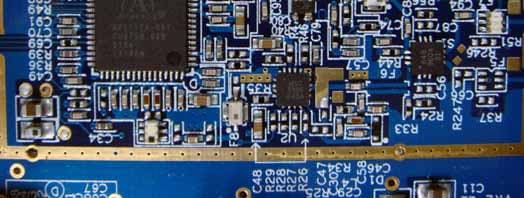
Click to zoom
Application Details
- Equipment Class
- NII - Unlicensed National Information Infrastructure TX
- Date of Grant
- Dec 19, 2007
- Application Purpose
- Original Equipment
- Date of Application
- Dec 19, 2007
- Equipment Note
- 802.11a+g Wireless Access Point
- Frequency Range
- 5180.00000000 - 5240.00000000
- Company
- Sercomm Corporation
- Country
- Taiwan
Documents & Files
Document Text
Text extracted from the exhibit documents filed with the FCC. Open a document above to read the original.
Users Manual
802.11a+g Wireless Access Point User's Guide i TABLE OF CONTENTS CHAPTER 1 INTRODUCTION ............................................................................................. 1 Features of your Wireless Access Point........................................................................... 1 Package Contents .............................................................................................................. 3 Physical Details .................................................................................................................. 4 CHAPTER 2 INSTALLATION............................................................................................... 6 Requirements ..................................................................................................................... 6 Procedure ........................................................................................................................... 6 CHAPTER 3 ACCESS POINT SETUP .................................................................................. 9 Overview ............................................................................................................................ 9 Setup using the Windows Utility ...................................................................................... 9 Setup using a Web Browser............................................................................................ 12 Basic Screen ..................................................................................................................... 15 Wireless Settings 11a Screen .......................................................................................... 17 Wireless Settings 11b/g Screen ....................................................................................... 18 Security Profile Settings 11a Screen .............................................................................. 19 Security Profile Settings 11b/g Screen ........................................................................... 20 Security Profile Configuration Screen........................................................................... 21 Radius Server Settings .................................................................................................... 31 Access Control .................................................................................................................33 Hotspot Settings...............................................................................................................35 Advanced Wireless Settings............................................................................................ 36 Advanced Access Point Settings ..................................................................................... 37 CHAPTER 4 PC AND SERVER CONFIGURATION ....................................................... 39 Overview .......................................................................................................................... 39 Using WEP .......................................................................................................................39 Using WPA-PSK/WPA2-PSK ........................................................................................ 40 Using WPA-Enterprise ................................................................................................... 41 802.1x Server Setup (Windows 2000 Server) ................................................................ 42 802.1x Client Setup on Windows XP ............................................................................. 52 Using 802.1x Mode (without WPA) ............................................................................... 58 CHAPTER 5 OPERATION AND STATUS ......................................................................... 59 Operation ......................................................................................................................... 59 General Screen.................................................................................................................59 Activity Log...................................................................................................................... 62 Wireless Station List ....................................................................................................... 63 Statistics Screen ...............................................................................................................64 CHAPTER 6 OTHER SETTINGS & FEATURES ............................................................. 66 Overview ....................................................................................................................... ... 66 Change Password Screen ................................................................................................ 66 Remote Management ...................................................................................................... 68 Firmware Upgrade .......................................................................................................... 69 Backup/Restore Settings ................................................................................................. 70 Reboot AP ........................................................................................................................ 72 APPENDIX A SPECIFICATIONS ....................................................................................... 73 Wireless Access Point ...................................................................................................... 73 APPENDIX B TROUBLESHOOTING ................................................................................ 76 Overview .......................................................................................................................... 76 General Problems ........................................................................................................…
Text truncated - open the document above for the full version.
Users Manual
PC and Server Configuration 47 Figure 35: Active Directory Screen 6. Select the Group Policy tab, choose Default Domain Policy then click Edit. Figure 36: Group Policy Tab 7. Select Computer Configuration - Windows Settings - Security Settings - Public Key Policies, right-click Automatic Certificate Request Settings - New - Automatic Certificate Request. Wireless Access Point User Guide 48 Figure 37: Group Policy Screen 8. When the Certificate Request Wizard appears, click Next. 9. Select Computer, then click Next. Figure 38: Certificate Template Screen 10. Ensure that your certificate authority is checked, then click Next. 11. Review the policy change information and click Finish. 12. Click Start - Run, type cmd and press enter. Enter secedit /refreshpolicy machine_policy This command may take a few minutes to take effect. PC and Server Configuration 49 Internet Authentication Service (Radius) Setup 1. Select Start - Programs - Administrative Tools - Internet Authentication Service 2. Right-click on Clients, and select New Client. Figure 39: Service Screen 3. Enter a name for the access point, click Next. 4. Enter the address or name of the Wireless Access Point, and set the shared secret, as entered on the Security Settings of the Wireless Access Point. 5. Click Finish. 6. Right-click on Remote Access Policies, select New Remote Access Policy. 7. Assuming you are using EAP-TLS, name the policy eap-tls, and click Next. 8. Click Add... If you don't want to set any restrictions and a condition is required, select Day-And-Time- Restrictions, and click Add... Figure 40: Attribute Screen 9. Click Permitted, then OK. Select Next. 10. Select Grant remote access permission. Click Next. Wireless Access Point User Guide 50 11. Click Edit Profile... and select the Authentication tab. Enable Extensible Authentication Protocol, and select Smart Card or other Certificate. Deselect other authentication methods listed. Click OK. Figure 41: Authentication Screen 12. Select No if you don't want to view the help for EAP. Click Finish. PC and Server Configuration 51 Remote Access Login for Users 1. Select Start - Programs - Administrative Tools- Active Directory Users and Computers. 2. Double click on the user who you want to enable. 3. Select the Dial-in tab, and enable Allow access. Click OK. Figure 42: Dial-in Screen Wireless Access Point User Guide 52 802.1x Client Setup on Windows XP Windows XP ships with a complete 802.1x client implementation. If using Windows 2000, you can install SP3 (Service Pack 3) to gain the same functionality. If you don't have either of these systems, you must use the 802.1x client software provided with your wireless adapter. Refer to your vendor's documentation for setup instructions. The following instructions assume that: • You are using Windows XP • You are connecting to a Windows 2000 server for authentication. • You already have a login (User name and password) on the Windows 2000 server. Client Certificate Setup 1. Connect to a network which doesn't require port authentication. 2. Start your Web Browser. In the Address box, enter the IP address of the Windows 2000 Server, followed by /certsrv e.g http://192.168.0.2/certsrv 3. You will be prompted for a user name and password. Enter the User name and Password assigned to you by your network administrator, and click OK. Figure 43: Connect Screen 4. On the first screen (below), select Request a certificate, click Next. PC and Server Configuration 53 Figure 44: Wireless CA Screen 5. Select User certificate request and select User Certificate, the click Next. Figure 45: Request Type Screen 6. Click Submit. Wireless Access Point User Guide 54 Figure 46: Identifying Information Screen 7. A message will be displayed, then the certificate will be returned to you. Click Install this certificate. Figure 47:Certificate Issued Screen 8. . You will receive a confirmation message. Click Yes. PC and Server Configuration 55 Figure 48: Root Certificate Screen 9. Certificate setup is now complete. 802.1x Authentication Setup 1. Open the properties for the wireless connection, by selecting Start - Control Panel - Network Connections. 2. Right Click on the Wireless Network Connection, and select Properties. 3. Select the Authentication Tab, and ensure that Enable network access control using IEEE 802.1X is selected, and Smart Card or other Certificate is selected from the EAP type. Figure 49: Authentication Tab Encryption Settings The Encryption settings must match the APs (Access Points) on the Wireless network you wish to join. • Windows XP will detect any available Wireless networks, and allow you to configure each network independently. Wireless Access Point User Guide 56 • Your network administrator can advise you of the correct settings for each network. 802.1x networks typically use EAP-TLS. This is a dynamic key system, so there is no need to enter key values. Enabling Encryption To enable encryption for a wireless network, follow this procedure: 1. Click on the Wireless Networks tab. Figure 50: Wireless Networks Screen 2. Select the wireless network from the Available Networks list, and click Configure. 3. Select and enter the correct values, as advised by your Network Administrator. For example, to use EAP-TLS, you would enable Data encryption, and click the checkbox for the setting The key is provided for me automatically, as shown below. PC and Server Configuration 57 Figure 51: Properties Screen Setup for Windows XP and 802.1x client is now complete. Wireless Access Point User Guide 58 Using 802.1x Mode (without WPA) This is very similar to using WPA-Enterprise. The only difference is that on your client, you must NOT enable the setting The key is provided for me automatically. Instead, you must enter the WEP key manually, ensuring it matches the WEP key used on the Access Point. Figure 52: Properties Screen Note: On some systems, the "64 bit" WEP key is shown as "40 bit" and the "128 bit" WEP key is shown as "104 bit". This…
Text truncated - open the document above for the full version.
Cover Letter(s)
SerComm Corporation磊 Taipei Office: 8F, No.3-1, YuanQu St., NanKang, Taipei 115, Taiwan, R.O.C. TEL: 886-2-2655-3988 FAX: 886-2-2655-3966 Chu Nan Office: 3F, No. 81, YuYi Rd., Chu-Nan, Miao-Li 350, Taiwan, R.O.C. TEL: 886-37-585-899 FAX: 886-37-585-000 Date: 2007-09-21 Declaration of Authorization We Name: SerComm Corporation Address: 8F, No.3-1, YuanQu St, Nankang City: Taipei City, 115 Country: Taiwan, R.O.C. Declare that: Name: Exclusive Certification Corporation Address: 4F-2, No.28, Xing-Ai Rd. City: Neihu, Taipei 114 Country: Taiwan, R.O.C. is authorized to apply for Certification of the following product(s): Product description: 802.11a+g Wireless Access Point Type designation: AP51DA Trademark: SerComm on our behalf. Yours sincerely, Ronnie Cheng / Associate Manager / R&D Division SerComm Corporation
Cover Letter(s)
SerComm Corporation磊 Taipei Office: 8F, No.3-1, YuanQu St., NanKang, Taipei 115, Taiwan, R.O.C. TEL: 886-2-2655-3988 FAX: 886-2-2655-3966 Chu Nan Office: 3F, No. 81, YuYi Rd., Chu-Nan, Miao-Li 350, Taiwan, R.O.C. TEL: 886-37-585-899 FAX: 886-37-585-000 Date: 2007-09-21 To: Telefication B.V. Attn: Dept. FCC TCB Edisonstraat 12A 6902 PK ZEVENAAR The Netherlands Subject: Request for non-disclosure (FCC ID: P27AP51DAR) Reference number: AP51DA Dear FCC TCB, Persuant to 47 CFR Section 0.459(a) & (b), SerComm Corporation hereby requests non-disclosure and confidential treatment of the following materials submitted in support of FCC certification application for FCC ID: ( P27AP51DAR) a. Schematic diagrams b. Operational description c. Block Diagram Above materials contain secrets, proprietary and technical information, which would customarily be quarded from competitors under 47 CFR, section 0.457(d)(2). Disclosure or publication or any portion of this company confidential material to other parties could cause substantial competitive harm and provide unjustified benefits for competitors. SerComm Corporation understands that pursuant to 47 CFR section 0.457(d)(1)(ii) disclosure of the applicant and all accompanying documentation will not be made before the date of the grant. Yours sincerely, Ronnie Cheng / Associate Manager / R&D Division SerComm Corporation
External Photos
Exclusive Certification Corp. Tel:886-2-2792-3366 Fax:886-2-2792-1100 Issued date: Nov. 28, 2007 1 of 7 FCC Test Report: FI05080301-C Appendix A. Photographs of EUT 05080301-C 05080301-C
ID Label/Location Info
Model No.: Serial No.: Server Name: Input:12VDC 1 A This device complies with Part 15 of the FCC rules. Operation is subject to the following two conditions:(1) This device may not cause harmful interference.(2)This device must accept any interference received including interference that may cause undesired operation. 101.00 mm 65.0 mm 4-R1.5 Made in China FCC ID:P27AP51DAR 1.#50 2. 3. 4. 5. 0.2mm 932YHJ0001 NOTES: 2007/07/12 Label & Location
Internal Photos
Exclusive Certification Corp. Tel:886-2-2792-3366 Fax:886-2-2792-1100 Issued date: Nov. 28, 2007 2 of 7 FCC Test Report: FI05080301-C 05080301-C 05080301-C Exclusive Certification Corp. Tel:886-2-2792-3366 Fax:886-2-2792-1100 Issued date: Nov. 28, 2007 3 of 7 FCC Test Report: FI05080301-C 05080301-C 05080301-C Exclusive Certification Corp. Tel:886-2-2792-3366 Fax:886-2-2792-1100 Issued date: Nov. 28, 2007 4 of 7 FCC Test Report: FI05080301-C 2.4GHz of RF part 5GHz of RF part 05080301-C 05080301-C Exclusive Certification Corp. Tel:886-2-2792-3366 Fax:886-2-2792-1100 Issued date: Nov. 28, 2007 5 of 7 FCC Test Report: FI05080301-C 05080301-C 05080301-C Exclusive Certification Corp. Tel:886-2-2792-3366 Fax:886-2-2792-1100 Issued date: Nov. 28, 2007 6 of 7 FCC Test Report: FI05080301-C 05080301-C Exclusive Certification Corp. Tel:886-2-2792-3366 Fax:886-2-2792-1100 Issued date: Nov. 28, 2007 7 of 7 FCC Test Report: FI05080301-C 05080301-C 05080301-C
RF Exposure Info
1.1. Test Result of RF Exposure Evaluation . Product: 802.11a+g Wireless Access Point . Test Item: RF Exposure Evaluation Data . Test site: OATSI-SD . Test Mode: Normal Operation 1.1.1. Antenna Gain The maximum Gain is 5.0 dBi. 1.1.2. EUT Operation condition Software provided by client enabled the EUT to transmit and receive data at lowest, middle and highest channel individually. 1.1.3. Output Power into Antenna & RF Exposure Evaluation Distance Modulation Standard: IEEE 802.11b Test Date: Oct. 24, 2007 Temperature: 25 Humidity: 62 Channel Channel Frequency (MHz) Output Power to Antenna (dBm) Power Density (S) (mW/cm 2 ) 01 2412 17.18 0.033 06 2437 17.73 0.037 11 2462 17.87 0.039 Modulation Standard: IEEE 802.11g Test Date: Oct. 24, 2007 Temperature: 25 Humidity: 62 Channel Channel Frequency (MHz) Output Power to Antenna (dBm) Power Density (S) (mW/cm 2 ) 01 2412 16.28 0.027 06 2437 14.42 0.017 11 2462 15.13 0.020 Modulation Standard: IEEE 802.11a Test Date: Jun. 28, 2006 Temperature: 24 Humidity: 68 Channel Channel Frequency (MHz) Output Power to Antenna (dBm) Power Density (S) (mW/cm 2 ) 36 5180 14.56 0.018 44 5220 14.56 0.018 48 5240 14.38 0.017 Modulation Standard: IEEE 802.11a Test Date: Oct. 19, 2007 Temperature: 24 Humidity: 64 Channel Channel Frequency (MHz) Output Power to Antenna (dBm) Power Density (S) (mW/cm 2 ) 09 5745 13.71 0.015 11 5785 13.87 0.015 13 5825 13.75 0.015 The MPE is calculated as 0.039 mW / cm 2 < limit 1 mW / cm 2 . So, RF exposure limit warning or SAR test are not required. For 2412-2462 MHz, the EUT will only be used with a separation of 20cm or greater between the antenna and nearby persons and can therefore be considered a mobile transmitter per 47CFR2.1091 (b). The RF Exposure Information page from the manual is included here for reference.
Test Report
Exclusive Certification Corp. Tel:886-2-2792-3366 Fax:886-2-2792-1100 Issued date: Nov. 28, 2007 1 of 59 FCC Test Report: FE05080301-C FCC TEST REPORT according to FCC Rules and Regulations Part 15 Subpart E Laboratory accreditation The test result refers exclusively to the test presented test model / sample., The test result does not include DFS test for 5250 ~ 5350 MHz. Without written approval of Exclusive Certification Corp. the test report shall not be reproduced except in full. The EUT is also considered as a kind of computer peripheral, because the connection to computer is necessary for typical use. It has been verified to comply with the requirements of FCC Part 15, Subpart B, Class B (DoC). The test report has been issued separately. Applicant : SerComm Corporation Address : 8F, No. 3-1, YuanQu St., NanKang, Taipei 115 Taiwan, R.O.C. Equipment : 802.11a+g Wireless Access Point Model No. : AP51DA FCC ID : P27AP51DAR Trade Name : SerComm Exclusive Certification Corp. Tel:886-2-2792-3366 Fax:886-2-2792-1100 Issued date: Nov. 28, 2007 2 of 59 FCC Test Report: FE05080301-C CONTENTS 1. Report of Measurements and Examinations.........................................................................................5 1.1. List of Measurements and Examinations ................................................................................... 5 2. Test Configuration of Equipment under Test ......................................................................................... 6 2.1. Feature of Equipment under Test............................................................................................... 6 2.2. RF Specifications ....................................................................................................................... 6 2.3. Carrier Frequency of Channels ..................................................................................................6 2.4. Test Mode and Test Software.....................................................................................................7 2.5. Description of Test System......................................................................................................... 7 2.6. Connection Diagram of Test System.......................................................................................... 8 2.7. General Information of Test........................................................................................................ 9 2.8. History of this test report ..........................................................................................................10 3. Antenna Requirements ....................................................................................................................... 11 3.1. Standard Applicable ................................................................................................................. 11 3.2. Antenna Construction and Directional Gain............................................................................. 11 4. Test of Conducted Emission ...............................................................................................................12 4.1. Test Procedures .......................................................................................................................12 4.2. Typical Test Setup Layout of Conducted Emission .................................................................. 13 4.3. Conducted Emission Requirement .......................................................................................... 13 4.4. Measurement equipment ......................................................................................................... 13 4.5. Test Result and Data................................................................................................................14 4.6. Photographs of Conducted Emission Test ............................................................................... 16 5. Test of Radiated Emission ..................................................................................................................17 5.1. Test Procedures .......................................................................................................................17 5.2. Typical Test Setup Layout of Radiated Emission ..................................................................... 18 5.3. Measurement equipment ......................................................................................................... 18 5.4. Test Result of Radiated Emission ............................................................................................ 19 5.5. Photographs of Radiated Emission Test .................................................................................. 39 6. Peak Transmit Power..........................................................................................................................41 6.1. Test Procedure .........................................................................................................................41 6.2. Test Setup Layout ....................................................................................................................41 6.3. Measurement equipment ......................................................................................................... 41 6.4. Test Result and Data................................................................................................................41 7. Peak Power Excursion........................................................................................................................46 7.1. Test Procedure .........................................................................................................................46 7.2. Test Setup Layout ....................................................................................................................46 7.3. Measurement equipment ................................................…
Text truncated - open the document above for the full version.
Test Setup Photos
Exclusive Certification Corp. Tel:886-2-2792-3366 Fax:886-2-2792-1100 Issued date: Nov. 28, 2007 26 of 117 FCC Test Report: FI05080301-C 4.6 Test Photographs Front View Rear View Exclusive Certification Corp. Tel:886-2-2792-3366 Fax:886-2-2792-1100 Issued date: Nov. 28, 2007 62 of 117 FCC Test Report: FI05080301-C 5.6 Test Photographs Test mode 1: Front View Rear View Exclusive Certification Corp. Tel:886-2-2792-3366 Fax:886-2-2792-1100 Issued date: Nov. 28, 2007 63 of 117 FCC Test Report: FI05080301-C Test mode 2: Front View Rear View Exclusive Certification Corp. Tel:886-2-2792-3366 Fax:886-2-2792-1100 Issued date: Nov. 28, 2007 91 of 117 FCC Test Report: FI05080301-C 10.6 Photographs of Conducted Emission Test Front View Rear View Exclusive Certification Corp. Tel:886-2-2792-3366 Fax:886-2-2792-1100 Issued date: Nov. 28, 2007 103 of 117 FCC Test Report: FI05080301-C 11.6 Photographs of Radiated Emission Test Test Mode 1: Front View Rear View Exclusive Certification Corp. Tel:886-2-2792-3366 Fax:886-2-2792-1100 Issued date: Nov. 28, 2007 104 of 117 FCC Test Report: FI05080301-C Test Mode 2: Front View Rear View
Contact Information
Applicant
Nick Wu(Engineer)
Technical Contact
SerComm CorporationRonnie Cheng
[email protected]+886-2-2655-3988
8F, No.3-1, YuanQu St. · Taipei · Taiwan
Test Firm
Cerpass Technology CorporationAnson Chou
Technical Specifications
| # | Rule Parts | Frequency Range | Power Output |
|---|---|---|---|
| 1 | 15E | 5.18 GHz - 5.24 GHz | 29.00 mW |
Other Applications from Sercomm Corporation
P27-MOTIONZW60R0
Aug 04, 2026WIRELESS PIR MOTION SENSOR
Equipment Class
DTS - Digital Transmission SystemP27-SCP5173P
Dec 24, 2025Moso Canopy 5GOD2
Equipment Class
CBD - Citizens Band Category A and B DevicesP27-TPM530
Nov 24, 2025CATM1 Module
Equipment Class
PCB - PCS Licensed TransmitterP27MQIO
Sep 16, 2025Mqio 9W
Equipment Class
DTS - Digital Transmission SystemP27LORAAREAV2
Jul 25, 2024MachineQ Area 8C V2 LoRaWAN Gateway
Equipment Class
PCB - PCS Licensed Transmitter