P4Q-N653MiTAC, Webfleet Solutions
Mitac Digital Technology Corporation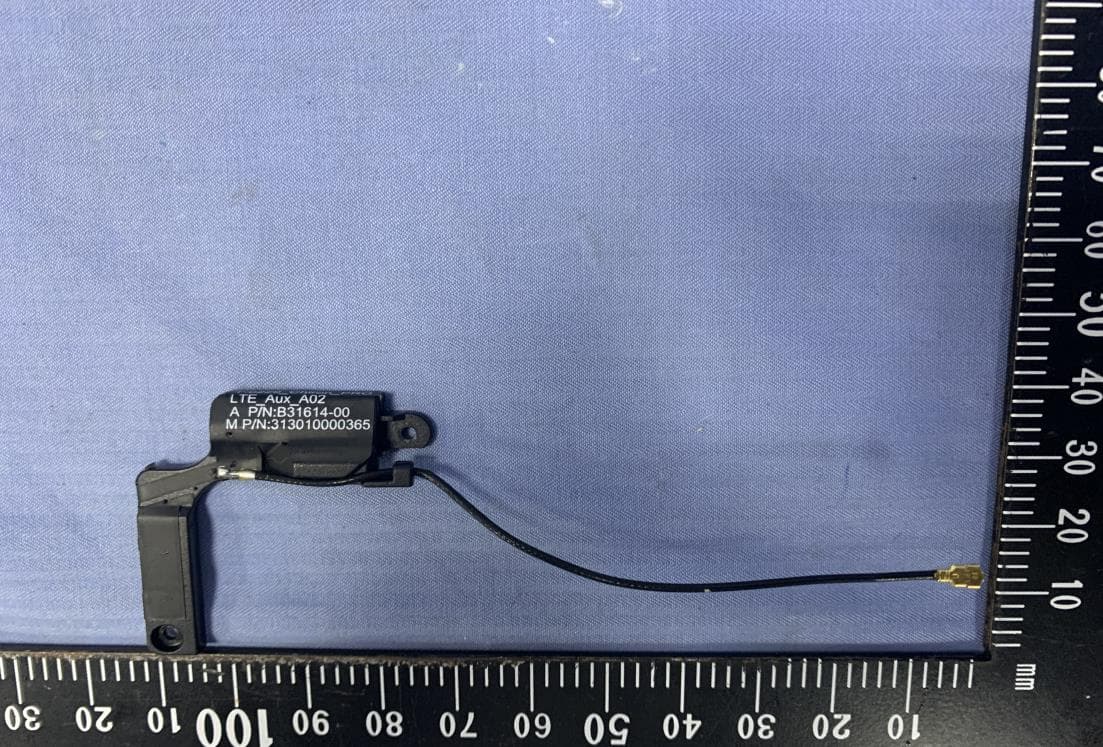
Click to zoom
Application Details
- Equipment Class
- DXX - Part 15 Low Power Communication Device Transmitter
- Date of Grant
- Jun 29, 2020
- Application Purpose
- Original Equipment
- Date of Application
- Jun 29, 2020
- Equipment Note
- MiTAC, Webfleet Solutions
- Frequency Range
- 13.56000000 - 13.56000000
- Country
- Taiwan
Documents & Files
Document Text
Text extracted from the exhibit documents filed with the FCC. Open a document above to read the original.
Users Manual
N653 User Manual 1 Revision: R00 (December 2019) Trademark All brand and product names are trademarks or registered trademarks of their respective companies. Google, Google Play , YouTube and other marks are trademarks of Google LLC. Disclaimer Specifications and documents are subject to change without notice. Note Not all models are available in all regions. Not all features are available on all models. Depending on the specific model purchased, the colour and look of your device and accessories may not exactly match the graphics shown in this document. The screenshots and other presentations shown in this document are for reference only. 2 Table of Contents Device Basics ................................................................................................................... 4 Getting to Know Your Device ................................................................................ 4 Front-Side View .......................................................................................... 4 Rear-Side View ........................................................................................... 4 Right-Side View .......................................................................................... 4 Bottom-Side View ....................................................................................... 5 Using a Micro-SIM Card ........................................................................................ 5 Using a Memory Card............................................................................................ 5 Turning the Device On and Off .............................................................................. 6 Turning On .................................................................................................. 6 Sleep Mode ................................................................................................. 6 Aeroplane Mode ......................................................................................... 6 Restarting the Device ................................................................................. 6 Turning Off .................................................................................................. 6 Shutting Down ............................................................................................ 7 Getting Started ................................................................................................................. 8 Using the Touch Screen ........................................................................................ 8 Home Screen ......................................................................................................... 9 Customising Your Device ............................................................................................... 10 Cellular Data Connection..................................................................................... 10 Wireless Network Connection ............................................................................. 10 Connecting to a Wireless Network ............................................................ 10 Removing a Remembered Network .......................................................... 11 Bluetooth ............................................................................................................. 11 Pairing with Another Bluetooth Device ..................................................... 11 Disconnecting a Bluetooth Connection ..................................................... 11 Reference ....................................................................................................................... 12 Caring for the Device ........................................................................................... 12 Regulatory Information ........................................................................................ 12 Bluetooth ................................................................................................... 13 Safety Precautions .............................................................................................. 13 About Charging ......................................................................................... 13 About the Charger .................................................................................... 13 About the Battery ...................................................................................... 13 3 Device Basics Getting to Know Your Device Front-Side View ❶ NFC sensor* ❷Light sensor ❸Power button ❹Volume buttons ❺Touch screen ❻Microphone *For selected models only Rear-Side View Right-Side View ❶Memory card slot ❷Micro-SIM card slot* *To use cellular services, you must have a subscription to the function with a mobile phone network service. ❶Rear camera lens ❷Flash LED ❸Speaker ❹Screw hole for cradle ❺Dock connector ❻Socket for cradle 4 Bottom-Side View ❶ USB Type C connector Using a Micro-SIM Card The device uses a Micro-SIM card. Open the cover on the right side of the device to locate the Micro-SIM card slot. With its label side facing the rear side of the device, hold the Micro-SIM card by the edges and gently insert it into the slot. Note that inserting the card in the reverse direction may cause damage. To remove a card, gently push the top edge of the card inwards to release it, and pull it out of the slot. Using a Memory Card Open the cover on the right side of the device to locate the memory card slot. With its label side facing the rear side of the device, hold the MicroSD card by the edges and gently insert it into the slot. Note that inserting the card in the reverse direction may cause damage. To remove a MicroSD card, first unmount it from the device by tapping Settings on the Home screen Storage . Then gently push the top edge of the card inwards to release it, and pull it out of the slot. Do not apply pressure to the center of the memory card. Inserting the card in the reve…
Text truncated - open the document above for the full version.
ID Label/Location Info
TF-LABEL;Rating,Device,US,2/2,Triton 242N65300002 R00 DIGITAL TECHNOLOGY CORP. Amy.Sheng 2020/04/14 Amy.Sheng 2020/04/14 Mandy,Gao 2020/04/14 Jimmy.Qian 2020/04/14 Made in China XX-X K DID: D046978 Model: N653 FCC ID: P4Q-N653 Input: 5V 2A Made in ChinaXX-X KCaution: For power supply see user instructions BC 50#白色压花PET+ PET 25N NPL QPM (避免高濕溫測試時產生氣泡) Vendor code PRO 8475 P/N: 4K7S.002.10.1 Webfleet Solutions - a Bridgestone company P/N: 242N65300002 R00 IC: 2420C-N653 Label location Device Cradle
Internal Photos
Page: 7 / 14 Report No.: T200407W01 Rev.: 00 INTERNAL PHOTOGRAPHS OF EUT Page: 8 / 14 Report No.: T200407W01 Rev.: 00 Page: 9 / 14 Report No.: T200407W01 Rev.: 00 NFC RF IC & Crystal Page: 10 / 14 Report No.: T200407W01 Rev.: 00 WWAN Antenna (LTE) Page: 11 / 14 Report No.: T200407W01 Rev.: 00 NFC Antenna Page: 12 / 14 Report No.: T200407W01 Rev.: 00 GPS Antenna Page: 13 / 14 Report No.: T200407W01 Rev.: 00 Battery Page: 14 / 14 Report No.: T200407W01 Rev.: 00 WLAN RF IC (BT & WIFI) WLAN Crystal (BT & WIFI)
Test Report
FCC ID: P4Q-N653 IC: 2420C-N653 Page: 1 / 30 Report No.: T200407W01-RP5 Rev.: 02 No.11, Wugong 6th Rd., Wugu Dist., New Taipei City , Taiwan /新北市五股區五工六路11號 t:(886-2) 2299-9720 f:(886-2) 2299-9721 www.sgs.com.tw www.ccsrf.com Unless otherwise stated the results shown in this test report refer only to the sample(s) tested and such sample(s) are retained for 90 days only. 除非另有說明,此報告結果僅對測試之樣品負責,同時此樣品僅保留90天。本報告未經本公司書面許可,不可部份複製。 This document is issued by the Company subject to its General Conditions of Service printed overleaf, available on request or accessible at http://www.sgs.com.tw/Terms-and-Conditions and, for electronic format documents, subject to Terms and Conditions for Electronic Documents at http://www.sgs.com.tw/Terms-and-Conditions. Attention is drawn to the limitation of liability, indemnification and jurisdiction issues defined therein. Any holder of this document is advised that information contained hereon reflects the Company’s findings at the time of its intervention only and within the limits of client’s instruction, if any. The Company’s sole responsibility is to its Client and this document does not exonerate parties to a transaction from exercising all their rights and obligations under the transaction documents. This document cannot be reproduced, except in full, without prior written approval of the Company. Any unauthorized alteration, forgery or falsification of the content or appearance of this document is unlawful and offenders may be prosecuted to the fullest extent of the law. Compliance Certification Services Inc. 程智科技股份有限公司 Member of the SGS Group FCC 47 CFR PART 15 SUBPART C & INDUSTRY CANADA RSS-210 TEST REPORT For PRO 8475 Trade Name: MiTAC, Webfleet Solutions Model: N653 Issued to FCC: Mitac Digital Technology Corporation No.200, Wen Hwa 2nd Rd.,Kuei Shan Dist. Taoyuan, 33383 Taiwan IC: MiTAC Digital Technology Corporation No.200, Wenhua 2nd Rd., Guishan Dist. Taoyuan City 333 Taiwan Issued by Compliance Certification Services Inc. Wugu Laboratory No.11, Wugong 6th Rd., Wugu Dist., New Taipei City, Taiwan. (R.O.C.) Issued Date: June 9, 2020 Page: 2 / 30 Report No.: T200407W01-RP5 Rev.: 02 Revision History Rev. Issue Date Revisions Effect Page Revised By 00 May 21, 2020 Initial Issue ALL Allison Chen 01 June 9, 2020 See the following note Rev.(01) ALL Allison Chen 02 June 16, 2020 See the following note Rev.(02) ALL May Lin Rev.(01) 1. Added test data for conduction and radiated emission. 2. Revised product name: PRO 8475, and model name: N653. Rev.(02) 1. Update the standard from RSS-210 Issue 9 to RSS-210 Issue 10, After the estimate, it is unnecessary to final tested. Page: 3 / 30 Report No.: T200407W01-RP5 Rev.: 02 TABLE OF CONTENTS 1. TEST RESULT CERTIFICATION ....................................................................................4 2. EUT DESCRIPTION ........................................................................................................5 3. TEST METHODOLOGY ..................................................................................................6 3.1 EUT CONFIGURATION ..........................................................................................6 3.2 FCC PART 15.205 RESTRICTED BANDS OF OPERATIONS ................................6 3.3 RSS GEN SECTION 8.10 RESTRICTED BANDS OF OPERATIONS .....................7 3.4 DESCRIPTION OF TEST MODES ..........................................................................8 4. TEST SUMMARY ............................................................................................................9 5. INSTRUMENT CALIBRATION ...................................................................................... 10 5.1 MEASURING INSTRUMENT CALIBRATION ........................................................ 10 5.2 MEASUREMENT EQUIPMENT USED.................................................................. 10 5.3 MEASUREMENT UNCERTAINTY ........................................................................ 11 6. FACILITIES AND ACCREDITATIONS .......................................................................... 12 6.1 FACILITIES ........................................................................................................... 12 6.2 EQUIPMENT ......................................................................................................... 12 7. SETUP OF EQUIPMENT UNDER TEST ....................................................................... 13 7.1 SETUP CONFIGURATION OF EUT ..................................................................... 13 7.2 SUPPORT EQUIPMENT ....................................................................................... 13 8. FCC PART 15.225 REQUIREMENTS ........................................................................... 14 8.1 POWERLINE CONDUCTED EMISSIONS ............................................................ 14 8.2 FUNDAMENTAL AND RADIATED EMISSIONS ................................................... 17 8.3 TEST DATA RE-USE SUMMARY ......................................................................... 29 APPENDIX A PHOTOGRAPHS OF TEST SETUP ........................................................... A-1 APPENDIX 1 - PHOTOGRAPHS OF EUT Page: 4 / 30 Report No.: T200407W01-RP5 Rev.: 02 1. TEST RESULT CERTIFICATION FCC Applicant: Mitac Digital Technology Corporation No.200, Wen Hwa 2nd Rd.,Kuei Shan Dist. Taoyuan, 33383 Taiwan IC Applicant: MiTAC Digital Technology Corporation No.200, Wenhua 2nd Rd., Guishan Dist. Taoyuan City 333 Taiwan Manufacturer: MITAC COMPUTER (KUNSHAN) CO., LTD. No. 269, 2nd Avenue, District A, Comprehensive Free Trade Zone, Kunshan, Jiangsu, P.R. China Equipment Under Test: PRO 8475 Trade Name: MiTAC, Webfleet Solutions Model: N653 Date of Test: June 1 ~ June 5, 2020 APPLICABLE STANDARDS STANDARD TEST RESULT FCC 47 CFR Part 15 Subpart C & RSS-210 Issue 10 and RSS-GEN Issue 5 No non-compliance noted Statements of Conformity Determination of compliance is based on the re…
Text truncated - open the document above for the full version.
Test Setup Photos
Page: A-1 / A-3 Report No.: T200407W01-RP5 Rev.: 02 APPENDIX A PHOTOGRAPHS OF TEST SETUP Radiated Emission Set up Photos 9kHz ~ 30MHz 30MHz ~ 1GHz Page: A-2 / A-3 Report No.: T200407W01-RP5 Rev.: 02 Powerline Conducted Emissions Setup Photos Page: A-3 / A-3 Report No.: T200407W01-RP5 Rev.: 02
Contact Information
Applicant
Ruey-Yuan Chen(Director)
Test Firm
Compliance Certification Services Inc. Wugu Lab.Hank Lee
Technical Specifications
| # | Rule Parts | Frequency Range | Power Output |
|---|---|---|---|
| 1 | 15C | 13.56 MHz - 13.56 MHz | - |
Other Applications from Mitac Digital Technology Corporation
P4Q-N749
Nov 28, 2025Motorcycle Dashcam
Equipment Class
DTS - Digital Transmission SystemP4Q-N711
Nov 28, 2025Motorcycle Dashcam
Equipment Class
DTS - Digital Transmission SystemP4Q-PROX
Oct 14, 2024PRO X
Equipment Class
DXX - Part 15 Low Power Communication Device TransmitterP4Q-N722
Apr 10, 2024Tablet
Equipment Class
DXX - Part 15 Low Power Communication Device Transmitter
P4Q-N635RN
Mar 07, 2024Chrion Pro
Equipment Class
PCB - PCS Licensed Transmitter