P9ATPMA2205 Wires Analog Resistive Touch Screen
ITM INC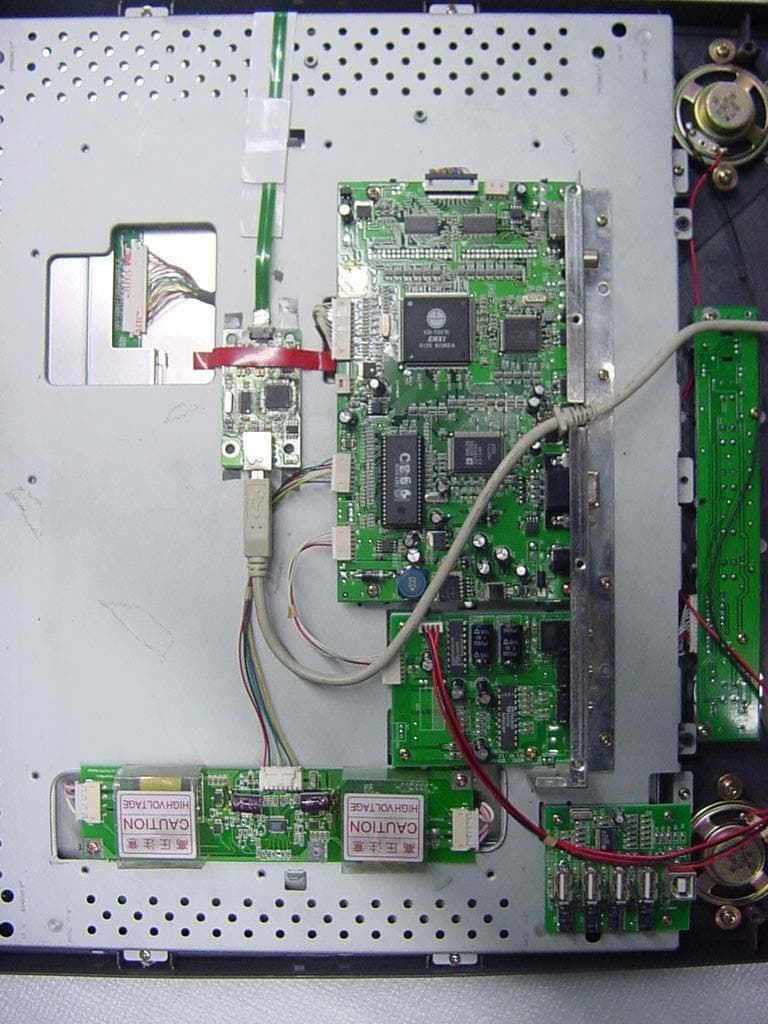
Click to zoom
Application Details
- Equipment Class
- JBP - Part 15 Class B Computing Device Peripheral
- Date of Grant
- Jan 16, 2005
- Application Purpose
- Original Equipment
- Date of Application
- Jan 16, 2005
- Equipment Note
- 5 Wires Analog Resistive Touch Screen
- Company
- ITM INC
- Country
- South Korea
Documents & Files
Document Text
Text extracted from the exhibit documents filed with the FCC. Open a document above to read the original.
Users Manual
TOUCH SCREEN USERS GUIDE PREFACE - Touch Screen is designed to be used in conjunction with Multi-media and Windows. This technology is increasingly applied to our daily lives, on a more regular basis, especially in the fields of information systems and automation, etc. It is the most user-friendly, visual-hand input device available. PRODUCT SPECIFICATIONS 1) TECHNOLOGY : Analog Resistive 2) SCREEN THICKNESS : 1.0 mm~3.5mm (Depending on request) 3) SCREEN SURFACE HARDNESS : ≥ 3H 4) TRANSPARENCY : ≥ 80% (General) 5) RESOLUTION : 4096 X 4096 6) PRESSURE SENSITIVITY : ≥ 80g 7) LIFE TIME : ≥ 1,000,000 touches 8) OPERATIONAL TEMP. RANGE : 0°C~60°C 9) POWER INPUT : DC 5V ± 10% 10) INTERFACE : USB or RS-232C 11) CONVERSION SPEED : USB1.1 or 19200 Baud 12) RESISTANCE : 200~800 Ω 13) TOUCH ACCURACY : ≥ 98.5% HARDWARE SYSTEM REQUIREMENTS 1) COMPUTER : 486 Compatible or above 2) HARD DISK DRIVE : 10 MB of free memory 3) CONNECT PORT : USB port or RS-232C port OPERATING SYSTEM REQUIREMENTS Windows 98 , Windows NT 4.0 , Windows 2000 , Windows Me and Windows XP TOUCH SCREEN STANDARD COMPONENTS 1) Resistive overlay touch panel with glass 2) Controller (USB or RS-232C) 3) CD-ROM Drive Diskette 4) Cable (USB or RS-232C Cable Ass’y) FIG. Touch Screen Standard components ASSEMBLY & DISASSEMBLY PROCEDURES: 1) Place the built-in Touch panel on LCD monitor that being removed cover assemble. 2) Attach Touch panel controller in the rear part of LCD monitor. 3) Combine the Touch panel with the adhesive rubber tape, and re-assembly of your monitor. 4) Connect the cable(USB) between PC and Touch Controller 5) Install the Driver to your computer. INSTALL TOUCH SCREEN DRIVER Installation of the software differs, depending on whether a serial port or USB port, has been connected to the touch-screen controller. This section describes the procedures for installation and the parts that you need to set individually depending on whether you have a serial or USB port connected. - Supported models 1) Supported model: IBM PC/AT or its compatibles 2) Supported operating system 3) Serial Port connection : Windows 98, Windows ME, Windows NT, Windows 2000, Windows XP 4) USB connection: Windows 98, Windows ME, Windows NT, Windows 2000, Windows XP A. Regular installation steps 1. Turn on the computer’s power. Turn on the power to boot Windows. 2. Start the Installer. 3. Insert the CD then the software starts automatic installation. B. Number of devices - Allows to set the number of touch screens (controllers). Enter the number of touch screen if multiple touch screens are used. Click on “Next(N)” or press <Enter> when finished. C. Selecting the controller - During the installation sequence, the screen for selecting the controller will appear. Then, you must select whether you want to connect your touch-screen controller to the serial port or USB. - To connect the controller with a serial port, choose [ITM Touch, Serial]. Alternatively, to connect the controller with the USB port, choose [ITM Touch, USB]. - If you choose [ITM Touch, USB], then go to [Complete installation]. - If you choose [ITM Touch, Serial], then go to [Serial port connection]. D. Serial port connection - If you choose [ITM Touch, Serial], the ‘Serial port setting’ window appears. If you want to use is COM1 as the serial port, click “Next (N)”, or press the <Enter> key. If you want to use COM2 or any other part, choose a port from the Popup menu, click on “Next (N) or any other port, choose a port from the Popup menu, click on “Next (N)”, or press the <Enter> key and go to [Complete installation]. E. Completing the installation - For connecting to a serial port, set ‘Serial port connection and to [Complete installation]. And in USB connection, set ‘Select a controller’ and go to the USB port. Click on ‘Next (N)’ or press the <Enter> key. Then, follow the instructions on the screen. Windows XP user. - While installation progresses the window entitled ‘the installation of the hardware’ is indicted. Click on ‘continuation©’ or press the <Enter> Key. A windows indicated in the same way when USB plug is put in the PC after installation is finished in the case of the USB connection. Click on ‘continuation(C)’ or press the <Enter> key in the same way in that case as well. Windows 2000 user. - While installation progresses the window entitled ‘A digital signature wasn’t found’ is indicated. Click on ‘Yes(Y)’ or press the <Enter> key. A window is indicated in the same way when USB Plug is put in the PC after installation is finished in the case of the USB connection. Click on ‘Yes(Y)’ or press the <Enter> key in the same way in that case as well. F. After completing the installation - You complete the installation. Click on “Continue”, and press the <Enter> key. In the case of Windows NT Workstation, reboot Windows to activate software. Click on “Yes(Y)”, or press the <Enter> key. G. Uninstalling the software - To uninstall the software, run “My Computer”, then go to the “Control Panel” and select “Add/Delete Application” to choose the “Touch screen driver.” Finally click “Add and Delete(R). “After activating the Uninstaller, follow the instructions on the screen to the software. In the case of Windows NT, reboot Windows to complete the uninstalling. Please check below before calling Touch Screen does not work properly □ Make sure that the software is installed properly.. □ Check the interface cable connection. - [ITM Touch, Serial] : RS-232C cable - [ITM Touch, USB]: USB cable □ Try reconnecting the interface cable. Touched area and the on-screen cursor does not match □ Try reconfiguring the calibration
Block Diagram
Block Diagram A/D Converter (12 Bits) Routine Clock : 500Hz A/D conversion Clock : 125kHz Y-Value X-Value CPU(MICOM) F =12MHz Data Command EEPROM Data USB IC (1.1) Clock: 6.0MHz Data Clock: 6.0MHz) Computer System 93C46 Touch Controller Command Clock: 6.0MHz)
Cover Letter(s)
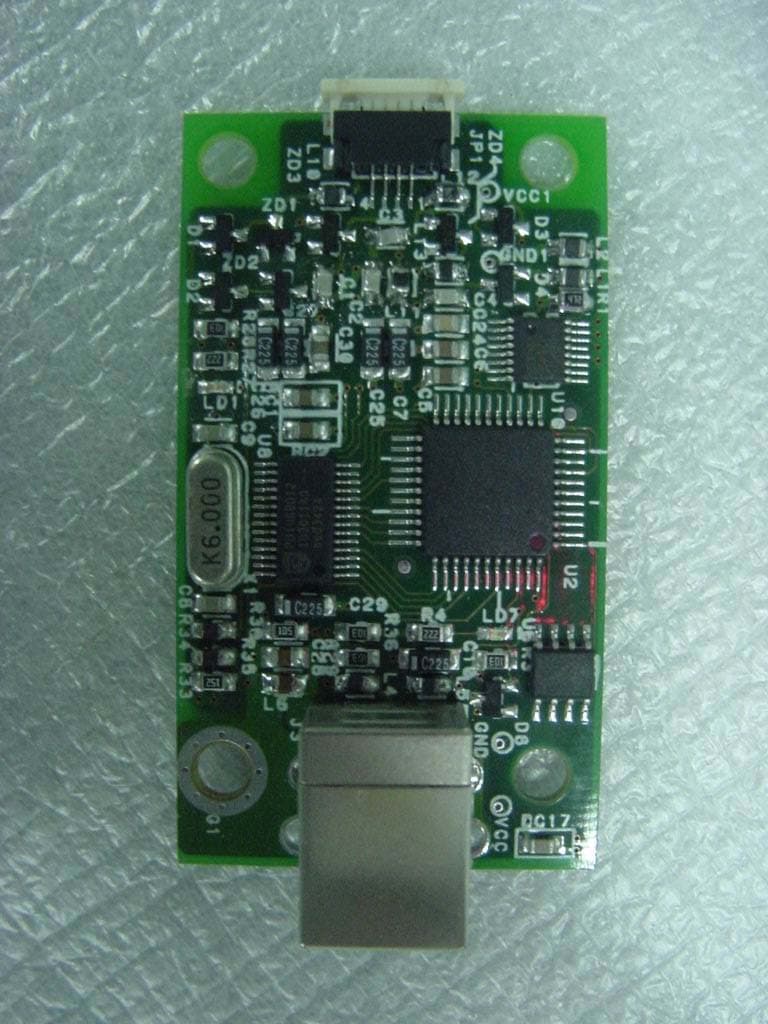
Helen Zhao Subject: FW: ITM INC., FCC ID: P9ATPMA220, Assessment NO.: AN05T4461, Notice#1 1/17/2005 -----Original Message----- From: schong Sent: Sunday, January 16, 2005 5:37 PM To: Helen Zhao Subject: ITM INC., FCC ID: P9ATPMA220, Assessment NO.: AN05T4461, Notice#1 Dear Ms. Helen Zhao, Thank you for your e-mail. We would like to inform you for the following question. Question #1: The EUT photos show a PCB board is attached to a touch screen (glass). Does the EUT consist of these two parts? What is the controller referred on the user manual? Please explain what is the white stuff on the LCD monitor. Please provide more detailed information as how you setup for the test. --> Yes, the EUT consist of two parts, one is PCB board(Controller) and the other is touch screen(glass). The controller referred on the manual is PCB board. And white stuff on the LCD monitor is not related product, it is a mere paper folder. The controller(PCB board) was installed in the inside of LCD monitor and connected with USB port of PC. If you have any question or need more information, please feel free to contact us. Thank you and have a great day! Best Regards, S. C. Hong / Project Engineer -------------------------------------------- ONETECH Corp. ONETECH Testing & Eval. Lab. EMC Div II, Team 2
External Photos
FCC ID. : P9ATPMA220 Report No. : E04NR-107 It should not be reproduced except in full, without the written approval of ONETECH. FCC-003 (Rev.0) HEAD OFFICE : #505 SK APT. Factory 223-28, Sangdaewon 1 Dong, Jungwon-Gu, Seongnam-City, Kyunggi-Do, 462-121, Korea (TEL: +82-31-746-8500, FAX: +82-31-746-8700) EMC Testing Dept : 426-1 Daessangryung-Ri, Chowol-Myun, Kwangju-City, Kyunggi-Do 464-860 Korea. (TEL: +82-31-765-8289, FAX: +82-31-766-2904) ONETECH Testing & Evaluation Lab. FCC ID. : P9ATPMA220 Report No. : E04NR-107 It should not be reproduced except in full, without the written approval of ONETECH. FCC-003 (Rev.0) HEAD OFFICE : #505 SK APT. Factory 223-28, Sangdaewon 1 Dong, Jungwon-Gu, Seongnam-City, Kyunggi-Do, 462-121, Korea (TEL: +82-31-746-8500, FAX: +82-31-746-8700) EMC Testing Dept : 426-1 Daessangryung-Ri, Chowol-Myun, Kwangju-City, Kyunggi-Do 464-860 Korea. (TEL: +82-31-765-8289, FAX: +82-31-766-2904) ONETECH Testing & Evaluation Lab. FCC ID. : P9ATPMA220 Report No. : E04NR-107 It should not be reproduced except in full, without the written approval of ONETECH. FCC-003 (Rev.0) HEAD OFFICE : #505 SK APT. Factory 223-28, Sangdaewon 1 Dong, Jungwon-Gu, Seongnam-City, Kyunggi-Do, 462-121, Korea (TEL: +82-31-746-8500, FAX: +82-31-746-8700) EMC Testing Dept : 426-1 Daessangryung-Ri, Chowol-Myun, Kwangju-City, Kyunggi-Do 464-860 Korea. (TEL: +82-31-765-8289, FAX: +82-31-766-2904) ONETECH Testing & Evaluation Lab. FCC ID. : P9ATPMA220 Report No. : E04NR-107 It should not be reproduced except in full, without the written approval of ONETECH. FCC-003 (Rev.0) HEAD OFFICE : #505 SK APT. Factory 223-28, Sangdaewon 1 Dong, Jungwon-Gu, Seongnam-City, Kyunggi-Do, 462-121, Korea (TEL: +82-31-746-8500, FAX: +82-31-746-8700) EMC Testing Dept : 426-1 Daessangryung-Ri, Chowol-Myun, Kwangju-City, Kyunggi-Do 464-860 Korea. (TEL: +82-31-765-8289, FAX: +82-31-766-2904) ONETECH Testing & Evaluation Lab. FCC ID. : P9ATPMA220 Report No. : E04NR-107 It should not be reproduced except in full, without the written approval of ONETECH. FCC-003 (Rev.0) HEAD OFFICE : #505 SK APT. Factory 223-28, Sangdaewon 1 Dong, Jungwon-Gu, Seongnam-City, Kyunggi-Do, 462-121, Korea (TEL: +82-31-746-8500, FAX: +82-31-746-8700) EMC Testing Dept : 426-1 Daessangryung-Ri, Chowol-Myun, Kwangju-City, Kyunggi-Do 464-860 Korea. (TEL: +82-31-765-8289, FAX: +82-31-766-2904) ONETECH Testing & Evaluation Lab.
ID Label/Location Info
FCC ID. : P9ATPMA220 Report No. : E04NR-107 This report shall not be reproduced except in full without our written approval. FCC-003 (Rev.0) HEAD OFFICE : #505 SK APT. Factory 223-28, Sangdaewon 1 Dong, Jungwon-Gu, Seongnam-City, Kyunggi-Do, 462-121, Korea (TEL: +82-31-746-8500, FAX: +82-31-746-8700) EMC Testing Dept : 426-1 Daessangryung-Ri, Chowol-Myun, Kwangju-City, Kyunggi-Do 464-860 Korea. (TEL: +82-31-765-8289, FAX: +82-31-766-2904) ONETECH Testing & Evaluation Lab. IDENTIFICATION LABEL: PROPOSED FCC ID LABEL Due to the product size, only the FCC ID shall be permanently affixed to the rear side of the equipment and other information shall be placed in the instruction manual. FCC ID: P9ATPMA220
Internal Photos
FCC ID. : P9ATPMA220 Report No. : E04NR-107 It should not be reproduced except in full, without the written approval of ONETECH. FCC-003 (Rev.0) HEAD OFFICE : #505 SK APT. Factory 223-28, Sangdaewon 1 Dong, Jungwon-Gu, Seongnam-City, Kyunggi-Do, 462-121, Korea (TEL: +82-31-746-8500, FAX: +82-31-746-8700) EMC Testing Dept : 426-1 Daessangryung-Ri, Chowol-Myun, Kwangju-City, Kyunggi-Do 464-860 Korea. (TEL: +82-31-765-8289, FAX: +82-31-766-2904) ONETECH Testing & Evaluation Lab. FCC ID. : P9ATPMA220 Report No. : E04NR-107 It should not be reproduced except in full, without the written approval of ONETECH. FCC-003 (Rev.0) HEAD OFFICE : #505 SK APT. Factory 223-28, Sangdaewon 1 Dong, Jungwon-Gu, Seongnam-City, Kyunggi-Do, 462-121, Korea (TEL: +82-31-746-8500, FAX: +82-31-746-8700) EMC Testing Dept : 426-1 Daessangryung-Ri, Chowol-Myun, Kwangju-City, Kyunggi-Do 464-860 Korea. (TEL: +82-31-765-8289, FAX: +82-31-766-2904) ONETECH Testing & Evaluation Lab. FCC ID. : P9ATPMA220 Report No. : E04NR-107 It should not be reproduced except in full, without the written approval of ONETECH. FCC-003 (Rev.0) HEAD OFFICE : #505 SK APT. Factory 223-28, Sangdaewon 1 Dong, Jungwon-Gu, Seongnam-City, Kyunggi-Do, 462-121, Korea (TEL: +82-31-746-8500, FAX: +82-31-746-8700) EMC Testing Dept : 426-1 Daessangryung-Ri, Chowol-Myun, Kwangju-City, Kyunggi-Do 464-860 Korea. (TEL: +82-31-765-8289, FAX: +82-31-766-2904) ONETECH Testing & Evaluation Lab. FCC ID. : P9ATPMA220 Report No. : E04NR-107 It should not be reproduced except in full, without the written approval of ONETECH. FCC-003 (Rev.0) HEAD OFFICE : #505 SK APT. Factory 223-28, Sangdaewon 1 Dong, Jungwon-Gu, Seongnam-City, Kyunggi-Do, 462-121, Korea (TEL: +82-31-746-8500, FAX: +82-31-746-8700) EMC Testing Dept : 426-1 Daessangryung-Ri, Chowol-Myun, Kwangju-City, Kyunggi-Do 464-860 Korea. (TEL: +82-31-765-8289, FAX: +82-31-766-2904) ONETECH Testing & Evaluation Lab. FCC ID. : P9ATPMA220 Report No. : E04NR-107 It should not be reproduced except in full, without the written approval of ONETECH. FCC-003 (Rev.0) HEAD OFFICE : #505 SK APT. Factory 223-28, Sangdaewon 1 Dong, Jungwon-Gu, Seongnam-City, Kyunggi-Do, 462-121, Korea (TEL: +82-31-746-8500, FAX: +82-31-746-8700) EMC Testing Dept : 426-1 Daessangryung-Ri, Chowol-Myun, Kwangju-City, Kyunggi-Do 464-860 Korea. (TEL: +82-31-765-8289, FAX: +82-31-766-2904) ONETECH Testing & Evaluation Lab.
Test Report
Page 1 of 11 FCC ID. : P9ATPMA220 Report No. : E04NR-107 It should not be reproduced except in full, without the written approval of ONETECH. FCC-003 (Rev.0) HEAD OFFICE : #505 SK APT. Factory 223-28, Sangdaewon 1 Dong, Jungwon-Gu, Seongnam-City, Kyunggi-Do, 462-121, Korea (TEL: +82-31-746-8500, FAX: +82-31-746-8700) EMC Testing Dept : 426-1 Daessangryung-Ri, Chowol-Myun, Kwangju-City, Kyunggi-Do 464-860 Korea. (TEL: +82-31-765-8289, FAX: +82-31-766-2904) ONETECH Testing & Evaluation Lab. ELECTROMAGNETIC EMISSION C OMPLIANCE REPORT FOR FCC CLASS B CERTIFICATION Test Report No. : E04NR-107 Applicant : ITM INC. Address : 880-3, Kwanyang-Dong, Dongan-Ku, Anyang-City, Kyunggi-Do, 431-060, Korea Manufacturer : ITM INC. Address : 880-3, Kwanyang-Dong, Dongan-Ku, Anyang-City, Kyunggi-Do, 431-060, Korea Type of Equipment : 5 Wires Analog Resistive Touch Screen FCC ID : P9ATPMA220 Model Name : MA-220 Serial number : N/A Total page of Report : 11 pages (including this page) Date of Incoming : October 02, 2004 Date of Issuing : November 30, 2004 SUMMARY The equipment complies with the requirements of FCC CFR 47 PART 15 SUBPART B, Class B. This test report contains only the results of a single test of the sample supplied for the examination. It is not a general valid assessment of the features of the respective products of the mass-production. Reviewed by: Approved by: Sung-Chel, You / Test Engineer G. W. Lee / Chief Engineer EMC Div. EMC Div. ONETECH Corp. ONETECH Corp. Page 2 of 11 FCC ID. : P9ATPMA220 Report No. : E04NR-107 It should not be reproduced except in full, without the written approval of ONETECH. FCC-003 (Rev.0) HEAD OFFICE : #505 SK APT. Factory 223-28, Sangdaewon 1 Dong, Jungwon-Gu, Seongnam-City, Kyunggi-Do, 462-121, Korea (TEL: +82-31-746-8500, FAX: +82-31-746-8700) EMC Testing Dept : 426-1 Daessangryung-Ri, Chowol-Myun, Kwangju-City, Kyunggi-Do 464-860 Korea. (TEL: +82-31-765-8289, FAX: +82-31-766-2904) ONETECH Testing & Evaluation Lab. CONTENTS Page 1. VERIFICATION OF COMPLIANCE .............................................................................................................................3 2. GENERAL INFORMATION............................................................................................................................................4 2.1 PRODUCT DESCRIPTION.................................................................................................................................................4 2.2 MODEL DIFFERENCES:..................................................................................................................................................4 2.3 RELATED SUBMITTAL(S) / GRANT(S)............................................................................................................................4 2.4 TEST SYSTEM DETAILS..................................................................................................................................................4 2.5 TEST METHODOLOGY....................................................................................................................................................4 2.6 TEST FACILITY...............................................................................................................................................................4 3. SYSTEM TEST CONFIGURATION...............................................................................................................................5 3.1 JUSTIFICATION...............................................................................................................................................................5 3.2 MODE OF OPERATION DURING THE TEST.......................................................................................................................5 3.3 CABLE DESCRIPTION.....................................................................................................................................................5 3.4 NOISE SUPPRESSION PARTS ON CABLE.........................................................................................................................5 3.5 EQUIPMENT MODIFICATIONS........................................................................................................................................6 3.6 CONFIGURATION OF TEST SYSTEM...............................................................................................................................6 4. PRELIMINARY TEST ......................................................................................................................................................6 4.1 AC POWER LINE CONDUCTED EMISSION TEST............................................................................................................6 4.2 RADIATED EMISSION TEST............................................................................................................................................6 5. FINAL RESULT OF MEASURMENT ............................................................................................................................7 5.1 CONDUCTED EMISSIONS TESTS.....................................................................................................................................7 5.2 RADIATED EMISSION TEST............................................................................................................................................9 6. FIELD STRENGTH CALCULATION ..........................................................................................................................10 7. LIST OF TEST EQUIPMENT........................................................................................................................................11 Page 3 of 11 FCC ID. : P9ATPMA220 Report No. : E04NR-107 It should not be reproduced except in full, without the written approval of ONETECH. FCC-003 (Rev.0) HEAD OFFICE : #505 SK APT. Factory 223-28, Sangdaewon 1 Dong,…
Text truncated - open the document above for the full version.
Test Setup Photos
FCC ID. : P9ATPMA220 Report No. : E04NR-107 It should not be reproduced except in full, without the written approval of ONETECH. FCC-003 (Rev.0) HEAD OFFICE : #505 SK APT. Factory 223-28, Sangdaewon 1 Dong, Jungwon-Gu, Seongnam-City, Kyunggi-Do, 462-121, Korea (TEL: +82-31-746-8500, FAX: +82-31-746-8700) EMC Testing Dept : 426-1 Daessangryung-Ri, Chowol-Myun, Kwangju-City, Kyunggi-Do 464-860 Korea. (TEL: +82-31-765-8289, FAX: +82-31-766-2904) ONETECH Testing & Evaluation Lab. Conducted Emission Test FCC ID. : P9ATPMA220 Report No. : E04NR-107 It should not be reproduced except in full, without the written approval of ONETECH. FCC-003 (Rev.0) HEAD OFFICE : #505 SK APT. Factory 223-28, Sangdaewon 1 Dong, Jungwon-Gu, Seongnam-City, Kyunggi-Do, 462-121, Korea (TEL: +82-31-746-8500, FAX: +82-31-746-8700) EMC Testing Dept : 426-1 Daessangryung-Ri, Chowol-Myun, Kwangju-City, Kyunggi-Do 464-860 Korea. (TEL: +82-31-765-8289, FAX: +82-31-766-2904) ONETECH Testing & Evaluation Lab. Radiated Emission Test
Contact Information
Applicant
Tae Hyoo Oh(Deputy Manager)
[email protected]31-424-6113
Test Firm
ONETECH Corp.Gea-Won Lee
Technical Specifications
| # | Rule Parts | Frequency Range | Power Output |
|---|---|---|---|
| 1 | 15B | - | - |
Other Applications from ITM INC
P9ATPMA330
Apr 05, 20054 Wires Analog Resistive Touch Screen
Equipment Class
JBP - Part 15 Class B Computing Device Peripheral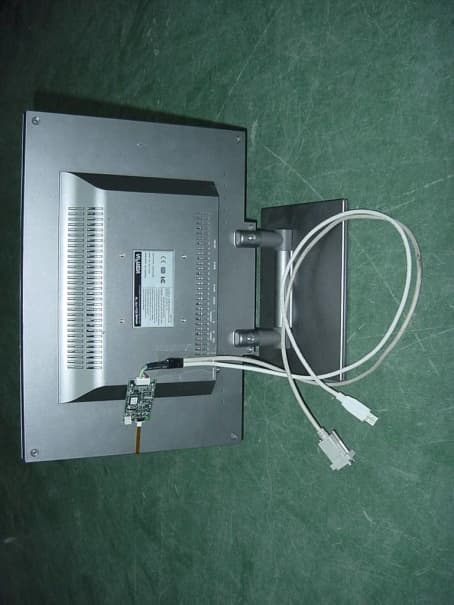
P9ATPMA111
Mar 12, 20024 Wires Analog Resistive Touch Screen
Equipment Class
JBP - Part 15 Class B Computing Device Peripheral