PB9PV52891720Pivothead Video Recording Eyewear
Cape Evolution (Shanghai) Co., Ltd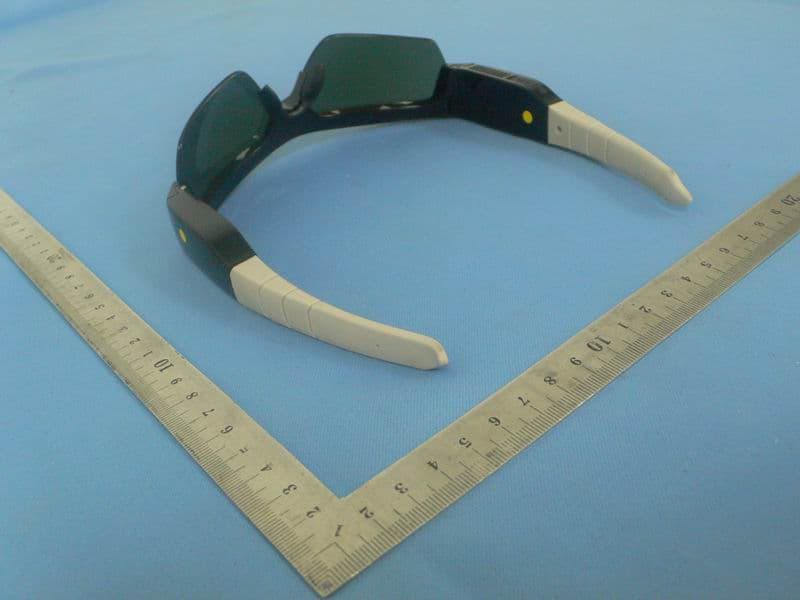
Click to zoom
Application Details
- Equipment Class
- JBP - Part 15 Class B Computing Device Peripheral
- Date of Grant
- Aug 16, 2012
- Application Purpose
- Original Equipment
- Date of Application
- Aug 16, 2012
- Equipment Note
- Pivothead Video Recording Eyewear
- Country
- China
Documents & Files
Document Text
Text extracted from the exhibit documents filed with the FCC. Open a document above to read the original.
Users Manual
Pivothead HDHF Video Recorder Eyewear High Definition Hand Free Device Draft 4 – 2012-5-7 Features Recording: • Brilliant HD Video & Audio Recording • Continuous Auto Focus • Still Image Capture During Video • Burst Still Image Capture • Black & White Video / Photo Settings • Simple to Use and Easy to Share • Numerous Control Setting Options • PC, Mac, iOS and Android Apps Features Sun Glasses: • Ultra Light Weight Impact-Resistant Frames • Polarized, Revo, and Photochromic lenses • 4 Models, 16 styles 1. Table of Contents 1. Table of Contents .......................................................................................... 2 2. Pivothead HDHF Eye Video Recorder Features: ........................................... 3 3. Getting started ............................................................................................... 3 4. Powering ON and OFF the glasses ............................................................... 4 a) Record Video .......................................................................................................... 4 b) Take Still Shots ....................................................................................................... 5 c) Real Time Clock ..................................................................................................... 5 d) Auto Power Off ....................................................................................................... 5 e) NTSC / PAL setting ................................................................................................ 6 5. Computer and Android device application: .................................................... 6 f) Mac and PC with Windows configuration requirements: ....................................... 6 g) Computer (MAC and PC) Software Download and Installation: ........................... 6 h) Connecting the Glasses to the computer: ................................................................ 7 Computer (Mac/PC) application: ........................................................................... 8 4. Quick Video and Manual Video modes, General video options: .................... 9 i) Quick Video modes................................................................................................. 9 j) Manual Video modes ............................................................................................ 10 k) General video options ........................................................................................... 10 l) Photo Manual Setting ............................................................................................ 11 5. To transfer video and photo files to a computer ........................................... 14 6. View your pictures, Play Your Video ............................................................ 15 7. Battery ......................................................................................................... 16 8. Glossary: ..................................................................................................... 17 9. Technical Specification ................................................................................ 18 10. IMPORTANT SAFETY INSTRUCTIONS ................................................. 18 11. FCC .......................................................................................................... 19 12. DISCLAIMER ........................................................................................... 19 2. Pivothead HDHF Eye Video Recorder Features: A. Camera Lens B1. SHUTTER Button Video B2. SHUTTER Button Photo C. LED Recording Light (Red) D. LED charging Light (Green) E. LED Power Light (Blue) F. Microphone G. POWER Button I. Heat Sink H. USB Port IMPORTANT: Visit our website at Pivothead.com You will find more information related to the products, Control Setting software user manual, news, info about our accessories, etc. Pivothead will also release new features under the form of Firmware and Application Upgrades. Visit our site regularly to get the latest information. You can also register for our monthly newsletter to keep track of the new features. 3. Getting started The product is ready to go out of the box with the battery 70% charged. However, we recommend fully charging the glasses before using your device by plugging the device into a USB charger (see Chapter 10 for more information). DEFAULT SETTINGS Your Pivothead HDHF recorder is configured with the following default settings: Video Resolution: 1080p @ 30fps Video mode: Active Still Photo Resolution: 8 Megapixels Pressing the Video Recording Button (B1) will start HD video recording Pressing the Photo Recording Button (B2) will start taking picture. Give it a try! 4. Powering ON and OFF the glasses A Steady Blue LED light (D) indicates that the PIVOTHEAD HDHF recorder is switched ON. • To power ON the PIVOTHEAD HDHF recorder: Press and release the power button when the device is switched OFF. The LED Power Light (Blue) on the left temple of the camera will switch on. • To power OFF the PIVOTHEAD HDHF recorder: Press and release the power button when the device is switched ON. The LED Power Light (Blue) will switch off. a) Record Video • To begin recording video: Press and release the Front Shutter Button (B1). The recorder’s Red recording LED light (C) will flash while recording continues. • To stop recording: Press and release the Front Shutter Button (B1). The LED Recording Light will stop flashing. Recording will automatically stop when the internal memory is full or the battery runs out of power. Your video will be saved before the camera powers off. LED indication for low battery or memory full: (red + blue light continuous blinking) = internal memory is full (red light on and & blue light continuously blinking) = low power & memory full (blue light slow blink) = low battery (10%) (blue light rapid blink = very low power (below 3%), glasses will shut down after five blinks • To …
Text truncated - open the document above for the full version.
External Photos
Photo of EUT Recon Moab accessory
ID Label/Location Info
Product Label: Definition:
Test Report
Report No.: SH12070007E01 Page 2 of 13 TABLE OF CONTENTS 1. GENERAL INFORMATION .................................................................................................... 3 1.1 EUT Description ......................................................................................................................... 3 1.2 Test Standards and Results ........................................................................................................ 4 1.3 Test Environment Conditions .................................................................................................... 4 1.4 Test Equipments Used ................................................................................................................ 4 2. TEST CONDITIONS SETTING............................................................................................... 5 2.1 Test Mode .................................................................................................................................... 5 3.1 Description Of Support Units .................................................................................................... 5 3. CONDUCTED EMISSION ....................................................................................................... 6 3.1 Requirement .................................................................................................................................. 6 3.2 Test Procedure .............................................................................................................................. 6 3.3 Test Setup...................................................................................................................................... 7 3.4 Test Result .................................................................................................................................... 7 4. RADIATED EMISSION .......................................................................................................... 10 4.1 Requirement ................................................................................................................................ 10 4.2 Test Procedure ............................................................................................................................ 10 4.3 Test Setup.................................................................................................................................... 11 4.4 Test Result .................................................................................................................................. 11 Report No.: SH12070007E01 Page 3 of 13 1. GENERAL INFORMATION 1.1 EUT Description EUT Type ............................. : Pivothead Video Recording Eyewear FCC ID ................................. : PB9PV52891720 Hardware Version ................. : v1.2 Software Version .................. : v0.29 Power supply ........................ : Battery Model No.: 391835 Brand Name: YOKU Capacitance: 440mAh Rated Voltage: 3.7V Charge Limit: 4.2V Manufacturer: YOKU ENERGY (ZHANGZHOU) CO., LTD NOTE: For a more detailed description, please refer to Specification or User’s Manual supplied by the applicant and/or manufacturer. Report No.: SH12070007E01 Page 4 of 13 1.2 Test Standards and Results The objective of the report is to perform testing according to 47 CFR Part 15 Subpart B: No. Identity Document Title 1 47 CFR Part 15 (10-1-05 Edition) Radio Frequency Devices Test detailed items/section required by FCC rules and results are as below: No. Section Description Result 1 15.107 Conducted Emission PASS 2 15.109 Radiated Emission PASS 3 ANSI C63.4-2003 Radiated Emission PASS 1.3 Test Environment Conditions During the measurement, the environmental conditions were within the listed ranges: Temperature (°C): 20 – 25 Relative Humidity (%): 40 – 60 Atmospheric Pressure (kPa): 106 1.4 Test Equipments Used Description Manufacturer Model Serial No. Cal. DateCal. Due Receiver Rohde&Schwarz ESCI3 100666 2011.09 1year Full-Anechoic Chamber Albatross 9m*6m*6m (n.a.) 2011.09 1year Test Antenna - Bi-Log Rohde&Schwarz HL562 100385 2011.09 1year System Simulator Rohde&Schwarz CMU200 105571 2011.09 1year LISN Rohde&Schwarz ENV216 812744 2011.09 1year NOTE: 1. Equipments listed above have been calibrated and are in the period of validation. Report No.: SH12070007E01 Page 5 of 13 2. TEST CONDITIONS SETTING 2.1 Te s t M o d e The test modes of the EUT are showed as below: Mode 1. EUT+PC Mode The EUT configuration of the emission test is EUT + Battery+PC. In this test mode, a connection was established between the EUT and a PC; date was transmitted between EUT and the PC, and maintained during the measurement. Mode 2. EUT Mode The EUT configuration of the emission test is EUT + Battery. In this test mode, the EUT is operating and maintained during the measurement. NOTE: All configurations and test modes are performed, only the worst cases are recorded in this report. 3.1 Description Of Support Units The EUT has been tested as an independent unit together with other necessary accessories or support units. The following support units or accessories were used to form a representative test configuration during the tests. No. Equipment Model No. Serial No. Trade Name 1 PC SL400 L3-BBB0A LENOVO Note: During the test, the support unit PC was powerd by AC 120V, 60Hz. Grounding was established in accordance with the manufacturer’s requirements and conditions for the intended use. Report No.: SH12070007E01 Page 6 of 13 3. CONDUCTED EMISSION 3.1 Requirement According to FCC section 15.107, the radio frequency voltage that is conducted back onto the AC power line on any frequency within the band 150kHz to 30MHz shall not exceed the limits in the following table, as measured using a 50μH/50Ω line impedance stabilization network (LISN). FREQUENCY (MHz) Class A (dBuV) Class B (dBuV) Quasi-peak Average Quasi-peak Average 0.15 - 0.5 79 66 66 - 56 56 - 46 0.50 - 5.0 73 60 56 46 5.0 - …
Text truncated - open the document above for the full version.
Test Setup Photos
Photo of test RE CE
Contact Information
Applicant
Vince Zhang
Test Firm
Shanghai Morlab Communications Technology Co.,Ltdzhang jun
Technical Specifications
| # | Rule Parts | Frequency Range | Power Output |
|---|---|---|---|
| 1 | 15B | - | - |