PIYL7281D1Im-me(USB Unit)
Mattel Asia Pacific Sourcing Ltd.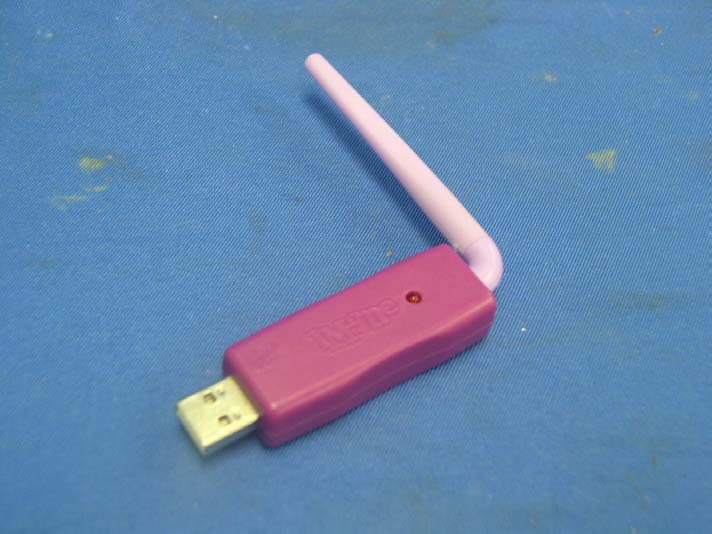
Click to zoom
Application Details
- Equipment Class
- JBP - Part 15 Class B Computing Device Peripheral
- Date of Grant
- Jul 27, 2007
- Application Purpose
- Original Equipment
- Date of Application
- Jul 27, 2007
- Equipment Note
- Im-me(USB Unit)
- Country
- Hong Kong
Documents & Files
Document Text
Text extracted from the exhibit documents filed with the FCC. Open a document above to read the original.
Users Manual
L7281 For 1 user / Ages 8 and up P/N 823B1700 Rev.A IM-me ™ Instructions E • For use with the GirlTech IM-me. • Requires Windows-compatible personal computer. It’s 4real! You don’t have to be glued to the computer anymore; with IM-me you can IM family & friends from anywhere in the house! What r u waiting 4? Let’s go! 1 TABLE OF CONTENTS Contents Table of Contents Software Requirements 3 Software Installation 3 Uninstalling the Software 4 New User Registration 4 Product Registration 5 Using the IM-me Handheld 6 Status Lights 6 Logging In 7 IM-me Menu 7 IM a Friend 7 IM a Group 7 Friends List 7 Log off 7 Reconnect 7 Set Up 7 Exit 7 IM-me a Friend 7 Stand By Mode 8 Using the IM-me PC Program 9 Logging In 9 Who’s Online 9 IM a Friend 10 IM a Group 10 Friends List 10 Go to GirlTech 10 Other Options 10 Under File 11 Under View 11 Under Help 11 Some IM Tips 11 Building Your IM-me Community 11 Ask Your Friends 11 Register Trial Users 11 Troubleshooting 12 The IM-me Flower in the task bar is RED 12 I can’t login using the PC program 12 I lost my login connection using PC 12 I can’t login using the IM-me handheld 12 I lost my login connection using the IM-me handheld 12 The screen names show as online but I can’t send a message to them 13 I don’t know which PC to connect the handheld to? 13 The IM-me handheld is functioning poorly or does not respond. 13 I forgot my password 13 I forgot my user name 13 Battery installation 14 Battery Safety Information 14 Caution 14 Warranty 15 2 3 SOFTWARE REqUIREMENTS Minimum System Requirements: • Windows Vista/XP/2000 • 800 MHz processor (1.3 GHz recommended) • 256 MB RAM (512 MB recommended) • 1 GB free hard disk space • USB port • 32 MB video card (64 MB recommended) • 8x CD or DVD drive • Sound card, keyboard, mouse INSTALLATION NOTE: You must have an internet connection in order to use IM-me! • Insert the IM-me USB antenna into a free USB port on your computer and rotate the antenna so it points up. Warning: Do not connect more than one USB antenna to a PC! • Insert the CD-ROM into your computer • If you have the AutoPlay feature on for your CD-ROM, left-click on the install button and skip the next two steps. • If you don’t have AutoPlay enabled, select Start and then Run from the Windows Taskbar. • Type d:\setup.exe (d: refers to your CD-ROM drive. If your CD-ROM drive letter is not d: use the appropriate drive letter instead.) • Follow the installation wizard and complete the prompted tasks • When the IM-me program is running & has a good connection to the internet, a green IM-me flower appears in the taskbar. • Open the back of the handheld IM-me and insert 3 AA batteries. Close the back and you’re ready. insert CD 4 NOTE: IM-me does not work with other instant messaging, text messaging or email services. Every time Windows launches, IM-me starts automatically so you’re always ready to IM. It also updates automatically if there’s a newer version of the program from GirlTech™. UNINSTALLING THE SOFTWARE You can uninstall by using the Add/Remove Programs on the Control Panel. REGISTRATION New User • On your PC, double-click the IM-me Icon on the desktop or the taskbar to start the program. • Left-click on the Blue Flower (Login). • Left-click on the Register button to create a new Screen Name. • Enter your Registration code. Your unique code can be found on the Registration card in the packaging. • Create a unique Screen Name and password. These must be 5-10 characters long and are case sensitive. If you want, write your Screen Name and password on your registration card for safekeeping. removing software 5 • Confirm your password • Select your “Hint” question. If you ever forget your password you will be prompted to answer your “Hint” question to retrieve it. • Select the answer to your “Hint” question. • Press OK That’s it! You’re ready to be CONNECTED to the IM-me network! You can use your IM-me to contact friends as far away as across the world or as close as in your own house. And you can use your IM-me from wherever the program is installed, whether it’s your house or your friend’s house! Product Registration Tend to forgets things? Don’t worry! We’ve got you covered. Go to www.girltech.com/imme to register. Click on the Register My IM-me and fill out the form. Once you are registered, if you ever forget your screen name or password, we can help. 6 USING THE IM-me HANDHELD With your IM-me Handheld, you can walk away from your computer and still chat with your BFF, whether she’s at her home or yours. Even better, up to four IM-me handhelds can be used per computer so when your friends come over, they can use IM-me too! Caps 1. Press the Caps button to enter an UPPERCASE letter. 2. Press and hold the Caps button to lock your keyboard into UPPERCASE. ALT 1. Press the ALT button to get alternate keys (like the numbers and Emoticons). 2. Press and hold the ALT button to lock your keyboard into alternate keys. Status Lights Steady GreenUnit is ON, fully charged, and no new messages. Slow Green FlashStand-by mode and no new messages. quick Green Flash You have new messages! Red & Green FlashBattery low (less than 2 operating hours remaining) The USB antenna will flash when it is actively connected with the IM-me handheld. Up/down & emoticons Bye Left Caps/caps lock Status lights Backlight Menu Right Power ALT/ALT lock 7 Logging In Make sure everything’s ready on the computer. A little green flower icon in your taskbar will tell you that the IM-me program is running and your computer is connected to the internet. • Press and hold the power button to turn on your IM-me handheld. • After it starts up, enter your screen name and password. • Your IM-me will talk to the computer & verify the name. NOTE: If more than one IM-me antenna is in range, you will be asked to choose which computer you want to use. The first time you log on, you will be asked if you want to add a friend: • Select New Friend from the menu and press enter • Type in a friend’s IM-me Screen …
Text truncated - open the document above for the full version.
External Photos
FCC ID: PIYL7281D1 Ophoto1 Ophoto2 FCC ID: PIYL7281D1 Ophoto3
ID Label/Location Info
24mm 2mm © 2007 Mattel, Inc. OPERATING VOLTAGE : DC 5V 0.5W MADE IN CHINA L7281 L7281 FCC Insert (Main unit) Size: 35 x 10 mm Date: Nov 29, 2006 This device complies with Part 15 of the FCC Rules. Operation is subject to the following two conditions : (1) this device may not cause harmful interference, and (2) this device must accept any interference received, including interference that may cause undesired operation. L7281 Rating Insert (Main unit) Rev.B Size: 30 x 20 mm Date: July 17, 2007 © 2007 Mattel, Inc. BATTERY: AA (LR6) x 3 OPERATING VOLTAGE : DC 4.5V 0.55W MADE IN CHINA L7281 L7281 Rating Insert (Dongle) Rev.B Size: 52 x 12mm Date: July 16, 2007 Main unit Dongle FCC ID: PIYL7281D1 This device complies with Part 15 of the FCC Rules. Operation is subject to the following two conditions : (1) this device may not cause harmful interference, and (2) this device must accept any interference received, including interference that may cause undesired operation. L7281 FCC ID Pad Print (Main unit) Rev.A Size: 30 x 20 mm Date: July 17, 2007 FCC ID: PIYL7281H1 L7281 FCC ID Pad Print (Dongle) Rev.A Size: 52 x 12mm Date: July 16, 2007 2mm FCC ID: 0JJL7281H1 FCC ID: PIYL7281H1 OR 2mm FCC ID: 0JJL7281D1 FCC ID: PIYL7281D1 OR 2mm 24mm FCC ID: PIYL7281H1 FCC ID: PIYL7281D1
Internal Photos
FCC ID: PIYL7281D1 Iphoto1 Iphoto2 FCC ID: PIYL7281D1 Iphoto3
Test Report
• The test results reported in this test report shall refer only to the sample actually tested and shall not refer or be deemed to refer to bulk from which such a sample may be said to have been obtained. • This report shall not be reproduced except in full without prior authorization from Intertek Testing Services Hong Kong Limited. • For Terms And Conditions of the services, it can be provided upon request. • The evaluation data of the report will be kept for 3 years from the date of issuance. Intertek Testing Services Hong Kong Ltd. 2/F., Garment Centre, 576 Castle Peak Road, Kowloon, Hong Kong. Tel: (852) 2173 8888 Fax: (852) 2785 5487 Website: www.hk.intertek-etlsemko.com Mattel Asia Pacific Sourcing Ltd. (MAPS) Application For Certification IM-me (USB Unit) (FCC ID: PIYL7281D1) 0713365 KL/at July 20, 2007 INTERTEK TESTING SERVICE FCC ID: PIYL7281D1 i LIST OF EXHIBITS INTRODUCTION EXHIBIT 1: Summary of Tests EXHIBIT 2 : General Description EXHIBIT 3 : System Test Configuration EXHIBIT 4 : Measurement Results EXHIBIT 5 : Equipment Photographs EXHIBIT 6 : Product Labelling EXHIBIT 7 : Technical Specifications EXHIBIT 8 : Instruction Manual EXHIBIT 9 : Confidentiality Request INTERTEK TESTING SERVICES FCC ID: PIYL7281D1 ii MEASUREMENT/TECHNICAL REPORT Mattel Asia Pacific Sourcing Ltd. (MAPS) - MODEL: L7281 FCC ID: PIYL7281D1 This report concerns (check one) Original Grant X Class II Change Equipment Type: DTS - Digital Transmission System and JBP - Class B Personal Computer Peripheral Deferred grant requested per 47 CFR 0.457(d)(1)(ii)? Yes No X If yes, defer until : date Company Name agrees to notify the Commission by: date of the intended date of announcement of the product so that the grant can be issued on that date. Transition Rules Request per 15.37? Yes No X If no, assumed Part 15, Subpart C for intentional Radicator - the new 47 CFR [04-05-07 Edition] provision. Report prepared by: Lam Chun Cheong, Kenneth Intertek Testing Services Hong Kong Ltd. 2/F., Garment Centre, 576 Castle Peak Road, Kowloon, Hong Kong. Phone: 852-2173-8474 Fax: 852-2742-9693 INTERTEK TESTING SERVICES FCC ID: PIYL7281D1 iii Table of Contents 1.0 Summary of test results................................................................................................ 2 2.0 General Description.................................................................................................. 4 2.1 Product Description............................................................................................. 4 2.2 Related Submittal(s) Grants ................................................................................ 5 2.3 Test Methodology ............................................................................................... 5 2.4 Test Facility ........................................................................................................ 5 3.0 System Test Configuration ...................................................................................... 7 3.1 Justification......................................................................................................... 7 3.2 EUT Exercising Software .................................................................................... 7 3.3 Support Equipment List and Description.............................................................. 8 3.4 Measurement Uncertainty ........................................................................................ 9 3.5 Equipment Modification....................................................................................... 9 4.0 Measurement Results ............................................................................................ 11 4.1 Maximum Conducted Output Power at Antenna Terminals ................................ 11 4.2 Minimum 6dB RF Bandwidth............................................................................. 12 4.3 Maximum Power Density ....................................................................................... 13 4.4 Out of Band Conducted Emissions........................................................................ 14 4.5 Out of Band Radicated Emissions ..................................................................... 15 4.6 Transmitter Radicated Emissions in Restricted Bands ....................................... 15 4.7 Field Strength Calculation ................................................................................. 16 4.8 Radicated Emission Configuration Photograph .................................................... 17 4.9 Radicated Emission Data.................................................................................. 18 4.10 AC Line Conducted Emission............................................................................ 22 4.11 Line Conducted Configuration Photograph ........................................................ 23 4.12 Line Conducted Emission Data ......................................................................... 24 4.13 Radicated Emission from Digital Section of Transceiver and Class B Personal Computer Peripheral............................................................................... 25 4.14 Transmitter Duty Cycle Calculation and Measurements ..................................... 27 5.0 Equipment Photographs ........................................................................................ 29 6.0 Product Labelling ................................................................................................... 31 7.0 Technical Specifications ........................................................................................ 33 8.0 Instruction Manual ...................................................................................................... 35 9.0 Confidentiality Request ............................................................................................... 37 INTERTEK TESTING SERVICES FCC ID: PIYL7281D1 iv List of attached file Exhibit type File Des…
Text truncated - open the document above for the full version.
Test Setup Photos
The Worst Case Configuration Photographs FCC ID: PIYL7281D1 Radiated Emission Front View Rear View The Worst Case Configuration Photographs FCC ID: PIYL7281D1 Conducted Emission Front View Left Side View The Worst Case Configuration Photographs FCC ID: PIYL7281D1 Conducted Emission Right Side View
Contact Information
Applicant
Joule Mak(Director, Electronic Engineering)
Technical Contact
Intertek Testing Services Hong Kong Ltd.Anthony Chan
[email protected]852-2173-8517
2/F., Garment Centre, · Kowloon, · Hong Kong
Non-Technical Contact
Intertek Testing Services Hong Kong Ltd.Anthony Chan
[email protected]852-2173-8517
Test Firm
Intertek Testing Services Hong KongBilly Chow
Technical Specifications
| # | Rule Parts | Frequency Range | Power Output |
|---|---|---|---|
| 1 | 15B | - | - |
Other Applications from Mattel Asia Pacific Sourcing Ltd.
PIY-HTX00-24-A5T
Jan 17, 2024Fisher-Price Link Squad Jam & Count Panda
Equipment Class
DXX - Part 15 Low Power Communication Device TransmitterPIY-HTX03-24-A5T
Jan 17, 2024Fisher-Price Link Squad A to Z Yak
Equipment Class
DXX - Part 15 Low Power Communication Device TransmitterPIY-HTX04-24-A5T
Jan 17, 2024Fisher-Price Link SquadBop & Groove Tiger
Equipment Class
DXX - Part 15 Low Power Communication Device TransmitterPIY-HTW99-24-A5T
Jan 17, 2024Fisher-Price Link Squad Opposites Fox
Equipment Class
DXX - Part 15 Low Power Communication Device TransmitterPIY-HTX01-24-A5T
Jan 17, 2024Fisher-Price Link Squad Crawl n Colors Chameleon
Equipment Class
DXX - Part 15 Low Power Communication Device Transmitter