PIYT8498-11A5TMindflex Duel
Mattel Asia Pacific Sourcing Ltd.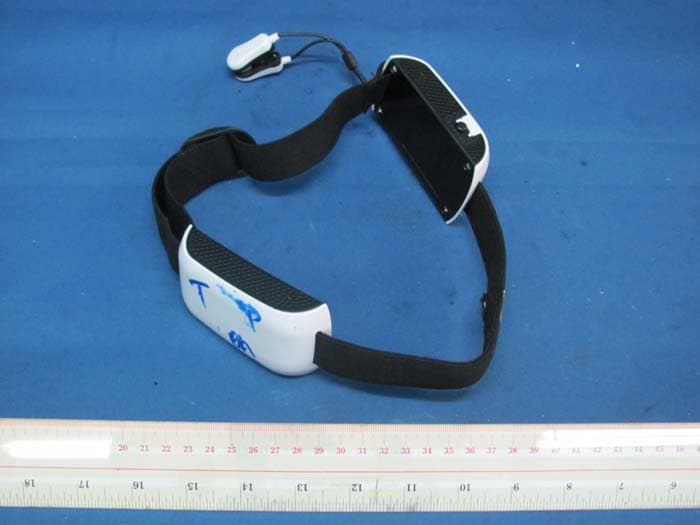
Click to zoom
Application Details
- Equipment Class
- DXX - Part 15 Low Power Communication Device Transmitter
- Date of Grant
- May 29, 2011
- Application Purpose
- Original Equipment
- Date of Application
- May 29, 2011
- Equipment Note
- Mindflex Duel
- Frequency Range
- 2407.00000000 - 2407.00000000
- Country
- Hong Kong
Documents & Files
Document Text
Text extracted from the exhibit documents filed with the FCC. Open a document above to read the original.
Users Manual
INSTRUCTION MANUAL THE CONSOLE CONTENTS Game 8 to Adult 1-2 Players 11 12 12 1 2 3 4 5 6 7 8 9 10 10 IMPORTANT: Please read the entire Quick Start section before playing any games. www.mindflexgames.com Keep these instructions for future reference as they contain important information. Requires 4 ‘C’ alkaline batteries and 6 ‘AAA’ alkaline batteries (Not Included). GET READY TO CONTROL THE ACTION AS YOU NEVER HAVE BEFORE – WITH THE POWER OF YOUR MIND! Just put on the Mindflex Duel™ headsets and your own brainwaves will move a ball up and down on a cushion of air or push it across the console. Concentrate and the ball will rise or move forward, relax and it will descend or move backward – it’s literally mind over matter! Mindflex Duel™ includes the following components: 1 Game Console 2 Headsets 4 Balls 1 Flex Tower 1 Wind Wheel 1 Score Wall 1 Flip Frame 1 Canon 1 Basket 1 Instruction Sheet Bottom of Console 1. Puck (Fan Nozzle) 2. Toggle Button 3. Enter Button 4. On/Off Switch 5. Player One’s Side (Orange #1) 6. Player One’s Concentration Meter 7. Player Two’s Side (Green #2) 8. Player Two’s Concentration Meter 9. Marker Lights 10. End Zones 11. Foam Ball Storage Compartment (Bottom) 12. Battery Compartment (Bottom) HANDLE FOAM BALLS WITH CARE. Do not press, crush or squeeze the foam balls, or you may damage their ability to float. Keep them safe by storing them in the compartment on the underside of the console. 2 THE HEADSET BATTERY INSTALLATION QUICK START 1 2 3 4 5 Console Headsets 1. Open the two battery covers with Phillips head screwdriver (not included). 2. Insert 4 ‘C’ alkaline batteries as shown. 3. Replace battery covers and tighten the screws. For best performance, use only alkaline batteries. Replace console batteries when console lights dim, sound becomes distorted or ball can no longer achieve a maximum height of 5 inches when all 3 concentration meter lights are lit. The console will say “Replace batteries in console” when power is running low. 1. Open battery cover with Phillips head screwdriver (not included). 2. Insert 3 ‘AAA’ alkaline batteries as shown. 3. Replace battery cover and tighten the screw. When a headset’s power light blinks, the headset batteries are running low. The console will say, “Player One/Two, replace batteries in headset.” To familiarize yourself with Mindlfex Duel™, try a few exercises in Freestyle mode. Just follow the steps below. PUTTING ON HEADSET One Player 1. When only one person is playing, put on the headset marked “1” as shown above. Make sure the forehead sensor located under the colored rings is positioned above your left eye, flat against your forehead, with no hair between your skin and the sensor. IMPORTANT: When playing Freestyle mode or any single-player game, you MUST wear the headset marked “1” – this is the headset that the console will attempt to contact. If you are using headset “2” when the console tries to connect, it will say, “Player One, turn on the headset.” If you hear this, make sure you are wearing headset “1” and that it is turned on. The console will continue to prompt you to “turn on the headset” until it can communicate with headset “1.” 2. If the headset does not fit comfortably against your forehead, use the buckle on the back of the headset to adjust for a snug fit. 3. Attach the ear clip to your ear lobe so the metal sensor is flat against your skin. 4. While sitting as still as you can, turn on the headset – the headset’s Power Light will come on. OnOff 1. Forehead Sensor 2. Ear Clip 3. On/Off Switch 4. Power Light 5. Player Number 6. Adjustable Buckle (on strap in back) + – + + + – – – 3 Helpful Hints 1. Before putting on the headset, be sure to remove hats, ponytails, hairclips or anything else that might get in the way, and brush the hair from your forehead. 2. Before attaching the ear clip, remove earrings. CONNECTION PROBLEMS Whenever the headset fails to read a player’s brainwaves, the console will call out the player and say, “Check headset sensor.” If this happens during a game, the game timer will pause until the signal is restored. Refer to the TROUBLESHOOTING section for tips on connection problems. Tips for Increasing Concentration • Relax your face – try not to move any muscles in your face. • Stare at the ball. Concentrate all of your attention on it. • Picture the ball rising. • Focus your attention on the exact spot you want to see it reach. • Imagine pushing the ball up with your mind. • Do math problems in your head. • Think the same thought over and over. • Everyone is different, so find out what works best for you! Tips for Lowering Concentration • Try to clear your mind. • Relax your body. • Take deep breaths. • Close your eyes for a moment then open them and look at different parts of the console without focusing on anything. • Think about sleeping. • Think about a peaceful, relaxing place. • Again, discover what techniques work best for you! OnOff Enter Button Toggle Button Two Players If two people are playing, the first player should put on the headset marked “1” and the second player should put on the headset marked “2,” both following the steps described above. TURNING ON CONSOLE 1. Position yourself at the end of the console labeled with an orange “1” (Player One’s side) and turn on the console. 2. When the console says “Select Game,” press the TOGGLE BUTTON until you hear “Freestyle.” 3. Press the ENTER button to confirm your choice of “Freestyle.” The fan nozzle – called the “puck” – will calibrate and move to Player One’s side of the console. IMPORTANT: After you select a game, the puck will calibrate by moving across the console. Do not touch the puck while it is moving or you will affect the game’s performance. 4. If may take a few seconds for the console to communicate with the headset. Just remain still until it does so. Once a connection is established, the console will say, “Ready – begin.” CONTROLLING THE BALL Once in Freestyle mode, try each of the practice exercises b…
Text truncated - open the document above for the full version.
External Photos
INTERTEK TESTING SERVICE Report No.: HK11041498-1 FCC ID: PIYT8498-11A5T Equipment Photographs Model : T8498 (External)
ID Label/Location Info
(mm)
Internal Photos
INTERTEK TESTING SERVICE Report No.: HK11041498-1 FCC ID: PIYT8498-11A5T Equipment Photographs Model : T8498 (Internal) INTERTEK TESTING SERVICE Report No.: HK11041498-1 FCC ID: PIYT8498-11A5T Equipment Photographs Model : T8498 (Internal) INTERTEK TESTING SERVICE Report No.: HK11041498-1 FCC ID: PIYT8498-11A5T Equipment Photographs Model : T8498 (Internal) INTERTEK TESTING SERVICE Report No.: HK11041498-1 FCC ID: PIYT8498-11A5T Equipment Photographs Model : T8498 (Internal) INTERTEK TESTING SERVICE Report No.: HK11041498-1 FCC ID: PIYT8498-11A5T Equipment Photographs Model : T8498 (Internal) INTERTEK TESTING SERVICE Report No.: HK11041498-1 FCC ID: PIYT8498-11A5T Equipment Photographs Model : T8498 (Internal) INTERTEK TESTING SERVICE Report No.: HK11041498-1 FCC ID: PIYT8498-11A5T Equipment Photographs Model : T8498 (Internal) INTERTEK TESTING SERVICE Report No.: HK11041498-1 FCC ID: PIYT8498-11A5T Equipment Photographs Model : T8498 (Internal)
Test Report
INTERTEK TESTING SERVICES Report No.: HK11041498-1 Sample No.: 3/4 Code: FCC15C_e / Effective Date: 20 Dec 2010 ( of ) Bandedge Plot – Pursuant to FCC Part 15 Section 15. 249 Requirement
Test Report
- The test report only allows to be revised within the retention period unless further standard or the requirement was noticed. - This report is for the exclusive use of Intertek's Client and is provided pursuant to the agreement between Intertek and its Client. Intertek's responsibility and liability are limited to the terms and conditions of the agreement. Intertek assumes no liability to any party, other than to the Client in accordance with the agreement, for any loss, expense or damage occasioned by the use of this report. Only the Client is authorized to permit copying or distribution of this report and then only in its entirety. Any use of the Intertek name or one of its marks for the sale or advertisement of the tested material, product or service must first be approved in writing by Intertek. The observations and test results in this report are relevant only to the sample tested. This report by itself does not imply that the material, product, or service is or has ever been under an Intertek certification program. Intertek Testing Services Hong Kong Ltd. 2/F., Garment Centre, 576 Castle Peak Road, Kowloon, Hong Kong. Tel: (852) 2173 8888 Fax: (852) 2785 5487 Website: www.hk.intertek-etlsemko.com TEST REPORT Report No.: HK11041498-1 Mattel Asia Pacific Sourcing Limited Application For Certification (Original Grant) (FCC ID: PIYT8498-11A5T) Transmitter Prepared and Checked by: Approved by: Signed On File Wong Kwok Yeung, Kenneth Engineer Chan Chi Hung, Terry Assistant Supervisor Date: May 31, 2011 INTERTEK TESTING SERVICES Report No.: HK11041498-1 FCC ID: PIYT8498-11A5T i GENERAL INFORMATION MATTEL ASIA PACIFIC SOURCING LIMITED MODEL: T8498 FCC ID: PIYT8498-11A5T Grantee: Mattel Asia Pacific Sourcing Limited Grantee Address: 13/F., South Tower, World Finance Centre, Harbour City, Tsim Sha Tsui, Kowloon, Hong Kong. Contact Person: Ivan Chang Tel: (852) 31855000 Fax: (852) 22650434 e-mail: [email protected] Manufacturer: N/A Manufacturer Address: N/A Brand Name: N/A Model: T8498 Type of EUT: Transmitter Description of EUT: Mindflex Duel Serial Number: N/A FCC ID: PIYT8498-11A5T Date of Sample Submitted: April 27, 2011 Date of Test: May 06, 2011 Report No.: HK11041498-1 Report Date: May 31, 2011 Environmental Conditions: Temperature: +10 to 40°C Humidity: 10 to 90% INTERTEK TESTING SERVICES Report No.: HK11041498-1 FCC ID: PIYT8498-11A5T ii SUMMARY OF TEST RESULT MATTEL ASIA PACIFIC SOURCING LIMITED MODEL: T8498 FCC ID: PIYT8498-11A5T TEST SPECIFICATION REFERENCE RESULTS Maximum Peak Output Power 15.247(b), (c) / RSS-210 A8.4 N/A Hopping Channel Carrier Frequencies Separation (for 2.4GHz Digital) 15.247(e) / RSS-210 A8.1 N/A 20dB Bandwidth of the Hopping Channel 15.247(a) / RSS-210 A8.1 N/A Number of Hopping Frequencies 15.247(e) / RSS-210 A8.1 N/A Average Time of Occupancy of Hopping Frequency 15.247(e) / RSS-210 A8.1 N/A Anteann Conducted Spurious Emissions 15.247(d) / RSS-210 A8.5 N/A Radiated Spurious Emissions 15.247(d) / RSS-210 A8.5 N/A RF Exposure Compliance 15.247(i) / RSS-Gen 5.5 N/A Transmitter Power Line Conducted Emissions 15.207 / RSS-Gen 7.2.2 N/A Transmitter Field Strength (for 27MHz) 15.227 / RSS-310 3.8 N/A Transmitter Field Strength (for 40MHz) 15.229 / RSS-210 A2.7 N/A Transmitter Field Strength, Bandwidth and Timing Requirement (for Remote Control) 15.231(a) / RSS-210 A1.1.1 N/A Transmitter Field Strength, Bandwidth and Timing Requirement (for 433MHz) 15.231(e) / RSS-210 A1.1.5 N/A Transmitter Field Strength and Bandwidth Requirement(for 88-108MHz) 15.239 / RSS-210 A2.8 N/A Transmitter Field Strength and Bandwidth Requirement(for 902- 928MHz or 2.4GHz) 15.249 / RSS-210 A2.9 Pass Transmitter Field Strength and Bandwidth Requirement (for 49MHz) 15.235 / RSS-310 3.9 N/A Receiver / Digital Device Radiated Emissions 15.109 / ICES-003 Pass Digital Device Conducted Emissions 15.107 / ICES-003 N/A Note: 1. The EUT uses a permanently attached antenna which, in accordance to section 15.203, is considered sufficient to comply with the pervisions of this section. 2. Pursuant to FCC part 15 Section 15.215(c), the 20 dB bandwidth of the emission was contained within the frequency band designated (mentioned as above) which the EUT operated. The effects, if any, from frequency sweeping, frequency hopping, other modulation techniques and frequency stability over excepted variations in temperature and supply voltage were considered. INTERTEK TESTING SERVICES Report No.: HK11041498-1 FCC ID: PIYT8498-11A5T iii Table of Contents 1.0 General Description....................................................................................... 1 1.1 Product Description .......................................................................................... 1 1.2 Related Submittal(s) Grants.............................................................................. 1 1.3 Test Methodology............................................................................................. 1 1.4 Test Facility ...................................................................................................... 1 2.0 System Test Configuration ............................................................................ 2 2.1 Justification ...................................................................................................... 2 2.2 EUT Exercising Software.................................................................................. 2 2.3 Special Accessories ......................................................................................... 2 2.4 Equipment Modification .................................................................................... 2 2.5 Measurement Uncertainty................................................................................. 2 2.6 Support Equipment List and Description ........................................................... 3 3.0 Emission Results ......................................................................................…
Text truncated - open the document above for the full version.
Test Setup Photos
INTERTEK TESTING SERVICE Report No: HK11041498-1 FCC ID: PIYT8498-11A5T Configuration Photographs Worst-Case Radiated Emissions (Front View) Model : T8498 INTERTEK TESTING SERVICE Report No: HK11041498-1 FCC ID: PIYT8498-11A5T Configuration Photographs Worst-Case Radiated Emissions (Back View) Model : T8498
Contact Information
Applicant
Joule Mak(Director, Electronic Engineering)
Technical Contact
Intertek Testing Services Hong Kong LtdTerry Chan
[email protected]2173-8503
2/F Garment Centre · Kowloon · Hong Kong
Non-Technical Contact
Intertek Testing Services Hong Kong LtdTerry Chan
[email protected]2173-8503
Test Firm
Intertek Testing Services Hong Kong Ltd.Billy Chow
Technical Specifications
| # | Rule Parts | Frequency Range | Power Output |
|---|---|---|---|
| 1 | 15C | 2.41 GHz - 2.41 GHz | - |
Other Applications from Mattel Asia Pacific Sourcing Ltd.
PIY-HTX00-24-A5T
Jan 17, 2024Fisher-Price Link Squad Jam & Count Panda
Equipment Class
DXX - Part 15 Low Power Communication Device TransmitterPIY-HTX03-24-A5T
Jan 17, 2024Fisher-Price Link Squad A to Z Yak
Equipment Class
DXX - Part 15 Low Power Communication Device TransmitterPIY-HTX04-24-A5T
Jan 17, 2024Fisher-Price Link SquadBop & Groove Tiger
Equipment Class
DXX - Part 15 Low Power Communication Device TransmitterPIY-HTW99-24-A5T
Jan 17, 2024Fisher-Price Link Squad Opposites Fox
Equipment Class
DXX - Part 15 Low Power Communication Device TransmitterPIY-HTX01-24-A5T
Jan 17, 2024Fisher-Price Link Squad Crawl n Colors Chameleon
Equipment Class
DXX - Part 15 Low Power Communication Device Transmitter