FCCID.CO- FCC ID Database
HomeCompaniesEquipment ClassesSearch

© 2026 FCC ID Database. All rights reserved.

AboutContactData sourced from FCC public records
  1. Home/
  2. DAIN TELECOM CO., LTD./
  3. PNPMYNET-8101

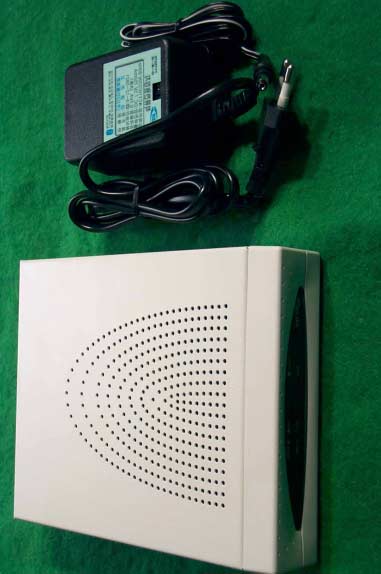
PNPMYNET-8101Internet Gateway Router

DAIN TELECOM CO., LTD.
Internet Gateway Router - FCC ID PNPMYNET-8101 - DAIN TELECOM CO., LTD.
Click to zoom

Application Details

Equipment Class
JBP - Part 15 Class B Computing Device Peripheral
Date of Grant
May 20, 2001
Application Purpose
Original Equipment
Date of Application
May 20, 2001
Equipment Note
Internet Gateway Router
Company
DAIN TELECOM CO., LTD.
Country
South Korea

Documents & Files

Select a file to view

Users Manual

↗

Block Diagram

↗

External Photos

↗

ID Label/Location Info

↗

Internal Photos

↗

Test Report

↗

Test Setup Photos

↗

Document Text

Text extracted from the exhibit documents filed with the FCC. Open a document above to read the original.

Users Manual

FCC NOTICE THIS DEVICE COMPLIES WITH PART 15 OF THE FCC RULES. OPERATION IS SUBJECT TO THE FOLLOWING TWO CONDITION: (1) THIS DEVICE MAY NOT CAUSE HARMFUL INTERFERENCE, AND (2) THIS DEVICE MUST ACCEPT ANY INTERFERENCE RECEIVED, INCLUDING INTERFERENCE THAT MAY CAUSE UNDERSIRED OPERATION. This equipment has been tested and found to comply with the limits for a Class B digital device, pursuant to part 15 of the FCC Rules. These limits are designed to provide reasonable protection against harmful interference in a residential installation. This equipment generates, uses and can radiate radio frequency energy and, if not installed and used in accordance with the instructions, may cause harmful interference to radio communication. However, there is no guarantee that interference will not occur in a particular installation. If this equipment does cause harmful interference to radio or television reception, which can be determined by turning the equipment off and on, the user is encouraged to try to correct the interference by one or more of the following measures : - Reorient or relocate the receiving antenna. - Increase the separation between the equipment and receiver. - Connect the equipment into an outlet on a circuit difference from that to which the receiver is connected. - Consult the dealer of an experienced radio/TV technician for help. NOTE : The manufacturer is not responsible for any radio or TV interference caused by unauthorized modifications to this equipment. Such modifications could void the user’s authority to operate the equipment. contents - MyNet-810x Introduction Introduction Specification of product Package content - MyNet-810x Hardware Installation Hardware Installation Connect MyNet-810x to ADSL/Cable Modem Connect the computer to MyNet-810x Connecting the power - PC Configuration PC Network Installation - MyNet-810x Configuration Menu items MyNet-810x environment establishing Basic Setup Menu description DHCP Menu explanation Special Setup Menu explanation Password Menu explanation Access Control Menu explanation Virtual Server Menu explanation Static Routing Menu explanation DMZ Host Menu explanation Upgrade Menu explanation 1. MyNet-810x Introduction MyNet-series Broadband Internet Gateways are designed for small business and home (SOHO). Each of MyNet gateways provides the easiest and safest way to share your broadband Internet access such as DSL modem or cable modem. MyNet-series are an integrated high speed Internet gateway and firewall with dual speed switch of a 1 & 4 port 10/100M auto-sense for users to immediately network and access the Internet economically and effortlessly. All users can have Internet access simultaneously via single IP of Cable/xDSL account. Designed for workgroups of up to 253 users, the MyNet-810x can be seamlessly configured through a user-friendly interface. The above product has the built-in DHCP Client and PPPoE client to work together with Cable Modem and xDSL, and contains the DHCP server for the automatic Local network. For the various application of equipment, WAN (Internet) port’s IP information can be composed manually. By realizing the high speed NAT using the high functioned CPU and optimized software, the delay of data transmission was minimized when the Cable/xDSL modem are connected and used. This product will act as firewall for your PCs, protecting you from intruders. In enhanced by including the various built-in firewall rule, which is optimized. Also, it has the function of limiting the internet use. This product has the flexible virtual server function which can designate the port range and has the built-in DMZ Host function. The user is possible to implement the software upgrade with only FTP client without the individual software tool in the Local web. This product supports to DNS Proxy and when the user connects internet by the name cache, the connecting time is made to be diminished. Also supports the function of VPN client Path-Thru and the PPTP client and IPSEC client can be used. . ◈ Specification of product Protocols TCP/IP, DHCP, DNS, NAT, FTP, HTTP, PPPoE VPN Pass-Thru (PPPT, IPSec) Yes Number of LAN connections 253 Internet access controls (filtering) IP filtering Web-based configuration Yes Network Address Translation (NAT) Yes DHCP Server Yes DNS Proxy Yes External MDI/MDX switch Yes Virtual Server support Yes Static IP address assignment Yes Dynamic IP address assignment Yes Software Upgrade Yes Interfaces InterfacesInterfaces Interfaces WAN Port 10Base-T 1 x RJ45 LAN Port 10/100Mbps 1 x RJ45 (MyNet-8101) 4 x RJ45 (MyNet-8104) Up-link port Physical Physical Physical Physical Dimension 145mm x 35mm x 173.5mm Operating temperature 0 ~ 70°C Operating humidity 5% ~ 90% Power Adapter Power AdapterPower Adapter Power Adapter Input : AC100V~AC230V Output : DC7.5V, 750mA ◈ Composition of product package ; One MyNet-8101 or MyNet-8104 unit ; One Power adapter ; One LAN cable ; One Installation guide Chapter 2. Hardware Installation ◈ Hardware installation You must check the internet is possible to use prior to connection of MyNet-8101 & MyNet-8104 into LAN. In case that the internet does not work, you can ask your internet service provider the internet shall be working normally. ◈ Connect MyNet-810x to ADSL/Cable Modem Once you are sure that the internet is working normally. If it is verified to work normally, install it according to the following procedure. 1) Turn off the PC. 2) Turn off the power of ADSL/Cable Modem. 3) Move and insert LAN cable from PC LAN connected with ADSL/Cable Modem into the WAN Port of MyNet-8101, MyNet-8104. (Again certify that WAN Port of ADSL/Cable Modem and MyNet-8101,MyNet-8104 is connected to the LAN cable.) ◈ Connect the computer to MyNet-8101, MyNet-8104 1) Use the hub to connect the computer to MyNet-8101 If the hub is used, you can use the internet upto the maximum 253 numbers of computers. If you connect the hub to MyNet-8101, connect the LAN cable provided with the product to …

Text truncated - open the document above for the full version.

External Photos

SK TECH CO., LTD. Page 1 of 2 SKT SKTOS-01069 FCC ID : XXXMYNET-8101 External Photographs of EUT SK TECH CO., LTD. Page 2 of 2 SKT SKTOS-01069 FCC ID : XXXMYNET-8101

ID Label/Location Info

SK TECH CO., LTD. Page 1 of 1 SKT SKTOS-01069 FCC ID : XXXMYNET-8101 FCC ID Sample Label & Location Information LABELLING REQUIREMENTS PER ∫∫∫∫ ∫∫∫∫∫∫∫∫ ∫∫∫∫2.928 The Label shown shall be permanently affixed at a conspicuous location on the device and be readily visible to the user at the time of purchase. FCC ID : PNPMYNET-8101 This device complies with part 15 of the FCC Rules. Operation is subject to the following two conditions: (1) This device may not cause harmful interference, and (2) this device must accept any interference received, including interference that may cause undesired operation.

Internal Photos

SK TECH CO., LTD. Page 1 of 2 SKT SKTOS-01069 FCC ID : XXXMYNET-8101 Internal Photographs of EUT SK TECH CO., LTD. Page 2 of 2 SKT SKTOS-01069 FCC ID : XXXMYNET-8101

Test Report

SK TECH CO., LTD. Page 1 of 13 SKT SKTOS-01069 FCC ID : XXXMYNET-8101 Certificate of Compliance Test Report No.: SKTOS-01069 NVLAP CODE : 200220-0 Applicant: Dain Telecom Co., Ltd. Applicant Address: #1628-29, 2Flr. Seokwang Bldg., Seocho-Dong, Seocho-Gu, Seoul, Korea Product: Internet Gateway Router FCC ID: PNPMYNET-8101 Model No.: MyNet- 8101 Receipt No.: SKE20010426-324 Date of receipt: Apr. 26, 2001 Date of Issue: Mar. 16, 2001 Testing location: SK TECH CO., LTD. 820-2, Wolmoon-Ri, Wabu-Up, Namyangju-Si, Kyunggi-Do, Korea Test Standards: ANSI C63.4 / 1992 Rule Parts: FCC part 15 Subpart B Equipment Class : Class B Digital Device Peripheral Test Result: The above mentioned product has been tested and passed. Prepared by:E.K.Seong Tested by:I.H.Oh/Engineer Approved by: J.Y.Hyun /Lab.Manager Signature Date Signature Date Signature Date Other Aspects : Abbreviations : · OK, Pass = passed · Fail = failed · N/A = not applicable ☞ ☞☞ ☞ •This test report is not permitted to copy partly without our permission. •This test result is dependent on only equipment to be used. •This test result is based on a single evaluation of one sample of the above mentioned. •This test report must not be used by the client to claim product endorsement by NVLAP or any agency of the U.S Government. • We certify that this test report has been based on the measurement standards that is traceable to the national or International standards. NVLAP Lab. Code: 200220-0 SK TECH CO., LTD. Page 2 of 13 SKT SKTOS-01069 FCC ID : XXXMYNET-8101 》》 》》》》 》》 Contents 《《 《《《《 《《 Contents 2 List of Tables 2 List of Figures 2 List of Photographs 2 1. General 3 2. Test Site 3 2.1 Location 3 2.2 List of Test and Measurement Instruments 4 2.3 Test Date 4 2.4 Test Environment 4 3. Description of the tested samples 5 3.1 Rating and Physical Characteristics 5 3.2 Submitted Documents 5 4. Measurement Conditions 6 4.1 Modes of Operation 6 4.2 List of Peripherals 6 4.3 Type of Used cables 7 4.4 Test Setup 7 4.5 Uncertainty 7 5. EMISSION Test 8 5.1 Conducted Emissions 8 5.2 Radiated Emissions 12 》 》》 》List of Tables Table 1 List of test and measurement Equipment 4 Table 2 Test Data, Conducted Emissions 11 Table 3 Test Data, Radiated Emissions 13 》 》》 》List of Figures Figure 1 Spectral Diagram, LINE-PE 9 Figure 2 Spectral Diagram, Neutral-PE 10 SK TECH CO., LTD. Page 3 of 13 SKT SKTOS-01069 FCC ID : XXXMYNET-8101 1. General This equipment has been shown to be capable of compliance with the applicable technical standards and was tested in accordance with the measurement procedures as indicated in this report. We attest to the accuracy of data. All measurements reported herein were performed by SK Tech Co., Ltd. and were made under Chief Engineer’s supervision. We assume full responsibility for the completeness of these measurements and vouch for the qualifications of all persons taking them. 2. Test Site SK TECH Co., Ltd. 2.1 Location 820-2, Wolmoon Ri, Wabu-Up, Namyangju-Si, Kyunggi-Do, Korea The test site is in compliance with ANSI C63.4/1992 for measurement of radio interference. SK TECH CO., LTD. Page 4 of 13 SKT SKTOS-01069 FCC ID : XXXMYNET-8101 2.2 List of Test and Measurement Instruments Table 1 : List of Test and Measurement Equipment ! Conducted Emissions Kind of Equipment Type S/N Calibrated until EMI Receiver ESHS10 862970/019 02.2002 Artificial Mains Network KNW-407 M63284 07.2001 EMI Receiver ESHS10 385871/002 11.2001 Artificial Mains Network ESH3-Z5 836679/018 11.2001 Conducted Cable N/A N/A 07.2001 ! Radiated Emissions Kind of Equipment Type S/N Calibrated until EMI Receiver ESVS 10 825120/013 02.2002 Spectrum Analyzer R3361A 11730187 07.2001 Amplifier 8447F 3113A05153 05.2001 Log Periodic Antenna UHALP9107 91071238 02.2002 Biconical Antenna BBA9106 N/A 02.2002 Open Site Cable N/A N/A 07.2001 Antenna Mast 5907 N/A N/A Antenna & Turntable controller 5906 91X519 N/A Amp & Receiver connection cable N/A N/A 07.2001 Amp & Spectrum connection cable N/A N/A 07.2001 50Ω Switcher MP59B M93083 07.2001 2.3 Test Date Date of Application : Apr. 26, 2001 Date of Test : May 03, 2001 ~ May 07, 2001 2.4 Test Environment See each test item’s description. SK TECH CO., LTD. Page 5 of 13 SKT SKTOS-01069 FCC ID : XXXMYNET-8101 3. Description of the tested samples The EUT is the Internet Gateway Router. 3.1 Rating and Physical Characteristics ! Input : AC100V ~ AC230V ! Output : DC7.5V, 750mA ! Dimension : 145mm x 25 mm x 173.5 mm ! Operating temperature : -5°C ~ +70°C ! Operating humidity : 5% ~ 90% 3.2 Submitted Documents N/A SK TECH CO., LTD. Page 6 of 13 SKT SKTOS-01069 FCC ID : XXXMYNET-8101 4. Measurement Conditions The operating voltage of EUT is DC 7.5V supplied by the AC/DC Adapter. (The AC/DC Adapter Input voltage : AC 230V, 50Hz) 4.1 Modes of Operation The EUT was in the following operation mode during all testing; Connect the LAN cable provided with the product to the UPLINK port and the hub’s port of the EUT. By using the LAN cable, connect the LAN card and PC. Check the normal operating condition 4.2 List of Peripherals Description Manufacturer Model Name Serial No. FCC ID Personal Computer H.P Brio 600/650 SG3603857 DoC Monitor Samsung SyncMaster750P PG17G3NK700245 DoC Printer H.P 2225C 3245S12493 DSI6XU2225 Keyboard Jing Mold LKB-0107 90602892 N/A Mouse 1 Logitech M-S48 LZA93274466 DZL211153 Mouse 2 A4 Tech AM-5E 951237243 H8GAM555P Mouse 3 Logitech M-BE55 LZE02551778 DoC Joystick Logitech J-ZA10 LZS01651409 N/A Mic LG Electronics N/A N/A N/A Adaptor (for EUT) Tea young N/A N/A N/A Speaker Chuang Dong CHK600 N/A N/A SK TECH CO., LTD. Page 7 of 13 SKT SKTOS-01069 FCC ID : XXXMYNET-8101 4.3 Type of Used Cables Description Length Type of shield Manufacturer Remark PC power cable 1.2m Non-shield None Pinter power cable 1.5m Non-shield None Monitor power cable 1.5m Non-shield None Printer interface cable 1.5m Shield None Video interface cable 1.5m Shield None Mouse 1 interface cable 1.2m Shield None Mouse 2 interface cable 1.2m Shield None …

Text truncated - open the document above for the full version.

Test Setup Photos

SK TECH CO., LTD. Page 1 of 2 SKT SKTOS-01069 FCC ID : XXXMYNET-8101 Test set up photos Photograph 1: Setup for Conducted Emissions SK TECH CO., LTD. Page 2 of 2 SKT SKTOS-01069 FCC ID : XXXMYNET-8101 Photograph 2: Setup for Radiated Emissions

Contact Information

Applicant

LAE-CHEOL JANG(MANAGER)
[email protected]82-2-523-5967Fax: 82-2-581-2805

Test Firm

SK Tech Co., Ltd.Jae-Yeong Hyun
[email protected]82-346-576-2204Fax: 82-346-576-2205

Technical Specifications

#Rule PartsFrequency RangePower Output
115B--

Other Applications from DAIN TELECOM CO., LTD.
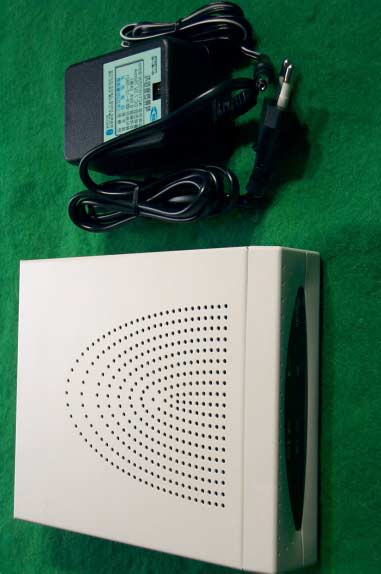
Internet Gateway Router - FCC ID PNPMYNET-8104 - DAIN TELECOM CO., LTD.
PNPMYNET-8104

Internet Gateway Router

May 20, 2001

Equipment Class

JBP - Part 15 Class B Computing Device Peripheral