PT8T703TransPhone
China Mobile Internet Technologies Inc.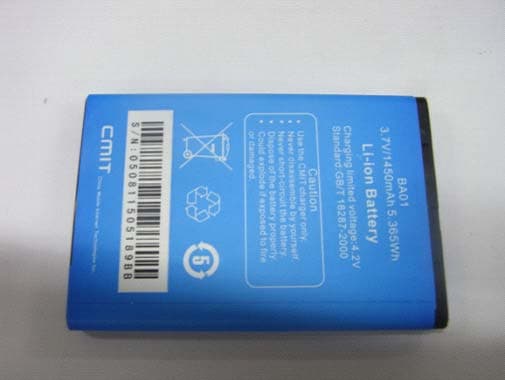
Click to zoom
Application Details
- Equipment Class
- JBP - Part 15 Class B Computing Device Peripheral
- Date of Grant
- Sep 27, 2012
- Application Purpose
- Original Equipment
- Date of Application
- Sep 27, 2012
- Equipment Note
- TransPhone
- Country
- China
Documents & Files
Document Text
Text extracted from the exhibit documents filed with the FCC. Open a document above to read the original.
Users Manual
Quick Start Guide Start Here Welcome to TransPhone. This Quick Start guide tells you how to set up your TransPhone and use its key features. Once you’re up and calling, you can learn even more about TransPhone at http://www.transphone.cn. Basics On/Off Button To turn the TransPhone on, press and hold the On/Off Button for 3 seconds. To turn the TransPhone off, press and hold the On/Off Button for 3 seconds until the popup menu appears. Select “Power off.” Then select “OK.” To lock the TransPhone, press the On/Off Button. Go to the home screen You can tap the Home Button to go to the home screen when using apps. Using apps Tap the Home Button to go to the home screen to see your apps, then tap an app icon. Or, open the Applications List by tapping at the bottom of home screen. Swipe up and down to scroll in Smartphone Mode, or swipe left and right to scroll in Tablet Mode. Search for your desired app, then tap the app icon to open it. Add app icons to the home screen Customize each mode’s home screen to your liking. In Smartphone Mode, tap at the bottom of the home screen to open the Applications List. Press and hold the app icon for 2 seconds until the home screen appears, then drag the app icon to the desired location. In Tablet Mode, tap at the bottom of the home screen to open the applications list. Press and hold the app icon and drag it to the “Move to Screen” bar, then drag the app icon to the desired location. TransPhone Overview Applications List in Tablet Mode Applications List in Smartphone Mode Add app icons in Tablet Mode Before draggingAfter draggingDragging Multitasking While calling, you can access email, documents or other applications, and even surf the web (Wifi or mobile data network connection needed.) To switch apps, go to the home screen, then tap the app you want to open. Or press and hold the Home Button for 2 seconds and switch to recently used apps. Notifications The Notification Center displays all of your notifications, including unread messages, missed phone calls, and notifications from other applications. To open the Notification Center, drag down from the top of the home screen. Swipe the list to see all of your notifications. Notification Center in Tablet Mode Notification of unread messages in Smartphone Mode Making a call Tap phone . Manually dial the number to make a call. You may also tap a contact name or number in your contacts or search, then tap to call that contact. Tap “End” to end the call. To receive a call in Tablet Mode, you can use the speaker- phone, earphones or a Bluetooth headset. Or, undock the TransPhone from the tablet to answer the call directly. Note: When the TransPhone is in Tablet Mode, you can undock the phone to continue your previous task at any time. Or press the On/Off Button to hang up and transform to Smartphone Mode. Send messages Tap the Messaging >New message. Type a name or phone number in the “To” field or select someone from your contacts and write your message, then tap” Send”. Or tap Back Button to save as a draft. To send photos, tap the Menu Button and select ”Attach” in the popup menu. To delete or forward a message, press and hold your finger on the text, then tap “Delete message” or “Forward.” Menu Button Menu Button Speaker Home ButtonBack Button Search Button Search Button Receiver On/Off Button Volume Up/Down Button Dock/ Data Connector Touch Screen Touch Screen Distance/ Light sensor Flash Rear Camera Connecting Port Phone Sliding Dock Indicator Light Charge phone battery switchOrientation Lock Data Connector Heat-Sink Hole Input method To change the input method, press and hold the text box on the screen, then tap “Input method” to show all possible input methods. (To enable an installed input method, go to Settings>Language & keyboard, then tap the input method you wish to select.) Dock the TransPhone into the tablet. This mode makes the text and images larger. The onscreen keyboard is also larger. Swipe, rotate, type, and touch the tablet’s larger screen with greater accuracy! Input method menu in Tablet Mode To select the input method in Tablet Mode Microphone Microphone Headset Jack Front Camera Quick Start Guide Start Here Welcome to TransPhone. This Quick Start guide tells you how to set up your TransPhone and use its key features. Once you’re up and calling, you can learn even more about TransPhone at http://www.transphone.cn. Basics On/Off Button To turn the TransPhone on, press and hold the On/Off Button for 3 seconds. To turn the TransPhone off, press and hold the On/Off Button for 3 seconds until the popup menu appears. Select “Power off.” Then select “OK.” To lock the TransPhone, press the On/Off Button. Go to the home screen You can tap the Home Button to go to the home screen when using apps. Using apps Tap the Home Button to go to the home screen to see your apps, then tap an app icon. Or, open the Applications List by tapping at the bottom of home screen. Swipe up and down to scroll in Smartphone Mode, or swipe left and right to scroll in Tablet Mode. Search for your desired app, then tap the app icon to open it. Add app icons to the home screen Customize each mode’s home screen to your liking. In Smartphone Mode, tap at the bottom of the home screen to open the Applications List. Press and hold the app icon for 2 seconds until the home screen appears, then drag the app icon to the desired location. In Tablet Mode, tap at the bottom of the home screen to open the applications list. Press and hold the app icon and drag it to the “Move to Screen” bar, then drag the app icon to the desired location. TransPhone Overview Applications List in Tablet Mode Applications List in Smartphone Mode Add app icons in Tablet Mode Before draggingAfter draggingDragging Multitasking While calling, you can access email, documents or other applications, and even surf the web (Wifi or mobile data network connection needed.) To switch apps, go to the home screen, then tap the app you want to open. Or press and h…
Text truncated - open the document above for the full version.
Cover Letter(s)
PHOENIX TEST-LAB GmbH Product Certification Königswinkel 10 D 32825 Blomberg Date: 21.05.2012 Authority to Act as an Agent We declare that the following representative (agent) Name Mark Wen Position General Manager Company Name Most Technology Service Co., Ltd. Address No.5, 2 nd Langshan Road, North District, Hi-Tech Industrial Park, Nanshan, Shenzhen, Guangdong, China Tel / Fax 86-755-86170306/86-755-86170310 E-Mail [email protected] to act on our behalf on all matters concerning the application and documents submitted to PHOENIX TEST-LAB for product certification below Product Name TransPhone Model Name TP703 Brand Name TransPhone We also authorize BZT – TCP Certification GmbH, Ms.Wanida Patthanavoj (address: Hermann - Loens - Weg 6, 15859 Storkow b. Berlin Germany) to process the application. Yours sincerely, Signatory Name Qisheng Zhang Position Project Manager Company Name China Mobile Internet Technologies Inc. Address No.76, Shenbei Road, Shenbei New Area, Shenyang, Liaoning ProVince, China Tel / Fax +86 24-89794329 E-Mail [email protected] In case of FCC, we certify that we are not subject to a denial of Federal benefits, that include FCC benefits, pursuant to Section 5301 of the Anti-Drug Abuse Act of 1988, 21 U.S.C. §862 because of a conviction for possession or distribution of a controlled substance. China Mobile Internet Technologies Inc. No.76, Shenbei Road, Shenbei New Area, Shenyang, Liaoning ProVince Tel: +86 24-89794329, Fax: +86 24-89794329
Cover Letter(s)
China Mobile Internet Technologies Inc. Federal Communications Commission Equipment Authorization Branch 7435 Oakland Mills Road Columbia, MD 21046 Request for Confidentiality Company name: China Mobile Internet Technologies Inc. FCC ID: PT8T703 FCC Part 15 & 22 & 24 Certification Gentlemen, Pursuant to 47 CFR 0.457(d)(1)(ii) and 0.459 we hereby requests permanent confidentiality of the following documents for the subject application: Exhibit Type Description ☒ Schematics All circuitry of devices and component values ☒ Block Diagrams Details of device showing the frequency of all oscillators ☒ Bill Of Materials Parts list of the product for the radio device ☒ Operational Description Description of the circuit functions Note: Exhibit types that are commonly held confidential are: (1) Schematics, (2) Block Diagrams, (3) Bill Of Materials, (4) Operational Descriptions. Any exhibit NOT granted confidentiality is viewable on the FCC website as soon as a grant is issued. These documents contain detailed system and equipment description and related information about the product which we considers to be proprietary, confidential and a custom design and otherwise would not release to the general public. Since the design is a basis from which future technological products will evolve, we consider that this information would be of benefit to its competitors and that the disclosure of the information in these documents would give competitors an unfair advantage in the market. Yours sincerely, Signatory Name Qisheng Zhang Position Managaer Company Name China Mobile Internet Technologies Inc. Address No.76, Shenbei Road, Shenbei New Area, Shenyang, Liaoning ProVince, China Tel / Fax +86 24-89794329 E-Mail [email protected]
External Photos
FCC ID: PT8T703Report No. : STS120808F1 Page1 FRONT VIEW OF SAMPLE BACK VIEW OF SAMPLE FCC ID: PT8T703Report No. : STS120808F1 Page 2 LEFT VIEW OF SAMPLE RIGHT VIEW OF SAMPLE FCC ID: PT8T703Report No. : STS120808F1 Page 3 TOP VIEW OF SAMPLE BOTTOM VIEW OF SAMPLE FCC ID: PT8T703 Report No.:STS120808F1 Page 4 PHOTO OF POWER SUPPLY FCC ID: PT8T703Report No. : STS120808F1 Page5 PHOTO OF HEADPHONE PHOTO OF USB FCC ID: PT8T703 Report No.:STS120808F1 Page 6 PHOTO OF BATTERY PHOTO OF THE ENTIRE SAMPLE
Internal Photos
FCC ID: PT8T703 Report No.:STS120808F1 Page 1 INTERNAL PHOTO OF SAMPLE – 1 INTERNAL PHOTO OF SAMPLE -2 FCC ID: PT8T703Report No. : STS120808F1 Page2 INTERNAL PHOTO OF SAMPLE – 3 INTERNAL PHOTO OF SAMPLE – 4 FCC ID: PT8T703Report No. : STS120808F1 Page 3 INTERNAL PHOTO OF SAMPLE –5 INTERNAL PHOTO OF SAMPLE –6 FCC ID: PT8T703Report No. : STS120808F1 Page4 INTERNAL PHOTO OF SAMPLE –
Test Report
FCC 47 CFR PART 15 SUBPART B TEST REPORT For Applicant: China Mobile Internet Technologies Inc. Address: No.76, Shenbei Road, Shenbei New Area, Shenyang, Liaoning ProVince, China Product Name: TransPhone Model Name: TP703 Brand Name: TransPhone FCC ID: PT8T703 Report No.: STS120808F1 Date of Issue: September 15,2012 Issued by: Shenzhen Super Test Service Technology Co., Ltd. Address : No.5, Langshan 2nd Rd., North Hi-Tech Industrial park, Nanshan, Shenzhen, Guangdong, China Tel : 86-755-2795 8522 Fax : 86-755-2795 8022 The report consists 35 pages in total. It may be duplicated completely for legal use with the approval of the applicant. It should not be reproduced except in full, without the written approval of our laboratory. The client should not use it to claim product end orse ment by STS. The test results in the report only apply to the tested sample. The test report shall be invalid without all the signatures of testing engineers, reviewer and approver. FCC ID: PT8T703 Report No.:STS120808F1 Page 2 of 35 TABLE OF CONTENTS 1.VERIFICATION OF CONFORMITY.......................................................................................... 3 2. GENERAL INFORMATION ........................................................................................................ 4 2.1 PRODUCT INFORMATION...................................................................................................... 4 2.2 OBJECTIVE.............................................................................................................................. 5 2.3 TEST STANDARDS AND RESULTS........................................................................................ 5 2.4 ENVIRONMENTAL CONDITIONS ........................................................................................... 5 3. TEST FACILITY .......................................................................................................................... 6 4. TEST EQUIPMENT LIST ........................................................................................................... 8 5. 47 CFR PART 15B REQUIREMENTS................................................................................... 10 5.1 GENERAL INFORMATION .................................................................................................... 10 6. LINE CONDUCTED EMISSION TEST .................................................................................. 12 6.1. LIMITS OF LINE CONDUCTED EMISSION TEST............................................................... 12 6.2. BLOCK DIAGRAM OF TEST SETUP ................................................................................... 12 6.3. PRELIMINARY PROCEDURE OF LINE CONDUCTED EMISSION TEST.......................... 13 6.4. FINAL PROCEDURE OF LINE CONDUCTED EMISSION TEST ........................................ 13 6.5. TEST RESULT OF LINE CONDUCTED EMISSION TEST .................................................. 14 7. RADIATED EMISSION TEST ................................................................................................ 16 7.1. LIMITS OF RADIATED DISTURBANCES AT 3M DISTANCES FOR CLASS B................... 16 7.2 TEST DESCRIPTION ............................................................................................................. 16 7.3 TEST RESULT........................................................................................................................ 18 APPENDIX 1 ................................................................................................................................ 21 PHOTOGRAPHS OF TEST SETUP ............................................................................................ 21 APPENDIX 2 ................................................................................................................................ 25 PHOTOGRAPHS OF EUT ........................................................................................................... 25 FCC ID: PT8T703 Report No.:STS120808F1 Page 3 of 35 1.VERIFICATION OF CONFORMITY Equipment Under Test: TransPhone Brand Name: TransPhone Model Number: TP703 Series Model Name: N/A Difference description: N/A FCC ID: PT8T703 China Mobile Internet Technologies Inc. Applicant: 1 No.76, Shenbei Road, Shenbei New Area, Shenyang, Liaoning ProVince, China China Mobile Internet Technologies Inc. Manufacturer: 1 No.76, Shenbei Road, Shenbei New Area, Shenyang, Liaoning ProVince, China Technical Standards: 47 CFR Part 15 Subpart C File Number: STS120808F1 Date of test: September 05,2012~ September 15,2012 Deviation: None Condition of Test Sample: Normal Test Result: PASS The above equipment was tested by Shenzhen Super Test Service Technology Co., Ltd. for compliance with the requirements set forth in FCC Part 15 and the Technical Standards mentioned above. This said equipment in the configuration described in this report shows the maximum emission levels emanating from equipment and the level of the immunity endurance of the equipment are within the compliance requirements. The test results of this report relate only to the tested sample identified in this report. Tested by (+ signature): Zhang Ling September 15,2012 Review by (+ signature): July Wen September 15,2012 Approved by (+ signature): Terry Yang September 15,2012 FCC ID: PT8T703 Report No.:STS120808F1 Page 4 of 35 2. GENERAL INFORMATION 2.1 PRODUCT INFORMATION EUT1- Mobile Phone Description: TransPhone Model Name: TP703 Brand Name: TransPhone Frequency: GSM 850MHz/1900MHz Hardware Version: SP Software Version: SP_R2.3_20 EUT2- Battery Description: Lithium-ion Battery Model Name: BA01 Brand Name: TransPhone Manufacturer: FUJI ELECTRONICS(SHENZHEN) CO.,LTD Capacitance: 1450 mAh Rated Voltage: 3.7V Charge Limit: 4.2V EUT3 – Power Supply Description: Travel Charger Model Name: PSA105R-050Q Brand Name: TransPhone Manufacturer: Phihong Electronics Co., Ltd. Rated Input: AC 100-240V,0.3A, 50/60Hz Rated Output: DC 5V, 1.2A Length o…
Text truncated - open the document above for the full version.
Test Setup Photos
FCC ID: PT8T703Report No. : STS120808F1 Page 1 CONDUCTED TEST SETUP CE TEST SETUP FCC ID: PT8T703Report No. : STS120808F1 Page 2 FCC ID: PT8T703Report No. : STS120808F1 Page 3 RE TEST SETUP FCC ID: PT8T703Report No. : STS120808F1 Page 4
Contact Information
Applicant
Qisheng Zhang(Manager)
Test Firm
Most Technology Service Co., Ltd.Mark Wen
Technical Specifications
| # | Rule Parts | Frequency Range | Power Output |
|---|---|---|---|
| 1 | 15B | - | - |