PX3G100Wireless Email and Calendar Device, G100
Good Technology, Inc.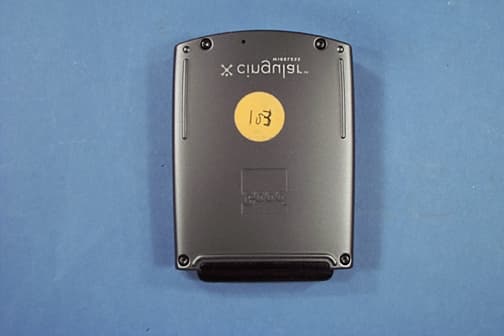
Click to zoom
Application Details
- Equipment Class
- TNB - Licensed Non-Broadcast Station Transmitter
- Date of Grant
- Jun 16, 2002
- Application Purpose
- Original Equipment
- Date of Application
- Apr 04, 2002
- Equipment Note
- Wireless Email and Calendar Device, G100
- Frequency Range
- 896.00000000 - 902.00000000
- Company
- Good Technology, Inc.
- Country
- United States
Documents & Files
Document Text
Text extracted from the exhibit documents filed with the FCC. Open a document above to read the original.
Users Manual
Alpha Draft Company Confidential GoodLink ™ Wireless Corporate Messaging System G100 User’s Guide Version 1.0 Alpha Draft MobiUser.book Page i Monday, April 1, 2002 2:26 PM Alpha Draft Company Confidential GoodLink ™ G100 User’s Guide Last revised 02/14/02 Part Number: 1001715, Revision A At time of printing, documentation complies with software version 1.0. Copyright © 2002 Good Technology, Inc. All rights reserved. Good, Good Technology and GoodLink are trademarks of Good Technology, Inc. in the United States and/or other countries. Good Technology, Inc. may have patents or pending patent applications, trademarks, copyrights or other intellectual property rights covering subject matter in this document. The furnishing of this document does not give you any license to these patents, trademarks, copyrights, or other intellectual property rights except as expressly provided in any written license agreement from Good Technology, Inc. Microsoft, Windows, Windows NT, Exchange and Outlook are either registered trademarks or trademarks of Microsoft Corporation in the United States and/or other countries. Mobitex is a trademark of the Swedish Telecommunications Administration that may be registered in some jurisdictions. Outside In®Wireless Export ©2001 Stellent Chicago, Inc. All rights reserved. All other companies and product names are trademarks or registered trademarks of their respective holders. This product uses code written by John Halleck, which is used with his permission. This distribution contains unmodified executables of the Netscape ® Security Service (NSS) and Netscape Portable Runtime (NSPR). These files are subject to the Mozilla Public License 1.1. You may obtain a copy of the license and source code for these files at www.mozilla.org. Disclaimer No part of this document may be reproduced or transmitted in any form or by any means, electronic or mechanical, for any purpose, without the express written permission of Good Technology, Inc. Information in this document is subject to change without notice. This publication could include technical inaccuracies or typographical errors. Good Technology, Inc. may make improvements or changes in the products or the programs described in this publication at any time. Good Technology, Inc. 1032 Morse Ave. Sunnyvale, CA, 94089 Tel. (408) 400-4800 Fax (408) 400-4801 Web site: www.good.com Printed In USA. Be Good. Be Safe. Please do not use while driving or engaged in any other activity that requires your full attention. MobiUser.book Page ii Monday, April 1, 2002 2:26 PM GoodLink User’s Guideiii Contents 1 Overview1 Features and Benefits 2 Package Contents 4 System Overview 5 For Additional Information 6 2 Tutorial: Sending an Email Message7 Keyboard and Controls 8 Composing a Message 9 Checking the Message 13 3 Using GoodLink Applications – Basics and Email17 About GoodLink Applications 18 Basics 19 Opening an Application 20 Using Menus 20 Setting the Text Insertion Point 21 Using Checkboxes 22 MobiUser.book Page iii Monday, April 1, 2002 2:26 PM ivGoodLink User’s Guide Changing Dates and Times 22 Returning to the Home Screen 24 Getting Help 24 Turning the Radio On and Off 25 Turning the Handheld Off and On 26 Resetting Your Handheld 26 Composing Text 27 Copying and Pasting Text 29 Email 30 Viewing Email Messages 31 Responding to Email Messages 33 Responding to a Meeting Request 34 Finding Messages 36 Viewing Email Attachments 37 Creating Email Messages 38 Using Email Folders 41 Viewing Email Folders 43 Filing Email Messages 44 Deleting Email Messages 45 Filtering Messages 46 Setting Email Options 48 Syncing All Incoming Messages 50 Viewing Digitally-Signed or Encrypted Messages 52 Keyboard Command Reference 52 4 Additional Applications57 Contacts 58 Viewing Contacts 58 Finding Contacts 60 Editing Contacts 61 Adding Contacts 61 Setting Contact Options 63 Using Contacts with Other Applications 64 MobiUser.book Page iv Monday, April 1, 2002 2:26 PM GoodLink User’s Guidev Calendar 65 Viewing Appointments 66 Adding New Appointments 69 Changing Appointments 72 Setting Calendar Options 73 Tasks 73 Viewing Tasks 74 Adding New Tasks 75 Editing Tasks 78 Setting Task Options 79 Notes 80 Viewing and Editing Notes 81 Adding Notes 82 Deleting Notes 84 Alarm Clock 84 Calculator 85 Working with a Series of Numbers 87 Solitaire 88 5 Preferences and Maintenance91 Setting Handheld Preferences 91 Using Autotext 94 Passwords 97 Adding a Password 98 Locking and Unlocking Your Handheld 100 Disabling a Password 101 Changing a Password 101 Changing the Time Zone 102 Battery Maintenance 102 Recharging the G100 Battery 103 Data Storage and Aging 104 Moving Servers or Changing Email Addresses 106 MobiUser.book Page v Monday, April 1, 2002 2:26 PM viGoodLink User’s Guide A Appendix107 Safety and Regulatory Information 107 FCC Statement (USA only) 108 Exposure To Radio Frequency Energy (SAR) 108 Specifications 108 Statement of Limited Warranty 110 GoodLink Applications Software License Agreement 113 MobiUser.book Page vi Monday, April 1, 2002 2:26 PM GoodLink User’s Guide1 Alpha Draft - Company Confidential 1 Overview Welcome to GoodLink™ wireless corporate messaging system from Good Technology, Inc. GoodLink enables mobile professionals to stay always up-to-date with their company email and organizer information when away from their desktops. CMDESC SPACE ALT GoodLink Application software on the G100 Wireless Handheld MobiUser.book Page 1 Monday, April 1, 2002 2:26 PM Overview 2GoodLink User’s Guide Alpha Draft - Company Confidential GoodLink provides mobile workers with a continuously synchronized wireless connection to their company servers, so they can instantly access up-to-date corporate email, secure attachments, contacts, calendar, notes and tasks when traveling. GoodLink adds always up-to-date wireless service and easy-to-use software to its G100 handheld devices. GoodLink delivers a complete and secure wireless solution for accessing corporate messaging acc…
Text truncated - open the document above for the full version.
Users Manual
User’s Guide Proprietary and Confidential – Beta 3 Use and Disclosure Governed by Good Technology, Inc. NDA GoodLink ™ Wireless Corporate Messaging System For Good™ G100 User’s Guide Version 1.5 Beta 3 iiUser’s Guide Proprietary and Confidential – Beta 3 Use and Disclosure Governed by Good Technology, Inc. NDA User’s Guide for Good G100 Last revised: 06/04/02 Part Number: 1001804, Revision A At time of printing, documentation complies with software version 1.5. Copyright © 2002 Good Technology, Inc. All rights reserved. Good, Good Technology, GoodLink, GoodInfo, and the Good Logo are trademarks and service marks of Good Technology, Inc. in the United States and/or other countries. Good Technology, Inc. may have patents or pending patent applications, trademarks, copyrights or other intellectual property rights covering subject matter in this document. The furnishing of this document does not give you any license to these patents, trademarks, copyrights, or other intellectual property rights except as expressly provided in any written license agreement from Good Technology, Inc. Microsoft, Windows, Windows NT, Exchange and Outlook are either registered trademarks or trademarks of Microsoft Corporation in the United States and/or other countries. RIM, Research in Motion, RIM 950, RIM 957, and BlackBerry are registered trademarks or trademarks of Research in Motion Limited in the United States and/or other countries. Good Technology, Inc. and its products and services are not related to, sponsored by, or affiliated with Research In Motion Limited. Mobitex is a trademark of the Swedish Telecommunications Administration that may be registered in some jurisdictions. Datalight is a registered trademark of Datalight, Inc. FlashFX(tm) is a trademark of Datalight, Inc. Copyright 1993- 2001 Datalight, Inc., All Rights Reserved. U.S. Patent Office 5,860,082. All other companies and product names are trademarks or registered trademarks of their respective holders. Some or all of the following notices may apply to portions of the software provided by Good that are described in this document: Outside In®Wireless Export © 2001 Stellent Chicago, Inc. All rights reserved. Code written by John Halleck is used with his permission. This distribution contains executables of the Netscape ® Security Service (NSS) and Netscape Portable Runtime (NSPR). You may obtain the source code for these files from www.mozilla.org, which source files are subject to the Mozilla Public License 1.1. Part of the software embedded in this product is eCos - Embedded Configurable Operating System, a trademark of Red Hat. Portions created by Red Hat are Copyright (C) 1998, 1999, 2000 Red Hat, Inc. (http://www.redhat.com/). All Rights Reserved. THE SOFTWARE IN THIS PRODUCT WAS IN PART PROVIDED BY RED HAT AND ANY EXPRESS OR IMPLIED WARRANTIES, INCLUDING, BUT NOT LIMITED TO, THE IMPLIED WARRANTIES OF MERCHANTABILITY AND FITNESS FOR A PARTICULAR PURPOSE ARE DISCLAIMED BY RED HAT. IN NO EVENT SHALL RED HAT BE LIABLE FOR ANY DIRECT, INDIRECT, INCIDENTAL, SPECIAL, EXEMPLARY, OR CONSEQUENTIAL DAMAGES (INCLUDING, BUT NOT LIMITED TO, PROCUREMENT OF SUBSTITUTE GOODS OR SERVICES; LOSS OF USE, DATA, OR PROFITS; OR BUSINESS INTERRUPTION) HOWEVER CAUSED AND ON ANY THEORY OF LIABILITY, WHETHER IN CONTRACT, STRICT LIABILITY, OR TORT (INCLUDING NEGLIGENCE OR OTHERWISE) ARISING IN ANY WAY OUT OF THE USE OF THIS SOFTWARE, EVEN IF ADVISED OF THE POSSIBILITY OF SUCH DAMAGE. You may obtain a copy of the source code of the eCos Original Code from http:// www.redhat.com. You may obtain a copy of source code of Good Technology, Inc.’s Modifications that have been publicly released in Executable form by sending an email to [email protected]. The source code of the eCos Original Code and Good Technology, Inc.’s Modifications are subject to the Red Hat eCos Public License Version 1.1 (the “License”). You may obtain a copy of the License at http://www.redhat.com/. Disclaimer No part of this document may be reproduced or transmitted in any form or by any means, electronic or mechanical, for any purpose, without the express written permission of Good Technology, Inc. Information in this document is subject to change without notice. This publication could include technical inaccuracies or typographical errors. Good Technology, Inc. may make improvements or changes in the products or the programs described in this publication at any time. Good Technology, Inc. 1032 Morse Ave. Sunnyvale, CA, 94089 Tel. (408) 400-4800 Fax (408) 400-4801 Web site: www.good.com Printed In USA. Be Good. Be Safe. Please do not use while driving or engaged in any other activity that requires your full attention. User’s Guideiii Proprietary and Confidential – Beta 3 Use and Disclosure Governed by Good Technology, Inc. NDA Contents 1Overview1 Features and Benefits2 GoodLink Features and Benefits 3 Good G100 Features and Benefits4 Package Contents5 System Overview7 For Additional Information8 2Tutorial: Sending an Email Message 9 Keyboard and Controls 10 Composing a Message10 Checking the Message 14 3Using GoodLink Applications – Basics and Email 17 About GoodLink Applications18 Basics19 Opening an Application19 Using Menus Within Applications 20 Setting the Text Insertion Point21 ivUser’s Guide Proprietary and Confidential – Beta 3 Use and Disclosure Governed by Good Technology, Inc. NDA Using Checkboxes21 Changing Dates and Times 22 Using the Home Key23 Using the Escape Key23 Getting Help 24 Turning On the Backlight24 Extending Battery Life25 Recharging the G100’s Battery 26 Using Screen Preferences to Reduce Power Consumption27 Turning the Radio On and Off28 Turning the Handheld On and Off30 Resetting Your Handheld30 Composing Text31 Cutting, Copying, and Pasting Text33 Email35 Viewing Email Messages36 Responding to Email Messages38 Responding to a Meeting Request 40 Viewing a Sender’s Email Address and Adding it to Your Contacts42 Finding Messages43 Sorting Messages 44 Viewing Email Attach…
Text truncated - open the document above for the full version.
Cover Letter(s)
Ite m 2: CKC Laboratories, Inc. procedure for performing measurements for Licensed devices is to first calculate the ERP using an FCC approved formula [P(W) = (ed)^2 / 30G]. If the margin is sufficient enough, the calculated readings are reported. If the margins are not sufficient, actual substitution method is performed. The spec limit is in dBc (43+10LOG(P)), however, this can be represented by an absolute value. Exa mple: Antenna terminal testing: 1) If the measured power is 20dBm, this would equal 100mW. 43+10Log(0.1) = 33dB 20dBm - 33dB = -13dBm = 50uW 2) If the power measured is 50dBm, which equals 100W 43+10Log(100) = 63dB 50dBm - 63dB = -13dBm = 50uW Substitution Testing: 3) If the Power measured using the substitution = 10W, this is equal to 40dBm 43+10Log(P) = 53dB 40dBm - 53dB = -13dBm = 50uW 4) If the Power measured using the substitution = 500mW, this is equal to 26.99dBm 43+10Log(P) = 39.99dB 26.99dBm - 39.99dB = -13dBm = 50uW As can be seen by the above examples, regardless if one measures 10W or 500mW the 43+10Log(p) limit can be equated to an absolute value of 50uW (-13dBm in a 50ohm system). In regards to Good Technologies, the field strength values were converted to ERP via the approved FCC formula and compared to the 43+10Log(P) limit (50uW). The highest measurement was -15.88dB from the limit and therefore there was no need to perform an actual substitution test.
Cover Letter(s)
Good Technology, Inc. 1032 Morse Avenue Sunnyvale, CA 94089 phone 408.400.4800 fax 408.400.4801 www.good.com FCC ID: PX3G100 Applicant: Good Technology, Inc. Correspondence Reference Number: 22989 731 Confirmation Number: EA703747 Subject: Good Technology’s replies to FCC inquires 1. FCC : Please justify your emission designator of 13K6F1D. F1D generally not used for GMSK modulation. Good Technology : The emission designator was calculated in accordance with the FCC rules outlined in 2.201 and 2.202. The F1D description of the transmitter radio signal was derived as follows: The G100 uses Gaussian filtered minimum shift keying (GMSK). MSK is continuous-phase FSK (frequency shift keying) with a minimum modulation index. Since MSK is a form of FSK, a frequency modulation designation is appropriate. Hence, the first symbol of the transmit signal description should be “F” (frequency modulation) as stipulated in FCC rules 2.201(c)(3). The G100 transmits digital information and does not use a sub-carrier. Therefore, the second symbol of the transmit signal description should be “1” as stipulated in FCC rules 2.201(d)(2). The G100 transmits data information only. Therefore, the third symbol of the transmit radio signal description should be “D” as stipulated in FCC rules 2.201(e)(5). Given the above, F1D is an appropriate description of the transmit radio signal. The F1D description is also consistent with other FCC approved products that operate on the Mobitex network and use the same modulation. As given in the FCC rules 2.202, the necessary bandwidth calculation was done using the following equation: Bn=2M+2DK, K=1. For the G100, D=2000Hz and M=4800Hz. Hence, the necessary bandwidth is 13600Hz. Hence, the appropriate emissions designator for the G100 is 13K6F1D. To: Stan Lyles ([email protected]) FCC Equipment Authorization Branch From: Louie Sanguinetti, Good Technology, ([email protected]) cc: Steve Behm, CKC Laboratories, Inc. ([email protected]) Good Technology, Inc. 1032 Morse Avenue Sunnyvale, CA 94089 phone 408.400.4800 fax 408.400.4801 www.good.com 2. FCC: Radiated spurious emissions measurements and the substitution method Good Technology : Please see separate response from CKC Laboratories regarding emissions measurements. 3. FCC: Operational Description states: "The G100 antenna..... an omnidirectional vertically polarized radiation pattern when oriented in the dominant user position." Please submit photos of device in "dominant user position." Good Technology: The dominant user position for the G100 is the position Good Technology expects the device to be positioned most of the time in operation. For most users, Good Technology considers the device oriented vertically in the holster to be the dominant user position. See photo below: Good Technology, Inc. 1032 Morse Avenue Sunnyvale, CA 94089 phone 408.400.4800 fax 408.400.4801 www.good.com 4. FCC: Please show location and connection scheme of antenna on internal photos. Good Technology: The antenna is formed by copper traces printed directly on the main printed circuit board. The antenna connects directly to the radio circuitry by microstrip and stripline transmission lines printed directly on the main PCB. See photo below for the location of the antenna on the main PCB. 5. FCC: SAR report page 5 of 5 - is that conducted power? Please submit details of measurement setup and procedure. Good Technology : The power listed on page 5 of the SAR report is conducted power (not radiated power). The conducted power is measured as follows: Test Conditions: The G100 (MOBI_EVT4) was cabled into the spectrum analyzer through an SMA 30 dB PAD. The amplitude setting on the spectrum analyzer was set to +10dBm. The spectrum analyzer span was set to 0Hz with a sweep time of 100msec. All measurements were performed with the spectrum analyzer in peak detect mode. Through special diagnostic software, the G100 was programmed to transmit a Good Technology, Inc. 1032 Morse Avenue Sunnyvale, CA 94089 phone 408.400.4800 fax 408.400.4801 www.good.com 50msec pulse at full power every 500msec. The peak power of the transmit pulse was measured on the spectrum analyzer. Test Equipment: 1. Spectrum Analyzer, Agilent, Model No: 8650E. 2. 30dB SMA Coaxial Attenuator, Mini-circuits, Model No: BW-S30W2. Test Setup: 6. FCC: Please describe how duty cycle = 9% is applicable, and how it is established. Is crest factor correction used with SAR probe? Please describe. Good Technology : The G100 has a source based 9% duty factor achieved by permanent firmware implemented at the factory to satisfy SAR compliance. The G100’s radio-modem keeps track of the total amount of time it spends transmitting and receiving at the link layer in order to communicate one network-layer message to the base station and then it waits before attempting to communicate the next message such that the inter-message transmit duty cycle does not exceed 9%. Therefore if the total amount of link layer transmission time to communicate one network layer message is x, and the total amount of time spent receiving between the start of one message dialogue and the start of the next is y then: (x / (x+y)) <= 0.09 = 9%. Please see separate document from Aprel Laboratories for an explanation on the crest factor. 7. FCC: Please explain how device against flat phantom represents hand. Will Good Technology, Inc. 1032 Morse Avenue Sunnyvale, CA 94089 phone 408.400.4800 fax 408.400.4801 www.good.com hand cover or be within a few cm of antenna in normal use? Good Technology: Please see separate document from Aprel Laboratories for an answer to this question. 8. FCC: Graph 3 shows "hot spot" outside of device. Please submit zoom scan plots superimposed on device for max SAR configurations. Good Technology: Please see separate document from Aprel Laboratories for an answer to this question.
Cover Letter(s)
Good Technology, Inc. 1032 Morse Avenue Sunnyvale, CA 94089 phone 408.400.4800 fax 408.400.4801 www.good.com FCC ID: PX3G100 Applicant: Good Technology, Inc. Correspondence Reference Number: 23040 731 Confirmation Number: EA703747 Date of original e-mail: 5/31/2002 Subject: Good Technology’s replies to FCC inquires of 5/31/2002 1. FCC: How is the data limited to 4800 Baud? Good Technology: The data is modulated and limited as follows. Digital baseband signals are generated by a GMSK MODEM IC (U10 on the schematic). They are Gaussian filtered (BT=0.3) and directly modulate the reference oscillator of the 900MHz RF transmitter. The GMSK MODEM IC using a +/-20ppm crystal oscillator fixes the symbol rate of the digital baseband signal at 8000 symbols/sec. The Gaussian filter band limits the modulation. The Gaussian filter is formed by a combination of internal circuitry of the GMSK MODEM IC and an RC filter (R16 and C37). The resulting Gaussian filter has a one-sided 3dB bandwidth of 2400Hz (for a total bandwidth of 4800Hz). 2. FCC: We are satisfied with Question number 2 from 5/24/02. Since the FCC limit Per Section 24.132 is 7 watts ERP in the 901.0 MHz to 902.0 MHz band, your calculated ERP value of 5.85 watts is within 1.0 dB of the limit. Therefore, we require the Substitution Method for ERP power. Please refer to test report example on pages 27, 28, 29, 30 and 31. FCC ID: ALH32943220. Good Technology: Please see separate response from CKC Laboratories regarding emissions measurements. 3. FCC: Need external photos with side views of device in holster please. Manual does not show holster option? Good Technology: An updated user manual has been uploaded. The holster is shown on page 5 and on page 6 on the updated user manual. Photographs of both left and right side views and a top view of the device in the holster are shown as follows: To: Stan Lyles ([email protected]) FCC Equipment Authorization Branch From: Louie Sanguinetti, Good Technology, ([email protected] ) cc: Steve Behm, CKC Laboratories, Inc. ([email protected]) Good Technology, Inc. 1032 Morse Avenue Sunnyvale, CA 94089 phone 408.400.4800 fax 408.400.4801 www.good.com Good Technology, Inc. 1032 Morse Avenue Sunnyvale, CA 94089 phone 408.400.4800 fax 408.400.4801 www.good.com 4. FCC: Need photos of EUT holder and setup with device in place as used for SAR test. Good Technology: Please see separate document from Aprel Laboratories for an answer to this question. 5. FCC: Follow-up for reply to 6) of CRN 22989: SAR report page 8 says time- domain waveform is captured; page 9 says diode compression point (dcp) is used to calculate final SAR. This seems like a contradiction. One well-known linearization method uses dcp and crest factor to calculate SAR from probe response. If dcp is used as stated, what additional crest factor or correction factor was used and how? Good Technology: Please see separate document from Aprel Laboratories for an answer to this question. 6. FCC: Contour plots: There are two plots called Graph 5 pp. 23,24. Graph 4 is mid channel 896 Graph 5 page 23 is low channel 896 Graph 6 page 25 is mid channel 899 Which are correct low, mid, high plots? Please explain difference between the two mid or low plots, and revise Table 2 and plots if needed. Good Technology: Please see separate document from Aprel Laboratories for an answer to this question. 7. FCC: Follow-up for reply to 7) of CRN 22989: Please submit users manual instructions as mentioned about hand placement with respect to antenna. Good Technology: An updated user manual has been uploaded. Please refer to page 118 in the Exposure To Radio Frequency Signals (SAR) section. 8. FCC: Device dimensions are 11.7 cm long by 7.9 cm wide. Accoding to SAR plots, device is 40cm wide. Please submit correct SAR plots, re-test if needed. Good Technology: The device dimensions are actually 99.6 mm length x 72 mm wide x 16 mm thick. The dimensions given in the user manual that was originally uploaded were incorrect and have been corrected in the new revision user manual. Please see separate document from Aprel Laboratories an explanation of the dimensions of the SAR plots. Good Technology, Inc. 1032 Morse Avenue Sunnyvale, CA 94089 phone 408.400.4800 fax 408.400.4801 www.good.com 9. FCC: It is expected that normal use position in hand will have antenna protruding some distance away from hand. It may be possible to better simulate that case with device at the edge of a flat phantom. How do SAR results support compliance for that case? Good Technology: Please see separate document from Aprel Laboratories for an answer to this question.
Cover Letter(s)
Ite m 2: The G100 transmitter operates over the 896-902MHz frequency range. This frequency range is covered under two FCC rules parts. When operating over the 896- 901MHz range, the G100 operates under the FCC Part 90 rules. When operating over the 901-902MHz range, the G100 operates under the FCC Part 24 rules. The maximum operating RF output power (ERP) was measured by CKC Laboratories, Inc. to be 5.85 Watts when operating from 896-901MHz under Part 90 rules and 2.674Watts when operating from 901-902MHz under Part 24 rules. The G100 transmits at different power levels depending upon what the transmit frequency is used. Refer to page 6 of the test report for more details regarding the operating RF output power. If the limit were 7 watts, a 1dB margin would be insufficient. However, the 5.85 watt measurement you are referring to was measured below 901MHz and falls under Part 90, which has a 100Watt limit (per 90.6359(d)). This equates to a margin of 12.33dB. The measurement performed for part 24.132 (Page 8 of the Test Report) was recorded at 2.674Watts and therefore yields a margin of 4.18dB. CKC Laboratories, Inc. felt that a 4.18dB Margin was sufficient and opted not to perform the substitution method.
RF Exposure Info
Certification Report on Specific Absorption Rate (SAR) Experimental Analysis Good Technology Inc G100 Wireless Corporate Messaging Device Test Date: March 2002 51 Spectrum Way Nepean ON K2R 1E6 Tel: (613) 820-2730 Fax: (613) 820-4161 email: [email protected] This report shall not be reproduced, except in full, without the express written permission of APREL Laboratories GDTB-G100-SAR-3879 G-100 Page 2 of 33 Project # GDTB-G100-SAR-3879 51 Spectrum WayTel. (613) 820-2730 Nepean, Ontario, K2R 1E6 Fax (613) 820 4161 e-mail: [email protected]© APREL 2000 This report shall not be reproduced, except in full, without the express written approval of APREL Laboratories. FCC ID:PX3G100 Applicant:Good Technology Inc Equipment:Wireless Corporate Messaging Device Model:G100 Standard:FCC 96 –326, Guidelines for Evaluating the Environmental Effects of Radio-Frequency Radiation, OET Bulletin 65 Supplement C 01-01 ENGINEERING SUMMARY This report contains the results of the engineering evaluation performed on the G100 Wireless Corporate Messaging Device. The measurements were carried out in accordance with FCC 96-326. The G100 Wireless Corporate Messaging Device was evaluated for its maximum power level 5.85 W (896-901 MHz) and 2.67 W (901-902 MHz) ERP with a 9% duty cycle. The G100 Wireless Corporate Messaging Device enables mobile professionals to always stay up-to-date with their company email and groupware when away from their desks. The G100 Wireless Corporate Messaging Device was tested at low, middle and high channels for the keyboard up, keyboard down, for body, and hand, exposure. The maximum 10g SAR (1.4 W/kg) was found to coincide with the peak performance RF output power Mid channel (899.0125 MHz) for the Keyboard Down of the device. The hot spot is located at the top left-hand side of the device, near the area of the internal antenna. The maximum 1g SAR (1.19 W/kg) was found to coincide with the peak performance RF output power for the low channel (896.0125 MHz) for the Keyboard Down of the device while attached to the holster. The hot spot is located at the top left-hand side of the device, near the area of the internal antenna. The conservative SAR was measured with a separation distance of 11mm from the device to the phantom (physical dimension of the holster). Test data and graphs are presented in this report. Based on the test results and on how the device will be marketed and used, it is certified that the product meets the requirements as set forth in the above specifications, for the RF exposure environment. The results presented in this report relate only to the sample tested. Page 3 of 33 Project # GDTB-G100-SAR-3879 51 Spectrum WayTel. (613) 820-2730 Nepean, Ontario, K2R 1E6 Fax (613) 820 4161 e-mail: [email protected]© APREL 2000 This report shall not be reproduced, except in full, without the express written approval of APREL Laboratories. TABLE OF CONTENTS ENGINEERING SUMMARY.................................................................................................2 1.Introduction...................................................................................................................4 2.Applicable Documents................................................................................................4 3.Device Under Investigation........................................................................................5 4.Test Equipment............................................................................................................6 5.SET Up..........................................................................................................................7 6.Test Results...............................................................................................................14 6.1.Transmitter Characteristics......................................................................................14 6.2.SAR Measurements..................................................................................................15 6.3.User’s Hand Exposure..............................................................................................16 6.4.Body Exposure..........................................................................................................17 7.Conclusions................................................................................................................18 Appendix A: Graphic Plots For SAR Measurements................................................19 Validation Scan.....................................................................................................................27 Appendix B: Uncertainty Budget..................................................................................28 Appendix C Probe Calibration.....................................................................................…
Text truncated - open the document above for the full version.
Contact Information
Applicant
Trae Vassallo(Program Manager)
[email protected]408-400-4917
Technical Contact
CKC Laboratories, Inc.Steve Behm
[email protected]209-966-5240
5473-A Clouds Rest · Mariposa, California · United States
Non-Technical Contact
CKC Laboratories, Inc.Mary Ellen Clayton
[email protected]209-966-5240
Test Firm
CKC Laboratories, Inc.Steve Behm
Technical Specifications
| # | Rule Parts | Frequency Range | Power Output | Emission | Tolerance |
|---|---|---|---|---|---|
| 1 | 24D,90 | 896 MHz - 902 MHz | 5.85 W | 13K6F1D | 0.9600000000 ppm |