PXWHL500SLCD Monitor
Wooyoung Telecom Co., Ltd.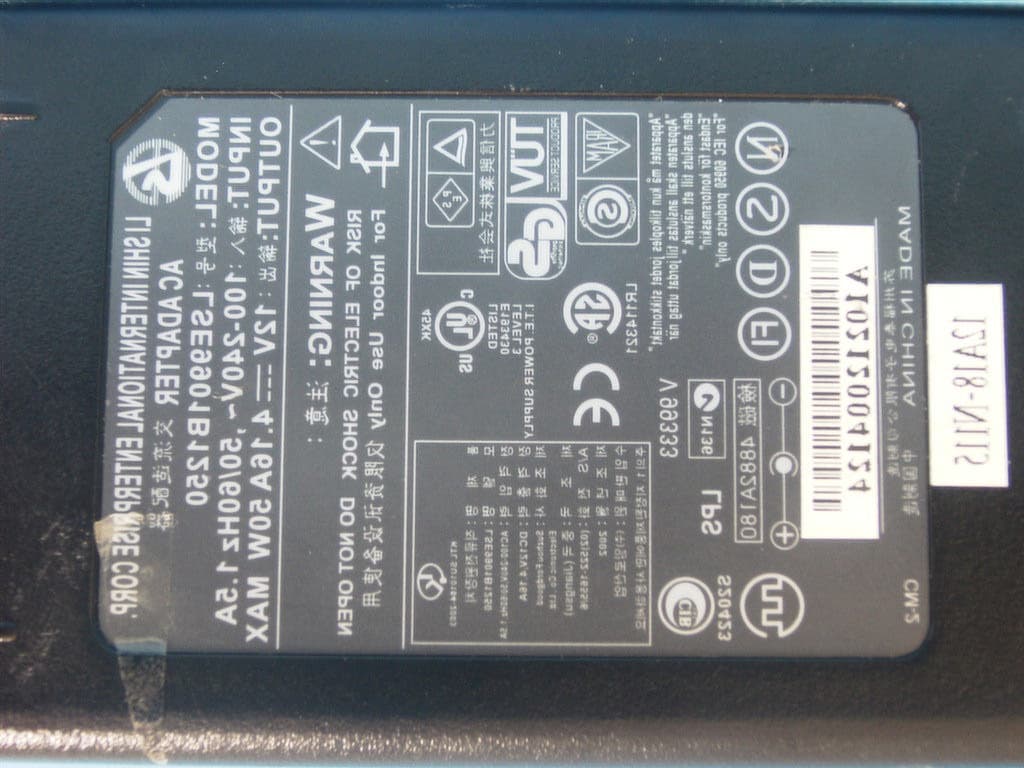
Click to zoom
Application Details
- Equipment Class
- JBP - Part 15 Class B Computing Device Peripheral
- Date of Grant
- Feb 17, 2003
- Application Purpose
- Original Equipment
- Date of Application
- Feb 17, 2003
- Equipment Note
- LCD Monitor
- Company
- Wooyoung Telecom Co., Ltd.
- Country
- South Korea
Documents & Files
Document Text
Text extracted from the exhibit documents filed with the FCC. Open a document above to read the original.
Users Manual
WOO YOUNG Telecom CO.,LTD. User°Øs Manual FCC STATEMENT This equipment has been tested and found to comply with the limits for a Class B digital device pursuant to part 15 of the FCC Rules. These limits are designed to provide reasonable protection against harmful interference in a residential installation. This equipment generates, uses and can radiate radio frequency energy and, if not installed and used in accordance with the instructions, may cause harmful interference to radio communications. However, there is no guarantee that interference will not occur in a particular installation. If this equipment does cause harmful interference to radio or tele- vision reception, with can be determined by turning the equipment off and on, the user is encouraged to try to correct the interference by one more of the following measures: - Reorient or relocate the receiving antenna. - Increase the separation between the equipment and receiver. - Connect the equipment into an outlet on a circuit different from that to which the receiver is connected. - Consult the dealer or an experienced radio/TV technician for help. - Only shielded interface cable should be used. Finally, any changes or modifications to the equipment by the user not expressly approved by the grantee or manufacturer could void the users authority to operate such equipment. 1 Contents 1. Before Setting up °°°°°°°°°°°°°°°°°°°°°°°°°°°°°°°° 3 Brief Specification of LCD Monitor °°°°°°°°°°°°°°°°°°°°°°°°° 3 Precautions °°°°°°°°°°°°°°°°°°°°°°°°°°° °°°° °°°° ° 4 2. Items °°°°°°°°°°°°°°°°°°°°°°°°°°°°°°°°°°°°°°°° 6 3. Setting up the LCD monitor °°°°°°°°°°°°°°°°°°°°°°°°°° 8 Where is a good place to position the monitor? °°°°°°°°°°°°°°°°°° 8 Check before connecting the power cord and the signal cable !! ° ° ° ° ° °° 8 How to connect the power cord and the several cables to the LCD monitor. °° 9 Connecting Your LCD Monitor °°°°°°°°°°°°°°°°°°°°°°°°°°° 10 Plug & Play °°°°°°°°°°°°°°°°°°°°°°°°°°°°°° °°° °°° 10 Warm-up Time °°°°°°°°°°°°°°°°°°°°°°°°°°°°°°°°°°° 10 4. Adjusting The Monitor °°°°°°°°°°°°°°°°°°°°°°°°°°°°° 11 The Function Control Buttons °°°°°°°°°°°°°°°°°°°°°°°°°°° 11 How to use the Hot Key. °°°°°°°°°°°°°°°°°°°°°°°°°°°°°° 11 Main OSD Menu °°°°°°°°°°°°°°°°°°°°°°°°°°°°°°°°°° 12 BRIGHTNESS/CONTRAST °°°°°°°°°°°°°°°°°°°°°°°°°°°° 12 COLOR °°°°°°°°°°°°°°°°°°°°°°°°°°°°°°°°°°°°°°° 13 POSITION &CLOCK/PHASE °°°°°°°°°°°°°°°°°°°°°°°°°°° 13 OSD MENU ADJUSTMENT & INPUT SOURCE °°°°°°°°°°°°°°°°° 15 SETUP MENU °°°°°°°°°°°°°°°°°°°°°°°°°°°°15 2 5. Appendix °°°°°°°°°°°°°°°°°°°°°°°°°°°°°°°°°°°°° 16 Specifications °°° °°°°°°°°°°°°°°°°°°°°°°°°°°°°°°°° 16 15-pin D-Sub Connector °°°°°°°°°°°°°°°°°°°°°°°°°°°°°° 17 DPMS Power Saving Mode °°°°°°°°°°°°°°°°°°°°°°°°°°°° 18 6. Troubleshooting °°°°°°°°°°°°°°°°°°°°°°°° °°°°°°° 19 3 Before setting up 1 °‹Resolution : 15.0 inch XGA (1024 X 768@75Hz) °‹Color display : 16,777,216 colors °‹DPMS (Display Power Management Signaling) °‹OSD (On Screen Display) °‹Auto Configuration : Hot key °‹DDC 1/2B : Plug & Play This is 15.0 inch TFT-LCD monitor. Before setting up the LCD Monitor, please read this manual to help your understanding of the LCD Monitor. Brief Specification of LCD Monitor According to PC system, DDC 1/2B may not be supported. If you meet Error message,check your video card which compatibility with DDC. If you eant to know more information, please contact our service center. Notice 4 Do not use Ketone type material (ex. Acetone), Ethyl Alcohol, Toluene, Ethyl Acid or Methyl chloride, to clear the panel. It might permanently damage the panel. Check the voltage corresponds to the local electrical supply before connecting the AC power cord. Never use the damaged AC power cord. Keeps it away from stoves, heaters, fireplaces and other sources of heat and magnets. Dont’ put your LCD monitor in a location with high humidity and dust. Temperature : 0~40°£C Humidity : 90% less Place the LCD monitor on a solid sur- face. If dropped, the screen can be damaged easily. Precautions 5 Don’t touch the screen with a acute nail and pin The LCD monitor can be damaged easi- ly by shock. The LCD monitor consists of electrical devices. If the LCD monitor is damaged, contact immediately our service center. Don’t use your LCD monitor under direct sunlight. If you don’t use the LCD monitor for a long time, unplug the LCD monitor. 6 Items LCD Monitor Power card, DC Adapter User Manual 2 7 15-pin D-Sub Signal Cable Please make sure the following items are included with your monitor. If any items are missing, contact your dealer. Notise 8 Setting up the LCD monitor 3 Place the LCD monitor on a solid and flat surface. If dropped, the screen can be dam- aged easily. Where is a good place to position the monitor? 9 How to connect the power cord and the several cables to the LCD monitor. 1 2 DC12VDC Adaptor 15-pin D-Sub Signal CablePC No. Cable connectionsName 1 0 All LCD monitors need time to become thermally stable whenever you turn on the monitor after letting the monitor be turned off for a couple of hours. Therefore, to achieve more accurate adjustments for parameters, allow the LCD monitor to be warmed up for at least 20 minutes before making any screen adjustments. Warm-up Time The adoption of the new VESA Plug and Play solution eliminates complicated and time consuming setup. It allows you to install your monitor in a Plug and Play compati- ble system without the usual hassles and confusion. Your PC system can easily identi- fy and configure itself for use with your display. This monitor automatically tells the PC system its Extended Display Identification Data (EDID) using Display Data Channel (DDC) protocols so the PC system can automatically configure itself to use the flat panel display. Plug & Play 1 1 Adjusting The Monitor 4 The Function Control Buttons How to use the function Key. 1. First click : The OSD main menu appears. 2. Second click : The OSD menu disappears. 1. Select a command function. 2. When you push Auto button, this will …
Text truncated - open the document above for the full version.
ID Label/Location Info
ID Label Sample & Location Information
Test Report
File No. 03-IST-020/FB IST EMC LAB. 117 IST EMC Lab. San 21-8 Goan-Ri, Baekam-Myun, Yongin-Si, Kyunggi-Do, KOREA International - Tel : 82-31 - 333 - 4093. Fax : 82-31 - 333 - 4094. Domestic - Tel : 031 - 333 - 4093. Fax : 031 - 333 - 4094. IST EMC LAB. EMISSION TEST REPORT Test report file No. : 03-IST-020/FB Date of issue : Feb. 03, 2003 Model / Type No. : HL500S Basic Alternate Kind of product Brand name Applicant Manufacturer License holder Address : 15” LCD Monitor : WOOYOUNG : WOO YOUNG Telecom CO.,LTD. : WOO YOUNG Telecom CO.,LTD. : WOO YOUNG Telecom CO.,LTD. : 222-1, Suwolam-Ri, Seotan-Myum, Pyungtaek-City, Kyunggi-Do, 451-852, Korea Test result according to the regulation(s) Positive Negative at page 3. This test report with appendix consists of 16 pages. The test result only responds to the tested sample. It is not allowed to copy this report even partly without the allowance of the Test Laboratory. This equipment is complied with the applicable technical standards as indicated in the measurement report and was tested in accordance with the measurement procedures specified in ANSI C63.4-1992. File No. 03-IST-020/FB IST EMC LAB. 217 IST EMC Lab. San 21-8 Goan-Ri, Baekam-Myun, Yongin-Si, Kyunggi-Do, KOREA International - Tel : 82-31 - 333 - 4093. Fax : 82-31 - 333 - 4094. Domestic - Tel : 031 - 333 - 4093. Fax : 031 - 333 - 4094. DIRECTORY A) Documentation. Page Directory Test regulations Information of Test Regulation Equipment under Test Test Conditions Test Result Measurement Uncertainty Test-setup Summary 2 3 3 4 5 ~ 6 7 8 9 ~ 11 17 B) Test Data. Conducted emissions (Mains) Radiated emissions : 150 kHz - 30 MHz : 30 MHz – 1 GHz 12 ~ 14 15 ~ 16 C) Appendix File No. 03-IST-020/FB IST EMC LAB. 317 IST EMC Lab. San 21-8 Goan-Ri, Baekam-Myun, Yongin-Si, Kyunggi-Do, KOREA International - Tel : 82-31 - 333 - 4093. Fax : 82-31 - 333 - 4094. Domestic - Tel : 031 - 333 - 4093. Fax : 031 - 333 - 4094. TEST REGULATIONS The tests were performed according to the following regulations ; - FCC Part 15, Subpart B (Unintentional Radiators, Class B) Information of Test Laboratory IST EMC Lab. San 21-8 Goan-Ri, Baekam-Myun, Yongin-Si, Kyunggi-Do, Korea International - Tel : 82-31 - 333 - 4093. Fax : 82-31 - 333 - 4094. Domestic - Tel : 031 - 333 - 4093. Fax : 031 - 333 - 4094. File No. 03-IST-020/FB IST EMC LAB. 417 IST EMC Lab. San 21-8 Goan-Ri, Baekam-Myun, Yongin-Si, Kyunggi-Do, KOREA International - Tel : 82-31 - 333 - 4093. Fax : 82-31 - 333 - 4094. Domestic - Tel : 031 - 333 - 4093. Fax : 031 - 333 - 4094. EQUIPMENT UNDER TEST Equipment Description : Resolution : 15 inch XGA (1024 X 768 @75Hz) Color display : 16,777,216 colors Plug & Play : DDC1/DDC2B Power Saving : DPMS Power Supply Adapter : LISHIN INTERNATIONAL ENTERPRISE CORP. LSE9901B1250 Input – 100 ~ 240 Vac, 1.5 A, 50/60 Hz Output – 12 Vdc, 4.16 A EUT Type : Table-Top. Floor-Standing. Table-Top and Floor-Standing(Combination). Operation – mode of the E.U.T. : The equipment under test was operated during the measurement under following conditions : Standby. Operational Condition : Scrolling “H” characters under MS Windows, at test mode of 1024 X 768, 75 Hz Configuration of the equipment under test : Following peripheral devices and interface cables were connected during the measurement : Equipment Type Brand Serial No. PC Brio BA600/550 HP SG01902402 Keyboard SK-2502C HP M0004102821 PS/2 Mouse M-S48A HP LZE01251424 Serial Mouse M-S428 Logitech LCA53305547 Printer A0302384 Northern Telecom 26633S60168 Connecting Interface Cables : - Unshielded AC power cable : 1.8 m - Unshielded DC power cable : 1.5 m - Shielded monitor’s signal cable : 1.5 m - Shielded printer’s signal cable : 1.8 m File No. 03-IST-020/FB IST EMC LAB. 517 IST EMC Lab. San 21-8 Goan-Ri, Baekam-Myun, Yongin-Si, Kyunggi-Do, KOREA International - Tel : 82-31 - 333 - 4093. Fax : 82-31 - 333 - 4094. Domestic - Tel : 031 - 333 - 4093. Fax : 031 - 333 - 4094. TEST CONDITIONS The measurement of the conducted emissions (Interference voltage) was performed in a shielded room. Test location : Shielded room. No.1 Compact chamber 2 Used testing instruments : Name Type Manufacturer Calibration. Date Serial Number ESH 3 Test Receiver Rohde & Schwarz Jul. 25, 2002 892108/018 3725/2 LISN EMCO Aug. 22, 2002 9101-2068 KNW-407 LISN Hyup-Rip Aug. 21, 2002 8-883-10 ESH 3-Z2 Pulse Limiter Rohde & Schwarz Jul. 25, 2002 357.8810.52 Test - accessories : Type Manufacturer Aneroid Barometer Sato Hygrometer Sato Measurement Procedures : Conducted emissions measurments were made in accordance with ANSI C-63.4-1992, “Method of Measurement of Radio-Noise Emissions from Low-Voltage Electrical and Electronic Equipment in the Range of 9 kHz to 40 GHz”. The measurement were performed over the frequency range of 0.45MHz to 30MHz using a 50 ? /50uH LISN as the input transducer to an EMI/Field Intensity Meter. The measurements were made with the detector set for “Peak” amplitude within an IF bandwidth of 10kHz or for “quasi-peak” within a bandwidth of 9kHz. All used test-instruments as well as the test-accessories are calibrated regularly. File No. 03-IST-020/FB IST EMC LAB. 617 IST EMC Lab. San 21-8 Goan-Ri, Baekam-Myun, Yongin-Si, Kyunggi-Do, KOREA International - Tel : 82-31 - 333 - 4093. Fax : 82-31 - 333 - 4094. Domestic - Tel : 031 - 333 - 4093. Fax : 031 - 333 - 4094. The measurement of the radiated emissions (Electric field) in the frequency range from 30 MHz to 1GHz was performed in horizontal and vertical antenna polarization at a open-site which meet the site attenuation requirement of ANSI C63.4-1992 and a test distance of : Location : Open Site No. 1 Open Site No. 2 Open Site No. 3 Distance : 3 meters 10 meters Used testing instruments : Name Type Manufacturer Calibration. Date Serial Number ESVP Test Receiver Rohde & Schwarz Aug. 16, 2002 861744/004 VULB 9160 Antenna Schwarzbeck Jul. 10, 2002 3048 Test - accessories : Type Manufacturer Aneroid Barometer Sato Hygrometer Sato Measurement proced…
Text truncated - open the document above for the full version.
Contact Information
Applicant
Yu-Ho Choi(General Manager)
Test Firm
IST Co., LtdBong Kyoon Bae
Technical Specifications
| # | Rule Parts | Frequency Range | Power Output |
|---|---|---|---|
| 1 | 15B | - | - |
Other Applications from Wooyoung Telecom Co., Ltd.

PXWU70A
Jul 26, 2007LCD Monitor
Equipment Class
JBP - Part 15 Class B Computing Device Peripheral
PXWU90A
Jul 26, 2007LCD Monitor
Equipment Class
JBP - Part 15 Class B Computing Device Peripheral
PXWU90P
Jul 23, 2007LCD MONITOR
Equipment Class
JBP - Part 15 Class B Computing Device Peripheral
PXWU70D
Apr 29, 2007LCD MONITOR
Equipment Class
JBP - Part 15 Class B Computing Device Peripheral
PXWU90D
Apr 01, 2007LCD Monitor
Equipment Class
JBP - Part 15 Class B Computing Device Peripheral