Q9DAPEX058457ACCESS POINT
Hewlett Packard Enterprise Company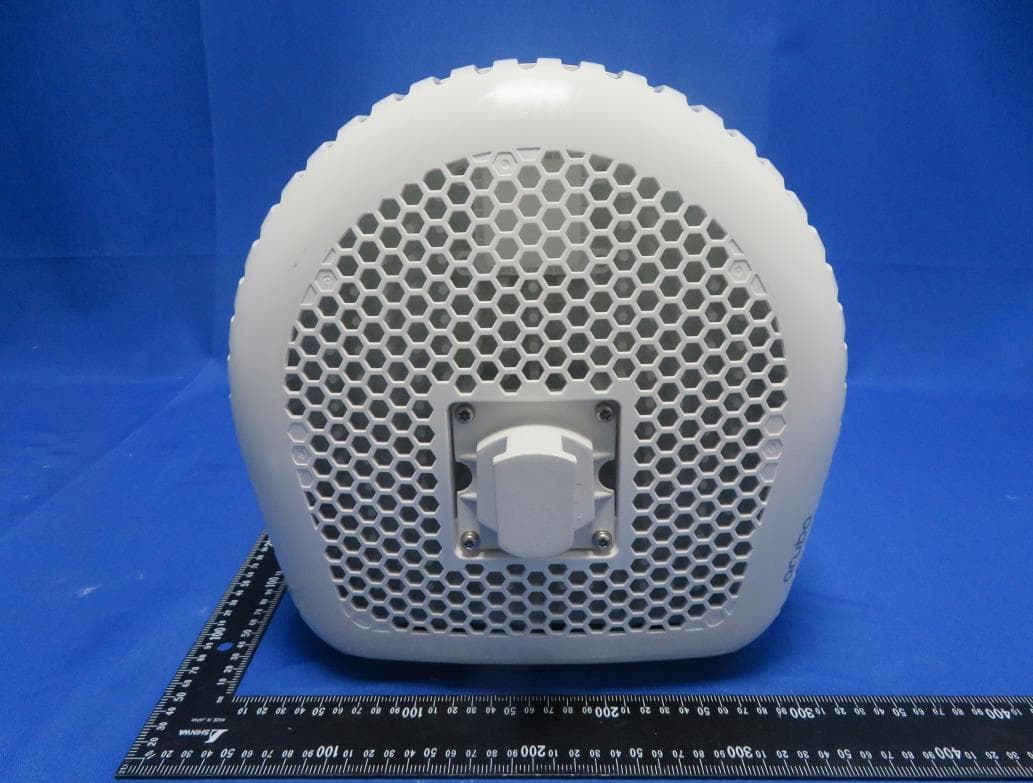
Click to zoom
Application Details
- Equipment Class
- DTS - Digital Transmission System
- Date of Grant
- Mar 21, 2022
- Application Purpose
- Original Equipment
- Date of Application
- Mar 05, 2022
- Equipment Note
- ACCESS POINT
- Frequency Range
- 2412.00000000 - 2462.00000000
- Country
- United States
Documents & Files
Document Text
Text extracted from the exhibit documents filed with the FCC. Open a document above to read the original.
Users Manual
Aruba 580 Series Outdoor Access Points Startup Guide The dual-radio Aruba 580 Series access points support the IEEE 802.11ax WLAN standard in the 5GHz and 2.4GHz bands, delivering high performance and capacity with MIMO (Multiple-Input, Multiple- Output) and OFDMA (Orthogonal Frequency Division Multiple Access) technologies, while also supporting IEEE 802.11a/b/g/n/ac wireless services. Package Contents 580 Series access point Cable gland x 2 USB-C console cable x 1 Ground lug kit x 1 2.4GHz Vpol N-type BLE antenna x 1 (AP-584 only) Installation This device must be professionally installed and serviced by a trained Aruba-Certified Mobility Professional (ACMP), or similar Aruba- certified technician. To install this device, refer to the Aruba 580 Series Outdoor Access Points Installation Guide by scanning the QR code in this section, or visiting https://asp.arubanetworks.com/downloads The following are the default AP management credentials for logging in: Username: admin Password: <Serial number of the AP> Software For instructions on initial setup and software configuration, refer to the latest version of the AP Software Quick Start Guide by scanning the QR code in the Installation section, or visiting https://asp.arubanetworks.com/downloads Software End User License Agreement The End User License Agreement (EULA) information for this product can be found at www.arubanetworks.com/assets/legal/EULA.pdf. Regulatory Compliance An upgrade to the AP firmware and/or downloadable regulatory table (DRT) file to the latest available version is recommended. This ensures that the AP supports the most up-to-date set of countries and regulatory specifications. Aruba access points are classified as radio transmission devices, and are subject to government regulations of the host country. The network administrator(s) is/are responsible for ensuring that this device operates in accordance with all local/regional laws of the host domain. Access points must use channel assignments appropriate to the domain in which the access point is deployed. For a complete list of approved devices for your country domain, refer to the Aruba Downloadable Regulatory Table Release Note by scanning the QR code in this section, or visiting https://www.arubanetworks.com/techdocs/DRT/Default.htm. The regulatory model number (RMN) for the 580 Series: AP-584 RMN: APEX0584 AP-585 RMN: APEX0585 AP-587 RMN: APEX0587 Changes or modifications to this unit not expressly approved by Aruba, a Hewlett Packard Enterprise Company could void the user’s authority to operate this equipment. Brazil Este equipamento não tem direito à proteção contra interferência prejudicial e não pode causar interferência em sistemas devidamente autorizados. Canada This device contains licence-exempt transmitter(s)/receiver(s) that comply with Innovation, Science and Economic Development Canada’s licence-exempt RSS(s). Operation is subject to the following two conditions: (1) This device may not cause interference. (2) This device must accept any interference, including interference that may cause undesired operation of the device. Déclaration d’Industrie Canada Cet appareil contient un ou plusieurs transmetteurs/récepteurs exempts de licence conformes aux RSS exempts de licence d’Innovation, Sciences et Développement économique Canada. L’utilisation de ce périphérique est soumise aux deux conditions suivantes: (1) Cet appareil ne doit pas produire d’interférences. (2) Cet appareil doit accepter toutes les interférences, y compris les interférences pouvant engendrer un fonctionnement indésirable de l’appareil. European Union The Declaration of Conformity made under RED 2014/53/EU is available for viewing at: www.hpe.com/eu/certificates. Select the document that corresponds to your device’s model number as it is indicated on the product label. Wireless Channel Restrictions 5150-5350MHz band is limited to indoor only in the following countries; Austria (AT), Belgium (BE), Bulgaria (BG), Croatia (HR), Cyprus (CY), Czech Republic (CZ), Denmark (DK), Estonia (EE), Finland (FI), France (FR), Germany (DE), Greece (GR), Hungary (HU), Iceland (IS), Ireland (IE), Italy (IT), Latvia (LV), Liechtenstein (LI), Lithuania (LT), Luxembourg (LU), Malta (MT), Netherlands (NL), Norway (NO), Poland (PL), Portugal (PT), Romania (RO), Slovakia (SK), Slovenia (SL), Spain (ES), Sweden (SE), Switzerland (CH), Turkey (TR), United Kingdom (UK(NI)). RadioFrequency Range MHzMax EIRP BLE/Zigbee2402-248010 dBm Wi-Fi 2412-247220 dBm 5150-525023 dBm 5250-535023 dBm 5470-572530 dBm 5725-585014 dBm Contact Aruba Copyright © Copyright 2021 Hewlett Packard Enterprise Development LP Open Source Code This product includes code licensed under the GNU General Public License, the GNU Lesser General Public License, and/or certain other open source licenses. A complete machine-readable copy of the source code corresponding to such code is available upon request. This offer is valid to anyone in receipt of this information and shall expire three years following the date of the final distribution of this product version by Hewlett Packard Enterprise Company. To obtain such source code, send a check or money order in the amount of US $10.00 to: Hewlett Packard Enterprise Company Attn: General Counsel 6280 America Center Drive San Jose, CA 95002 USA Warranty This hardware product is protected by an Aruba warranty. For more details visit www.hpe.com/us/en/support.html and select the “HPE Servers, Storage, and Networking” option from the Product Support menu to access HPE’s Warranty Check. 3333 Scott Boulevard Santa Clara, California 95054 USA Main Sitewww.arubanetworks.com Support Sitehttps://asp.arubanetworks.com Airheads Social Forums and Knowledge Base community.arubanetworks.com/ North America Telephone1-800-943-4526 1-408-754-1200 International Telephonewww.arubanetworks.com/support- services/contact-support/ Software Licensing Sitewww.hpe.com/networking/support End-of-Life Informationwww.aru…
Text truncated - open the document above for the full version.
Users Manual
Aruba 580 Series Outdoor Access Points Installation Guide Rev 01 | November 20211 The Aruba 580 Series outdoor wireless access points (AP-584, AP-585 and AP-587) support the IEEE 802.11ax standard, delivering high performance with the MIMO (Multiple-Input, Multiple-Output) and OFDMA (Orthogonal Frequency Division Multiple Access) technologies, while also supporting 802.11a/b/g/n/ac wireless services. Package Contents 580 Series access point M20 cable gland x 2 USB Type-C console cable x 1 Ground lug kit x 1 2.4GHz Vpol N-type BLE antenna x 1 (AP-584 only) Tools Required Phillips screwdriver (#2 for M4x6 screw) Flat blade screwdriver (for Ethernet port cap) 8mm Allen or hex key (for USB console cap) The weatherproof caps for Ethernet and Console interfaces are connected to the access point, not loose in the package. Mounting kits for use with the 580 Series access points are sold separately. Contact your Aruba sales representative for details. Inform your supplier if there are any incorrect, missing, or damaged parts. If possible, retain the carton, including the original packing materials. Use these materials to repack and return the unit to the supplier if needed. 2Aruba 580 Series Outdoor Access Points| Installation Guide Hardware Overview Figure 1 AP-584 Front View (with Aesthetic Cover) Figure 2 AP-584 Rear View (with Aesthetic Cover) The antenna connectors of the AP-584 are covered by an aesthetic cover. The aesthetic cover can be removed when necessary. If leaving the cover in place, be careful not to exceed the antenna cable bend radius, or use proper angled connector cables to minimize cable bends. E1/SFP+E2/PSEE0/PoE+ Grounding Point AC Power Port USB Console Port, Reset Button and LED Aruba 580 Series Outdoor Access Points| Installation Guide3 Figure 3 AP-585 Front View Figure 4 AP-585 Rear View E1/SFP+E2/PSEE0/PoE+ Grounding Point AC Power Port USB Console Port, Reset Button and LED 4Aruba 580 Series Outdoor Access Points| Installation Guide Figure 5 AP-587 Front View Figure 6 AP-587 Rear View External Antenna Connectors The AP-584 access point comes with four external Wi-Fi antenna connectors and one external BLE antenna connector. One 2.4GHz Vpol omni-directional N-type BLE antenna is included in the package of the AP-584 access point. A Wi-Fi antenna is not included in the package and must be purchased separately, refer to the 580 Series ordering guide on the Aruba website https://www.arubanetworks.com. E1/SFP+E2/PSEE0/PoE+Grounding Point AC Power Port USB Console Port, Reset Button and LED Mounting instructions for the antennas for the AP-584 access points are provided with the antennas. The mounting must be consistent with the instructions provided to ensure compliance with US and Canadian regulatory requirements when used outdoors. Aruba 580 Series Outdoor Access Points| Installation Guide5 Figure 7 AP-584 Bottom View (without Aesthetic Cover) LED The 580 Series access point is equipped with one LED that indicates the system status of the access point. ! External antennas for this device must be installed by an Aruba Certified Mobility Professional (ACMP) or other Aruba-certified technician, using manufacturer-approved antennas only. The Equivalent Isotropically Radiated Power (EIRP) levels for all external antenna devices must not exceed the regulatory limit set by the host country/domain. Installers are required to record the antenna gain for this device in the system management software. Les antennes externes pour cet appareil doivent être installées par un professionnel de la mobilité certifié Aruba (ACMP) ou un autre technicien certifié Aruba, en utilisant uniquement des antennes approuvées par le fabricant. Les niveaux équivalents de puissance à rayonnement isotrope (EIRP) pour tous les périphériques d'antenne externe ne doivent pas dépasser la limite réglementaire définie par le pays hôte / domaine. Les installateurs doivent enregistrer le gain d'antenne pour cet appareil dans le logiciel de gestion du système. WI-FI 3WI-FI 2 WI-FI 0WI-FI 1 BLE 6Aruba 580 Series Outdoor Access Points| Installation Guide Table 1 580 Series LED Meanings during Boot Up 1. Mostly off (off 6 seconds, then one blink flash) 2. Equally off/on (off 1 second, then red 1 second) Table 2 580 Series LED Meanings during Operation Ethernet Ports The 580 Series access point is equipped with three Ethernet ports: E0 PoE+ port: 100/1000/2500/5000Base-T auto-sensing MDI/MDI-X wired network port (RJ45). The E0 port supports PoE-in, allowing the AP to draw power from an 802.3at/802.3bt PoE power source. E1 SFP+ port: 10GBASE-R SFP+ port. E2 PSE port: 100/1000Base-T auto-sensing MDI/MDI-X wired network port (RJ45). The AP supports 802.3af PoE-Out when PoE powered, and supports up to 802.3at when powered by AC. AC Power Port The 580 Series access point is equipped with an AC power port. The 580 Series access point does not ship with any AC power cables. Aruba offers an AC power connector kit (sold separately) for customers to assemble their own AC power cable. Grounding Point Always remember to protect the access point by installing the grounding line first before connecting to a network and applying power. Additionally, if removing or taking down the AP, the grounding line should be the last item disconnected. LEDColor/StateMeaning System LEDOffNo power to AP RedInitial power-up Flashing - Green AP booting, not ready On - GreenAP ready. GbE (or better) or SFP+ connected. The LED turns off after 1200 seconds Green - Yellow, 6 seconds period AP ready. 100Mb connected. The LED turns off after 1200 seconds Green - Flashing 1 AP in deep sleep Red - Flashing 2 AP in thermal shutdown LEDColor/StateMeaning System LEDSolid RedGeneral fault - Immediate attention required One red blink every 3 seconds Radio 0 fault (5 GHz) Two quick red blinks 0.5 seconds apart cycled every 3 seconds Radio 1 fault (2.4GHz) To enable 802.3at support on E2, Intelligent Power and Temperature Monitoring (IPTM) must be enab…
Text truncated - open the document above for the full version.
Attestation Statements
Mark Hill Regulatory Compliance Engineer Hewlett Packard Enterprise Company [email protected] +1 408-807-0476 6280 America Center Drive San Jose, CA 95002 USA arubanetworks.com Date: 17-Nov-2023 Federal Communications Commissions Authorization and Evaluation Division 7435 Oakland Mills Road Columbia, MD 21046 RE: CFR 47 §2.911 (d)(5) Attestation FCC ID: Q9DAPEX058457 1. Hewlett Packard Enterprise Company (“the applicant”) certifies that the equipment for which authorization is sought is not “covered” equipment prohibited from receiving an equipment authorization pursuant to section 2.903 of the FCC rules. 2. Hewlett Packard Enterprise Company (“the applicant”) certifies that, as of the date of the filing of the application, the applicant is not identified on the Covered List as an entity producing “covered” equipment and is not an affiliate or subsidiary of an entity identified on the Covered List. Sincerely yours, Mark Hill Hewlett Packard Enterprise Company 6280 America Center Dr, San Jose, CA 95002 USA
Attestation Statements
Mark Hill Regulatory Compliance Engineer Hewlett Packard Enterprise Company [email protected] +1 408-807-0476 6280 America Center Drive San Jose, CA 95002 USA arubanetworks.com Date: 17-Nov-2023 Federal Communications Commissions Authorization and Evaluation Division 7435 Oakland Mills Road Columbia, MD 21046 RE: CFR 47 §2.911 (d)(7) Agent Designation Attestation FCC ID: Q9DAPEX058457 Applicant (Grantee) FRN: 0026486175 To whom it may concern: Hewlett Packard Enterprise Company (“the applicant”) as required by section §2.911(d)(7), will also serve as the agent for service of process for the above referenced FCC ID. Q9DAPEX058457. The applicant acknowledges that they will maintain an agent for no less than one year after the grantee has terminated all marketing and importation or the conclusion of any Commission-related proceeding involving the equipment. The applicant further acknowledges their responsibility under CFR 47 §2.929(c) to inform the FCC whenever the agent information changes. Mark Hill Hewlett Packard Enterprise Company 6280 America Center Dr, San Jose, CA 95002 USA [email protected] Sincerely yours, Mark Hill Hewlett Packard Enterprise Company 6280 America Center Dr, San Jose, CA 95002 USA
Cover Letter(s)
DECLARATION OF CONFORMITY FCC ID: Q9DAPEX058457 Date: Dec 8, 2021 Please be notified that we, the undersigned, Hewlett Packard Enterprise Company declares that the product which bears the above FCC ID is also compliant with the FCC requirements for sDOC. And the sDoC procedure shall be carried out prior to marketing the device in the US. Sincerely, ---------------------------------------------------------- Name: Phillip Carranco Position: Regulatory Compliance Manager Hewlett Packard Enterprise Company
Cover Letter(s)
Date: 2021-12-08 Federal Communications Commission 7435 Oakland Mills Road Columbia MD 21046 To whom it may concern: I, the undersigned, hereby authorize MRT Technology (Taiwan) Co., Ltd to act on our behalf in all manners relating to application for equipment authorization, including signing of all documents relating to these matters. Any and all acts carried out by MRT Technology (Taiwan) Co., Ltd on our behalf shall have the same effect as acts of our own. I, the undersigned, hereby certify that we are not subject to a denial of federal benefits, that includes FCC benefits, pursuant to Section 5301 of the Anti-Drug Abuse Act of 1988, 21 U.S.C. 853(a). In authorizing MRT Technology (Taiwan) Co., Ltd as our representative, we still recognize that we are responsible to: a) comply with the relevant provisions of the certification program; b) make all necessary arrangements for the conduct of the evaluation, including provision for examining documentation and access to all areas, records (including internal audit reports) and personnel for the purposes of evaluation (e.g. testing, inspection, assessment, surveillance, reassessment) and resolution of complaints; c) make claims regarding certification only in respect of the scope for which certification has been granted; d) do not use our product certification in such a manner as to bring the Certification Division into disrepute and not make any statement regarding our product certification which the Certification Division may consider misleading or unauthorized; e) upon suspension or cancellation of certification, discontinue use of all advertising matter that contains any reference thereto and return any certification documents as required by the Certification Division; f) use certification only to indicate the products are certified as being in conformity with specified standards; g) endeavor to ensure that no certificate or report nor any part thereof is used in a misleading manner; h) ensure that any reference to our product certification in communication media such as documents, brochures or advertising, complies with the requirements of the Certification Division; i) keep a record of all complaints made known to us relating to the product’s compliance with requirements of the relevant standard and to make these records available when requested; j) take appropriate action with respect to such complaints and any deficiencies found in products or services that affect compliance with the requirements for certification; k) document the actions taken. This authorization is valid until further written notice from the applicant. Sincerely Yours, Name: Phillip Carranco Position: Regulatory Compliance Manager Hewlett Packard Enterprise Company
Cover Letter(s)
Federal Communications Commission 7435 Oakland Mills Road Columbia MD 21046 Subject: Request for Confidentiality FCC ID: (Q9DAPEX058457) To Whom It May Concern: Pursuant to the provisions of Sections 0.457 and 0.459 of the Commission’s rules (47 CFR §§ 0.457, 0.459), we are requesting the Commission to withhold the following attachments as confidential document from public disclosure indefinitely. Schematic Diagram Block Diagram Theory of Operation Software Security Requirements Cover Letter Above mentioned document contains detailed system and equipment description are considered as proprietary information in operation of the equipment. The public disclosure of above documents might be harmful to our company and would give competitor an unfair advantage in the market. In additional to above mentioned documents, pursuant to Public Notice DA 04-1705 of the Commission’s policy, in order to comply with the marketing regulations in 47 CFR §2.803 and the importation rules in 47 CFR §2.1204, while ensuring that business sensitive information remains confidential until the actual marketing of newly authorized devices. We are requesting the commission to grant short-term confidentiality request on the following attachments until (180 days): External Photos Internal Photos Test Setup Photos User Manual It is our understanding that all measurement test reports, FCC ID label format and correspondent during certification review process cannot be granted as confidential documents and those information will be available for public review once the grant of equipment authorization is issued. Best Regards Name: Phillip Carranco Position: Regulatory Compliance Manager Hewlett Packard Enterprise Company 2021-12-08
Cover Letter(s)
Professional Installation Attestation Date: Dec 8, 2021 FCC ID: Q9DAPEX058457 IC: 4675A-APEX058457 TCB: Hewlett Packard Enterprise Company, declare that the above reference product is professionally installed. The APEX0587 / APEX0584 / APEX0585 are intended for enterprise level installations. HPE supports direct sales to large customers and sales via value-added resellers/distributors. There are no retail or mail order sales channels. In all cases, installation is performed by a trained installer. Aruba provides a certified training program. The complexity of the Aruba OS makes training a requirement for installation and operation. Without training, a user would not be able to perform the initial configuration that would enable transmission of the access points. It is during the initial provisioning of any APs that the There is a specific ordering guide that provides a list of acceptable antennas for a particular access point. This is referenced in the Installation Guide. Sign by: Name: Phillip Carranco Position: Regulatory Compliance Manager Hewlett Packard Enterprise Company
Cover Letter(s)
Software Defined Radio (SDR) Date: Dec 8, 2021 Federal Communications Commission Authorization and Evaluation Division 7435 Oakland Mills Road Columbia, MD 21046 Attention: OET Dept. FCC ID: Q9DAPEX058457 Regarding Certification as a Software Defined Radio This letter is to notify the FCC of our intentions regarding submitting for grant approvals as a Software Defined Radio in accordance to KDB 442812 D01 SDR Apps Guide v02r03. All supporting documentation to be approved as an SDR will be included. Sign by: Print Name: Phillip Carranco Title: Regulatory Compliance Manager Company: Hewlett Packard Enterprise Company
Cover Letter(s)
ZigBee Duty Cycle Attestation Federal Communications Commission 7435 Oakland Mills Road Columbia MD 21046 FCC ID: (Q9DAPEX058457) To Whom It May Concern: TCB: Hewlett Packard Enterprise (Aruba Networks), declare that the ZigBee operation, when implemented, will be limited to a duty cycle of 10% or less in any 100ms period. This will not be user configurable. Best Regards Name: Phillip Carranco Position: Regulatory Compliance Manager Hewlett Packard Enterprise Company 2021-12-08
External Photos
Report No.: 2105TW0005-UE 1 of 18 EUT Photograph (1) EUT Photo - APEX0585 (2) EUT Photo - APEX0585 Report No.: 2105TW0005-UE 2 of 18 (3) EUT Photo - APEX0585 (4) EUT Photo - APEX0585 Report No.: 2105TW0005-UE 3 of 18 (5) EUT Photo - APEX0585 (6) EUT Photo - APEX0585 Report No.: 2105TW0005-UE 4 of 18 (7) EUT Photo - APEX0585 (8) EUT Photo - APEX0587 Report No.: 2105TW0005-UE 5 of 18 (9) EUT Photo - APEX0587 (10) EUT Photo - APEX0587 Report No.: 2105TW0005-UE 6 of 18 (11) EUT Photo - APEX0587 (12) EUT Photo - APEX0587 Report No.: 2105TW0005-UE 7 of 18 (13) EUT Photo - APEX0587 (14) EUT Photo - APEX0587 Report No.: 2105TW0005-UE 8 of 18 (15) EUT Photo - APEX0584 (16) EUT Photo - APEX0584 Report No.: 2105TW0005-UE 9 of 18 (17) EUT Photo - APEX0584 (18) EUT Photo - APEX0584 Report No.: 2105TW0005-UE 10 of 18 (19) EUT Photo - APEX0584 (20) EUT Photo - APEX0584 Report No.: 2105TW0005-UE 11 of 18 (21) EUT Photo - APEX0584 (22) EUT Photo - APEX0584 Report No.: 2105TW0005-UE 12 of 18 (23) EUT Photo (ANT-2X2-2005-H) (24) EUT Photo (ANT-2X2-2005-V) Report No.: 2105TW0005-UE 13 of 18 (25) EUT Photo (ANT-2X2-5005-H) (26) EUT Photo (ANT-2X2-5005-V) Report No.: 2105TW0005-UE 14 of 18 (27) EUT Photo (ANT-2X2-2314) (28) EUT Photo (ANT-2X2-2314) Report No.: 2105TW0005-UE 15 of 18 (29) EUT Photo (ANT-3x3-5712) (30) EUT Photo (ANT-4x4-D100) Report No.: 2105TW0005-UE 16 of 18 (31) EUT Photo (ANT-4x4-D608) (32) EUT Photo (ANT-2x2-5010) Report No.: 2105TW0005-UE 17 of 18 (33) EUT Photo (ANT-4x4-5314) (34) EUT Photo (ANT-4x4-5314) Report No.: 2105TW0005-UE 18 of 18 (35) EUT Photo (ANT-2x2-2714)
Internal Photos
Report No.: 2105TW0005-UE 1 of 20 EUT Photograph (1) EUT Photo - APEX0585 (2) EUT Photo - APEX0585 Report No.: 2105TW0005-UE 2 of 20 (3) EUT Photo - APEX0585 (4) EUT Photo - APEX0585 Report No.: 2105TW0005-UE 3 of 20 (5) EUT Photo - APEX0585 (6) EUT Photo - APEX0585 Report No.: 2105TW0005-UE 4 of 20 (7) EUT Photo - APEX0585 (8) EUT Photo - APEX0587 Report No.: 2105TW0005-UE 5 of 20 (9) EUT Photo - APEX0587 (10) EUT Photo - APEX0587 Report No.: 2105TW0005-UE 6 of 20 (11) EUT Photo - APEX0587 (12) EUT Photo - APEX0584 Report No.: 2105TW0005-UE 7 of 20 (13) EUT Photo - APEX0584 (14) EUT Photo - APEX0584 Report No.: 2105TW0005-UE 8 of 20 (15) EUT Photo - APEX0584 (16) EUT Photo - APEX0584 Report No.: 2105TW0005-UE 9 of 20 (17) EUT Photo (18) EUT Photo Report No.: 2105TW0005-UE 10 of 20 (19) EUT Photo (20) EUT Photo Report No.: 2105TW0005-UE 11 of 20 (21) EUT Photo (22) EUT Photo Report No.: 2105TW0005-UE 12 of 20 (23) EUT Photo (24) EUT Photo Report No.: 2105TW0005-UE 13 of 20 (25) EUT Photo (26) EUT Photo Report No.: 2105TW0005-UE 14 of 20 (27) EUT Photo (28) EUT Photo Report No.: 2105TW0005-UE 15 of 20 (29) EUT Photo (30) EUT Photo Report No.: 2105TW0005-UE 16 of 20 (31) EUT Photo (32) EUT Photo Report No.: 2105TW0005-UE 17 of 20 (33) EUT Photo (34) EUT Photo Report No.: 2105TW0005-UE 18 of 20 (35) EUT Photo (36) EUT Photo Report No.: 2105TW0005-UE 19 of 20 (37) EUT Photo (38) EUT Photo Report No.: 2105TW0005-UE 20 of 20 (39) EUT Photo (40) EUT Photo
RF Exposure Info
MRT Technology (Taiwan) Co., Ltd Report No.: 2105TW0005-U6 Phone: +886-3-3288388 Report Version: V01 Web: www.mrt-cert.com Issue Date: 12-31-2021 Page Number: 1 of 11 RF Exposure Evaluation Declaration FCC ID: Q9DAPEX058457 APPLICANT: Hewlett Packard Enterprise Company Application Type: Certification Product: ACCESS POINT Model No.: APEX0587, APEX0584, APEX0585 Trademark: , FCC Classification: Digital Transmission System (DTS) Unlicensed National Information Infrastructure (UNII) Reviewed By: ( Paddy Chen ) Approved By: ( Chenz Ker ) The test results relate only to the samples tested. The test results shown in the test report are traceable to the national/international standards through the calibration of the equipment and evaluated measurement uncertainty herein. The test report shall not be reproduced except in full without the written approval of MRT Technology (Taiwan) Co., Ltd. Report No.: 2105TW0005-U6 Page Number: 2 of 11 Revision History Report No. Version Description Issue Date Note 2105TW0005-U6 Rev. 01 Initial Report 12-31-2021 Valid Report No.: 2105TW0005-U6 Page Number: 3 of 11 CONTENTS Description Page 1. Product Information ............................................................................................................... 4 1.1. Equipment Description ........................................................................................... 4 1.2. Antenna Description .............................................................................................. 5 2. RF Exposure Evaluation ........................................................................................................ 7 2.1. Test Limit ............................................................................................................... 7 2.2. Test Result ............................................................................................................. 8 Report No.: 2105TW0005-U6 Page Number: 4 of 11 1. Product Information 1.1. Equipment Description Product Name ACCESS POINT Model No. APEX0587, APEX0584, APEX0585 Wi-Fi Specification 802.11a/b/g/n/ac/ax Bluetooth Specification v5.0 single mode, BLE only ZigBee Specification 802.15.4 Operating Temperature -40 ~ 65 °C Power Type AC input or PoE input Operating Environment Outdoor Use Antenna Information Refer to Section 1.2 Remark: Note 1: The difference between three models is that the EUT use different antenna and appearance, other hardware and software are the same. Each model has its own power parameter value. Note 2: The information of EUT was provided by the manufacturer, and the accuracy of the information shall be the responsibility of the manufacturer. Report No.: 2105TW0005-U6 Page Number: 5 of 11 1.2. Antenna Description APEX0585 Polarization Frequency Band (GHz) Max Peak Gain (dBi) 30 Degree ANT Gain (dBi) CDD Directional Gain (dBi) BF Gain (dBi) For Power For PSD Wi-Fi Internal Antenna (4*4 MIMO) Omni (Note 2) 2.4 ~ 2.5 3.0 N/A 3.00 6.01 6.01 5.15 ~ 5.85 4.5 -5.00 4.50 7.51 7.51 Bluetooth / ZigBee Internal Antenna Omni 2.4 ~ 2.5 4.8 APEX0584 Polarization Frequency Band (GHz) Model No. Max Peak Gain (dBi) 30 Degree ANT Gain (dBi) BF Gain (dBi) CDD Directional Gain (dBi) For Power For PSD Wi-Fi External Antenna List (4*4 MIMO) Omni (Note 2) 2.4 ~ 2.5 ANT-2x2-2005 5.0 N/A 8.01 5.0 8.01 Omni (Note 2) 5.15 ~ 5.85 ANT-2x2-5005 5.0 0 8.01 5.0 8.01 Omni (Note 2) 5.15 ~ 5.85 ANT-2x2-5010 10.0 0 13.01 10.0 13.01 Directional (Note 2) 2.4 ~ 2.5 ANT-2x2-2714 14.0 N/A 17.01 14.0 17.01 Directional (Note 2) 2.4 ~ 2.5 ANT-2x2-2314 14.0 N/A 14.00 14.0 14.00 Directional (Note 2) 5.15 ~ 5.85 ANT-3x3-5712 11.5 1.5 14.51 11.5 14.51 Directional (Note 2) 5.15 ~ 5.85 ANT-4x4-5314 14.0 6.0 17.01 14.0 17.01 Directional (Note 2) 2.4 ~ 2.5 ANT-4x4-D608 7.5 N/A 10.51 7.5 10.51 5.15 ~ 5.85 7.5 4.5 10.51 7.5 10.51 Directional (Note 2) 2.4 ~ 2.5 ANT-4x4-D100 5.0 N/A 8.01 5.0 8.01 5.15 ~ 5.85 5.0 4.0 8.01 5.0 8.01 Bluetooth / ZigBee Internal Antenna Omni 2.4 ~ 2.5 5.0 Report No.: 2105TW0005-U6 Page Number: 6 of 11 APEX0587 Polarization Frequency Band (GHz) Max Peak Gain (dBi) 30 Degree ANT Gain (dBi) CDD Directional Gain (dBi) BF Gain (dBi) For Power For PSD Wi-Fi Internal Antenna (4*4 MIMO) Omni (Note 2) 2.4 ~ 2.5 5.7 N/A 5.70 8.71 8.71 5.15 ~ 5.85 5.2 5.2 5.20 8.21 8.21 Bluetooth / ZigBee Internal Antenna Omni 2.4 ~ 2.5 6.3 Note: 1. The EUT supports Cyclic Delay Diversity (CDD) mode, and CDD signals are correlated. For CDD transmissions, directional gain is calculated as follows, N ANT = 2, N SS = 1. If all antennas have the same gain, G ANT , Directional gain = G ANT + Array Gain, where Array Gain is as follows. • For power spectral density (PSD) measurements on all devices, Array Gain = 10 log(N ANT / N SS ) dB = 3.01; • For power measurements on IEEE 802.11 devices, Array Gain = 0 dB for N ANT ≤ 4; The EUT also supports Beam Forming mode, and the Beam Forming support 802.11n/ac/ax, not include 802.11a/b/g. 2. These antennas are cross polarized design, the detail refer to antenna specification. Directional gain calculation refer to KDB 662911 section F)2)c). 3. For APEX0584, low gain antenna (ANT-2x2-2005 & ANT-2x2-5005) was selected to perform all RF testing that can got maximum power setting, high gain different type antenna (ANT-2x2-2314 & ANT-4x4-5314) was selected to perform radiated spurious emission and band edge testing. High gain antenna power setting will be reduced according to difference value of antenna gain declared by applicant. Report No.: 2105TW0005-U6 Page Number: 7 o…
Text truncated - open the document above for the full version.
Contact Information
Applicant
Mark Hill(Principal Engineer)
Test Firm
MRT Technology (Taiwan) Co.,LtdChenz Ker
Technical Specifications
| # | Rule Parts | Frequency Range | Power Output |
|---|---|---|---|
| 3 | 15C | 2.41 GHz - 2.46 GHz | 696.60 mW |
Other Applications from Hewlett Packard Enterprise Company
Q9DAPINH721
Jul 17, 2026Access Point
Equipment Class
6ID - 15E 6 GHz Low Power Indoor Access PointQ9DASIN0307
Dec 22, 2025HPE Aruba User Experience Sensor
Equipment Class
DTS - Digital Transmission SystemQ9DASIN0308
Nov 23, 2025HPE Aruba User Experience Sensor
Equipment Class
DTS - Digital Transmission SystemQ9DAPEX0764
Nov 20, 2025ACCESS POINT
Equipment Class
DTS - Digital Transmission SystemQ9DAPIN0763
Sep 29, 2025ACCESS POINT
Equipment Class
NII - Unlicensed National Information Infrastructure TX