QD4WA168MID
XiangDe Electronic Tech(Shenzhen)Co.,Ltd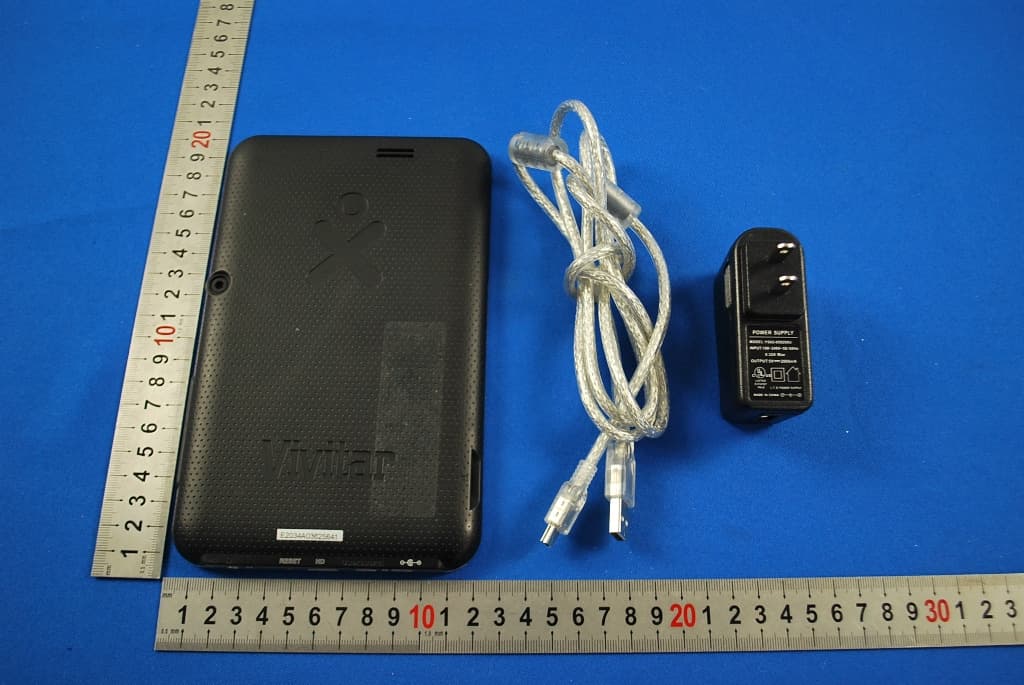
Click to zoom
Application Details
- Equipment Class
- DTS - Digital Transmission System
- Date of Grant
- May 05, 2013
- Application Purpose
- Original Equipment
- Date of Application
- May 02, 2013
- Equipment Note
- MID
- Frequency Range
- 2412.00000000 - 2462.00000000
- Country
- China
Documents & Files
Document Text
Text extracted from the exhibit documents filed with the FCC. Open a document above to read the original.
Users Manual
MID Tablet PC Quick Start Guide This guide provide basic information for initial users on how to operate the tablet. 1 Function description Volume(+), volume (-): adjust the volume. Power button: press the power button for 5 seconds to power on/off the tablet; short press the power button to lock or unlock HDMI jack: HDMI output interface. USB slot: connect to the PC and data transmission. Micro SD card slot: external micro SD card. Host jack: connect the external equipment, such as mouse, U disk and OTG cable. DC interface: connect with the power source to charge the tablet. TF card slot: external TF card. Basic operation Power on/off In power off status, press the power button for 5 seconds, 2 after the boot up image then the device will enter main interface. In power on status, press the power button for 5 seconds, then ”Would you like to shut down” message will pop up on the screen, click “OK” to power off . Connect the PC and transfer file In power on status, use the USB cable to connect the device and PC, then click the “Turn on the USB Storage”, then the device will act as a removable disk, it can upload and download file or data, click “Turn off USB storage” to quit the connection status. Charging A “Low battery” message will flash on the screen when the battery power is insufficient. Please use the provided charger to connect the power source and the tablet. It can only charge in off status. The whole charging time needs about 5 hours. 3 Reset function When the PC tablet is at fault, use the pen pincushion to insert into the reset hole on the back of the tablet, and the tablet will force to shutdown. Factory reset Settings---factory data reset---erase Nand storage---reset tablet---erase everything. Note : select “Erase Nand Storage” will clear all the data, like pictures ,music and movie. If you don’t select “Erase Nand Storage” it will only delete part of the date and the APK downloaded data, can’t clear the pictures ,music and movies in Nand Main interface introduction Power on the device, after unlock the device it will enter the main interface Screen lock: drag the screen lock icon to the unlock direction. 4 After it will enter the main interface as below (note: the device has many kinds of unlock methods, it can set in setting menu.) main screen detailed operating instructions: screen switch: this device supplied with many main interface, you can drag the screen left or right to see the screen. Create shortcuts: Click the icon you want to create shortcuts on the main interface for 3 seconds, the icon will become large, then you can drag the icon on the main interface. Remove shortcuts: Click the icon you want to delete for 3 5 seconds, and then click the remove appear on the middle top of the screen to delete the shortcuts. Touch function description as below: back button: In different applications, you can click the back key back to the previous interface. Note: the icon on the right side of the screen is of the same function. home button: No matter which interface you are on the 6 screen, you can go back to the main interface through touch the home key. Note: the icon on the right side of the screen is of the same function. history memory key: you can browse the history memory ,and click it you can enter the application soft ware. In different applications, click the menu button ,then the submenu will pop up, it has many other settings and operation. Note: the icon on the right side of the screen is of the same function. status bar: display time , Network signal strength, battery level. Click the icon on the top right on the screen to enter the applications, as follow: 7 Click the application icon to enter the relative application Slide left or right to on the screen to enter the widgets ,you can also click the widgets to enter it. Important settings WIFI setting as follow: 8 first open the WIFI, The system will automatically scan the Internet available. Second: select the internet you want to connect, insert the password, then click connect to enter WIFI. (Note: If the Internet don’t need password, you can directly connect the WIFI) 3G internet settings as below: Setup:settings---wireless&network---more---mobile networks---data enabled. Use the OTG cable (optional 9 accessory) to connect the 3G-Dongle(optional accessory), Then you can surf the internet. Language & input setup: Users can download the common input software in the third party website, and install it through applications. The newly installed input software should only select to be use. Setup the default input met hod: settings---language&input---default ---s elect input method---configure input methods. 10 Location services: it can determine the location through WIFI Note: users should download the relative map software ,after install the map software(like google map) then it can use WIFI to determine the location(it should also select the “Google’s location service). My pad 11 multi choose and open icon: after click this icon, you can select multiple files at once, after select ,you can copy ,cut ,paste, rename the file. Double click the icon ,you can play the music and video files the device supported. Applications installation In application interface, click the icon, the system can automatically scan all the third party software stored on the device. Click the relative icon can install or uninstall the APK software. In the APK software list, it will indicated whether the software is installed or not. 12 Click the software you want to installed ,pop up the dialogue as below: Click install to install the software,click the “cancel” to revert back to the previous catalogue. (Note: To install the non-market apps, please select the “Unknown sources” in security menu.) Click “OK” to uninstall the software, click “cancel” to revert back to the previous catalogue. 13 Connect to PC Use the USB cable to connect the device with the PC, the LCD screen will pop up the USB connection window, click “Turn on USB storage…
Text truncated - open the document above for the full version.
External Photos
1 Photographs - EUT Constructional Details Test model No.: PI070H08XO MID: Adapter:
Internal Photos
1 Photographs - EUT Constructional Details Test Model No.: PI070H08XO MID: Adapter:
RF Exposure Info
SGS-CSTC Standards Technical Services Co., Ltd. No. 1 W orkshop, M-10, Middle section, Science & Technology Park, Nanshan District, Shenzhen, Guangdong, China 518057 Telephone: +86 (0) 755 2601 2053 Fax: +86 (0) 755 2671 0594 Email: [email protected] Report No.: SZEM130200077802 Page : 1 of 60 Authorized Signature: Jack Zhang EMC Laboratory Manager The manufacturer should ensure that all products in series production are in conformity with the product sample detailed in this report. If the product in this report is used in any configuration other than that detailed in the report, the manufacturer must ensure the new system complies with all relevant standards. Any mention of SGS International Electrical Approvals or testing done by SGS International Electrical Approvals in connection with, distribution or use of the product described in this report must be approved by SGS International Electrical Approvals in writing. The report must not be used by the client to claim product certification, approval, or endorsement by NVLAP, NIST, or any agency of the federal government. All test results in this report can be traceable to National or International Standards. “This document is issued by the Company subject to its General Conditions of Service printed overleaf, available on request or accessible at www.sgs.com/terms_and_conditions.htm and, for electronic format documents, subject to Terms and Conditions for Electronic Documents at www.sgs.com/terms_e-document.htm. Attention is drawn to the limitation of liability, indemnification and jurisdiction issues defined therein. Any holder of this document is advised that information contained hereon reflects the Company’s findings at the time of its intervention only and within the limits of Client’s instructions, if any. The Company’s sole responsibility is to its Client and this document does not exonerate parties to a transaction from exercising all their rights and obligations under the transaction documents. This document cannot be reproduced except in full, without prior written approval of the Company. Any unauthorized alteration, forgery or falsification of the content or appearance of this document is unlawful and offenders may be prosecuted to the fullest extent of the law. Unless otherwise stated the results shown in this test report refer only to the sample(s) tested and such sample(s) are retained for 90 days only.” 1 COVER PAGE FCC SAR TEST REPORT Application No.: SZEM1302000778RF Applicant: XiangDe electronic technology (ShenZhen) CO., LTD Manufacturer: XiangDe electronic technology (ShenZhen) CO., LTD Factory: XiangDe electronic technology (ShenZhen) CO., LTD Product Name: MID Model No.(EUT): PI070H08XO FCC ID: QD4WA168 Standards: IEEE Std C95; IEEE1528; OET Bulletin No. 65, Supplement C Date of Receipt: 2013-03-09 Date of Test: 2013-03-10 to 2013-03-10 Date of Issue: 2013-05-02 Test Result : PASS * * In the configuration tested, the EUT detailed in this report complied with the standards specified above. SGS-CSTC Standards Technical Services Co., Ltd. Report No.: SZEM130200077802 Page: 2 of 60 “This document is issued by the Company subject to its General Conditions of Service printed overleaf, available on request or accessible at www.sgs.com/terms_and_conditions.htm and, for electronic format documents, subject to Terms and Conditions for Electronic Documents at www.sgs.com/terms_e-document.htm. Attention is drawn to the limitation of liability, indemnification and jurisdiction issues defined therein. Any holder of this document is advised that information contained hereon reflects the Company’s findings at the time of its intervention only and within the limits of Client’s instructions, if any. The Company’s sole responsibility is to its Client and this document does not exonerate parties to a transaction from exercising all their rights and obligations under the transaction documents. This document cannot be reproduced except in full, without prior written approval of the Company. Any unauthorized alteration, forgery or falsification of the content or appearance of this document is unlawful and offenders may be prosecuted to the fullest extent of the law. Unless otherwise stated the results shown in this test report refer only to the sample(s) tested and such sample(s) are retained for 90 days only.” 2 Test Summary Frequenc y Band Test position Test mode Test Ch. /Freq. Max average SAR1-g(W/kg) Conducted power(dBm) Scaled SAR(W/kg) SAR limit (W/kg) verdict WIFI (2.4GHz) Body 802.11b 1/2412 0.518 16.750 0.616 1.6 PASS Remark: The maximum SAR value of Body is 0.518W/kg SGS-CSTC Standards Technical Services Co., Ltd. Report No.: SZEM130200077802 Page: 3 of 60 “This document is issued by the Company subject to its General Conditions of Service printed overleaf, available on request or accessible at www.sgs.com/terms_and_conditions.htm and, for electronic format documents, subject to Terms and Conditions for Electronic Documents at www.sgs.com/terms_e-document.htm. Attention is drawn to the limitation of liability, indemnification and jurisdiction issues defined therein. Any holder of this document is advised that information contained hereon reflects the Company’s findings at the time of its intervention only and within the limits of Client’s instructions, if any. The Company’s sole responsibility is to its Client and this document does not exonerate parties to a transaction from exercising all their rights and obligations under the transaction documents. This document cannot be reproduced except in full, without prior written approval of the Company. Any unauthorized alteration, forgery or falsification of the content or appearance of this document is unlawful and offenders may be prosecuted to the fullest extent of the law. Unless otherwise stated the results shown in this test report refer only to the sample(s) tested and such sample(s) are retained for 90 days only.” 3 Contents Page 1 COVER PAGE .............................…
Text truncated - open the document above for the full version.
Test Report
SGS-CSTC Standards Technical Services Ltd. No. 1 W orkshop, M-10, Middle section, Science & Technology Park, Nanshan District, Shenzhen, Guangdong, China 518057 Telephone: +86 (0) 755 2601 2053 Fax: +86 (0) 755 2671 0594 Email: [email protected] Report No.: SZEM130200077801 Page: 1 of 98 Authorized Signature: Jack Zhang EMC Laboratory Manager The manufacturer should ensure that all products in series production are in conformity with the product sample detailed in this report. If the product in this report is used in any configuration other than that detailed in the report, the manufacturer must ensure the new system complies with all relevant standards. Any mention of SGS International Electrical Approvals or testing done by SGS International Electrical Approvals in connection with, distribution or use of the product described in this report must be approved by SGS International Electrical Approvals in writing. The report must not be used by the client to claim product certification, approval, or endorsement by NVLAP, NIST, or any agency of the federal government. All test results in this report can be traceable to National or International Standards. “This document is issued by the Company subject to its General Conditions of Service printed overleaf, available on request or accessible at www.sgs.com/terms_and_conditions.htm and, for electronic format documents, subject to Terms and Conditions for Electronic Documents at www.sgs.com/terms_e-document.htm . Attention is drawn to the limitation of liability, indemnification and jurisdiction issues defined therein. Any holder of this document is advised that information contained hereon reflects the Company’s findings at the time of its intervention only and within the limits of Client’s instructions, if any. The Company’s sole responsibility is to its Client and this document does not exonerate parties to a transaction from exercising all their rights and obligations under the transaction documents. This document cannot be reproduced except in full, without prior written approval of the Company. Any unauthorized alteration, forgery or falsification of the content or appearance of this document is unlawful and offenders may be prosecuted to the fullest extent of the law. Unless otherwise stated the results shown in this test report refer only to the sample(s) tested and such sample(s) are retained for 90 days only.” 1 Cover page FCC REPORT Application No: SZEM1302000778RF Applicant: XiangDe electronic technology (ShenZhen) CO., LTD Manufacturer: XiangDe electronic technology (ShenZhen) CO., LTD Factory: XiangDe electronic technology (ShenZhen) CO., LTD Product Name: MID Model No.(EUT): PI070H08XO FCC ID: QD4WA168 Standards: 47 CFR Part 15, Subpart C (2011) Date of Receipt: 2013-02-22 Date of Test: 2013-02-26 to 2013-04-08 Date of Issue: 2013-05-02 Test Result: PASS * . * In the configuration tested, the EUT complied with the standards specified above. SGS-CSTC Standards Technical Services Ltd. Report No.: SZEM130200077801 Page: 2 of 98 “This document is issued by the Company subject to its General Conditions of Service printed overleaf, available on request or accessible at www.sgs.com/terms_and_conditions.htm and, for electronic format documents, subject to Terms and Conditions for Electronic Documents at www.sgs.com/terms_e-document.htm. Attention is drawn to the limitation of liability, indemnification and jurisdiction issues defined therein. Any holder of this document is advised that information contained hereon reflects the Company’s findings at the time of its intervention only and within the limits of Client’s instructions, if any. The Company’s sole responsibility is to its Client and this document does not exonerate parties to a transaction from exercising all their rights and obligations under the transaction documents. This document cannot be reproduced except in full, without prior written approval of the Company. Any unauthorized alteration, forgery or falsification of the content or appearance of this document is unlawful and offenders may be prosecuted to the fullest extent of the law. Unless otherwise stated the results shown in this test report refer only to the sample(s) tested and such sample(s) are retained for 90 days only.” 2 Test Summary Test Item Test Requirement Test method Result Antenna Requirement 47 CFR Part 15, Subpart C Section 15.203/15.247 (c) KDB558074 D01 PASS AC Power Line Conducted Emission 47 CFR Part 15, Subpart C Section 15.207 ANSI C63.4- 2009+KDB 558074 D01 PASS Conducted Peak Output Power 47 CFR Part 15, Subpart C Section 15.247 (b)(3) KDB558074 D01 PASS 6dB Occupied Bandwidth 47 CFR Part 15, Subpart C Section 15.247 (a)(2) KDB558074 D01 PASS Power Spectral Density 47 CFR Part 15, Subpart C Section 15.247 (e) KDB558074 D01 PASS Band-edge for RF Conducted Emissions 47 CFR Part 15, Subpart C Section 15.247(d) KDB558074 D01 PASS RF Conducted Spurious Emissions 47 CFR Part 15, Subpart C Section 15.247(d) KDB558074 D01 PASS Radiated Spurious Emissions 47 CFR Part 15, Subpart C Section 15.205/15.209 KDB558074 D01 PASS Band Edge (Radiated Emission) 47 CFR Part 15, Subpart C Section 15.205/15.209 KDB558074 D01 PASS SGS-CSTC Standards Technical Services Ltd. Report No.: SZEM130200077801 Page: 3 of 98 “This document is issued by the Company subject to its General Conditions of Service printed overleaf, available on request or accessible at www.sgs.com/terms_and_conditions.htm and, for electronic format documents, subject to Terms and Conditions for Electronic Documents at www.sgs.com/terms_e-document.htm. Attention is drawn to the limitation of liability, indemnification and jurisdiction issues defined therein. Any holder of this document is advised that information contained hereon reflects the Company’s findings at the time of its intervention only and within the limits of Client’s instructions, if any. The Company’s sole responsibility is to its Client and this document does not exonerate parties to a…
Text truncated - open the document above for the full version.
Test Setup Photos
1 Photographs - EUT Test Setup(Test Model No.: PI070H08XO) 1.1 Conducted Emission 1.2 Radiated Emission
Contact Information
Applicant
Shiping Cai(Sales)
Technical Contact
SGS-CSTC Standards Technical ServicesLtdSheek Luo
[email protected]0755-2654 4119
No.1Workshop, M-10, Middle Section, · Shenzhen · China
Non-Technical Contact
SGS-CSTC Standards Technical ServicesLtdHellen Wang
[email protected]0755-8602 7259
Test Firm
SGS-CSTC Standards Technical Services Co.,Ltd.June Zhang
Technical Specifications
| # | Rule Parts | Frequency Range | Power Output |
|---|---|---|---|
| 1 | 15C | 2.41 GHz - 2.46 GHz | 77.50 mW |
Other Applications from XiangDe Electronic Tech(Shenzhen)Co.,Ltd

QD4-HDHM
Nov 22, 2012DIGITAL VIDEO CAMERA
Equipment Class
JBP - Part 15 Class B Computing Device Peripheral