QI3BIL-7600NXGigabit Wireless-N VPN ADSL2+ Router
Billion Electric Co., Ltd.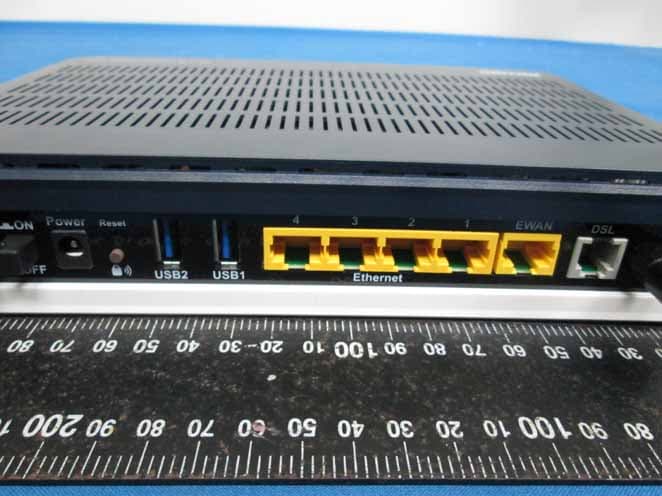
Click to zoom
Application Details
- Equipment Class
- DTS - Digital Transmission System
- Date of Grant
- Mar 18, 2013
- Application Purpose
- Original Equipment
- Date of Application
- Mar 18, 2013
- Equipment Note
- Gigabit Wireless-N VPN ADSL2+ Router
- Frequency Range
- 2422.00000000 - 2452.00000000
- Company
- Billion Electric Co., Ltd.
- Country
- Taiwan
Documents & Files
Document Text
Text extracted from the exhibit documents filed with the FCC. Open a document above to read the original.
Users Manual
BiPAC 7600NX(L) Gigabit Wireless-N (VPN) ADSL2+ Router User Manual Version Released: 1.02b.rc5.dy1 Last Revised Date: March 11, 2013 Table of Contents Chapter 1................................................................................................................................................................1 Introducing the BiPAC 7600NX(L).......................................................................................................................1 1.2 Features of the BiPAC 7600NX(L)..................................................................................................................3 ADSL Compliance............................................................................................................................................3 Network Protocols and Features ....................................................................................................................4 Firewall ...........................................................................................................................................................4 Quality of Service Control...............................................................................................................................4 IPTV Applications............................................................................................................................................4 Wireless LAN...................................................................................................................................................4 USB Application Server...................................................................................................................................5 Virtual Private Network (VPN) (BiPAC 7600NX only)......................................................................................5 Managemen t ..................................................................................................................................................5 1.3 H ardware Specifications...............................................................................................................................5 Physical In terface............................................................................................................................................5 1.4 Applic ations for the BiPAC 7600NX(L) ..........................................................................................................6 Chapter 2................................................................................................................................................................7 2.1 Important note for using the BiPAC 7600NX(L)............................................................................................7 2.2 Package Contents .........................................................................................................................................8 2.3 The Front LEDs..............................................................................................................................................9 2.4 The Re ar Ports ............................................................................................................................................10 The detail instruction in Reset Button..........................................................................................................11 2.6 Cabling........................................................................................................................................................11 Chapter 3 ..............................................................................................................................................................12 3.1 Be fore Configuration ..................................................................................................................................12 3.1.1 Con figuring a PC in Windows 7 ...........................................................................................................13 3.1.2 Con figuring a PC in Windows Vista .....................................................................................................16 3.1.3 Configuring a PC in Windows XP .........................................................................................................18 3.1.3 Con figuring PC in Windows 2000 ........................................................................................................20 3.1.4 Configuring PC in Windows 98/Me......................................................................................................21 3.1.5 Configuring PC in Windows NT4.0.......................................................................................................22 3.2 Fa ctory Default Settings .............................................................................................................................23 3.2.1 Username and P assword .....................................................................................................................23 3.3 LAN and WAN Port Addresses....................................................................................................................24 3.4 Information from your ISP..........................................................................................................................24 Chapter 4..............................................................................................................................................................26 4.1 Eas y Sign‐On (EZSO)....................................................................................................................................26 Chapter 5 ..............................................................................................................................................................29 5.1 Configuring 7600NX(L) with your Web Browser ..........................................…
Text truncated - open the document above for the full version.
Users Manual
75 by 3 consecutive fails, the router will determine failover to WAN2 (backup port)). 2).The failback setting follow the same decision policy as the failover. For example, according to settings above in the screenshot, the connection probe will be carried out every 30 seconds, and 3 consecutive times of probe success is found, the router will determine failback to WAN1 (main WAN). Probe WAN 1/2: Choose the probe policy, to probe gateway or host (users decide themselves) Gateway: It will send ping packets to gateway of Wan1 interface and wait for response from it in every “Probe Cycle” to check the connectivity of the gateway of WAN1 interface. Host: It will send ping packets to specific host and wait for response in every “Probe Cycle”. The host must be an IP address 76 5.5.2 Outbound Load Balance (7600NX only) The connections are distributed over WAN1 and WAN2 so that it can utilize bandwidth of both WAN ports. With Outbound load balance, traffic may be routed to a faster link when one of the WAN is slower or congested so that user gains better throughput and less delay. User can distribute outbound traffic based on Session Mechanism or IP Hash Mechanism. Based on Session Mechanism Balance by Session (Round Robin): Balance session traffic based on a round robin method. Balance by Session weight: Balance session traffic based on a weight ratio. Enter the desired ratio in the fields provided. Balance by Traffic weight: Balance traffic based on a traffic weight ratio. Enter the desired ratio into the fields provided. Based on IP Hash Mechanism Balance by weight: Use an IP hash to balance traffic based on a ratio. Enter the desired ratio into the fields provided. 77 5.5.3 Protocol Binding (7600NX only) Protocol Binding lets you direct specific traffic to go out from a specific WAN port. Policies determine how specific types of internet traffic are routed, for example, traffic from a particular IP(es) granted access to only one WAN port rather than using both of the WAN ports as with load balancing. Rule Index: The index marking the rule. Maximum entries can be 16. Active: Select whether to enable the rule. Bind Interface: To determine the WAN interface the to-be-set rule will apply to and what type of traffic is to be bound to forward to the which WAN interface. Source IP Address: Enter the source IP address featuring the traffic origin. Subnet mask: Enter the subnet mask of the source network. Port Number: Enter the port number. Destination IP Address: Enter the destination IP address featuring the traffic destination. Subnet mask: Enter the subnet of the designation network. Port Number: Enter the port number which defines the application. DSCP: The DSCP value. Value Range:0~64, 64 means Don't care Protocol: Select the protocol traffic is using (TCP, UDP, ICMP). Press SET to submit the settings. For example: All traffic from 192.168.1.105 with port 80 (exclusive for http web access) will be routed to WAN 1, or this IP communicates with Internet through WAN1. 78 5.6 Advanced Setup 5.6.1 Firewall Your router includes a firewall for helping to prevent attacks from hackers. In addition to this, when using NAT (Network Address Translation) the router acts as a “natural” Internet firewall, since all PCs on your LAN use private IP addresses that cannot be directly accessed from the Internet. Firewall: To automatically detect and block Denial of Service (DoS) attacks, such as Ping of Death, SYN Flood, Port Scan and Land Attack. Enabled: As set in default setting, it activates your firewall function. Disabled: It disables the firewall function. SPI: If you enabled SPI, all traffics initiated from WAN would be blocked, including DMZ, Virtual Server, and ACL WAN side. Enabled: As set in default setting, it activates your SPI function. Disabled: It disables the SPI function. 79 5.6.2 Routing This is static route feature. You are equipped with the capability to control the routing of all the traffic across your network. With each routing rule created, user can specifically assign the destination where the traffic will be routed to. #: Item number Dest IP: IP address of the destination network Mask: The subnet mask of destination network. Gateway IP: IP address of the gateway or existing interface that this route uses. Metric: It represents the cost of transmission for routing purposes. The number need not be precise, but it must be between 1 and 15. Device: Media/channel selected to append the route. Edit: Edit the route; this icon is not shown for system default route. Drop: Drop the route; this icon is not shown for system default route. 80 ADD Route Destination IP Address: This is the destination subnet IP address. IP Subnet Mask: The subnet mask of destination network. Gateway IP Address/Interface:This is the gateway IP address or existing interface to which packets are to be forwarded. Metric:It represents the cost of transmission for routing purposes. The number need not be precise, but it must be between 1 and 15. 81 5.6.3 NAT The NAT (Network Address Translation) feature transforms a private IP into a public IP, allowing multiple users to access the internet through a single IP account, sharing the single IP address. NAT break the originally envisioned model of IP end-to-end connectivity across the internet so NAT can cause problems where IPSec/ PPTP encryption is applied or some application layer protocols such as SIP phones are located behind a NAT. And NAT makes it difficult for systems behind a NAT to accept incoming communications. In this session, there are “VPN Switch”, “SIP Switch”, “DMZ” and “Virtual Server” provided to solve these nasty problems. VPN Switch: It is VPN pass-throughput. VPN pass-through is a feature of routers which allows VPN client on a private network to establish outbound VPNs unhindered. SIP Switch: It is SIP ALG. Enable the SIP ALG when SIP phone needs ALG to pass through the NAT. Disable the SIP ALG when SIP phone includes NAT-Traversal algorithm. In…
Text truncated - open the document above for the full version.
Attestation Statements
Date: 12/19/2012 Subject: Ad Hoc Mode Function Declaration FCC ID: QI3BIL-SG7600NEX To Whom it may concern, 1. This device is acting as master and operating on 2.4GHz band. Ad Hoc function is available on client mode and not able to work on non-US frequencies. Please contact the one signed below or the authorized agent for this filing. Thank you. 2. We don’t provide with any controls or software to allow operation outside the USA frequency band for all future applications when we sell this product in USA. 3. We attestation that all the difference models showed in test report, all RF characteristics and functions are exactly the same. Regards,
Cover Letter(s)
Billion Electric Co., Ltd. February 18, 2013 Federal Communications Commission Authorization and Evaluation Division FCC IDQI3BIL-7600NX Confidentiality Request Pursuant to Sections 0.457 and 0.459 of the Commission’s Rules, the applicant hereby requests confidential treatment of information applied this application as outlined below: 1. Block Diagram 2. Circuit Diagram 3. Operational Description The above materials contain trade secrets and proprietary information not customarily released to the public. The public disclosure of these matters might be harmful to the applicant and provide unjustified benefits to its competitors. The Applicant understands that pursuant to Rule 0.457, disclosure of this Application and all accompanying documentation will not be made before the date of the Grant for this application Sincerely, Name/Title: Ted Ho / CTO Company Name: Billion Electric Co., Ltd. Address: 8F., No.192, Sec. 2, Zhongxing Rd., Xindian Dist., New Taipei City 231, Taiwan, (R.O.C.) TEL: 886-2-2914-5665 FAX: 886-2-2918-2895 Email: [email protected]
Cover Letter(s)
Date: 12/19/2012 Subject: DoC declaration To Whom it may concern, We, as the grantee of this project FCC ID: QI3BIL-7600NX , would like to declare that the composite portion categorized as computer peripheral has been authorized under the Declaration of Conformity procedures. Regards,
Cover Letter(s)
Billion Electric Co., Ltd. February 18, 2013 Dear Sir, I hereby have entrusted the following person to be a proxy regarding application for Type Certification. Compliance Certification Services Inc. Address: No.8, Jiucengling, Xinhua Dist., Tainan City 712, Taiwan, R.O.C Name: Daphne Liang Job Title: Section Manager Email: [email protected] I am therefore responsible for the contents of the application. Brand Name and Model Name of the specified radio equipment: Billion (Brand Name) / BiPAC 7600NX (Model Name) FCC ID: QI3BIL-7600NX Product Name: Name/Title: Ted Ho / CTO Company Name: Billion Electric Co., Ltd. Address: 8F., No.192, Sec. 2, Zhongxing Rd., Xindian Dist., New Taipei City 231, Taiwan, (R.O.C.) TEL: 886-2-2914-5665 FAX: 886-2-2918-2895 Email: [email protected]
External Photos
Report No.T121019S01 Page 1 of 5 External Photo Report No.T121019S01 Page 2 of 5 Report No.T121019S01 Page 3 of 5 1 Report No.T121019S01 Page 4 of 5 Report No.T121019S01 Page 5 of 5
ID Label/Location Info
2013/01/28 RoxyJosy Katie Nicole Billion 1. 材質為反銀龍貼紙 2. 為 Arial Bold 8.5級 3. 為 Arial Bold 6級 4. 為 Arial Bold 5.5級 5. 其餘文字為 Arial Regular 5.5 級 6. 黑色印刷 7. 產地別需依照生產地作變動 59.7x39.7mm/±0.15mm 0.15mm BiPAC 7600NX 59.7±0.15 39.7±0.15 R1.0 R1.0 R1.0 R1.0 Billion Electric Co., Ltd. This device complies with Part 15 of the FCC Rules. Operation is subject to the following two conditions: (1) this device may not cause harmful interference, and (2) this device must accept any interference received, including interference that may cause undesired operation. Made in Taiwan Model: BiPAC 7600NX FCC ID: QI3BIL-7600NX Made in Taiwan Model: BiPAC 7600NX FCC ID: QI3BIL-7600NX N12127 Billion Electric Co., Ltd. Product: Gigabit Wireless-N VPN ADSL2+ Router Power Input: 15V 1.6A Product: Gigabit Wireless-N VPN ADSL2+ Router Power Input: 15V 1.6A
Internal Photos
Report No.T121019S01 Page 1 of 6 Internal Photo Report No.T121019S01 Page 2 of 6 Report No.T121019S01 Page 3 of 6 1 Report No.T121019S01 Page 4 of 6 Report No.T121019S01 Page 5 of 6 Report No.T121019S01 Page 6 of 6
RF Exposure Info
FCC IDQI3BIL-7600NX Report No.T121019S01-RP1 Page 102 of 106 This report shall not be reproduced, except in full, without the written approval of Compliance Certification Services Inc. APPENDIX I MAXIMUM PERMISSIBLE EXPOSURE According to FCC 1.1310 : The criteria listed in the following table shall be used to evaluate theenvironment impact of human exposure to radio frequency (RF) radiation as specified in 1.1307(b)LIMITS FOR MAXIMUM PERMISSIBLE EXPOSURE (MPE) Frequency Range (MHz) Electric Field Strength (V/m) Magnetic Field Strength (A/m) Power Density (mW/cm 2 ) Average Time (A) Limits for Occupational / Control Exposures 300-1,500 -- -- F/300 6 1,500-100,000 -- -- 5 6 (B) Limits for General Population / Uncontrol Exposures 300-1,500 -- -- F/1500 6 1,500-100,000 -- -- 1 30 CALCULATIONS Given d G×P×30 =E & 3770 E =S 2 Where E = Field strength in Volts / meter P = Power in Watts G = Numeric antenna gain d = Distance in meters S = Power density in milliwatts / square centimeter Combining equations and re-arranging the terms to express the distance as a function of the remaining variables yields: 2 d3770 G×P×30 =S Changing to units of mW and cm, using: P (mW) = P (W) / 1000 and d (cm) = d(m) / 100 Yields () () 22 d G×P ×0796.0= 100/d×3770 G×1000/P×30 =S Where d = Distance in cm P = Power in mW G = Numeric antenna gain S = Power density in mW / cm2 FCC IDQI3BIL-7600NX Report No.T121019S01-RP1 Page 103 of 106 This report shall not be reproduced, except in full, without the written approval of Compliance Certification Services Inc. LIMIT Power Density Limit, S=1.0mW/cm 2 TEST RESULTS Mode Antenna Gain (dBi) Minimum separation distance (cm) Output Power (dBm) Total Power (dBm) Numeric antenna gain (mW) Power Density Limit (mW/cm2) Power Density at 20cm (mW/cm2) IEEE 802.11b 2.09 20 20.98 20.98 1.62 1.00 0.040339 IEEE 802.11g 2.09 20 24.01 24.01 1.62 1.00 0.081044 2.09 23.43 1.62 IEEE 802.11n HT20 2.09 20 23.00 26.23 1.62 1.00 0.135139 2.09 22.86 1.62 IEEE 802.11n HT40 2.09 20 22.45 25.67 1.62 1.00 0.118777 Remark: For mobile or fixed location transmitters, the maximum power density is 1.0 mW/cm 2 even if the calculation indicates that the power density would be larger.
Test Report
FCC IDQI3BIL-7600NX Report No.T121019S01-RP1 Page 1 of 106 This report shall not be reproduced, except in full, without the written approval of Compliance Certification Services Inc. FCC 47 CFR PART 15 SUBPART C AND ANSI C63.4:2003 TEST REPORT For Gigabit Wireless-N VPN ADSL2+ Router Model : BiPAC 7600NX Data Applies To : Please refer to section 2 (altogether 16 series models) Issued for Billion Electric Co., Ltd. 8F., No.192, Sec. 2, Zhongxing Rd., Xindian Dist., New Taipei City 231, Taiwan (R.O.C.) Issued by Compliance Certification Services Inc. Hsinchu Lab. NO. 989-1 Wen Shan Rd., Shang Shan Village, Qionglin Shiang Hsinchu County 30741, Taiwan, R.O.C TEL: +886-3-5921698 FAX: +886-3-5921108 http://www.ccsrf.com E-Mail : [email protected] Issued Date: January 30, 2013 Note: This report shall not be reproduced except in full, without the written approval of Compliance Certification Services Inc. This document may be altered or revised by Compliance Certification Services Inc. personnel only, and shall be noted in the revision section of the document. The client should not use it to claim product endorsement by TAF or any government agencies. The test results of this report relate only to the tested sample identified in this report. FCC IDQI3BIL-7600NX Report No.T121019S01-RP1 Page 2 of 106 This report shall not be reproduced, except in full, without the written approval of Compliance Certification Services Inc. Revision History Rev. Issue Date Revisions Effect Page Revised By 00 11/16/2012 Initial Issue All Page 107 Victoria Liu 01 01/09/2013 Revised the Remark Description P.9 Gloria Chang 02 01/16/2013 Revised the PAGE NO.Conducted Emission / Radiated Emission Test (Below 1 GHz)SETUP OF EQUIPMENT UNDER TEST RADIATED EMISSION CONDUCTED EMISSION APPENDIX II SETUP PHOTOS All Page 106 P 3811 126568 100101104 106 Victoria Liu 03 01/30/2013 Revised the Product name Model nameFCC ID series of difference All Page 1~106 Victoria Liu 04 03/11/2013 Revised the EUT DESCRIPTION series of difference Page 5~6 Victoria Liu 05 03/12/2013 Revised the series of difference Page 6 Victoria Liu 06 03/13/2013 Revised the Conducted / Radiated Emission Test (Above 1 GHz) EUT OPERATING CONDITION MAXIMUM PEAK OUTPUT POWER POWER SPECTRAL DENSITY Page 812 2932 Victoria Liu FCC IDQI3BIL-7600NX Report No.T121019S01-RP1 Page 3 of 106 This report shall not be reproduced, except in full, without the written approval of Compliance Certification Services Inc. TABLE OF CONTENTS TITLE PAGE NO. 1. TEST REPORT CERTIFICATION ................................................................................ 4 2. EUT DESCRIPTION ..................................................................................................... 5-6 3. DESCRIPTION OF TEST MODES ............................................................................... 7 4. TEST METHODOLOGY ............................................................................................... 8 5. FACILITIES AND ACCREDITATION ........................................................................... 9 5.1 FACILITIES ............................................................................................................ 9 5.2 ACCREDITATIONS................................................................................................ 9 5.3 MEASUREMENT UNCERTAINTY ......................................................................... 10 6. SETUP OF EQUIPMENT UNDER TEST...................................................................... 11-12 7. FCC PART 15.247 REQUIREMENTS.......................................................................... 13 7.1 6dB BANDWIDTH .................................................................................................. 13-26 7.2 MAXIMUM PEAK OUTPUT POWER..................................................................... 27-29 7.4 POWER SPECTRAL DENSITY............................................................................. 30-44 7.5 CONDUCTED SPURIOUS EMISSION .................................................................. 45-63 7.6 RADIATED EMISSION........................................................................................... 64-96 7.7 CONDUCTED EMISSION ......................................................................................97-101 APPENDIX I MAXIMUM PERMISSIBLE EXPOSURE..................................................... 102-103 APPENDIX II SETUP PHOTOS .......................................................................................104-106 FCC IDQI3BIL-7600NX Report No.T121019S01-RP1 Page 4 of 106 This report shall not be reproduced, except in full, without the written approval of Compliance Certification Services Inc. 1. TEST REPORT CERTIFICATION Applicant Billion Electric Co., Ltd. Address 8F., No.192, Sec. 2, Zhongxing Rd., Xindian Dist., New Taipei City 231, Taiwan (R.O.C.) Equipment Under Test Gigabit Wireless-N VPN ADSL2+ Router Model BiPAC 7600NX Data Applies To Please refer to section 2 (altogether 16 series models) Tested Date October 19, 2012 ~ January 15, 2013 APPLICABLE STANDARD Standard Test Result FCC Part 15 Subpart C AND ANSI C63.4:2003 PASS WE HEREBY CERTIFY THAT: The above equipment has been tested by Compliance Certification Services Inc., and found compliance with the requirements set forth in the technical standards mentioned above. The results of testing in this report apply only to the product/system, which was tested. Other similar equipment will not necessarily produce the same results due to production tolerance and measurement uncertainties. Approved by: Reviewed by: Sb. Lu Gundam Lin Sr. Engineer Sr. Engineer FCC IDQI3BIL-7600NX Report No.T121019S01-RP1 Page 5 of 106 This report shall not be reproduced, except in full, without the written approval of Compliance Certification Services Inc. 2. EUT DESCRIPTION Product Name Gigabit Wireless-N VPN ADSL2+ Router Model Number BiPAC 7600NX Data Applies To Please refer to section 2 (altogether 16 s…
Text truncated - open the document above for the full version.
Test Setup Photos
FCC IDQI3BIL-7600NX Report No.T121019S01-RP1 Page 104 of 106 This report shall not be reproduced, except in full, without the written approval of Compliance Certification Services Inc. APPENDIX II SETUP PHOTOS RADIATED EMISSION SETUP FCC IDQI3BIL-7600NX Report No.T121019S01-RP1 Page 105 of 106 This report shall not be reproduced, except in full, without the written approval of Compliance Certification Services Inc. ANTENNA PORT CONDUCTED RF MEASUREMENT SETUP FCC IDQI3BIL-7600NX Report No.T121019S01-RP1 Page 106 of 106 This report shall not be reproduced, except in full, without the written approval of Compliance Certification Services Inc. CONDUCTED EMISSION SETUP
Contact Information
Applicant
Kevin Lien
Test Firm
Compliance Certification Services Inc.Winnie Chen
Technical Specifications
| # | Rule Parts | Frequency Range | Power Output |
|---|---|---|---|
| 2 | 15C | 2.42 GHz - 2.45 GHz | 369.00 mW |
Other Applications from Billion Electric Co., Ltd.
QI3BECMX220UT5GAB
Jul 01, 2024Advanced 5G Industrial Router
Equipment Class
CBD - Citizens Band Category A and B DevicesQI3BEC-8355P
Jul 01, 20245G NR Wi-Fi 6 AX1800 CPE, 5G NR CPE
Equipment Class
DTS - Digital Transmission System
QI3BEC-8112
Jul 04, 20235G Enterprise Router
Equipment Class
PCB - PCS Licensed Transmitter
QI3BEC-8231
Sep 18, 20225G CBRS Outdoor Router
Equipment Class
CBD - Citizens Band Category A and B Devices
QI3BEC-MX200PL9
Jan 08, 20224G LTE Industrial Router
Equipment Class
TNB - Licensed Non-Broadcast Station Transmitter