QI3BIL-7800NEX3G/Wireless-N Dual WAN ADSL2+ Firewall Router
Billion Electric Co., Ltd.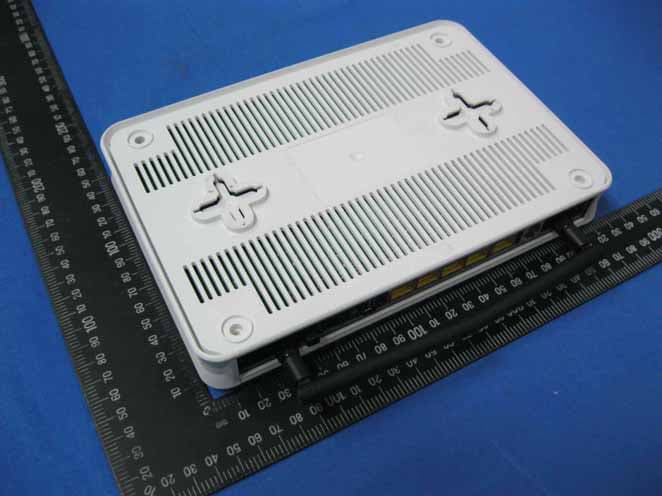
Click to zoom
Application Details
- Equipment Class
- DTS - Digital Transmission System
- Date of Grant
- Dec 21, 2010
- Application Purpose
- Original Equipment
- Date of Application
- Dec 21, 2010
- Equipment Note
- 3G/Wireless-N Dual WAN ADSL2+ Firewall Router
- Frequency Range
- 2422.00000000 - 2452.00000000
- Company
- Billion Electric Co., Ltd.
- Country
- Taiwan
Documents & Files
Document Text
Text extracted from the exhibit documents filed with the FCC. Open a document above to read the original.
Users Manual
BiPAC 7800NEXL 3G / Wireless-N Dual WAN ADSL2+ Firewall Router User Manual Version released: 2.02a.dc1 Last revised date: 11-19-2010 Table of Contents Chapter 1: Introduction ..................................................................................................................1 Introduction to your Router ...................................................................................................... 1 Features ..................................................................................................................................4 ADSL Compliance ...................................................................................................................................................................4 Network Protocols and Features ..........................................................................................................................................4 Firewall.........................................................................................................................................................................................5 Quality of Service Control........................................................................................................................................................5 ATM, PTM and PPP Protocols.............................................................................................................................................5 IPTV Applications......................................................................................................................................................................6 Wireless LAN.............................................................................................................................................................................6 Management .............................................................................................................................................................................6 Hardware Specifications .......................................................................................................... 7 Physical Interface ......................................................................................................................................................................7 Chapter 2: Installing the Router .....................................................................................................8 Package Contents ...................................................................................................................8 Important note for using this router..........................................................................................9 Device Description.................................................................................................................10 The Front LEDs.......................................................................................................................................................................10 The Rear Ports ........................................................................................................................................................................11 Cabling ..................................................................................................................................12 Chapter 3: Basic Installation ........................................................................................................13 Connecting Your Router.........................................................................................................14 Network Configuration ........................................................................................................... 15 Configuring PC in windows 7...............................................................................................................................................15 Configuring PC in Windows Vista ......................................................................................................................................17 Configuring PC in Windows XP .......................................................................................................................................... 19 Configuring PC in Windows 2000 ......................................................................................................................................20 Configuring PC in Windows 95/98/Me .............................................................................................................................. 21 Configuring PC in Windows NT4.0 ....................................................................................................................................22 Factory Default Settings ........................................................................................................ 23 Information from your ISP......................................................................................................25 Configuration via Web Interface ............................................................................................26 Chapter 4: Configuration..............................................................................................................27 Device Info ............................................................................................................................28 Summary..................................................................................................................................................................................29 WAN ..........................................................................................................................................................................................30 Statistics....................................................................................................................................................…
Text truncated - open the document above for the full version.
Users Manual
83 Security Packet Filter Packet filtering enables you to configure your router to block specified internal/external users (IP address) from Internet access, or you can disable specific service requests (Port number) to /from Internet. The relationship among all filters is “or” operation, which means that the router checks these different filter rules one by one, starting from the first rule. As long as one of the rules is satisfied, the specified action will be taken. Above is the listing table. Click Add to add new configurations. Filter name: a user-defined filter name or you can select from the drop-down menu the application, and leave the automatically generated name as the Filter name. IP Version: Select the IP Version, IPv4 or IPv6. Internal IP Address / External IP Address: This is the Address-Filter used to allow or block traffic to/from particular IP address (es). Input the range you want to filter out. If you leave empty, it means any IP address. Protocol: Specify the packet type (TCP/UDP,TCP, UDP, ICMP, RAW and Any) that the rule applies 84 to. Only when RAW is selected, then you can type the protocol number (0-254) to identify the protocol that you want the filter applies to. When Any is selected, it means the filter will applies to any protocol. Internal Port: This Port or Port Range defines the ports allowed to be used by the Remote/WAN to connect to the application. Default is set from range 1 ~ 65535. It is recommended that this option be configured by an advanced user. External Port: This is the Port or Port Range that defines the application. Default is set from range 1 ~ 65535. Action: If a packet matches this filter rule, forward (allows the packets to pass) or drop (disallow the packets to pass) this packet. Direction: Determine whether the rule is for outgoing packets or for incoming packets. Set up Select the application you want to filter, input the information or leave it as default according to yourself. Press Apply to confirm and the item will be listed in the following table. 85 Remove Check the checkbox, press Remove, the item will be removed. Reorder When there are more than one Filter application, you can reorder them to the priority you want. The former is prior to the latter one. Click or to change the priority of the filter, then press to confirm. 86 Parental Control Time Restriction A MAC (Media Access Control) address is the unique network hardware identifier for each PC on your network’s interface (i.e. its Network Interface Card or Ethernet card). Using your router’s MAC Address Filter function, you can configure the network to block specific machines from accessing your LAN during the specified time. Action: L Disable: disable the Time Restriction function. L Allow: allow the members in the following table to access the router. L Block: block the members listed in the following table from accessing the router. Note: here users should add the rules first, then select the wanted action. Click Add to add the rules. Username: user-defined name. MAC Address: enter the MAC address(es) you want to allow or block to access the router and LAN. The format of MAC address could be: xx:xx:xx:xx:xx:xx or xx-xx-xx-xx-xx-xx. Days of the week: select the days of a week this rule takes efforts. 87 Start Time: enter the start time of each day in hh:mm format. Leaving it empty means 00:00. End Time: enter the end time of each day in hh:mm format. Leaving it empty means 23:59. Click Apply to confirm your settings. The following prompt window will appear to remind you of the attention. If you needn’t this rule, you can check the box, press Remove, it will be OK. URL Filter URL (Uniform Resource Locator – e.g. an address in the form of http://www.abcde.com or http://www.example.com) filter rules allow you to prevent users on your network from accessing particular websites by their URL. There are no pre-defined URL filter rules; you can add filter rules to meet your requirements. URL Filtering: select to enable or disable URL Filtering feature. 88 Keywords Filtering: Allow blocking against specific keywords within a particular URL rather than having to specify a complete URL (e.g.to block any image called “advertisement.gif”). When enabled, your specified keywords list will be checked to see if any keywords are present in URLs accessed to determine if the connection attempt should be blocked. Please note that the URL filter blocks web browser (HTTP) connection attempts using port 80 only. Domains Filtering: This function checks the whole URL address but not the IP address against your list of domains to block or allow. If it is matched, the URL request will either be sent (Trusted) or dropped (Forbidden). Restrict URL Features: Click Block Java Applet to filter web access with Java Applet components. Click Block ActiveX to filter web access with ActiveX components. Click Block Cookie to filter web access with Cookie components. Click Block Proxy to filter web proxy access. Exception IP Address: You can input a list of IP addresses as the exception list for URL filtering. Log: Select Enable for this option if you will like to capture the logs for this URL filter policy. Keywords Filtering Click to add the keywords. Enter the Keyword, for example image, then click Add. You can add other keyword like this. The keywords you add will be listed as above. If you want to reedit the keyword, press the Edit radio button left beside the item, and the word will listed in the Keyword field, edit, then press Edit/Delete to confirm. If you want to delete certain keyword, check Delete checkbox right beside the item, and press Edit/Delete. Click Return to be back to the previous page. 89 Domain Filtering Click to add Domains. Domains Filtering: enter the domain you want this filter applies to. Type: select the action this filter deals with the Domain. L Forbidden Domain: the domain is the forbidden to access. L Trusted Domain: the domain is trusted and allowed access. Enter a domain and s…
Text truncated - open the document above for the full version.
External Photos
Report No.T100603307 Page 1 of 13 External Photo Report No.T100603307 Page 2 of 13
ID Label/Location Info
BiPAC 7800NEXL SIZE: 59.7x39.7/+-0.15mm 文字面 Label Location Billion Electric Co., Ltd. Product: 3G/ Wireless-N Dual WAN ADSL2+ Firewall Router Power Input: 12V DC, 1.2A (Minimum) This device complies with Part 15 of the FCC Rules. Operation is subject to the following two conditions: (1) this device may not cause harmful interference, and (2) this device must accept any interference received, including interference that may cause undesired operation. Model: BiPAC 7800NEXL FCC ID: QI3BIL-7800NEX Made in China
Internal Photos
Report No.T100603307 Page 3 of 13 Internal Photo Report No.T100603307 Page 4 of 13 Report No.T100603307 Page 5 of 13 Report No.T100603307 Page 6 of 13 Report No.T100603307 Page 7 of 13 Antenna Report No.T100603307 Page 8 of 13 Power Adapter Photo(PAW012A12UL) Report No.T100603307 Page 9 of 13 Report No.T100603307 Page 10 of 13 Power Adapter Photo(PAW018A12UL 8066) Report No.T100603307 Page 11 of 13 Report No.T100603307 Page 12 of 13 Power Adapter Photo(PAW018A12UL) Report No.T100603307 Page 13 of 13
Test Report
FCC IDQI3BIL-7800NEX Report No.T100603307-RP1 Page 1 of 127 This report shall not be reproduced except in full, without the written approval of Compliance Certification Services. FCC 47 CFR PART 15 SUBPART C AND ANSI C63.4:2003 TEST REPORT For 3G / Wireless-N Dual WAN ADSL2+ Firewall Router Model : BiPAC 7800NEXL Data Applies To : BiPAC 7800NEL; BiPAC 7800NL; BiPAC 6800NEXL; BiPAC 6800NEL; BiPAC 6800NL; BEC 7800TNR2; BEC 6800NR2 Issued for Billion Electric Co., Ltd. 8F., No.192, Sec.2, Chung -Hsing Road, Hsin-Tien City, Taipei Hsien, Taiwan, R.O.C. Issued by Compliance Certification Services Inc. Hsinchu Lab. NO. 989-1 Wen Shan Rd., Shang Shan Village, Qionglin Shiang Hsinchu County 30741, Taiwan, R.O.C TEL: +886-3-5921698 FAX: +886-3-5921108 http://www.ccsrf.com E-Mail : [email protected] Note: This report shall not be reproduced except in full, without the written approval of Compliance Certification Services Inc. This document may be altered or revised by Compliance Certification Services Inc. personnel only, and shall be noted in the revision section of the document. The client should not use it to claim product endorsement by TAF or any government agencies. The test results in the report only apply to the tested sample. FCC IDQI3BIL-7800NEX Report No.T100603307-RP1 Page 2 of 127 This report shall not be reproduced except in full, without the written approval of Compliance Certification Services. Revision History Rev. Issue Date Revisions Effect Page Revised By 00 10/27/2010 Initial Issue All Page 127 Kate Shi FCC IDQI3BIL-7800NEX Report No.T100603307-RP1 Page 3 of 127 This report shall not be reproduced except in full, without the written approval of Compliance Certification Services. TABLE OF CONTENTS TITLE PAGE NO. 1. TEST REPORT CERTIFICATION ................................................................................ 4 2. EUT DESCRIPTION ..................................................................................................... 5 2.1 DESCRIPTION OF EUT & POWER ....................................................................... 5-6 3. DESCRIPTION OF TEST MODES ............................................................................... 7 4. TEST METHODOLOGY ............................................................................................... 7 5. FACILITIES AND ACCREDITATION ........................................................................... 8 5.1 FACILITIES ............................................................................................................ 8 5.2 ACCREDITATIONS................................................................................................ 8 5.3 MEASUREMENT UNCERTAINTY ......................................................................... 9 6. SETUP OF EQUIPMENT UNDER TEST...................................................................... 10-11 7. FCC PART 15.247 REQUIREMENTS.......................................................................... 12 7.1 6dB BANDWIDTH .................................................................................................. 12-25 7.2 MAXIMUM PEAK OUTPUT POWER..................................................................... 26-28 7.3 AVERAGE POWER ............................................................................................... 29-31 7.4 POWER SPECTRAL DENSITY............................................................................. 32-51 7.5 CONDUCTED SPURIOUS EMISSION .................................................................. 52-76 7.6 RADIATED EMISSION........................................................................................... 77-111 7.7 CONDUCTED EMISSION ...................................................................................... 112-120 APPENDIX I MAXIMUM PERMISSIBLE EXPOSURE..................................................... 121-122 APPENDIX II SETUP PHOTOS .......................................................................................123-127 FCC IDQI3BIL-7800NEX Report No.T100603307-RP1 Page 4 of 127 This report shall not be reproduced except in full, without the written approval of Compliance Certification Services. 1. TEST REPORT CERTIFICATION Applicant Billion Electric Co., Ltd. Address 8F., No.192, Sec.2, Chung -Hsing Road, Hsin-Tien City, Taipei Hsien, Taiwan, R.O.C. Equipment Under Test 3G / Wireless-N Dual WAN ADSL2+ Firewall Router Model BiPAC 7800NEXL Data Applies To BiPAC 7800NEL; BiPAC 7800NL; BiPAC 6800NEXL; BiPAC 6800NEL; BiPAC 6800NL; BEC 7800TNR2; BEC 6800NR2 Tested Date June 03 ~ October 26, 2010 APPLICABLE STANDARD Standard Test Result FCC Part 15 Subpart C AND ANSI C63.4:2003 PASS WE HEREBY CERTIFY THAT: The above equipment has been tested by Compliance Certification Services Inc., and found compliance with the requirements set forth in the technical standards mentioned above. The results of testing in this report apply only to the product/system, which was tested. Other similar equipment will not necessarily produce the same results due to production tolerance and measurement uncertainties. Approved by: Reviewed by: Alex Chiu Gundam Lin Director Team Leader FCC IDQI3BIL-7800NEX Report No.T100603307-RP1 Page 5 of 127 This report shall not be reproduced except in full, without the written approval of Compliance Certification Services. 2. EUT DESCRIPTION 2.1 DESCRIPTION OF EUT & POWER Product Name 3G / Wireless-N Dual WAN ADSL2+ Firewall Router Model Number BiPAC 7800NEXL BiPAC 7800NEL; BiPAC 7800NL; BiPAC 6800NEXL; BiPAC 6800NEL; BiPAC 6800NL; BEC 7800TNR2; Data Applies To BEC 6800NR2 Received Date June 03, 2010 IEEE 802.11b/g, 802.11n HT20 : 2412MHz~2462MHz Frequency Range IEEE 802.11n HT40 : 2422MHz~2452MHz IEEE 802.11b : 18.98 dBm (0.0.791W) IEEE 802.11g : 22.19 dBm (0.1656W) IEEE 802.11n HT20 : 25.39 dBm (0.3461W) Transmit Power IEEE 802.11n HT40 : 24.20 dBm (0.2628W) Channel Spacing IEEE 802.11b/g, 802.11n HT20/HT40 : 5MHz IEEE 802.11b/g : 11 Channels Channel Nu…
Text truncated - open the document above for the full version.
Test Setup Photos
FCC IDQI3BIL-7800NEX Report No.T100603307-RP1 Page 123 of 127 This report shall not be reproduced except in full, without the written approval of Compliance Certification Services. APPENDIX II SETUP PHOTOS RADIATED EMISSION SETUP Below 1 GHz FCC IDQI3BIL-7800NEX Report No.T100603307-RP1 Page 124 of 127 This report shall not be reproduced except in full, without the written approval of Compliance Certification Services. Above 1 GHz FCC IDQI3BIL-7800NEX Report No.T100603307-RP1 Page 125 of 127 This report shall not be reproduced except in full, without the written approval of Compliance Certification Services. FCC IDQI3BIL-7800NEX Report No.T100603307-RP1 Page 126 of 127 This report shall not be reproduced except in full, without the written approval of Compliance Certification Services. ANTENNA PORT CONDUCTED RF MEASUREMENT SETUP FCC IDQI3BIL-7800NEX Report No.T100603307-RP1 Page 127 of 127 This report shall not be reproduced except in full, without the written approval of Compliance Certification Services. CONDUCTED EMISSION SETUP
Contact Information
Applicant
Kevin Lien
Test Firm
Compliance Certification Services Inc.Winnie Chen
Technical Specifications
| # | Rule Parts | Frequency Range | Power Output |
|---|---|---|---|
| 2 | 15C | 2.42 GHz - 2.45 GHz | 262.80 mW |
Other Applications from Billion Electric Co., Ltd.
QI3BECMX220UT5GAB
Jul 01, 2024Advanced 5G Industrial Router
Equipment Class
CBD - Citizens Band Category A and B DevicesQI3BEC-8355P
Jul 01, 20245G NR Wi-Fi 6 AX1800 CPE, 5G NR CPE
Equipment Class
DTS - Digital Transmission System
QI3BEC-8112
Jul 04, 20235G Enterprise Router
Equipment Class
PCB - PCS Licensed Transmitter
QI3BEC-8231
Sep 18, 20225G CBRS Outdoor Router
Equipment Class
CBD - Citizens Band Category A and B Devices
QI3BEC-MX200PL9
Jan 08, 20224G LTE Industrial Router
Equipment Class
TNB - Licensed Non-Broadcast Station Transmitter