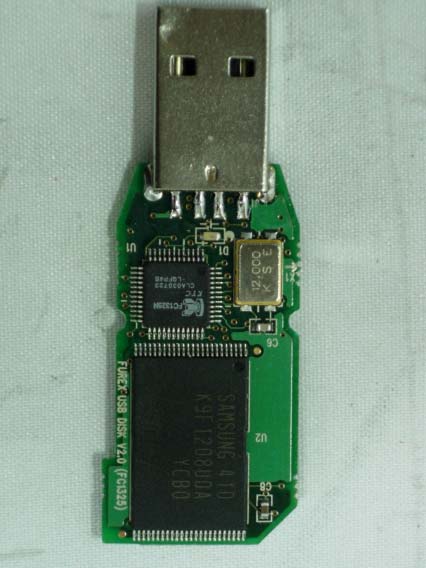
FCCID.CO- FCC ID Database
HomeCompaniesEquipment ClassesSearch

© 2026 FCC ID Database. All rights reserved.

AboutContactData sourced from FCC public records
  1. Home/
  2. Dong Yang Semiconductor Co., Ltd/
  3. QNRDY-USBDRIVE

QNRDY-USBDRIVEUSB Drive

Dong Yang Semiconductor Co., Ltd
USB Drive - FCC ID QNRDY-USBDRIVE - Dong Yang Semiconductor Co., Ltd
Click to zoom

Application Details

Equipment Class
JBP - Part 15 Class B Computing Device Peripheral
Date of Grant
May 13, 2004
Application Purpose
Original Equipment
Date of Application
May 13, 2004
Equipment Note
USB Drive
Company
Dong Yang Semiconductor Co., Ltd
Country
South Korea

Documents & Files

Select a file to view

Users Manual

↗

Block Diagram

↗

External Photos

↗

ID Label/Location Info

↗

Internal Photos

↗

Test Report

↗

Test Setup Photos

↗

Document Text

Text extracted from the exhibit documents filed with the FCC. Open a document above to read the original.

Users Manual

USER GUIDE 1. What is USB Flash Drive ? “USB Flash Drive” is a compact, light-weight, and slim device. It is perfect for carrying around in your pocket, on a key chain, or even around your neck. It is the most easily transportable memory storage device around. By using the USB port, USB Flash Drive is capable of extremely quick data transfer. In addition, the transportable disk does not require any extra cables nor does it require any additional power (i.e. batteries). As soon as you plug the device into a computer(Desktop or Notebook and etc..) with a USB port, the device is ready to be used. In other words, you do not need to install any additional software to use USB Flash Drive. 2. Operating System Environment - Windows 98 - Windows 98SE - Windows ME - Windows 2000 - Windows XP 3. Installation Guide for Windows '98 A. When using the extension cable, insert the computer before inserting USB Flash Drive into the cable. B. After inserting USB Flash Drive, Windows will automatically detect the new hardware and hardware installation will begin. <Appendix 2> Windows New Hardware Installation Wizard will begin. <Appendix 3> Windows New Hardware Installation Wizard will begin C. After inserting the CD that is included in the USB Flash Drive package, choose "browse" and select the Win98 Directory from the CD. <Appendix 4> Select the appropriate CD path (i.e. drive D) and choose the appropriate setting <Appendix 5> Windows will designate the USB device drive, and it will prepare for installation <Appendix 6> Installation is complete D. Open Windows Explorer (see image below) <Appendix 7> The circled items represent removable drives within Windows Explorer. FORMAT and PASSWORD SETTING Manager Program Manual (Version 1.11) 1. In a case that format is needed. - In a case that a product made using a Uni Drive is first time. - In a case that Uni Drive is need for disk arrangement. - In a case that the password is newly set. (Formatting will erase ALL data on this disk.) 1-1. Connect the device to the USB port 1-2. Execute “Manager.exe’ in the utility files, so that the window will appear. Execute ‘Manager.exe file into Utility file. “Please connect your Device” since your device did not connect your computer properly. The Program shall be closed automatically. Check your device connection & start again from 1-1. “Please select your device” since device are connected more than one using same chip. 1-3. Please select ‘Quick Format’ or ‘Full Format’ and then click on a ‘Format’ button. 1-4. Use the device after finish Format. 1-5. Disconnect the device from the USB port. 1-6. Connect the device and the USB port again. 2. In case that the password is set and the device is then used 2-1. Connect the device for which the format is completed to the USB port. 2-2. Execute “Manager.exe’ in the utility files, so that the window will appear. 2-3. In case that the device is used with the password set, check a ”Using Password’ box, click on the ‘Exit’ button and then finish the Manager Program. Disconnect the device from the USB port. Connect the device and the USB port again. (Shall be found “Please log-In first” in the Password Mode.) 2-4. Execute windows explorer program. Click removable device. 2-5. Execute “Passman.exe” in the windows of right side. Enter your password, Click “Apply” button 2-6. Use the driver after log-in properly. 3. In case that the password is changed 3-1. Connect the Device settled Password to USB Port in your Computer after the format. 3-2. Execute “Passman.exe”. Click “Change password”, then change your password. (In case that the Password Mode) 3-3. Execute “Passman.exe”. Click “Change password”, then change your password. (In case that the Non-Password Mode.) 4. In case that the safety remove Device. Windows 98 or 98 SE : Confirm turn off LED. Windows ME, 2000 : after execute hardware remove menu in left bottom of windows. Mac : After throw the Icon Wastebasket. Linux : Execute ‘unmount’ quarry. FCC NOTICE This device complies with Part 15 of the FCC Rules. Operation is subject to the following two conditions: (1)This Device may not cause harmful interference, and (2) This device must accept any interference received, including interference that may cause undesired operation. CAUTION : Any changes or modifications in construction of this device which are not expressly approved by the party responsible for compliance could void the user's authority to operate the equipment. This equipment has been tested and found to comply with the limits for a Class B digital device, pursuant to part 15 of the FCC Rules. These limits are designed to provide reasonable protection against harmful interference in a residential installation. This equipment generates, uses and can radiate radio frequency energy and, if not installed and used in accordance with the instructions, may cause harmful interference to radio communication. However, there is no guarantee that interference will not occur in a particular installation. If this equipment does cause harmful interference to radio or television reception, which can be determined by turning the equipment off and on, the user is encouraged to try to correct the interference by one or more of the following measures : - Reorient or relocate the receiving antenna. - Increase the separation between the equipment and receiver. - Connect the equipment into an outlet on a circuit difference from that to which the receiver is connected. - Consult the dealer of an experienced radio/TV technician for help.

External Photos

Test report Our reference : KEL04-F04001 Page : B1 of Appendix Issued date : 2004-04-03 Appendix-B : External Photographs of E.U.T <FRONT VIEW OF EUT> Korea EMC Laboratory <REAR VIEW OF EUT>

ID Label/Location Info

Test report Our reference : KEL04-F04001 Page : D1 of Appendix Issued date : 2004-04-03 Appendix-D : FCC ID label location information and Sample - FCC ID label location information The label included following statement will be attached on the side of product. - FCC ID label sample Korea EMC Laboratory

Internal Photos

Test report Our reference : KEL04-F04001 Page : C1 of Appendix Issued date : 2004-04-03 Appendix-C : Internal Photographs of E.U.T <INTERNAL VIEW OF E.U.T> Korea EMC Laboratory Test report Our reference : KEL04-F04001 Page : C2 of Appendix Issued date : 2004-04-03 <FRONT VIEW OF MAIN BOARD> Korea EMC Laboratory Test report Our reference : KEL04-F04001 Page : C3 of Appendix Issued date : 2004-04-03 <REAR VIEW OF MAIN BOARD> Korea EMC Laboratory

Test Report

210-3 Yungduck-Ri, Kihung-Eup, Yongin-Si, Kyungki-Do, South Korea 449-908 TEL : (82)31-206-4693 FAX : (82)31-206-3051 http://www.kesilab.com [email protected] http://www.koreaemc.co.kr [email protected] CERTIFICATE OF COMPLIANCE (CLASS B) CERTIFICATION OF COMPLIANCE is hereby issued to the named Applicant and is VALID ONLY for the equipment identified below: Date of Tested : Apr. 02. 2004 Applicant’s Name : DONG YANG SEMICONDUCTOR CO., LTD. A p p l i c a n t ’s A d d re s s : 435-030 #222-6 DANGJEONG-DONG,GUNPO-CITY KYUNGKI-DO, KOREA Manufacturer’s Name : DONG YANG SEMICONDUCTOR CO., LTD. M a n u f a c t u re r ’s A d d re s s : 435-030 #222-6 DANGJEONG-DONG,GUNPO-CITY KYUNGKI-DO, KOREA Declares that the product Product Description : USB DRIVE B r a n d N a m e : DONG YANG Model Number : USB DRIVE 2.0 FCC ID : QNRDY-USBDRIVE Conforms to FCC Rules and Regulations Part 15 Subpart B requirements. This product herewith complies with the requirements of the FCC Rules and Regulations as listed below: Part 15.107: Conducted Emissions. Part 15.109: Radiated Spurious Emissions. TESTED and CERTIFIED by: KOREA EMC LABORATORY 210-3 Yungduck-Ri, Kihung-Eup, Yongin-Si, Kyungki-Do, South, Korea Date :Apr. 03. 2004 Report No :KEL04-F04001 Authorized Signature : M. S. CHO / President Test report Our reference : KEL04-F04001 Page : 2 of 13 Issued date : 2004-04-03 TABLE OF CONTENTS DESCRIPTION Page 0. VERIFICATION OF COMPLIANCE 3 1. GENERAL INFORMATION 1.1 Product Description 4 1.2 Related Submittal(s)/Grant(s) 4 1.3 Tested System Details 4 1.4 System Configuration 4 1.5 General Setup of the test Shield room 5 1.6 Test Facility 5 2. Measurement Procedure 2.1 System test configuration 6 2.1.1 Video mode Justification 6 2.1.2 EUT Exercise S/W 6 2.2 Special Accessories 6 2.3 Equipment Modification 6 2.4 Connected Cable 6 2.5 System Configuration Diagram 6 2.6 Preliminary testing 7 2.7 Shielded Enclosure 7 2.8 Data Reporting Format 7 2.9 Operating Condition 7 2.10 Conditioning of the EUT 7 2.11 Power Line Conducted Emissions 8 2.12 Open field Radiated Emissions Tests 8 3. Measurement Data 3.1 Conducted Emission Data 9 3.2 Conducted Emission Graph 10 3.3 Radiated Emission Data 11 3.4 Summary 12 4. Labeling Requirement 13 Appendix - A : Test set-up Photographs (Conducted and Radiated) - B : External Photographs of E.U.T - C : Internal Photographs of E.U.T - D : FCC ID label location information and sample - E : Block Diagram Korea EMC Laboratory - F : User’s Manual Test report Our reference : KEL04-F04001 Page : 3 of 13 Issued date : 2004-04-03 0 . VERIFICATION OF COMPLIANCE Equipment Under Test : USB DRIVE Model Number : USB DRIVE 2.0 Serial Number : Prototype Manufacturer : DONG YANG SEMICONDUCTOR CO., LTD. 435-030 #222-6 DANGJEONG-DONG,GUNPO-CITY KYUNGKI-DO, KOREA Type of Test : FCC CLASS B Report Number : KEL04-F04001 Date Tested : Apr. 02. 2004 Tested By : W.S.CHOI The results show that the sample equipment tested as described in this reports is in compliance with the CLASS B conducted and radiated emission limits of FCC Rules Part 15, Subpart B. Korea EMC Laboratory Test report Our reference : KEL04-F04001 Page : 4 of 13 Issued date : 2004-04-03 1. GENERAL INFORMATION 1.1 PRODUCT DESCRIPTION The USB DRIVE 2.0 is a USB DRIVE made by DONG YANG SEMICONDUCTOR CO., LTD. in Korea. Refer to the user's manual for more information. ITEM SPECIFICATION Memory 128 MB USB Interface USB2.0 Dimension 6.0 x 2.5 x 1.0 cm 1.2 Related Submittal(s)/Grant(s) N/A 1.3 Tested System Details Type Model Name FCC ID Serial NO Manufacturer USB DRIVE USB DRIVE 2.0 QNRDY-USBDRIVE Prototype DONG YANG SEMICONDUCTOR CO., LT D . Desk Book TGIC-NP2400PA DoC 9146TZ101032100124K000 S A M B O Adapter ADP-150BB B Verification NONE Delta Electronics Inc. Keyboard WK-713 DoC 0105449 Trapezia USB Mouse U813I-O DoC K020803612 HP Speaker TGX-100 - NONE TRIGEM MIC RM-1000 - NONE HANIL Printer 2225C DSI6XU2225 3119S96116 HP Adapter 0912-TY Verification NONE HANSUNG Monitor L665 DoC 27729072 B EIZO 1.4 System Configuration Korea EMC Laboratory Type Model Name Serial NO Manufacturer Remark MAIN B/D FC1325 NONE DONG YANG SEMICONDUCTOR CO., LTD. Korea Test report Our reference : KEL04-F04001 Page : 5 of 13 Issued date : 2004-04-03 1.5 General Set-up of the Test Shielded Room The EUT was set up in accordance with the suggested configuration given in FCC measurement Procedure ANSI C63.4 2000. The measurement are performed in the shielded room which dimension is 3.0*7.0*2.5(m). The EUT was placed on a non conductive table which is 1.0*1.5(m), 80 cm above an earthed ground plane and is kept at least 1m from any other earthed ground plane except the rear of table top being removed 40 cm from a vertical conducting plane. Power to the EUT was provided through the LISN(NSLK8128, SCHWARZBECK) which has the Impedance vs Frequency Characteristic in accordance with the conducted setup photographs in Appendix-A Impedance Characteristic of LISN. Peripheral equipment required to provide a functional system(support equipment) for EUT testing was powered through another LISN(ESH3-Z5, Rohde & Schwarz). Power to the LISN was filtered to eliminate ambient signal interference. A coaxial type connector which provides a 50 Ohm terminating impedance was provided for the test instrument. The excess length of the power cord was wrapped in the two non metallic pegs attached to the top of the LISN. The two pegs are 9 cm high, approximately 2.0 cm in diameter and that are spaced 6 cm on the center apart. 1.6 Test Facility Location: Korea EMC Laboratory 210-3 Yungduck-Ri, Kihung-Eup, Yongin-Si, Kyungki-Do, South, Korea Site : - 3/10m Open Fielded Radiated - Indoor Line Conducted Room(Shielded) The Open Field Radiated and Indoor Line Conducted sites are constructed and calibrated to meet the FCC requirements in documents ANSI C63.4 2000. Korea EMC Lab. was refiled in FCC in Dec. 19. 2003. INSTRUMENTATION Description Model Manufacturer Serial No Due Cal. TEST RECEIVER ESVS10…

Text truncated - open the document above for the full version.

Test Setup Photos

Test report Our reference : KEL04-F04001 Page : A1 of Appendix Issued date : 2004-04-03 Appendix-A : Test Setup Photographs - Conducted Setup Photographs LINE CONDUCTED SETUP PHOTOGRAPH - FRONT VIEW LINE CONDUCTED SETUP PHOTOGRAPH - REAR VIEW Korea EMC Laboratory Test report Our reference : KEL04-F04001 Page : A2 of Appendix Issued date : 2004-04-03 - Radiated Setup Photograph RADIATED EMISSION SETUP PHOTOGRAPH - FRONT VIEW RADIATED EMISSION SETUP PHOTOGRAPH - REAR VIEW

Contact Information

Applicant

Seung Rae Kim(Quality Manager)
[email protected]+82-31-428-2501Fax: +82-31-454-1172

Test Firm

Korea EMC Laboratory Co., LtdMan-sung Cho
[email protected]82-31-286-5881Fax: 82-31-286-2661

Technical Specifications

#Rule PartsFrequency RangePower Output
115B--

Other Applications from Dong Yang Semiconductor Co., Ltd
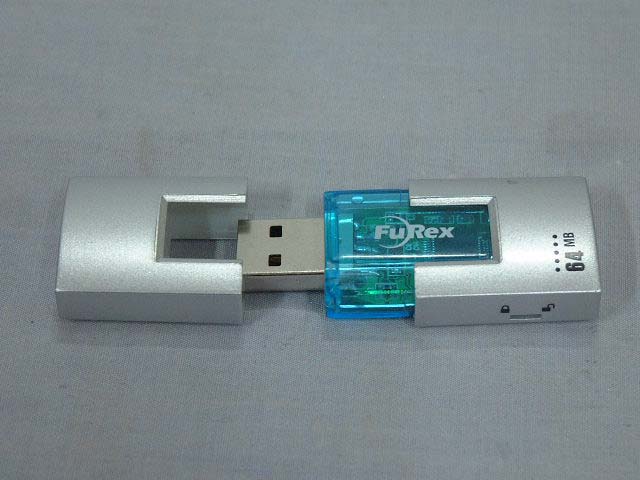
USB Flash Drive - FCC ID QNRDY-USB64B - Dong Yang Semiconductor Co., Ltd
QNRDY-USB64B

USB Flash Drive

Feb 02, 2003

Equipment Class

JBP - Part 15 Class B Computing Device Peripheral