QTG-ZKPI2TBluetooth Keyboard
ZAGG Inc.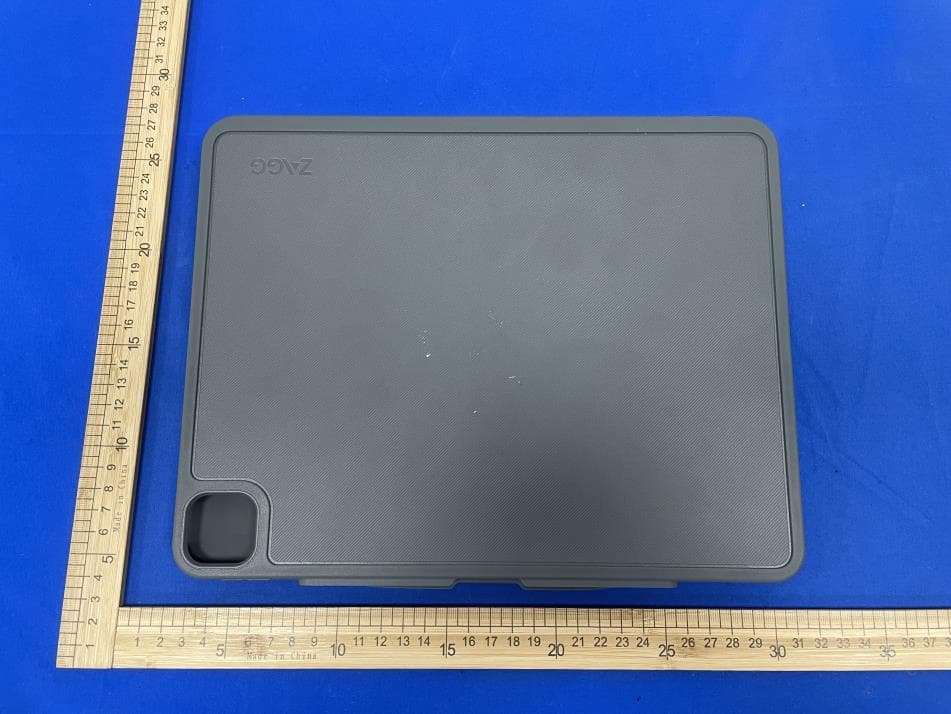
Click to zoom
Application Details
- Equipment Class
- DTS - Digital Transmission System
- Date of Grant
- Feb 17, 2022
- Application Purpose
- Original Equipment
- Date of Application
- Feb 16, 2022
- Equipment Note
- Bluetooth Keyboard
- Frequency Range
- 2402.00000000 - 2480.00000000
- Company
- ZAGG Inc.
- Country
- United States
Documents & Files
Document Text
Text extracted from the exhibit documents filed with the FCC. Open a document above to read the original.
Users Manual
fnct rl 1 2 fnct rl 1 2 fnct rl 1 2 fnct rl 1 2 ZAGG ® and Pro Keys ™ are trademarks of ZAGG Inc. iPad ® is a trademark of Apple Inc., registered in the U.S. and other countries. The Bluetooth ® word mark and logos are registered trademarks owned by Bluetooth SIG, Inc. and any use of such marks by ZAGG Inc is under license. Other trademarks and trade names are those of their respective owners. ZAGG ® et Pro Keys™ sont des marques commerciales de ZAGG Inc. iPad ® est une marque commerciale d’Apple Inc. enregistrée aux États-Unis et dans d’autres pays. La marque de mot et les logos Bluetooth ® sont des marques déposées appartenant à Bluetooth SIG, Inc. et toute utilisation de ces marques par ZAGG Inc est soumise à une licence. Les autres marques et noms commerciaux appartiennent à leurs propriétaires respectifs. Welcome Removing Your Device: Hold on to the top lip of the case and press against the back of the case. Then, grasp the exposed side of your device and lift/pull it away from the cover. Powering On/Off: Press the Power button to turn your Pro Keys keyboard on. A green LED will light briefly. Press and hold the Power button for three seconds to turn your Pro Keys keyboard off. A red LED will flash indicating it has turned off. Pairing the Keyboard with Your Device: Verify your device’s Bluetooth ® settings are on. Press and hold Pro Key’s Bluetooth 1 button for three seconds. A blue LED under the Power button will flash until pairing is complete. Select “ZAGG Pro Keys” from your device’s list of available devices to complete pairing. To pair a second device, press and hold the Bluetooth 2 button for three seconds, and follow the same procedure. Charging Your Keyboard: Plug the Type-C end of the charging cable into the keyboard and the other USB end into your preferred USB charging outlet. A red LED light on the battery key will illuminate to show that your keyboard is charging. When this light turns off, your Pro Keys keyboard is finished charging. Disconnect the charging cable. fn Toggle Trackpad On & Off: TURN ON: Press the Function key (Fn) and the left cursor simultaneously. TURN OFF: Press the Function key and the left cursor again. fn Cómo encender y apagar el panel táctil: ENCENDIDO: Presione la tecla de función (Fn) y el cursor izquierdo al mismo tiempo. APAGADO: Presione la tecla de función y el cursor izquierdo otra vez. fn Activation et désactivation du pavé tactile: ACTIVATION : Appuyez simultanément sur la touche Fonction (Fn) et le curseur gauche. DÉSACTIVATION : Appuyez de nouveau sur la touche Fonction et le curseur gauche. Disconnecting Your Keyboard: First, detach the keyboard from the case. See previous instructions. There are three ways to switch to your onscreen keyboard: 1. Press the Keyboard Hide/Show button. 2. Turn off the Bluetooth connection from your device. 3. Turn the Pro Keys keyboard off. Checking Your Battery Level: To check your Pro Keys’ battery life, press fn + the battery key. The LED light will flash one of the following three ways: • 3 green flashes = 50% or more battery life • 2 yellow flashes = 25-49% battery life • 1 red flash = less than 25% battery life Inserting Your Device: Holding your device in landscape mode with the volume control buttons facing up, press the top half of your device into the case and apply light pressure to snap it snuggly into place. Press the bottom half of your device into the case and check each corner to make sure your device is seated properly. Attaching the Keyboard with Magnetic, Foldable Flap: Attach the case to the keyboard by setting the case in one of the two cradles on the keyboard (above the keys). Place the top of the magnetized, foldable back flap against the top of the back of the case. You’ll feel it magnetically snap into place. This should create a triangular stand at the base of the flap that props up your tablet in the case. Detaching the Case from the Keyboard: Simply pull the magnetized back flap away from the case. For a full instruction manual, please visit zagg.to/instructions. Trouble Shooting If your device doesn’t respond to Pro Keys, there may be a simple explanation. Try the following steps. 1. Restart your device. 2. Turn your Pro Keys off and back on. 3. Forget and re-pair your Pro Keys. 4. If your Pro Keys does not establish or maintain a Bluetooth connection, reset the Bluetooth module by charging your keyboard. 5. If, after charging, your keyboard doesn’t operate correctly, please contact ZAGG Customer Service. If you still experience problems, please contact ZAGG Customer Service. zagg.com/support/contact.php | questions@ zagg.com 1-800-700-ZAGG [9244] 00-1-801-839-3906 for international customers Boas-v indas Como remover o dispositivo: Segure a parte superior da capa e pressione na direção da parte de trás. Em seguida, segure na parte exposta do dispositivo e retire-o da capa. Como ligar/desligar: Prima o botão de energia para ligar o teclado Pro Keys. Um LED verde acender-se-á momentaneamente. Mantenha o botão de energia premido durante três segundos para desligar o teclado Pro Keys. Um LED vermelho piscará a indicar que foi desligado. Como emparelhar o teclado com o dispositivo: Verifique se o dispositivo tem o Bluetooth ® ativado. Prima o botão Bluetooth 1 do Pro Keys durante três segundos. Um LED azul sob o botão de energia piscará até o emparelhamento ser concluído. Selecione "ZAGG Pro Keys" na lista de dispositivos disponíveis do seu dispositivo para concluir o emparelhamento. Para emparelhar um segundo dispositivo, mantenha o botão Bluetooth 2 premido durante três segundos e siga o mesmo procedimento. Como carregar o teclado: Ligue o conetor Tipo-C do cabo de carrega- mento ao teclado e o outro conetor USB à tomada de carregamento USB da sua escolha. Acender-se-á um LED vermelho na tecla da bateria para indicar que o teclado está a carregar. Quando esta luz se apagar, o teclado Pro Keys está carregado. Desligue o cabo de carregamento. Como desligar o teclado do disposit…
Text truncated - open the document above for the full version.
Cover Letter(s)
ZAGG Inc. 2022.02.15 Eurofins Electrical and Electronic Testing NA, Inc. 914 W. Patapsco Avenue Baltimore, MD 21230 USA RE: LETTER OF AGENT AUTHORIZATION EUT NAME: Bluetooth Keyboard Trademark: ZAGG MODEL : ZKB129FTB34 FCC ID: QTG-ZKPI2T To Whom It May Concern: We, the undersigned, hereby authorize Shenzhen BCTC Testing Co., Ltd to act on our behalf in all matters relating to application for equipment authorization, including the signing of all documents relating to these matters. We also hereby certify that no party to the application authorized hereunder is subject to the denial of benefits, including FCC benefits, pursuant to Section 5301 of the Anti-Drug Abuse Act of 1988, 21 U.S.C.853(a). This agreement expires one year from the current date. Sincerely, Client’s signature: Client’s name / title : Dan Oakeson / Director of Product Development Contact information / address: 910 West Legacy Center Way, Midvale, Utah 84047,USA.
External Photos
External Photos
ID Label/Location Info
Label location This device complies with part 15 of the FCC Rules. Operation is subject to the following two conditions: (1) This device may not cause harmful interference, and (2) this device must accept any interference received, including interference that may cause undesired operation.
Internal Photos
Internal Photos Antenna
RF Exposure Info
FCC ID: QTG-ZKPI2T RF exposure evaluation §2.1093 Radiofrequency radiation exposure evaluation: Portable Devices. According to§15.247(i) and§1.1307b(1), systems operating under the provisions of this section shall be operated in a manner that ensures that the public is not exposed to radio frequency energy level in excess of the commission’s guidance. The 1-g SAR test exclusion thresholds for 100 MHz to 6 GHz at test separation distances ≤ 50 mm are determined by: [(max. power of channel, including tune-up tolerance, mW) / (min. test separation distance, mm)] · [√f(GHz)] ≤ 3.0 for 1-g SAR, where f(GHz) is the RF channel transmit frequency in GHz Power and distance are rounded to the nearest mW and mm before calculation When the minimum test separation distance is < 5 mm, a distance of 5 mm according is applied to determine SAR test exclusion. The result is rounded to one decimal place for comparison BLE Modulation Frequency (GHz) Max. Power (dBm) Tune up Power (dBm) Max. Tune up Power (dBm) Max. Tune up Power (mW) Test distance (mm) Result exclusion thresholds for 1-g SAR GFSK(2M) 2.402 0.56 0±1 1 1.26 5 0.391 3.0
Test Report
No.:BCTC/RF-EMC-005 Page: 1 of 59 Edition:A.4 TEST REPORT Shenzhen BCTC Testing Co., Ltd. Report No.: BCTC2201907052E Applicant: ZAGG Inc. Product Name: Bluetooth Keyboard Model/Type Ref.: ZKB129FTB34 Tested Date: 2022-01-19 to 2022-01-27 Issued Date: 2022-01-27 Report No.: BCTC2201907052E No.:BCTC/RF-EMC-005 Page: 2 of 59 Edition:A.4 FCC ID: QTG-ZKPI2T The test report is effective only with both signature and specialized stamp. This result(s) shown in this report refer only to the sample(s) tested. Without written approval of Shenzhen BCTC Testing Co., Ltd, this report can’t be reproduced except in full. The tested sample(s) and the sample information are provided by the client. Product Name: Bluetooth Keyboard Trademark: ZAGG Model/Type Ref.: ZKB129FTB34 Prepared For: ZAGG Inc. Address: 910 West Legacy Center Way, Midvale, Utah 84047, USA. Manufacturer: ZAGG Inc. Address: 910 West Legacy Center Way, Midvale, Utah 84047, USA. Prepared By: Shenzhen BCTC Testing Co., Ltd. Address: 1-2/F., Building B, Pengzhou Industrial Park, No.158, Fuyuan 1st Road, Tangwei, Fuhai Subdistrict, Bao'an District, Shenzhen, Guangdong, China Sample Received Date: 2022-01-19 Sample tested Date: 2022-01-19 to 2022-01-27 Issue Date: 2022-01-27 Report No.: BCTC2201907052E Test Standards: FCC Part15.247 ANSI C63.10-2013 Test Results: PASS Remark: This is Bluetooth BLE radio test report. Tested by: Approved by: Brave Zeng/ Project Handler Zero Zhou/Reviewer Report No.: BCTC2201907052E No.:BCTC/RF-EMC-005 Page: 3 of 59 Edition:A.4 Table Of Content Test Report Declaration Page 1. Version .................................................................................................................. 5 2. Test Summary ....................................................................................................... 6 3. Measurement Uncertainty ..................................................................................... 7 4. Product Information And Test Setup ..................................................................... 8 4.1 Product Information ............................................................................................... 8 4.2 Test Setup Configuration ...................................................................................... 8 4.3 Support Equipment ............................................................................................... 8 4.4 Channel List .......................................................................................................... 9 4.5 Test Mode ............................................................................................................. 9 4.6 Table Of Parameters Of Text Software Setting ..................................................... 9 4.7 Copy of marking plate ......................................................................................... 10 5. Test Facility And Test Instrument Used ............................................................... 11 5.1 Test Facility ......................................................................................................... 11 5.2 Test Instrument Used .......................................................................................... 11 6. Conducted Emissions .......................................................................................... 13 6.1 Block Diagram Of Test Setup .............................................................................. 13 6.2 Limit .................................................................................................................... 13 6.3 Test Procedure ................................................................................................... 13 6.4 EUT Operating Conditions .................................................................................. 14 6.5 Test Result .......................................................................................................... 15 7. Radiated Emissions ............................................................................................. 17 7.1 Block Diagram Of Test Setup .............................................................................. 17 7.2 Limit .................................................................................................................... 18 7.3 Test Procedure ................................................................................................... 19 7.4 EUT Operating Conditions .................................................................................. 20 7.5 Test Result .......................................................................................................... 21 8. Radiated Band Emission Measurement And Restricted Bands Of Operation ..... 25 8.1 Block Diagram Of Test Setup .............................................................................. 25 8.2 Limit .................................................................................................................... 25 8.3 Test Procedure ................................................................................................... 26 8.4 EUT operating Conditions ................................................................................... 26 8.5 Test Result .......................................................................................................... 27 9. Power Spectral Density Test ............................................................................... 28 9.1 Block Diagram Of Test Setup .............................................................................. 28 9.2 Limit .................................................................................................................... 28 9.3 Test Procedure ................................................................................................... 28 9.4 EUT Operating Conditions .................................................................................. 28 9.5 Test Result ..........…
Text truncated - open the document above for the full version.
Test Setup Photos
EUT Test Setup Photographs Conducted emissions Radiated Measurement Photos
Contact Information
Applicant
Dan Oakeson(Director of Product Development)
Technical Contact
Shenzhen BCTC Testing Co., Ltd.Alan Mei
[email protected]+8675536882589
1-2/F., Building B, Pengzhou Industrial Park, · Bao'an District, Shenzhen, Guangdong · China
Test Firm
Shenzhen BCTC Testing Co., Ltd.Sally He
[email protected]15999690624
Technical Specifications
| # | Rule Parts | Frequency Range | Power Output |
|---|---|---|---|
| 1 | 15C | 2.40 GHz - 2.48 GHz | 1.14 mW |
Other Applications from ZAGG Inc.

QTG-ZKPXN
Jul 23, 2026Bluetooth Keyboard
Equipment Class
DTS - Digital Transmission System
QTG-ZWSAPUNI58-2
Sep 10, 2024Pro stylus 2
Equipment Class
DTS - Digital Transmission System
QTG-ZKPIB13
Sep 04, 2024Pro Keys 2
Equipment Class
DTS - Digital Transmission System
QTG-ZWCIHSTK
Jul 21, 2024Magnetic Wireless Charger
Equipment Class
DCD - Part 15 Low Power Transmitter Below 1705 kHz
QTG-ZMIHSTK
Jul 13, 2024Mouse
Equipment Class
DTS - Digital Transmission System