QTGBKOiFrogz FreeRein Reflect Earbud
ZAGG Inc.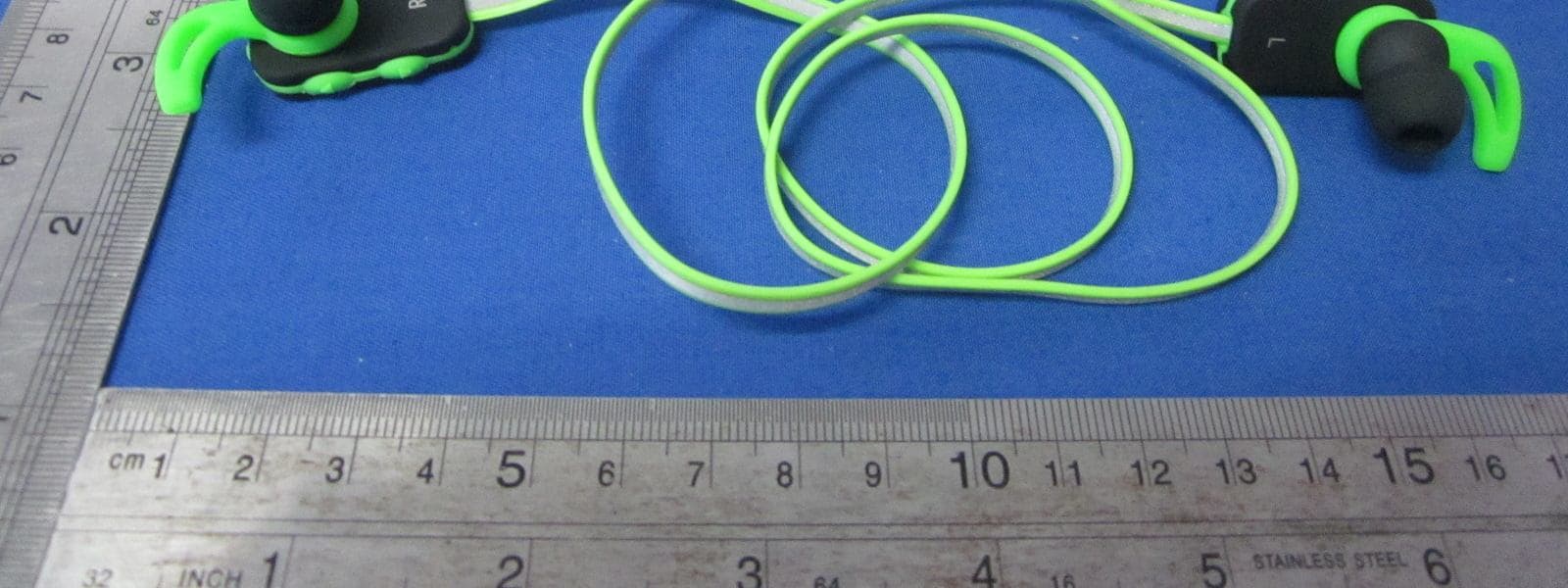
Click to zoom
Application Details
- Equipment Class
- DXX - Part 15 Low Power Communication Device Transmitter
- Date of Grant
- Mar 05, 2015
- Application Purpose
- Original Equipment
- Date of Application
- Mar 05, 2015
- Equipment Note
- iFrogz FreeRein Reflect Earbud
- Frequency Range
- 2402.00000000 - 2480.00000000
- Company
- ZAGG Inc.
- Country
- United States
Documents & Files
Document Text
Text extracted from the exhibit documents filed with the FCC. Open a document above to read the original.
Users Manual
USER MANUAL Your iFrogz FreeRein Reflect earbuds come with a one-year manufacturer’s warranty. In order to activate the warranty, you must register your FreeRein Reflect earbuds as well as keep your purchase receipt. If you purchased your earbuds from iFrogz.com, iFrogz® has already registered them and has a copy of your proof of purchase. iFrogz is a ZAGG Inc brand. NEED MORE HELP? PLEASE SEE OUR FAQ SECTION AT: www.ifrogz.com/faq Warranty Registration Introduction The FreeRein Reflect wireless Bluetooth® earbuds are designed to enhance your active lifestyle. Their angled tips slide comfortably into your ears while soft, silicone sport wings secure them in place no matter your activity. Simple built-in controls, and a convenient microphone, are covered in silicone to protect against moisture and to give you an easy way to control your music and calls. And with a battery that lasts up to 5.5 hours, you can keep your tunes going even through the long workouts. Read these instructions to learn more about your FreeRein Reflect earbuds. Keep these instructions for future reference. Your FreeRein Reflect earbuds are ready to go right out of the box. However, you may wish to charge them fully before using them. To charge your earbuds: 1. Lift the protective cover off the charging port on your FreeRein Reflect’s right earbud. 2. While holding the cover back, connect the included micro USB cable to the charging port. 3. Connect the USB end of the charging cable to any USB power adapter. 4. The LED on the right earbud will light red to indicate your earbuds are charging. When this light turns blue your FreeRein Reflect earbuds are fully charged. 5. Disconnect the charging cable and enjoy your music anywhere, wirelessly. When your FreeRein Reflect earbuds get low on power, the LED will begin flashing red and a high pitched tone will sound. Charging Your Earbuds 4. Your device’s Bluetooth menu will display “iFrogz FreeRein Reflect Earbuds” as an available device. Select this option to complete pairing. 5. Enjoy your music and calls through all your activities without bothersome wires getting in the way. While playing, the LED will flash blue every second. 6. When you’re ready to turn your earbuds off, press and hold the power button for three seconds. A tone will sound and the LED will light red briefly, indicating your earbuds have turned off. Your FreeRein earbuds are designed to make managing your music and calls during all your activities convenient and easy. With only two buttons to control everything, you won’t have to waste time searching awkward controls for the right function. Controlling Your Music and Calls Pairing your FreeRein earbuds is quick and easy. They should only need to be paired once, but if your Bluetooth connection is ever interrupted simply repeat these steps. 1. Make sure your device’s Bluetooth function is on. 2. Turn your FreeRein earbuds on by pressing and holding the power button. A blue LED will light and a tone will sound indicating your earbuds are on. 3. Press and hold the power button for two seconds, or until you hear a double tone, to enter pairing mode. The LED will flash red and blue until pairing is complete. If you have paired your FreeRein earbuds before, they will automatically enter pairing mode when turned on. If your earbuds don’t pair within two minutes they will enter standby mode; press and hold the power button again to resume pairing. If your earbuds sit idle for five minutes, a tone will sound and they will power off. Power and Pairing Play/Pause Press the power button quickly to play your music. While your music is playing, press the power button again to pause, and once more to resume playing your music. Track Forward Press the down button once quickly. Track Back Press the up button quickly. Answer a Call Press the power button (the same motion as playing/pausing your music) when you are receiving a call. Functionality End a Call During a call, press the power button. Volume Up Press and hold the up button on the right earbud until your desired volume is reached. The earbuds will sound a high pitched tone when you have reached their maximum volume. Volume Down Press and hold the down button on the right earbud until your desired volume is reached. Your earbuds will sound a low pitched tone when you have reached their minimum volume. Power/Play/Pause Answer/End Call Volume Up / Track Back Volume Down / Track Forward Microphone Product Functionality For more help please see our FAQ section at: www.ifrogz.com/faq To reach a trained customer service representative, please use one of the following: ifrogz.com/support/contact.php | [email protected] 1-855-443-FROG [7649] | 00-1-801-823-3411 for international customers For unparalleled scratch protection for your devices, we recommend ZAGG’s InvisibleShield®. ©2005 - 2015 ZAGG Inc All Rights Reserved. NASDAQ: ZAGG | MADE IN CHINA iFrogz™, ZAGG®, InvisibleShield®, and FreeRein® are trademarks or registered trademarks of ZAGG Inc. The Bluetooth word mark and logos are registered trademarks of Bluetooth SIG, Inc. If your device does not respond to your FreeRein earbuds there may be a simple explanation such as a dead battery or an unsuccessful pairing. Please use the following to help troubleshoot your situation. If none of the following solve your issue, then please contact ZAGG Customer Service and one of our trained professionals will be happy to assist you. 1. Restart your device. 2. Turn your earbuds off and then back on. You should see the LED illuminate briefly; if not, charge your FreeRein earbuds. 3. After charging, turn your earbuds on. If the LED does not illuminate, and your earbuds don’t pair and/or operate correctly, please contact ZAGG’s customer service. 4. If your earbuds can’t establish or maintain a Bluetooth connection, reset the Bluetooth module by charging them. 5. Have your device forget your FreeRein earbuds, and then re-pair them. See the Pairing section to review how to pair …
Text truncated - open the document above for the full version.
Cover Letter(s)
ZAGG INC 3855 South 500 West , Suite Q, Salt Lake City, UT 84115 USA Confidentiality Letter To: Federal Communications Commission Authorization and Evaluation Division 7435 Oakland Mills Road Columbia, MD Subject: Permanent Confidentiality Request for FCC ID: QTGBKO Product: iFrogz FreeRein Reflect Earbud Model: IFFRRE-BK0, IFFRRE-PK0, IFFRRE-GR0, IFFRRE-RD0, IFFRRE-BL0, IFFRRE-PU0, IFFRRE-OR0 We hereby request confidential treatment of information accompanying this application as outlined below: Block Diagram Schematics Operational Description The above materials contain trade secrets and proprietary information not customarily released to the public. The public disclosure of these materials may be harmful to the applicant and provide unjustified benefits to its competitors. The applicant understands that pursuant to Section 0.457 & 0.459 of the Rules, disclosure of this application and all accompanying documentation will not be made before the date of the Grant for this application. Sincerely, signature : name / title: Paul Faerber / Director of Product Development address: 3855 South 500 West , Suite Q, Salt Lake City, UT 84115 USA
ID Label/Location Info
M/N: IFFRRE-BK0 FCC ID: QTGBKO Label location
Internal Photos
Antenna Location
Test Report
FCC ID: QTGBKO Keyway Testing Technology Co., Ltd. Report No. 15KWE021758F Page 1 of 26 FCC TEST REPORT(Bluetooth) for ZAGG INC iFrogz FreeRein Reflect Earbud Model Number: IFFRRE-BK0, IFFRRE-PK0, IFFRRE-GR0, IFFRRE-RD0, IFFRRE-BL0, IFFRRE-PU0, IFFRRE-OR0 FCC ID: QTGBKO Prepared for : ZAGG INC Address : 3855 South 500 West Salt Lake City, UT 84115 USA Prepared by : Keyway Testing Technology Co., Ltd. Address : Buliding 1, Baishun Industrial Zone, Zhangmutou Town, Dongguan, Guangdong, China Tel: 86-769-8718 2258 Fax: 86-769-8718 1058 Report No. : 15KWE021758F Date of Test : Feb. 24~28, 2015 Date of Report : Feb. 28, 2015 FCC ID: QTGBKO Keyway Testing Technology Co., Ltd. Report No. 15KWE021758F Page 2 of 26 TABLE OF CONTENTS Test Report Declaration Page 1. TEST SUMMARY ........................................................................................................................ 4 2. GENERAL PRODUCT INFORMATION........................................................................................ 4 2.1. Product Function .................................................................................................................. 4 2.2. Description of Device (EUT) ................................................................................................. 4 2.3. Difference between Model Numbers..................................................................................... 4 2.4. Independent Operation Modes ............................................................................................. 4 2.5. Test Supporting System ....................................................................................................... 4 2.6. Test Facilities ....................................................................................................................... 5 2.7. List of Test and Measurement Instruments ........................................................................... 6 3. TEST SET-UP AND OPERATION MODES ................................................................................. 7 3.1. Principle of Configuration Selection ...................................................................................... 7 3.2. Block Diagram of Test Set-up ............................................................................................... 7 3.3. Test Operation Mode and Test Software .............................................................................. 7 3.4. Special Accessories and Auxiliary Equipment ...................................................................... 7 3.5. Countermeasures to Achieve EMC Compliance ................................................................... 7 3.6. Test Environment: ................................................................................................................ 7 4. EMISSION TEST RESULTS ........................................................................................................ 8 4.1. Conducted Emission at the Mains Terminals Test ................................................................ 8 4.2. Radiated Emission Test...................................................................................................... 11 5. 20DB OCCUPY BANDWIDTH ................................................................................................... 18 5.1. Limits.................................................................................................................................. 18 5.2. Test setup .......................................................................................................................... 18 6. BAND EDGE COMPLIANCE TEST ........................................................................................... 20 6.1. Limits.................................................................................................................................. 20 6.2. Test setup .......................................................................................................................... 20 7. ANTENNA REQUIREMENTS .................................................................................................... 21 7.1. Limits.................................................................................................................................. 21 7.2. Result ................................................................................................................................. 21 8. PHOTOGRAPHS OF TEST SET-UP ......................................................................................... 22 9. PHOTOGRAPHS OF THE EUT ................................................................................................. 24 FCC ID: QTGBKO Keyway Testing Technology Co., Ltd. Report No. 15KWE021758F Page 3 of 26 Keyway Testing Technology Co., Ltd. Applicant: Address: ZAGG INC 3855 South 500 West Salt Lake City, UT 84115 USA Manufacturer: Address: Fine Acoustic Electronic Factory No.139 Sanjiang industrial Area, Hengli Town, Dong Guan City, Guangdong, China E.U.T: iFrogz FreeRein Reflect Earbud Model Number: IFFRRE-BK0, IFFRRE-PK0, IFFRRE-GR0, IFFRRE-RD0, IFFRRE-BL0, IFFRRE-PU0, IFFRRE-OR0 Trade Name: Serial No.: ------ Date of Receipt: Feb. 24, 2015 Date of Test: Feb. 24~28, 2015 Test Specification: FCC Part 15, Subpart C Section 15.249: 2014 ANSI C63.4:2009 Test Result: The equipment under test was found to be compliance with the requirements of the standards applied. Issue Date: Feb. 29, 2015 Tested by: Reviewed by: Approved by: William Huang / Engineer Andy Gao / Supervisor Jade Yang/ Supervisor Other Aspects: None. Abbreviations: OK/P=passed fail/F=failed n.a/N=not applicable E.U.T=equipment under tested This test report is based on a single evaluation of one sample of above mentioned products. It is not permitted to be duplicated in extracts without written approval of Keyway Testing Technology Co., Ltd. FCC ID: QTGBKO Keyway Testing Technology Co., Ltd. Report No. 15KWE021758F Page 4 …
Text truncated - open the document above for the full version.
Test Setup Photos
Radiated Emission Conducted Emission
Contact Information
Applicant
Dan Oakeson(Director of Product Development)
Test Firm
Keyway Testing Technology Co., Ltd.Jade Yang
Technical Specifications
| # | Rule Parts | Frequency Range | Power Output |
|---|---|---|---|
| 1 | 15C | 2.40 GHz - 2.48 GHz | - |
Other Applications from ZAGG Inc.

QTG-ZKPXN
Jul 23, 2026Bluetooth Keyboard
Equipment Class
DTS - Digital Transmission System
QTG-ZWSAPUNI58-2
Sep 10, 2024Pro stylus 2
Equipment Class
DTS - Digital Transmission System
QTG-ZKPIB13
Sep 04, 2024Pro Keys 2
Equipment Class
DTS - Digital Transmission System
QTG-ZWCIHSTK
Jul 21, 2024Magnetic Wireless Charger
Equipment Class
DCD - Part 15 Low Power Transmitter Below 1705 kHz
QTG-ZMIHSTK
Jul 13, 2024Mouse
Equipment Class
DTS - Digital Transmission System