QVDDNB1660Tablet PC
Cytas Co., Ltd.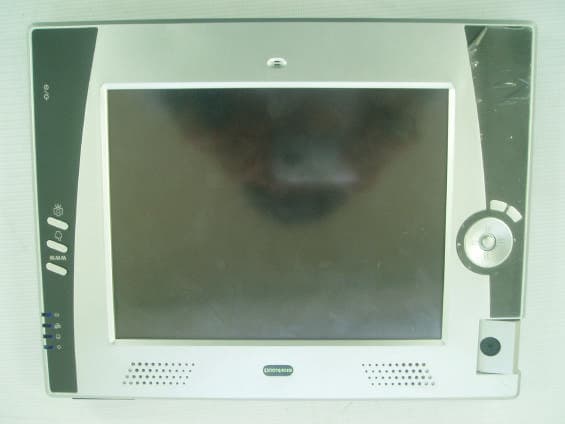
Click to zoom
Application Details
- Equipment Class
- JBC - Part 15 Class B Computing Device/Personal Computer
- Date of Grant
- Feb 04, 2003
- Application Purpose
- Original Equipment
- Date of Application
- Feb 04, 2003
- Equipment Note
- Tablet PC
- Company
- Cytas Co., Ltd.
- Country
- South Korea
Documents & Files
Document Text
Text extracted from the exhibit documents filed with the FCC. Open a document above to read the original.
Users Manual
User’s Manual Trademarks StepUp, DocuNote, the StepUp logo, and other StepUp trademarks are the property of StepUp Computing, LLC and may be registered in the United States and/or other countries. Microsoft, Windows, and the Microsoft logo are trademarks or registered trademarks of Microsoft Corporation in the United States and/or other countries. Crusoe is a trademark of Transmeta Corporation in the United States and/or other countries. Other product names, logos, designs, or titles mentioned within this manual may be trademarks of their respective owners. Disclaimer STEPUP COMPUTING, LLC MAKES NO WARRANTIES, EITHER EXPRESS OR IMPLIED, REGARDING THIS MANUAL AND THE INFORMATION CONTAINED HEREIN. STEPUP COMPUTING, LLC HEREBY EXPRESSLY DISCLAIMS ANY IMPLIED WARRANTIES OF MERCHANTABILITY OR FITNESS FOR ANY PARTICULAR PURPOSE AND UNDER NO CIRCUMSTANCES SHALL STEPUP COMPUTING, LLC BE LIABLE FOR ANY INCIDENTAL, CONSEQUENTIAL, OR SPECIAL DAMAGES, WHETHER BASED ON TORT, CONTACT, OR OTHERWISE, ARISING OUT OF OR IN CONNECTION WITH THIS MANUAL, INFORMATION CONTAINED HEREIN, OR THE USE THEREOF. Copyright © 2002 StepUp Computing, LLC. All rights reserved. This manual may not be copied, photocopied, reproduced, translated, or converted to any electronic form in whole or in part without prior written consent of StepUp Computing, LLC. StepUp Computing, LLC reserves the right to make any modification to this manual or the information contained herein at any time without notice. StepUp Computing, LLC assumes no responsibility for errors or omissions in this manual. For the latest modifications and more information, visit our website at http://www.docunote.com. Part Number: GTP-M0211 Version 1.0 First Edition: November 2002 Printed in Korea StepUp Computing, LLC. 1440 N. Harbor Blvd., Suite 305 Fullerton, CA 92835, U.S.A. i Contents Contents........................................................i Notice to Users..............................................1 Safety Precautions...................................................1 Notice of EMC Compliance.........................................2 Safety Notices for the Power Cord...............................3 Disposal of Lithium Polymer Battery............................3 Introduction.................................................5 Features.................................................................5 High-Performance Computing Power........................5 Mobile Productivity...............................................5 Wireless Mobility..................................................6 Pen Computing....................................................6 Standard Operating Systems Compatibility...............7 Unpacking Your DocuNote.........................................7 Understanding Your DocuNote.......................9 Two Ways to Use Your DocuNote................................9 Stand-alone Tablet PC On-the-Go............................9 With an Optional Carrying Case and Keyboard...........9 With an Optional Carrying Case and Keyboard..........10 Locating Controls and Connectors..............................10 Locating Controls and Connectors..............................11 LED Indicators....................................................13 User’s Manual ii Contents Buttons.............................................................13 Connectors.........................................................14 Auxiliary Devices.................................................14 Using the Battery....................................................15 Charging the Battery............................................15 Installing the Battery...........................................16 Managing the Battery...........................................16 Connecting to a Power Source...................................17 Using an AC Adapter as a Power Source..................18 Using a Battery as a Power Source.........................18 Starting Up Your DocuNote.......................................18 Shutting Down Your DocuNote...................................19 Installing Operating System........................21 How to Install Operating System................................21 Drivers & Utilities....................................................22 Installing Device Drivers.......................................23 Installing Utilities................................................26 Using Utility Software..................................29 G2 Video Capture....................................................29 Virtual Keyboard.....................................................31 PenOffice...............................................................32 Pivot.....................................................................33 Customizing Your DocuNote.........................35 Using LCD Touch Screen...........................................35 Basics...............................................................35 Calibration.........................................................36 Customizing E-Key Settings......................................36 Customizing E-Key Settings......................................37 User’s Manual www.docunote.com iii Power management.................................................38 Upgrading Your DocuNote.........................................40 Memory Upgrade.................................................40 HDD Upgrade.....................................................40 Advanced Options...................................................42 CMOS Setup.......................................................42 Setting up System Password.................................43 CMOS Battery Replacement...................................44 Getting Help................................................45 Support Options......................................................45 Returning for Repair Service.....................................45 Appendices.................................................47 Freque…
Text truncated - open the document above for the full version.
Test Report
82-1, JEIL-RI, YANGJI-MYUN, YONGIN-CITY, KYUNGGI-DO, KOREA TEL: 82 31 336 9919 FAX : 82 31 336 4767 This test report shall not be reproduced except in full, Without the written approval. Report No.: EMC-FCC-0056 Page : 1 of 15 EMI TEST REPORT Test report No. : EMC- FCC- 0056 Type of equipment : Tablet PC Model No. : DocuNote B1660 FCC ID. : QVDDNB1660 Applicant : Cytas Co., Ltd. Test standards : FCC part 15 subpart B, Class B Test Procedure and Items : - AC Power Line Conducted Emissions Measurement: ANSI C63.4-1992 - Radiated Emissions Measurement : ANSI C63.4-1992 Test result : Complied The above equipment was tested by EMC compliance Testing Laboratory for compliance with the requirements of FCC Rules and Regulations. The results of testing in this report apply to the product/system which was tested only. Other similar equipment will not necessarily produce the same results due to production tolerance and measurement uncertainties. Date of test: 2003.1.28~1.28 Issued date: 2003 . 1. 29 Tested by : Approved by: Kim, Jung-Soo Chung, Min-Seok 82-1, JEIL-RI, YANGJI-MYUN, YONGIN-CITY, KYUNGGI-DO, KOREA TEL: 82 31 336 9919 FAX : 82 31 336 4767 This test report shall not be reproduced except in full, Without the written approval. Report No.: EMC-FCC-0056 Page : 2 of 15 Contents 1. Client information 2. Laboratory information 3. Test system configuration 3.1 Operation environment 3.2 Measurement Uncertainty 3.3 Sample calculation 4. Descriptions of EUT 4.1 Product description 4.2 Peripherals 4.3 Used cables 4.4 Operating conditions 4.6 EUT test configuration 5. Summary of test results 5.1 Modification to the EUT 5.2 Standards & results 6. Test results 6.1 Conducted emission 6.1.1 Measurement procedure 6.1.2 Used equipments 6.1.3 Measurement uncertainty 6.1.4 Test data 6.2 Radiated emission 6.2.1 Measurement procedure 6.2.2 Used equipments 6.2.3 Measurement uncertainty 6.2.4 Test data 7. Test photographs Conducted emission Radiated emission 82-1, JEIL-RI, YANGJI-MYUN, YONGIN-CITY, KYUNGGI-DO, KOREA TEL: 82 31 336 9919 FAX : 82 31 336 4767 This test report shall not be reproduced except in full, Without the written approval. Report No.: EMC-FCC-0056 Page : 3 of 15 1. Client information Applicant: Cytas Co., Ltd. Address: Dawoo Bldg., 108-11, Bangi-dong, Songpa-gu, Seoul, Korea Telephone number: 82-2-417-8031 Facsimile number: 82-2-417-8032 President: Koo-Hyun Cho Manufacture: Cytas Co., Ltd. Address: Dawoo Bldg., 108-11, Bangi-dong, Songpa-gu, Seoul, Korea Telephone number: 82-2-417-8031 Facsimile number: 82-2-417-8032 82-1, JEIL-RI, YANGJI-MYUN, YONGIN-CITY, KYUNGGI-DO, KOREA TEL: 82 31 336 9919 FAX : 82 31 336 4767 This test report shall not be reproduced except in full, Without the written approval. Report No.: EMC-FCC-0056 Page : 4 of 15 2. Laboratory information Address EMC compliance Ltd. 82-1, JEIL-RI, YANGJI-MYUN, YOUNGIN-CITY, KYUNGGI-DO, KOREA Telephone Number : 82 31 336 9919 Facsimile Number : 82 31 336 4767 FCC Filing No. : 793334 SITE MAP EMC compliance Yongin city 82-1, JEIL-RI, YANGJI-MYUN, YONGIN-CITY, KYUNGGI-DO, KOREA TEL: 82 31 336 9919 FAX : 82 31 336 4767 This test report shall not be reproduced except in full, Without the written approval. Report No.: EMC-FCC-0056 Page : 5 of 15 3. TEST SYSTEM CONFIGURATION 3.1 Operation Environment Temperature Humidity Pressure OATS : 3°C 32 % 1014 hPa Shielded room : 19 °C 30 % 1014 hPa Test site These testing were performed following locations; Shielded room: Conducted emission, OATS (10m) : Radiated emission 3.2 Measurement Uncertainty All measurements involve certain levels of uncertainties, especially in field of EMI. The factors contributing to uncertainties are test receiver, Cable Loss, antenna factor calibration, Antenna directivity, antenna factor Variation with height, antenna phase center variation, antenna Frequency interpolation, measurement distance variation, Site imperfection, mismatching, and system repeatability. Based on NIS 80, 81, the measurement uncertainty level with a 95% confidence level was applied. 82-1, JEIL-RI, YANGJI-MYUN, YONGIN-CITY, KYUNGGI-DO, KOREA TEL: 82 31 336 9919 FAX : 82 31 336 4767 This test report shall not be reproduced except in full, Without the written approval. Report No.: EMC-FCC-0056 Page : 6 of 15 3.3 Sample calculation Conducted emission The field strength is calculated by adding the LISN factor, cable loss tr the measured reading. The sample calculation is as follows : FS = MR + LF + CL MR = Meter Reading LF = LISN Factor CL = Cable Loss If MR is 30dB, LISN Factor 1dB, CL 1dB The result (MR) is 30 + 1 + 1 = 32dBuV Radiated emission The field strength is calculated adding the antenna Factor, cable loss and, Antenna pad adding, subtracting the amplifier gain from the measured reading. The sample calculation is as follows : FS = MR + AF + CL + AT -AG MR = Meter Reading AF = Antenna Factor CL = Cable Loss AP = Antenna Pad AG=Amplifier Gain If MR is 30dB, AF 12dB, CL 5dB, AP 10dB, AG 35dB The result (MR) is 30 + 12 + 5 + 10 –35 = 22dBuV/m 82-1, JEIL-RI, YANGJI-MYUN, YONGIN-CITY, KYUNGGI-DO, KOREA TEL: 82 31 336 9919 FAX : 82 31 336 4767 This test report shall not be reproduced except in full, Without the written approval. Report No.: EMC-FCC-0056 Page : 7 of 15 4. Description of EUT 4.1 Product Description Manufactured by: Cytas Co., Ltd. Address: Dawoo Bldg., 108-11, Bangi-dong, Songpa-gu, Seoul, Korea Type of equipment: Tablet PC Model: DocuNote B1660 Serial Number: N/A Features: - Processor : 667MHz Transmeta Crusoe TMS5600 - Memory : 256MB SDRAM - HDD : 20GB 2.5” HDD Ultra ATA - Display : 8.4” TFT LCD (800X600) - Dimension/Weight : 253(W)X26(H)X187(D)mm / 1kg 4.2 Peripherals Description Model / Part # Serial Number Manufacture MOUSE OMGB30A N/A SAMSUNG HEADPHONE N/A N/A JESEN FLASH MEMORY 4MB N/A Micron 4.3 Used cables EUT Port Type Shield (Y/N) Length (m) Connection point 1 Connection point 2 SPK OUT Jack N 2.0 HEADPHONE USB USB Y 1.8 MOUSE LAN RJ-45 N 10.0 LAN HUB USB USB Y 2.0 CABLE…
Text truncated - open the document above for the full version.
Test Setup Photos
Test setup Conducted emission Radiated emission
Contact Information
Applicant
Koo Hyun Cho(President)
Test Firm
EMC Compliance LTDMin Seok Chung
Technical Specifications
| # | Rule Parts | Frequency Range | Power Output |
|---|---|---|---|
| 1 | 15B | - | - |