QXTYB-S2-C20VDRPERSONAL COMPUTER
Safer Computer Co., Ltd.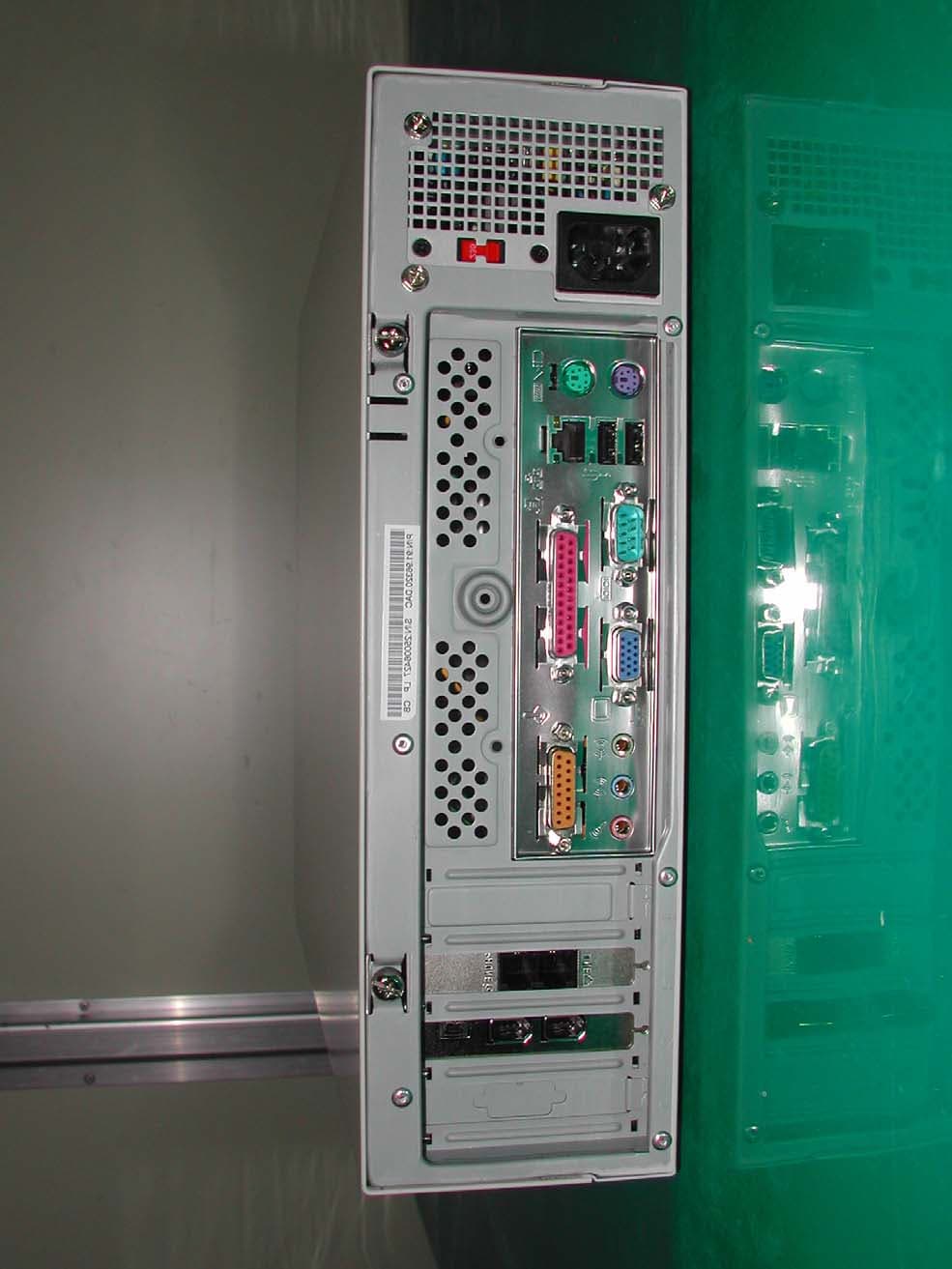
Click to zoom
Application Details
- Equipment Class
- JBC - Part 15 Class B Computing Device/Personal Computer
- Date of Grant
- Jun 25, 2003
- Application Purpose
- Original Equipment
- Date of Application
- Jun 25, 2003
- Equipment Note
- PERSONAL COMPUTER
- Company
- Safer Computer Co., Ltd.
- Country
- South Korea
Documents & Files
Document Text
Text extracted from the exhibit documents filed with the FCC. Open a document above to read the original.
Users Manual
Personal Computer User’s Manual (M/N: YB-S2-C20VDR) Safer Computer Co., Ltd. 11FL., Daeryung Techno Town III, 448, Gasan-Dong, Kumchun-Gu, Seoul, Korea Tel. 82-2-2107-3866 Fax. 82-2-2107-3877 FCC NOTICE THIS DEVICE COMPLIES WITH PART 15 OF THE FCC FULES. OPERATION IS SUBJECT TO THE FOLLOWING TWO CONDITION: (1) THIS DEVICE MAY NOT CAUSE HARMFUL INTERFERENCE, AND (2) THIS DEVICE MUST ACCEPT ANY INTERFERENCE RECEIVED, INCLUDING INTERFERENCE THAT MAY CAUSE UNDERSIRED OPERATION. This equipment has been tested and found to comply with the limits for a Class B digital device, pursuant to part 15 of the FCC Rules. These limits are designed to provide reasonable protection against harmful interference in a residential installation. This equipment generates, uses and can radiate radio frequency energy and, if not installed and used in accordance with the instructions, may cause harmful interference to radio communication. However, there is no guarantee that interference will not occur in a particular installation. If this equipment does cause harmful interference to radio or television reception, which can be determined by turning the equipment off and on, the user is encouraged to try to correct the interference by one or more of the following measures : - Reorient or relocate the receiving antenna. - Increase the separation between the equipment and receiver. - Connect the equipment into an outlet on a circuit difference from that to which the receiver is connected. - Consult the dealer of an experienced radio/TV technician for help. NOTE : The manufacturer is not responsible for any radio or TV interference caused by unauthorized modifications to this equipment. Such modifications could void the user’s authority to operate the equipment. Product Information Pointing Device Components Front side A=CD ROM, B=FDD, C=Power LED, D=power button, E= HDD LED, F=Reset button Rear side G=Power supply jack, H=Power Supply, I=Keyboard port, J=USB port, K=Serial port, L=Mouse port, M=Printer port, N=VGA card, O=Sound card, P=LAN card, Q=Keyboard, R=Mouse How to install 1. Unpack the carton box and check the items inside. 2. Connect the power cable, keyboard jack, mouse jack, and monitor cable to the counterparts in the rear side. 3. Input the serial numbers(25digits) attached on the top of the left side in the window asking the serial numbers, after powering on and booting. 4. Fit to your individual requirement, if any, then it’s ready to use. XP Installation ; 1. How to install Window XP 1) Press Delete key many times when the computer is powered on. Then it returns to CMOS setting up the environment of this computer. You can move to each line using the arrow keys. You also can correct the contents using the keys of PageUp and PageDown. 2) Enter after moving to BIOS FEATURES SETUP. 3) After screen changed, change A, C, SCSI line of Boot Sequence to CD-ROM, C, A with PageUP and PageDown keys. That’s the procedure of putting disks in order for booting. 4) Press ESC, and then returns to the first screen. 5) Press F10, and then the screen of ‘Save & Setup? Y/N’ will appear. Press Y and then Enter. All the set up procedure for starting with Window CD is over. 6) Computer will be rebooted. Window XP CD must be in CD ROM at this moment. 7) Press any key when you see the message of ‘Press any key to boot from CD...’. That means it’ll boot with Window XP CD. 8) Waiting for a while, a blue screen appears. You must wait till the next screen appears, while Window searches hardware information and sets up. 9) Press Enter for new installation. 10) License Agreement is shown after a while. Press F8 as agreement. 11) Press ESC to erase the ex-Window program. 12) Press Enter for the question of requiring the selection of keyboard types. 13) A screen of setting up partition is shown. 14) In case partition is not installed or repartition is required, press D key and delete the current partition. After deleting, press C key and you can make the partition. But we’re reinstalling Window, so just press Enter. 15) Press C key. 16) If you select “Maintaining the current file system”, there’ll be no change in file, and Window will be reinstalled. If something wrong in Window and recovered with reinstallation, it’s O.K. However unless recovered, everything must be deleted and reinstalled. Reinstallation requires set up with NTSF or FAT and format.(Everything in HDD is clearly deleted.) Initial setup from factory is NTSF or FAT. 17) Format starts when press F key. When format is over, restart after copying Window installation file. Just leave it while restart sequence. Window will be reinstalled soon. 18) 1. If country and language option is asked during Window installation sequence, then click the following. 2. Register name. 3. Register CD Key. 4.Register Computer name. 5. Set up date and time. Installation will be continued. 6. Set up networking.(Usually leave it basic and press Enter.) 19) Arrange hardware devices and fit the drivers, and then set up the screen. Now installation procedure is over. If you don’t understand this instruction, refer to our homepage. 2. How to install drivers 1) Click ‘Transfer to classic look’ in Control Menu located in left top. 2) The window of Control Panel is open. Double click System. 3) Click ‘Hardware’ when the window of ‘System Registration information. 4) Click ‘Device Manager’ in the window of ‘Hardware’. 5) This left screen shows no question mark or no exclamation mark, because all the drivers are arranged. However without that arrangement, a question mark or an exclamation mark will be expressed. Usually 80% of drivers are automatically arranged by Window XP, but some not. In that case, you can put our Electronic manual in CD ROM and select the automatic installation, and then Window itself installs related drivers automatically. Next step will show you how to install automatically. Double click the devices that show a question mark or an exclamation mark. 6) Click ‘Driver’, when the left …
Text truncated - open the document above for the full version.
Block Diagram
Socket 478 SiS 645DX HOS/Memory Controller SiS 961B IPC Display A1A55 IDE 2USB Ports 3.3V SDRAM SMART I PCI AUDIO CMI -8738 AC97 LAN RTL8201PHY Host Bus 100/133MHz 400/533MHz 66/100/133MHz 100/133/166MHz Hub Interface 14.318/33/48/66 AC97 Link PCI Bus 33MHz Block Diagram Monitor 66/100/133MHz Option Multi-I/O ITE8707F Mouse Keyboard Floppy
External Photos
SK TECH CO., LTD. Page 1 of 4 SKT SKTFCE-030619-079 FCC ID : QXTYB-S2-C20VDR External Photographs of EUT SK TECH CO., LTD. Page 2 of 4 SKT SKTFCE-030619-079 FCC ID : QXTYB-S2-C20VDR SK TECH CO., LTD. Page 3 of 4 SKT SKTFCE-030619-079 FCC ID : QXTYB-S2-C20VDR SK TECH CO., LTD. Page 4 of 4 SKT SKTFCE-030619-079 FCC ID : QXTYB-S2-C20VDR
ID Label/Location Info
SK TECH CO., LTD. Page 1 of 1 SKT SKTFCE-030619-079 FCC ID : QXTYB-S2-C20VDR FCC ID Sample Label & Location Information LABELLING REQUIREMENTS PER ∫∫∫∫ 2.928 The Label shown shall be permanently affixed at a conspicuous location on the device and be readily visible to the user at the time of purchase. Personal Computer FCC ID : QXTYB-S2-C20VDR Manufacturer : Safer Computer Co., Ltd. This device complies with part 15 of the FCC Rules. Operation is subject to the following two conditions: (1)This device may not cause harmful interference, and (2) this device must accept any interference received, including interference that may cause undesired operation. Made in Korea
ID Label/Location Info
SK TECH CO., LTD. Page 1 of 1 SKT SKTFCE-030619-079 FCC ID : QXTYB-S2-C20VDR FCC ID Label Sample
Internal Photos
SK TECH CO., LTD. Page 1 of 21 SKT SKTFCE-030619-079 FCC ID : QXTYB-S2-C20VDR Internal Photographs of EUT SK TECH CO., LTD. Page 2 of 21 SKT SKTFCE-030619-079 FCC ID : QXTYB-S2-C20VDR SK TECH CO., LTD. Page 3 of 21 SKT SKTFCE-030619-079 FCC ID : QXTYB-S2-C20VDR SK TECH CO., LTD. Page 4 of 21 SKT SKTFCE-030619-079 FCC ID : QXTYB-S2-C20VDR SK TECH CO., LTD. Page 5 of 21 SKT SKTFCE-030619-079 FCC ID : QXTYB-S2-C20VDR SK TECH CO., LTD. Page 6 of 21 SKT SKTFCE-030619-079 FCC ID : QXTYB-S2-C20VDR SK TECH CO., LTD. Page 7 of 21 SKT SKTFCE-030619-079 FCC ID : QXTYB-S2-C20VDR SK TECH CO., LTD. Page 8 of 21 SKT SKTFCE-030619-079 FCC ID : QXTYB-S2-C20VDR SK TECH CO., LTD. Page 9 of 21 SKT SKTFCE-030619-079 FCC ID : QXTYB-S2-C20VDR SK TECH CO., LTD. Page 10 of 21 SKT SKTFCE-030619-079 FCC ID : QXTYB-S2-C20VDR SK TECH CO., LTD. Page 11 of 21 SKT SKTFCE-030619-079 FCC ID : QXTYB-S2-C20VDR SK TECH CO., LTD. Page 12 of 21 SKT SKTFCE-030619-079 FCC ID : QXTYB-S2-C20VDR SK TECH CO., LTD. Page 13 of 21 SKT SKTFCE-030619-079 FCC ID : QXTYB-S2-C20VDR SK TECH CO., LTD. Page 14 of 21 SKT SKTFCE-030619-079 FCC ID : QXTYB-S2-C20VDR SK TECH CO., LTD. Page 15 of 21 SKT SKTFCE-030619-079 FCC ID : QXTYB-S2-C20VDR SK TECH CO., LTD. Page 16 of 21 SKT SKTFCE-030619-079 FCC ID : QXTYB-S2-C20VDR SK TECH CO., LTD. Page 17 of 21 SKT SKTFCE-030619-079 FCC ID : QXTYB-S2-C20VDR SK TECH CO., LTD. Page 18 of 21 SKT SKTFCE-030619-079 FCC ID : QXTYB-S2-C20VDR SK TECH CO., LTD. Page 19 of 21 SKT SKTFCE-030619-079 FCC ID : QXTYB-S2-C20VDR SK TECH CO., LTD. Page 20 of 21 SKT SKTFCE-030619-079 FCC ID : QXTYB-S2-C20VDR SK TECH CO., LTD. Page 21 of 21 SKT SKTFCE-030619-079 FCC ID : QXTYB-S2-C20VDR
Test Report
SK TECH CO., LTD. Page 1 of 16 SKT SKTFCE-030619-079 FCC ID : QXTYB-S2-C20VDR Certificate of Compliance Test Report No.: SKTFCE-030619-079 NVLAP CODE : 200220-0 Applicant: Safer Computer Co., Ltd. Applicant Address: 11FL., Daeryung Techno Town III, 448, Gasan-Dong, Keumchun-Gu, Seoul, Korea Product: Personal Computer FCC ID: QXTYB-S2-C20VDR Model No.: YB-S2-C20VDR Receipt No.: SKTEU03-0370 Date of receipt: June 18, 2003 Date of Issue: June 19, 2003 Testing location: SK TECH CO., LTD. 820-2, Wolmoon-Ri, Wabu-Up, Namyangju-Si, Kyunggi-Do, Korea Test Standards: ANSI C63.4 / 2001 Rule Parts: FCC part 15 Subpart B Equipment Class : Class B Computing Device ※ This device has shown compliance with the conducted emissions limits in 15.107, 15.207 or 18.307 adopted under FCC 02-157(ET Docket 98-80). The device may be marketed after July 11, 2005, and is not affected by the 15.37(j) or 18.123 transition provisions. Test Result: The above mentioned product has been tested and passed. Prepared by:Y.H.Kang Tested by:S.B.Kim/Engineer Approved by: C.H.Jung/Manager & Chief Engineer Signature Date Signature Date Signature Date Other Aspects : Abbreviations : · OK, Pass = passed · Fail = failed · N/A = not applicable ☞ •This test report is not permitted to copy partly without our permission. •This test result is dependent on only equipment to be used. •This test result is based on a single evaluation of one sample of the above mentioned. •This test report must not be used by the client to claim product endorsement by NVLAP or any agency of the U.S Government. • We certify that this test report has been based on the measurement standards that is traceable to the national or International standards. NVLAP Lab. Code: 200220-0 SK TECH CO., LTD. Page 2 of 16 SKT SKTFCE-030619-079 FCC ID : QXTYB-S2-C20VDR 》》 Contents 《《 Contents 2 List of Tables 2 List of Figures 2 1. General 3 2. Test Site 3 2.1 Location 3 2.2 List of Test and Measurement Instruments 4 2.3 Test Date 4 2.4 Test Environment 4 3. Description of the tested samples 5 3.1 Rating and Physical Characteristics 5 3.2 Submitted Documents 5 4. Measurement Conditions 6 4.1 Modes of Operation 6 4.2 List of Peripherals 6 4.3 Type of Used cables 7 4.4 Test Setup 7 4.5 Uncertainty 8 5. EMISSION Test 11 5.1 Conducted Emissions 11 5.2 Radiated Emissions 15 》List of Tables Table 1 List of test and measurement Equipment 4 Table 2 Test Data, Conducted Emissions 14 Table 3 Test Data, Radiated Emissions 16 》List of Figures Figure 1 Spectral Diagram, LINE-PE 12 Figure 2 Spectral Diagram, Neutral-PE 13 SK TECH CO., LTD. Page 3 of 16 SKT SKTFCE-030619-079 FCC ID : QXTYB-S2-C20VDR 1. General This equipment has been shown to be capable of compliance with the applicable technical standards and was tested in accordance with the measurement procedures as indicated in this report. We attest to the accuracy of data. All measurements reported herein were performed by SK Tech Co., Ltd. and were made under Chief Engineer’s supervision. We assume full responsibility for the completeness of these measurements and vouch for the qualifications of all persons taking them. 2. Test Site SK TECH Co., Ltd. 2.1 Location 820-2, Wolmoon Ri, Wabu-Up, Namyangju-Si, Kyunggi-Do, Korea The test site is in compliance with ISO/IEC 17025 for general requirements for the competence of testing and calibration laboratories. This laboratory is accredited by NVLAP for NVLAP Lab. Code : 200220-0 and DATech for DAR-Registration No.:DAT-P-076/97-01 SK TECH CO., LTD. Page 4 of 16 SKT SKTFCE-030619-079 FCC ID : QXTYB-S2-C20VDR 2.2 List of Test and Measurement Instruments Table 1 : List of Test and Measurement Equipment z Conducted Disturbance Kind of Equipment Type S/N Calibrated until EMI Receiver ESHS10 862970/019 10.2003 Artificial Mains Network ESH2-Z5 834549/011 10.2003 EMI Receiver ESHS10 835871/002 10.2003 Artificial Mains Network ESH3-Z5 836679/018 10.2003 Conducted Cable N/A N/A N/A z Radiated Disturbance Kind of Equipment Type S/N Calibrated until EMI Receiver ESVS 10 825120/013 10.2003 EMI Receiver ESVS 10 834468/008 10.2003 Spectrum Analyzer R3361A 11730187 10.2003 Amplifier 8447F 3113A05153 10.2003 Log Periodic Antenna UHALP9107 1819 10.2003 Biconical Antenna BBA9106 91031626 10.2003 Antenna Mast 5907 N/A N/A Antenna & Turntable controller 5906 N/A N/A Amp & Receiver connection cables N/A N/A N/A 50Ω Switcher MP59B 6100214538 N/A 2.3 Test Date Date of Application : June 18, 2003 Date of Test : June 18, 2003 ~ June 19, 2003 2.4 Test Environment See each test item’s description. SK TECH CO., LTD. Page 5 of 16 SKT SKTFCE-030619-079 FCC ID : QXTYB-S2-C20VDR 3. Description of the tested samples The EUT is the Personal Computer. 3.1 Rating and Physical Characteristics z System Requirements - CPU : Intel Celeron 2.0GHz - HOUSING : Aopen H340D Micro ATX Slim Case - Power : Micro ATX 200W - FSB : FSB 400MHz - Cache memory : L1 : 8KB L2 : 128KB - M/B : SIS 650 Chipset Asus P4S 533VM - Cooling fan : Pentium 4 Cooler - RAM : 256MB PC2100 DDR SDRAM - HDD : Seagate 40GB/5400rpm-ST340015ACE - FDD : 3.5”/1.44MB - ODD : LG-Hitachi DVD Multi - VGA : SIS 315 Built-in - Sound : AC 97 Codec built-in - Lan : 10/100Mbps Ethernet Built-in - Modem : 56Kbps Fax modem(HPI56SPII) - IEEE1394 : IEEE1394 Card – (X-1394Ai) - Others : 2 USB 2.0 port / FSB400MHz - Voltage : 200 WATT/110V(50-60Hz) 3.2 Submitted Documents N/A SK TECH CO., LTD. Page 6 of 16 SKT SKTFCE-030619-079 FCC ID : QXTYB-S2-C20VDR 4. Measurement Conditions Operating voltage of the EUT is AC 120V, 60Hz. 4.1 Modes of Operation The EUT was in the following operation mode during all testing; Tested in mode of displaying “H” on the screen. (CD-ROM operating) 4.2 List of Peripherals Description Manufacturer Model Name Serial No. FCC ID Monitor Comtec CT-150B B202100494 Adapter (for Monitor) ILAN F1650K N/A - Joystick Logitech J-ZA10 LZS01651409 DoC Speaker Comep tech CS-7000 N/A - Keyboard Jing Mold LKB-0107 20103129 - PS/2 Mouse A4 Tech SWW-23 N/A N/A Serial Mouse …
Text truncated - open the document above for the full version.
Test Setup Photos
SK TECH CO., LTD. Page 1 of 1 SKT SKTFCE-030619-079 FCC ID : QXTYB-S2-C20VDR Test set up photos Photograph 1: Setup for Conducted Emissions SK TECH CO., LTD. Page 2 of 2 SKT SKTFCE-030619-079 FCC ID : QXTYB-S2-C20VDR Photograph 2: Setup for Radiated Emissions
Contact Information
Applicant
Harry Jang(Sales Manager)
Test Firm
SK Tech Co., Ltd.Jae-Yeong Hyun
Technical Specifications
| # | Rule Parts | Frequency Range | Power Output |
|---|---|---|---|
| 1 | 15B | - | - |
Other Applications from Safer Computer Co., Ltd.

QXTYB-S1-C17DRW
Mar 11, 2003Personal Computer
Equipment Class
JBC - Part 15 Class B Computing Device/Personal Computer