R44INTOUCHDAHL InTouch I GSM and WCDMA Dual sim-card Smart phone
DAHL SWEDEN MOBILE TECHNOLOGY AB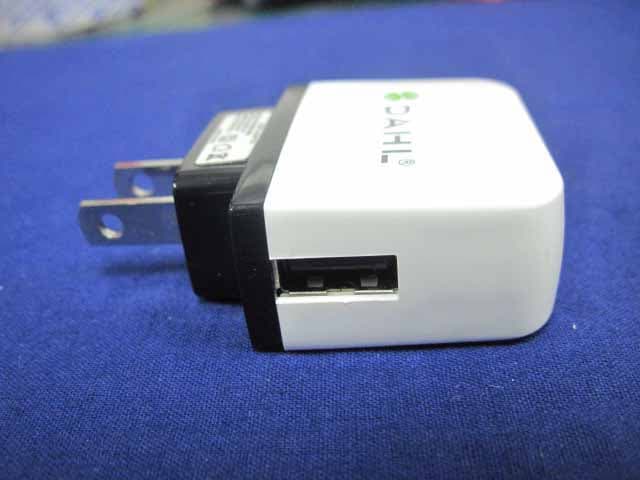
Click to zoom
Application Details
- Equipment Class
- PCE - PCS Licensed Transmitter held to ear
- Date of Grant
- Mar 17, 2013
- Application Purpose
- Original Equipment
- Date of Application
- Mar 17, 2013
- Equipment Note
- DAHL InTouch I GSM and WCDMA Dual sim-card Smart phone
- Frequency Range
- 826.40000000 - 846.60000000
- Country
- Sweden
Documents & Files
Document Text
Text extracted from the exhibit documents filed with the FCC. Open a document above to read the original.
Users Manual
Welcome to Dahl Intouch. This Quick Start guide tells you how to set up your cell phone Intouch and use its key features. To start, turn on your Intouch by pressing and holding the On/Off button for a few seconds. Then follow the onscreen instructions to set up your Intouch. Quick Start Guide DAHL SWEDEN MOBILE TECHNOLOGY AB DAHL InTouch I GSM and WCDMA Dual sim-card Smart phone In Touch DAHL Finger Tips On/Off Sleep/Wake Button basics. To turn off or restart intouch, press and hold the On/Off button for a few seconds, then drag the slider to confirm. To turn off the screen but still receive calls, press On/Off once. Press the Home button at any time to return to the Home screen. To quickly switch between recently used apps, double-click the Home button and tap an app icon. Make a call. Tap a phone number in Contacts, Favorites, an email, a text message, or almost anywhere in intouch to make a call. Or open the Phone app and tap the Keypad button to dial manually. To silence an incoming call, press the On/Off button once. To send a call directly to voicemail, press On/Off twice. To answer a call while using the intouch headset, press the center button once. Press it again to end your call. Volume Up/Down Home Video call Requires a FaceTime-enabled device for both caller and recipient. Messages Tap the Messages icon to to send an SMS or MMS to other mobile phone users. Type a name or phone number in the To field or select someone from your contacts. Type your message, then tap Send. To send photos or video, tap the Camera button. Intelligent keyboard Intouch automatically corrects and suggests words as you type. So if you tap a wrong let- ter, just keep typing. To accept the suggested word, tap the space bar. Or tap the“x”to ig- nore the suggestion. The keyboard automati- cally inserts apostrophes in contractions. If you tap the space bar twice, it adds a period. You can double-tap a word to look it up in the dictionary. To dictate rather than type, tap the Microphone button. Cut, copy, and paste Tap the text you want to edit, or touch and hold to bring up the magnifying glass, then slide your finger to move the insertion point. You can select a word by double-tapping it, and select more or less text by dragging the grab points. Then tap to cut, copy, or paste. To copy text from web pages, email, or text messages, touch and hold to select the text, then tap Copy. Wifi Go to Settings, then click it; Choose Wlan, choose On ; Then you can see the list of available wifi connections; Click the wifi connections available to you, you need input the password if necessary; Then you can see the wifi signals on the top of the screen. You can use wifi for network connections to save you data browsing for surfing internet, watching videos, playing music, sending and receiving emails.... If you want to terminate the wifi network connections, please go to settings and click it. Choose Wlan and choose Off. Or go to the top of screen, pull down the menu and you see Wlan signal and click it, then Wlan will become grey and then it is successfully Camera From the Lock screen, double-click the Home button to quickly access the camera, or tap the Camera icon on the Home screen. Adjust focus and exposure by tapping anyone or anything on the screen. To take a picture, tap the Camera button or press the Volume Up button. To record HD video, set the switch to Video, then tap the Record button. Tap it again to stop recording. Photos Tap the Photos icon on the Home screen to see your pictures. Flick right or left to move between images. Double-tap or pinch to zoom. Tap once to bring up the onscreen controls. You can edit or enhance a photo, share it, print it, and more. If you have Photo Stream enabled in iCloud, new pictures you take are automatically pushed to all your other devices. Video and song controls While playing music or watching a movie, tap anywhere on the screen to bring up the controls. Tap again to hide them. To stream your music or video to an Apple TV, tap the AirPlay button.* From the Lock screen, you can double-click the Home button to quickly access your audio controls. See the web up close Double-tap any element on a web page—picture or text—to zoom in. Doubletap again to zoom back out. Rotate iPhone to see the web in widescreen. Tap the Reader button at the top of the screen to view an article without clutter. Tap the Multi-page button to flick between multiple web pages or open a new one. Find location, Search surroundings To see where you are on a map, tap the Location button. A blue dot appears at your current position. To see which way you’re facing, tap the Location button again to turn on compass view. Find places around you by typing words like “Starbucks” or “pizza”in the search field. Double-tap to zoom in.Tap once with two fingers to zoom out. Youcan also get directions or tap the Page Curlbutton for additional map views. Create folders, Organize apps Touch and hold any app icon until it starts to jiggle. Then drag one app onto another to create a folder. Folders are automatically named by category, or you can rename them. You can customize your Home screen by dragging apps and folders to different positions and screens. When you’re done, press the Home button. Learn more Learn more about Intouch features at www.dahlmobile.com/ inTouch. For the InTouch User Guide and important information, visit support.dahlmobile.com intouch. To view the guide on intouch, download it from the www.dahlmobile.com/ inTouch. Get support Contact your wireless service provider for support on network services, voicemail, and billing. Visit www.dahlmobile.com/support/ intouch for support on Intouch Battery The lithium-ion battery in InTouch I should be replaced by Dahl Mobile or a Dahl Mobile Authorized Service Provider, and must be recycled or disposed of separately from household waste. Bluetooth You can use blue tooth to exchange data either from you or from other people after pairing; Go to Settings, …
Text truncated - open the document above for the full version.
Cover Letter(s)
DAHL SWEDEN MOBILE TECHNOLOGY AB Rasundavagen 166, 1tr. 169 36 SOLNA/ SWEDEN Confidentiality Request Letter Page 1 of 1 Rev 2.0 January 08, 2013 To: Federal Communications Commission Authorization and Evaluation Division 7435 Oakland Mills Road Columbia, MD Permanent Confidentiality Request Confidentiality Request regarding application for certification of FCC ID: R44INTOUCH We hereby request confidential treatment of information accompanying this application as outlined below: - Block Diagram - Operational Description - Schematic - BOM list - Tune Up Procedure The above materials contain trade secrets and proprietary information not customarily released to the public. The public disclosure of these materials may be harmful to the applicant and provide unjustified benefits to its competitors. The applicant understands that pursuant to Section 0.457 & 0.459 of the Rules, disclosure of this application and all accompanying documentation will not be made before the date of the Grant for this application. Sincerely, Client’s signature: Client’s name / title: ROBIN DAHL / CEO Contact information / address: Rasundavagen 166, 1tr. 169 36 SOLNA/ SWEDEN TEL: 86-755-23148121 FAX: 86-755-23148121 E-mail: [email protected]
Cover Letter(s)
DAHL SWEDEN MOBILE TECHNOLOGY AB Rasundavagen 166, 1tr. 169 36 SOLNA/ SWEDEN Tel: 86-755-23148121 ; Fax: 86-755-23148121 Date: February 18, 2013 Statement We, DAHL SWEDEN MOBILE TECHNOLOGY AB. declare that this EUT(FCC ID: R44INTOUCH) doesn’t have Ad Hoc Mode function on “non-US/Canada frequencies”. In addition, the frequency selection feature is disabled by firmware for devices marketed to the US/Canada. For DTS part of this device, only channels 1-11 will be used in North American. Country code selection is disabled. Sincerely yours, ROBIN DAHL CEO DAHL SWEDEN MOBILE TECHNOLOGY AB Rasundavagen 166, 1tr. 169 36 SOLNA/ SWEDEN TEL: 86-755-23148121 FAX: 86-755-23148121 E-mail: [email protected]
Cover Letter(s)
DAHL SWEDEN MOBILE TECHNOLOGY AB Rasundavagen 166, 1tr. 169 36 SOLNA/ SWEDEN Tel: 86-755-23148121 ; Fax: 86-755-23148121 Date: February 18, 2013 Statement We, DAHL SWEDEN MOBILE TECHNOLOGY AB, states that our device, FCC ID: R44INTOUCH, The label will put under the battery inside the battery compartment and it is visible to the users as they purchase the products and install the battery. For and Behalf of: DAHL SWEDEN MOBILE TECHNOLOGY AB ROBIN DAHL CEO
External Photos
External Photo Adapter photo
ID Label/Location Info
FCC Certification Label FCC ID: R44INTOUCH Model: InTouch I Tra de Name: Dahl DAHL SWEDEN MOBILE TECHNOLOGY AB Label Location on EUT EUT Bottom View/ FCC ID Label Location
Internal Photos
Uncover Internal Photo Uncover Internal Photo Bluetooth, Wi-Fi Antenna GSM, WCDMA Antenna GPS Antenna Uncover Internal Photo Uncover Internal Photo Front Main PCB Photo Front Main PCB Photo Front Main PCB Photo Front Main PCB Photo Back Main PCB Photo Back Main PCB Photo Back Main PCB Photo Back Main PCB Photo Back Main PCB Photo Back Main PCB Photo
RF Exposure Info
Report No.: 12CS021R-HP-US-P03V01 Page: 1 of 123 SAR Test Report Product Name : DAHL InTouch I GSM and WCDMA Dual sim-card Smart phone Model No. : InTouch I FCC ID : R44INTOUCH Applicant : DAHL SWEDEN MOBILE TECHNOLOGY AB Address : Rasundavagen 166, 1tr. 169 36 SOLNA/ SWEDEN Date of Receipt : 10/12/2012 Date of Test : 07/01/2013~07/03/2013 Issued Date : 10/03/2013 Report No. : 12CS021R-HP-US-P03V01 Report Version : V 4.5 The test results relate only to the samples tested. The test report shall not be reproduced except in full without the written approval of QuieTek Corporation. Report No.: 12CS021R-HP-US-P03V01 Page: 2 of 123 Test Report Certification Issued Date: 10/03/2013 Report No.: 12CS021R-HP-US-P03V01 Product Name : DAHL InTouch I GSM and WCDMA Dual sim-card Smart phone Applicant : DAHL SWEDEN MOBILE TECHNOLOGY AB Address : Rasundavagen 166, 1tr. 169 36 SOLNA/ SWEDEN Manufacturer : Fujie (China) Co., Limited Address : Zehua Building, No. #1 Donghuan Rd., Longhua, Baoan, Shenzhen, China Model No. : InTouch I FCC ID : R44INTOUCH Brand Name : Dahl EUT Voltage : DC 3.7V Applicable Standard : FCC Oet65 Supplement C June 2001 IEEE Std. 1528-2003,47CFR § 2.1093 Test Result : Max. SAR Measurement (1g) Head: 0.372 W/kg Body: 1.342 W/kg Performed Location : Suzhou EMC Laboratory No.99 Hongye Rd., Suzhou Industrial Park Loufeng Hi-Tech Development Zone., Suzhou, China TEL: +86-512-6251-5088 / FAX: +86-512-6251-5098 FCC Registration Number: 800392 Documented By : (Engineering ADM: Alice Ni) Reviewed By : (Engineering Supervisor: Robin Wu) Approved By : (Manager: Marlin Chen) Report No.: 12CS021R-HP-US-P03V01 Page: 3 of 123 Laboratory Information We, QuieTek Corporation, are an independent EMC and safety consultancy that was established the whole facility in our laboratories. The test facility has been accredited/accepted(audited or listed) by the following related bodies in compliance with ISO 17025, EN 45001 and specified testing scope: The related certificate for our laboratories about the test site and management system can be downloaded from QuieTek Corporation’s Web Site :http://www.quietek.com/tw/ctg/cts/accreditations.htm The address and introduction of QuieTek Corporation’s laboratories can be founded in our Web site : http://www.quietek.com/ If you have any comments, Please don’t hesitate to contact us. Our contact information is as below: HsinChu Testing Laboratory : No.75-2, 3 rd Lin, Wangye Keng, Yonghxing Tsuen, Qionglin Shiang, Hsinchu County 307, Taiwan, R.O.C. TEL:+886-3-592-8858 / FAX:+886-3-592-8859 E-Mail : [email protected] LinKou Testing Laboratory : No.5-22, Ruishukeng, Linkou Dist., New Taipei City 24451, Taiwan, R.O.C. TEL : 886-2-8601-3788 / FAX : 886-2-8601-3789 E-Mail : [email protected] Suzhou Testing Laboratory : No.99 Hongye Rd., Suzhou Industrial Park Loufeng Hi-Tech Development Zone., SuZhou, China TEL : +86-512-6251-5088 / FAX : 86-512-6251-5098 E-Mail : [email protected] Taiwan R.O.C. : BSMI, NCC, TAF Germany : TUV Rheinland Norway : Nemko, DNV USA : FCC, NVLAP Japan : VCCI China : CNAS Report No.: 12CS021R-HP-US-P03V01 Page: 4 of 123 TABLE OF CONTENTS Description Page 1. General Information .................................................................................................... 6 1.1. EUT Description .................................................................................................. 6 1.2. Test Environment ................................................................................................. 8 1.3. EUT Antenna Locations ....................................................................................... 8 1.4. Simultaneous Transmission Configurations ......................................................... 9 1.5. SAR Test Exclusions Applied ............................................................................... 9 1.6. Power Reduction for SAR .................................................................................. 10 1.7. Guidance Documents ........................................................................................ 10 2. SAR Measurement System ...................................................................................... 11 2.1. DASY5 System Description ............................................................................... 11 2.1.1. Applications ................................................................................................... 12 2.1.2. Area Scans .................................................................................................... 12 2.1.3. Zoom Scan (Cube Scan Averaging) ............................................................... 12 2.1.4. Uncertainty of Inter-/Extrapolation and Averaging .......................................... 12 2.2. DASY5 E-Field Probe ........................................................................................ 13 2.2.1. Isotropic E-Field Probe Specification ............................................................. 13 2.3. Boundary Detection Unit and Probe Mounting Device ...................................... 14 2.4. DATA Acquisition Electronics (DAE) and Measurement Server ......................... 14 2.5. Robot ................................................................................................................. 15 2.6. Light Beam Unit ................................................................................................. 15 2.7. Device Holder .................................................................................................... 16 2.8. SAM Twin Phantom ........................................................................................... 16 3. Tissue Simulating Liquid ........................................................................................... 17 3.1. The composition of the tissue simulating liquid ................................................. 17 3.2. Tissue Calibration Result ...................................................…
Text truncated - open the document above for the full version.
Test Report
EMI MEASUREMENT AND TEST REPORT For DAHL SWEDEN MOBILE TECHNOLOGY AB Rasundavagen 166, 1tr. 169 36 SOLNA/ SWEDEN FCC ID:R44INTOUCH January 11, 2013 This Report Concerns: Original Report Equipment Type: DAHL InTouch I GSM and WCDMA Dual sim-card Smart phone Test Engineer: Anna Lv Test Engineer of performing the tests: Hans Hu Report No.: BST12104072YER-3 Receive EUT Date/Test Date: December 02, 2012/ December 02, 2012- January 11, 2013 Reviewed By: Mike Moo Prepared By: Shenzhen BST Technology Co.,Ltd. 3F,Weames Technology Building, No. 10 Kefa Road,Science Park, Nanshan District,Shenzhen,Guangdong,China Tel: 0755-26747751-3 Fax: 0755-26747751-3 ext.826 Note: The test report is specially limited to the above company and this particular sample only. It may not be duplicated without prior written consent of Shenzhen BST Technology Co.,Ltd. This report must not be used by the client to claim product certification,approval,or endorsement by NVLAP, NIST or any agency of the US Government. FCC ID: R44INTOUCH BST12104072YER-3 Page 2/45 TABLE OF CONTENTS 1. GENERAL INFORMATION ....................................................................................................3 1.1. Report infor mation ...........................................................................................................3 1.2. Measurement Uncertainty .................................................................................................3 2. PRODUCT DESCRIPTION ......................................................................................................4 2.1. EUT Description ...............................................................................................................4 2.2. Block Diagram of EUT Configuration..............................................................................4 2.3. Test Conditions .................................................................................................................5 3. TEST RESULTS SUMMARY ...................................................................................................5 Modifications ................................................................................................................................5 4. TEST EQUIPMENT USED .......................................................................................................6 5. OUTPUT POWER ......................................................................................................................7 5.1. Conducted Output Power ..................................................................................................7 5.2. Radiated Output Power .....................................................................................................9 6. SPURIOUS EMISSION............................................................................................................12 6.1. CONDUCTED SPURIOUS EMISSION ........................................................................12 6.2. Radiated Spurious Emission ...........................................................................................21 6.3. MEASUREMENT RESULT ..........................................................................................22 7. MAINS CONDUCTED EMISSION........................................................................................24 7.1. MEASUREMENT METHOD ........................................................................................24 7.2. PROVISIONS APPLICABLE ........................................................................................24 7.3. MEASUREMENT RESULT ..........................................................................................25 8. FREQUENCY STABILITY.....................................................................................................27 8.1. Applicable Standard........................................................................................................27 8.2. Test Procedure ................................................................................................................27 8.3. Measurement Result........................................................................................................28 9. OCCUPIED BANDWIDTH .....................................................................................................30 9.1. MEASUREMENT METHOD ........................................................................................30 9.2. PROVISIONS APPLICABLE ........................................................................................30 9.3. MEASUREMENT RESULT ..........................................................................................30 10. EMISSION BANDWIDTH ......................................................................................................36 10.1. MEASUREMENT METHOD ........................................................................................36 10.2. PROVISIONS APPLICABLE ........................................................................................36 10.3. MEASUREMENT RESULT ..........................................................................................36 11. BAND EDGE .............................................................................................................................42 11.1. MEASUREMENT METHOD ........................................................................................42 11.2. PROVISIONS APPLICABLE ........................................................................................42 11.3. MEASUREMENT RESULT ..........................................................................................42 FCC ID: R44INTOUCH BST12104072YER-3 Page 3/45 1. GENERAL INFORMATION 1.1. Report infor mation 1.1.1.This report is not a certificate of quality; it only applies to the sample of the specific product/equipment given at the time of its testing. The results are not used to indicate or imply that they are application to th…
Text truncated - open the document above for the full version.
Test Setup Photos
Radiated emissions test Conducted emissions test
Contact Information
Applicant
ROBIN DAHL
Test Firm
Global United Technology Service Co., LtdRobinson Lo
Technical Specifications
| # | Rule Parts | Frequency Range | Power Output | Emission | Tolerance |
|---|---|---|---|---|---|
| 3 | 22H | 826.4 MHz - 846.6 MHz | 168.70 mW | 4M18F9W | 0.03 ppm |