R7OFILESCAN716WBusiness Card Scanner
Shanghai Microtek Technology Co.,ltd.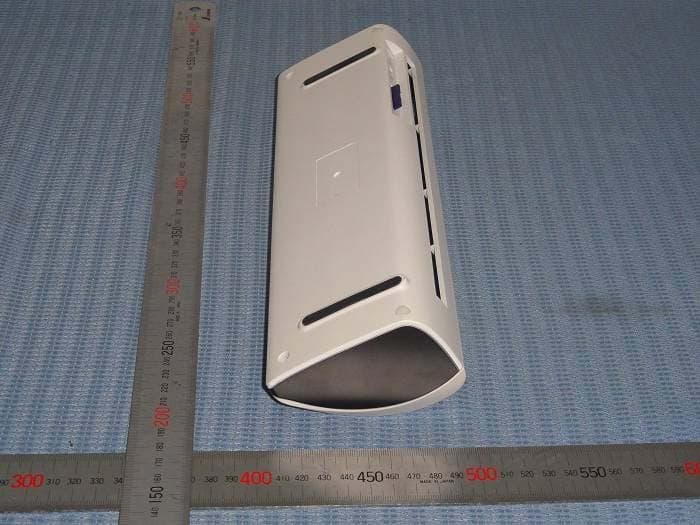
Click to zoom
Application Details
- Equipment Class
- JBP - Part 15 Class B Computing Device Peripheral
- Date of Grant
- Nov 28, 2012
- Application Purpose
- Original Equipment
- Date of Application
- Nov 27, 2012
- Equipment Note
- Business Card Scanner
- Country
- China
Documents & Files
Document Text
Text extracted from the exhibit documents filed with the FCC. Open a document above to read the original.
Users Manual
FS716W OSD User Manual 1 Preface 1.1 Scanner Outlook Status Indicator WiFi Key Key LCD 1.2 Function Keys Description There are total 4 keys resided on top of the scanner ①TDOWN : Select ②SUP : Select, if this key is being pressed longer than 3s Æ Power ON/OFF() ③WLEFT : Return; __Double arrows means key being pressed longer than 3s Æ entering SETUP ④XRIGHT : OK, ``Double arrows means key being pressed longer than 3s Æ can also turn off the scanner. 1.3 Display 1.3.1 Display Area Description 1.3.2 System Status Description Battery Capacity: Red alarm, Pre-alarm,、(4 Bars = 100% - Fully charged). Color Mode: B/W, Grayscale, Color Resolution: 150dpi、200dpi、300dpi、600dpi。 Paper Size: A4 (Document), A5 (Photo), A8 (Business Card) 2 User Interface 2.1 System Boot-up (Starting) When scanner off, Press () longer than 3s to turn on the scanner, “Microtek Logo” is shown below, system boot-up time is around 1~2s. (Figure 1) System starting, when finished, will switch to main display (Figure 2). During power on, if SD card is not inserted, a reminder will be shown on the display (Figure 1.1), (Figure 1.1) and after SD card’s been inserted in, will switch to main display automatically (Figure 2). FS716W operation will not continue without properly inserted a mass storage SD card! Note : To avoid damage or malfunction on the SD card, please insert SD card in before turning power on of FS716W and not pulling SD card out during operation are highly recommended !!! 2.2 System Main Display Figure 2 displays different scan modes, preview, and set-up functions. If no keys are pressed within 30s, system shall go into Stand by mode (LEDs, + LCD backlights are turned off). During stand-by, should any key be pressed or paper inserted the system will return to normal operation mode. However, if stand-by is over 3 minutes period (when USB is connected with PC – scanner is configured as U-Disk, the 3 minute stand-by time period shall be extended to 5 minutes), system will shut down automatically so to save power. (Figure 2) a. Press ①T②S key to select scan mode, such as: document, photo, business card or customized. The customization is described as follows: Mode Color Paper Size Resolution Pages Format Document Grayscale A4 300 Duplex PDF Photo Color A5 300 Simplex JPEG Business Card B/W A8 600 Duplex JPEG Custom/ Default Setting User Define/ Color User Define/ A4 User Define/ 300 User Define/ Duplex User Define/ JPEG The Custom set-up interface is shown in Figure 7. When entered into Custom mode, user can define his/her own settings. b. In System Main Display, press ③W④Xkey to preview images saved in the SD Card (Figure 3) c. In System Main Display, press ③__ longer than 3s to enter System Set-up (Figure 6); press ④`` or () longer than 3s to turn off scanner. 2.3 Image Preview Display (Figure 3) Full screen to preview images, key functions in this display are described below : a. Press ①T②S key to select images (previous, next) b. Press ③W key to return to System Main Display (Figure 2). c. If no operations after 10s, will return to System Main Display (Figure 2) d. Press ④X key to delete previewed image, system will ask for confirmation as shown below : e. Press ④X key again to confirm the delete, Press ③W key to cancel delete. 2.4 Scan Confirmation The system provides two kinds of scanning. 1. Auto, 2. Manual. In Auto scanning, user just insert the paper to the scanner, it will scan automatically according to the selected scan mode settings. In manual feed, when paper is detected by the paper sensor, the following display is shown for user to confirm the scanning. (Figure 4) a. Press ④X key to confirm to start scan, Scanning... is shown in Figure 5. b. During scanning, press ③W key to cancel scan, paper is withdrawn rapidly, system goes back to Figure 2. 2.5 Scanning Display (Figure 5) When scanner detects scan media in the scan slot, the system will check whether Auto scanning is set or not, if so, the system will start Auto scan according to the selected scan mode settings. User can press ③W key to cancel scan. The system goes back to Figure 2. 2.6 System Set-up In System Set-up manual (Figure 6), user can do all the settings on Scan modes, Auto Scan, Calibration, Date, Language and Clean. (Figure 6) a. In System Set-up, press ①②ST to select item. When select finished, press ④X to confirm (after confirmation, display will jump into the selected item display) b. Press ③W to return to previous level. 2.7 Scan Mode (Custom) Setting In Custom Scan Mode setting, User can select paper size, resolution, color, pages and format settings. (Figure 7) a. Press ①②ST key first to select paper size, resolution, color, pages or format, then press ④Xkey to confirm. Press ③W key to return to Figure 6. b. After paper size, resolution, color, pages or format being selected, press ①②STkey to choose desired parameter, then press ④Xto confirm, press ③W back to step a. 2.8 Auto Scan Setting (Figure 8) a. Press ①②ST key to Turn Auto Scan on/off, then press ④Xkey to confirm. b. Press ③W key to return to Figure 6. 2.9 Calibration The scanner Calibration has been accomplished after manufacturing, and the calibration data was saved in the scanner flash memory. It will not be altered for different PCs, thus, re-calibrate is not necessary. However, under any circumstances, the scanned image quality is not acceptable; user can do calibration on his/her own. Please do calibration as described in Figure 9, and make sure the arrow on calibration paper is facing the scanner when inserting calibration paper. (Figure 9) a. Calibration begins automatically : (Figure 9.1) b. When calibration is finished, will return to system setup display automatically (Figure 6). 2.10 Connection Method Display The FS716W can only provide U-DISK connection mode with PC. Scanning with PC connected (USB) is not allowed. However, when USB is Connected with PC or N/B, the scanner will automatically be configured as U-Disk mode (Figure 10) :. (Figure 10) Images (in th…
Text truncated - open the document above for the full version.
Cover Letter(s)
Statement We Shanghai Microtek Technology Co.,ltd. Hereby that The product Business Card Scanner, models Number FileScan 716W, FileScan 720W、FileScan 728W 、ArtixScan DI 870W、ArtixScan DI 872W、ArtixScan DI 878W、iScan e17, Image scan pro 500i are all identical in interior structure, electrical circuits and components, and just model names are different for the marketing requirement. Your assistance on this matter is highly appreciated. Yours sincerely, Dated this Nov 22, 2012 Agency agreement expiration date: Usually Give 8 - 12 Months By: Lemon Rao Signature Printed Title: Manager On behalf of : Shanghai Microtek Technology Co.,ltd. Telephone: 13510907826
Cover Letter(s)
DATE : Nov 22, 2012 Nemko Canada Inc 303 River Road Ottawa, Ontario, Canada K1V 1H2 Attn: Director of Certification Authority to Act as Agent On our behalf, I appoint _ Shenzhen Timeway Technology Consulting Co., Ltd. East 5/Block 4, Anhua Industrial Zone, No.8,Tairan Rd. CheGongMiao, FuTian District, Shenzhen City, Guangdong Province, China_, to act as our agent in the preparation of this application for equipment certification. I certify that submitted documents properly describe the device or system for which equipment certification is sought. I also certify that each unit manufactured, imported or marketed, as defined in the Federal Communications Commission’s regulations will have affixed to it a label identical to that submitted for approval with this application. For instances where our authorized agent signs the application for certification on our behalf, I acknowledge that all responsibility for complying with the terms and conditions for certification, as specified by Nemko Canada Inc, still resides with Shanghai Microtek Technology Co.,ltd. Building.35,NO.680,Guiping Rd. Shanghai 200233,P.R.China __ Dated this Nov 22, 2012 Agency agreement expiration date: Usually Give 8 - 12 Months By: Lemon Rao Signature Printed Title: Manager On behalf of : Shanghai Microtek Technology Co.,ltd. Telephone: 13510907826
Cover Letter(s)
DATE :Nov 22, 2012 Equipment Autorisation Division Federal Communications Commission 7435 Oakland Mills Road Columbia, MD 21046 FCC ID: R7OFILESCAN716W Product Name: Business Card Scanner Request for Confidentiality Pursuant to Sections 0.457 and 0.459 of the commissions rules, we hereby request that the following documents be held confidential: • Schematics • Block diagram • Operational Description These materials contain trade secrets and proprietary information and are not customarily released to the public. The public disclosure of this information might be harmful to the company and provide unjustified benefits to our competitors. Dated this Nov 22, 2012 Agency agreement expiration date: Usually Give 8 - 12 Months By: Lemon Rao Signature Printed Title: Manager On behalf of : Shanghai Microtek Technology Co.,ltd. Telephone: 13510907826
External Photos
Outside view Outside view
ID Label/Location Info
Business Card Scanner Model: FileScan 716W Rating: DC5V, .05A Battery: 3.7V, 1100mAh FCC ID: R7OFILESCAN716W This device complies with part 15 of the FCC rules. Operation is subject to the following two conditions (1) this device may not cause harmful interference, and (2) this device must accept any interference received, including interference that may cause undesired operation.
ID Label/Location Info
FCC ID Label Location
Internal Photos
Inside view Inside view Inside view Inside view Inside view Inside view Inside view
Test Report
ISO/IEC17025 Accredited Lab. Report No: FCC 1211064-01 File reference No: 2012-11-19 Applicant: Shanghai Microtek Technology Co., Ltd. Product: Business Card Scanner Trademark: MINIX™ Model No: FileScan 716W, FileScan 720W, FileScan 728W, ArtixScan DI 870W, ArtixScan DI 872W, ArtixScan DI 878W, iScan e17, Image scan pro 500i Test Standards: FCC Part 15 Subpart B: 2009 Test result: It is herewith confirmed and found to comply with the requirements set up by ANSI C63.4 and FCC Part 15 regulations for the evaluation of electromagnetic compatibility Approved By Jack Chung Manager Dated: Nov 19, 2012 Results appearing herein relate only to the sample tested The technical reports is issued errors and omissions exempt and is subject to withdrawal at SHENZHEN TIMEWAY TECHNOLOGY CONSULTING CO., LTD East 5/Block 4, Anhua Industrial Zone, No.8, Tairan Rd. Chegongmiao, FuTian District, Shenzhen, CHINA. Tel (755) 83448688 Fax (755) 83442996 Report No: 1211064-01 Page 2 of 28 Date: 2012-11-19 The report refers only to the sample tested and does not apply to the bulk. This report is issued in confidence to the client and it will be strictly treated as such by the Shenzhen Timeway Technology Consulting Co., Ltd. It may not be reproduced rather in its entirety or in part and it may not be used for adverting. The client to whom the report is issued may, however, show or send it . or a certified copy there of prepared by the Shenzhen Timeway Technology Consulting co., Ltd to his customer. Supplier or others persons directly concerned. Shenzhen Timeway Technology Consulting co., Ltd will not, without the consent of the client enter into any discussion of correspondence with any third party concerning the contents of the report. In the event of the improper use of the report. The Shenzhen Timeway Technology Consulting co., Ltd reserves the rights to withdraw it and to adopt any other remedies which may be appropriate. Special Statement: The testing quality ability of our laboratory meet with "Quality Law of People's Republic of China" Clause 19. The testing quality system of our laboratory meet with ISO/IEC-17025 requirements, which is approved by CNAS. This approval result is accepted by MRA of APLAC. Our test facility is recognized, certified, or accredited by the following organizations: CNAS-LAB Code: L2292 The EMC Laboratory has been assessed and in compliance with CNAS-CL01 accreditation criteria for testing Laboratories (identical to ISO/IEC 17025:2005 General Requirements) for the Competence of testing Laboratories. FCC-Registration No.: 899988 The EMC Laboratory has been registered and fully described in a report filed with the (FCC) Federal Communications commission. The acceptance letter from the FCC is maintained in our files. Registration No.: 899988. IC- Registration No.: IC5205A-02 The EMC Laboratory has been registered and fully described in a report filed with the (IC) Industry Canada. The acceptance letter from the IC is maintained in our files. Registration IC No.: 5205A-02. Report No: 1211064-01 Page 3 of 28 Date: 2012-11-19 The report refers only to the sample tested and does not apply to the bulk. This report is issued in confidence to the client and it will be strictly treated as such by the Shenzhen Timeway Technology Consulting Co., Ltd. It may not be reproduced rather in its entirety or in part and it may not be used for adverting. The client to whom the report is issued may, however, show or send it . or a certified copy there of prepared by the Shenzhen Timeway Technology Consulting co., Ltd to his customer. Supplier or others persons directly concerned. Shenzhen Timeway Technology Consulting co., Ltd will not, without the consent of the client enter into any discussion of correspondence with any third party concerning the contents of the report. In the event of the improper use of the report. The Shenzhen Timeway Technology Consulting co., Ltd reserves the rights to withdraw it and to adopt any other remedies which may be appropriate. Test Report Conclusion Content 1.0 General Details ................................................................................................ 4 1.1 Test Lab Details................................................................................................ 4 1.2 Applicant Details.............................................................................................. 4 1.3 Description of EUT ............................................................................................4 1.4 Test Uncertainty................................................................................................ 4 1.5 Submitted Sample............................................................................................. 4 1.6 Test Duration.................................................................................................. 4 2.0 List of Measurement Equipment........................................................................ 5 2.1 Conducted Emission Test..................................................................................... 5 2.2 Radiated electromagnetic disturbance test................................................................. 5 2.3 Auxiliary Equipment.......................................................................................... 5 3.0 Technical Details............................................................................................. 6 3.1 Investigations Requested..................................................................................... 6 3.2 Test Standards.................................................................................................. 6 4.0 Power line Conducted Emission Test..................................................................... 7 5.0 Radiated Disturbance Test................................................................................... 11 6.0 FCC ID Label ...............................................................................…
Text truncated - open the document above for the full version.
Test Setup Photos
Conducted Emission Test Setup: Radiated Emission Test Setup: Radiated Emission Test Setup:
Contact Information
Applicant
Lemon Rao(Manager)
Test Firm
Shenzhen Timeway Testing LaboratoriesJack Chung
Technical Specifications
| # | Rule Parts | Frequency Range | Power Output |
|---|---|---|---|
| 1 | 15B | - | - |