Text extracted from the exhibit documents filed with the FCC. Open a document above to read the original.
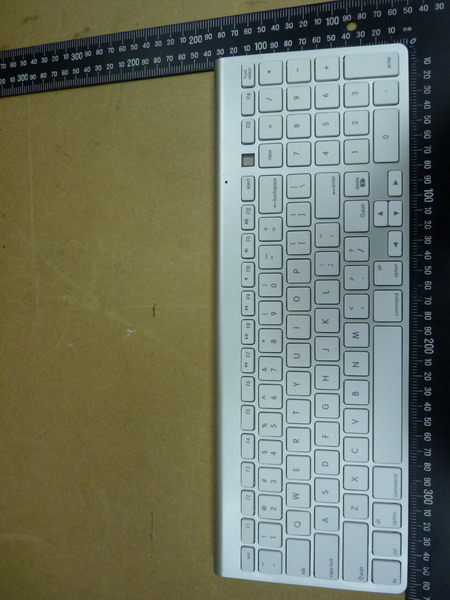
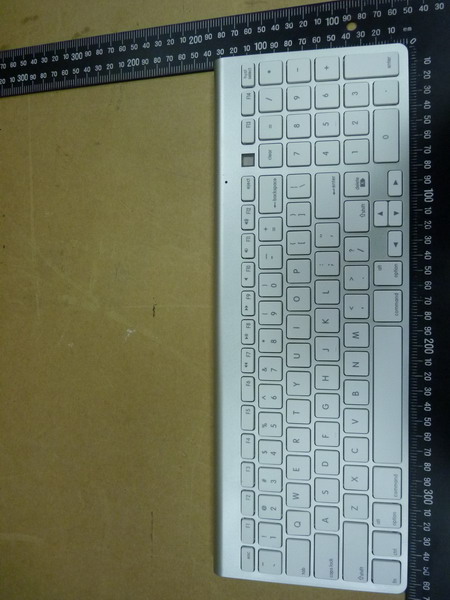
Preface Thank you for purchasing the WKB-802A Bluetooth wireless Keyboard! The WKB-802A is specifically designed for Bluetooth-enabled Macintosh™ computer * . It can also use it as an external wireless Keyboard for iPad or iPhone for mass data input. Thanks to its multi-host switchable support, it can use Mac, iPad or iPhone in between. Before using the WKB-802A, read this manual and the FAQ carefully. Keep the User Manual for future reference. * See package contents on system requirements. Not all Bluetooth dongles may support the WKB-802A Keyboard in all its functions! Key Features It is compact-size design for space saving environment. 100/101-key compact-size wireless Keyboard with numeric keypad for easy and fast working with figures, tables, calculations, spread sheets, etc. – a perfect alternative solution to the USB keyboard! With multi-host switchable support, it can register up to 8 Bluetooth hosts Bluetooth wireless technology for convenient wireless access to any Blue- tooth-enabled Macintosh™ computer. No dongle or driver installation required! Can be used as an external wireless Keyboard with iPad or iPhone * . Function keys F1, F2, F3, F4 support Mac OS X for decrease brightness, increase brightness, expose and dashboard. F1 Decrease brightness F2 Increase brightness F3 Expose F4 Dashboard Special function keys, F5, F6, eject and host select keys support iPad and iPhone for home screen, sleep/wake, onscreen Keyboard and Bluetooth host select. F5 Home screen F6 Sleep/Wake button eject On-screen Keyboard host select Bluetooth host select Broadcom Bluetooth chipset. * Works with iPad and iPhone 3Gs or later. Scissor-type membrane keys with non-curved square keycaps for high comfort typing and reduced typing tiredness. No dongle or driver installation needed! Overview Getting Started 1. Hold the Keyboard upside down in both hands. Open the battery compartment by gently pushing trip of battery cover on the arrows with your thumb and lifting battery cover. 2. Place the 2 AA-size batteries in the battery compartment. Make sure the batteries are placed according to the polarity symbols (+/-) shown in the battery compartment! 3. Push the power switch on the Keyboard to turn on the Keyboard. Pairing the WKB-802A Bluetooth Keyboard in Mac OS X Make sure that you have Bluetooth support on your Macintosh™ and Mac OS X 10.5.x or higher installed. The WKB-802A Keyboard may work with older Mac OS X but it is not officially supported. 1. Press “host select “ key and press “1” key, located beneath F1. HTN display will show 1 on screen. 2. Start to register your keyboard; Choose the Apple menu and open the "System Preferences." Under “Internet & wireless communication” (OS X 10.6.x)/”Hardware” (OS X 10.5.x) you should see a Bluetooth icon. If you do not, your Mac does not have Bluetooth. 3. Enable Bluetooth. Under "System Preferences" click the Bluetooth icon and make sure you see "Bluetooth: On" under the "Settings" tab. If it's not turned on, click "Turn Bluetooth On." 4. Go to the menu bar and click the Bluetooth icon, then click "Bluetooth Preferences." 5. Click the "+" tab (set up new device) in the left window to pair a new Bluetooth device. The Bluetooth assistant opens. (With Mac OS X 10.5.x, the Bluetooth assistant may ask what kind of device you are going to pair. Choose “keyboard” and click “continue”). Your computer now searches automatically for new Bluetooth devices. 6. Press the Pairing Button on the backside of the WKB-802A Compact-size Keyboard with a pen to set up a connection to your Macintosh™. The pairing LED starts to flash in green. Your Macintosh™ should see the WKB-802A Keyboard as “Bluetooth mini Keyboard”. Click “continue”. 7. In the dialog box the device “Bluetooth mini Keyboard” will appear. If it is not listed, make sure that WKB-802A Keyboard is turned on and in pairing mode. Then click "Search Again" in the "Bluetooth Device" dialog box. 8. Click on “Bluetooth mini Keyboard” and press “continue”. The PIN number of the WKB-802A Keyboard will be shown on your screen. 9. Enter the 8-digit PIN number with your WKB-802A Keyboard according to the digits shown on your screen and press the “enter” key of your WKB-802A Keyboard. Do not hold “host select” key and press “1” key Click "OK" and the Bluetooth mini Keyboard should be listed in the "Devices" tab under "Bluetooth Preferences." 10. LED indicator will become blue color. It means that Bluetooth keyboard is well linked to Mac. When you enter a digit on the WKB-802 Keyboard, it is not highlighted as with some other Bluetooth devices. Keep entering the digits quickly and press the “enter” key at the end. If you need too long to or enter a wrong digit, you may have to enter the PIN number again. Register the WKB-802A to another Bluetooth Host 1. Press “host select “ key and press “2” key, located beneath F2. HTN display will show 2 on screen. 2. Follow the pairing procedure same as step 2 ~ 10 of Pairing the WKB-802A Bluetooth keyboard. 3. Register the WKB-802A to other Bluetooth enabled devices, up to 8 different hosts. Swap Bluetooth Host in Between How to switch the WKB-802A from Mac system (register host 1) to iPad (register host 2), for example. 1. Press “host select “ key and press “2” key, located beneath F2. HTN display will show 2 on screen. 2. LED indicator start to flash in green. Then LED indicator will become blue upon the WKB-802A well link to iPad, host 2. Using the Pairing Button 1. You may use the pairing button after you have changed the batteries (you need to set up the WKB-802 Keyboard like you did for the first time) or when the connection is constantly lost. It is not necessary to press pairing button after you have changed the batteries. 2. If you want to use the WKB-802A Keyboard with another Macintosh™ computer, you need to register the WKB-802 Keyboard again. Please refer to the procedure of Register the WKB-802A to another Bluetooth Host. Power Management To save power, …
Text truncated - open the document above for the full version.
Digimore Electronics Co., Ltd 10 FL., No. 61, Yan-Ping South Road, Taipei 100, Taiwan Tel : +886 2 2311 3299 . Fax : +886 2 2311 3375 [email protected] . www.capacity-keyboard.com Federal Communications Commission Equipment Authorization Branch 7435 Oakland Mills Road Columbia, MD 21046 Date: 3 rd , December 2012 Request for Confidentiality Company name: Digimore Electronics Co., Ltd FCC ID: R87-WKB-801A FCC Part 15 Certification To whom it may concern: In accordance with 0.459 of CFR 47, Digimore Electronics Co., Ltd hereby requests confidentiality of all Block Diagrams, Schematics, Operational Description attachments for the subject application. These documents contain detailed system and equipment description and related information about the product which Digimore Electronics Co., Ltd considers to be proprietary, confidential and a custom design and otherwise would not release to the general public. Since the design is a basis from which future technological products will evolve, Digimore Electronics Co., Ltd considers that this information would be of benefit to its competitors and that the disclosure of the information in these documents would give competitors an unfair advantage in the market. Sincerely, Signature Name : Sam Yeh Title : Project Manager Company : Digimore Electronics Co., Ltd
Registration number: W6D21211-12887-FCC FCC ID: R87-WKB-801A Worldwide Testing Services(Taiwan) Co., Ltd. Appendix page 2 of 16 External Photos Registration number: W6D21211-12887-FCC FCC ID: R87-WKB-801A Worldwide Testing Services(Taiwan) Co., Ltd. Appendix page 3 of 16 Registration number: W6D21211-12887-FCC FCC ID: R87-WKB-801A Worldwide Testing Services(Taiwan) Co., Ltd. Appendix page 4 of 16 Registration number: W6D21211-12887-FCC FCC ID: R87-WKB-801A Worldwide Testing Services(Taiwan) Co., Ltd. Appendix page 5 of 16 Registration number: W6D21211-12887-FCC FCC ID: R87-WKB-801A Worldwide Testing Services(Taiwan) Co., Ltd. Appendix page 6 of 16 Registration number: W6D21211-12887-FCC FCC ID: R87-WKB-801A Worldwide Testing Services(Taiwan) Co., Ltd. Appendix page 7 of 16 Registration number: W6D21211-12887-FCC FCC ID: R87-WKB-801A Worldwide Testing Services(Taiwan) Co., Ltd. Appendix page 8 of 16
Registration number: W6D21211-12887-FCC FCC ID: R87-WKB-801A Worldwide Testing Services(Taiwan) Co., Ltd. Appendix page 9 of 16 Internal Photos Registration number: W6D21211-12887-FCC FCC ID: R87-WKB-801A Worldwide Testing Services(Taiwan) Co., Ltd. Appendix page 10 of 16 Registration number: W6D21211-12887-FCC FCC ID: R87-WKB-801A Worldwide Testing Services(Taiwan) Co., Ltd. Appendix page 11 of 16 Registration number: W6D21211-12887-FCC FCC ID: R87-WKB-801A Worldwide Testing Services(Taiwan) Co., Ltd. Appendix page 12 of 16 Registration number: W6D21211-12887-FCC FCC ID: R87-WKB-801A Worldwide Testing Services(Taiwan) Co., Ltd. Appendix page 13 of 16
Digimore Electronics Co., Ltd 10 FL., No. 61, Yan-Ping South Road, Taipei 100, Taiwan Tel : +886 2 2311 3299 . Fax : +886 2 2311 3375 [email protected] . www.capacity-keyboard.com Federal Communications Commission Authorization and Evaluation Division Equipment Authorization Branch 7435 Oakland Mills Road Columbia, MD 21046 Applicant’s declaration concerning RF Radiation Exposure We hereby indicate that the product Product description: Multi -host Bluetooth Keyboard Model No: WKB -801A The equipment complies with FCC RF radiation exposure limits set forth for an uncontrolled environment. The integral antennas used for this transmitter must not be co-located or operating in co njunction with any other antenna or transmitter within the host device. A safety statement concerning minimum separation distances from enclosure of the Product : Multi -host Bluetooth Keyboard will be integrated in the user’s manual to provide end-users with transmitter operating conditions for satisfying RF exposure compliance. The appropriate information can be drawn from the test report no: W6D21211-12887-C-1 and the accompanying calculations. Company: Digimore Electronics Co., Ltd Address : 10 FL., No. 61, Yan-Ping South Road, Taipei 100, Taiwan Date: 3 rd Dec ember 2012 Signature Sam YEH/ Project Manager Digimore Electronics Co., Ltd RF EXPOSURE MODEL NO.: WKB-801A Approval holder: Digimore Electronics Co., Ltd FCC ID: R87-WKB-801A Conclusion: No Evaluation required if power is below this threshold: F(GHz) mW Low 2.402 High 2.480 24.58 Maximum measured transmitter power: Conducted Power -7.74 dBm (0.168 mW) EIRP Power -8.73 dBm (0.134 mW) z The antenna is Chip antenna, antenna gain is -0.99 dBi. Threshold for no SAR evaluation is 24.58 mW. Conclusion: No SAR evaluation required since Transmitter output power is below FCC threshold.
of Applicant: Digimore Electronics Co., Ltd Address: 10 FL., No. 61, Yan-Ping South Road, Taipei 100, Taiwan Tested and Prepared by Worldwide Testing Services (Taiwan) Co., Ltd. FCC Registration No.: 930600 Industry Canada filed test laboratory Reg. No. IC 5679A-1 A2LA Accredited No.: 2732.01 Report No.: W6D21211-12887-C-1 6F, NO. 58, LANE 188, RUEY-KUANG RD., NEIHU TAIPEI 114, TAIWAN, R.O.C. TEL: 886-2-66068877 FAX: 886-2-66068879 E-mail: [email protected] FCC PART 15 SUBPART C TEST REPORT for Multi-host Bluetooth Keyboard Model No.: WKB-801A FCC ID: R87-WKB-801A Registration number: W6D21211-12887-C-1 FCC ID: R87-WKB-801A Worldwide Testing Services(Taiwan) Co., Ltd. Page 1 of 43 TABLE OF CONTENTS 1 GENERAL INFORMATION ...................................................................................................... 2 1.1 Notes .................................................................................................. 2 1.2 Testing laboratory .................................................................................................. 3 1.2.1 Location .................................................................................................. 3 1.2.2 Details of accreditation status .............................................................................................. 3 1.3 Details of approval holder .................................................................................................. 3 1.4 Application details .................................................................................................. 4 1.5 General information of Test item......................................................................................... 4 1.6 Test standards .................................................................................................. 5 2 TECHNICAL TEST .................................................................................................................... 6 2.1 Summary of test results .................................................................................................. 6 2.2 Test environment .................................................................................................. 6 2.3 Test Equipment List .................................................................................................. 7 2.4 General Test Procedure ................................................................................................ 11 3 TEST RESULTS (ENCLOSURE) ............................................................................................ 13 3.1 Peak Output Power (transmitter) ....................................................................................... 14 3.2 RF Exposure Compliance Requirements ........................................................................... 17 3.3 Out of Band Radiated Emissions ....................................................................................... 17 3.4 Transmitter Radiated Emissions in restricted Bands ......................................................... 18 3.5 Spurious emissions (tx) ................................................................................................ 19 3.6 Carrier Frequency Separation ............................................................................................ 23 3.7 Number of Hopping Frequencies....................................................................................... 26 3.7.1 Pseudorandom Frequency Hopping Sequence................................................................... 28 3.7.2 Coordination of hopping sequences to other transmitters ................................................. 28 3.7.3 System Receiver Hopping Capability ................................................................................ 28 3.8 Time of Occupancy (Dwell Time) ..................................................................................... 29 3.9 20dB Bandwidth ................................................................................................ 35 3.9.1 System Receiver Input Bandwidth .................................................................................... 37 3.10 Band-edge Compliance of RF Emissions .......................................................................... 38 3.11 Radiated Emissions from Receiver Section of Transceiver............................................... 41 3.12 Power Line Conducted Emission....................................................................................... 42 Appendix..........................................................................................................43 Registration number: W6D21211-12887-C-1 FCC ID: R87-WKB-801A Worldwide Testing Services(Taiwan) Co., Ltd. Page 2 of 43 1 General Information 1.1 Notes The purpose of conformity testing is to increase the probability of adherence to the essential requirements or conformity specifications, as appropriate. The complexity of the technical specifications, however, means that full and thorough testing is impractical for both technical and economic reasons. Furthermore, there is no guarantee that a test sample which has passed all the relevant tests conforms to a specification. Neither is there any guarantee that such a test sample will interwork with other genuinely open systems. The existence of the tests nevertheless provides the confidence that the test sample possesses the qualities as maintained and that is performance generally conforms to representative cases of communications equipment. The test results of this test report relate exclusively to the item tested as specified in 1.5. The test report may only be reproduced or published in full. Reproduction or publication of extracts from the report requires the prior written approval of the Worldwide Testing Services(Taiwan) Co., Ltd. Tester: November 26, 2012 Robert Ren Date WTS-Lab. Name Signature Technical responsibility for area of testing: November 26, 2012 Danny Sung Dat…
Text truncated - open the document above for the full version.
Registration number: W6D21211-12887-FCC FCC ID: R87-WKB-801A Worldwide Testing Services(Taiwan) Co., Ltd. Appendix page 14 of 16 Set Up Photo of Radiated Emission EMI Below 1GHz Registration number: W6D21211-12887-FCC FCC ID: R87-WKB-801A Worldwide Testing Services(Taiwan) Co., Ltd. Appendix page 15 of 16 Above 1GHz Registration number: W6D21211-12887-FCC FCC ID: R87-WKB-801A Worldwide Testing Services(Taiwan) Co., Ltd. Appendix page 16 of 16 RF
6F., No. 58, Lane 188, Ruey Kuand Rd. · Taipei · Taiwan
| # | Rule Parts | Frequency Range | Power Output |
|---|---|---|---|
| 1 | 15C | 2.40 GHz - 2.48 GHz | 168.00 µW |

Multi-host Bluetooth Keyboard
Equipment Class
DSS - Part 15 Spread Spectrum Transmitter