FCCID.CO- FCC ID Database
HomeCompaniesEquipment ClassesSearch

© 2026 FCC ID Database. All rights reserved.

AboutContactData sourced from FCC public records
  1. Home/
  2. G,G-Kaiser.com Ltd/
  3. RKQKOMACHO-V

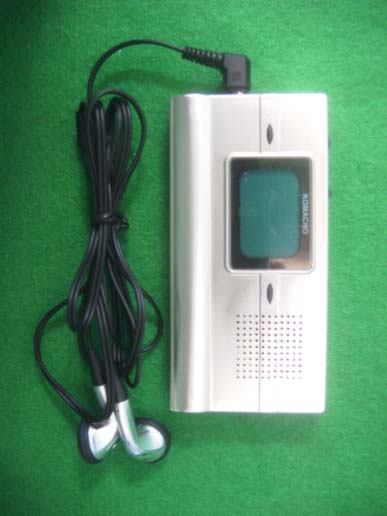
RKQKOMACHO-VMP3 PLAYER

G,G-Kaiser.com Ltd
MP3 PLAYER - FCC ID RKQKOMACHO-V - G,G-Kaiser.com Ltd
Click to zoom

Application Details

Equipment Class
JBP - Part 15 Class B Computing Device Peripheral
Date of Grant
Oct 30, 2003
Application Purpose
Original Equipment
Date of Application
Oct 30, 2003
Equipment Note
MP3 PLAYER
Company
G,G-Kaiser.com Ltd
Country
South Korea

Documents & Files

Select a file to view
Users Manual

↗

Cover Letter(s)

↗

External Photos

↗

ID Label/Location Info

↗
↗

Internal Photos

↗

Test Report

↗

Test Setup Photos

↗

Document Text

Text extracted from the exhibit documents filed with the FCC. Open a document above to read the original.

Users Manual

° Ø 4. 2 X AAA Battery 5. Earphone 6. USB cable 1. KOMACHO-V 2. Neck Strap 3. A/V Cable Enclosed Items Firmware Upgrade Support This function connects to GGKAISER's website and downloads the latest software version to keep your unit updated. 1. Getting Started Product Features Wireless (RF Function) This function is sending & receiving audio file with radio frequency by using the bandwidth of 87.5MHz~92.5MHz, with this function you can enjoy the audio file with your car audio, home audio and FM radio, etc by receiving the frequency sent by the RF Function. Hard Drive This is a convenient function where the unit can be connected to a PC by a USB cable, creating a 'Removable Drive' that can be used like a regular hard drive R e c o r d i n g Records in MP3 format to store and playback. Built-in Speaker You can hear audio file through the built-in speaker. Lecture Study Five playback speed variable adjustments & sectional playback functions for helpful lecture use. Real Time MP3 Encoding Output from CD audio can be converted into MP3 format, stored, and played back by connecting the LINE IN port, without the need of a PC. Multi-format Digital Audio Supports storage and playback of MP3, WMA, and ADPCM file types. GVF Format As a format designed exclusively by GGKAISER for voice files, GVF offers high audio quality and output rate of 6KBit. FM Radio Reception & Recording FM radio signals can be received and directly recorded in MP3 format. VAD (Voice Activity Detection) Records only when sound is detected and pauses when sound is not detected any longer: this function minimizes file size and reduces memory use. Variable Bit Rate Configuration This function allows the user to adjust the bit rate during sound or LINE IN recordings, adjusting sound quality and effectively managing memory. Getting Started Before using the player, connect to the download site in GGKAISER's homepage (www.ggkaiser.com) and download/install a USB driver compatible with your PC. (Refer to the Installing USB Driver section of this manual) Insert batteries into the player, then press the PLAY button to power it on. Connect the PC and the player via a USB cable. ('Mass Connect' will display on the LCD) Access the 'My Computer' folder to find a newly created 'Removable Drive.' Use in the same manner as a regular hard drive to quickly and conveniently up/download music files.. Disconnect the USB cable. Press the PLAY button to playback music. Connect the earphone to the player and enjoy high quality music! Installation is required for WIN98/SE only. WINME/2000/XP will automatically install without prompting. 7. DOWN button 8. STOP 9. Up 10. REW 11. PLAY, POWER 12. FF 1. DC Jick button 2. USB button 3. HOLD 4. RF button 5. Voice quik button 6. MENU O v e r v i e w Inserting Batteries Open the cover on back of the unit and place AAA2EA batteries. Warning! Always check the +/- markings on the batteries when inserting them into the player. 1 211 1 0 9 8 7 6 5 4 3 2 1 2. Basic Functions Powering ON To power on, hold down the PLAY button for 1 to 2 seconds. Powering OFF To power off, hold down the STOP button for 3 seconds. The LCD will indicate Power Off,and the unit will power down. The player will not power down if it is connected to a PC via a USB cable. The player will power down automatically if no input has been made in 2 minutes under STOP mode. 3.Playback Mode Playing Back Press the PLAY button while the power is ON to start playback. Track Selection Press the UP/DOWN buttons while power is ON to select track. S T O P / P A U S E Pressing the STOP button while in PLAY mode will stop playback. Pressing the PLAY button while in PLAY mode will pause playback. REPEAT Mode Configuration Press the MENU button while in PLAY mode to convert to RPT mode. Select by using the UP/DOWN buttons. Sectional Repeat When in [A - B] mode during PLAY menu, press the MENU button at the desired starting point of the section to be repeated. [A-B] will indicate and pressing the UP button will start playback, indicated by the blinking [AB] icon. Press the UP button again at the end point of the section. The [ AB] icon will seize to blink and sectional repeat will start. To cancel the selected repeat section, press the STOP button. Sectional repeat will cancel as indicated by the disappearance of [AB], and normal playback will resume. Play a random track and stop Play once and stop Repeat selected track Repeat only the tracks in selected f o l d e r Repeat all tracks Volume Control Press the MENU button while in PLAY mode to have VOL indicated on the LCD. Adjust the volume by pressing the UP/DOWN buttons. Equalizer Press the MENU button while in PLAY mode to access the Equalizer function. Select a preset (Rock, Classic, Jazz, Pop, and Norm) by using the UP/DOWN buttons. Bass Control Press the MENU button while in PLAY mode to have BASS indicated on the LCD. Adjust the volume by pressing the UP/DOWN buttons. Treble Control Press the MENU button while in PLAY mode to have TREBLE indicated on the LCD. Adjust the volume by pressing the UP/DOWN buttons. Adjusting Playback Speed Press the MENU button in succession in PLAY mode to access SPPED. Press the UP/DOWN buttons to select from five playback speeds (SLOW1, SLOW2, SLOW3, SLOW4, and N O R M A L ) . When the desired speed is indicated, the unit will perform playback in that speed without having to press any buttons. 4.Portable Language Lab 5 Speed control 5. Wireless (RF Function) Mode Sending & receiving audio file through RF Function To send an audio file, press RF button in succession in PLAY mode, press UP/DOWN buttons by degree in 0.1MHz from 90MHz preset to select the best frequency, by setting the same frequency with your FM radio in car audio or home audio, they receive the frequency sent by the RF and you can enjoy the high-quality audio file through the radio speaker. Record Stop Press the STOP button when recording is completed to stop it.. Selecting a Recorded File Use the FF/REW button…

Text truncated - open the document above for the full version.

Cover Letter(s)

October 29, 2003 G,G-KAISER.COM., Ltd. 36 Dong 301 Ho #1367, Jung Wang Dong Siheung-City, Kyungki-Do, Korea Federal Communications Commission 7435 Oakland Mills Road Columbia, MD 21046 Gentlemen : This letter is comply with Section 0.457(d)(2)(i) pertaining to confidential material. G,G-KAISER.COM., Ltd. would like the following documents regarding this submission for FCC ID:RKQKOMACHO-V to be kept confidential. 1. “Circuit Diagram.pdf” 2. “Block Diagram.pdf” The above material contains trade secrets or technical data, which would customarily be guarded from competitors. We do not want these documents to be accessible to the general public. Sincerely, Hung Su, Park President

External Photos

KTI03EF10005 FCC ID: RKQKOMACHO-V Korea Technology Institute Co., Ltd. Page 1 of 6 External photo (front) KTI03EF10005 FCC ID: RKQKOMACHO-V Korea Technology Institute Co., Ltd. Page 2 of 6 External photo (Rear) KTI03EF10005 FCC ID: RKQKOMACHO-V Korea Technology Institute Co., Ltd. Page 3 of 6 External photo (Top) KTI03EF10005 FCC ID: RKQKOMACHO-V Korea Technology Institute Co., Ltd. Page 4 of 6 External photo (Bottom) KTI03EF10005 FCC ID: RKQKOMACHO-V Korea Technology Institute Co., Ltd. Page 5 of 6 External photo (Left Side) KTI03EF10005 FCC ID: RKQKOMACHO-V Korea Technology Institute Co., Ltd. Page 6 of 6 External photo (Right Side)

ID Label/Location Info

KTI03EF10005 FCC ID: RKQKOMACHO-V Korea Technology Institute Co., Ltd. Page 1 of 1 Label location FCC Label Location

ID Label/Location Info

KTI03EF10005 FCC ID: RKQKOMACHO-V Korea Technology Institute Co., Ltd. Page 1 of 1 FCC ID Sample Label Model Number: KOMACHO-V FCC ID: RKQKOMACHO-V S/N: G,G-KAISER.COM., Ltd. Made in Korea

Internal Photos

KTI03EF10005 FCC ID:RKQKOMACHO-V Korea Technology Institute Co., Ltd. Page 1 of 2 Internal photo (Front) KTI03EF10005 FCC ID:RKQKOMACHO-V Korea Technology Institute Co., Ltd. Page 2 of 2 Internal photo (Rear)

Test Report

KTI03EF10005 FCC ID: RKQKOMACHO-V Korea Technology Institute Co., Ltd. Page 1 of 13 Test Report Test Report No.: KTI03EF10005 Registration No.: 99058 Applicant: G,G-KAISER.COM., Ltd. Applicant Address: 36Dong 301Ho #1367, Jung Wang Dong, Siheung-City, Kyungki-Do, Korea Product: MP3 Player FCC ID: RKQKOMACHO-V Model No. KOMACHO-V Receipt No.: 03-1006 Date of receipt:October 4, 2003 Date of Issue: October 21, 2003 Testing location Korea Technology Institute Co., Ltd. 51-19, Sanglim3-Ri, Docheok-Myeun, Gwangju-Shi, Gyeungki-Do, Korea Test Standards: FCC/ANSI. C63.4: 2001 Rule Parts: FCC Part 15, Subpart B Equipment Class: Class B Test Result: The above-mentioned product has been tested with compliance. Tested by: E.S. Park / Engineer Approved by: G. C. Min /President Signature Date Signature Date Other Aspects: Abbreviations: * OK, Pass=passed * Fail=failed * N/A=not applicable ☞ - This test report is not permitted to copy partly without our permission. - This test result is dependent on only equipment to be used. - This test result is based on a single evaluation of one sample of the above mentioned. - This test report must not be used by the client to claim product endorsement by NVLAP or any agency of the U.S Government. - We certify this test report has been based on the measurement standards that is traceable to the national or international standards. KTI03EF10005 FCC ID: RKQKOMACHO-V Korea Technology Institute Co., Ltd. Page 2 of 13 ≫≫ Contents ≪≪ 1. 2. 3. 4. 5. 6. Annex1 Annex2 Contents List of Tables List of Figures List of Photographs General Test Site 2.1 Location 2.2 List of Test and Measurement Instruments 2.3 Test Data 2.4 Test Environment Description of the tested samples 3.1 Rating and Physical characteristics 3.2 Submitted documents Measurement conditions 4.1 Modes of operation 4.2 List of peripherals 4.3 Uncertainty 4.4 Test Setup Emission Test 5.1 Conducted Emissions 5.2 Radiated Emissions Photographs of the Test Set-up Label Photographs of EUT 2 2 2 2 3 3 3 4 4 4 5 5 5 6 6 6 6 7 8 8 12 14 16 18~20 ≫ List of Tables Table 1 List of test and measurement equipment Table 2 Test Data. Conducted Emissions Table 3 Test Data. Radiated Emissions ≫ List of Figures Figure 1 Spectral Diagram, LINE-PE Figure 2 Spectral Diagram, Neutral-PE ≫ List of Photographs Photograph 1 Setup for Radiated Emissions Photograph 2 Setup for Conducted Emissions 4 11 13 9 10 14 15 KTI03EF10005 FCC ID: RKQKOMACHO-V Korea Technology Institute Co., Ltd. Page 3 of 13 1. General This equipment has been shown to be capable of compliance with the applicable technical standards and was tested in accordance with the measurement procedures as indicated in this report. We attest to the accuracy of data. Korea Technology Institute Co., Ltd. performed all measurements reported herein. And were made under Chief Engineer’s supervisor. We assume full responsibility for the completeness of these measurements and vouch for the qualifications of all persons taking them. 2. Test Site Korea Technology Institute Co., Ltd. 2.1 Location 51-19, Sanglim3-Ri, Docheok-Myeun, Gwangju-Shi, Gyeungki-Do, Korea The Test Site is in compliance with ANSI C63.4/2001 for measurement of radio Interference. KTI03EF10005 FCC ID: RKQKOMACHO-V Korea Technology Institute Co., Ltd. Page 4 of 13 2.2 List of Test and Measurement Instruments Table 1: List of Test and Measurement Equipment - Conducted Emissions Kind of Equipment Type S/N Calibrated until Spectrum Analyzer R3261C 61720417 11.2003 Field Strength Meter ESPC 832827/011 9.2003 LISN KNW407 8-1157-2 10.2004 LISN EM-7823 115019 1.2004 Conducted Cable N/A N/A 11.2003 - Radiated Emissions Kind of Equipment Type S/N Calibrated until Field Strength Meter ESIB 40 100093 1088.7490K40 1.2004 Spectrum Analyzer R3261C 61720417 11.2003 Pre Amplifier 8447D 2944A06874 11.2003 BiconiLog Antenna 3142B 1705 12.2003 Bilog Antenna CBL6140A 1217 5.2004 Open Site Cable N/A N/A 11.2003 Antenna Mast DETT-03 N/A N/A Antenna & Turntable controller DETT-04 91X519 N/A 2.3 Test Date Date of Application: October 4, 2003 Date of Test: October 7, 2003 2.4 Test Environment See each test item’s description. KTI03EF10005 FCC ID: RKQKOMACHO-V Korea Technology Institute Co., Ltd. Page 5 of 13 3. Description of the tested samples The EUT is MP3 Player. 3.1. Rating and Physical Characteristics ! MP3 Decoding Supports MPEG 1/2 Layer 3 Including variable Bit rate) ! MPEG 1 Layer3 : 16KHz/22.05KHz/24KHz 8,16,24,32,40,48,56,64,80,96,112,128,144,160 Kbps MONO/STEREO MODE(Variable Bit rate) ! WMA Decoding Supports High Bit Rate version. Middle Bit Rate version Bit rate: 32Kbps to 192Kbps ! MP3 Encoding MPEG 1/2 Layer 3 Supports Including variable Bit rate (up to 256Kbps) Sampling Frequency: 48KHz, 44.1KHz, 32KHz, 22.05KHz, 16KHz, 8KHz MP3 Encoding: 8Kbps to 256 Kbps Earphone Output: 103dB Signal to Noise Ratio: Over 80dB (without filter) Playback Time: Over 14hours FM: Over 20hours Recording Time: Over 16hours (Based on 128MB memory at 16Kbps encoding) Line-In Recording Time: Over 2hours (Based on 128MB memory at 128Kbps encoding) ! PC Interface: USB ! Power: AAAx2 3V ! Dimensions: 51mm x 103mm x 12mm(WxH) ! Weight: 53g (without the battery) 3.2. Submitted Documents - User’s Guide - Block Diagram KTI03EF10005 FCC ID: RKQKOMACHO-V Korea Technology Institute Co., Ltd. Page 6 of 13 4. Measurement Conditions Testing Input Voltage: DC 3V 4.1 Modes of Operation The EUT was in the following operation mode during all testing; 1) MP3 files download. 4.2 Additional Equipment DEVICE TYPE Manufacturer M/N S/N FCC ID PC Compaq computer Corp.ARMADA M7003J14FmpzBD2C - 4.3 Uncertainty 1) Radiated disturbance Uc (Combined standard Uncertainty) = ± 1.8dB Expanded uncertainty U=KUc K = 2 ∴ U = ± 3.6dB 2) Conducted disturbance Uc = ± 0.88dB U = KUc=2 x Uc = ± 1.8dB KTI03EF10005 FCC ID: RKQKOMACHO-V Korea Technology Institute Co., Ltd. Page 7 of 13 4.4 Test Setup Signal Line Power Line Monitor PC Printer MOUSE Keyboard EUT MOUSE KTI03EF10005 FCC ID: RKQK…

Text truncated - open the document above for the full version.

Test Setup Photos

KTI03EF10005 FCC ID: RKQKOMACHO-V Korea Technology Institute Co., Ltd. Page 1 of 2 6. Photograph of the Test Set-Up Photograph 1 : Setup for radiated Emissions KTI03EF10005 FCC ID: RKQKOMACHO-V Korea Technology Institute Co., Ltd. Page 2 of 2 Photograph 2 : Setup for Conducted Emissions

Contact Information

Applicant

Hung Su Park(President)
[email protected]+82314307150Fax: +82314307152

Test Firm

Korea Technology Institute Co., Ltd.Seung Hyun Song
[email protected]82-031-721-5061Fax: 82-031-721-5075

Technical Specifications

#Rule PartsFrequency RangePower Output
115B--
Confidentiality
Long Term

Other Applications from G,G-Kaiser.com Ltd

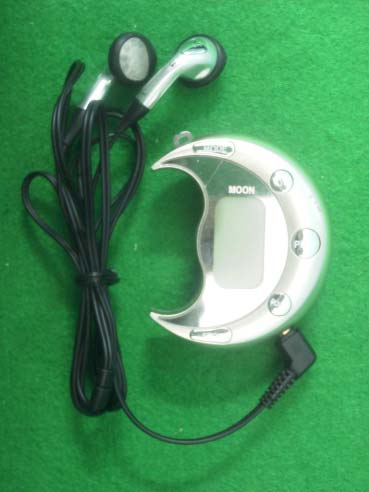
MP3 PLAYER - FCC ID RKQKOMACHO-M - G,G-Kaiser.com Ltd
RKQKOMACHO-M

MP3 PLAYER

Oct 30, 2003

Equipment Class

JBP - Part 15 Class B Computing Device Peripheral