RLN895663ionKids Wrist Tag Transmitter
Bluespan LLC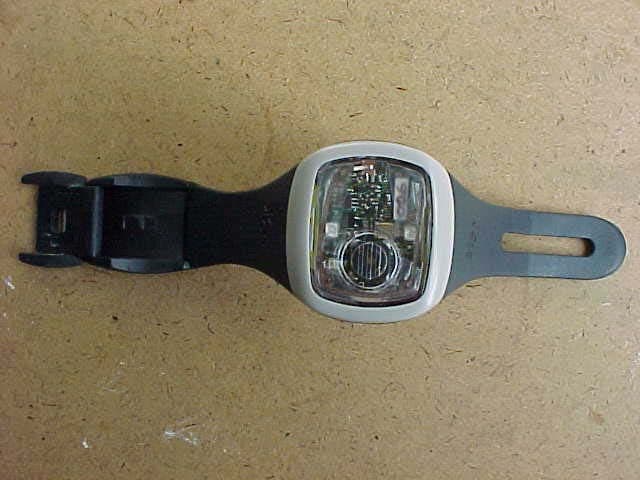
Click to zoom
Application Details
- Equipment Class
- DXX - Part 15 Low Power Communication Device Transmitter
- Date of Grant
- Jan 28, 2004
- Application Purpose
- Original Equipment
- Date of Application
- Jan 28, 2004
- Equipment Note
- ionKids Wrist Tag Transmitter
- Frequency Range
- 908.96800000 - 921.20000000
- Company
- Bluespan LLC
- Country
- United States
Documents & Files
Document Text
Text extracted from the exhibit documents filed with the FCC. Open a document above to read the original.
Users Manual
Exhibit L – Users Manual Bluespan LLC ionKids Wrist Tag Transmitter Quick Start Guide What’s what? NOTE: Check all elements to make sure everything is present and working. If an problems should occur or elements missing, please contact 1-888-8-ion-kids (1-888-846-6543). Red Activation Dot Security Clasp Red Light Requires Wristag Key (found on Base Unit) to open Speaker Green Light Blinks to signal complete activation/ deactivation of Wristag or when charging Ascending chirp and flash indicates that Wristag is in the process of activating Descending chirp and flash indicates that Wristag is in the process of deactivating Constant chirp and flash indicates that Wristag is unsuccessful in activating Blinks when Wristag is activated or when charging is complete. A C D E Tamper Sensor F B Wristag features Wristag will emit an audio and visual alarm if it senses tampering, or if it is removed from child’s wrist while still activated. For this reason, if you are initially practicing Step 3 and Step 4 without your child, remember to place Wristag on your own wrist, or cover the back with white paper. Otherwise, an empty Wristag will immediately release a Tamper Mode Alert. Wristag tamper sensor Base Unit features Activation Transmitter Wristag Key Base Unit Screen Find Button Essential component for opening Security Clasp (3 included) A C D Software Upgrade Port Charging Port E F B Quick Reference of Terms Activation Mode - This screen first appears when you turn on Base Unit and can be recalled at any time by pressing Activate. In this mode the Base Unit is activating the Wristag. Comfort Zone - Indicates the relative distance a child must be before triggering an alarm. Can be adjusted as needed by parent using the Arrow Keys. Find Mode - When Out of Range Alert signals and you cannot see your child, open the Base Unit Cover and press the Find Button to enter the Find Mode. Monitoring Mode - Base Unit Screen rests in this mode at all times unless there is an alert. Here you can view the child icon in relation to the Comfort Zone which you can adjust as needed. Out of Range Alert - sounds when child goes beyond the Comfort Zone setting. Return to Base - A signal you can send to your child’s Wristag to communicate a predefined message such as "Come home for dinner. " Sleep - puts a Wristag ‘to sleep' and allows a child to go beyond the Comfort Zone for 30 minutes without signaling an alarm. Silent Mode - a setting that silences the audio alarm and the vibration alarm. Tamper Mode Alert - an alarm that signals when Wristag senses tampering or is removed from wrist without being deactivated Play a Game! It is important to familiarize yourself with the operation of the ionKids system before actual use. We recommend reading through the following steps and then playing a game of hide-n-seek with your child. This will help you to become comfortable with the Base Unit, and understand and customize its features. We suggest starting in a familiar place, like your backyard. After successfully placing a Wristag on your child’s wrist and activating it, begin by having your child hide. Then, while monitoring with the Base Unit, practice setting your Comfort Zone, enabling the Find Mode, initiating a Return To Base Call, and the other ionKids features detailed below. Once you feel that you have mastered the System in a familiar space, try moving to a larger and different environment like a store or park. Practice will ensure both you, and your child feel comfortable with the reliability of the ionKids system, its functionality, and its alert system. 1 Putting Wristag on Child Locate the Base Unit and turn over to locate the Wristag Key. Remove the Key and insert it into the opening on the Wristag’s Security Clasp. Using your thumb, lift clasp to release strap. Place the Wristag on your child’s wrist and adjust strap to be comfortable, yet snug. Close clasp until it clicks. This indicates a secure lock between clasp and strap. NOTE: When you are finished, remember to put the Security Key back into the Base Unit. NOTE: Please be aware of Tamper Alert function as explained above and in the Advanced Features section on back. 2 Power On & Activate Press the Power button on the Base Unit. The ionKids logo will appear on the Base Unit Screen, then the Activation Mode will appear. Now, press and hold down Activate. At the same time, aim the Activation Transmitter on the Base Unit at the Red Activation Dot located on the Wristag. (Note: Be sure the Base Unit is within 1 inch of the Wristag). The Wristag's Green Light will signal you with ascending chirps and flashes if it has sucessfully activated. (If unsucessful, Green Light will signal constant chirps and flashes) When fully activated, the Wristag’s green light will flash on a slow and constant basis. 3 Assign a Name After Activation, the Base Unit will give you the options of defaulting to a sequential tag (such as Tag 1), assigning a tag name previously added and stored, or adding a new tag name. If introducing a new child to the Base Unit, use the Arrow Keys to scroll to “Add a New Name” and press Select. Use the Arrow Keys and Select to spell out name of the child you are monitoring. Use the Arrow Keys to scroll to “Done” and press Select. The Base Unit will enter the Monitoring Mode. Options to Edit or Delete a name are further explained in the Advanced Features on back. 4 Understanding the Monitoring Mode 5 Setting Comfort Zone The Base Unit Screen rests in Monitoring Mode at all times unless there is an alert. You can set your Comfort Zone by using the Arrow Keys to increase or decrease the bar. The Base Unit signals an Out of Range Alert when a child goes past your Comfort Zone setting. The Base Unit will notify you of this by buzzing, vibrating, and illuminating the Base Unit Screen in red. The Base Unit will also illustrate which child has gone Out of Range by illuminating their particular bar graph. 6 Out of Range Alert - What to do? I can still see my c…
Text truncated - open the document above for the full version.
Cover Letter(s)
Exhibit J – Letter of Confidentiality Bluespan LLC ionKids Wrist Tag Transmitter Date: December 3. 2003 Bluespan, LLC 802 Cornell Drive Austin, TX 78660 RE: Certification Application FRN: 0009802885 FCC ID: RLN895663 Please be advised the following information is to be held confidential on behalf of Company. 1. Schematics 2. Block diagrams 3. Theory of operation Sincerely, _____________________________ Bruce Cummings President Bluespan, LLC
Cover Letter(s)
Exhibit I – Letter of Agency Bluespan LLC ionKids Wrist Tag Transmitter Ref: FCC ID# RLN895663 Date: November 11. 2003 Bluespan, LLC 802 Cornell Drive Austin, TX 78660 Letter of Authorization To Whom It May Concern: Please be advised that Bluespan LLC, located at 802 Cornell Dr., Austin TX 78660, authorizes Professional testing to act on our behalf, until otherwise notified. We certify that we are not subject to denial of federal benefits, that includes FCC benefits, pursuant to Section 5301 of the Anti-Drug Abuse Act of 1988, U.S.C. 862. Further, no party as defined in 47 CFR 1.2002(b), to the application is subject to denial of federal benefits that includes FCC benefits. Thank you for your cooperation in this matter. Sincerely, _____________________________ Bruce Cummings President Bluespan, LLC
External Photos
Exhibit D – External Photos Bluespan LLC ionKids Wrist Tag Transmitter Bluespan LLC ionKids Wrist Tag Transmitter External View
ID Label/Location Info
Exhibit F – Label Artwork Bluespan LLC ionKids Wrist Tag Transmitter
Internal Photos
Exhibit E – Internal Photos Bluespan LLC ionKids Wrist Tag Transmitter Bluespan LLC ionKids Wrist Tag Transmitter Internal View Bluespan LLC ionKids Wrist Tag Transmitter Internal View Internal View of EUT with Battery Removed
Test Report
Professional Testing (EMI), Inc. Exhibit B – Test Report Bluespan LLC ionKids Wrist Tag Transmitter FCC ID: RLN895663 ____________________________________________________________________________________________ Professional Testing (EMI), Inc. Page 1 of 16 Project Number: 04231-10 Prepared for: BLUESPAN LLC 802 Cornell Drive Pflugerville, TX By Professional Testing (EMI), Inc. 1601 FM 1460, Suite B Round Rock, Texas 78664 November 2003 CERTIFICATION Electromagnetic Interference Test Report BLUESPAN LLC IONKIDS WRIST TAG TRANSMITTER FCC ID: RLN895663 ____________________________________________________________________________________________ Professional Testing (EMI), Inc. Page 2 of 16 Table of Contents Title Page .........................................................................................................................................1 Table of Contents .............................................................................................................................2 Certificate of Compliance ................................................................................................................3 1.0 EUT Description ..................................................................................................................4 1.1 EUT Operation.....................................................................................................................4 2.0 Electromagnetic Emissions Testing.....................................................................................5 2.1 Conducted Emissions Measurements ..............................................................................5 2.2 Radiated Emissions Measurements .....................................................................................5 2.2.1 Test Procedure ..............................................................................................................5 2.2.2 Test Criteria ..................................................................................................................6 2.2.3 Test Results ...................................................................................................................6 2.3 Occupied Bandwidth Measurements ...................................................................................6 3.0 Antenna Requirement ..........................................................................................................6 3.1 Evaluation Procedure .......................................................................................................7 3.2 Evaluation Criteria ...........................................................................................................7 3.3 Evaluation ........................................................................................................................7 4.0 Receiver Portion ..................................................................................................................7 5.0 RF Safety .............................................................................................................................7 6.0 Modifications to Equipment ................................................................................................8 7.0 List of Test Equipment.........................................................................................................9 Figures FIGURE 1: Radiated Emissions Test Setup ................................................................................. 10 Appendices Appendix A Emissions Data Sheets ............................................................................................. 11 Appendix B Occupied Bandwidth Data........................................................................................ 14 THIS REPORT SHALL NOT BE REPRODUCED EXCEPT IN FULL, WITHOUT THE WRITTEN APPROVAL OF PROFESSIONAL TESTING (EMI), INC. FCC ID: RLN895663 ____________________________________________________________________________________________ Professional Testing (EMI), Inc. Page 3 of 16 Applicant: Bluespan LLC Applicant’s Address: 802 Cornell Drive Pflugerville, TX Model: ionKids Wrist Tag Transmitter FCC ID: RLN895663 Project Number: 04231-10 The Bluespan LLC ionKids Wrist Tag Transmitter was tested to and found to be in compliance with FCC Part 15.203, 15.205, 15.209 and 15.249 for Intentional Radiators. The highest average emissions generated by the above equipments are listed below: Frequency (MHz) Level (dBuV/m) Limit (dBuV/m) Margin (dB) Fundamental 921.179 91.7 94 -2.3 I, Jeffrey A. Lenk, for Professional Testing (EMI), Inc., being familiar with the FCC rules and test procedures have reviewed the test setup, measured data and this report. I believe them to be true and accurate. ______________________________ Jeffrey A. Lenk President Certificate of Compliance FCC ID: RLN895663 ____________________________________________________________________________________________ Professional Testing (EMI), Inc. Page 4 of 16 1.0 EUT Description The Equipment Under Test (EUT) is the Bluespan LLC, ionKids Wrist Tag Transmitter.The wrist tag is a watch sized transceiver worn on the wrist of a child. The transmitter on the wrist tag works in conjunction with the ionKids base station. The purpose is for radiolocation of the child by a caretaker holding the associated base station. The unit is powered by a rechargeable lithium ion battery. It has audible alerts and warning lights. The EUT is a frequency hopping transmitter. There are 50 hopping frequencies, selected in a random but predetermined order. The average time of occupancy per channel is 15 ms. The average channel spacing is 280 kHz. The EUT was tested for compliance to 15.249. 47 CFR 15.249 Fundamental and Harmonic Radiated Power 47 CFR 15.209 Spurious Radiated Emission Limits 47 CFR 15.203 Antenna Requirements The system tested consisted of the following: Manufacturer & Model Serial # FCC ID # Description Bluespan LLC ionKids Wrist Tag Transmi…
Text truncated - open the document above for the full version.
Test Setup Photos
Exhibit C – Test Setup Photos Bluespan LLC ionKids Wrist Tag Transmitter Bluespan LLC ionKids Wrist Tag Transmitter Radiated Emissions Test Setup Bluespan LLC ionKids Wrist Tag Transmitter Radiated Emissions Test Setup
Contact Information
Applicant
Bruce Cummings
Technical Contact
Professional Testing (EMI) Inc.Mike Royer
(512) 244 3371
1601 FM 1460, Suite B · Round Rock, Texas · United States
Test Firm
Professional Testing (EMI), Inc.Michael Royer
Technical Specifications
| # | Rule Parts | Frequency Range | Power Output |
|---|---|---|---|
| 1 | 15C | 908.968 MHz - 921.2 MHz | - |
Other Applications from Bluespan LLC
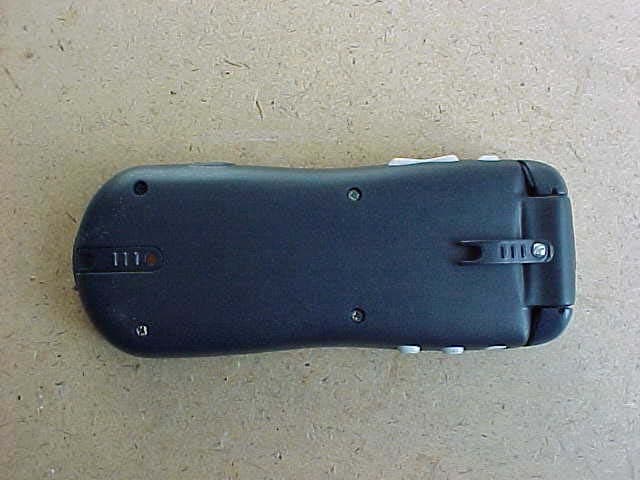
RLN895662
Jan 28, 2004ionKids Base Station Transmitter
Equipment Class
DSS - Part 15 Spread Spectrum Transmitter