ROF-STREAMPORTBluetooth Receiver
Bayan Audio Ltd.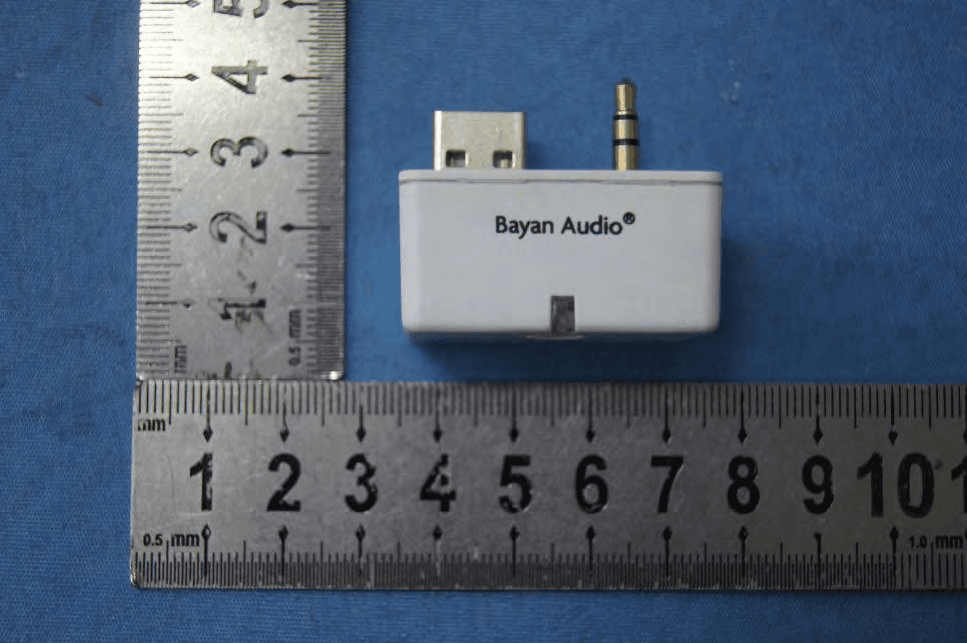
Click to zoom
Application Details
- Equipment Class
- DSS - Part 15 Spread Spectrum Transmitter
- Date of Grant
- Jan 14, 2013
- Application Purpose
- Original Equipment
- Date of Application
- Jan 14, 2013
- Equipment Note
- Bluetooth Receiver
- Frequency Range
- 2402.00000000 - 2480.00000000
- Company
- Bayan Audio Ltd.
- Country
- United Kingdom
Documents & Files
Document Text
Text extracted from the exhibit documents filed with the FCC. Open a document above to read the original.
Users Manual
StreamPort ™ User Manual Les instructions StreamPort ™ Handbuch Ihrer StreamPort ™ Manuel de StreamPort ™ Handleiding StreamPort ™ Istruzioni StreamPort ™ Инструкции по StreamPort ™ Pairing of the StreamPort with your Bluetooth Audio Source: º Press and hold down the pairing button on your StreamPort for 5 seconds to power it on. º Press and hold down the pairing button on your StreamPort for 1 second to enter pairing mode (the blue light will flash rapidly). º Consult your phone/tablet/laptop user manual for instructions on how to pair with Bluetooth devices – generally you will need to go into your settings, Bluetooth, scan for new Bluetooth devices and select ‘Bayan StreamPort’. You will not be prompted for a passcode for pairing. At all times, please observe the safety warnings and instructions contained in your Bayan Audio Speaker Dock manual. Installation of the Bayan Audio StreamPort: º Unplug your Bayan Audio Speaker Dock from the mains power supply. º Plug your StreamPort Bluetooth Adapter into the rear accessory sockets (3.5mm audio and USB) – depending on your Bayan Product, this socket may be labelled ‘Tablet’ or ‘StreamPort’. º Power on your Bayan Audio Speaker Dock, ensuring that the power indicator is illuminated BLUE/BLUE AND WHITE to indicate that it is powered on (and not in Standby mode). º Press the ‘StreamPort’ button on your remote control (this may be labelled ‘Tablet’ or ‘Airstream’ or have the icon: on some speaker docks). On/Pairing button English remember the last 4 devices that it was paired with. º StreamPort will automatically connect to the last paired device if it is in range. If you want to connect to an alternate device, switch off Bluetooth on the current device, and then pair/connect with the alternate device according to the steps outlined above. Specifications: Bluetooth Version: 4.0 (can pair with devices back to Bluetooth version 2.1) Profile: A2DP, AVCRP aptX high quality audio: yes Effective Range: 10m (30 feet) Dimensions: 38mm x 26mm x 32mm Weight: 14.5g Contact For support, please contact Bayan Audio via the website at: www.bayanaudio.com or email support at: [email protected] aptX® software is copyright CSR plc or its group companies. All rights reserved. The aptX® mark and the aptX logo are trade marks of CSR plc or one of its group companies and may be registered in one or more jurisdictions. Playing Music: º Check that your source device is connected to the StreamPort (the status indicator light on the StreamPort will blink slowly, on for one second, off for 1 second to indicate that it is connected to a device). º Select StreamPort for outputting audio on your phone/tablet/laptop. On an iPhone, iPod Touch or iPad this is done in the ‘Music’ app, where an ‘output selector’ option will appear next to the Rewind/Play/Fast Forward controls. Controlling Volume: º You have 2 volume controls available to adjust how loud your music is playing back – on the source device (phone/tablet etc.) and on the Bayan Audio amplifier itself. You will not be able to get maximum volume unless the volume is turned up to maximum both on the Bayan Audio Speaker Dock AND your source device (phone/tablet etc.). Notes: º You may find it easiest to turn your Bayan Audio Speaker Dock up to maximum volume, and then simply control your listening level from your phone/tablet etc. º For secure simple pairing to work your phone/tablet/laptop must be in close proximity to the StreamPort when trying to pair (within a range of 1 metre). º If pairing is not successful after 1 minute, you will need to switch off the StreamPort by pressing the pairing button for 3 seconds to turn it off, then start again. º After Pairing is successful, paired devices will remember each-other – unless pairing information is deleted there is no need to carry out pairing again. StreamPort can English Comment rendre compatible le StreamPort avec votre source audio Bluetooth : º Pressez et maintenez enfoncé le bouton de compatibilité de votre StreamPort pendant 5 secondes pour l’alimenter. º Pressez et maintenez enfoncé le bouton de compatibilité de votre StreamPort pendant 1 seconde pour accéder au mode de compatibilité (la lumière bleue clignotera rapidement). º Consultez le manuel d’instructions de votre téléphone portable /tablette/ordinateur portable pour savoir comment on peut les rendre compatibles avec les appareils Bluetooth : en général, vous devrez aller à vos réglages, Bluetooth, scanner pour chercher des nouveaux appareils Bluetooth et sélectionner « Bayan StreamPort ». On vous demandera un mot de passe pour la compatibilité. Prière de toujours respecter les avis de sécurité et les instructions contenues dans le manuel de votre Dock haut-parleur Bayan. Installation du StreamPort du haut-parleur Bayan : º Débranchez votre Dock haut-parleur Bayan du réseau électrique général. º Branchez votre adaptateur Bluetooth StreamPort dans les prises arrière de l’accessoire (3,5mm audio et USB) – selon votre produit Bayan, cette prise peut être identifiée comme « Tablet » ou « StreamPort ». º Branchez votre Dock haut-parleur Bayan, et assurez-vous que le voyant du courant est allumé BLEU/BLEU ET BLANC, ce qui indique que l’appareil est allumé (contrairement au mode veille). º Pressez le bouton « StreamPort » de votre commande à distance (qui peut être identifié comme « Tablet » ou « Airstream » ou par un symbole : sur certains docks de haut-parleurs). Puissance / Bouton d’appariement Français º Si la compatibilité fonctionne, les appareils rendus compatibles se souviendront les uns des autres : à moins que l’information de compatibilité ne soit effacée, il ne sera plus nécessaire de refaire l’opération de compatibilité. StreamPort se rappellera des 4 derniers appareils avec lesquels on l’a rendu compatible. º StreamPort se branchera automatiquement au dernier appareil avec lequel on l’aura rendu compatible, si ce dernier se trouve à sa portée. Si vous désirez le connecter à un autre appareil, ét…
Text truncated - open the document above for the full version.
Cover Letter(s)
Radiopaq Limited Dec 13, 2012 To: SIEMIC, INC. 775 Montague Expressway Milpitas, CA 95035 USA Dear Sir/Madam, Re: Project and Product Certification Representative Authorization Letter We, ______ Radiopaq Limited ___hereby authorize SIEMIC, INC. to act as a Certification Body for certifying for the following project(s): Product Description: Bluetooth Receiver Model name: BT-01, BT-02, BT-03, Bayan Streamport, Bayan Universal Streamport FCC ID: ROF-STREAMPORT We affirm that between SIEMIC and _ Radiopaq Limited __, any difference in understanding, including test plan, measurement methods, applicable standards and relevant procedures and processes have been resolved prior to commencement of testing activities.
Cover Letter(s)
SCS-F19: Confidentiality Request Letter Page 1 of 3 Rev 3.0 775 Montague Expressway Milpitas, CA 95035 Tel: 408-526-1188 Fax: 408-526-1088 Email: [email protected] Confidentiality Request Letter Revision History Reason for Amendment (current / obsolete) From To Approved Date Initial Release (obsolete) 1.0 1.0 Nov-14-2006 Adding CFR 2.459 (obsolete) 1.0 2.0 August – 11 - 2008 Updated company template & Added text box (current) 2.0 3.0 Jan-31-2012 SCS-F19: Confidentiality Request Letter Page 2 of 3 Rev 3.0 Radiopaq Limited Dec 13, 2012 To: Federal Communications Commission Authorization and Evaluation Division 7435 Oakland Mills Road Columbia, MD Subject: Permanent Confidentiality Request for FCC ID: ROF-STREAMPORT We hereby request confidential treatment of information accompanying this application as outlined below: - Block Diagram - Schematics - Operational Description The above materials contain trade secrets and proprietary information not customarily released to the public. The public disclosure of these materials may be harmful to the applicant and provide unjustified benefits to its competitors. The applicant understands that pursuant to Section 0.457 & 0.459 of the Rules, disclosure of this application and all accompanying documentation will not be made before the date of the Grant for this application. SCS-F19: Confidentiality Request Letter Page 3 of 3 Rev 3.0
Cover Letter(s)
Radiopaq Limited Date: Dec 13, 2012 To SIEMIC Inc 775 Montague Expressway Milpitas, CA 95035 Statement Model number: Bayan Bayan StreamPort, Bayan Universal Streamport , BT-01, BT-02, BT-03 We hereby state that these models are identical in interior structure, electrical circuits and components, and just model names, plastic surface and color are different. Your assistance on this matter is highly appreciated.
Cover Letter(s)
Radiopad Limited Date: Dec 28, 2012 To SIEMIC Inc 775 Montague Expressway Milpitas, CA 95035 Statement Model number: Bayan Bayan StreamPort, Bayan Universal Streamport , BT-01, BT-02, BT-03 We hereby state that these models have not BLE mode, BLE mode is served function, and only in the information display Your assistance on this matter is highly appreciated. Sincerely, Client’s signature Client’s name / title : Engeeer Contact information / address:
ID Label/Location Info
Bayan Audio FCC ID: ROF-STREAMPORT This device complies with Part 15 of FCC rules. Operation is subject to the following two conditions: (1) This device may not cause interference, and (2) This device must accept any interference, including interference that may cause undesired operation of the device
Internal Photos
Antenna
RF Exposure Info
FCC ID : ROF-STREAMPORT 1. RF EXPOSURE 1.1. The Requirement System operating under the provisions of this section shall be operated in a manner that ensures that the public is not exposed to radio frequency energy levels in excess of the Commission’s guidelines. See Section 15.247(b)(4) and Section 1.1307(b)(1) 1.2. Limit For Maximum Permissible Exposure (MPE) Limits for General Population/ Uncontrolled Exposure F = frequency in MHz, * Plane-wave equivalent power density 1.3. MPE Calculations E(V/m) = 30 P G d , Power Density: S( 2 mW/cm) = 2 377 E Where E = Electric Field (V/m) P = Peak Output Power (mW) Frequency Range (MHz) Electric Field Strength (E) (V/m) Magnetic Field Strength (H) (A/m) Power Density (S) ( 2 mW/cm) Averaging Time 2 E, 2 H or S (minutes) 0.3-1.34 614 1.63 (100)* 30 1.34-30 824/f 2.19/f (180/f)* 30 30-300 27.5 0.073 0.2 30 300-1500 f/1500 30 1500-100,000 1.0 30 G = Antenna Numeric Gain (numeric) = 10 x , x = Antenna Gain(dBi) /10 d = Separation Distance (cm) We can change the formula to: S = 2 30 377 PG d or, d = 30 377 PG S Because the EUT is belong to general population/uncontrolled exposure. So 1.3.1. We considering the limit of minimum separation distance (d) is 20cm, Maximum Output Power = 0.67mW Antenna Gain = 2.5(dBi) = 1.78(numeric) S = 2 30 377 PG d = 0.00024 2 mW/cm < 1.0 2 mW/cm (limit) Calculated RF Exposure power density is 0.00024 2 mW/cm , less than the limit. 1.3.2. We considering the limit of power density (S) is 1.0 2 mW/cm , Maximum Output Power = 0.67mW Antenna Gain = 2(dBi) = 1.78numeric) d = 30 377 PG S = 0.31 cm < 20 cm Calculated RF Exposure separation distance is 0.31 cm, less than the minimum separation distance 1.3.3.FCC Radiation Exposure Statement This equipment complies with FCC radiation exposure limits set forth for an uncontrolled environment. In order to avoid the possibility of exceeding the FCC radio frequency exposure limits, Human proximity to the antenna shall not be less than 20cm(8 inches) during normal operation. Proposed RF exposure safety information to include in User’s Manual.
Test Report
Page 1 of 80 FCC ID: ROF-STREAMPORT ACCURATE TECHNOLOGY CO. LTD REPORT NO. ATE20122817 APPLICATION CERTIFICATION On Behalf of Radiopaq Limited Bluetooth Receiver Model No.: Bayan StreamPort, Bayan Universal Streamport , BT-01, BT-02, BT-03 FCC ID: ROF-STREAMPORT Prepared for : Radiopaq Limited Address : 5 The Pavilions,Brighton Road,Pease Pottage,West Sussex,RH11 9BJ UNITED KINGDOM Prepared by : ACCURATE TECHNOLOGY CO. LTD Address : F1, Bldg. A, Changyuan New Material Port, Keyuan Rd. Science & Industry Park, Nanshan, Shenzhen, Guangdong P.R. China Tel: (0755) 26503290 Fax: (0755) 26503396 Report Number : ATE20122817 Date of Test : Dec 13-Dec 20, 2012 Date of Report : Dec 20, 2012 Page 2 of 80 FCC ID: ROF-STREAMPORT ACCURATE TECHNOLOGY CO. LTD REPORT NO. ATE20122817 TABLE OF CONTENTS Description Page Test Report Certification 1. GENERAL INFORMATION .......................................................................................................... 5 1.1. Description of Device (EUT)....................................................................................................................5 1.2. Description of Test Facility ......................................................................................................................6 1.3. Measurement Uncertainty.........................................................................................................................6 2. MEASURING DEVICE AND TEST EQUIPMENT ..................................................................... 7 3. OPERATION OF EUT DURING TESTING ................................................................................. 8 3.1. Operating Mode ........................................................................................................................................8 3.2. Configuration and peripherals ..................................................................................................................8 4. TEST PROCEDURES AND RESULTS ......................................................................................... 9 5. 20DB BANDWIDTH TEST............................................................................................................ 10 5.1. Block Diagram of Test Setup..................................................................................................................10 5.2. The Requirement For Section 15.247(a)(1) ............................................................................................10 5.3. EUT Configuration on Measurement .....................................................................................................10 5.4. Operating Condition of EUT ..................................................................................................................10 5.5. Test Procedure ........................................................................................................................................11 5.6. Test Result ..............................................................................................................................................11 6. CARRIER FREQUENCY SEPARATION TEST........................................................................ 15 6.1. Block Diagram of Test Setup..................................................................................................................15 6.2. The Requirement For Section 15.247(a)(1) ............................................................................................15 6.3. EUT Configuration on Measurement .....................................................................................................15 6.4. Operating Condition of EUT ..................................................................................................................15 6.5. Test Procedure ........................................................................................................................................16 6.6. Test Result ..............................................................................................................................................16 7. NUMBER OF HOPPING FREQUENCY TEST ......................................................................... 20 7.1. Block Diagram of Test Setup..................................................................................................................20 7.2. The Requirement For Section 15.247(a)(1)(iii) ......................................................................................20 7.3. EUT Configuration on Measurement .....................................................................................................20 7.4. Operating Condition of EUT ..................................................................................................................20 7.5. Test Procedure ........................................................................................................................................21 7.6. Test Result ..............................................................................................................................................21 8. DWELL TIME TEST ..................................................................................................................... 23 8.1. Block Diagram of Test Setup..................................................................................................................23 8.2. The Requirement For Section 15.247(a)(1)(iii) ......................................................................................23 8.3. EUT Configuration on Measurement .....................................................................................................23 8.4. Operating Condition of EUT ..................................................................................................................23 8.5. Test Procedure .............................................................................................................…
Text truncated - open the document above for the full version.
Test Setup Photos
Radiated spurious emission (up to 1G): Radiated spurious emission (above 1G): Conducted emission:
Contact Information
Applicant
John Whitehead
Test Firm
Accurate Technology Co., Ltd.Sean Liu
Technical Specifications
| # | Rule Parts | Frequency Range | Power Output |
|---|---|---|---|
| 1 | 15C | 2.40 GHz - 2.48 GHz | 670.00 µW |
Other Applications from Bayan Audio Ltd.
ROF-SOUNDBOOKX3
Dec 05, 2013Bayan Soundbook
Equipment Class
DSS - Part 15 Spread Spectrum Transmitter
ROF-SOUNDBOOK
Jul 18, 2013Bluetooth Soundbook
Equipment Class
DSS - Part 15 Spread Spectrum Transmitter