RT8H04A0Photo Printer - Model CV01-H01
Heiwa Tokei Mfg. Co. 、 Ltd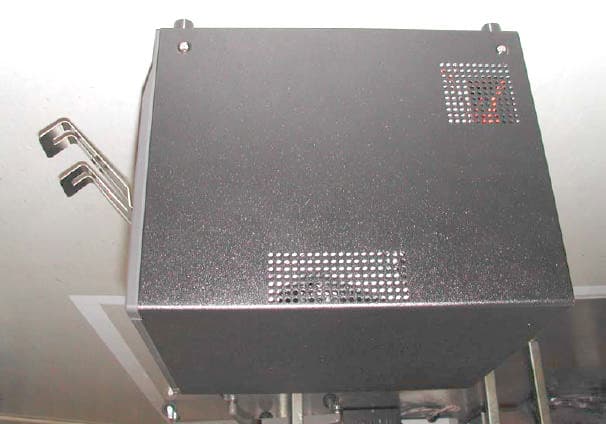
Click to zoom
Application Details
- Equipment Class
- DXT - Part 15 Low Power Transceiver, Rx Verified
- Date of Grant
- Mar 21, 2004
- Application Purpose
- Original Equipment
- Date of Application
- Mar 21, 2004
- Equipment Note
- Photo Printer - Model CV01-H01
- Frequency Range
- 13.54600000 - 13.54600000
- Country
- Japan
Documents & Files
Document Text
Text extracted from the exhibit documents filed with the FCC. Open a document above to read the original.
Users Manual
U U s s e e r r ’ ’ s s M M a a n n u u a a l l C C V V C C S S P P r r e e l l i i m m i i n n a a r r y y E E d d i i t t i i o o n n Ver. 1.10 Be sure to read this manual before put the printer in operation. After that, please keep the manual for the time to reread whenever necessary. Please don't touch, disassemble nor repair any part of the printer other than the part to which this manual instructs. ● In order to prevent the harm to those who use, or to other persons, and to the damage to property, the matter surely has to be followed is shown as follows . ● The level of the harm and damage which is caused by miss operation or wrong use of the printer without following the instruction is explained as follows. In order to use safely – Please be sure to follow with the instruction! This mark is a picture of "notice" which should be taken care This shows "a possibility of death or a serious damage will be assumed" if wrong operation is carried out without following this notice. Warning Caution This shows "a possibility of undertaking an obstacle, or material damage will be assumed" if wrong operation is carried out without following this n otice. The following action has possibilities to make the printer be damaged, broken down, or heated, and fumed. So do not carry out by any means, since it becomes the cause of a fire and an electric shock. When any damage and/or serious trouble happens, please switch off the printe r and pull out a power plug from a wall socket, and ask supplier for their help. Please don't drop, step on, give strong pressure or a strong shock on the printer. Please don't install the printer in the place where non air flow is and also don't use the printer by disturbing air flow to/from the printer. Please don't install the printer in the place where gives chemical reactions, such as a laboratory, and the place where air contains salt and gas. Please do not use the printer other than the specified power supply voltage and frequency. At the time of power cable/interface cable connection and disconnection, please pay special attention not to move and/or carry the printer with giving weight pressure to the cable. Please don't drop foreign substances, such as a clip and an insect pin, inside in the printer. Please don't plug several power supply leads into a single socket. Please don't spill drinks, such as tea, coffee, and juice, to the printer, or don't blow a insecticide spray to the printer. When water etc. is spilt, please switch off the printer and pull out a power supply code from a wall socket, and ask supplier's help. Please don't disassemble nor modify the printer. Please keep or throw the bag containing the printer away to the safety place where a hand does not reach so that a child may not wear. If it is worn, there is fear of suffocation. Warning 1. In use of the printer, please read out "in order to use safely"in advance well and follow with it's instruction. 2. Be careful not to drop a clip or a thing like a pin into the printer. It becomes the cause of failure. 3. Be careful of movement and carrying of the printer enough. If the printer is dropped, there is a possibility of damaging body and/or anything others. 4. In opening a cover, please work after opening a cover completely. There is a possibility of a cover closing and damaging the body etc. 5. Be careful of a cover when the cover is opened. There is a possibility of damaging the body with cover edge etc. 6. Please don't open the printer cover during printing. 7. When you clean the printer housing, please don't use thinner, trikren, benzine, a ketone liquid agent nor a chemistry dustcloth. 8. Please avoid to use the printer in the place with much oil, iron powder, garbage, dust, etc. 9. Please don't spill a liquid etc. to the printer or don't blow a medicine etc. 10. Please don't step on the printer, don't drop, don't strike, or don't give a strong shock or strong vibration. 11. Be careful in the edge part of sheet metal not to damage your body and anything others. 12. If abnormal problem occurs while in use of the printer, please stop use immediately and pull out a power supply plug from a wall socket. 13. Please don't disassemble the printer at the time of unrecoverable failure, and ask supplier's help. 1. In use of the printer, please read out "in order to use safely" in advance well and follow with it's instruction. 2. Please don't use the printer in the places where temperature is unusually high, such as near the place with fire or moisture, the place where direct rays hit, a heating instrument, or a heat instrument, a low place, and a place of high humidity and dusty. 3. Please don't install in a place from which chemical reactions, such as a laboratory, are generated. 4. Please don't install in a place where air contains salt and gas. 5. Please install a printer on the flat and stable table where enough air flow is given. (Please don't close fan blow off with a wall etc. by any means.) 6. Please don't put anything on the printer. 7. Since it may become the cause of a receiving obstacle if it is used near radio or the television or the same wall socket is used, be careful. 8. Please don't use the printer other than the specified voltage and frequency. 9. Please don't place anything on power supply cable and don't step on it. 10. Please don't pull nor carry the printer by power supply code or interface cable. 11. Please don't plug several power supply leads into a single socket. 12. Please don't bundle power supply codes for using. 13. Please be sure to catch the plug for extraction and/or insertion of power supply cable. 14. Please be sure to connect and/or disconnect the interface cable only after printer switch off. 15. Please avoid long distance cabling and/or to connect with the equipment having much noises. If there is no other way, please take sufficient measures to use a shield line, a twisted pair wire, etc. for every signal line. 16. Please install the printer in such place where the …
Text truncated - open the document above for the full version.
Cover Letter(s)
Exhibit 13 (Confidentiality Request)
External Photos
Page 1 of 4 Exhibit 3 (External Photographs) Photograph 1 – Front View of the CV01-H01 and Optional Paper Tray Page 2 of 4 Photograph 2 – Back View or the CV01-H01 Page 3 of 4 Photograph 3 – Left Side of the CV01-H01 Page 4 of 4 Photograph 4 – Right Side of the CV01-H01
Internal Photos
Page 1 of 13 Exhibit 9 (Internal Photos) Photograph 1 – Internal Top View of the CV01-H01 Page 2 of 13 Photograph 2 – Internal Right Side View of the CV01-H01 Page 3 of 13 Photograph 3 – Internal Left Side View of the CV01-H01 Page 4 of 13 Photograph 4 – Internal Left Side View of the CV01-H01 with Cover Removed Page 5 of 13 Photograph 5 – Internal Back View of the CV01-H01 Page 6 of 13 Photograph 6 & 7 – Top and Bottom View of the RFID Read/Write Control PCB Photograph 8 & 9 – Top and Bottom View of the RFID Read/Write Antenna PCB Photograph 10 & 11 – Top and Bottom View of the Joint PCB Page 7 of 13 Photograph 13 – Top View of the RFID tag Page 8 of 13 Photograph 14 – Bottom View of the RFID tag Page 9 of 13 Photograph 15 – View of the RFID tag Retainer Page 10 of 13 Photograph 16 – View of the CV01-H01 with Front Cover Open Showing Placement of the RFID Tag In the Printer Page 11 of 13 Photograph 17 – View of the Power Supply Module Page 12 of 13 Photograph 18 – Top View of the Driver PCB Photograph 19 – Bottom View of the Driver PCB Page 13 of 13 Photograph 20 – Top View of the Main PCB Photograph 21 – Bottom View of the Main PCB
Test Report
Exhibit 6 TEST REPORT FROM: COMMUNICATION CERTIFICATION LABORATORY TEST OF: CV01-H01 FCC ID: RT8H04A0 To FCC PART 15.203, 15.207, and 15.209, Subpart C Test Report Serial No: 73-7939 Exhibit 6 TEST REPORT FROM: COMMUNICATION CERTIFICATION LABORATORY 1940 W. Alexander Street Salt Lake City, Utah 84119-2039 Type of Report: Certification TEST OF: CV01-H01 FCC ID: RT8H04A0 To FCC PART 15.203, 15.207, and 15.209, Subpart C Test Report Serial No: 73-7939 Applicant: Heiwa Tokei Mfg. Co. Ltd Electronic Equipment Division 7572 Myou, Matsuo Iida-Shi, Nagano-Ken 395-8577 Japan Dates of Test: February 24 & 25, 2004 Issue Date: March 2, 2004 Equipment Receipt Date: February 24, 2004 COMMUNICATION CERTIFICATION LABORATORY TEST REPORT: 73-7939 FCC ID: RT8H04A0 Page 2 of 49 CERTIFICATION OF ENGINEERING REPORT This report has been prepared by Communication Certification Laboratory to document compliance of the device described below with the requirements of Federal Communications Commission (FCC) Part 15.203, 15.207, and 15.209, Subpart C. This report may be reproduced in full, partial reproduction may only be made with the written consent of the laboratory. The results in this report apply only to the sample tested. - Applicant: Heiwa Tokei Mfg. Co. Ltd - Manufacturer: Heiwa Tokei Mfg. Co. Ltd - Brand Name: Heiwa Tokei - Model Number: CV01-H01 - FCC ID Number: RT8H04A0 On this 2 nd day of March 2004, I, individually, and for Communication Certification Laboratory, certify that the statements made in this engineering report are true, complete, and correct to the best of my knowledge, and are made in good faith. Although NVLAP has recognized that the Communication Certification Laboratory EMC testing facilities are in good standing, this report must not be used to claim product certification, approval, or endorsement by NVLAP, NIST, or any agency of the federal government. COMMUNICATION CERTIFICATION LABORATORY Tested by: Norman P. Hansen EMC Technician COMMUNICATION CERTIFICATION LABORATORY TEST REPORT: 73-7939 FCC ID: RT8H04A0 Page 3 of 49 TABLE OF CONTENTS PAGE SECTION 1.0 CLIENT INFORMATION .................................4 SECTION 2.0 EQUIPMENT UNDER TEST (EUT) ..........................5 SECTION 3.0 TEST SPECIFICATION, METHODS & PROCEDURES ...........8 SECTION 4.0 OPERATION OF EUT DURING TESTING ...................12 SECTION 5.0 SUMMARY OF TEST RESULTS ...........................14 SECTION 6.0 MEASUREMENTS, EXAMINATIONS AND DERIVED RESULTS .....15 APPENDIX 1 TEST PROCEDURES AND TEST EQUIPMENT ..................22 APPENDIX 2 PHOTOGRAPHS .........................................27 COMMUNICATION CERTIFICATION LABORATORY TEST REPORT: 73-7939 FCC ID: RT8H04A0 Page 4 of 49 SECTION 1.0 CLIENT INFORMATION 1.1 Applicant: Company Name: Heiwa Tokei Mfg. Co. Ltd Electronic Equipment Division 7572 Myou, Matsuo Iida-Shi, Nagano-Ken 395-8577 Japan Contact Name: Shuichi Sekigawa Title: Manager 1.2 Manufacturer: Company Name: Heiwa Tokei Mfg. Co. Ltd Electronic Equipment Division 7572 Myou, Matsuo Iida-Shi, Nagano-Ken 395-8577 Japan Contact Name: Shuichi Sekigawa Title: Manager COMMUNICATION CERTIFICATION LABORATORY TEST REPORT: 73-7939 FCC ID: RT8H04A0 Page 5 of 49 SECTION 2.0 EQUIPMENT UNDER TEST (EUT) 2.1 Identification of EUT: Brand Name: Heiwa Tokei Model Name or Number: CV01-H01 Serial Number: PP-40100027 Options Fitted: N/A Country of Manufacture: Japan 2.2 Description of EUT: The CV01-H01 is a photograph printer that incorporates the use of an RFID reader/writer and associated RFID tag. The RFID reader receives serial and control data from the printer circuitry. The CPU processes a modulation signal based on a 13.56MHz oscillator. The modulated signal is amplified, demodulated and matched into the appropriate impedance. Finally the signal is matched to the antenna and then it is radiated to RFID tag. The RFID tag, which is a companion to RFID reader, requires no internal power supply. Its contactless interface generates the power supply and the system clock via the resonant circuitry by inductive coupling to the reader. The interface also demodulates data, which is transmitted from the reader to the label IC, and modulates the electromagnetic field for data transmission from the label IC to the reader. Data is stored in a non-volatile memory (EEPROM). COMMUNICATION CERTIFICATION LABORATORY TEST REPORT: 73-7939 FCC ID: RT8H04A0 Page 6 of 49 2.3 EUT and Support Equipment: The FCC ID numbers for all the EUT and support equipment used during the test (including inserted cards) are listed below: Brand Name Model Number Serial No. FCC ID Number Description Name of Interface Ports / Interface Cables BN: Heiwa Tokei MN: CV01-H01 (1) SN:PP-40100027 RT8H04A0 Photograph Printer See Section 2.4 BN: Dell MN: Dimension 4100 SN: CTZD31S DoC Desktop Computer USB/USB Cable Serial/Serial Mouse Cable BN: Gateway MN: EV500 SN: 15017A444139 BEJCB575B Monitor Video/Attached Shielded Video Cable (4) BN: Dell MN: SK-800 SN: None DoC Keyboard PS/2 / Attached PS/2 Cable (3) BN: Microsoft MN: Intellimouse 1.2A SN: None DoC PS/2 Mouse PS/2 / Attached PS/2 Cable (3) BN: Logitech MN: ClearCase SN: LT48127 DZL6QBC Serial Mouse Serial/Attached Serial Cable (3) Note: (1) EUT. (2) Interface port connected to EUT (See Section 2.4) (3) Mouse and keyboard cable permanently attached. (4) Monitor’s attached video cable includes manufacturer- supplied ferrite. The support equipment listed above was not modified in order to COMMUNICATION CERTIFICATION LABORATORY TEST REPORT: 73-7939 FCC ID: RT8H04A0 Page 8 of 49 SECTION 3.0 TEST SPECIFICATION, METHODS & PROCEDURES 3.1 Test Specification: Title: FCC PART 15, Subpart C (47 CFR 15) 15.203, 15.207, and 15.209 Limits and methods of measurement of radio interference characteristics of radio frequency devices. Purpose of Test: The tests were performed to demonstrate initial compliance. 3.2 Methods & Procedures: 3.2.1 §15.203 Antenna Requirement An intentional radiator shall be designed to ensure that no …
Text truncated - open the document above for the full version.
Test Setup Photos
Page 1 of 4 Exhibit 7 (Test Setup Photographs) Photograph 1 – Front View of the Radiated Emissions Testing Setup Page 2 of 4 Photograph 2 – Back View of the Radiated Emissions Testing Setup Page 3 of 4 Photograph 3 – Front View of the Conducted Emissions Testing Setup Page 4 of 4 Photograph 4 – Back/Side View of the Conducted Emissions Testing Setup
Contact Information
Applicant
Masao Yoshizawa
Technical Contact
Communication Certification LaboratoryKirk P Thomas
[email protected]801-972-6146
1940 West Alexander Street · Salt Lake City, Utah · United States
Test Firm
Communication Certification LaboratoryThomas Jackson
Technical Specifications
| # | Rule Parts | Frequency Range | Power Output |
|---|---|---|---|
| 1 | 15C | 13.546 MHz - 13.546 MHz | 0.70 µW |