SBVRM008802.11b/g/n (3x3) 2.4GHz WIRELESS ROUTER
Sonos, Inc.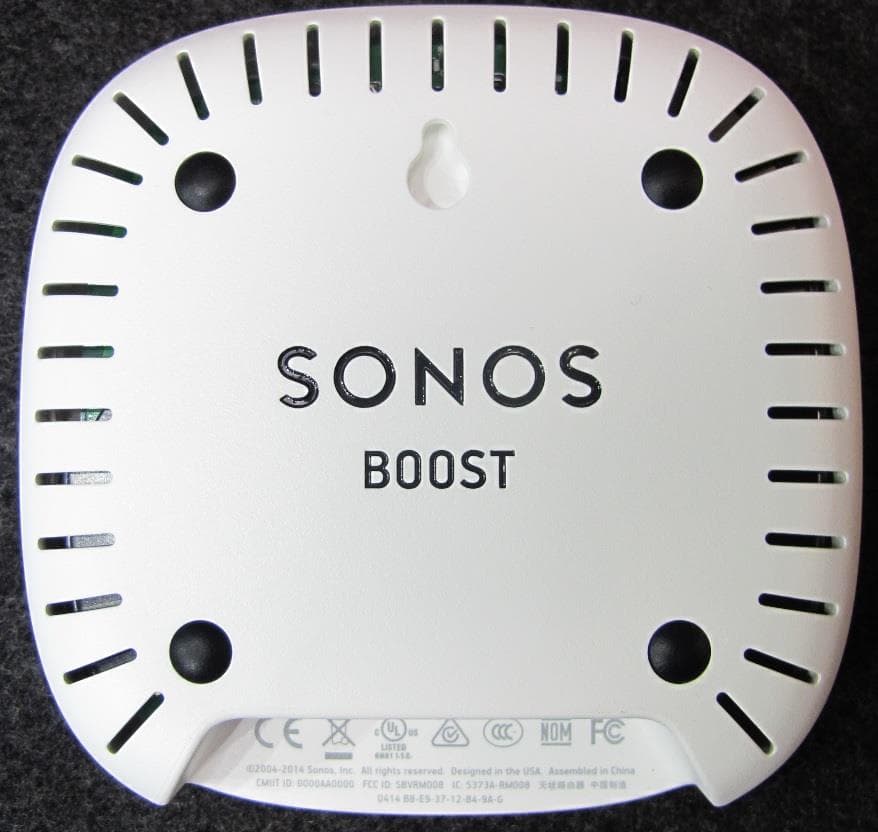
Click to zoom
Application Details
- Equipment Class
- DTS - Digital Transmission System
- Date of Grant
- Sep 02, 2014
- Application Purpose
- Original Equipment
- Date of Application
- Sep 02, 2014
- Equipment Note
- 802.11b/g/n (3x3) 2.4GHz WIRELESS ROUTER
- Frequency Range
- 2412.00000000 - 2462.00000000
- Company
- Sonos, Inc.
- Country
- United States
Documents & Files
Document Text
Text extracted from the exhibit documents filed with the FCC. Open a document above to read the original.
Users Manual
SONOS ® BOOST Product Guide THIS DOCUMENT CONTAINS INFORMATION THAT IS SUBJECT TO CHANGE WITHOUT NOTICE. No part of this publication may be reproduced or transmitted in any form or by any means, electronic or mechanical, including but not limited to photocopying, recording, information retrieval systems, or computer network without the written permission of Sonos, Inc. SONOS and all other Sonos product names and slogans are trademarks or registered trademarks of Sonos, Inc. SONOS Reg. U.S. Pat. & Tm. Off. Sonos products may be protected by one or more patents. Our patent-to-product information can be found here: sonos.com/legal/patents iPhone®, iPod®, iPad® and iTunes® are trademarks of Apple Inc., registered in the U.S. and other countries. Windows® is a registered trademark of Microsoft Corporation in the United States and other countries. Android™ is a trademark of Google, Inc. MPEG Layer-3 audio decoding technology licensed from Fraunhofer IIS and Thomson. Sonos uses MSNTP software, which was developed by N.M. Maclaren at the University of Cambridge. © Copyright, N.M. Maclaren, 1996, 1997, 2000; © Copyright, University of Cambridge, 1996, 1997, 2000. All other products and services mentioned may be trademarks or service marks of their respective owners. March 2014 ©2004-2014 by Sonos, Inc. All rights reserved. SONOS BOOST The SONOS BOOST is an optional accessory you can purchase to unleash the full power of Sonos. When Should I Use a BOOST? •To boost wireless performance. If your WiFi network is already in high demand with streaming video, gaming, and web surfing, connect a BOOST to your router to establish a separate wireless network exclusively for your Sonos speakers. •To achieve rock solid coverage. If you want to strengthen the wireless performance of your Sonos system, a BOOST provides three wireless antennae broadcasting 360-degree signals through walls and ceilings for flawless coverage even to the most remote room in your home. •To create theater-quality surround sound. If you want to create an immersive surround sound experience that’s easy to set up and control, connect a BOOST to your router and wirelessly connect a SUB and a pair of PLAY:1 or PLAY:3 speakers to your PLAYBAR home theater setup. New to Sonos? It takes just a few steps to get your Sonos system up and running (the steps below are fully explained in the QuickStart Guide packaged with your BOOST)— • Connect a SONOS BOOST to your router using an Ethernet cable (supplied). • Place other Sonos products in the rooms of your choice. • Download a Sonos Controller App and then follow the on-screen prompts to set up Sonos. Once you’ve set up your music system, you can add more Sonos products any time. Adding to an existing Sonos system? Sonos can be easily expanded room by room. If you are adding this BOOST to an existing Sonos music system, you can turn directly to "Adding to an Existing Sonos System" on page 3. Product Guide 2 Your Home Network To access Internet music services, Internet radio, and any digital music stored on your computer or Network-Attached Storage (NAS) device, your home network must meet the following requirements: Network requirements • High-speed DSL/Cable modem, or fiber-to-the-home broadband connection for proper playback of Internet-based music services. (If your Internet service provider only offers Satellite Internet access, you may experience playback issues due to fluctuating download rates.) • If your modem is not a modem/router combination and you want to take advantage of Sonos' automatic online updates, or stream music from an Internet-based music service, you must install a router in your home network. If you do not have a router, purchase and install one before proceeding. If you are going to use the Sonos Controller App on an Android™ smartphone, iPhone®, iPod Touch®, iPad® or other tablet, you will need a wireless router. Please visit our Web site at http://faq.sonos.com/apps for more information. • Connect a SONOS BOOST to your router if: • You have a larger home where the WiFi performance isn’t robust and you want to strengthen the wireless performance of your Sonos system. • Your WiFi network is already in high demand with streaming video and web surfing and you want to create a separate wireless network just for your Sonos speakers. • You want to wirelessly connect a SUB and/or a pair of PLAY:1 or PLAY:3 speakers to your PLAYBAR home theater setup. • For best results, you should connect the computer or NAS drive that contains your personal music library collection to your home network router using an Ethernet cable. System requirements • Windows® XP SP3 and higher • Macintosh® OS X 10.6 and higher • Compatible with iPhone, iPod touch, and iPad devices running iOS 6.0 or later, certain features require higher versions of iOS • Android: 2.1 and higher, certain features require higher versions of Android Note:Your network must have a high-speed Internet connection, as the Sonos system is designed to provide you with online software updates. Your Sonos system must be registered to receive these updates, so be sure to register during the setup process. We do not share your e-mail address with other companies. Note:For the latest system requirements, including supported operating system versions, please visit our Web site at http://faq.sonos.com/specs. SONOS BOOST 3 Adding to an Existing Sonos System Once you’ve got a Sonos system set up, you can easily add more Sonos speakers any time (up to 32 rooms). 1.Attach the power adapter and plug in the SONOS BOOST. 2.Choose one of the following options: • Select Add a BRIDGE or BOOST from the Manage menu on a Mac or PC. • Select Add a BRIDGE or BOOST from the Settings menu on a handheld controller. During the setup process, you will be prompted to press and release the Join button on the side of the SONOS BOOST. The indicator lights flash orange and white while the BOOST is connecting. You may be prompted to update the rest of your Sonos…
Text truncated - open the document above for the full version.
Users Manual
Important Product Information BOOST_LegalBooklet_640-00205.fm Page -1 Tuesday, March 11, 2014 2:56 PM THIS DOCUMENT CONTAINS INFORMATION THAT IS SUBJECT TO CHANGE WITHOUT NOTICE. No part of this publication may be reproduced or transmitted in any form or by any means, electronic or mechanical, including but not limited to photocopying, recording, information retrieval systems, or computer network without the written permission of Sonos, Inc. SONOS and all other Sonos product names and slogans are trademarks or registered trademarks of Sonos, Inc. SONOS Reg. U.S. Pat. & Tm. Off. Sonos products may be protected by one or more patents. Our patent-to-product information can be found here: sonos.com/legal/patents. iPhone®, iPod®, iPad® and iTunes® are trademarks of Apple Inc., registered in the U.S. and other countries. Windows® is a registered trademark of Microsoft Corporation in the United States and other countries. Android® is a trademark of Google Inc. MPEG Layer-3 audio decoding technology licensed from Fraunhofer IIS and Thomson. Sonos uses MSNTP software, which was developed by N.M. Maclaren at the University of Cambridge. © Copyright, N.M. Maclaren, 1996, 1997, 2000; © Copyright, University of Cambridge, 1996, 1997, 2000. All other products and services mentioned may be trademarks or service marks of their respective owners. © 2004-2014 by Sonos, Inc. All rights reserved. 031014 To reduce our use of paper, we have moved our product documentation online. For the latest Sonos user guides, please go to www.sonos.com/support. BOOST_LegalBooklet_640-00205.fm Page 0 Tuesday, March 11, 2014 2:56 PM 1 Technical Support •Web site •Visit our Web site at www.sonos.com/support. There you can visit our Forums, browse our Frequently Asked Questions (FAQ) pages, or request assistance. •Email •[email protected] • Telephone •UK 0808 2346596 •US and Canada (English) 1 800 680 2345 •Australia 03 9874 0800 (see page 37 for additional information) •Austria 0800 291 623 •Belgium 0800 38904 •Brazil 0800 025 0827 •China (English) 49(0)1803447000 •China (Mandarin) 400 664 9889 •France 0800 910 769 •Germany 0800 000 5339 •Italy 800 972444 •Mexico 01 800 083 5513 •Netherlands 0800 0234361 •New Zealand 06 833 6925 •Spain 0917 482942 •Sweden 0207 93593 •Switzerland 0800 56 25 25 If your country is not listed here, please visit www.sonos.com/support to find the correct telephone number for your country. BOOST_LegalBooklet_640-00205.fm Page 1 Tuesday, March 11, 2014 2:56 PM 2 Regulation Information Europe Sonos declares that this product herewith complies with the requirements of the EMC Directive 2004/108/EC, Low Voltage Directive 2006/95/EC, Eco-Design Directive 2005/32/EC, RoHS Directive 2011/65/EU and the R&TTE Directive 1999/5/EC when installed and used in accordance with the manufacturer's instructions. A copy of the full Declaration of Conformance may be obtained at www.sonos.com/support/policies. SonosNet is the propriety wireless mesh network architecture designed to provide robust transmission of high fidelity streaming digital music. All Sonos players within the SonosNet mesh network act as both a client and access point simultaneously. Each Sonos player expands the range of SonosNet mesh network because while each device must be within range of at least one other Sonos player, they do not need to be within range of a central access point. In addition to extending the range between Sonos products, SonosNet can extend the range of other data networking devices within the home, such as Android devices directly connected to SonosNet. Due to the high network availability requirements of the SonosNet mesh network, Sonos players do not have a standby or off mode other than removing the power cord from the AC mains. Sonos certifie que ce produit est conforme aux exigences de la directive CEM 2004/108/EC, de la directive basse tension 2006/95/EC, RoHS Directive 2011/65/EU et de la directive 1999/5/EC sur les équipements hertziens et les équipements terminaux de télécommunications, sous réserve d'une installation et d'une utilisation conformes aux instructions en vigueur du fabricant. Une copie complète de la Déclaration de conformité est disponible sur le site www.sonos.com/support/policies. SonosNet est l'architecture de réseau maillé propriétaire sans fil conçue pour permettre une transmission fiable haute fidélité lors de la diffusion de musique numérique. Tous les lecteurs Sonos au sein du réseau maillé SonosNet servent à la fois de client et de point d'accès. Chaque lecteur Sonos augmente la portée du réseau maillé SonosNet. En effet, il n'est pas indispensable que chaque périphérique soit à la portée d'un point d'accès central. Il suffit qu'il soit à la portée d'au moins un autre lecteur Sonos. Outre l'extension de la portée entre les produits Sonos, SonosNet peut étendre la portée d'autres périphériques réseau de données à l'intérieur de la maison, par exemple des périphériques Android connectés directement à SonosNet. En raison des exigences sévères en matière de disponibilité réseau auxquelles doit satisfaire le réseau maillé SonosNet, les lecteurs Sonos ne peuvent être placés en mode de veille ou d'arrêt qu'en débranchant le cordon d'alimentation de la prise secteur CA. BOOST_LegalBooklet_640-00205.fm Page 2 Tuesday, March 11, 2014 2:56 PM 3 Sonos erklärt hiermit, dass dieses Produkt den Anforderungen der EMV-Richtlinie 2004/108/EC, der Niederspannungsrichtlinie 2006/95/EC, RoHS Directive 2011/65/EU und der R&TTE-Richtlinie 1999/5/EC entspricht, sofern es den Anweisungen des Herstellers gemäß installiert und verwendet wird. Die vollständige Konformitätserklärung finden Sie unter www.sonos.com/support/policies. SonosNet ist eine proprietäre Wireless-Netzwerkarchitektur, die auf die zuverlässige Übertragung digitaler HiFi- Streaming-Musik ausgelegt ist. Alle Sonos-Player innerhalb des SonosNet-Netzwerks agieren gleichzeitig sowohl als Client als auch als Zugriffspunkt. Jeder Sonos-Player erweitert die …
Text truncated - open the document above for the full version.
Cover Letter(s)
Date: Au Federal C 7435 Oak Columbi Subject: FCC Ma n To Who m I, Mark K Best reg a Mark K e Sonos In ugust 15th, 20 Communicat kland Mills R a MD 21046 Signat nufacturer d m It May Co Keefe, autho ards, eefe c. | Compli a 014 tions Comm Road 6 ture Authori designation: oncern: orize David P ance Enginee ission ization Lette SBV Petry to sign er | 857 998 er n FCC related 5085 | mark d documents k.keefe@son s for Sonos, nos.com Inc.
External Photos
Sonos BOOST Front Back Side Top Bottom
ID Label/Location Info
Label Location Boost Bottom View
Internal Photos
Sonos BOOST Main PCB top Main PCB bottom without shield Main PCB bottom with shield Main PCB bottom - detail
RF Exposure Info
FCC Part 1 Subpart I FCC Part 2 Subpart J INDUSTRY CANADA RSS 102 ISSUE 3 RF EXPOSURE REPORT FOR 802.11 B/G/N (3X3) 2.4GHZ WIRELESS ROUTER MODEL NUMBER: BOOST FCC ID: SBVRM008 IC: 5373A-RM008 REPORT NUMBER: 13U16720-2 ISSUE DATE: FEBRUARY 28, 2014 Prepared for SONOS, INC. 223 E. DE LA GUERRA SANTA BARBARA, CA 93101, U.S.A. Prepared by UL VERIFICATION SERVICES INC. 47173 BENICIA STREET FREMONT, CA 94538, U.S.A. TEL: (510) 771-1000 FAX: (510) 661-0888 REPORT NO: 13U16720-2 DATE: FEBRUARY 28, 2014 FCC ID: SBVRM008 IC: 5373A-RM008 Page 2 of 11 UL VERIFICATION SERVICES INC. FORM NO: CCSUP4701I 47173 BENICIA STREET, FREMONT, CA 94538, USA TEL: (510) 771-1000 FAX: (510) 661-0888 This report shall not be reproduced except in full, without the written approval of . UL Verification Services Inc. Revision History Rev. Issue Date Revisions Revised By -- 02/28/14 Initial Issue T. Chan REPORT NO: 13U16720-2 DATE: FEBRUARY 28, 2014 FCC ID: SBVRM008 IC: 5373A-RM008 Page 3 of 11 UL VERIFICATION SERVICES INC. FORM NO: CCSUP4701I 47173 BENICIA STREET, FREMONT, CA 94538, USA TEL: (510) 771-1000 FAX: (510) 661-0888 This report shall not be reproduced except in full, without the written approval of . UL Verification Services Inc. TABLE OF CONTENTS 1. ATTESTATION OF TEST RESULTS ................................................................................. 4 2. TEST METHODOLOGY ..................................................................................................... 5 3. REFERENCES ................................................................................................................... 5 4. FACILITIES AND ACCREDITATION ................................................................................. 5 5. MAXIMUM PERMISSIBLE RF EXPOSURE ....................................................................... 6 5.1. FCC RULES ................................................................................................................ 6 5.2. IC RULES .................................................................................................................... 7 5.3. EQUATIONS ................................................................................................................ 8 5.4. LIMITS AND IC EXEMPTION .....................................................................................10 6. RF EXPOSURE RESULTS ................................................................................................11 REPORT NO: 13U16720-2 DATE: FEBRUARY 28, 2014 FCC ID: SBVRM008 IC: 5373A-RM008 Page 4 of 11 UL VERIFICATION SERVICES INC. FORM NO: CCSUP4701I 47173 BENICIA STREET, FREMONT, CA 94538, USA TEL: (510) 771-1000 FAX: (510) 661-0888 This report shall not be reproduced except in full, without the written approval of . UL Verification Services Inc. 1. ATTESTATION OF TEST RESULTS COMPANY NAME: SONOS, INC. 223 E. DE LA GUERRA ST. SANTA BARBARA, CA 93101, U.S.A. EUT DESCRIPTION: 802.11 B/G/N (3X3) 2.4GHZ WIRELESS ROUTERTYPE MODEL: BOOST SERIAL NUMBER: B8E937000C4A5-CONDUCTED, B8E937000C5E8-RADIATED DATE TESTED: FEBRUARY 10 – 15, 2014 APPLICABLE STANDARDS STANDARD TEST RESULTS FCC PART 1 SUBPART I & PART 2 SUBPART J Pass INDUSTRY CANADA RSS 102 ISSUE 3 Pass UL Verification Services Inc. calculated the RF Exposure of the above equipment in accordance with the requirements set forth in the above standards, using test results reported in the test report documents referenced below and/or documentation furnished by the applicant. All indications of Pass/Fail in this report are opinions expressed by UL Verification Services Inc. based on interpretations of these calculations. The results show that the equipment is capable of demonstrating compliance with the requirements as documented in this report. Note: The results documented in this report apply only to the tested sample, under the conditions and modes of operation as described herein. This document may not be altered or revised in any way unless done so by UL Verification Services Inc. and all revisions are duly noted in the revisions section. Any alteration of this document not carried out by UL Verification Services Inc. will constitute fraud and shall nullify the document. This report must not be used by the client to claim product certification, approval, or endorsement by NVLAP, NIST, any agency of the Federal Government, or any agency of any government. Approved & Released For UL Verification Services Inc. By: Calculated By: Thu Chan Francisco Guarnero WiSE Operations Manager WiSE Lab Technician UL Verification Services Inc. UL Verification Services Inc. REPORT NO: 13U16720-2 DATE: FEBRUARY 28, 2014 FCC ID: SBVRM008 IC: 5373A-RM008 Page 5 of 11 UL VERIFICATION SERVICES INC. FORM NO: CCSUP4701I 47173 BENICIA STREET, FREMONT, CA 94538, USA TEL: (510) 771-1000 FAX: (510) 661-0888 This report shall not be reproduced except in full, without the written approval of . UL Verification Services Inc. 2. TEST METHODOLOGY All calculations were made in accordance with FCC OET Bulletin 65 Edition 97-01 and IC Safety Code 6. 3. REFERENCES All measurements were made as documented in test report UL Verification Services Inc. Document 13U16283-1 FCC IC DTS WLAN Report for operation in the 2.4 GHz band. Output power, Duty cycle and Antenna gain data is excerpted from the applicable test reports. Antenna gain data is excerpted from the applicable test reports. 4. FACILITIES AND ACCREDITATION The test sites and measurement facilities used to collect data are located at 47173 Benicia Street, Fremont, California, USA. UL Verification Services Inc. is accredited by NVLAP, Laboratory Code 200065-0. The full scope of accreditation can be viewed at http://ts.nist.gov/standards/scopes/2000650.htm. REPORT NO: 13U16720-2 DATE: FEBRUARY 28, 2014 FCC ID: SBVRM008 IC: 5373A-RM008 Page 6 of 11 UL VERIFICATION SERVICES INC. FORM NO: CCSUP4701I 47173 BENICIA STREET, FREMONT, CA 94538, USA TEL: (510) 771-1000 FAX: (510) 661-0888 This report shall not be r…
Text truncated - open the document above for the full version.
Test Report
FCC 47 CFR PART 15 SUBPART C INDUSTRY CANADA RSS-210 ISSUE 8 CERTIFICATION TEST REPORT FOR 802.11 B/G/N (3X3) 2.4GHZ WIRELESS ROUTER MODEL NUMBER: BOOST FCC ID: SBVRM008 IC: 5373A-RM008 REPORT NUMBER: 13U16720-1, REVISION A ISSUE DATE: AUGUST 19, 2014 Prepared for SONOS, INC. 223 E. DE LA GUERRA STREET SANTA BARBARA, CA, 93101, U.S.A. Prepared by UL VERIFICATION SERVICES INC. 47173 BENICIA STREET FREMONT, CA 94538, U.S.A. TEL: (510) 771-1000 FAX: (510) 661-0888 REPORT NO: 13U16720-1A DATE: AUGUST 19, 2014 FCC ID: SBVRM008 IC: 5373A-RM008 Page 2 of 176 UL VERIFICATION SERVICES INC. FORM NO: CCSUP4701J 47173 BENICIA STREET, FREMONT, CA 94538, USA TEL: (510) 771-1000 FAX: (510) 661-0888 This report shall not be reproduced except in full, without the written approval of UL Verification Services Inc. Revision History Rev. Issue Date Revisions Revised By -- 03/13/14 Initial Issue T. Chan A 08/19/14 Address TCB Questions MM / CP REPORT NO: 13U16720-1A DATE: AUGUST 19, 2014 FCC ID: SBVRM008 IC: 5373A-RM008 Page 3 of 176 UL VERIFICATION SERVICES INC. FORM NO: CCSUP4701J 47173 BENICIA STREET, FREMONT, CA 94538, USA TEL: (510) 771-1000 FAX: (510) 661-0888 This report shall not be reproduced except in full, without the written approval of UL Verification Services Inc. TABLE OF CONTENTS 1. ATTESTATION OF TEST RESULTS ................................................................................. 5 2. TEST METHODOLOGY ..................................................................................................... 6 3. FACILITIES AND ACCREDITATION ................................................................................. 6 4. CALIBRATION AND UNCERTAINTY ................................................................................ 6 4.1. MEASURING INSTRUMENT CALIBRATION .............................................................. 6 4.2. SAMPLE CALCULATION ............................................................................................ 6 4.3. MEASUREMENT UNCERTAINTY ............................................................................... 6 5. EQUIPMENT UNDER TEST ............................................................................................... 7 5.1. DESCRIPTION OF EUT .............................................................................................. 7 5.2. MAXIMUM OUTPUT POWER...................................................................................... 7 5.3. DESCRIPTION OF AVAILABLE ANTENNAS .............................................................. 7 5.4. SOFTWARE AND FIRMWARE .................................................................................... 7 5.5. WORST-CASE CONFIGURATION AND MODE .......................................................... 8 5.6. DESCRIPTION OF TEST SETUP ................................................................................ 8 6. TEST AND MEASUREMENT EQUIPMENT ......................................................................10 7. ON TIME, DUTY CYCLE AND MEASUREMENT METHODS ...........................................11 7.1. ON TIME AND DUTY CYCLE RESULTS ....................................................................11 7.2. MEASUREMENT METHODS .....................................................................................11 7.3. DUTY CYCLE PLOTS ................................................................................................12 8. ANTENNA PORT TEST RESULTS ...................................................................................14 8.1. 802.11b MODE IN THE 2.4 GHz BAND ......................................................................14 8.1.1. 6 dB BANDWIDTH ...............................................................................................14 8.1.2. 99% BANDWIDTH ...............................................................................................20 8.1.3. AVERAGE POWER .............................................................................................26 8.1.4. OUTPUT POWER ...............................................................................................27 8.1.5. POWER SPECTRAL DENSITY ...........................................................................34 8.1.6. OUT-OF-BAND EMISSIONS ...............................................................................40 8.2. 802.11g MODE IN THE 2.4 GHz BAND ......................................................................53 8.2.1. 6 dB BANDWIDTH ...............................................................................................53 8.2.2. 99% BANDWIDTH ...............................................................................................59 8.2.3. AVERAGE POWER .............................................................................................65 8.2.4. OUTPUT POWER ...............................................................................................66 8.2.5. POWER SPECTRAL DENSITY ...........................................................................73 8.2.6. OUT-OF-BAND EMISSIONS ...............................................................................79 8.3. 802.11n HT20 MODE IN THE 2.4 GHz BAND ............................................................92 8.3.1. 6 dB BANDWIDTH ...............................................................................................92 8.3.2. 99% BANDWIDTH ...............................................................................................98 REPORT NO: 13U16720-1A DATE: AUGUST 19, 2014 FCC ID: SBVRM008 IC: 5373A-RM008 Page 4 of 176 UL VERIFICATION SERVICES INC. FORM NO: CCSUP4701J 47173 BENICIA STREET, FREMONT, CA 94538, USA TEL: (510) 771-1000 FAX: (510) 661-0888 This report shall not be reproduced except in full, without the written approval of UL Verification Services Inc. 8.3.3. AVERAGE POWER ........................................................................................... 104 8.3.4. OUTPUT POWER ...........................…
Text truncated - open the document above for the full version.
Test Setup Photos
REPORT NO: 13U16720-1A DATE: AUGUST 19, 2014 FCC ID: SBVRM008 IC: 5373A-RM008 Page 173 of 176 UL VERIFICATION SERVICES INC. FORM NO: CCSUP4701J 47173 BENICIA STREET, FREMONT, CA 94538, USA TEL: (510) 771-1000 FAX: (510) 661-0888 This report shall not be reproduced except in full, without the written approval of UL Verification Services Inc. 12. SETUP PHOTOS ANTENNA PORT CONDUCTED RF MEASUREMENT SETUP ANTENNA PORT CONDUCTED PHOTO REPORT NO: 13U16720-1A DATE: AUGUST 19, 2014 FCC ID: SBVRM008 IC: 5373A-RM008 Page 174 of 176 UL VERIFICATION SERVICES INC. FORM NO: CCSUP4701J 47173 BENICIA STREET, FREMONT, CA 94538, USA TEL: (510) 771-1000 FAX: (510) 661-0888 This report shall not be reproduced except in full, without the written approval of UL Verification Services Inc. RADIATED RF MEASUREMENT ABOVE 1GHz SETUP RADIATED FRONT PHOTO RADIATED BACK PHOTO REPORT NO: 13U16720-1A DATE: AUGUST 19, 2014 FCC ID: SBVRM008 IC: 5373A-RM008 Page 175 of 176 UL VERIFICATION SERVICES INC. FORM NO: CCSUP4701J 47173 BENICIA STREET, FREMONT, CA 94538, USA TEL: (510) 771-1000 FAX: (510) 661-0888 This report shall not be reproduced except in full, without the written approval of UL Verification Services Inc. RADIATED RF MEASUREMENT BELOW 1GHz SETUP RADIATED FRONT PHOTO RADIATED BACK PHOTO REPORT NO: 13U16720-1A DATE: AUGUST 19, 2014 FCC ID: SBVRM008 IC: 5373A-RM008 Page 176 of 176 UL VERIFICATION SERVICES INC. FORM NO: CCSUP4701J 47173 BENICIA STREET, FREMONT, CA 94538, USA TEL: (510) 771-1000 FAX: (510) 661-0888 This report shall not be reproduced except in full, without the written approval of UL Verification Services Inc. POWER LINE CONDUCTED EMISSIONS MEASUREMENT SETUP END OF REPORT LINE CONDUCTED FRONT PHOTO LINE CONDUCTED BACK PHOTO
Contact Information
Applicant
Mark Keefe(Compliance Engineer)
Test Firm
Compliance Certification ServicesThu Chan
Technical Specifications
| # | Rule Parts | Frequency Range | Power Output |
|---|---|---|---|
| 1 | 15C | 2.41 GHz - 2.46 GHz | 533.33 mW |
Other Applications from Sonos, Inc.
SBVRM059
Aug 14, 2026wireless smart speaker
Equipment Class
NII - Unlicensed National Information Infrastructure TXSBVRM052
Aug 10, 2026Wireless Headphone
Equipment Class
DTS - Digital Transmission SystemSBVRM051
Mar 12, 2026Wireless Amplifier
Equipment Class
DTS - Digital Transmission SystemSBVRM058
Dec 19, 2025Wireless Smart Speaker
Equipment Class
DSS - Part 15 Spread Spectrum TransmitterSBVRM045
Jul 10, 2024Wireless Smart Speaker
Equipment Class
DTS - Digital Transmission System