SBVRM010802.11 b/g/n 3x3 CLIENT DEVICE
Sonos, Inc.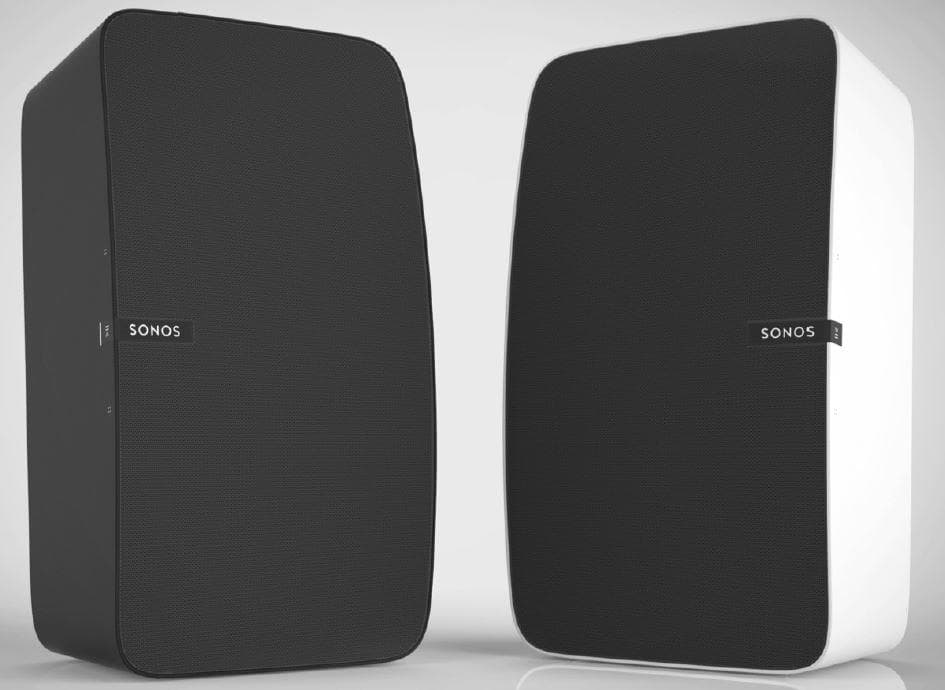
Click to zoom
Application Details
- Equipment Class
- NII - Unlicensed National Information Infrastructure TX
- Date of Grant
- Aug 27, 2015
- Application Purpose
- Original Equipment
- Date of Application
- Aug 23, 2015
- Equipment Note
- 802.11 b/g/n 3x3 CLIENT DEVICE
- Frequency Range
- 5745.00000000 - 5825.00000000
- Company
- Sonos, Inc.
- Country
- United States
Documents & Files
Document Text
Text extracted from the exhibit documents filed with the FCC. Open a document above to read the original.
Users Manual
Important Product Information 5GHz_LegalBooklet_640-00275_124.pdf 15GHz_LegalBooklet_640-00275_124.pdf 13/23/2015 3:52:48 PM3/23/2015 3:52:48 PM THIS DOCUMENT CONTAINS INFORMATION THAT IS SUBJECT TO CHANGE WITHOUT NOTICE. No part of this publication may be reproduced or transmitted in any form or by any means, electronic or mechanical, including but not limited to photocopying, recording, information retrieval systems, or computer network without the written permission of Sonos, Inc. SONOS and all other Sonos product names and slogans are trademarks or registered trademarks of Sonos, Inc. SONOS Reg. U.S. Pat. & Tm. Off. Sonos products may be protected by one or more patents. Our patent-to-product information can be found here: sonos.com/legal/patents. iPhone®, iPod®, iPad® and iTunes® are trademarks of Apple Inc., registered in the U.S. and other countries. Windows® is a registered trademark of Microsoft Corporation in the United States and other countries. Android® is a trademark of Google Inc. Sonos uses MSNTP software, which was developed by N.M. Maclaren at the University of Cambridge. © Copyright, N.M. Maclaren, 1996, 1997, 2000; © Copyright, University of Cambridge, 1996, 1997, 2000. All other products and services mentioned may be trademarks or service marks of their respective owners. 022815 © 2004-2015 by Sonos, Inc. All rights reserved. 5GHz_LegalBooklet_640-00275_124.pdf 25GHz_LegalBooklet_640-00275_124.pdf 23/23/2015 3:52:54 PM3/23/2015 3:52:54 PM 1 To reduce our use of paper, we have moved our product documentation online. For the latest Sonos product guides, please go to www.sonos.com/guides. Technical Support •Web site •Visit our Web site at www.sonos.com/support. There you can visit our Forums, browse our Frequently Asked Questions (FAQ) pages, or request assistance. •Email •[email protected] • Telephone •UK 0808 2346596 •US and Canada (English) 1 800 680 2345 •Australia 03 9874 0800 (see page 13 for additional information) •Austria 0800 291 623 •Belgium 0800 38904 •Brazil 0800 025 0827 •China (English) 49(0)1803447000 •China (Mandarin) 400 664 9889 •Finland 0800 917 381 •France 0800 910 769 •Germany 0800 000 5339 •Italy 800 972444 •Mexico 01 800 083 5513 •Netherlands 0800 0234361 •New Zealand 06 833 6925 •Norway 800 691 13 •Singapore 800 101 3283 •Spain 0917 482942 •Sweden 0207 93593 •Switzerland 0800 56 25 25 If your country is not listed here, please visit www.sonos.com/support to find the correct telephone number for your country. 5GHz_LegalBooklet_640-00275_124.pdf 35GHz_LegalBooklet_640-00275_124.pdf 33/23/2015 3:52:54 PM3/23/2015 3:52:54 PM 2 License Agreement and Limited Warranty (U.S. and rest of world, excluding Europe) Sonos, Inc. READ THE TERMS OF THIS LICENSE AGREEMENT AND LIMITED WARRANTY ("AGREEMENT") GOVERNING THE USE OF THE SOFTWARE AND RELATED FIRMWARE AND DOCUMENTATION (COLLECTIVELY, THE "SOFTWARE") PROVIDED TO YOU BY SONOS ("SONOS") CAREFULLY BEFORE USING THE APPLICABLE SONOS PRODUCT (SUCH HARDWARE, TOGETHER WITH THE SOFTWARE, REFERRED TO AS THE "PRODUCT"). BY OPENING THIS PACKAGE, INSTALLING AND USING THE PRODUCT, YOU ARE (1) REPRESENTING THAT YOU ARE OVER THE AGE OF 18, (2) REPRESENTING THAT YOU HAVE THE RIGHT AND AUTHORITY TO LEGALLY BIND YOURSELF OR YOUR COMPANY, AS APPLICABLE, AND (3) CONSENTING TO BE LEGALLY BOUND BY ALL OF THE TERMS OF THIS AGREEMENT. IF YOU DO NOT AGREE TO ALL THESE TERMS OR CANNOT MAKE SUCH REPRESENTATIONS, DO NOT USE THE PRODUCT. IF YOU ELECT NOT TO ACCEPT THE TERMS OF THIS AGREEMENT, YOU MAY RETURN THE NEW, UNUSED PRODUCT WITHIN THIRTY (30) DAYS OF PURCHASE TO THE RETAIL LOCATION WHERE YOU PURCHASED IT, WITH ALL ORIGINAL PACKAGING FOR A FULL REFUND. 1.GRANT OF LICENSE (a) Subject to the terms and conditions of this Agreement, Sonos grants to You a worldwide, non-exclusive, non-transferable, personal license (without the right to sub-license) to (i) use the Software as embedded in the Product for the purpose of operating the Product, and (ii) use the desktop application portion(s) of the Software on any personal computer owned or controlled by You during the Term. Except as provided above, You may not transfer the Software to any other computing device or otherwise remove the Software from the Product. Notwithstanding any license granted herein by Sonos, You acknowledge and agree that it is Your sole responsibility to comply with U.S. and international copyright laws with respect to Your use of the Software. (b) You agree not to copy, modify, reverse engineer, decompile or disassemble the Product to the extent that such restriction is not prohibited by law. Except for the limited license granted herein, Sonos and its suppliers hereby retain all right, title and interest in and to all worldwide intellectual property rights embodied in the Software. All other rights are reserved by Sonos. You acknowledge and agree that the technology embedded in and used to create the Product constitute the valuable trade secrets and know-how of Sonos, and to the extent you discover any such trade secrets, You will not disclose them to any third party. (c) Sonos shall have no obligation to provide any updates or upgrades to the Product, but in the event that it does, such updates, upgrades and any documentation shall be deemed the "Product", and shall be subject to the terms and conditions of this Agreement. 2.TERM OF AGREEMENT (a) You may terminate this Agreement at any time by notifying Sonos, discontinuing use of the Product and purging the Software from Your computing device. (b) This Agreement will automatically terminate if You violate any of its terms. 5GHz_LegalBooklet_640-00275_124.pdf 45GHz_LegalBooklet_640-00275_124.pdf 43/23/2015 3:52:54 PM3/23/2015 3:52:54 PM 3 (c) Sections 1(b), 3, 4, 6(c), 7 and 9 shall survive termination or expiration for any reason. 3.COMPLIANCE WITH COPYRIGHT LAWS Sonos complies with U.S. and international copyright laws and in consideration of the licenses granted herein, You agree to do the same. You acknow…
Text truncated - open the document above for the full version.
Users Manual
Sonos ® PLAY:5 (gen 2) The all-new Play:5 ® is the ultimate smart speaker for today’s streaming universe—powerfully smart, fine- tuning its sound to bring you all the energy and emotion the artist packed into the original recording. • Hardware and software custom-designed by Sonos to produce pure, immersive sound that’s crystal clear at any volume. • Powered by 3 tweeters and 3 mid-woofers, each with a dedicated amplifier, perfectly tuned to match the speakers and acoustic architecture. • Works seamlessly with the complete range of Sonos products New to Sonos? It takes just a few steps to get your Sonos system up and running—simply follow the setup instructions packaged with your PLAY:5. Once you’ve got it set up, you can add additional Sonos products any time. Adding to an existing Sonos system? The Sonos system can be easily expanded room by room. If you are adding this PLAY:5 to an existing Sonos system, you can turn directly to "Adding to an Existing Sonos System" on page 6. Product Guide 2 Yo u r H o m e N e t w o r k To access Internet music services, Internet radio, and any digital music stored on your computer or Network- Attached Storage (NAS) device, your home network must meet the following requirements: Home network requirements • High-speed DSL/Cable modem, or fiber-to-the-home broadband connection for proper playback of Internet-based music services. (If your Internet service provider only offers Satellite Internet access, you may experience playback issues due to fluctuating download speeds.) • If your modem is not a modem/router combination and you want to take advantage of Sonos' automatic online updates, or stream music from an Internet-based music service, you must install a router in your home network. If you do not have a router, purchase and install one before proceeding. If you are going to use the Sonos Controller App on an Android™ or iOS device, or you are setting up Sonos wirelessly, you will need a wireless router. Please visit our website at http://faq.sonos.com/apps for more information. Connect a Sonos BOOST (or player) to your router if: • You have a larger home where the WiFi performance isn’t reliable and you want to strengthen the wireless performance of your Sonos system. • Your WiFi network is already in high demand with streaming video and web surfing and you want to create a separate wireless network exclusively for your Sonos speakers. • Your home network is 5GHz only (not switchable to 2.4GHz). For best results, you should connect the computer or NAS drive that contains your personal music library collection to your home network router using an Ethernet cable. Computer software requirements • Windows® XP SP3 and higher (while Windows XP SP3 and higher are compatible with Sonos version 5.1 and higher, standard wireless setup is only supported on Windows 7 and higher) • Macintosh® OS X 10.7 and higher iOS software requirements • Compatible with iPhone, iPad and iPod touch running iOS 6.0 and higher. Certain features may require later versions of iOS. Note:Your network must have a high-speed Internet connection, as the Sonos system is designed to provide you with free, online software updates. Your Sonos system must be registered to receive these updates so be sure to register during the setup process. We do not share your e-mail address with other companies. Note:Sonos communicates over a 2.4GHz home network supporting 802.11 b/g/n wireless technology. 5GHz networks are not supported in a completely wireless Sonos setup. Sonos PLAY:5 3 Android software requirements Android™ 2.2 and higher, certain features require higher versions of Android; standard wireless setup is only supported on Android 2.3 or 4.0 and higher . Sonos Controllers You can use any Sonos controller with the Sonos PLAY:5, including: •Sonos Controller for Android—Touch the Play Store or Market button on your Android device to download the free Sonos application from Google Play. •Sonos Controller for iOS —Touch the App Store button on your iPhone, iPod touch or iPad to download the free Sonos controller application, or download the application from iTunes ® . (If you download from iTunes, you will need to sync before you see the Sonos logo display on your device.) •Sonos Controller for Mac or PC—Download from our website at: www.sonos.com/support/downloads. •Sonos CONTROL —(this product has been discontinued, but it’s compatible with your new Sonos product) Note:For the latest system requirements, including supported operating system versions, please visit our website at http://faq.sonos.com/specs. Product Guide 4 Sonos PLAY:5 Front Note:The Sonos PLAY:5’s front grille is not removable. Tampering with the grille may result in damage to your PLAY:5. On/OffYour Sonos system is designed to be always on; the system uses minimal electricity whenever it is not playing music. • To quickly stop streaming audio in all rooms, select Pause All from the Rooms menu on a Sonos controller. • To stop streaming audio in one room, you can touch the Play/Pause button on the PLAY:5. Status indicator Indicates the current status of a Sonos product. When the PLAY:5 is in normal operation, the white indicator is dimly lit. When touch controls are activated, the white light is brightly illuminated. For a complete list of status indications, please go to http://faq.sonos.com/led. Play/PauseToggles between playing and pausing the audio (defaults to restarting the same music source when pressed unless a different source is selected). Touch to start or stop streaming audio. Touch Controls Sonos PLAY:5 5 Sonos PLAY:5 Back Volume up (+) Volume down (-) When placed horizontally, the Volume Up touch control is on the right. When placed vertically, the Volume Up touch control is above the logo. When placed horizontally, the Volume Down touch control is on the left. When placed vertically, the Volume Down touch control is below the logo. Touch and hold the volume control for rapid volume change. Next track Previous …
Text truncated - open the document above for the full version.
Cover Letter(s)
Date: Au Federal C 7435 Oak Columbi Subject: FCC Ma n To Who m I, Mark K Best reg a Mark K e Sonos In ugust 15th, 20 Communicat kland Mills R a MD 21046 Signat nufacturer d m It May Co Keefe, autho ards, eefe c. | Compli a 014 tions Comm Road 6 ture Authori designation: oncern: orize David P ance Enginee ission ization Lette SBV Petry to sign er | 857 998 er n FCC related 5085 | mark d documents k.keefe@son s for Sonos, nos.com Inc.
External Photos
Sonos Model: S100 Front Back Top & Side
Internal Photos
Sonos Model: S100 Main PCB top with shield Main PCB top - without shield Main PCB bottom with shield Main PCB bottom – without shield
RF Exposure Info
FCC Part 1 Subpart I FCC Part 2 Subpart J INDUSTRY CANADA RSS 102 ISSUE 5 RF EXPOSURE REPORT FOR 802.11 b/g/n 3x3 CLIENT DEVICE MODEL NUMBER: S100 FCC ID: SBVRM010 IC ID: 5373A-RM010 REPORT NUMBER: 14U19239-E10 REVISION A ISSUE DATE: AUG 20, 2015 Prepared for SONOS INC. 614 Chapala Street, Santa Barbara, CA 93101 U.S.A. Prepared by UL VERIFICATION SERVICES INC. 47173 BENICIA STREET FREMONT, CA 94538, U.S.A. TEL: (510) 771-1000 FAX: (510) 661-0888 REPORT NO: 14U19239-E10A DATE: AUG 20, 2015 MODEL NUMBER: S100 FCC ID: SBVRM010 Page 2 of 12 UL VERIFICATION SERVICES INC. FORM NO: CCSUP4701I 47173 BENICIA STREET, FREMONT, CA 94538, USA TEL: (510) 771-1000 FAX: (510) 661-0888 This report shall not be reproduced except in full, without the written approval of . UL Verification Services Inc. Revision History Rev. Issue Date Revisions Revised By -- 6/21/15 Initial Issue P. Zhang A 8/20/15 Separate 2.4 and 5GHz table P. Zhang REPORT NO: 14U19239-E10A DATE: AUG 20, 2015 MODEL NUMBER: S100 FCC ID: SBVRM010 Page 3 of 12 UL VERIFICATION SERVICES INC. FORM NO: CCSUP4701I 47173 BENICIA STREET, FREMONT, CA 94538, USA TEL: (510) 771-1000 FAX: (510) 661-0888 This report shall not be reproduced except in full, without the written approval of . UL Verification Services Inc. TABLE OF CONTENTS 1. ATTESTATION OF TEST RESULTS ................................................................................. 4 2. TEST METHODOLOGY ..................................................................................................... 5 3. REFERENCES ................................................................................................................... 5 4. FACILITIES AND ACCREDITATION ................................................................................. 5 5. MAXIMUM PERMISSIBLE RF EXPOSURE ....................................................................... 6 5.1. FCC RULES ................................................................................................................ 6 5.2. IC RULES .................................................................................................................... 7 5.3. EQUATIONS ................................................................................................................ 8 5.4. LIMITS AND IC EXEMPTION .....................................................................................10 6. RF EXPOSURE RESULTS ................................................................................................11 REPORT NO: 14U19239-E10A DATE: AUG 20, 2015 MODEL NUMBER: S100 FCC ID: SBVRM010 Page 4 of 12 UL VERIFICATION SERVICES INC. FORM NO: CCSUP4701I 47173 BENICIA STREET, FREMONT, CA 94538, USA TEL: (510) 771-1000 FAX: (510) 661-0888 This report shall not be reproduced except in full, without the written approval of . UL Verification Services Inc. 1. ATTESTATION OF TEST RESULTS COMPANY NAME: SONOS Inc. EUT DESCRIPTION: 802.11 b/g/n 3x3 Client Device MODEL: S100 SERIAL NUMBER: 5C-AA-FD-08-03-E6-1 APPLICABLE STANDARDS STANDARD TEST RESULTS FCC PART 1 SUBPART I & PART 2 SUBPART J Pass INDUSTRY CANADA RSS 102 ISSUE 5 Pass UL Verification Services Inc. calculated the RF Exposure of the above equipment in accordance with the requirements set forth in the above standards, using test results reported in the test report documents referenced below and/or documentation furnished by the applicant. All indications of Pass/Fail in this report are opinions expressed by UL Verification Services Inc. based on interpretations of these calculations. The results show that the equipment is capable of demonstrating compliance with the requirements as documented in this report. Note: The results documented in this report apply only to the tested sample, under the conditions and modes of operation as described herein. This document may not be altered or revised in any way unless done so by UL Verification Services Inc. and all revisions are duly noted in the revisions section. Any alteration of this document not carried out by UL Verification Services Inc. will constitute fraud and shall nullify the document. This report must not be used by the client to claim product certification, approval, or endorsement by NVLAP, NIST, any agency of the Federal Government, or any agency of any government. Approved & Released For UL Verification Services Inc. By: Calculated By: PENG ZHANG KIYA KENDIDA CONSUMER TECHNOLOGY DIVISION CONSUMER TECHNOLOGY DIVISION PROJECT LEAD LAB ENGINEER UL Verification Services Inc. UL Verification Services Inc. REPORT NO: 14U19239-E10A DATE: AUG 20, 2015 MODEL NUMBER: S100 FCC ID: SBVRM010 Page 5 of 12 UL VERIFICATION SERVICES INC. FORM NO: CCSUP4701I 47173 BENICIA STREET, FREMONT, CA 94538, USA TEL: (510) 771-1000 FAX: (510) 661-0888 This report shall not be reproduced except in full, without the written approval of . UL Verification Services Inc. 2. TEST METHODOLOGY All calculations were made in accordance with FCC OET Bulletin 65 Edition 97-01 and IC Safety Code 6. 3. REFERENCES All measurements were made as documented in test report UL Verification Services Inc. Document 14U19239-E1 for operation in the 2.4 GHz band and UL Verification Services Inc. Document 14U19239-E2 for operation in the 5 GHz bands. Output power, Duty cycle and Antenna gain data is excerpted from the applicable test reports. Antenna gain data is excerpted from product documentation provided by the applicant. 4. FACILITIES AND ACCREDITATION The test sites and measurement facilities used to collect data are located at 47173 Benicia Street, Fremont, California, USA. UL Verification Services Inc. is accredited by NVLAP, Laboratory Code 200065-0. The full scope of accreditation can be viewed at http://ts.nist.gov/standards/scopes/2000650.htm. REPORT NO: 14U19239-E10A DATE: AUG 20, 2015 MODEL NUMBER: S100 FCC ID: SBVRM010 Page 6 of 12 UL VERIFICATION SERVICES INC. FORM NO: CCSUP4701I 47173 BENICIA STREET, FREMONT, CA 94538, USA TEL: (510) 771-1000 FAX: (510) 6…
Text truncated - open the document above for the full version.
Test Report
DFS PORTION of FCC 47 CFR PART 15 SUBPART E DFS PORTION of INDUSTRY CANADA RSS-247 ISSUE 1 CERTIFICATION TEST REPORT FOR 802.11b/g/n 3x3 CLIENT DEVICE MODEL NUMBER: S100 FCC ID: SBVRM010 IC: 5373A-RM010 REPORT NUMBER: 14U19239-E9 ISSUE DATE: JUNE 30, 2015 Prepared for SONOS, INC. 614 CHAPALA STREET SANTA BARBARA CA, 93101, U.S.A. Prepared by UL VERIFICATION SERVICES INC. 47173 BENICIA STREET FREMONT, CA 94538, U.S.A. TEL: (510) 771-1000 FAX: (510) 661-0888 REPORT NO: 14U19239-E9 DATE: JUNE 30, 2015 FCC ID: SBVRM010 IC ID: 5373A-RM010 Page 2 of 25 UL VERIFICATION SERVICES INC. FORM NO: CCSUP4701J 47173 BENICIA STREET, FREMONT, CA 94538, USA TEL: (510) 771-1000 FAX: (510) 661-0888 This report shall not be reproduced except in full, without the written approval of UL Verification Services Inc. . Revision History Rev. Issue Date Revisions Revised By -- 06/30/15 Initial Issue C. Cheung REPORT NO: 14U19239-E9 DATE: JUNE 30, 2015 FCC ID: SBVRM010 IC ID: 5373A-RM010 Page 3 of 25 UL VERIFICATION SERVICES INC. FORM NO: CCSUP4701J 47173 BENICIA STREET, FREMONT, CA 94538, USA TEL: (510) 771-1000 FAX: (510) 661-0888 This report shall not be reproduced except in full, without the written approval of UL Verification Services Inc. . TABLE OF CONTENTS 1. ATTESTATION OF TEST RESULTS ................................................................................. 4 2. TEST METHODOLOGY ..................................................................................................... 5 3. FACILITIES AND ACCREDITATION ................................................................................. 5 4. CALIBRATION AND UNCERTAINTY ................................................................................ 5 4.1. MEASURING INSTRUMENT CALIBRATION .............................................................. 5 4.2. SAMPLE CALCULATION ............................................................................................ 5 4.3. MEASUREMENT UNCERTAINTY ............................................................................... 5 5. DYNAMIC FREQUENCY SELECTION ............................................................................... 6 5.1. OVERVIEW ................................................................................................................. 6 5.1.1. LIMITS .................................................................................................................. 6 5.1.2. TEST AND MEASUREMENT SYSTEM ...............................................................10 5.1.3. SETUP OF EUT ...................................................................................................13 5.1.4. DESCRIPTION OF EUT ......................................................................................14 5.2. RESULTS FOR 20 MHz BANDWIDTH .......................................................................16 5.2.1. TEST CHANNEL .................................................................................................16 5.2.2. RADAR WAVEFORM AND TRAFFIC ..................................................................16 5.2.3. OVERLAPPING CHANNEL TESTS .....................................................................19 5.2.4. MOVE AND CLOSING TIME ...............................................................................19 5.2.5. 10-MINUTE BEACON MONITORING PERIOD ...................................................23 6. SETUP PHOTOS ...............................................................................................................24 REPORT NO: 14U19239-E9 DATE: JUNE 30, 2015 FCC ID: SBVRM010 IC ID: 5373A-RM010 Page 4 of 25 UL VERIFICATION SERVICES INC. FORM NO: CCSUP4701J 47173 BENICIA STREET, FREMONT, CA 94538, USA TEL: (510) 771-1000 FAX: (510) 661-0888 This report shall not be reproduced except in full, without the written approval of UL Verification Services Inc. . 1. ATTESTATION OF TEST RESULTS COMPANY NAME: SONOS, INC. 614 CHAPALA STREET SANTA BARBARA, CA, 93101, USA EUT DESCRIPTION: 802.11b/g/n 3x3 CLIENT DEVICE MODEL: S100 SERIAL NUMBER: 5C-AA-FD-08-00-DE:7 / 5C-AA-FD-00-04-86:0 (LEFT / RIGHT) DATE TESTED: MAY 18, 2015 APPLICABLE STANDARDS STANDARD TEST RESULTS DFS Portion of CFR 47 Part 15 Subpart E Pass INDUSTRY CANADA RSS-247 Issue 1 Pass UL Verification Services Inc. tested the above equipment in accordance with the requirements set forth in the above standards. All indications of Pass/Fail in this report are opinions expressed by UL Verification Services Inc. based on interpretations and/or observations of test results. Measurement Uncertainties were not taken into account and are published for informational purposes only. The test results show that the equipment tested is capable of demonstrating compliance with the requirements as documented in this report. Note: The results documented in this report apply only to the tested sample, under the conditions and modes of operation as described herein. This document may not be altered or revised in any way unless done so by UL Verification Services Inc. and all revisions are duly noted in the revisions section. Any alteration of this document not carried out by UL Verification Services Inc. will constitute fraud and shall nullify the document. This report must not be used by the client to claim product certification, approval, or endorsement by NVLAP, NIST, any agency of the Federal Government, or any agency of any government. Approved & Released For UL Verification Services Inc. By: Tested By: CONAN CHEUNG DOUG ANDERSON PROJECT LEAD EMC ENGINEER UL Verification Services Inc. UL Verification Services Inc. REPORT NO: 14U19239-E9 DATE: JUNE 30, 2015 FCC ID: SBVRM010 IC ID: 5373A-RM010 Page 5 of 25 UL VERIFICATION SERVICES INC. FORM NO: CCSUP4701J 47173 BENICIA STREET, FREMONT, CA 94538, USA TEL: (510) 771-1000 FAX: (510) 661-0888 This report shall not be reproduced except in full, without the written approval of UL Verification Services Inc. . 2. TEST METHODOLOGY The tests documented in…
Text truncated - open the document above for the full version.
Test Report
FCC 47 CFR PART 15 SUBPART E CERTIFICATION TEST REPORT FOR 802.11 b/g/n 3x3 CLIENT DEVICE MODEL NUMBER: S100 FCC ID: SBVRM010 IC ID: 5373A-RM010 REPORT NUMBER: 14U19239-E2 REVISION B ISSUE DATE: Aug 28, 2015 Prepared for SONOS INC. 614 Chapala Street, Santa Barbara, CA 93101 U.S.A. Prepared by UL VERIFICATION SERVICES INC. 47173 BENICIA STREET FREMONT, CA 94538, U.S.A. TEL: (510) 771-1000 FAX: (510) 661-0888 REPORT NO: 14U19239-E2B DATE: Aug 28, 2015 MODEL NUMER: S100 FCC ID: SBVRM010 Page 2 of 97 UL VERIFICATION SERVICES INC. FORM NO: CCSUP4701J 47173 BENICIA STREET, FREMONT, CA 94538, USA TEL: (510) 771-1000 FAX: (510) 661-0888 This report shall not be reproduced except in full, without the written approval of UL Verification Services Inc. Revision History Rev. Issue Date Revisions Revised By - 6/21/15 Initial issue P. Zhang A 8/27/15 Updated Section 5.3 P. Zhang B 8/28/15 Updated Section 5.3 P. Zhang REPORT NO: 14U19239-E2B DATE: Aug 28, 2015 MODEL NUMER: S100 FCC ID: SBVRM010 Page 3 of 97 UL VERIFICATION SERVICES INC. FORM NO: CCSUP4701J 47173 BENICIA STREET, FREMONT, CA 94538, USA TEL: (510) 771-1000 FAX: (510) 661-0888 This report shall not be reproduced except in full, without the written approval of UL Verification Services Inc. TABLE OF CONTENTS 1. ATTESTATION OF TEST RESULTS ................................................................................. 5 2. TEST METHODOLOGY ..................................................................................................... 6 3. FACILITIES AND ACCREDITATION ................................................................................. 6 4. CALIBRATION AND UNCERTAINTY ................................................................................ 6 4.1. MEASURING INSTRUMENT CALIBRATION .............................................................. 6 4.2. SAMPLE CALCULATION ............................................................................................ 6 4.3. MEASUREMENT UNCERTAINTY ............................................................................... 6 5. EQUIPMENT UNDER TEST ............................................................................................... 7 5.1. DESCRIPTION OF EUT .............................................................................................. 7 5.2. MAXIMUM OUTPUT POWER...................................................................................... 7 5.3. DESCRIPTION OF AVAILABLE ANTENNAS .............................................................. 8 5.4. WORST-CASE CONFIGURATION AND MODE .......................................................... 9 5.5. DESCRIPTION OF TEST SETUP ...............................................................................10 6. TEST AND MEASUREMENT EQUIPMENT ......................................................................12 7. SUMMARY TABLE ...........................................................................................................13 8. ON TIME, DUTY CYCLE AND MEASUREMENT METHODS ...........................................14 8.1. ON TIME AND DUTY CYCLE RESULTS ....................................................................14 8.2. DUTY CYCLE PLOTS ................................................................................................14 9. MEASUREMENT METHOD...............................................................................................15 10. ANTENNA PORT TEST RESULTS ...................................................................................16 10.1. 6 dB BANDWIDTH ..................................................................................................16 10.1.1. 802.11n HT20 MODE IN THE 5.8 GHz BAND .....................................................16 10.1.2. 6 dB BANDWIDTH MID CH PLOTS .....................................................................17 10.2. 26 dB BANDWIDTH ................................................................................................18 10.2.1. 802.11n HT20 MODE IN THE 5.2 GHz BAND .....................................................18 10.2.1. 802.11n HT20 MODE IN THE 5.3 GHz BAND .....................................................18 10.2.2. 802.11n HT20 MODE IN THE 5.5 GHz BAND .....................................................18 10.2.3. 802.11n HT20 MODE IN THE 5.8 GHz BAND .....................................................18 10.2.1. 26 dB BANDWIDTH PLOTS ................................................................................19 10.3. 99% BANDWIDTH ..................................................................................................23 10.3.1. 802.11n HT20 MODE IN THE 5.2 GHz BAND .....................................................23 10.3.2. 802.11n HT20 MODE IN THE 5.3 GHz BAND .....................................................23 10.3.3. 802.11n HT20 MODE IN THE 5.5 GHz BAND .....................................................23 10.3.4. 802.11n HT20 MODE IN THE 5.8 GHz BAND .....................................................23 10.3.1. 99% BANDWIDTH PLOTS ..................................................................................24 10.4. OUTPUT POWER AND PPSD ................................................................................28 REPORT NO: 14U19239-E2B DATE: Aug 28, 2015 MODEL NUMER: S100 FCC ID: SBVRM010 Page 4 of 97 UL VERIFICATION SERVICES INC. FOR…
Text truncated - open the document above for the full version.
Contact Information
Applicant
Mark Keefe(Compliance Engineer)
Test Firm
UL Verification Services Inc. (formerly UL CCS)Jay Kogoma
Technical Specifications
| # | Rule Parts | Frequency Range | Power Output |
|---|---|---|---|
| 4 | 15E | 5.75 GHz - 5.83 GHz | 85.50 mW |
Other Applications from Sonos, Inc.
SBVRM059
Aug 14, 2026wireless smart speaker
Equipment Class
NII - Unlicensed National Information Infrastructure TXSBVRM052
Aug 10, 2026Wireless Headphone
Equipment Class
DTS - Digital Transmission SystemSBVRM051
Mar 12, 2026Wireless Amplifier
Equipment Class
DTS - Digital Transmission SystemSBVRM058
Dec 19, 2025Wireless Smart Speaker
Equipment Class
DSS - Part 15 Spread Spectrum TransmitterSBVRM045
Jul 10, 2024Wireless Smart Speaker
Equipment Class
DTS - Digital Transmission System