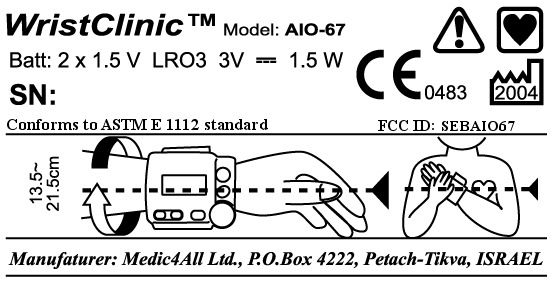
SEBAIO67AIO-67
Medic4all
Click to zoom
Application Details
- Equipment Class
- DXT - Part 15 Low Power Transceiver, Rx Verified
- Date of Grant
- Jan 05, 2005
- Application Purpose
- Original Equipment
- Date of Application
- Aug 04, 2004
- Equipment Note
- AIO-67
- Frequency Range
- 915.00000000 - 915.00000000
- Company
- Medic4all
- Country
- Israel
Documents & Files
Document Text
Text extracted from the exhibit documents filed with the FCC. Open a document above to read the original.
Users Manual
FCC submission Product Manual October 21, 2004 Medic4All Ltd. POB 4222 Petach Tikva, Israel 49000 Medic4All Telemedicine Solutions Operation Manual WristClinic™ - AIO67 The all-in-one wireless remote medical monitoring revolution August 2004 Caution: Federal law restricts this device to sale by or on the order of a physician. Ref: OM-110v1 Copyright © 2003-2004, Medic4All AG, all rights reserved. No part of this material may be copied in any form without the express written approval of Medic4All AG. User Assistance Information For assistance, contact Medic4All at: [email protected] Local Provider Details: Table of Contents User Assistance Information 3 Table of Contents 3 General Warnings and Cautions 5 Conventions 6 Introducing WristClinic™ 6 Description of the WristClinic™ 7 Getting Started 7 Inserting the Batteries 8 Working with the WristClinic™ Display and Buttons 8 Turning on the WristClinic™ 8 Main Menu Options 9 WristClinic™ Buttons 9 Setting Up the WristClinic™ 10 Setting the Temperature Units 11 Setting the Date and Time 11 Setting the User Mode 12 Viewing the WristClinic™ Serial Numbers 12 Setting the Display Language 13 Tech Mode 14 Exiting SETTINGS 14 Selecting and Changing Users 14 Using the Memory Function 14 Browsing Through Current User Measurements 15 Clearing Memory 15 Operating Instructions 15 Wrapping the WristClinic 15 Unwrapping the WristClinic™ Cuff 16 Measuring your Blood Pressure and Heart Rate 17 Obtaining the Correct Posture 17 Taking your Blood Pressure and Heart Rate 17 Measuring your ECG 18 Aborting the Measurement 19 Viewing your ECG Results 19 Measuring your ECG and Breath Rate 19 Aborting the Measurement 21 Viewing your ECG and Breath Rate Results 21 Measuring your SpO 2 and Heart Rate 21 Aborting the Measurement 23 Viewing SpO 2 and Heart Rate Results 23 Measuring your Temperature 24 Connecting the Thermometer to the WristClinic™ 24 Putting on the Thermal Sheath 24 Placing the Thermometer 24 Taking your Temperature 26 Cleaning the Device 26 Low Battery Indication 27 Maintenance 27 Replacing the Electrodes 27 Disposal of WristClinic™ Accessories 28 Storage 28 Troubleshooting 28 Spare Parts and Accessories 31 Specifications 32 Warranty 36 General Warnings and Cautions ¥ ¥ Use of this device is not intended as a substitute for consulting with your physician. Self-diagnosis can be dangerous, and may worsen the problem. Always follow your doctor’s instructions. ¥ ¥ Do not use the Medic4All WristClinic ™ for an infant or a person who cannot express their intention. ¥ ¥ Do not disassemble or modify the Medic4All WristClinic™. Any modifications made to the equipment void warranty and service contract obligations. ¥ ¥ Only authorized service personnel can disassemble or modify the Medic4All WristClinic™ device. ¥ ¥ Consult your local provider, concerning any operational problems. Do not attempt to carry out any repairs by yourself. ¥ ¥ Please take the batteries out if the Medic4All WristClinic™ is not used for a long period (app. 2 months or more) ¥ ¥ Do not use the Medic4All WristClinic™ for anything other than the functions described in this user guide. ¥ ¥ The performance of Medic4All WristClinic™ may be degraded should one of the following occur: {A.1.1} Operating outside the manufacturer’s stated temperature and humidity range {A.1.2} Storage outside the manufacturer’s stated temperature and humidity range {A.1.3} Mechanical shock (such as harsh drop) {A.1.4} Patient temperature below ambient temperature ¥ ¥ Set your Medic4All WristClinic™ to work in multi-user mode if the device is to be used by more than one user. Always use the same user number when taking measurements. Do not use a user number that is being used by someone else. ¥ ¥ Keep the Medic4All WristClinic™ away from electro-magnetic emitting devices, such as portable phones. ¥ ¥ Do not store the Medic4All WristClinic™ in direct sunlight, at a high temperature, or at excessive humidity. ¥ ¥ To make medical decisions, additional measurements beyond those supplied by the Medic4All WristClinic™ may be necessary. 1. Make sure to read this entire instruction manual before trying to operate the WristClinic™. Disposal of this product and used batteries should be carried out in accordance with the national regulations for the disposal of electronic product. Conventions The following are conventions that are used throughout this guide: Icon Description Note. Information that describes important features or instructions. Caution. Information that instructs you to be cautious. Introducing WristClinic™ Medic4All WristClinic™ is a revolutionary all-in-one wireless remote medical monitoring device for telemedicine and homecare applications. It enables timely intervention, disease and chronic care management, improved patient compliance, and better patient care. WristClinic™ enables you to perform and transmit a wide range of medical measurements, including: ¥ ¥ Blood pressure ¥ ¥ One lead ECG ¥ ¥ Heart rate ¥ ¥ Respiratory rate ¥ ¥ Pulse Oximeter (SpO 2 ) ¥ ¥ Heart rhythm regularity ¥ ¥ Body temperature WristClinic™ measures, stores, displays measurement results, and wirelessly transmits physiological data to a telemedicine call center through MedicGate™ or MiniGate™. These gateways forward the data by telephone or the Internet to a telemedicine call center or to an automated web databank, where the patient’s medical record is accessible via the Internet. Optionally, measurements can be taken continuously and recorded on a continuous loop system. If transmission is disrupted, WristClinic™ stores up to 200 readings for transmission at a later time. WristClinic™ allows you to maintain your daily routine without disruption, providing monitoring at home, at the office, or while outdoors. WristClinic™ works with up to four users. Measurements are stored for each of the users separately. Description of the WristClinic™ The following are the various parts of the WristClinic™. Following are various accessories includ…
Text truncated - open the document above for the full version.
Users Manual
FCC submission Product Manual October 21, 2004 Medic4All Ltd. POB 4222 Petach Tikva, Israel 49000 Medic4All Telemedicine Solutions Operation Manual WristClinic™ - AIO67 The all-in-one wireless remote medical monitoring revolution August 2004 Caution: Federal law restricts this device to sale by or on the order of a physician. Ref: OM-110v1 Copyright © 2003-2004, Medic4All AG, all rights reserved. No part of this material may be copied in any form without the express written approval of Medic4All AG. User Assistance Information For assistance, contact Medic4All at: [email protected] Local Provider Details: Table of Contents User Assistance Information 3 Table of Contents 3 General Warnings and Cautions 5 Conventions 6 Introducing WristClinic™ 6 Description of the WristClinic™ 7 Getting Started 7 Inserting the Batteries 8 Working with the WristClinic™ Display and Buttons 8 Turning on the WristClinic™ 8 Main Menu Options 9 WristClinic™ Buttons 9 Setting Up the WristClinic™ 10 Setting the Temperature Units 11 Setting the Date and Time 11 Setting the User Mode 12 Viewing the WristClinic™ Serial Numbers 12 Setting the Display Language 13 Tech Mode 14 Exiting SETTINGS 14 Selecting and Changing Users 14 Using the Memory Function 14 Browsing Through Current User Measurements 15 Clearing Memory 15 Operating Instructions 15 Wrapping the WristClinic 15 Unwrapping the WristClinic™ Cuff 16 Measuring your Blood Pressure and Heart Rate 17 Obtaining the Correct Posture 17 Taking your Blood Pressure and Heart Rate 17 Measuring your ECG 18 Aborting the Measurement 19 Viewing your ECG Results 19 Measuring your ECG and Breath Rate 19 Aborting the Measurement 21 Viewing your ECG and Breath Rate Results 21 Measuring your SpO 2 and Heart Rate 21 Aborting the Measurement 23 Viewing SpO 2 and Heart Rate Results 23 Measuring your Temperature 24 Connecting the Thermometer to the WristClinic™ 24 Putting on the Thermal Sheath 24 Placing the Thermometer 24 Taking your Temperature 26 Cleaning the Device 26 Low Battery Indication 27 Maintenance 27 Replacing the Electrodes 27 Disposal of WristClinic™ Accessories 28 Storage 28 Troubleshooting 28 Spare Parts and Accessories 31 Specifications 32 Warranty 36 General Warnings and Cautions ¥ ¥ Use of this device is not intended as a substitute for consulting with your physician. Self-diagnosis can be dangerous, and may worsen the problem. Always follow your doctor’s instructions. ¥ ¥ Do not use the Medic4All WristClinic ™ for an infant or a person who cannot express their intention. ¥ ¥ Do not disassemble or modify the Medic4All WristClinic™. Any modifications made to the equipment void warranty and service contract obligations. ¥ ¥ Only authorized service personnel can disassemble or modify the Medic4All WristClinic™ device. ¥ ¥ Consult your local provider, concerning any operational problems. Do not attempt to carry out any repairs by yourself. ¥ ¥ Please take the batteries out if the Medic4All WristClinic™ is not used for a long period (app. 2 months or more) ¥ ¥ Do not use the Medic4All WristClinic™ for anything other than the functions described in this user guide. ¥ ¥ The performance of Medic4All WristClinic™ may be degraded should one of the following occur: {A.1.1} Operating outside the manufacturer’s stated temperature and humidity range {A.1.2} Storage outside the manufacturer’s stated temperature and humidity range {A.1.3} Mechanical shock (such as harsh drop) {A.1.4} Patient temperature below ambient temperature ¥ ¥ Set your Medic4All WristClinic™ to work in multi-user mode if the device is to be used by more than one user. Always use the same user number when taking measurements. Do not use a user number that is being used by someone else. ¥ ¥ Keep the Medic4All WristClinic™ away from electro-magnetic emitting devices, such as portable phones. ¥ ¥ Do not store the Medic4All WristClinic™ in direct sunlight, at a high temperature, or at excessive humidity. ¥ ¥ To make medical decisions, additional measurements beyond those supplied by the Medic4All WristClinic™ may be necessary. 1. Make sure to read this entire instruction manual before trying to operate the WristClinic™. Disposal of this product and used batteries should be carried out in accordance with the national regulations for the disposal of electronic product. Conventions The following are conventions that are used throughout this guide: Icon Description Note. Information that describes important features or instructions. Caution. Information that instructs you to be cautious. Introducing WristClinic™ Medic4All WristClinic™ is a revolutionary all-in-one wireless remote medical monitoring device for telemedicine and homecare applications. It enables timely intervention, disease and chronic care management, improved patient compliance, and better patient care. WristClinic™ enables you to perform and transmit a wide range of medical measurements, including: ¥ ¥ Blood pressure ¥ ¥ One lead ECG ¥ ¥ Heart rate ¥ ¥ Respiratory rate ¥ ¥ Pulse Oximeter (SpO 2 ) ¥ ¥ Heart rhythm regularity ¥ ¥ Body temperature WristClinic™ measures, stores, displays measurement results, and wirelessly transmits physiological data to a telemedicine call center through MedicGate™ or MiniGate™. These gateways forward the data by telephone or the Internet to a telemedicine call center or to an automated web databank, where the patient’s medical record is accessible via the Internet. Optionally, measurements can be taken continuously and recorded on a continuous loop system. If transmission is disrupted, WristClinic™ stores up to 200 readings for transmission at a later time. WristClinic™ allows you to maintain your daily routine without disruption, providing monitoring at home, at the office, or while outdoors. WristClinic™ works with up to four users. Measurements are stored for each of the users separately. Description of the WristClinic™ The following are the various parts of the WristClinic™. Following are various accessories includ…
Text truncated - open the document above for the full version.
Cover Letter(s)
Dear Mr. Leimer, I would like to answer your letter (Correspondence Reference Number: 27724). Certainly, I saw all exhibits that must be submitted with application. But, as usually, I sent you Test Report only , because it include almost al exhibits: block diagram, external and internal photos, operational description, test setup etc. There are no ID labels and location info in our report. I received you request to submit a drawing of the ID label (see the letter with correspondence reference number 27446). It was send to FCC immediately. So, do you think that I must to send to FCC all exhibits separately or Test Report (with it’s contents) is enough? Thank you very much and I’m waiting for your answer. Sincerely, Albert Herzenshtein EMC engineer, Standard Institution of Israel. [email protected]
Cover Letter(s)
Dear Mr. Leimer, I would like to answer your letter (Correspondence Reference Number: 27724). Certainly, I saw all exhibits that must be submitted with application. But, as usually, I sent you Test Report only , because it include almost al exhibits: block diagram, external and internal photos, operational description, test setup etc. There are no ID labels and location info in our report. I received you request to submit a drawing of the ID label (see the letter with correspondence reference number 27446). It was send to FCC immediately. So, do you think that I must to send to FCC all exhibits separately or Test Report (with it’s contents) is enough? Thank you very much and I’m waiting for your answer. Sincerely, Albert Herzenshtein EMC engineer, Standard Institution of Israel. [email protected]
Cover Letter(s)
Medic4All Ltd. Hamefalsim 10, P.O.B 4222, Petach Tikva, 49000, Israel. Tel: 972-3-9226610 Fax: 972-3-9226615 To: FCC Equipment Authorization Branch Attn: Mr. Andrew Leimer [email protected] From: Rami Shmueli [email protected] Medic4All Applicant: Medic4All FCC ID: SEBAIO67 Date: 6 January, 2005 Correspondence Reference Number: 28234 Subject: Confidentiality request Letter Dear Andrew Leimer, 1. We request to keep the exhibit of the Schematics confidential. 2. The schematics are of no interest for the public and can be used by potential competitors for copying our products. 3. This request is made under the provisions of Section 0.457(d) of the Commission's Rules, and Section 552(b)(4) of the Freedom of Information Act. 4. I, the undersigned, am listed on Form 731 of the application. Sincerely yours, Rami Shmueli Medic4All VP R&D
External Photos
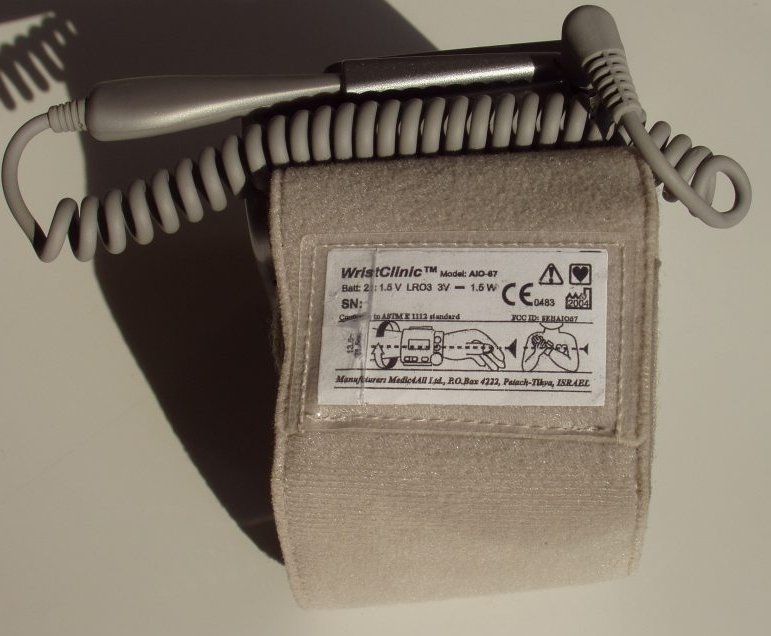
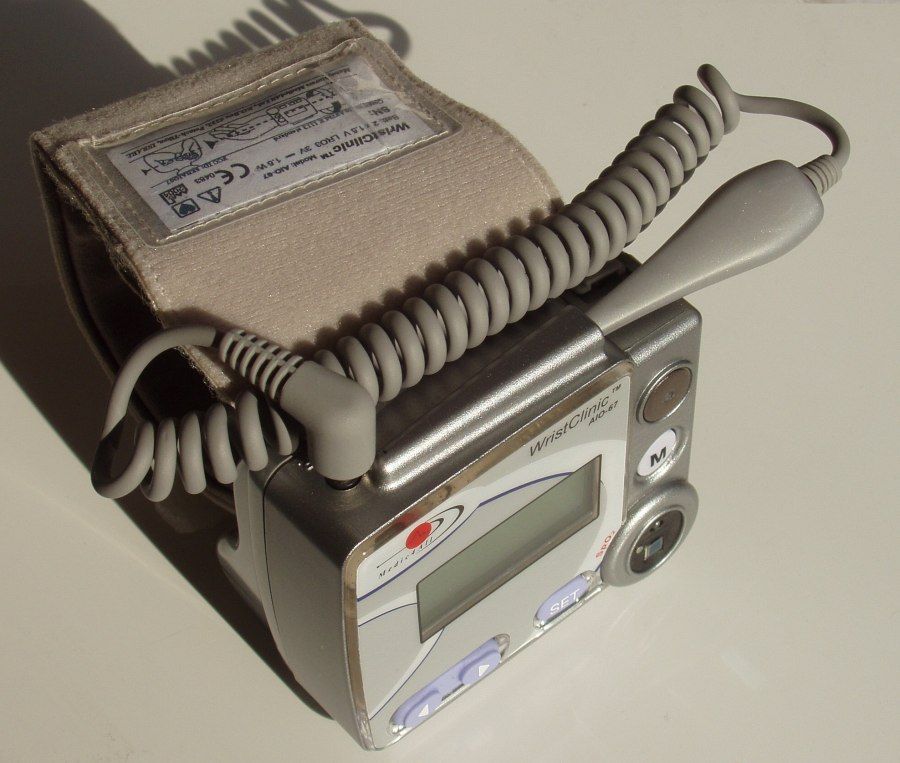
External photo AIO-67 with thermometer and SPO2 connected AIO-67 thermometer External SPO2 monitor EUT AIO-67
Internal Photos
AIO-67 internal photos
Operational Description
AIO67 operational description The AIO-67 is a multi-function medical monitoring device which performs the following measurements: blood pressure, ECG, heart rate, breathing rate, heart rhythm regularity, body temperature and oxygen saturation (internal or external sensor). The AIO-67 communicates with the MedicGate (VMG02) and with the MiniGate (VMG03) via wireless protocol and also can communicate with other peripheral devices via RS-232 interface. The AIO67 was tested together with following devices: 1. AIO-67 thermometer 2. External SPO2 monitor 3. External Nonin Medical Pulse Oximeter The AIO67 dimensions: 9 cm x 8 cm x 8 cm. The AIO67 powered from two 1.5V AA batteries. The current consumption of the AIO-67 is up to 240 mA The AIO67 block diagram and RF transceiver block diagram are shown in Figures 1 and 2, respectively. The AIO67 transceiver is based on chipset Chipcon CC1020. The transceiver uses one channel. Integrated antenna – printed circuit board (PCB). The antenna cannot be de-attached or changed by the user. RF communication frequency: 915 MHz. Output transmission power: -1 dBm (EIRP) Baud rate: 9.6 Kbps Modulation type: FSK Bandwidth: 50 kHz The AIO67 field strength is less than 50 mV/m at 3 meters and meets the requirements of paragraph (a) of section 15.249. Figure 1. AIO67 block diagram Temperature Sensor Digital SpO2+HR , SPI bus ECG (3 electrodes) 1or 2 Analog input SPI bus 2 AAA alkaline batteries Acceleromet er sensor Enable Analog X- axis Analog MSP430 Controller CC1020 Transceiver Module Selection buttons (left, right) Internal antenna LCD 2 X 8 DC/DC converter to 4V, LDO of 3.3V, Low battery indication Optional 1MB FLASH 1 or 3 lead ECG Amplifier / filter Temperature Amplifier 1 Analog in put SET button Analog Y- axis Analog input External SpO2 finger Sensor SpO2 system (ASIC) Blood pressure Digital RS2232 +5V External MINI USB Memory button A/D 10bit 4 TH electrode The following are the main components shown in the block diagram: ∗ TI MSP430F449 micro controller has the following features: • 64K byte FLASH memory • 2000 byte RAM • 16 bit architecture with 16 bit multiplier • 8 MIPS (8 MHz) • 8 X 12 bit A/D converter • 3 timers • UART • I2C • LCD driver • Watch dog • Ambient Temperature sensor ∗ The MSP430 is the CPU of the AIO and performs the following tasks: • Communicates with the RF transceiver an BT. • Detects when the regulator output voltage drops below 3.1V and disables the RF transceiver. • Measures the batteries voltage during operation for providing an indication when the batteries need to be replaced. • 8 analog inputs + 2 reference voltage: 2 accelerometer, one ECG analog output, one touch detect for ECG, body temperature. • Custom LCD driver- 40X4 characters LCD output, 160 segments, ¼ duty, 1/3 bias • Arrow buttons operation • Set button operation • Memory button operation ∗ The Chipcon CC1020 is an RF transceiver supporting up to 153.6Kbps. In the AIO project it operates at 9.6Kbps at 915MHz. The power of the CC1020 is regulated through low noise linear regulator to reduce noise phase and to switch off during standby mode. ∗ Temperature sensor – a thermistor located in the metal tip of the thermometer plastic case, connected through a wire to the AIO main body. ∗ ECG sensor – 2 pairs of Ag/AgCl coated leads mounted on the AIO lower surface and additional lead located at the upper side of the AIO. The ECG amplifier measures the voltage potential between two hands, filters it between 0.05Hz to 40Hz and amplifies the signal by 310 to support maximum allowed inputs of +/-5mV to stay within the regulated voltage of 3.3 volt. The analog output signal is transferred to the MSP430F449 A/D input, for sampling, decimation and transmitting by the CC1020. ∗ Accelerometer – Analog Devices ADXL311, 2-axis precision accelerometer detecting breathing movements in two dimensions (X and Y). The accelerometer amplifier amplifies accelerometer output by 101 before sampling by the A/D. ∗ Temperature amplifier – high impedance instrumental amplifier, followed by a 1 Hz low- pass filter. The module is powered by the regulator output. ∗ Blood pressure monitor - Omron HEM637 wrist blood pressure monitor. ∗ SpO2 sensor – SPO Medical ASIC driving red and infrared LEDs and receiving electrical signal from a photo-detector. The red and infrared light is reflected by the patient finger and measured by the photo-detector. ∗ External Nonin Medical IPOD Pulse Oximeter can be connected through the Mini USB connector ∗ FLASH – 1 MByte Flash memory. ∗ LCD – 2 lines of 8 character alphanumeric LCD ∗ DC/DC converter – takes the battery input from 3V down to 1.8V, regulates the battery into stable 4V. The DC/DC output drives two 3.3V LDOs for the analog and digital circuits. ∗ 2 alkaline batteries, generating a voltage between 3V and 1.8V. The batteries are attached to the main body using battery compartment and can be replaced easily from the outside. ∗ Arrow buttons – for navigating in the menu’s ∗ Set button – for setting the user selection ∗ Memory button – for viewing the historical measurement results Figure 2. Tx-Rx block diagram
Test Report
Test Report No.8412305148 For Medic4All (Israel) Ltd. Equipment Under Test: WristClinic Model: AIO-67 (915 MHz) From The Standards Institution Of Israel Industry Division Telematics Laboratory EMC Section Certificate No. 1487-01 Test Report No.: 8412305148 Page 1 of 24 Pages Title: Test on WristClinic Model: AIO-67 (915 MHz) Order placed by: Medic4All (Israel) Ltd. Address: 10 Hamefalsim Str., P.O. Box 4222, Petach-Tikva 49000, Israel Sample for test selected by: The customer The date of test: 14, 20/04 10, 15/05/2004 Description of Equipment Under Test (EUT): WristClinic Model: AIO-67 (915 MHz) Manufactured by: Medic4All (Israel) Ltd. Reference Documents: ! CFR 47 FCC: Rules and Regulations; Part 15. “Radio frequency devices”; Subpart B. “Unintentional Radiators”. Section 15.109. “Radiated emission limits”. Subpart C : “Intentional radiators” (2002), Section 15.205. “Restricted bands of operations”, Section 15.209. “Radiated emission limits, general requirements”. “Radiated Emission Limits, Additional Provisions”; Section 15.249. “Operation within the bands 902 - 928 MHz, 2400 - 2483.5 MHz, 5725 - 5875 MHz, and 24.0 - 24.25 GHz”. Test Results: The EUT meets the following requirements of CFR 47 FCC Part 15: Subpart B Section 15.109. Radiated emission Class B. Subpart C Section 15.209. Radiated Emission, Section 15.429 (a), Section 15.205. This Test Report contains 24 pages and may be used only in full. This Test Report applies only to the specimen tested and may not be applied to other specimens of the same product. Test Report No.: 8412305148 Page 2 of 24 Pages Title: Test on WristClinic Model: AIO-67 (915 MHz) Table of Contents 1. EUT Description and operation 3 1.1. General description: 3 1.2. EUT's sub-assemblies list: 9 1.3. EUT connector list: 9 1.4. Potential emission sources: 10 1.5. EUT setup and operation: 10 2. Measurements, examinations and derived results 10 2.1. Location of the Test Site: 10 2.2. Test condition: 10 2.3. Initial visual check and functional test: 10 2.4. Radiated emission test: 11 2.5. General: 11 2.6. Test of field strength of emission from intentional radiators 13 3. Test summary 18 4. Appendix 1. Test equipment used 19 5. Appendix 2: Antenna Factor and Cable Loss 20 6. Appendix 3. Test configuration illustrations 24 Test Report No.: 8412305148 Page 3 of 24 Pages Title: Test on WristClinic Model: AIO-67 (915 MHz) 1. EUT Description and operation 1.1. General description: * Note: All information in below clause was supplied by the customer. Description of Equipment Under Test (EUT): WristClinic Model: AIO-67 (915 MHz) Manufactured by: Medic4All (Israel) Ltd. The AIO-67 is a multi-function medical monitoring device which performs the following measurements: blood pressure, ECG, heart rate, breathing rate, heart rhythm regularity, body temperature and oxygen saturation (internal or external sensor). The AIO-67 communicates with the MedicGate (VMG02) and with the MiniGate (VMG03) via wireless protocol and also can communicate with a other peripheral devices via RS- 232 interface. Tested model has carrier frequency 915 MHz. The EUT is Transceiver based on chipset Chipcon CC1020. The transceiver uses one channel. Integrated antenna – printed circuit board (PCB). The EUT was tested together with following devices: 1. with AIO-67 thermometer 2. with External SPO2 monitor. Output transmission power: -1 dBm (EIRP) Bandwidth: 50 kHz Modulation type: FSK. The EUT’s dimensions: : 9 cm x 8 cm x 8 cm. The EUT’s powered from two 1.5V AA batteries. The current consumption of the AIO-67 is up to 240 mA. The EUT’s block diagram and Tx block diagram are shown in Figures 1 and 2, respectively/. The AIO-67 external and internal views are presented in Photos ##1-2. The SPO2 external vies are presented in Photos ##3-4. Test Report No.: 8412305148 Page 4 of 24 Pages Title: Test on WristClinic Model: AIO-67 (915 MHz) Figure 1. EUT’s block diagram Temperature Sensor Digital SpO2+HR , SPI bus ECG (3 electrodes) 1or 2 Analog input SPI bus 2 AAA alkaline batteries Acceleromet er sensor Enable Analog X- axis Analog MSP430 Controller CC1020 Transceiver Module Selection buttons (left, right) Internal antenna LCD 2 X 8 DC/DC converter to 4V, LDO of 3.3V, Low battery indication Optional 1MB FLASH 1 or 3 lead ECG Amplifier / filter Temperature Amplifier 1 Analog in put SET button Analog Y- axis Analog input External SpO2 finger Sensor SpO2 system (ASIC) Blood pressure Digital RS2232 +5V External MINI USB Memory button A/D 10bit 4 TH electrode Test Report No.: 8412305148 Page 5 of 24 Pages Title: Test on WristClinic Model: AIO-67 (915 MHz) Figure 2. Tx-Rx block diagram Test Report No.: 8412305148 Page 6 of 24 Pages Title: Test on WristClinic Model: AIO-67 (915 MHz) Photo 1. AIO-67 with thermometer and SPO2 connected AIO-67 thermometer External SPO2 monitor EUT AIO-67 Test Report No.: 8412305148 Page 7 of 24 Pages Title: Test on WristClinic Model: AIO-67 (915 MHz) Photo 2. EUT’s internal views Test Report No.: 8412305148 Page 8 of 24 Pages Title: Test on WristClinic Model: AIO-67 (915 MHz) Photo 3. SPO3. Front/ side overall view Photo 4. SPO. Rear view Test Report No.: 8412305148 Page 9 of 24 Pages Title: Test on WristClinic Model: AIO-67 (915 MHz) * Information in clauses below is provided by the manufacturer. 1.2. EUT's sub-assemblies list: EUT’s sub-assemblies list is detailed in table below. Table 1. Sub-assemblies list Function Mfr / Serial No./ Model Main board AD4439 Blood pressure board HEM-637 mfr Omron AIO-67 thermometer mfr Medic4All External SPO2 monitor AIO-67 / SPO2 mfr Medic4All 1.3. EUT connector list: A list of the EUT's connectors is detailed in Table 2. Table 2. Connector list No. Connector's name Connector's type Type of Cable Length (m) No. of identical connectors 1 Temperature 3.5mm jack Three wire shielded1.0 1 2 AUX 2.5mm jack Two wire shielded 0.50 1 3 Ext SPO2 Mini USB type- B Four wire shielded 0.30 1 Test Report No.: 8412305148 Page 10 of 24 Pages Title: Test on Wris…
Text truncated - open the document above for the full version.
Test Setup Photos
Radiated emission test setup with Thermometer on Open site.
Contact Information
Applicant
Rami Shmueli
Technical Contact
Medic4allRami Shmueli
97239226610
10 Hamefalsim · Petach Tikva · Israel
Test Firm
Standard Institution of IsraelSteli Loznen
Technical Specifications
| # | Rule Parts | Frequency Range | Power Output |
|---|---|---|---|
| 1 | 15C | 915 MHz - 915 MHz | - |
Other Applications from Medic4all
SEBVMW03
Mar 07, 2005VMW03
Equipment Class
DXT - Part 15 Low Power Transceiver, Rx Verified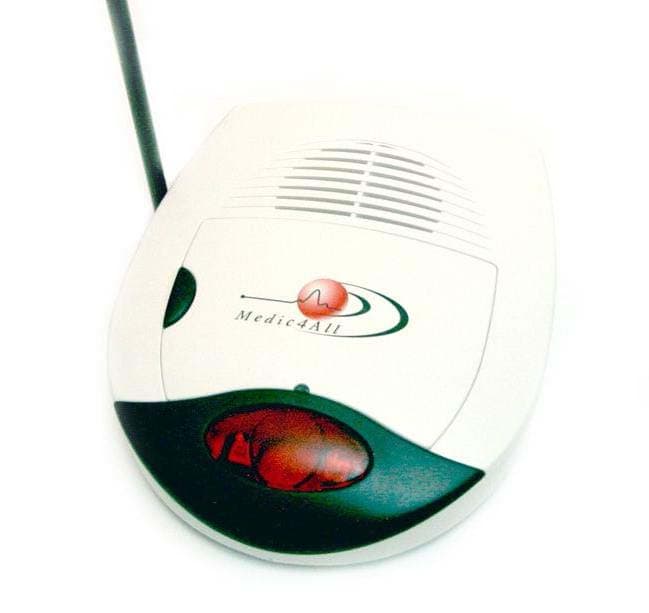
SEBVMG02
Jan 05, 2005VMG02
Equipment Class
DXT - Part 15 Low Power Transceiver, Rx Verified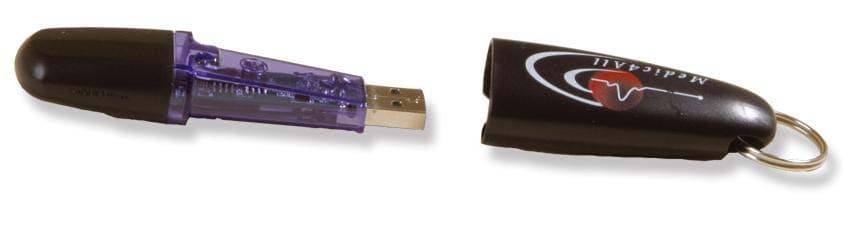
SEBVMG03
Jan 05, 2005VMG03
Equipment Class
DXT - Part 15 Low Power Transceiver, Rx Verified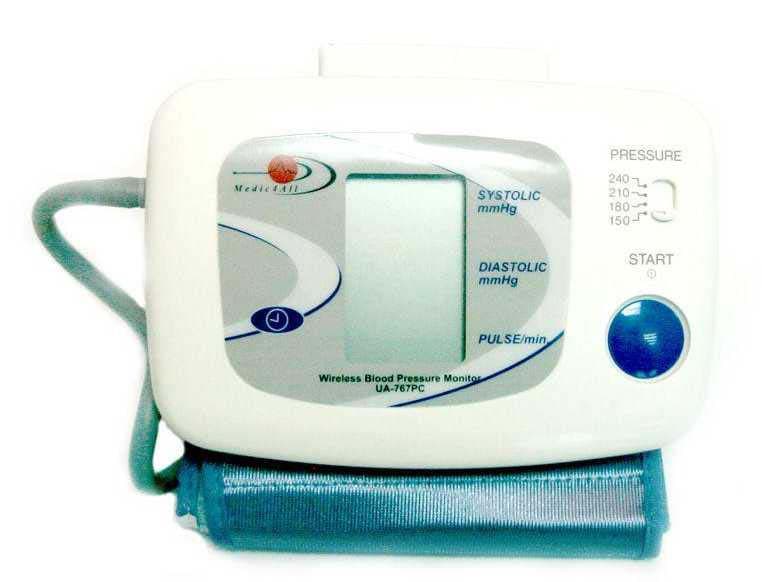
SEBRFADAPTER
Jan 03, 2005RFadapter
Equipment Class
DXT - Part 15 Low Power Transceiver, Rx Verified